
An example project to get you started with React Native using shadow-cljs in 3 minutes
Clojure
384
128 commits
updated Apr 23, 2026
README
Looking for maintainers. I am no longer using React Native for work or for any open source things. I haven't for quite a long time and am not giving this template the attention it needs. If you are using RN with ClojureScript and want to help the community with keeping this quick starter up to date, please contact me where you find Clojurians.
React Native using shadow-cljs in 3 minutes
The fastest way a ClojureScript coder can get started with React Native development. Prove me wrong.
This is an example project, only slightly beyond Hello World, using: shadow-cljs, React Native, Expo, Reagent, and re-frame.
ClojureScript ❤️ React Native
Follow along to get started. There are instructions for Calva, Emacs/CIDER, Cursive, and the command line. It is assumed you have Java and Node installad as well as dev tool chains for the platforms you are targeting. (If you are targeting the Web, then Chrome is enough.)
Installing
To facilitate that you can easily try this out without installing anything globally on your machine, this project installs everything it needs locally in node_modules. Then npx is used to execute tools like expo-cli.
To install dependencies, and setup the project, run:
npm i
From there use your favorite editor and/or the prompt.
Using VS Code + Calva
Assuming you have installed the Calva extension in VS Code:
Build and start the app, and connect Calva
- Open the project in VS Code. Then:
- Run the Calva command Start a Project REPL and Connect (aka Jack-in)
- Wait for shadow to build the project.
Start Expo
- Then Run Build Task. This will start Expo and the Metro bundler. Wait for expo to show its menu options in the terminal pane.
- In the expo menu press w for open web.
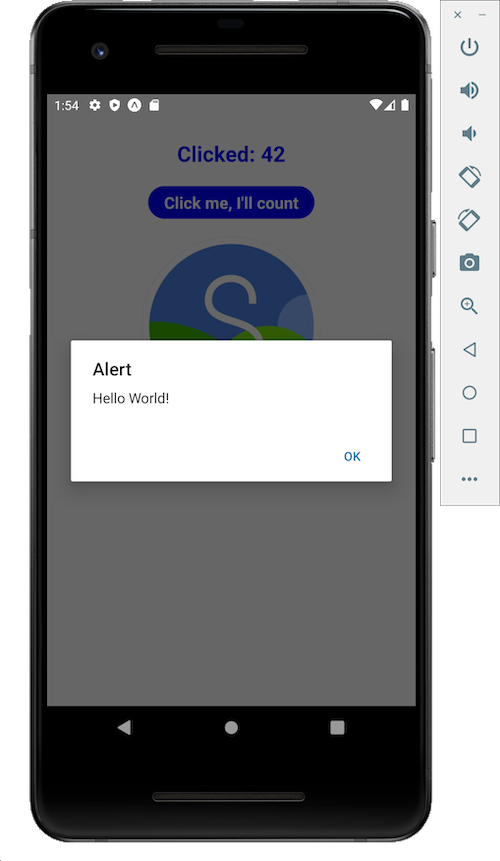
The app now should be running in your web browser and Calva automatically connects to it. Confirm this by evaluating something like this in Calva (from a cljs file or in the REPL window):
(js/alert "Hello world!")
You should see the alert pop up where the app is running.
Of course you should try to fire up the app on all simulators, emulators and phones you have as well. Please note that Calva will only be connected to one of your apps at a time, and it is a bit arbitrary which one. Use (js/alert) to check this.
Using Emacs with CIDER
Open Emacs and a bash shell:
-
Run
npx shadow-cljs compile :appto perform an initial build of the app. -
In Emacs open one of the files in the project (
deps.ednis fine) -
From that buffer, do
cider-jack-in-clojurescript[C-c M-J] to launch a REPL. Follow the series of interactive prompts in the minibuffer:- select
shadow-cljsas the command to launch - select
shadowas the repl type - select
:appas the build to connect - and optionally answer
yornto the final question about opening theshadow-cljsUI in a browser. At this pointshadow-cljswill be watching the project folder and running new builds of the app if any files are changed. You'll also have a REPL prompt, however the REPL doesn't work because it isn't connected to anything. The app isn't running yet.
- select
-
In a shell run
npm run ios(same asnpx expo start -i). This starts the Metro bundler, perform the bundling, launch the iPhone simulator, and transmit the bundled app. Be patient at this step as it can take many seconds to complete. When the app is finally running expo will display the message:WebSocket connected! REPL init successful -
Once you see that the REPL is initalized, you can return to Emacs and confirm the REPL is connected and functional:
cljs.user> (js/alert "hello world!")Which should pop-up a modal alert in the simulator, confirming the app is running and the REPL is connected end to end.
Using IntelliJ + Cursive REPL
- Follow the instructions specified in Or the Command line.
- Create a Maven POM using
shadow-cljs pom, as described in the Shadow doc. - There are now two options
- If you already have a project open, open the project in IntelliJ using File | New | Project from existing sources... and indicating the
pom.xmlfile. - If you're at the welcome screen, press the "Open" button and navigate to the
pom.xml.
- If you already have a project open, open the project in IntelliJ using File | New | Project from existing sources... and indicating the
- Ensure the project has an SDK configured using File | Project Structure, and checking under
Project. - The project comes with a REPL run configuration called "REPL". Run the REPL using the Run | Run 'REPL' menu item, or the toolbar button.
- Run the commands in Using ClojureScript REPL
Or the Command line
$ npm i
$ npx shadow-cljs watch app
# wait for first compile to finish or expo gets confused
# on another terminal tab/window:
$ npm start
This will run Expo DevTools at http://localhost:19002/
To run the app in browser using expo-web (react-native-web), press w in the same terminal after expo devtools is started.
This should open the app automatically on your browser after the web version is built. If it does not open automatically, open http://localhost:19006/ manually on your browser.
Note that you can also run the following instead of npm start to run the app in browser:
# same as npx expo start --web
$ npm run web

# or

# same as npx expo start --web-only
$ npm run web-only
Using ClojureScript REPL
Once the app is deployed and opened in phone/simulator/emulator/browser, connect to nrepl and run the following:
(shadow/nrepl-select :app)
NB: Calva users don't need to do ^ this ^.
To test the REPL connection:
(js/alert "Hello from Repl")
Command line CLJS REPL
Shadow can start a CLJS repl for you, if you prefer to stay at the terminal prompt:
$ npx shadow-cljs cljs-repl :app
Disabling Expo Fast Refresh
You will need to disable Fast Refresh provided by the Expo client, which conflicts with shadow-cljs hot reloading. You really want to use Shadow's, because it is way better and way faster than the Expo stuff is.
For the iOS and Android there is a Disable Fast Refresh option in the development menu. NB: Often you need to first enable it and then disable it.
For web there may be some way to disable it via a webpack.config file as per this example. But failing that, once the app has loaded you can block requests to/from localhost:19006/* (the Webpack dev server) in devtools like so, for instance by right-clicking on a request in the Network tab, selecting Block request URL, then editing the pattern. In Chrome this looks something like:
This workaround is far from ideal, because the block needs to be manually toggled off whenever a full refresh is required (e.g. to load a new file), then back on again. But it seems to do the job.
Production builds
A production build involves first asking shadow-cljs to build a release, then to ask Expo to work in Production Mode.
- Kill the watch and expo tasks.
- Execute
shadow-cljs release app - Start the expo task (as per above)
- Enable Production mode.
- Start the app.
Using EAS Build
expo build is the classic way of building an Expo app, and eas build is the new version of expo build. Using EAS Build currently requires an Expo account with a paid plan subscription.
The steps below provide an example of using EAS Build to build an apk file to run on an Android emulator or device.
- Install the latest EAS CLI by running
npm install -g eas-cli - Log into your Expo account
- Configure EAS Build in your project with
eas build:configure. - Make your eas.json file contents look like this:
{ "build": { "production": {}, "development": { "distribution": "internal", "android": { "buildType": "apk" }, "ios": { "simulator": true } } } } - Commit your changes, run
eas build --profile development, and follow the prompts. - Navigate to the URL given by the command to monitor the build. When it completes, download the apk and install it on your device or emulator.
See the EAS Build docs for more information.
If you want to use EAS Build with a project not based on this template, see this PR for information about how your project can be set up to avoid an error during the build process.
Note: The eas-build-pre-install.sh script makes EAS install Java in the MacOS environment when running a build for iOS. This ensures that shadow-cljs can be run in the EAS pipeline to build your ClojureScript code.
React Navigation included
The app is setup to use React Navigation. If you don't need that in your app, just remove it.
Happy Hacking! ❤️
Please don't hesitate to star the project repository.
Contributors



Similar repos




Languages
Clojure
80.1%
JavaScript
15.2%
Shell
4.8%
An example project to get you started with React Native using shadow-cljs in 3 minutes
Clojure
384
128 commits
updated Apr 23, 2026
README
Looking for maintainers. I am no longer using React Native for work or for any open source things. I haven't for quite a long time and am not giving this template the attention it needs. If you are using RN with ClojureScript and want to help the community with keeping this quick starter up to date, please contact me where you find Clojurians.
React Native using shadow-cljs in 3 minutes
The fastest way a ClojureScript coder can get started with React Native development. Prove me wrong.
This is an example project, only slightly beyond Hello World, using: shadow-cljs, React Native, Expo, Reagent, and re-frame.
ClojureScript ❤️ React Native
Follow along to get started. There are instructions for Calva, Emacs/CIDER, Cursive, and the command line. It is assumed you have Java and Node installad as well as dev tool chains for the platforms you are targeting. (If you are targeting the Web, then Chrome is enough.)
Installing
To facilitate that you can easily try this out without installing anything globally on your machine, this project installs everything it needs locally in node_modules. Then npx is used to execute tools like expo-cli.
To install dependencies, and setup the project, run:
npm i
From there use your favorite editor and/or the prompt.
Using VS Code + Calva
Assuming you have installed the Calva extension in VS Code:
Build and start the app, and connect Calva
- Open the project in VS Code. Then:
- Run the Calva command Start a Project REPL and Connect (aka Jack-in)
- Wait for shadow to build the project.
Start Expo
- Then Run Build Task. This will start Expo and the Metro bundler. Wait for expo to show its menu options in the terminal pane.
- In the expo menu press w for open web.
The app now should be running in your web browser and Calva automatically connects to it. Confirm this by evaluating something like this in Calva (from a cljs file or in the REPL window):
(js/alert "Hello world!")
You should see the alert pop up where the app is running.
Of course you should try to fire up the app on all simulators, emulators and phones you have as well. Please note that Calva will only be connected to one of your apps at a time, and it is a bit arbitrary which one. Use (js/alert) to check this.
Using Emacs with CIDER
Open Emacs and a bash shell:
-
Run
npx shadow-cljs compile :appto perform an initial build of the app. -
In Emacs open one of the files in the project (
deps.ednis fine) -
From that buffer, do
cider-jack-in-clojurescript[C-c M-J] to launch a REPL. Follow the series of interactive prompts in the minibuffer:- select
shadow-cljsas the command to launch - select
shadowas the repl type - select
:appas the build to connect - and optionally answer
yornto the final question about opening theshadow-cljsUI in a browser. At this pointshadow-cljswill be watching the project folder and running new builds of the app if any files are changed. You'll also have a REPL prompt, however the REPL doesn't work because it isn't connected to anything. The app isn't running yet.
- select
-
In a shell run
npm run ios(same asnpx expo start -i). This starts the Metro bundler, perform the bundling, launch the iPhone simulator, and transmit the bundled app. Be patient at this step as it can take many seconds to complete. When the app is finally running expo will display the message:WebSocket connected! REPL init successful -
Once you see that the REPL is initalized, you can return to Emacs and confirm the REPL is connected and functional:
cljs.user> (js/alert "hello world!")Which should pop-up a modal alert in the simulator, confirming the app is running and the REPL is connected end to end.
Using IntelliJ + Cursive REPL
- Follow the instructions specified in Or the Command line.
- Create a Maven POM using
shadow-cljs pom, as described in the Shadow doc. - There are now two options
- If you already have a project open, open the project in IntelliJ using File | New | Project from existing sources... and indicating the
pom.xmlfile. - If you're at the welcome screen, press the "Open" button and navigate to the
pom.xml.
- If you already have a project open, open the project in IntelliJ using File | New | Project from existing sources... and indicating the
- Ensure the project has an SDK configured using File | Project Structure, and checking under
Project. - The project comes with a REPL run configuration called "REPL". Run the REPL using the Run | Run 'REPL' menu item, or the toolbar button.
- Run the commands in Using ClojureScript REPL
Or the Command line
$ npm i
$ npx shadow-cljs watch app
# wait for first compile to finish or expo gets confused
# on another terminal tab/window:
$ npm start
This will run Expo DevTools at http://localhost:19002/
To run the app in browser using expo-web (react-native-web), press w in the same terminal after expo devtools is started.
This should open the app automatically on your browser after the web version is built. If it does not open automatically, open http://localhost:19006/ manually on your browser.
Note that you can also run the following instead of npm start to run the app in browser:
# same as npx expo start --web
$ npm run web

# or

# same as npx expo start --web-only
$ npm run web-only
Using ClojureScript REPL
Once the app is deployed and opened in phone/simulator/emulator/browser, connect to nrepl and run the following:
(shadow/nrepl-select :app)
NB: Calva users don't need to do ^ this ^.
To test the REPL connection:
(js/alert "Hello from Repl")
Command line CLJS REPL
Shadow can start a CLJS repl for you, if you prefer to stay at the terminal prompt:
$ npx shadow-cljs cljs-repl :app
Disabling Expo Fast Refresh
You will need to disable Fast Refresh provided by the Expo client, which conflicts with shadow-cljs hot reloading. You really want to use Shadow's, because it is way better and way faster than the Expo stuff is.
For the iOS and Android there is a Disable Fast Refresh option in the development menu. NB: Often you need to first enable it and then disable it.
For web there may be some way to disable it via a webpack.config file as per this example. But failing that, once the app has loaded you can block requests to/from localhost:19006/* (the Webpack dev server) in devtools like so, for instance by right-clicking on a request in the Network tab, selecting Block request URL, then editing the pattern. In Chrome this looks something like:
This workaround is far from ideal, because the block needs to be manually toggled off whenever a full refresh is required (e.g. to load a new file), then back on again. But it seems to do the job.
Production builds
A production build involves first asking shadow-cljs to build a release, then to ask Expo to work in Production Mode.
- Kill the watch and expo tasks.
- Execute
shadow-cljs release app - Start the expo task (as per above)
- Enable Production mode.
- Start the app.
Using EAS Build
expo build is the classic way of building an Expo app, and eas build is the new version of expo build. Using EAS Build currently requires an Expo account with a paid plan subscription.
The steps below provide an example of using EAS Build to build an apk file to run on an Android emulator or device.
- Install the latest EAS CLI by running
npm install -g eas-cli - Log into your Expo account
- Configure EAS Build in your project with
eas build:configure. - Make your eas.json file contents look like this:
{ "build": { "production": {}, "development": { "distribution": "internal", "android": { "buildType": "apk" }, "ios": { "simulator": true } } } } - Commit your changes, run
eas build --profile development, and follow the prompts. - Navigate to the URL given by the command to monitor the build. When it completes, download the apk and install it on your device or emulator.
See the EAS Build docs for more information.
If you want to use EAS Build with a project not based on this template, see this PR for information about how your project can be set up to avoid an error during the build process.
Note: The eas-build-pre-install.sh script makes EAS install Java in the MacOS environment when running a build for iOS. This ensures that shadow-cljs can be run in the EAS pipeline to build your ClojureScript code.
React Navigation included
The app is setup to use React Navigation. If you don't need that in your app, just remove it.
Happy Hacking! ❤️
Please don't hesitate to star the project repository.
Similar repos
Contributors
Languages
Clojure
80.1%
JavaScript
15.2%
Shell
4.8%