This program show you IMSI numbers of cellphones around you.
Python
4,589
164 commits
updated Jun 6, 2026
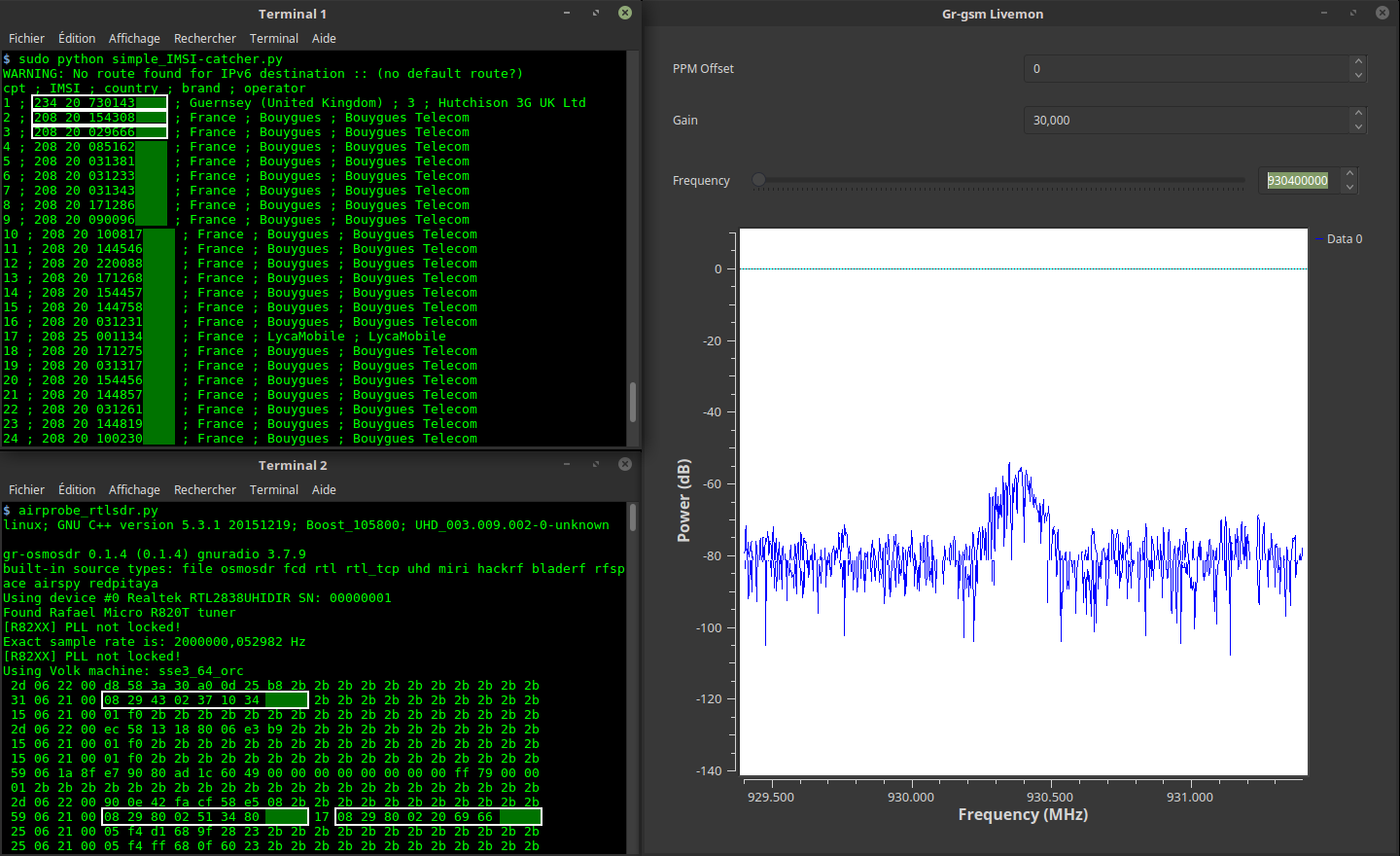
This program shows you IMSI numbers, country, brand and operator of cellphones around you.
/!\ This program was made to understand how GSM network work. Not for bad hacking !
1 PC with Gnu/Linux. Tested with :
1 SDR receiver. Tested with :
git clone https://github.com/Oros42/IMSI-catcher.git
cd IMSI-catcher
or
wget https://github.com/Oros42/IMSI-catcher/archive/master.zip && unzip -q master.zip
cd IMSI-catcher-master
sudo apt install python3-numpy python3-scipy python3-scapy gr-gsm
Warning : don't use python 3.9 (ctypes bug)!
Beginning with Python 3.1, Imp is replaced by importlib. Imp is deprecated in Python 3.11, with the new requirements met as follows.
apt install python3-pip
pip install importlib
sudo xhost +local:docker
docker pull atomicpowerman/imsi-catcher
docker run -ti --net=host -e DISPLAY=$DISPLAY --privileged -v /dev/bus/usb:/dev/bus/usb  atomicpowerman/imsi-catcher bash
Run all grgsm_* in this docker.
We use grgsm_livemon to decode GSM signals and simple_IMSI-catcher.py to find IMSIs.
python3 simple_IMSI-catcher.py -h
Usage: simple_IMSI-catcher.py: [options]

Options:
  -h, --help            show this help message and exit
  -a, --alltmsi         Show TMSI who haven't got IMSI (default  : false)
  -i IFACE, --iface=IFACE
                        Interface (default : lo)
  -m IMSI, --imsi=IMSI  IMSI to track (default : None, Example:
                        123456789101112 or "123 45 6789101112")
  -p PORT, --port=PORT  Port (default : 4729)
  -s, --sniff           sniff on interface instead of listening on port
                        (require root/suid access)
  -w SQLITE, --sqlite=SQLITE
                        Save observed IMSI values to specified SQLite file
  -t TXT, --txt=TXT     Save observed IMSI values to specified TXT file
  -z, --mysql           Save observed IMSI values to specified MYSQL DB (copy
                        .env.dist to .env and edit it)
Open 2 terminals.
In terminal 1
sudo python3 simple_IMSI-catcher.py -s
In terminal 2
grgsm_livemon
Now, change the frequency until it display, in terminal, something like that :
15 06 21 00 01 f0 2b 2b 2b 2b 2b 2b 2b 2b 2b 2b 2b 2b 2b 2b 2b 2b 2b
25 06 21 00 05 f4 f8 68 03 26 23 2b 2b 2b 2b 2b 2b 2b 2b 2b 2b 2b 2b
49 06 1b 95 cc 02 f8 02 01 9c c8 03 1e 57 a5 01 79 00 00 1c 13 2b 2b
You can watch GSM packets with wireshark.
sudo apt install wireshark
sudo wireshark -k -Y '!icmp && gsmtap' -i lo
grgsm_scanner
ARFCN:  974, Freq:  925.0M, CID:     2, LAC:   1337, MCC: 208, MNC:  20, Pwr: -41
ARFCN:  976, Freq:  925.4M, CID:  4242, LAC:   1007, MCC: 208, MNC:  20, Pwr: -45
Now, you can set the frequency for grgsm_livemon :
grgsm_livemon -f 925.4M
Or, for hackrf, fetch the kalibrate-hackrf tool like this:
sudo apt-get install automake autoconf libhackrf-dev
git clone https://github.com/scateu/kalibrate-hackrf
cd kalibrate-hackrf/
./bootstrap
./configure
make
sudo make install
Run
kal -s GSM900
kal: Scanning for GSM-900 base stations.
GSM-900:
	chan:   14 (937.8MHz + 10.449kHz)	power: 3327428.82
	chan:   15 (938.0MHz + 4.662kHz)	power: 3190712.41
...
Use db-example.sql to create your DB.
cp .env.dist .env
nano .env
# set your config
sudo apt install python-decouple python3-mysqldb
sudo python3 simple_IMSI-catcher.py -s --mysql
Scan frequencies and listen the 1st found :
In terminal 1
python3 scan-and-livemon
In terminal 2
python3 simple_IMSI-catcher.py
Setup of Gr-Gsm : https://osmocom.org/projects/gr-gsm/wiki/Installation and https://github.com/velichkov/gr-gsm
Frequency : http://www.worldtimezone.com/gsm.html and https://fr.wikipedia.org/wiki/Global_System_for_Mobile_Communications
Mobile Network Code : https://en.wikipedia.org/wiki/Mobile_Network_Code
Scapy : http://secdev.org/projects/scapy/doc/usage.html
IMSI : https://fr.wikipedia.org/wiki/IMSI
Realtek RTL2832U : https://osmocom.org/projects/sdr/wiki/rtl-sdr and http://doc.ubuntu-fr.org/rtl2832u and http://doc.ubuntu-fr.org/rtl-sdr
To support my work, a tipee would be nice ;-)
https://liberapay.com/Oros/
132 followers · starred Jul 2017
948 followers · starred Nov 2018
1,482 followers · starred Nov 2025
79 followers · starred May 2018
This program show you IMSI numbers of cellphones around you.
Python
4,589
164 commits
updated Jun 6, 2026
This program shows you IMSI numbers, country, brand and operator of cellphones around you.
/!\ This program was made to understand how GSM network work. Not for bad hacking !
1 PC with Gnu/Linux. Tested with :
1 SDR receiver. Tested with :
git clone https://github.com/Oros42/IMSI-catcher.git
cd IMSI-catcher
or
wget https://github.com/Oros42/IMSI-catcher/archive/master.zip && unzip -q master.zip
cd IMSI-catcher-master
sudo apt install python3-numpy python3-scipy python3-scapy gr-gsm
Warning : don't use python 3.9 (ctypes bug)!
Beginning with Python 3.1, Imp is replaced by importlib. Imp is deprecated in Python 3.11, with the new requirements met as follows.
apt install python3-pip
pip install importlib
sudo xhost +local:docker
docker pull atomicpowerman/imsi-catcher
docker run -ti --net=host -e DISPLAY=$DISPLAY --privileged -v /dev/bus/usb:/dev/bus/usb  atomicpowerman/imsi-catcher bash
Run all grgsm_* in this docker.
We use grgsm_livemon to decode GSM signals and simple_IMSI-catcher.py to find IMSIs.
python3 simple_IMSI-catcher.py -h
Usage: simple_IMSI-catcher.py: [options]

Options:
  -h, --help            show this help message and exit
  -a, --alltmsi         Show TMSI who haven't got IMSI (default  : false)
  -i IFACE, --iface=IFACE
                        Interface (default : lo)
  -m IMSI, --imsi=IMSI  IMSI to track (default : None, Example:
                        123456789101112 or "123 45 6789101112")
  -p PORT, --port=PORT  Port (default : 4729)
  -s, --sniff           sniff on interface instead of listening on port
                        (require root/suid access)
  -w SQLITE, --sqlite=SQLITE
                        Save observed IMSI values to specified SQLite file
  -t TXT, --txt=TXT     Save observed IMSI values to specified TXT file
  -z, --mysql           Save observed IMSI values to specified MYSQL DB (copy
                        .env.dist to .env and edit it)
Open 2 terminals.
In terminal 1
sudo python3 simple_IMSI-catcher.py -s
In terminal 2
grgsm_livemon
Now, change the frequency until it display, in terminal, something like that :
15 06 21 00 01 f0 2b 2b 2b 2b 2b 2b 2b 2b 2b 2b 2b 2b 2b 2b 2b 2b 2b
25 06 21 00 05 f4 f8 68 03 26 23 2b 2b 2b 2b 2b 2b 2b 2b 2b 2b 2b 2b
49 06 1b 95 cc 02 f8 02 01 9c c8 03 1e 57 a5 01 79 00 00 1c 13 2b 2b
You can watch GSM packets with wireshark.
sudo apt install wireshark
sudo wireshark -k -Y '!icmp && gsmtap' -i lo
grgsm_scanner
ARFCN:  974, Freq:  925.0M, CID:     2, LAC:   1337, MCC: 208, MNC:  20, Pwr: -41
ARFCN:  976, Freq:  925.4M, CID:  4242, LAC:   1007, MCC: 208, MNC:  20, Pwr: -45
Now, you can set the frequency for grgsm_livemon :
grgsm_livemon -f 925.4M
Or, for hackrf, fetch the kalibrate-hackrf tool like this:
sudo apt-get install automake autoconf libhackrf-dev
git clone https://github.com/scateu/kalibrate-hackrf
cd kalibrate-hackrf/
./bootstrap
./configure
make
sudo make install
Run
kal -s GSM900
kal: Scanning for GSM-900 base stations.
GSM-900:
	chan:   14 (937.8MHz + 10.449kHz)	power: 3327428.82
	chan:   15 (938.0MHz + 4.662kHz)	power: 3190712.41
...
Use db-example.sql to create your DB.
cp .env.dist .env
nano .env
# set your config
sudo apt install python-decouple python3-mysqldb
sudo python3 simple_IMSI-catcher.py -s --mysql
Scan frequencies and listen the 1st found :
In terminal 1
python3 scan-and-livemon
In terminal 2
python3 simple_IMSI-catcher.py
Setup of Gr-Gsm : https://osmocom.org/projects/gr-gsm/wiki/Installation and https://github.com/velichkov/gr-gsm
Frequency : http://www.worldtimezone.com/gsm.html and https://fr.wikipedia.org/wiki/Global_System_for_Mobile_Communications
Mobile Network Code : https://en.wikipedia.org/wiki/Mobile_Network_Code
Scapy : http://secdev.org/projects/scapy/doc/usage.html
IMSI : https://fr.wikipedia.org/wiki/IMSI
Realtek RTL2832U : https://osmocom.org/projects/sdr/wiki/rtl-sdr and http://doc.ubuntu-fr.org/rtl2832u and http://doc.ubuntu-fr.org/rtl-sdr
To support my work, a tipee would be nice ;-)
https://liberapay.com/Oros/
132 followers · starred Jul 2017
948 followers · starred Nov 2018
1,482 followers · starred Nov 2025
79 followers · starred May 2018



