
Self-hosted manga collection manager and reader. Auto-monitors sources for new chapters, downloads them, and packages into CBZ+ComicInfo.xml. Can be read via built-in reader, Kavita integration, or OPDS.
C#
14
824 commits
updated Oct 4, 2026
README
 Maki
Maki
Maki is a manga collection manager in the spirit of Sonarr and Radarr: add a series once and Maki keeps it complete. It watches sites for new chapters, downloads the pages, and writes CBZ files with ComicInfo.xml metadata, which Kavita and most comic readers understand. You can also read them in Maki's built-in reader or over OPDS.


Maki is almost entirely AI-slop-built, developed with Anthropic's latest Claude models.
Highlights
- Automatic monitoring. Maki checks its sources on a schedule, maps each series to every source that carries it, and downloads new chapters from your preferred one on the next check.
- Reader with progress sync. Paged, double-page, or continuous scroll. Progress is merged with Kavita and sent to AniList, MyAnimeList, Kitsu, and MangaBaka. Pages read over OPDS in Panels, Chunky, KOReader, or Mihon count as read too.
- Recommendations. Local ONNX embeddings over the MangaBaka catalog find titles similar to what is already in your library, using more than shared genre tags. The Browse tab adds genre rails, blind spots, Readers like you, and a Your Taste view of how your reading has shifted.
- Local metadata. A local copy of the MangaBaka database gives instant search with no API rate limits, and links each series to its MyAnimeList, AniList, MangaUpdates, and Kitsu IDs.
- Torrents alongside scrapers. Search releases through Prowlarr and send them to qBittorrent. Maki imports each one when it finishes, repacking anything that is not already CBZ.
- Built for a household. Per-user history, preferences, tracker accounts, and library access over one shared set of files. It also supports two-factor authentication, API keys, and OpenID Connect single sign-on.
- You own the files. Everything lands on disk as plain CBZ + ComicInfo.xml, so nothing is locked in Maki's database. Any CBZ reader, including Kavita, can use the same folder.
Features
Reading
- Built-in reader. Paged, double-page, 1:1 (original size), and continuous-scroll modes. Progress is tracked and merged with Kavita so nothing double-counts. A read meter shows how far through the series you are, and time-remaining estimates are based on comparable chapters.
- Reading profiles. Per-user defaults for page fit, direction, and mode by series type, with per-series overrides on top.
- Home. Continue reading, Recently added, Downloading now, Progress, and other rails, drag-reorderable and switchable per user.
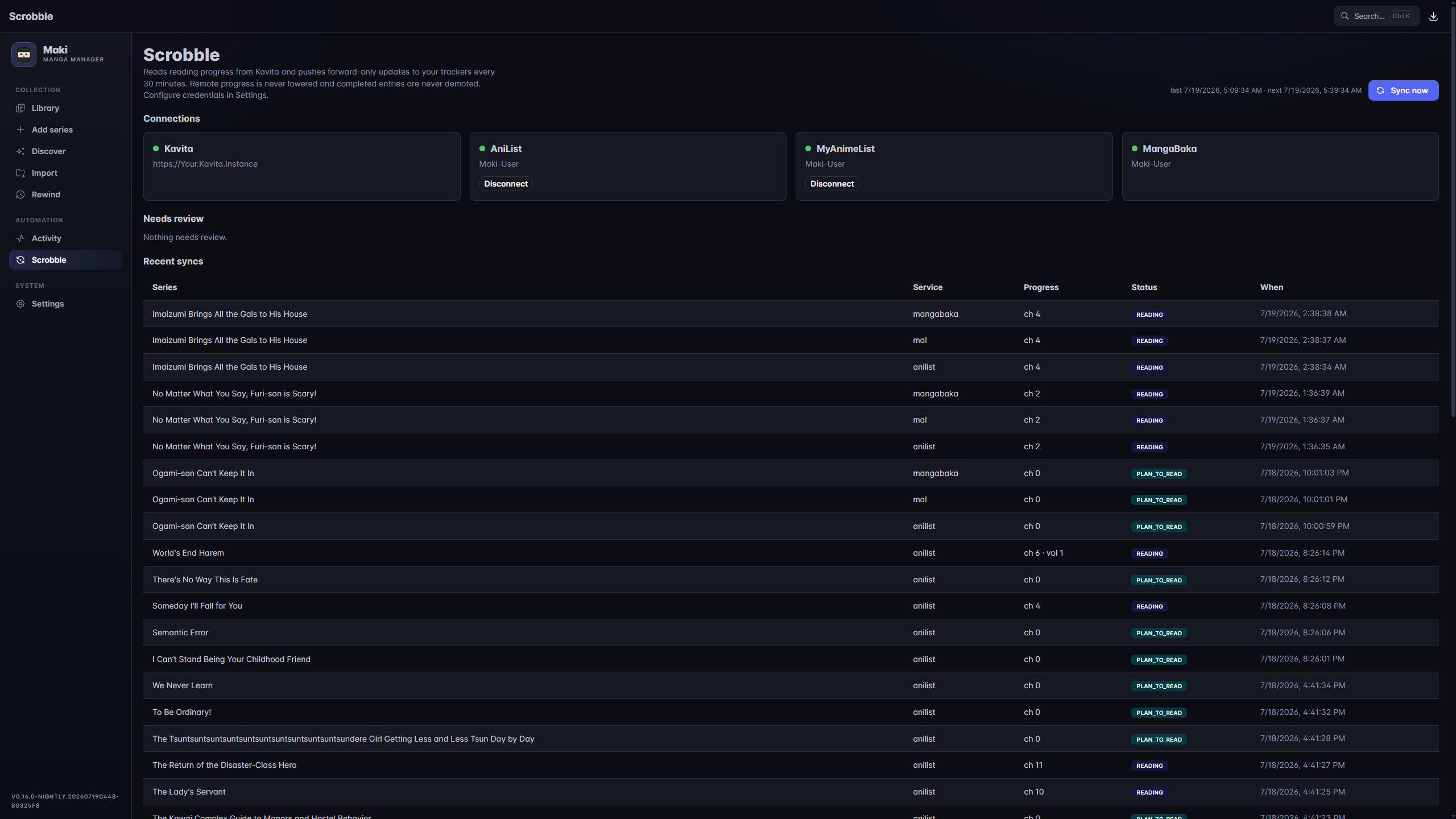
- Scrobbling. Sends read progress to AniList, MyAnimeList, Kitsu, and MangaBaka, whether the reading happened in Maki, over OPDS, or in Kavita. Your lists on those trackers can also be imported into the library from Settings.
- Anime tie-in. For a series with an anime adaptation, Maki can start you at the chapter where the anime ended.
- OPDS server. OPDS 1.2 with page streaming (OPDS-PSE), so Panels, Chunky, KOReader, and Mihon read straight from Maki. Off by default. Each user's feed URL carries its own rotatable token, and pages streamed this way count as read.
Discover
- Recommendations. Local ONNX embeddings over the MangaBaka dump find titles similar to your library. Seed them from your whole library or from specific titles, and filter by year, rating, type, status, genre, chapter count, content rating, and popularity.
- Browse. The Browse tab has catalog and genre rails, recent-reading picks, side interests, blind spots, and Readers like you. Your Taste shows reading behavior, grouped interests, and how your taste has moved. Every rail has a fullscreen Show more view. Detail cards show categorized tags, alternate titles, creators, per-source ratings, and MyAnimeList reviews.
- Metadata. One MangaBaka search identifies a series and brings along its MyAnimeList, AniList, MangaUpdates, and Kitsu IDs. The local MangaBaka dump (nightly snapshot, about 3 GB on disk) makes metadata search and library imports instant. MangaBaka-original data is CC BY-NC-SA 4.0.
Stats
- History. Overview and Library tabs built from an append-only history of reading and downloads: per-series read counts, activity over time, and so on.
- Progress. Levels, streaks, achievements, and reading time, with a Reader track (yours) and a Library track (the whole instance). Series marked incognito never generate events.
Library and downloads
- Monitoring. Chapter lists refresh on a schedule and new chapters are queued automatically. Whole-series monitor modes decide what gets queued, and a per-chapter Wanted toggle keeps individual chapters or specials out.
- Automatic source matching. Adding a series returns instantly; matching runs in the background and can be re-run or fixed by hand. Sources are drag-ordered by preference and can be disabled globally, and the series page can compare linked sources side by side on sampled page quality. A single chapter can also be re-fetched from whichever linked source has the better copy.
- Torrents. Search releases through Prowlarr, grab them with qBittorrent, and auto-import on
completion. Files are hardlinked into the library where possible, and torrents share the queue
with scraper downloads. Anything that is not already CBZ is converted on the way in:
.zipis placed unchanged (a CBZ is a zip),.cbr/.rar/.7z/.tarare repacked, and a folder of loose images becomes one CBZ per folder. A PDF is the one exception: it is kept as it is and read in place. Manual library import converts files the same way and leaves your originals in place. - Output. The default layout is
{Series}/{Series} Vol.X Ch.Y.cbz, with configurable folder and file naming. ComicInfo.xml carries series, chapter number, volume, authors, genres, language, and reading direction. Files are written atomically, so a reader never sees a half-written CBZ. Maki can also write acover.jpginto each series folder for readers that look for one. - Multilingual libraries. A series' link to a source can hold several languages, each with its own chapter rows and files, with the language recorded in ComicInfo.xml. Per-user title-language preferences pick the display title without renaming anything on disk.
- Library view. Grid or list view with density options. Shows download state, read badges, and monitor status. Filter by source, chapter count, or user tag, save filters, and set Wanted in bulk. Per-series incognito mode keeps a title out of stats and progress without hiding it.
- Activity queue. Updates live over SignalR with per-page progress. You can retry or remove items and review downloads that need a decision, for example an import that would replace existing chapter files.
- Library health. Admins can index and verify archives, and find missing, unreadable, duplicate, or suspicious files. Replacement and deletion operations are reviewed before they run, and unlinked CBZs can be imported.
Administration
- Multi-user. Per-user history, preferences, and tracker accounts over one shared library, with per-root-folder access grants. See Multiple readers.
- Security. Two-factor authentication, per-user API keys, HTTPS enforcement, trusted proxies, lockout, and OpenID Connect single sign-on. See Exposing Maki to the internet.
- Backup & restore. One-click zip of database and settings, plus an automatic safety backup before every schema migration. See Backup & restore.
- Notifications. Outbound events (new chapters, download results, health warnings, and more) go to Discord, Telegram, Slack, Notifiarr, ntfy, Gotify, Pushover, Apprise, or a plain webhook. Connections can be scoped to user tags so each person only hears about their own series.
- Interface. Eleven UI languages, four accent colors (Indigo, Rose, Emerald, Amber), and a light theme alongside the default dark one.
- REST API. Available at
/api/v1withX-Api-Keyauth. Swagger is served at/swaggerwhen running in the Development environment.
Sources
Sources are built into Maki, so there are no extensions to install.
| Source | Notes |
|---|---|
| MangaDex | Official API, language filter |
| MANGA Plus | Official (Shueisha), language-specific mappings |
| WEBTOON | Official (webtoons.com), ORIGINALS and CANVAS in en, id, th, es, fr, zh-Hant, de |
| Naver Webtoon | Official (comic.naver.com), Korean, WEBTOON tier only |
| GigaViewer sites | Official Japanese: Shonen Jump+, Comic Days, Sunday Webry, MAGCOMI, Tonari no Young Jump, Comic Zenon, Kurage Bunch (free episodes only) |
| KadoComi (Comic Walker) | Official, Japanese |
| MangaPill | |
| Weeb Central | |
| MangaFire | Language filter, requires FlareSolverr |
| TCB Scans | |
| Asura Scans | Manhwa/manhua |
| Flame Comics | Manhwa/manhua |
| TopManhua | Manhwa/manhua, requires FlareSolverr |
| MangaKatana | |
| MangaKakalot | Requires FlareSolverr |
| Atsumaru | atsu.moe |
| Dynasty Scans | English, yuri |
| Toonily | Manhwa, adult, requires FlareSolverr |
| Manhwa18.net | Adult, requires FlareSolverr |
| Baozi Manhua | Simplified Chinese manhua |
| Manhuagui | Simplified Chinese, mirror override via MAKI_SOURCE_MANHUAGUI_BASEURL |
| Manga Livre | Brazilian Portuguese |
| Taiyō | Brazilian Portuguese |
| ManhwaWeb | Spanish |
| Olympus Scanlation | Spanish, requires FlareSolverr |
| Anime-Sama | French, requires FlareSolverr |
| Manga-Tube | German |
| MangaWorld | Italian |
| MangaLib | Russian |
| MangaDenizi | Turkish |
| Shinigami | Indonesian, manhwa/manhua/manga |
| Cứu Truyện | Vietnamese, FlareSolverr when challenged, mirror override via MAKI_SOURCE_CUUTRUYEN_BASEURL |
| Team-X | Arabic, requires FlareSolverr; the domain rotates, override it with MAKI_SOURCE_TEAMX_BASEURL |
| Sen Manga | Japanese raws |
| Rawkuma | Japanese raws, FlareSolverr when challenged, mirror override via MAKI_SOURCE_RAWKUMA_BASEURL |
Quick start (Docker)
services:
  maki:
    image: ghcr.io/orbitmpgh/maki:latest
    container_name: maki
    environment:
      - PUID=1000
      - PGID=1000
    volumes:
      - ./maki-config:/config
      - /path/to/manga-library:/library
    ports:
      - "8990:8990"
    restart: unless-stopped

  # Optional. Point a Kavita library at the same folder.
  kavita:
    image: jvmilazz0/kavita:latest
    container_name: kavita
    volumes:
      - ./kavita-config:/kavita/config
      - /path/to/manga-library:/library
    ports:
      - "5000:5000"
    restart: unless-stopped

  # Optional. Needed for Cloudflare-protected sources (see the Sources table).
  flaresolverr:
    image: ghcr.io/flaresolverr/flaresolverr:latest
    container_name: flaresolverr
    ports:
      - "8191:8191"
    restart: unless-stopped
- Open
http://localhost:8990and create the administrator account. - Under Settings, add
/libraryas a root folder. - If you use FlareSolverr, set its URL under Settings → FlareSolverr to
http://flaresolverr:8191and hit Test. - Click Add Series, search for a title, and pick it. Maki links sources and syncs chapters in the background.
- Download a chapter or click Search all missing, then follow progress under Activity.
Upgrading from a single-user Maki? The first page asks you to set a username and password. Your library, history, and tracker connections are already attached to that account.
Languages
The interface ships in English, German, French, Spanish, Brazilian Portuguese, Polish, Russian, Turkish, Japanese, Simplified Chinese, and Korean. Set yours under Settings → My account → Language, or leave it on Automatic to follow the browser. The choice is stored per account and follows you across devices. It is separate from Title language, which controls how series titles are displayed.
English is the source language. Everything else is machine-translated and marked as needing review, so expect awkward phrasing. Untranslated strings fall back to English.
Corrections are the easiest way to contribute. The simplest route is Maki on Hosted Weblate: sign in, pick your language, and fix or approve strings in the browser. Weblate sends the changes back here as a pull request. The translated percentage only counts strings a person has approved, so it starts low even though every string already has a machine translation.
If you would rather work in the repo, the catalogs are gettext PO files under locales/, one
directory per language. Or open an issue quoting the string and what it should say.
scripts/i18n/glossary.md lists the terms that stay in English.
Multiple readers
Each account has its own reading history, preferences, and tracker connections. The library itself is shared: one copy of the files, one set of series and chapters, so a second reader costs no disk.
- Per user: read state and resume position, bookmarks, ratings, reader defaults and per-series overrides, saved filters, start page, Home layout, title language, series-page rails, content-rating ceiling, OPDS feed, and the tracker accounts (AniList, MyAnimeList, Kitsu, MangaBaka) your progress is sent to. Ratings land on your tracker profile.
- Shared, admin-only: root folders, download clients and indexers, sources and their priority, metadata and recommendation settings, notifications, backups, and tracker app registrations. The client ID and secret are shared, but each person connects their own account.
- Library access is granted per root folder under Settings → Users. An account with no grants sees an empty library. Series, chapters, covers, search, and OPDS all respect it.
- Kavita is one server with one API key, so everything it reports is a single person's reading. Settings → Kavita chooses which Maki account Kavita's reading belongs to (unset means the first admin). Only that account can sync read status with Kavita.
Exposing Maki to the internet
Maki authenticates with an HttpOnly session cookie and per-user API keys. Before putting it on a public address:
- Terminate TLS in front of it, then enable Settings → Security → Require HTTPS. This
marks the cookie
Secureand turns on HSTS. Do not enable it before TLS works: aSecurecookie over plain HTTP is never returned, so sign-in silently fails. - List your reverse proxy under Trusted proxies (IP or CIDR, for example
172.18.0.0/16). Until you do, Maki ignoresX-Forwarded-Forand attributes every failed sign-in to the proxy. Trusting the header from any address would let a client forge the audit log and get around rate limiting and lockout. - Turn on two-factor authentication under Settings → My account.
- Give each reader their own account. A new account starts with OPDS and tracker access, no root folders, and no admin. If you run an identity provider, use single sign-on instead of handing out passwords.
Security settings are read at startup, so restart Maki after changing them.
Two directories under /config are credential material and deserve the same permissions as the
database: dataprotection-keys (whoever holds it can mint a session cookie for any user) and
backups. Backups exclude the key ring, which is why restoring onto a different machine signs
everyone out once.
API keys and OPDS feed URLs are shown exactly once. Only a SHA-256 fingerprint is stored, so a lost key cannot be recovered; generate a new one.
Single sign-on (OpenID Connect)
Single sign-on is optional and works alongside local passwords. Tested against Authelia, Keycloak, Authentik, and Entra ID; anything with OpenID Connect discovery and the authorization code flow should work.
Register Maki with your provider as a confidential or public client using the authorization code
flow with PKCE. The redirect URI is https://<your-host>/api/v1/auth/oidc/callback. Then fill in
Settings → Single sign-on and restart Maki; the provider configuration is read once at
startup.
| Field | Notes |
|---|---|
| Issuer URL | For example https://auth.example.com. Maki appends /.well-known/openid-configuration. |
| Client ID / secret | Leave the secret empty for a public client; PKCE protects the exchange either way. |
| Scopes | openid is always requested. Add groups (or your provider's equivalent) for claim mapping. |
| Create accounts on first sign-in | Off by default. When on, anyone the provider authenticates gets an account. Fine for a household realm; leave it off for a shared company realm. |
| Admin claim / Permission claim | Optional, see below. |
- New accounts start with no library access. Grant a root folder under Settings → Users.
- Linking. An account is identified by the provider's
subclaim, so upstream renames do not strand anyone. The first time an unknown subject signs in, Maki links it to a local account with the same email if the provider marks the address as verified and exactly one account has it. Otherwise it creates an account (if allowed) or refuses. - Claim mapping is all-or-nothing. With both claim fields empty, the provider only says who
someone is and permissions stay as set on the Users page. Fill either one in and the provider
becomes the authority: permissions are recomputed on every sign-in, and edits on the Users page
are overwritten. The admin claim is
claim=value(groups=maki-admins); the permission claim is a claim name whose values are matched against permission names (DownloadChapters,UseOpds, and so on). Unmatched values are ignored, andAdminonly comes from the admin claim. - Require single sign-on refuses password sign-in for everyone except administrators, so a
provider outage never locks you out of your own library. If you are locked out anyway, set
MAKI_ALLOW_LOCAL_LOGIN=1and restart: password sign-in returns for every account, and Maki logs a warning and shows a banner until you remove it. http://issuers are allowed for a provider on the same LAN or Docker network, with a startup warning. Tokens are signed either way, but the discovery document and signing keys travel in the clear. Preferhttps://where you can.
Backup & restore
Settings → Backup & Restore takes zip snapshots of the database plus config.json. Together
these are everything that cannot be cheaply regenerated. The MangaBaka dump, embeddings, covers,
and cache are excluded so backups stay small. Backups are stored under {ConfigDir}/backups, and
a setting controls how many are kept.
Maki also backs up automatically before any upgrade applies a database migration. Migrations are forward-only, so this is your recovery path if an upgrade goes wrong.
Backups contain the secrets from your settings (API keys, passwords) in plain text. Treat a downloaded backup like a password.
Restoring replaces the database and settings, then restarts Maki. Under Docker
(restart: unless-stopped) or systemd it comes back on its own; a process started with
dotnet run or the Windows executable exits and must be started again by hand. You can restore a
backup from another machine, but not one taken by a newer Maki version.
Screenshots
Add Series
Series page
Scrobbling
Recommendations
Stats
Building the Docker image
The multi-stage Dockerfile builds the frontend (Node 24) and backend (.NET 10)
and packages them into an aspnet:10.0 runtime image serving the SPA from wwwroot/.
docker build -t maki:local .

docker run -d --name maki \
  -p 8990:8990 \
  -v "$PWD/maki-config:/config" \
  -v "/path/to/manga-library:/library" \
  maki:local

# Multi-arch push with Buildx
docker buildx build --platform linux/amd64,linux/arm64 -t ghcr.io/<you>/maki:latest --push .
- The build context must be the repo root: both stages copy
locales/in (the API embedsserver.po, Vite bundlesclient.po), and the build fails if any language is missing from either the frontend or the backend stage. entrypoint.shfixes ownership of/configand drops toPUID/PGIDviagosu.- State lives in the
/configvolume; the library is a separate mount you can share with Kavita. distribution/docker/Dockerfileis an identical copy used by CI and thedistribution/build-*.ps1scripts. Keep the two in step.
Development
# Backend (http://localhost:8990, Swagger at /swagger in the Development environment only)
dotnet run --project src/Maki.Api

# Frontend dev server (http://localhost:5173, proxies /api and /signalr)
npm --prefix frontend run dev

# Tests
dotnet test

# Release publish (what the container ships)
dotnet publish src/Maki.Api -c Release
State lives in MAKI_CONFIG_DIR. If it is unset, Maki uses /config when that directory exists
(the Docker convention) and otherwise a per-user application-data folder, %APPDATA%\Maki on
Windows. It holds the SQLite database, logs, covers, page cache, MangaBaka dump, embedding index,
and precomputed recommendation data. For local development point it at a throwaway directory:
MAKI_CONFIG_DIR="$PWD/.devconfig" dotnet run --project src/Maki.Api
EF Core migrations apply automatically on startup.
Architecture
src/
├── Maki.Api/        ASP.NET Core host, REST /api/v1, SignalR, Quartz jobs, download workers
├── Maki.Core/       Domain: entities, ISource/IMetadataProvider, parser, naming, CBZ pipeline
├── Maki.Data/       EF Core + SQLite
├── Maki.Sources/    One ISource implementation per site
└── Maki.Metadata/   MangaBaka provider + local dump + ONNX embeddings
frontend/            Vite + React + TypeScript + Mantine SPA
Sources implement a single ISource interface (search / series / chapters / pages) and are
registered in DI. Adding a site is one class plus one registration. Page requests carry their own
headers (Referer, cookies) through to the image fetch, so hotlink-protected CDNs work.
Project status
Maki is pre-1.0 and under active development. Schema and API can still shift between releases. Issues and pull requests are welcome.
Legal
Maki is a tool for organizing your library. Scraper sources access third-party websites. You are responsible for complying with those sites' terms of service and your local laws. Support the industry: buy official releases.
License
Similar repos


Languages
C#
59.1%
HTML
21.8%
TypeScript
15.9%
CSS
1.6%
Self-hosted manga collection manager and reader. Auto-monitors sources for new chapters, downloads them, and packages into CBZ+ComicInfo.xml. Can be read via built-in reader, Kavita integration, or OPDS.
C#
14
824 commits
updated Oct 4, 2026
README
Maki
Maki is a manga collection manager in the spirit of Sonarr and Radarr: add a series once and Maki keeps it complete. It watches sites for new chapters, downloads the pages, and writes CBZ files with ComicInfo.xml metadata, which Kavita and most comic readers understand. You can also read them in Maki's built-in reader or over OPDS.
Maki is almost entirely AI-slop-built, developed with Anthropic's latest Claude models.
Highlights
- Automatic monitoring. Maki checks its sources on a schedule, maps each series to every source that carries it, and downloads new chapters from your preferred one on the next check.
- Reader with progress sync. Paged, double-page, or continuous scroll. Progress is merged with Kavita and sent to AniList, MyAnimeList, Kitsu, and MangaBaka. Pages read over OPDS in Panels, Chunky, KOReader, or Mihon count as read too.
- Recommendations. Local ONNX embeddings over the MangaBaka catalog find titles similar to what is already in your library, using more than shared genre tags. The Browse tab adds genre rails, blind spots, Readers like you, and a Your Taste view of how your reading has shifted.
- Local metadata. A local copy of the MangaBaka database gives instant search with no API rate limits, and links each series to its MyAnimeList, AniList, MangaUpdates, and Kitsu IDs.
- Torrents alongside scrapers. Search releases through Prowlarr and send them to qBittorrent. Maki imports each one when it finishes, repacking anything that is not already CBZ.
- Built for a household. Per-user history, preferences, tracker accounts, and library access over one shared set of files. It also supports two-factor authentication, API keys, and OpenID Connect single sign-on.
- You own the files. Everything lands on disk as plain CBZ + ComicInfo.xml, so nothing is locked in Maki's database. Any CBZ reader, including Kavita, can use the same folder.
Features
Reading
- Built-in reader. Paged, double-page, 1:1 (original size), and continuous-scroll modes. Progress is tracked and merged with Kavita so nothing double-counts. A read meter shows how far through the series you are, and time-remaining estimates are based on comparable chapters.
- Reading profiles. Per-user defaults for page fit, direction, and mode by series type, with per-series overrides on top.
- Home. Continue reading, Recently added, Downloading now, Progress, and other rails, drag-reorderable and switchable per user.
- Scrobbling. Sends read progress to AniList, MyAnimeList, Kitsu, and MangaBaka, whether the reading happened in Maki, over OPDS, or in Kavita. Your lists on those trackers can also be imported into the library from Settings.
- Anime tie-in. For a series with an anime adaptation, Maki can start you at the chapter where the anime ended.
- OPDS server. OPDS 1.2 with page streaming (OPDS-PSE), so Panels, Chunky, KOReader, and Mihon read straight from Maki. Off by default. Each user's feed URL carries its own rotatable token, and pages streamed this way count as read.
Discover
- Recommendations. Local ONNX embeddings over the MangaBaka dump find titles similar to your library. Seed them from your whole library or from specific titles, and filter by year, rating, type, status, genre, chapter count, content rating, and popularity.
- Browse. The Browse tab has catalog and genre rails, recent-reading picks, side interests, blind spots, and Readers like you. Your Taste shows reading behavior, grouped interests, and how your taste has moved. Every rail has a fullscreen Show more view. Detail cards show categorized tags, alternate titles, creators, per-source ratings, and MyAnimeList reviews.
- Metadata. One MangaBaka search identifies a series and brings along its MyAnimeList, AniList, MangaUpdates, and Kitsu IDs. The local MangaBaka dump (nightly snapshot, about 3 GB on disk) makes metadata search and library imports instant. MangaBaka-original data is CC BY-NC-SA 4.0.
Stats
- History. Overview and Library tabs built from an append-only history of reading and downloads: per-series read counts, activity over time, and so on.
- Progress. Levels, streaks, achievements, and reading time, with a Reader track (yours) and a Library track (the whole instance). Series marked incognito never generate events.
Library and downloads
- Monitoring. Chapter lists refresh on a schedule and new chapters are queued automatically. Whole-series monitor modes decide what gets queued, and a per-chapter Wanted toggle keeps individual chapters or specials out.
- Automatic source matching. Adding a series returns instantly; matching runs in the background and can be re-run or fixed by hand. Sources are drag-ordered by preference and can be disabled globally, and the series page can compare linked sources side by side on sampled page quality. A single chapter can also be re-fetched from whichever linked source has the better copy.
- Torrents. Search releases through Prowlarr, grab them with qBittorrent, and auto-import on
completion. Files are hardlinked into the library where possible, and torrents share the queue
with scraper downloads. Anything that is not already CBZ is converted on the way in:
.zipis placed unchanged (a CBZ is a zip),.cbr/.rar/.7z/.tarare repacked, and a folder of loose images becomes one CBZ per folder. A PDF is the one exception: it is kept as it is and read in place. Manual library import converts files the same way and leaves your originals in place. - Output. The default layout is
{Series}/{Series} Vol.X Ch.Y.cbz, with configurable folder and file naming. ComicInfo.xml carries series, chapter number, volume, authors, genres, language, and reading direction. Files are written atomically, so a reader never sees a half-written CBZ. Maki can also write acover.jpginto each series folder for readers that look for one. - Multilingual libraries. A series' link to a source can hold several languages, each with its own chapter rows and files, with the language recorded in ComicInfo.xml. Per-user title-language preferences pick the display title without renaming anything on disk.
- Library view. Grid or list view with density options. Shows download state, read badges, and monitor status. Filter by source, chapter count, or user tag, save filters, and set Wanted in bulk. Per-series incognito mode keeps a title out of stats and progress without hiding it.
- Activity queue. Updates live over SignalR with per-page progress. You can retry or remove items and review downloads that need a decision, for example an import that would replace existing chapter files.
- Library health. Admins can index and verify archives, and find missing, unreadable, duplicate, or suspicious files. Replacement and deletion operations are reviewed before they run, and unlinked CBZs can be imported.
Administration
- Multi-user. Per-user history, preferences, and tracker accounts over one shared library, with per-root-folder access grants. See Multiple readers.
- Security. Two-factor authentication, per-user API keys, HTTPS enforcement, trusted proxies, lockout, and OpenID Connect single sign-on. See Exposing Maki to the internet.
- Backup & restore. One-click zip of database and settings, plus an automatic safety backup before every schema migration. See Backup & restore.
- Notifications. Outbound events (new chapters, download results, health warnings, and more) go to Discord, Telegram, Slack, Notifiarr, ntfy, Gotify, Pushover, Apprise, or a plain webhook. Connections can be scoped to user tags so each person only hears about their own series.
- Interface. Eleven UI languages, four accent colors (Indigo, Rose, Emerald, Amber), and a light theme alongside the default dark one.
- REST API. Available at
/api/v1withX-Api-Keyauth. Swagger is served at/swaggerwhen running in the Development environment.
Sources
Sources are built into Maki, so there are no extensions to install.
| Source | Notes |
|---|---|
| MangaDex | Official API, language filter |
| MANGA Plus | Official (Shueisha), language-specific mappings |
| WEBTOON | Official (webtoons.com), ORIGINALS and CANVAS in en, id, th, es, fr, zh-Hant, de |
| Naver Webtoon | Official (comic.naver.com), Korean, WEBTOON tier only |
| GigaViewer sites | Official Japanese: Shonen Jump+, Comic Days, Sunday Webry, MAGCOMI, Tonari no Young Jump, Comic Zenon, Kurage Bunch (free episodes only) |
| KadoComi (Comic Walker) | Official, Japanese |
| MangaPill | |
| Weeb Central | |
| MangaFire | Language filter, requires FlareSolverr |
| TCB Scans | |
| Asura Scans | Manhwa/manhua |
| Flame Comics | Manhwa/manhua |
| TopManhua | Manhwa/manhua, requires FlareSolverr |
| MangaKatana | |
| MangaKakalot | Requires FlareSolverr |
| Atsumaru | atsu.moe |
| Dynasty Scans | English, yuri |
| Toonily | Manhwa, adult, requires FlareSolverr |
| Manhwa18.net | Adult, requires FlareSolverr |
| Baozi Manhua | Simplified Chinese manhua |
| Manhuagui | Simplified Chinese, mirror override via MAKI_SOURCE_MANHUAGUI_BASEURL |
| Manga Livre | Brazilian Portuguese |
| Taiyō | Brazilian Portuguese |
| ManhwaWeb | Spanish |
| Olympus Scanlation | Spanish, requires FlareSolverr |
| Anime-Sama | French, requires FlareSolverr |
| Manga-Tube | German |
| MangaWorld | Italian |
| MangaLib | Russian |
| MangaDenizi | Turkish |
| Shinigami | Indonesian, manhwa/manhua/manga |
| Cứu Truyện | Vietnamese, FlareSolverr when challenged, mirror override via MAKI_SOURCE_CUUTRUYEN_BASEURL |
| Team-X | Arabic, requires FlareSolverr; the domain rotates, override it with MAKI_SOURCE_TEAMX_BASEURL |
| Sen Manga | Japanese raws |
| Rawkuma | Japanese raws, FlareSolverr when challenged, mirror override via MAKI_SOURCE_RAWKUMA_BASEURL |
Quick start (Docker)
services:
  maki:
    image: ghcr.io/orbitmpgh/maki:latest
    container_name: maki
    environment:
      - PUID=1000
      - PGID=1000
    volumes:
      - ./maki-config:/config
      - /path/to/manga-library:/library
    ports:
      - "8990:8990"
    restart: unless-stopped

  # Optional. Point a Kavita library at the same folder.
  kavita:
    image: jvmilazz0/kavita:latest
    container_name: kavita
    volumes:
      - ./kavita-config:/kavita/config
      - /path/to/manga-library:/library
    ports:
      - "5000:5000"
    restart: unless-stopped

  # Optional. Needed for Cloudflare-protected sources (see the Sources table).
  flaresolverr:
    image: ghcr.io/flaresolverr/flaresolverr:latest
    container_name: flaresolverr
    ports:
      - "8191:8191"
    restart: unless-stopped
- Open
http://localhost:8990and create the administrator account. - Under Settings, add
/libraryas a root folder. - If you use FlareSolverr, set its URL under Settings → FlareSolverr to
http://flaresolverr:8191and hit Test. - Click Add Series, search for a title, and pick it. Maki links sources and syncs chapters in the background.
- Download a chapter or click Search all missing, then follow progress under Activity.
Upgrading from a single-user Maki? The first page asks you to set a username and password. Your library, history, and tracker connections are already attached to that account.
Languages
The interface ships in English, German, French, Spanish, Brazilian Portuguese, Polish, Russian, Turkish, Japanese, Simplified Chinese, and Korean. Set yours under Settings → My account → Language, or leave it on Automatic to follow the browser. The choice is stored per account and follows you across devices. It is separate from Title language, which controls how series titles are displayed.
English is the source language. Everything else is machine-translated and marked as needing review, so expect awkward phrasing. Untranslated strings fall back to English.
Corrections are the easiest way to contribute. The simplest route is Maki on Hosted Weblate: sign in, pick your language, and fix or approve strings in the browser. Weblate sends the changes back here as a pull request. The translated percentage only counts strings a person has approved, so it starts low even though every string already has a machine translation.
If you would rather work in the repo, the catalogs are gettext PO files under locales/, one
directory per language. Or open an issue quoting the string and what it should say.
scripts/i18n/glossary.md lists the terms that stay in English.
Multiple readers
Each account has its own reading history, preferences, and tracker connections. The library itself is shared: one copy of the files, one set of series and chapters, so a second reader costs no disk.
- Per user: read state and resume position, bookmarks, ratings, reader defaults and per-series overrides, saved filters, start page, Home layout, title language, series-page rails, content-rating ceiling, OPDS feed, and the tracker accounts (AniList, MyAnimeList, Kitsu, MangaBaka) your progress is sent to. Ratings land on your tracker profile.
- Shared, admin-only: root folders, download clients and indexers, sources and their priority, metadata and recommendation settings, notifications, backups, and tracker app registrations. The client ID and secret are shared, but each person connects their own account.
- Library access is granted per root folder under Settings → Users. An account with no grants sees an empty library. Series, chapters, covers, search, and OPDS all respect it.
- Kavita is one server with one API key, so everything it reports is a single person's reading. Settings → Kavita chooses which Maki account Kavita's reading belongs to (unset means the first admin). Only that account can sync read status with Kavita.
Exposing Maki to the internet
Maki authenticates with an HttpOnly session cookie and per-user API keys. Before putting it on a public address:
- Terminate TLS in front of it, then enable Settings → Security → Require HTTPS. This
marks the cookie
Secureand turns on HSTS. Do not enable it before TLS works: aSecurecookie over plain HTTP is never returned, so sign-in silently fails. - List your reverse proxy under Trusted proxies (IP or CIDR, for example
172.18.0.0/16). Until you do, Maki ignoresX-Forwarded-Forand attributes every failed sign-in to the proxy. Trusting the header from any address would let a client forge the audit log and get around rate limiting and lockout. - Turn on two-factor authentication under Settings → My account.
- Give each reader their own account. A new account starts with OPDS and tracker access, no root folders, and no admin. If you run an identity provider, use single sign-on instead of handing out passwords.
Security settings are read at startup, so restart Maki after changing them.
Two directories under /config are credential material and deserve the same permissions as the
database: dataprotection-keys (whoever holds it can mint a session cookie for any user) and
backups. Backups exclude the key ring, which is why restoring onto a different machine signs
everyone out once.
API keys and OPDS feed URLs are shown exactly once. Only a SHA-256 fingerprint is stored, so a lost key cannot be recovered; generate a new one.
Single sign-on (OpenID Connect)
Single sign-on is optional and works alongside local passwords. Tested against Authelia, Keycloak, Authentik, and Entra ID; anything with OpenID Connect discovery and the authorization code flow should work.
Register Maki with your provider as a confidential or public client using the authorization code
flow with PKCE. The redirect URI is https://<your-host>/api/v1/auth/oidc/callback. Then fill in
Settings → Single sign-on and restart Maki; the provider configuration is read once at
startup.
| Field | Notes |
|---|---|
| Issuer URL | For example https://auth.example.com. Maki appends /.well-known/openid-configuration. |
| Client ID / secret | Leave the secret empty for a public client; PKCE protects the exchange either way. |
| Scopes | openid is always requested. Add groups (or your provider's equivalent) for claim mapping. |
| Create accounts on first sign-in | Off by default. When on, anyone the provider authenticates gets an account. Fine for a household realm; leave it off for a shared company realm. |
| Admin claim / Permission claim | Optional, see below. |
- New accounts start with no library access. Grant a root folder under Settings → Users.
- Linking. An account is identified by the provider's
subclaim, so upstream renames do not strand anyone. The first time an unknown subject signs in, Maki links it to a local account with the same email if the provider marks the address as verified and exactly one account has it. Otherwise it creates an account (if allowed) or refuses. - Claim mapping is all-or-nothing. With both claim fields empty, the provider only says who
someone is and permissions stay as set on the Users page. Fill either one in and the provider
becomes the authority: permissions are recomputed on every sign-in, and edits on the Users page
are overwritten. The admin claim is
claim=value(groups=maki-admins); the permission claim is a claim name whose values are matched against permission names (DownloadChapters,UseOpds, and so on). Unmatched values are ignored, andAdminonly comes from the admin claim. - Require single sign-on refuses password sign-in for everyone except administrators, so a
provider outage never locks you out of your own library. If you are locked out anyway, set
MAKI_ALLOW_LOCAL_LOGIN=1and restart: password sign-in returns for every account, and Maki logs a warning and shows a banner until you remove it. http://issuers are allowed for a provider on the same LAN or Docker network, with a startup warning. Tokens are signed either way, but the discovery document and signing keys travel in the clear. Preferhttps://where you can.
Backup & restore
Settings → Backup & Restore takes zip snapshots of the database plus config.json. Together
these are everything that cannot be cheaply regenerated. The MangaBaka dump, embeddings, covers,
and cache are excluded so backups stay small. Backups are stored under {ConfigDir}/backups, and
a setting controls how many are kept.
Maki also backs up automatically before any upgrade applies a database migration. Migrations are forward-only, so this is your recovery path if an upgrade goes wrong.
Backups contain the secrets from your settings (API keys, passwords) in plain text. Treat a downloaded backup like a password.
Restoring replaces the database and settings, then restarts Maki. Under Docker
(restart: unless-stopped) or systemd it comes back on its own; a process started with
dotnet run or the Windows executable exits and must be started again by hand. You can restore a
backup from another machine, but not one taken by a newer Maki version.
Screenshots
Add Series
Series page
Scrobbling
Recommendations
Stats
Building the Docker image
The multi-stage Dockerfile builds the frontend (Node 24) and backend (.NET 10)
and packages them into an aspnet:10.0 runtime image serving the SPA from wwwroot/.
docker build -t maki:local .

docker run -d --name maki \
  -p 8990:8990 \
  -v "$PWD/maki-config:/config" \
  -v "/path/to/manga-library:/library" \
  maki:local

# Multi-arch push with Buildx
docker buildx build --platform linux/amd64,linux/arm64 -t ghcr.io/<you>/maki:latest --push .
- The build context must be the repo root: both stages copy
locales/in (the API embedsserver.po, Vite bundlesclient.po), and the build fails if any language is missing from either the frontend or the backend stage. entrypoint.shfixes ownership of/configand drops toPUID/PGIDviagosu.- State lives in the
/configvolume; the library is a separate mount you can share with Kavita. distribution/docker/Dockerfileis an identical copy used by CI and thedistribution/build-*.ps1scripts. Keep the two in step.
Development
# Backend (http://localhost:8990, Swagger at /swagger in the Development environment only)
dotnet run --project src/Maki.Api

# Frontend dev server (http://localhost:5173, proxies /api and /signalr)
npm --prefix frontend run dev

# Tests
dotnet test

# Release publish (what the container ships)
dotnet publish src/Maki.Api -c Release
State lives in MAKI_CONFIG_DIR. If it is unset, Maki uses /config when that directory exists
(the Docker convention) and otherwise a per-user application-data folder, %APPDATA%\Maki on
Windows. It holds the SQLite database, logs, covers, page cache, MangaBaka dump, embedding index,
and precomputed recommendation data. For local development point it at a throwaway directory:
MAKI_CONFIG_DIR="$PWD/.devconfig" dotnet run --project src/Maki.Api
EF Core migrations apply automatically on startup.
Architecture
src/
├── Maki.Api/        ASP.NET Core host, REST /api/v1, SignalR, Quartz jobs, download workers
├── Maki.Core/       Domain: entities, ISource/IMetadataProvider, parser, naming, CBZ pipeline
├── Maki.Data/       EF Core + SQLite
├── Maki.Sources/    One ISource implementation per site
└── Maki.Metadata/   MangaBaka provider + local dump + ONNX embeddings
frontend/            Vite + React + TypeScript + Mantine SPA
Sources implement a single ISource interface (search / series / chapters / pages) and are
registered in DI. Adding a site is one class plus one registration. Page requests carry their own
headers (Referer, cookies) through to the image fetch, so hotlink-protected CDNs work.
Project status
Maki is pre-1.0 and under active development. Schema and API can still shift between releases. Issues and pull requests are welcome.
Legal
Maki is a tool for organizing your library. Scraper sources access third-party websites. You are responsible for complying with those sites' terms of service and your local laws. Support the industry: buy official releases.
License
Similar repos
Languages
C#
59.1%
HTML
21.8%
TypeScript
15.9%
CSS
1.6%