Time-series applications call for more than accurate forecasts: they also require understanding context and answering questions about the signals. OpenTSLM TeeMoE brings these capabilities together in one language model. Three LoRA experts share a frozen Qwen3.6-27B backbone, with a learned controller composing their weights for each request.
This repository provides the model's inference API, evaluation tools, and training code as part of the OpenTSLM project.
Paper · Hugging Face · News · Installation · Quickstart · More examples · Evaluation · Citation · Authors · License · Training
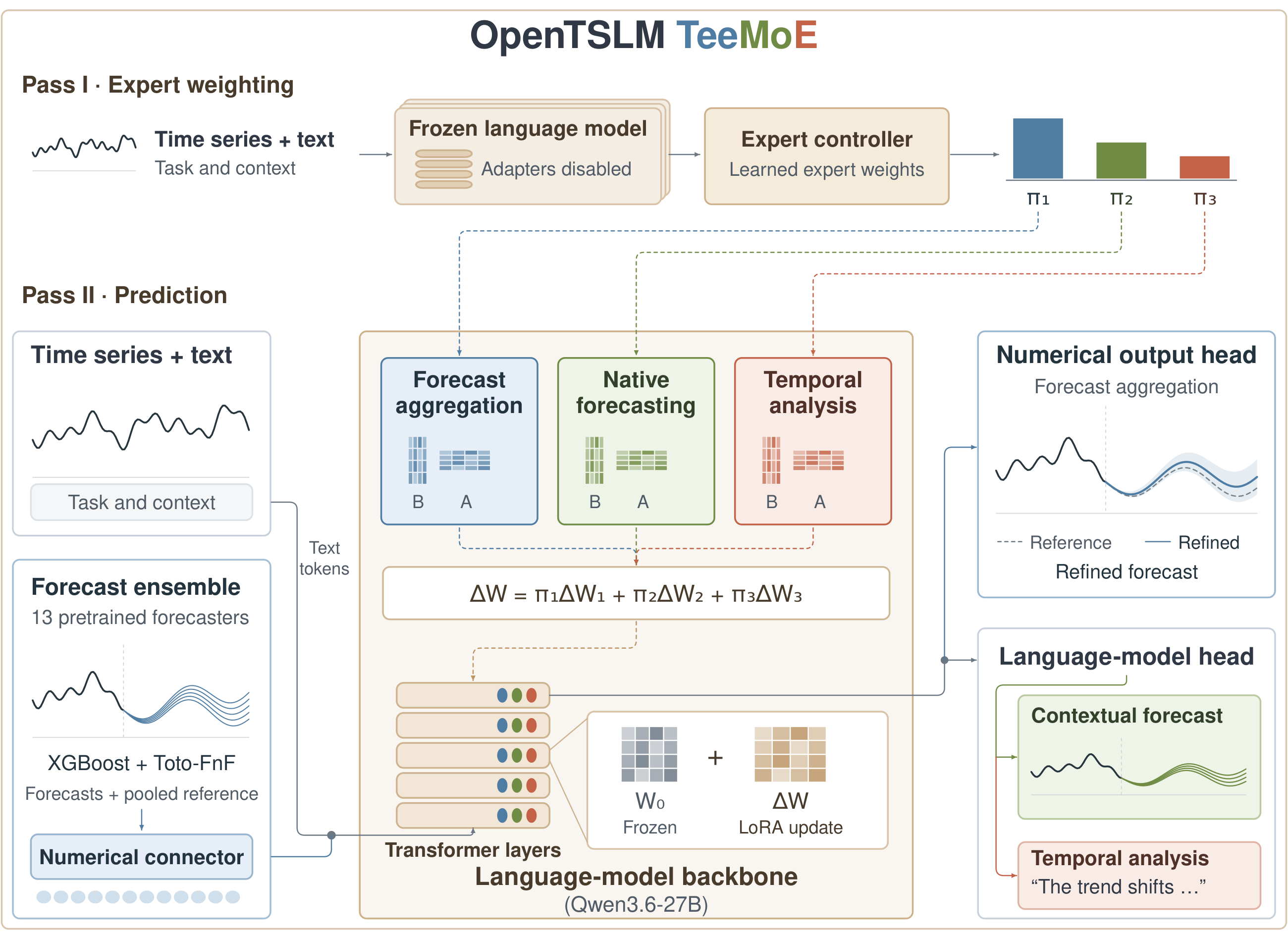
TeeMoE supports three kinds of time-series requests, from predicting future measurements to interpreting patterns in observed signals:
The paper evaluates TeeMoE on three benchmarks covering these capabilities:
| GIFT-Eval · mean MASE rank ↓ | Context is Key · RCRPS ↓ | TimeSeriesExam · accuracy ↑ |
|---|---|---|
| 19.990 | 0.115 | 78.55% |
The inference setup targets Linux with an NVIDIA 80 GB GPU, such as an H100.
You will need Git, uv, the CUDA toolkit (nvcc), and
a C++ compiler. TiRex compiles GPU kernels on first use. The setup script creates
Python 3.12 environments for you.
git clone https://github.com/OpenTSLM/OpenTSLM-TeeMoE
cd OpenTSLM-TeeMoE
bash scripts/setup.sh inference
source .venv/bin/activate
Keep this terminal in the repository directory for the commands below. In a new
terminal, run source .venv/bin/activate again before using the package.
You only need the inference setup to use the model on your own data. The full
setup, without that argument, also installs benchmark and training dependencies.
The forecasting models and vLLM have conflicting dependencies, so the script gives
them separate environments (.venv-fm, .venv-moirai, .venv-timer,
.venv-tirex, and .venv-vllm). Stay in the main .venv; TeeMoE starts the other
environments automatically.
TeeMoE uses Qwen3.6-27B as its shared
language backbone. The TeeMoE checkpoint supplies the three expert adapters,
controller, and numerical prediction components. TeeMoE.from_pretrained loads
these components together; you do not need to assemble the experts yourself.
The backbone and external forecasting models are downloaded as needed. Allow time and disk space for the first model load. On a single GPU, TeeMoE temporarily offloads the backbone to CPU memory while other models run.
Load the pretrained checkpoint from Hugging Face
using TeeMoE.from_pretrained("OpenTSLM/TeeMoE"), or pass a local checkpoint directory.
Save the following as example.py in the repository directory. It creates a
simple series, forecasts its next 24 hours with additional context, and asks a
multiple-choice question about the observed pattern.
import numpy as np
from teemoe import TeeMoE

model = TeeMoE.from_pretrained("OpenTSLM/TeeMoE")
history = (10 + np.sin(np.arange(168) / 12)).tolist()

forecast = model.forecast(
    history,
    horizon=24,
    frequency="h",
    start="2024-05-01 00:00",
    context="A promotion starts at the first forecast hour and lasts 24 hours.",
)
print(forecast.median)
print(forecast.quantiles.shape)  # (24, 9), quantile levels 0.1 through 0.9

answer = model.analyze(
    history,
    "Which pattern best describes the series?",
    options=["Periodic variation", "Constant values", "Steady increase"],
)
print(answer.text)
Run it with:
python example.py
Keep the model loaded when making more requests; you do not need to call
from_pretrained for each forecast or question.
Replace history with a one-dimensional list or NumPy array of observations,
ordered from oldest to newest. You supply the observed values only, not the
future values you want to predict.
| Forecast argument | Meaning |
|---|---|
history | Observed values in chronological order. |
horizon | Number of future steps to predict. |
frequency | Sampling interval, such as "h", "D", or "15min". |
start | Timestamp of the first observation in the history, not the first forecast step. |
context | Optional text describing relevant events, constraints, or background. |
For example, 168 hourly observations beginning on May 1 end on May 7; a horizon of 24 predicts the 24 hours of May 8. The frequency should match the spacing of your observations.
Both forecasting paths return the same Forecast object:
| Field | What you get |
|---|---|
forecast.median | One point forecast per future step, shape (horizon,). |
forecast.quantiles | Nine quantiles per step, shape (horizon, 9), ordered from 0.1 to 0.9. |
forecast.timestamps | Timestamps corresponding to the forecast steps. |
forecast.output | "numerical" for the aggregation path or "text" for generated future values. |
answer.text contains the analysis response. When you supply multiple-choice
options, answer.choice is the zero-based index of the parsed choice, or None
if no option was recognized. The controller selects the model's output path;
you do not need to manually choose an expert.
The snippets below reuse model and history from the quickstart. You can append
them to example.py or run them in the same Python session.
Omit context when you only have the observations:
forecast = model.forecast(
    history, horizon=24, frequency="h", start="2024-05-01 00:00"
)
print(forecast.median)
The numerical path runs external forecasting models before refining their ensemble. Its first call may therefore download and load additional models.
Omit options for a free-text response. To compare a pair, pass two series:
answer = model.analyze(history, "Describe the overall pattern in this series.")
print(answer.text)

second_series = (np.asarray(history) + 2).tolist()
comparison = model.analyze(
    [history, second_series],
    "How do the patterns and levels of these two series compare?",
)
print(comparison.text)
Use the batch methods when you have several series or questions. They return results in the same order as the input requests:
second_series = (np.asarray(history) + 2).tolist()
forecasts = model.forecast_batch([
    dict(history=history, horizon=24, frequency="h", start="2024-05-01 00:00"),
    dict(history=second_series, horizon=24, frequency="h", start="2024-05-01 00:00",
         context="The equipment will be offline for the first six forecast hours."),
])

answers = model.analyze_batch([
    dict(series=history, question="Describe the trend."),
    dict(series=second_series, question="Is there a repeating pattern?"),
])

for result in forecasts:
    print(result.median)
for result in answers:
    print(result.text)
A local directory works in place of a Hugging Face model ID:
model = TeeMoE.from_pretrained("checkpoints/teemoe")
By default, TeeMoE uses cuda:0 and runs text generation with vLLM. For a
two-GPU setup, you can keep the backbone on GPU 0 and use GPU 1 for text
generation and the forecasting models. Use this instead of the model-loading
line in the quickstart:
model = TeeMoE.from_pretrained(
    "OpenTSLM/TeeMoE",
    device="cuda:0",
    vllm_devices="1",
    forecast_devices=("cuda:1",),
)
Each GPU must have enough memory for the model assigned to it; these options place workloads on devices rather than splitting the backbone across GPUs.
Alternatively, TeeMoE.from_pretrained("OpenTSLM/TeeMoE", backend="transformers")
runs text generation in the main process. It avoids a separate vLLM worker but
is slower. The default vLLM backend is recommended for normal use.
You do not need to download the benchmarks to use TeeMoE on your own data. To evaluate the model, first install the full set of dependencies:
bash scripts/setup.sh
source .venv/bin/activate
Download the benchmark data once, then run the evaluation. Start with --gpus 0
on a single GPU:
hf download Salesforce/GiftEval --repo-type dataset --local-dir data/gift-eval
python -m teemoe.eval.gift --gpus 0
To distribute the evaluation across an eight-GPU machine, use
--gpus 0 1 2 3 4 5 6 7 instead. The summary is written to
results/gift/report.json. This is a full-benchmark evaluation, not a quick
installation test.
GIFT-Eval ranks are computed against the leaderboard results in the pinned GIFT-Eval checkout, since ranks change when models are added. As in the paper, the Toto-FnF part of the ensemble on GIFT-Eval is the forecast released with Toto-2.0-Family-and-Friends (about 17 GB, downloaded on the first run); the eight pretrained forecasting models and the five extra candidates are run by the evaluation.
Interrupted GIFT evaluations resume in the same output directory. Use a different
--output directory when changing checkpoints, evaluation settings, or GPU count;
incompatible cached results are rejected instead of silently reused.
These evaluators download their benchmark data on first use:
python -m teemoe.eval.cik
python -m teemoe.eval.tse
The reports are written to results/cik.json and results/tse.json respectively.
Context is Key reports weighted RCRPS; TimeSeriesExam reports accuracy.
All three evaluators accept --checkpoint for a different model ID or local
directory. For example:
python -m teemoe.eval.tse --checkpoint checkpoints/teemoe --output results/tse-local.json
Run an evaluator with --help to see its GPU, backend, and output options.
If you use TeeMoE in your work, please cite:
@misc{chen2026opentslmteemoe,
  title = {{OpenTSLM TeeMoE: A Unified Time-Series Language Model for Forecasting, Contextual Prediction, and Reasoning}},
  author = {Tony Chen and Timo Stoffregen and Maxwell Xu and Thomas Kaar and Martin Maritsch and Geremia Pompei and Nicolas Zumarraga and Robert Jakob and Paul Schmiedmayer and Patrick Langer and Juncheng Liu},
  year = {2026},
  eprint = {2609.40265},
  archivePrefix = {arXiv},
  primaryClass = {cs.LG},
  url = {https://arxiv.org/abs/2609.40265}
}
OpenTSLM TeeMoE was made possible through the collaborative efforts of:
† Shared last authors.
This project is released under the MIT license. The pretrained models and datasets retain their respective licenses.
Training is optional: you can use the prepared checkpoint without rebuilding datasets or fitting any adapters. To train your own model, the provided recipe targets one eight-GPU node.
First accept the Time-MQA/TSQA dataset access terms on Hugging Face and authenticate; the analysis-data builder needs access to this gated dataset. Then run:
bash scripts/setup.sh
source .venv/bin/activate
hf auth login
bash scripts/train.sh
This builds the training data from public sources, trains the experts and the
controller on one 8-GPU node, and writes checkpoints/teemoe, which loads with
TeeMoE.from_pretrained("checkpoints/teemoe"). The steps are:
| Step | Command | Output |
|---|---|---|
| Forecasting windows (GIFT-Eval training split, BOOM, RMISC, LOTSA, UTSD) | python -m teemoe.data.aggregation | data/aggregation |
| Contextual forecasting examples | python -m teemoe.data.native | data/native/train.jsonl |
| Analysis examples | python -m teemoe.data.analysis | data/analysis/train.jsonl |
| Forecasting-model ensemble | python -m teemoe.train.aggregation prepare | artifacts/aggregation |
| Aggregation expert | torchrun … -m teemoe.train.aggregation editor | artifacts/aggregation/expert |
| Native and analysis experts | torchrun … -m teemoe.train.text | artifacts/native, artifacts/analysis |
| Controller | torchrun … -m teemoe.train.controller | artifacts/controller |
Hyperparameters are in configs/. Training uses fixed seeds and the
released model's data sources and sample counts. Rerunning the same script reuses
completed stages and resumes text-expert training when checkpoints are available.
See scripts/train.sh for the individual commands if you
want to change the recipe or restart a particular stage.
After training finishes, load your model with:
model = TeeMoE.from_pretrained("checkpoints/teemoe")
CAF uses the released model's cleaned row selection in teemoe/data/caf_rows.json.
Scripts for the paper's ablations and baselines are in paper/.
Time-series applications call for more than accurate forecasts: they also require understanding context and answering questions about the signals. OpenTSLM TeeMoE brings these capabilities together in one language model. Three LoRA experts share a frozen Qwen3.6-27B backbone, with a learned controller composing their weights for each request.
This repository provides the model's inference API, evaluation tools, and training code as part of the OpenTSLM project.
Paper · Hugging Face · News · Installation · Quickstart · More examples · Evaluation · Citation · Authors · License · Training
TeeMoE supports three kinds of time-series requests, from predicting future measurements to interpreting patterns in observed signals:
The paper evaluates TeeMoE on three benchmarks covering these capabilities:
| GIFT-Eval · mean MASE rank ↓ | Context is Key · RCRPS ↓ | TimeSeriesExam · accuracy ↑ |
|---|---|---|
| 19.990 | 0.115 | 78.55% |
The inference setup targets Linux with an NVIDIA 80 GB GPU, such as an H100.
You will need Git, uv, the CUDA toolkit (nvcc), and
a C++ compiler. TiRex compiles GPU kernels on first use. The setup script creates
Python 3.12 environments for you.
git clone https://github.com/OpenTSLM/OpenTSLM-TeeMoE
cd OpenTSLM-TeeMoE
bash scripts/setup.sh inference
source .venv/bin/activate
Keep this terminal in the repository directory for the commands below. In a new
terminal, run source .venv/bin/activate again before using the package.
You only need the inference setup to use the model on your own data. The full
setup, without that argument, also installs benchmark and training dependencies.
The forecasting models and vLLM have conflicting dependencies, so the script gives
them separate environments (.venv-fm, .venv-moirai, .venv-timer,
.venv-tirex, and .venv-vllm). Stay in the main .venv; TeeMoE starts the other
environments automatically.
TeeMoE uses Qwen3.6-27B as its shared
language backbone. The TeeMoE checkpoint supplies the three expert adapters,
controller, and numerical prediction components. TeeMoE.from_pretrained loads
these components together; you do not need to assemble the experts yourself.
The backbone and external forecasting models are downloaded as needed. Allow time and disk space for the first model load. On a single GPU, TeeMoE temporarily offloads the backbone to CPU memory while other models run.
Load the pretrained checkpoint from Hugging Face
using TeeMoE.from_pretrained("OpenTSLM/TeeMoE"), or pass a local checkpoint directory.
Save the following as example.py in the repository directory. It creates a
simple series, forecasts its next 24 hours with additional context, and asks a
multiple-choice question about the observed pattern.
import numpy as np
from teemoe import TeeMoE

model = TeeMoE.from_pretrained("OpenTSLM/TeeMoE")
history = (10 + np.sin(np.arange(168) / 12)).tolist()

forecast = model.forecast(
    history,
    horizon=24,
    frequency="h",
    start="2024-05-01 00:00",
    context="A promotion starts at the first forecast hour and lasts 24 hours.",
)
print(forecast.median)
print(forecast.quantiles.shape)  # (24, 9), quantile levels 0.1 through 0.9

answer = model.analyze(
    history,
    "Which pattern best describes the series?",
    options=["Periodic variation", "Constant values", "Steady increase"],
)
print(answer.text)
Run it with:
python example.py
Keep the model loaded when making more requests; you do not need to call
from_pretrained for each forecast or question.
Replace history with a one-dimensional list or NumPy array of observations,
ordered from oldest to newest. You supply the observed values only, not the
future values you want to predict.
| Forecast argument | Meaning |
|---|---|
history | Observed values in chronological order. |
horizon | Number of future steps to predict. |
frequency | Sampling interval, such as "h", "D", or "15min". |
start | Timestamp of the first observation in the history, not the first forecast step. |
context | Optional text describing relevant events, constraints, or background. |
For example, 168 hourly observations beginning on May 1 end on May 7; a horizon of 24 predicts the 24 hours of May 8. The frequency should match the spacing of your observations.
Both forecasting paths return the same Forecast object:
| Field | What you get |
|---|---|
forecast.median | One point forecast per future step, shape (horizon,). |
forecast.quantiles | Nine quantiles per step, shape (horizon, 9), ordered from 0.1 to 0.9. |
forecast.timestamps | Timestamps corresponding to the forecast steps. |
forecast.output | "numerical" for the aggregation path or "text" for generated future values. |
answer.text contains the analysis response. When you supply multiple-choice
options, answer.choice is the zero-based index of the parsed choice, or None
if no option was recognized. The controller selects the model's output path;
you do not need to manually choose an expert.
The snippets below reuse model and history from the quickstart. You can append
them to example.py or run them in the same Python session.
Omit context when you only have the observations:
forecast = model.forecast(
    history, horizon=24, frequency="h", start="2024-05-01 00:00"
)
print(forecast.median)
The numerical path runs external forecasting models before refining their ensemble. Its first call may therefore download and load additional models.
Omit options for a free-text response. To compare a pair, pass two series:
answer = model.analyze(history, "Describe the overall pattern in this series.")
print(answer.text)

second_series = (np.asarray(history) + 2).tolist()
comparison = model.analyze(
    [history, second_series],
    "How do the patterns and levels of these two series compare?",
)
print(comparison.text)
Use the batch methods when you have several series or questions. They return results in the same order as the input requests:
second_series = (np.asarray(history) + 2).tolist()
forecasts = model.forecast_batch([
    dict(history=history, horizon=24, frequency="h", start="2024-05-01 00:00"),
    dict(history=second_series, horizon=24, frequency="h", start="2024-05-01 00:00",
         context="The equipment will be offline for the first six forecast hours."),
])

answers = model.analyze_batch([
    dict(series=history, question="Describe the trend."),
    dict(series=second_series, question="Is there a repeating pattern?"),
])

for result in forecasts:
    print(result.median)
for result in answers:
    print(result.text)
A local directory works in place of a Hugging Face model ID:
model = TeeMoE.from_pretrained("checkpoints/teemoe")
By default, TeeMoE uses cuda:0 and runs text generation with vLLM. For a
two-GPU setup, you can keep the backbone on GPU 0 and use GPU 1 for text
generation and the forecasting models. Use this instead of the model-loading
line in the quickstart:
model = TeeMoE.from_pretrained(
    "OpenTSLM/TeeMoE",
    device="cuda:0",
    vllm_devices="1",
    forecast_devices=("cuda:1",),
)
Each GPU must have enough memory for the model assigned to it; these options place workloads on devices rather than splitting the backbone across GPUs.
Alternatively, TeeMoE.from_pretrained("OpenTSLM/TeeMoE", backend="transformers")
runs text generation in the main process. It avoids a separate vLLM worker but
is slower. The default vLLM backend is recommended for normal use.
You do not need to download the benchmarks to use TeeMoE on your own data. To evaluate the model, first install the full set of dependencies:
bash scripts/setup.sh
source .venv/bin/activate
Download the benchmark data once, then run the evaluation. Start with --gpus 0
on a single GPU:
hf download Salesforce/GiftEval --repo-type dataset --local-dir data/gift-eval
python -m teemoe.eval.gift --gpus 0
To distribute the evaluation across an eight-GPU machine, use
--gpus 0 1 2 3 4 5 6 7 instead. The summary is written to
results/gift/report.json. This is a full-benchmark evaluation, not a quick
installation test.
GIFT-Eval ranks are computed against the leaderboard results in the pinned GIFT-Eval checkout, since ranks change when models are added. As in the paper, the Toto-FnF part of the ensemble on GIFT-Eval is the forecast released with Toto-2.0-Family-and-Friends (about 17 GB, downloaded on the first run); the eight pretrained forecasting models and the five extra candidates are run by the evaluation.
Interrupted GIFT evaluations resume in the same output directory. Use a different
--output directory when changing checkpoints, evaluation settings, or GPU count;
incompatible cached results are rejected instead of silently reused.
These evaluators download their benchmark data on first use:
python -m teemoe.eval.cik
python -m teemoe.eval.tse
The reports are written to results/cik.json and results/tse.json respectively.
Context is Key reports weighted RCRPS; TimeSeriesExam reports accuracy.
All three evaluators accept --checkpoint for a different model ID or local
directory. For example:
python -m teemoe.eval.tse --checkpoint checkpoints/teemoe --output results/tse-local.json
Run an evaluator with --help to see its GPU, backend, and output options.
If you use TeeMoE in your work, please cite:
@misc{chen2026opentslmteemoe,
  title = {{OpenTSLM TeeMoE: A Unified Time-Series Language Model for Forecasting, Contextual Prediction, and Reasoning}},
  author = {Tony Chen and Timo Stoffregen and Maxwell Xu and Thomas Kaar and Martin Maritsch and Geremia Pompei and Nicolas Zumarraga and Robert Jakob and Paul Schmiedmayer and Patrick Langer and Juncheng Liu},
  year = {2026},
  eprint = {2609.40265},
  archivePrefix = {arXiv},
  primaryClass = {cs.LG},
  url = {https://arxiv.org/abs/2609.40265}
}
OpenTSLM TeeMoE was made possible through the collaborative efforts of:
† Shared last authors.
This project is released under the MIT license. The pretrained models and datasets retain their respective licenses.
Training is optional: you can use the prepared checkpoint without rebuilding datasets or fitting any adapters. To train your own model, the provided recipe targets one eight-GPU node.
First accept the Time-MQA/TSQA dataset access terms on Hugging Face and authenticate; the analysis-data builder needs access to this gated dataset. Then run:
bash scripts/setup.sh
source .venv/bin/activate
hf auth login
bash scripts/train.sh
This builds the training data from public sources, trains the experts and the
controller on one 8-GPU node, and writes checkpoints/teemoe, which loads with
TeeMoE.from_pretrained("checkpoints/teemoe"). The steps are:
| Step | Command | Output |
|---|---|---|
| Forecasting windows (GIFT-Eval training split, BOOM, RMISC, LOTSA, UTSD) | python -m teemoe.data.aggregation | data/aggregation |
| Contextual forecasting examples | python -m teemoe.data.native | data/native/train.jsonl |
| Analysis examples | python -m teemoe.data.analysis | data/analysis/train.jsonl |
| Forecasting-model ensemble | python -m teemoe.train.aggregation prepare | artifacts/aggregation |
| Aggregation expert | torchrun … -m teemoe.train.aggregation editor | artifacts/aggregation/expert |
| Native and analysis experts | torchrun … -m teemoe.train.text | artifacts/native, artifacts/analysis |
| Controller | torchrun … -m teemoe.train.controller | artifacts/controller |
Hyperparameters are in configs/. Training uses fixed seeds and the
released model's data sources and sample counts. Rerunning the same script reuses
completed stages and resumes text-expert training when checkpoints are available.
See scripts/train.sh for the individual commands if you
want to change the recipe or restart a particular stage.
After training finishes, load your model with:
model = TeeMoE.from_pretrained("checkpoints/teemoe")
CAF uses the released model's cleaned row selection in teemoe/data/caf_rows.json.
Scripts for the paper's ablations and baselines are in paper/.



