
[ICCV2025] V2PE: Improving Multimodal Long-Context Capability of Vision-Language Models with Variable Visual Position Encoding
See the codeREADME
V2PE: Improving Multimodal Long-Context Capability of Vision-Language Models with Variable Visual Position Encoding
The official implementation of the paper "V2PE: Improving Multimodal Long-Context Capability of Vision-Language Models with Variable Visual Position Encoding".
📖 Summary
The main contributions of this work are as follows:
- We construct mixed datasets for VLMs' long-context training and evaluation by augmenting existing multimodal instruction tuning datasets and conduct a thorough investigation into why current VLMs struggle with long-context multimodal inputs, revealing that directly applying LLM positional encoding to visual tokens is ineffective.
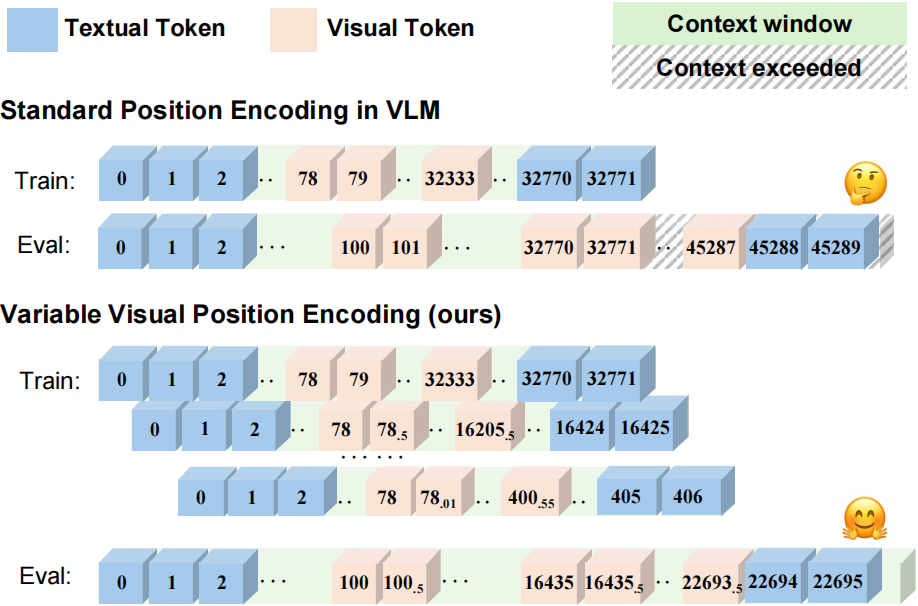
- We propose Variable Visual Position Encoding (V2PE), a novel positional encoding strategy that employs variable and smaller increments for visual tokens, significantly enhancing VLMs' ability to understand and reason over long multimodal contexts.
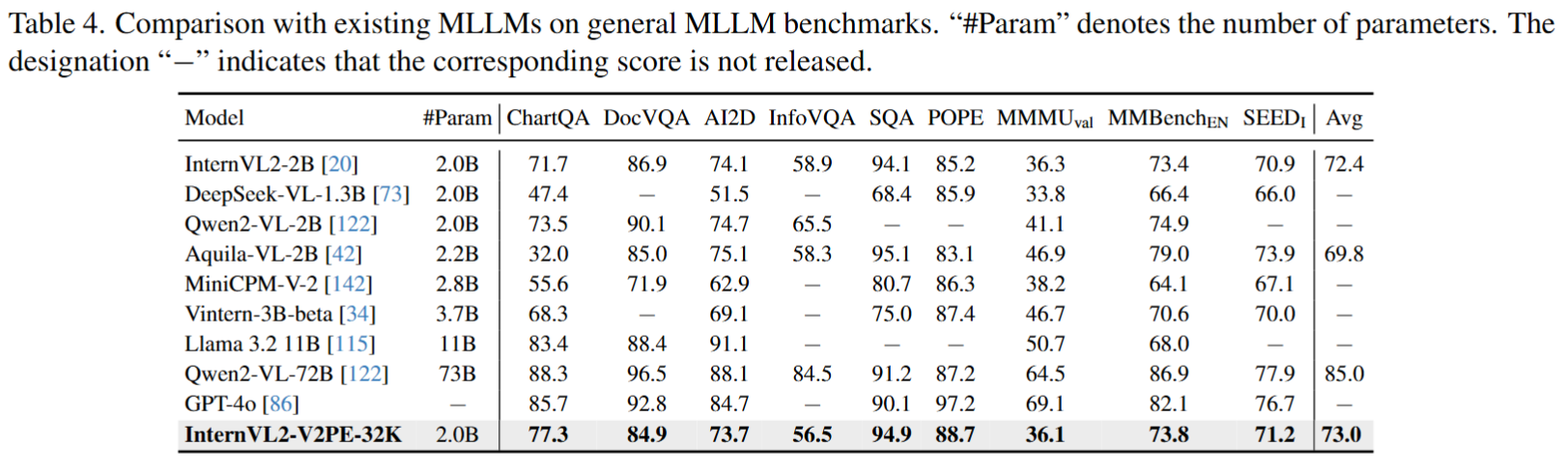
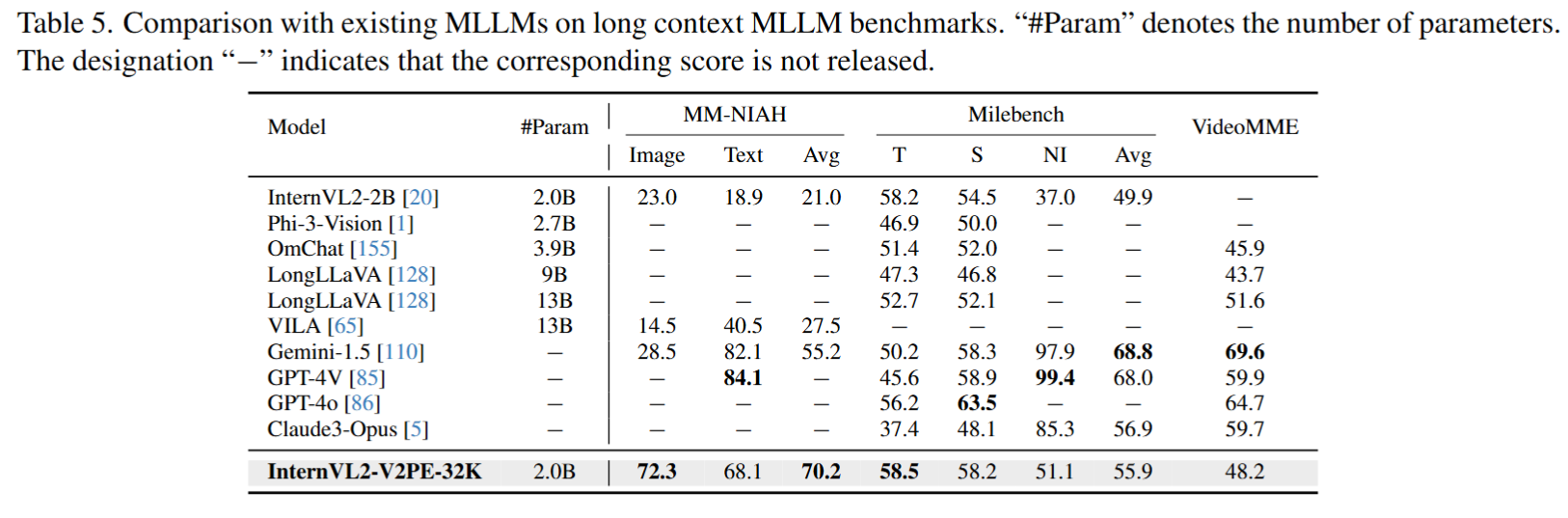
- We apply our V2PE method and extend training data on the open-source VLM, InternVL2-2B. The fine-tuned VLM performs exceptionally well on both general multimodal benchmarks and long-context multimodal tasks, with the capacity to handle sequences of up to 1M tokens.
🛠️ Installation
See INSTALLATION.md
In addition, using this codebase requires executing the following steps:
-
Install other requirements:
pip install --upgrade pip  # enable PEP 660 support
pip install -e .
📦 Model Preparation
Our models are built from InternVL2-2B.
Please download the above model weights and place them in the pretrained/ folder.
| model name | type | download | size |
|---|---|---|---|
| InternVL2-2B | VLM | 🤗 HF link | 4.4 GB |
cd pretrained/
# pip install -U huggingface_hub
huggingface-cli download --resume-download --local-dir-use-symlinks False OpenGVLab/InternVL2-2B --local-dir InternVL2-2B
The directory structure is:
pretrained
└── InternVL2-2B/
🔥 Supervised Fine-tuning
Prepare Training Datasets
-
Download training and validation dataset from HuggingFace
-
Organize the data as follows in
dataset/:
`dataset/` Directory Structure
dataset
├── annotation
│   ├── long_mr_128k/
│   ├── long_mr_256k/
│   ├── long_mr_32k/
│   ├── long_vqa_32k/
│   ├── milebench_16k/
│   └── milebench_nh/
├── image
│   ├── long_mr
│   │   ├── train/
│   │   └── val/
│   ├── long_vqa
│   │   ├── image
│   │   │   ├── deepform
│   │   │   │   ├── train/
│   │   │   │   └── val/
│   │   │   ├── docvqa
│   │   │   │   ├── train/
│   │   │   │   └── val/
│   │   │   ├── infovqa
│   │   │   │   ├── train/
│   │   │   │   └── val/
│   │   │   ├── kleistercharity
│   │   │   │   ├── train/
│   │   │   │   └── val/
│   │   │   ├── svqa
│   │   │   │   ├── train/
│   │   │   │   └── val/
│   │   │   └── visualmrc
│   │   │       ├── train/
│   │   │       └── val/
│   │   └── paste
│   │       ├── chartqa
│   │       │   ├── train/
│   │       │   └── val/
│   │       ├── clevr
│   │       │   ├── train/
│   │       │   └── val/
│   │       ├── dvqa
│   │       │   ├── train/
│   │       │   └── val/
│   │       ├── gqa
│   │       │   ├── train/
│   │       │   └── val/
│   │       ├── ocrvqa
│   │       │   ├── train/
│   │       │   └── val/
│   │       ├── okvqa
│   │       │   ├── train/
│   │       │   └── val/
│   │       ├── tabfact
│   │       │   ├── train/
│   │       │   └── val/
│   │       ├── textcaps
│   │       │   ├── train/
│   │       │   └── val/
│   │       ├── textvqa
│   │       │   ├── train/
│   │       │   └── val/
│   │       ├── vizwiz
│   │       │   ├── train/
│   │       │   └── val/
│   │       └── wikitablequestions
│   │           ├── train/
│   │           └── val/
│   └── milebench
│       ├── clevr
│       │   └── train/
│       ├── gpr
│       │   └── train/
│       ├── iedit
│       │   └── train/
│       ├── mmcoqa
│       │   └── train/
│       ├── mmqa
│       │   └── train/
│       ├── nh
│       │   └── train/
│       ├── objintercn
│       │   └── train/
│       ├── ocrvqa
│       │   └── train/
│       ├── percept
│       │   └── train/
│       ├── slidevqa
│       │   └── train/
│       ├── spotdiff
│       │   └── train/
│       ├── sta_charades
│       │   └── train/
│       ├── star
│       │   └── train/
│       ├── tqa
│       │   └── train/
│       └── webqa
│           └── train/
└── val
    ├── long_mr_128k/
    ├── long_mr_1m/
    ├── long_mr_256k/
    ├── long_mr_512k/
    ├── long_vqa_32k/
    ├── long_vqa_40k/
    ├── long_vqa_48k/
    ├── long_vqa_56k/
    └── long_vqa_64k/
Start Training
We provide slurm scripts for multi-node multi-GPU training. You can use 32 GPUs to train this model, and it will take approximately 48 hours.
# using 32 GPUs
PARTITION='your partition' GPUS=32 sh shell/internlm2_2b/internvl_chat_v2_internlm2_2b_dynamic_res_v2pe_32k.sh
Training using ring-attention
When training on 256k length or longer dataset, you may need using ring attention to limit GPU memory usage. To use ring attention, you need to set two variables in the training script:
  --chunk_num 8 \
  --attn_type 'ring' \
Here, chunk_num specifies the number of chunks each sample is split into, which are distributed across chunk_num GPUs. The use_chunkTrainer flag indicates that ring attention is used during training.
We provide an example training script that utilizes ring attention at: shell/internlm2_2b/internvl_chat_v2_internlm2_2b_dynamic_res_v2pe_256k.sh. You can run this script with the following command:
# using 32 GPUs
PARTITION='your partition' GPUS=32 sh shell/internlm2_2b/internvl_chat_v2_internlm2_2b_dynamic_res_v2pe_256k.sh
📊 Evaluation
Evaluation results in paper
General MLLM Benchmarks
Long-Context MLLM Benchmarks
Evaluation results of our released model
After organizing our codebase and training a released model, we renewed our evaluation results of the released model as follows:
General MLLM Benchmarks
| Model | #Param | ChartQA | DocVQA | AI2D | InfoVQA | SQA | POPE | MMMUval | MMBenchEN | SEEDI | Avg |
|---|---|---|---|---|---|---|---|---|---|---|---|
| InternVL2-2B | 2.0B | 71.7 | 86.9 | 74.1 | 58.9 | 94.1 | 85.2 | 36.3 | 73.4 | 70.9 | 72.4 |
| DeepSeek-VL-1.3B | 2.0B | 47.4 | - | 51.5 | - | 68.4 | 85.9 | 33.8 | 66.4 | 66.0 | - |
| Qwen2-VL-2B | 2.0B | 73.5 | 90.1 | 74.7 | 65.5 | - | - | 41.1 | 74.9 | - | - |
| Aquila-VL-2B | 2.2B | 32.0 | 85.0 | 75.1 | 58.3 | 95.1 | 83.1 | 46.9 | 79.0 | 73.9 | 69.8 |
| MiniCPM-V-2 | 2.8B | 55.6 | 71.9 | 62.9 | - | 80.7 | 86.3 | 38.2 | 64.1 | 67.1 | - |
| Vintern-3B-beta | 3.7B | 68.3 | - | 69.1 | - | 75.0 | 87.4 | 46.7 | 70.6 | 70.0 | - |
| Llama 3.2 11B | 11B | 83.4 | 88.4 | 91.1 | - | - | - | 50.7 | 68.0 | - | - |
| Qwen2-VL-72B | 73B | 88.3 | 96.5 | 88.1 | 84.5 | 91.2 | 87.2 | 64.5 | 86.9 | 77.9 | 85.0 |
| GPT-4o | - | 85.7 | 92.8 | 84.7 | - | 90.1 | 97.2 | 69.1 | 82.1 | 76.7 | - |
| InternVL2-V2PE-32K | 2.0B | 76.4 | 83.9 | 73.2 | 55.9 | 94.9 | 88.8 | 36.6 | 73.5 | 71.2 | 72.5 |
Long-Context MLLM Benchmarks
| Model | #Param | MM-NIAH/Image | MM-NIAH/Text | MM-NIAH/Avg | Milebench/T | Milebench/S | Milebench/NI | Milebench/Avg | VideoMME | MVBench |
|---|---|---|---|---|---|---|---|---|---|---|
| InternVL2-2B | 2.0B | 23.0 | 18.9 | 21.0 | 58.2 | 54.5 | 37.0 | 49.9 | - | - |
| Phi-3-Vision | 2.7B | - | - | - | 46.9 | 50.0 | - | - | - | - |
| OmChat | 3.9B | - | - | - | 51.4 | 52.0 | - | - | 45.9 | 50.2 |
| LongLLaVA | 9B | - | - | - | 47.3 | 46.8 | - | - | 43.7 | 49.1 |
| LongLLaVA | 13B | - | - | - | 52.7 | 52.1 | - | - | 51.6 | 54.6 |
| VILA | 13B | 14.5 | 40.5 | 27.5 | - | - | - | - | - | - |
| Gemini-1.5 | - | 28.5 | 82.1 | 55.2 | 50.2 | 58.3 | 97.9 | 68.8 | 69.6 | - |
| GPT-4V | - | - | 84.1 | - | 45.6 | 58.9 | 99.4 | 68.0 | 59.9 | 43.5 |
| GPT-4o | - | - | - | - | 56.2 | 63.5 | - | - | 64.7 | - |
| Claude3-Opus | - | - | - | - | 37.4 | 48.1 | 85.3 | 56.9 | 59.7 | - |
| InternVL2-V2PE-32K | 2.0B | 78.1 | 85.7 | 81.8 | 65.5 | 56.4 | 97.2 | 72.5 | 50.7 | 65.6 |
❓ How to Evaluate
Preparing General MLLM Benchmarks
ChartQA test-human & test-augmented
Data Preparation
mkdir -p data/chartqa && cd data/chartqa

# download images from https://drive.google.com/file/d/1Lm_w6zeET1Hyl_9ks6w5nEsgpoyPHalV/view

# download converted files
wget https://ofasys-wlcb.oss-cn-wulanchabu.aliyuncs.com/Qwen-VL/evaluation/chartqa/train_human.jsonl
wget https://ofasys-wlcb.oss-cn-wulanchabu.aliyuncs.com/Qwen-VL/evaluation/chartqa/train_augmented.jsonl
wget https://ofasys-wlcb.oss-cn-wulanchabu.aliyuncs.com/Qwen-VL/evaluation/chartqa/test_human.jsonl
wget https://ofasys-wlcb.oss-cn-wulanchabu.aliyuncs.com/Qwen-VL/evaluation/chartqa/test_augmented.jsonl

cd ../..
DocVQA val & test
Data Preparation
mkdir -p data/docvqa && cd data/docvqa

# download images and annotations
wget https://datasets.cvc.uab.es/rrc/DocVQA/train.tar.gz --no-check-certificate # (optional)
wget https://datasets.cvc.uab.es/rrc/DocVQA/val.tar.gz --no-check-certificate
wget https://datasets.cvc.uab.es/rrc/DocVQA/test.tar.gz --no-check-certificate

# unzip files
tar -zxvf train.tar.gz
tar -zxvf val.tar.gz
tar -zxvf test.tar.gz

# download converted jsonl files
wget https://ofasys-wlcb.oss-cn-wulanchabu.aliyuncs.com/Qwen-VL/evaluation/docvqa/train.jsonl
wget https://ofasys-wlcb.oss-cn-wulanchabu.aliyuncs.com/Qwen-VL/evaluation/docvqa/val.jsonl
wget https://ofasys-wlcb.oss-cn-wulanchabu.aliyuncs.com/Qwen-VL/evaluation/docvqa/test.jsonl
cd ../..
AI2D test
Data Preparation
mkdir -p data/ai2diagram && cd data/ai2diagram
# download converted files
wget https://huggingface.co/OpenGVLab/InternVL/raw/main/ai2d_test_vlmevalkit.jsonl -O test_vlmevalkit.jsonl
wget https://huggingface.co/OpenGVLab/InternVL/resolve/main/AI2D_TEST.zip && unzip AI2D_TEST.zip

# download images from Google drive (optional, provided by InternLM-XComposer)
# https://drive.google.com/file/d/1dqqa3MnrxMXaU_K9JA6C83je32ibwdOY/view?usp=sharing
# images should be placed in `data/ai2diagram/ai2d/abc_images` and `data/ai2diagram/ai2d/images`
cd ../..
InfoVQA
Data Preparation
Please refer to https://rrc.cvc.uab.es/?ch=17 for details
ScienceQA test
Data Preparation
mkdir -p data/scienceqa/images && cd data/scienceqa/images

# download images
wget https://scienceqa.s3.us-west-1.amazonaws.com/images/test.zip && unzip test.zip

cd ..

# download original questions
wget https://github.com/lupantech/ScienceQA/blob/main/data/scienceqa/problems.json

# download converted files
wget https://ofasys-wlcb.oss-cn-wulanchabu.aliyuncs.com/Qwen-VL/evaluation/scienceqa/scienceqa_test_img.jsonl

cd ../..
POPE
Data Preparation
mkdir -p data/pope && cd data/pope

# make sure you have downloaded COCO images
ln -s ../coco/val2014 ./
wget https://github.com/OpenGVLab/InternVL/releases/download/data/llava_pope_test.jsonl

# download `coco` from POPE
mkdir -p coco && cd coco
wget https://github.com/AoiDragon/POPE/raw/e3e39262c85a6a83f26cf5094022a782cb0df58d/output/coco/coco_pope_adversarial.json
wget https://github.com/AoiDragon/POPE/raw/e3e39262c85a6a83f26cf5094022a782cb0df58d/output/coco/coco_pope_popular.json
wget https://github.com/AoiDragon/POPE/raw/e3e39262c85a6a83f26cf5094022a782cb0df58d/output/coco/coco_pope_random.json
cd ../../..
MMMU
Data Preparation
The evaluation code will automatically download the dataset from huggingface.
MMBench dev & test
Data Preparation
mkdir -p data/mmbench && cd data/mmbench

# download csv files of mmbench
wget http://opencompass.openxlab.space/utils/MMBench/CCBench_legacy.tsv
wget https://download.openmmlab.com/mmclassification/datasets/mmbench/mmbench_dev_20230712.tsv
wget https://download.openmmlab.com/mmclassification/datasets/mmbench/mmbench_dev_cn_20231003.tsv
wget https://download.openmmlab.com/mmclassification/datasets/mmbench/mmbench_dev_en_20231003.tsv
wget https://download.openmmlab.com/mmclassification/datasets/mmbench/mmbench_test_cn_20231003.tsv
wget https://download.openmmlab.com/mmclassification/datasets/mmbench/mmbench_test_en_20231003.tsv

cd ../..
SEED
Data Preparation
mkdir -p data/SEED && cd data/SEED
# 1. Follow the official instructions [Data Preparation for SEED-Bench-1](https://github.com/AILab-CVC/SEED-Bench/blob/main/DATASET.md#data-preparation-for-seed-bench-1)
#    to download the images and the videos. Put images under `./data/SEED/SEED-Bench-image`.
# 2. Extract the video frame in the middle from the downloaded videos, and put them under `./data/SEED/SEED-Bench-image`.
#    LLaVA provided the script [`extract_video_frames.py`](../internvl_chat/tools/extract_video_frames.py) modified from the official one.

wget https://huggingface.co/OpenGVLab/InternVL/raw/main/seed.jsonl
cd ../..
Preparing Long-Context MLLM Benchmarks
MM-NIAH
Data Preparation
-
Download MM-NIAH dataset from HuggingFace and put the files in
dataset/benchmark/MM-NIAHfolder. -
Unzip images using the following command
tar -xzvf dataset/benchmark/MM-NIAH/mm_niah_test/images.tar.gz -C dataset/benchmark/MM-NIAH/mm_niah_test/ tar -xzvf dataset/benchmark/MM-NIAH/mm_niah_val/annotations.tar.gz -C dataset/benchmark/MM-NIAH/mm_niah_val/ -
The directory structure should look like this:
dataset
└── benchmark
    └── MM-NIAH
        ├── mm_niah_test
        │   ├── annotations/
        │   └── images/
        └── mm_niah_val/
            ├── annotations/
            └── images/
Milebench
Data Preparation
-
Download milebench dataset from hugging face
-
Unzip them using the following command
for file in MileBench_part*.tar.gz do tar -xzvf "$file" done -
Put the unzipped files in
dataset/benchmark/MileBenchfolder. The directory structure should look like this:dataset └── benchmark └── MileBench ├── ActionLocalization │ ├── images/ │ └── ActionLocalization.json ├── ActionPrediction │ ├── images/ │ └── ActionPrediction.json |── ActionSequence │ ...
Evaluation Steps
Evaluating General MLLM Benchmarks
Evaluation
For all general MLLM benchmarks, you can only run this one scripts to get all results.
# use STRIDE=64 as an example
STRIDE=64 sh scripts/evaluate_auto.sh <checkpoint> --rope_pos_id_version v2pe_fix --rope_pos_id_stride 64
Evaluating Long-Context MLLM Benchmarks
Evaluation for milebench
# use STRIDE=64 as an example
STRIDE=64 sh scripts/evaluate_milebench.sh <checkpoint> --rope_pos_id_version v2pe_fix --rope_pos_id_stride 64
Evaluation for mm_niah
# use STRIDE=64 as an example
STRIDE=64 sh scripts/evaluate_mmniah.sh <checkpoint> --rope_pos_id_version v2pe_fix --rope_pos_id_stride 64
Evaluation for mm_niah-1M
# use STRIDE=64 as an example
STRIDE=64 sh scripts/evaluate_mmniah_long.sh <checkpoint> --rope_pos_id_version v2pe_fix --rope_pos_id_stride 64
Evaluation for long-vqa
# use STRIDE=64 as an example
STRIDE=64 GROUP=32 GPUS_PER_TASK=1 sh scripts/evaluate_longvqa.sh <checkpoint> --rope_pos_id_version v2pe_fix --rope_pos_id_stride 64
STRIDE=64 GROUP=40 GPUS_PER_TASK=2 sh scripts/evaluate_longvqa.sh <checkpoint> --rope_pos_id_version v2pe_fix --rope_pos_id_stride 64
STRIDE=64 GROUP=48 GPUS_PER_TASK=2 sh scripts/evaluate_longvqa.sh <checkpoint> --rope_pos_id_version v2pe_fix --rope_pos_id_stride 64
STRIDE=64 GROUP=56 GPUS_PER_TASK=4 sh scripts/evaluate_longvqa.sh <checkpoint> --rope_pos_id_version v2pe_fix --rope_pos_id_stride 64
STRIDE=64 GROUP=64 GPUS_PER_TASK=4 sh scripts/evaluate_longvqa.sh <checkpoint> --rope_pos_id_version v2pe_fix --rope_pos_id_stride 64
🎫 License
This project is released under the MIT License.
🖊️ Citation
If you find this work helpful in your research, please consider citing:
@misc{ge2024v2peimprovingmultimodallongcontext,
      title={V2PE: Improving Multimodal Long-Context Capability of Vision-Language Models with Variable Visual Position Encoding},
      author={Junqi Ge and Ziyi Chen and Jintao Lin and Jinguo Zhu and Xihui Liu and Jifeng Dai and Xizhou Zhu},
      year={2024},
      eprint={2412.09616},
      archivePrefix={arXiv},
      primaryClass={cs.CV},
      url={https://arxiv.org/abs/2412.09616},
}
Contributors

2 commits

2 commits
Similar repos



Languages
Python
95.7%
Shell
4.3%
[ICCV2025] V2PE: Improving Multimodal Long-Context Capability of Vision-Language Models with Variable Visual Position Encoding
See the codeREADME
V2PE: Improving Multimodal Long-Context Capability of Vision-Language Models with Variable Visual Position Encoding
The official implementation of the paper "V2PE: Improving Multimodal Long-Context Capability of Vision-Language Models with Variable Visual Position Encoding".
📖 Summary
The main contributions of this work are as follows:
- We construct mixed datasets for VLMs' long-context training and evaluation by augmenting existing multimodal instruction tuning datasets and conduct a thorough investigation into why current VLMs struggle with long-context multimodal inputs, revealing that directly applying LLM positional encoding to visual tokens is ineffective.
- We propose Variable Visual Position Encoding (V2PE), a novel positional encoding strategy that employs variable and smaller increments for visual tokens, significantly enhancing VLMs' ability to understand and reason over long multimodal contexts.
- We apply our V2PE method and extend training data on the open-source VLM, InternVL2-2B. The fine-tuned VLM performs exceptionally well on both general multimodal benchmarks and long-context multimodal tasks, with the capacity to handle sequences of up to 1M tokens.
🛠️ Installation
See INSTALLATION.md
In addition, using this codebase requires executing the following steps:
-
Install other requirements:
pip install --upgrade pip  # enable PEP 660 support
pip install -e .
📦 Model Preparation
Our models are built from InternVL2-2B.
Please download the above model weights and place them in the pretrained/ folder.
| model name | type | download | size |
|---|---|---|---|
| InternVL2-2B | VLM | 🤗 HF link | 4.4 GB |
cd pretrained/
# pip install -U huggingface_hub
huggingface-cli download --resume-download --local-dir-use-symlinks False OpenGVLab/InternVL2-2B --local-dir InternVL2-2B
The directory structure is:
pretrained
└── InternVL2-2B/
🔥 Supervised Fine-tuning
Prepare Training Datasets
-
Download training and validation dataset from HuggingFace
-
Organize the data as follows in
dataset/:
`dataset/` Directory Structure
dataset
├── annotation
│   ├── long_mr_128k/
│   ├── long_mr_256k/
│   ├── long_mr_32k/
│   ├── long_vqa_32k/
│   ├── milebench_16k/
│   └── milebench_nh/
├── image
│   ├── long_mr
│   │   ├── train/
│   │   └── val/
│   ├── long_vqa
│   │   ├── image
│   │   │   ├── deepform
│   │   │   │   ├── train/
│   │   │   │   └── val/
│   │   │   ├── docvqa
│   │   │   │   ├── train/
│   │   │   │   └── val/
│   │   │   ├── infovqa
│   │   │   │   ├── train/
│   │   │   │   └── val/
│   │   │   ├── kleistercharity
│   │   │   │   ├── train/
│   │   │   │   └── val/
│   │   │   ├── svqa
│   │   │   │   ├── train/
│   │   │   │   └── val/
│   │   │   └── visualmrc
│   │   │       ├── train/
│   │   │       └── val/
│   │   └── paste
│   │       ├── chartqa
│   │       │   ├── train/
│   │       │   └── val/
│   │       ├── clevr
│   │       │   ├── train/
│   │       │   └── val/
│   │       ├── dvqa
│   │       │   ├── train/
│   │       │   └── val/
│   │       ├── gqa
│   │       │   ├── train/
│   │       │   └── val/
│   │       ├── ocrvqa
│   │       │   ├── train/
│   │       │   └── val/
│   │       ├── okvqa
│   │       │   ├── train/
│   │       │   └── val/
│   │       ├── tabfact
│   │       │   ├── train/
│   │       │   └── val/
│   │       ├── textcaps
│   │       │   ├── train/
│   │       │   └── val/
│   │       ├── textvqa
│   │       │   ├── train/
│   │       │   └── val/
│   │       ├── vizwiz
│   │       │   ├── train/
│   │       │   └── val/
│   │       └── wikitablequestions
│   │           ├── train/
│   │           └── val/
│   └── milebench
│       ├── clevr
│       │   └── train/
│       ├── gpr
│       │   └── train/
│       ├── iedit
│       │   └── train/
│       ├── mmcoqa
│       │   └── train/
│       ├── mmqa
│       │   └── train/
│       ├── nh
│       │   └── train/
│       ├── objintercn
│       │   └── train/
│       ├── ocrvqa
│       │   └── train/
│       ├── percept
│       │   └── train/
│       ├── slidevqa
│       │   └── train/
│       ├── spotdiff
│       │   └── train/
│       ├── sta_charades
│       │   └── train/
│       ├── star
│       │   └── train/
│       ├── tqa
│       │   └── train/
│       └── webqa
│           └── train/
└── val
    ├── long_mr_128k/
    ├── long_mr_1m/
    ├── long_mr_256k/
    ├── long_mr_512k/
    ├── long_vqa_32k/
    ├── long_vqa_40k/
    ├── long_vqa_48k/
    ├── long_vqa_56k/
    └── long_vqa_64k/
Start Training
We provide slurm scripts for multi-node multi-GPU training. You can use 32 GPUs to train this model, and it will take approximately 48 hours.
# using 32 GPUs
PARTITION='your partition' GPUS=32 sh shell/internlm2_2b/internvl_chat_v2_internlm2_2b_dynamic_res_v2pe_32k.sh
Training using ring-attention
When training on 256k length or longer dataset, you may need using ring attention to limit GPU memory usage. To use ring attention, you need to set two variables in the training script:
  --chunk_num 8 \
  --attn_type 'ring' \
Here, chunk_num specifies the number of chunks each sample is split into, which are distributed across chunk_num GPUs. The use_chunkTrainer flag indicates that ring attention is used during training.
We provide an example training script that utilizes ring attention at: shell/internlm2_2b/internvl_chat_v2_internlm2_2b_dynamic_res_v2pe_256k.sh. You can run this script with the following command:
# using 32 GPUs
PARTITION='your partition' GPUS=32 sh shell/internlm2_2b/internvl_chat_v2_internlm2_2b_dynamic_res_v2pe_256k.sh
📊 Evaluation
Evaluation results in paper
General MLLM Benchmarks
Long-Context MLLM Benchmarks
Evaluation results of our released model
After organizing our codebase and training a released model, we renewed our evaluation results of the released model as follows:
General MLLM Benchmarks
| Model | #Param | ChartQA | DocVQA | AI2D | InfoVQA | SQA | POPE | MMMUval | MMBenchEN | SEEDI | Avg |
|---|---|---|---|---|---|---|---|---|---|---|---|
| InternVL2-2B | 2.0B | 71.7 | 86.9 | 74.1 | 58.9 | 94.1 | 85.2 | 36.3 | 73.4 | 70.9 | 72.4 |
| DeepSeek-VL-1.3B | 2.0B | 47.4 | - | 51.5 | - | 68.4 | 85.9 | 33.8 | 66.4 | 66.0 | - |
| Qwen2-VL-2B | 2.0B | 73.5 | 90.1 | 74.7 | 65.5 | - | - | 41.1 | 74.9 | - | - |
| Aquila-VL-2B | 2.2B | 32.0 | 85.0 | 75.1 | 58.3 | 95.1 | 83.1 | 46.9 | 79.0 | 73.9 | 69.8 |
| MiniCPM-V-2 | 2.8B | 55.6 | 71.9 | 62.9 | - | 80.7 | 86.3 | 38.2 | 64.1 | 67.1 | - |
| Vintern-3B-beta | 3.7B | 68.3 | - | 69.1 | - | 75.0 | 87.4 | 46.7 | 70.6 | 70.0 | - |
| Llama 3.2 11B | 11B | 83.4 | 88.4 | 91.1 | - | - | - | 50.7 | 68.0 | - | - |
| Qwen2-VL-72B | 73B | 88.3 | 96.5 | 88.1 | 84.5 | 91.2 | 87.2 | 64.5 | 86.9 | 77.9 | 85.0 |
| GPT-4o | - | 85.7 | 92.8 | 84.7 | - | 90.1 | 97.2 | 69.1 | 82.1 | 76.7 | - |
| InternVL2-V2PE-32K | 2.0B | 76.4 | 83.9 | 73.2 | 55.9 | 94.9 | 88.8 | 36.6 | 73.5 | 71.2 | 72.5 |
Long-Context MLLM Benchmarks
| Model | #Param | MM-NIAH/Image | MM-NIAH/Text | MM-NIAH/Avg | Milebench/T | Milebench/S | Milebench/NI | Milebench/Avg | VideoMME | MVBench |
|---|---|---|---|---|---|---|---|---|---|---|
| InternVL2-2B | 2.0B | 23.0 | 18.9 | 21.0 | 58.2 | 54.5 | 37.0 | 49.9 | - | - |
| Phi-3-Vision | 2.7B | - | - | - | 46.9 | 50.0 | - | - | - | - |
| OmChat | 3.9B | - | - | - | 51.4 | 52.0 | - | - | 45.9 | 50.2 |
| LongLLaVA | 9B | - | - | - | 47.3 | 46.8 | - | - | 43.7 | 49.1 |
| LongLLaVA | 13B | - | - | - | 52.7 | 52.1 | - | - | 51.6 | 54.6 |
| VILA | 13B | 14.5 | 40.5 | 27.5 | - | - | - | - | - | - |
| Gemini-1.5 | - | 28.5 | 82.1 | 55.2 | 50.2 | 58.3 | 97.9 | 68.8 | 69.6 | - |
| GPT-4V | - | - | 84.1 | - | 45.6 | 58.9 | 99.4 | 68.0 | 59.9 | 43.5 |
| GPT-4o | - | - | - | - | 56.2 | 63.5 | - | - | 64.7 | - |
| Claude3-Opus | - | - | - | - | 37.4 | 48.1 | 85.3 | 56.9 | 59.7 | - |
| InternVL2-V2PE-32K | 2.0B | 78.1 | 85.7 | 81.8 | 65.5 | 56.4 | 97.2 | 72.5 | 50.7 | 65.6 |
❓ How to Evaluate
Preparing General MLLM Benchmarks
ChartQA test-human & test-augmented
Data Preparation
mkdir -p data/chartqa && cd data/chartqa

# download images from https://drive.google.com/file/d/1Lm_w6zeET1Hyl_9ks6w5nEsgpoyPHalV/view

# download converted files
wget https://ofasys-wlcb.oss-cn-wulanchabu.aliyuncs.com/Qwen-VL/evaluation/chartqa/train_human.jsonl
wget https://ofasys-wlcb.oss-cn-wulanchabu.aliyuncs.com/Qwen-VL/evaluation/chartqa/train_augmented.jsonl
wget https://ofasys-wlcb.oss-cn-wulanchabu.aliyuncs.com/Qwen-VL/evaluation/chartqa/test_human.jsonl
wget https://ofasys-wlcb.oss-cn-wulanchabu.aliyuncs.com/Qwen-VL/evaluation/chartqa/test_augmented.jsonl

cd ../..
DocVQA val & test
Data Preparation
mkdir -p data/docvqa && cd data/docvqa

# download images and annotations
wget https://datasets.cvc.uab.es/rrc/DocVQA/train.tar.gz --no-check-certificate # (optional)
wget https://datasets.cvc.uab.es/rrc/DocVQA/val.tar.gz --no-check-certificate
wget https://datasets.cvc.uab.es/rrc/DocVQA/test.tar.gz --no-check-certificate

# unzip files
tar -zxvf train.tar.gz
tar -zxvf val.tar.gz
tar -zxvf test.tar.gz

# download converted jsonl files
wget https://ofasys-wlcb.oss-cn-wulanchabu.aliyuncs.com/Qwen-VL/evaluation/docvqa/train.jsonl
wget https://ofasys-wlcb.oss-cn-wulanchabu.aliyuncs.com/Qwen-VL/evaluation/docvqa/val.jsonl
wget https://ofasys-wlcb.oss-cn-wulanchabu.aliyuncs.com/Qwen-VL/evaluation/docvqa/test.jsonl
cd ../..
AI2D test
Data Preparation
mkdir -p data/ai2diagram && cd data/ai2diagram
# download converted files
wget https://huggingface.co/OpenGVLab/InternVL/raw/main/ai2d_test_vlmevalkit.jsonl -O test_vlmevalkit.jsonl
wget https://huggingface.co/OpenGVLab/InternVL/resolve/main/AI2D_TEST.zip && unzip AI2D_TEST.zip

# download images from Google drive (optional, provided by InternLM-XComposer)
# https://drive.google.com/file/d/1dqqa3MnrxMXaU_K9JA6C83je32ibwdOY/view?usp=sharing
# images should be placed in `data/ai2diagram/ai2d/abc_images` and `data/ai2diagram/ai2d/images`
cd ../..
InfoVQA
Data Preparation
Please refer to https://rrc.cvc.uab.es/?ch=17 for details
ScienceQA test
Data Preparation
mkdir -p data/scienceqa/images && cd data/scienceqa/images

# download images
wget https://scienceqa.s3.us-west-1.amazonaws.com/images/test.zip && unzip test.zip

cd ..

# download original questions
wget https://github.com/lupantech/ScienceQA/blob/main/data/scienceqa/problems.json

# download converted files
wget https://ofasys-wlcb.oss-cn-wulanchabu.aliyuncs.com/Qwen-VL/evaluation/scienceqa/scienceqa_test_img.jsonl

cd ../..
POPE
Data Preparation
mkdir -p data/pope && cd data/pope

# make sure you have downloaded COCO images
ln -s ../coco/val2014 ./
wget https://github.com/OpenGVLab/InternVL/releases/download/data/llava_pope_test.jsonl

# download `coco` from POPE
mkdir -p coco && cd coco
wget https://github.com/AoiDragon/POPE/raw/e3e39262c85a6a83f26cf5094022a782cb0df58d/output/coco/coco_pope_adversarial.json
wget https://github.com/AoiDragon/POPE/raw/e3e39262c85a6a83f26cf5094022a782cb0df58d/output/coco/coco_pope_popular.json
wget https://github.com/AoiDragon/POPE/raw/e3e39262c85a6a83f26cf5094022a782cb0df58d/output/coco/coco_pope_random.json
cd ../../..
MMMU
Data Preparation
The evaluation code will automatically download the dataset from huggingface.
MMBench dev & test
Data Preparation
mkdir -p data/mmbench && cd data/mmbench

# download csv files of mmbench
wget http://opencompass.openxlab.space/utils/MMBench/CCBench_legacy.tsv
wget https://download.openmmlab.com/mmclassification/datasets/mmbench/mmbench_dev_20230712.tsv
wget https://download.openmmlab.com/mmclassification/datasets/mmbench/mmbench_dev_cn_20231003.tsv
wget https://download.openmmlab.com/mmclassification/datasets/mmbench/mmbench_dev_en_20231003.tsv
wget https://download.openmmlab.com/mmclassification/datasets/mmbench/mmbench_test_cn_20231003.tsv
wget https://download.openmmlab.com/mmclassification/datasets/mmbench/mmbench_test_en_20231003.tsv

cd ../..
SEED
Data Preparation
mkdir -p data/SEED && cd data/SEED
# 1. Follow the official instructions [Data Preparation for SEED-Bench-1](https://github.com/AILab-CVC/SEED-Bench/blob/main/DATASET.md#data-preparation-for-seed-bench-1)
#    to download the images and the videos. Put images under `./data/SEED/SEED-Bench-image`.
# 2. Extract the video frame in the middle from the downloaded videos, and put them under `./data/SEED/SEED-Bench-image`.
#    LLaVA provided the script [`extract_video_frames.py`](../internvl_chat/tools/extract_video_frames.py) modified from the official one.

wget https://huggingface.co/OpenGVLab/InternVL/raw/main/seed.jsonl
cd ../..
Preparing Long-Context MLLM Benchmarks
MM-NIAH
Data Preparation
-
Download MM-NIAH dataset from HuggingFace and put the files in
dataset/benchmark/MM-NIAHfolder. -
Unzip images using the following command
tar -xzvf dataset/benchmark/MM-NIAH/mm_niah_test/images.tar.gz -C dataset/benchmark/MM-NIAH/mm_niah_test/ tar -xzvf dataset/benchmark/MM-NIAH/mm_niah_val/annotations.tar.gz -C dataset/benchmark/MM-NIAH/mm_niah_val/ -
The directory structure should look like this:
dataset
└── benchmark
    └── MM-NIAH
        ├── mm_niah_test
        │   ├── annotations/
        │   └── images/
        └── mm_niah_val/
            ├── annotations/
            └── images/
Milebench
Data Preparation
-
Download milebench dataset from hugging face
-
Unzip them using the following command
for file in MileBench_part*.tar.gz do tar -xzvf "$file" done -
Put the unzipped files in
dataset/benchmark/MileBenchfolder. The directory structure should look like this:dataset └── benchmark └── MileBench ├── ActionLocalization │ ├── images/ │ └── ActionLocalization.json ├── ActionPrediction │ ├── images/ │ └── ActionPrediction.json |── ActionSequence │ ...
Evaluation Steps
Evaluating General MLLM Benchmarks
Evaluation
For all general MLLM benchmarks, you can only run this one scripts to get all results.
# use STRIDE=64 as an example
STRIDE=64 sh scripts/evaluate_auto.sh <checkpoint> --rope_pos_id_version v2pe_fix --rope_pos_id_stride 64
Evaluating Long-Context MLLM Benchmarks
Evaluation for milebench
# use STRIDE=64 as an example
STRIDE=64 sh scripts/evaluate_milebench.sh <checkpoint> --rope_pos_id_version v2pe_fix --rope_pos_id_stride 64
Evaluation for mm_niah
# use STRIDE=64 as an example
STRIDE=64 sh scripts/evaluate_mmniah.sh <checkpoint> --rope_pos_id_version v2pe_fix --rope_pos_id_stride 64
Evaluation for mm_niah-1M
# use STRIDE=64 as an example
STRIDE=64 sh scripts/evaluate_mmniah_long.sh <checkpoint> --rope_pos_id_version v2pe_fix --rope_pos_id_stride 64
Evaluation for long-vqa
# use STRIDE=64 as an example
STRIDE=64 GROUP=32 GPUS_PER_TASK=1 sh scripts/evaluate_longvqa.sh <checkpoint> --rope_pos_id_version v2pe_fix --rope_pos_id_stride 64
STRIDE=64 GROUP=40 GPUS_PER_TASK=2 sh scripts/evaluate_longvqa.sh <checkpoint> --rope_pos_id_version v2pe_fix --rope_pos_id_stride 64
STRIDE=64 GROUP=48 GPUS_PER_TASK=2 sh scripts/evaluate_longvqa.sh <checkpoint> --rope_pos_id_version v2pe_fix --rope_pos_id_stride 64
STRIDE=64 GROUP=56 GPUS_PER_TASK=4 sh scripts/evaluate_longvqa.sh <checkpoint> --rope_pos_id_version v2pe_fix --rope_pos_id_stride 64
STRIDE=64 GROUP=64 GPUS_PER_TASK=4 sh scripts/evaluate_longvqa.sh <checkpoint> --rope_pos_id_version v2pe_fix --rope_pos_id_stride 64
🎫 License
This project is released under the MIT License.
🖊️ Citation
If you find this work helpful in your research, please consider citing:
@misc{ge2024v2peimprovingmultimodallongcontext,
      title={V2PE: Improving Multimodal Long-Context Capability of Vision-Language Models with Variable Visual Position Encoding},
      author={Junqi Ge and Ziyi Chen and Jintao Lin and Jinguo Zhu and Xihui Liu and Jifeng Dai and Xizhou Zhu},
      year={2024},
      eprint={2412.09616},
      archivePrefix={arXiv},
      primaryClass={cs.CV},
      url={https://arxiv.org/abs/2412.09616},
}
Similar repos
Contributors
2 commits
2 commits
Languages
Python
95.7%
Shell
4.3%