
Reels that look edited, made by your coding agent: a SKILL.md for Claude Code, Codex, Antigravity, Gemini CLI and Cursor plus a Python engine (captions word by word, animated layers, wipes, cuts on the beat, audio mix) with Magnific, ElevenLabs or your own footage.
Python
1
7 commits
updated Oct 6, 2026
See what people are saying
README
Invokard Studio
Created by Antonio José Bergoños (Octonove). The code and documentation are MIT-licensed; keep the copyright notice when you reuse them. The example media have separate rights: MEDIA_LICENSE.md.
If this saves you an editing session, buy me a Paulaner. The reel engine runs perfectly well without the beer.
Reels that look edited, made by your coding agent. A skill for Claude Code, Codex, Antigravity, Gemini CLI and Cursor, plus a Python engine that composes every frame: word-by-word captions with the key word highlighted, animated headlines and chips, charts, before/after wipes, cuts on the beat, end cards, a proper audio mix. Bring AI images and clips from Magnific (or any provider), or the client's own footage, or just a song and its artwork.
Lee esto en español: README.es.md.
| Client footage, cut on the beat | Illustrations + voice + chart | A song and its artwork |
|---|---|---|
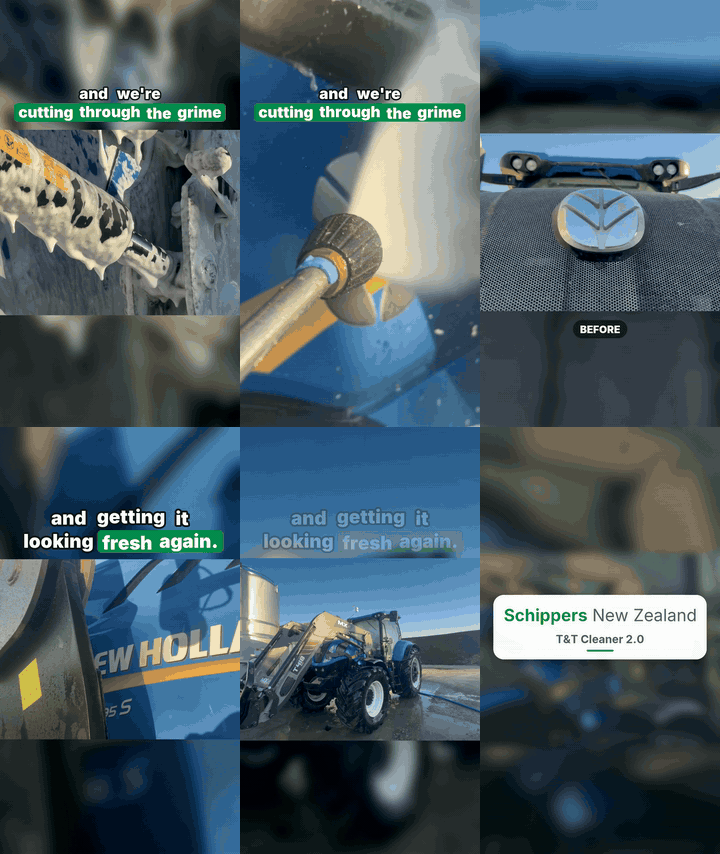 |  |  |
| Schippers New Zealand · 31 s · 34 phone clips, no voice-over, the client's script on screen, a wipe on the logo, everything on a 115 BPM grid. Zero credits on video. | Ekilib · 45 s · nine sentences of voice, thirteen illustrations in the client's style, an animated glucose card, a numbered list, a morph. | Maemuki · 20 s · the chorus transcribed locally and snapped to the lyrics; a pan across the artwork. Zero credits. |
A fourth set, three prompt reels for Simplifica con IA, shows the "comment WORD" outro and
the section chips (made with the previous version of the engine; no script shipped). For the other three, the
reel.py that produced them ships inside the skill (skills/invokard-studio/assets/examples/), so agents read it
before writing their own: that file is the edit.
How it works
   script ──▶ voice (one file per sentence) ──▶ captions timed word by word ──▶ every cut = a word time
   images (AI, with a style reference) ──▶ preview the whole edit on stills ──▶ clips only for the shots that need motion
   client clips ──▶ contact sheets ──▶ extract segments ──▶ beat grid ──▶ wipe ──▶ end card on the final hit
   song / narration ──▶ align.py (faster-whisper) ──▶ captions from timed words
                                        │
                              reel.py  ─┴─▶  reelkit: Pillow frames ──▶ ffmpeg h264 + ducked, normalised mix ──▶ out/reel.mp4 + cover
The agent writes reel.py — 60 to 150 lines that describe shots, layers, voice, effects — previews it as a contact
sheet, fixes it, and renders. The skill (skills/invokard-studio/SKILL.md) is the method: what to generate and in
what order, how to time, what to check, what things cost, what not to do. It was distilled from delivered client work,
not from a demo.
Install
Requirements: Python 3.10+, ffmpeg and ffprobe on PATH (troubleshooting).
git clone https://github.com/Octonove/invokard-studio.git
cd invokard-studio
pip install -r requirements.txt
python install.py            # detects Claude Code / Codex / Antigravity / Gemini CLI / Cursor / Windsurf and installs the skill for each
python install.py doctor     # ffmpeg, packages, fonts, keys (names only), agents found
| Agent | Where the skill goes | How to call it |
|---|---|---|
| Claude Code | ~/.claude/skills/invokard-studio | ask for a reel; or /invokard-studio |
| Codex CLI / app | ~/.codex/skills/invokard-studio and ~/.agents/skills/ | $invokard-studio make me a 30 s reel from these clips |
| Antigravity | ~/.gemini/config/skills/invokard-studio | /invokard-studio |
| Gemini CLI | ~/.gemini/skills/invokard-studio | /invokard-studio or ask |
| Cursor | ~/.cursor/skills/invokard-studio | ask; Cursor also reads the Claude and Codex folders |
| Windsurf | ~/.codeium/windsurf/skills/invokard-studio | ask |
python install.py --project . installs into the current project (.agents/skills, .claude/skills, …) so a team
shares it through git. --link uses a symlink/junction so edits in this repo apply at once. --agents codex,cursor
limits the targets. python install.py uninstall removes what it installed.
Optional: pip install -r requirements-align.txt (faster-whisper) for captions from a recorded narration or a song.
Connect a media provider
The engine renders local media without any account. To generate images, clips, voice and music:
- Magnific MCP (recommended): add
https://mcp.magnific.comto your agent's MCP servers and sign in in the browser..mcp.json.exampleis the Claude Code snippet;codex mcp add magnific --url https://mcp.magnific.comfor Codex. Gives Nano Banana Pro, Kling 3.0, Veo 3.1, ElevenLabs voices, Lyria 3 music and a cost simulator. - Magnific REST:
MAGNIFIC_API_KEYin.env(see.env.example) →scripts/providers/magnific.py. - ElevenLabs:
ELEVENLABS_API_KEY→scripts/providers/elevenlabs.py, with per-word timestamps. - Your own files: photos, clips, a recorded voice, a licensed track, dropped in the work folder.
Keys stay in the environment or in .env, never in the chat or in scripts. Details, model choices and credit prices:
references/providers.md.
First reel
Tell your agent what you have. Three prompts that work:
Make a 30-second Instagram reel about this article. Use the invokard-studio skill. Brand colours from ref/logo.png.
Here are 20 clips of the job in
clips/. Build a before/after reel with this text on screen, no voice-over, cut on the music.
This is a song and its cover. Make a 20-second lyric teaser of the chorus.
The agent will scaffold a work folder (python scripts/new_reel.py), generate or ingest the material, preview the edit
as a contact sheet (review/preview.jpg), render (out/reel.mp4, out/cover.jpg) and verify the file
(media.py verify: specs, loudness, a contact sheet from the final MP4). It will not publish anything.
What is in the box
skills/invokard-studio/
  SKILL.md                     the method (Agent Skills standard; works in every agent that reads SKILL.md)
  references/                  production.md · footage.md · providers.md · api.md · troubleshooting.md
  scripts/reelkit.py           the engine: sources, layers, captions, audio mix, beat grid
  scripts/pieces.py            components: brand, headline, chips, text blocks, chart card, list items, wipe, end cards
  scripts/media.py             tools: frames, extract, contact sheets, voice spans, beats, splice, verify, web, gif…
  scripts/align.py             word timings from any audio (faster-whisper), snapped to the real text
  scripts/providers/           magnific.py · elevenlabs.py · costs.py · env.py
  scripts/new_reel.py          scaffolds a work folder + reel.py from template_reel.py
  assets/fonts/ · assets/sfx/  Inter, Playfair Display (OFL); eight sound effects
  assets/examples/             schippers · ekilib · maemuki: the reel.py of each delivered reel
examples/                      the same three plus simplificaconia: 720p copies, gifs, covers, notes
install.py                     install / doctor / uninstall
tests/                         engine and installer tests (pytest; no credits, no keys)
Run the tests with python -m pytest tests -q (needs ffmpeg).
Design notes
- Everything on screen is set by the engine. Images are generated without text; type, boxes, captions and animation are composed at render time, so they are sharp and exactly timed, and a brand change is one line.
- Timing comes from audio, not from eyes. One voice file per sentence gives the engine the pauses; captions and
cuts derive from them. With a recorded narration or a song,
align.pygives the words. - Preview before spending. The edit is built and reviewed on still images; clips are generated last, only for the shots that need motion, after a cost estimate.
- Real footage is a first-class input. Landscape clips are fitted over their own blur, segments come from contact sheets, and cuts sit on a beat grid measured from the track.
- The mix is done. Sidechain ducking under the voice, −14 LUFS, true-peak limiter; sound effects on the cuts.
Status
Public release, version 1.0.0. Built and verified on Windows 11 with Python 3.14 and ffmpeg 8; the code has no
platform-specific paths (fonts are bundled, system fonts are fallbacks), but macOS and Linux have not been exercised
yet. The 0.x TypeScript plugin for Codex is preserved under the tag v0.2.0-codex.
Licence: MIT for code and documentation (LICENSE); example media are display-only under separate terms. Fonts are OFL.
Similar repos


Reels that look edited, made by your coding agent: a SKILL.md for Claude Code, Codex, Antigravity, Gemini CLI and Cursor plus a Python engine (captions word by word, animated layers, wipes, cuts on the beat, audio mix) with Magnific, ElevenLabs or your own footage.
Python
1
7 commits
updated Oct 6, 2026
See what people are saying
README
Invokard Studio
Created by Antonio José Bergoños (Octonove). The code and documentation are MIT-licensed; keep the copyright notice when you reuse them. The example media have separate rights: MEDIA_LICENSE.md.
If this saves you an editing session, buy me a Paulaner. The reel engine runs perfectly well without the beer.
Reels that look edited, made by your coding agent. A skill for Claude Code, Codex, Antigravity, Gemini CLI and Cursor, plus a Python engine that composes every frame: word-by-word captions with the key word highlighted, animated headlines and chips, charts, before/after wipes, cuts on the beat, end cards, a proper audio mix. Bring AI images and clips from Magnific (or any provider), or the client's own footage, or just a song and its artwork.
Lee esto en español: README.es.md.
| Client footage, cut on the beat | Illustrations + voice + chart | A song and its artwork |
|---|---|---|
| | |
| Schippers New Zealand · 31 s · 34 phone clips, no voice-over, the client's script on screen, a wipe on the logo, everything on a 115 BPM grid. Zero credits on video. | Ekilib · 45 s · nine sentences of voice, thirteen illustrations in the client's style, an animated glucose card, a numbered list, a morph. | Maemuki · 20 s · the chorus transcribed locally and snapped to the lyrics; a pan across the artwork. Zero credits. |
A fourth set, three prompt reels for Simplifica con IA, shows the "comment WORD" outro and
the section chips (made with the previous version of the engine; no script shipped). For the other three, the
reel.py that produced them ships inside the skill (skills/invokard-studio/assets/examples/), so agents read it
before writing their own: that file is the edit.
How it works
   script ──▶ voice (one file per sentence) ──▶ captions timed word by word ──▶ every cut = a word time
   images (AI, with a style reference) ──▶ preview the whole edit on stills ──▶ clips only for the shots that need motion
   client clips ──▶ contact sheets ──▶ extract segments ──▶ beat grid ──▶ wipe ──▶ end card on the final hit
   song / narration ──▶ align.py (faster-whisper) ──▶ captions from timed words
                                        │
                              reel.py  ─┴─▶  reelkit: Pillow frames ──▶ ffmpeg h264 + ducked, normalised mix ──▶ out/reel.mp4 + cover
The agent writes reel.py — 60 to 150 lines that describe shots, layers, voice, effects — previews it as a contact
sheet, fixes it, and renders. The skill (skills/invokard-studio/SKILL.md) is the method: what to generate and in
what order, how to time, what to check, what things cost, what not to do. It was distilled from delivered client work,
not from a demo.
Install
Requirements: Python 3.10+, ffmpeg and ffprobe on PATH (troubleshooting).
git clone https://github.com/Octonove/invokard-studio.git
cd invokard-studio
pip install -r requirements.txt
python install.py            # detects Claude Code / Codex / Antigravity / Gemini CLI / Cursor / Windsurf and installs the skill for each
python install.py doctor     # ffmpeg, packages, fonts, keys (names only), agents found
| Agent | Where the skill goes | How to call it |
|---|---|---|
| Claude Code | ~/.claude/skills/invokard-studio | ask for a reel; or /invokard-studio |
| Codex CLI / app | ~/.codex/skills/invokard-studio and ~/.agents/skills/ | $invokard-studio make me a 30 s reel from these clips |
| Antigravity | ~/.gemini/config/skills/invokard-studio | /invokard-studio |
| Gemini CLI | ~/.gemini/skills/invokard-studio | /invokard-studio or ask |
| Cursor | ~/.cursor/skills/invokard-studio | ask; Cursor also reads the Claude and Codex folders |
| Windsurf | ~/.codeium/windsurf/skills/invokard-studio | ask |
python install.py --project . installs into the current project (.agents/skills, .claude/skills, …) so a team
shares it through git. --link uses a symlink/junction so edits in this repo apply at once. --agents codex,cursor
limits the targets. python install.py uninstall removes what it installed.
Optional: pip install -r requirements-align.txt (faster-whisper) for captions from a recorded narration or a song.
Connect a media provider
The engine renders local media without any account. To generate images, clips, voice and music:
- Magnific MCP (recommended): add
https://mcp.magnific.comto your agent's MCP servers and sign in in the browser..mcp.json.exampleis the Claude Code snippet;codex mcp add magnific --url https://mcp.magnific.comfor Codex. Gives Nano Banana Pro, Kling 3.0, Veo 3.1, ElevenLabs voices, Lyria 3 music and a cost simulator. - Magnific REST:
MAGNIFIC_API_KEYin.env(see.env.example) →scripts/providers/magnific.py. - ElevenLabs:
ELEVENLABS_API_KEY→scripts/providers/elevenlabs.py, with per-word timestamps. - Your own files: photos, clips, a recorded voice, a licensed track, dropped in the work folder.
Keys stay in the environment or in .env, never in the chat or in scripts. Details, model choices and credit prices:
references/providers.md.
First reel
Tell your agent what you have. Three prompts that work:
Make a 30-second Instagram reel about this article. Use the invokard-studio skill. Brand colours from ref/logo.png.
Here are 20 clips of the job in
clips/. Build a before/after reel with this text on screen, no voice-over, cut on the music.
This is a song and its cover. Make a 20-second lyric teaser of the chorus.
The agent will scaffold a work folder (python scripts/new_reel.py), generate or ingest the material, preview the edit
as a contact sheet (review/preview.jpg), render (out/reel.mp4, out/cover.jpg) and verify the file
(media.py verify: specs, loudness, a contact sheet from the final MP4). It will not publish anything.
What is in the box
skills/invokard-studio/
  SKILL.md                     the method (Agent Skills standard; works in every agent that reads SKILL.md)
  references/                  production.md · footage.md · providers.md · api.md · troubleshooting.md
  scripts/reelkit.py           the engine: sources, layers, captions, audio mix, beat grid
  scripts/pieces.py            components: brand, headline, chips, text blocks, chart card, list items, wipe, end cards
  scripts/media.py             tools: frames, extract, contact sheets, voice spans, beats, splice, verify, web, gif…
  scripts/align.py             word timings from any audio (faster-whisper), snapped to the real text
  scripts/providers/           magnific.py · elevenlabs.py · costs.py · env.py
  scripts/new_reel.py          scaffolds a work folder + reel.py from template_reel.py
  assets/fonts/ · assets/sfx/  Inter, Playfair Display (OFL); eight sound effects
  assets/examples/             schippers · ekilib · maemuki: the reel.py of each delivered reel
examples/                      the same three plus simplificaconia: 720p copies, gifs, covers, notes
install.py                     install / doctor / uninstall
tests/                         engine and installer tests (pytest; no credits, no keys)
Run the tests with python -m pytest tests -q (needs ffmpeg).
Design notes
- Everything on screen is set by the engine. Images are generated without text; type, boxes, captions and animation are composed at render time, so they are sharp and exactly timed, and a brand change is one line.
- Timing comes from audio, not from eyes. One voice file per sentence gives the engine the pauses; captions and
cuts derive from them. With a recorded narration or a song,
align.pygives the words. - Preview before spending. The edit is built and reviewed on still images; clips are generated last, only for the shots that need motion, after a cost estimate.
- Real footage is a first-class input. Landscape clips are fitted over their own blur, segments come from contact sheets, and cuts sit on a beat grid measured from the track.
- The mix is done. Sidechain ducking under the voice, −14 LUFS, true-peak limiter; sound effects on the cuts.
Status
Public release, version 1.0.0. Built and verified on Windows 11 with Python 3.14 and ffmpeg 8; the code has no
platform-specific paths (fonts are bundled, system fonts are fallbacks), but macOS and Linux have not been exercised
yet. The 0.x TypeScript plugin for Codex is preserved under the tag v0.2.0-codex.
Licence: MIT for code and documentation (LICENSE); example media are display-only under separate terms. Fonts are OFL.