
AAAI2026 X2Edit: Revisiting Arbitrary-Instruction Image Editing through Self-Constructed Data and Task-Aware Representation Learning
Python
97
27 commits
updated Nov 21, 2025
README
AAAI2026 X2Edit




X2Edit: Revisiting Arbitrary-Instruction Image Editing through Self-Constructed Data and Task-Aware Representation Learning
Jian Ma1, Xujie Zhu2, Zihao Pan2, Qirong Peng1, Xu Guo3, Chen Chen1, Haonan Lu1
1OPPO AI Center, 2Sun Yat-sen University, 3Tsinghua University
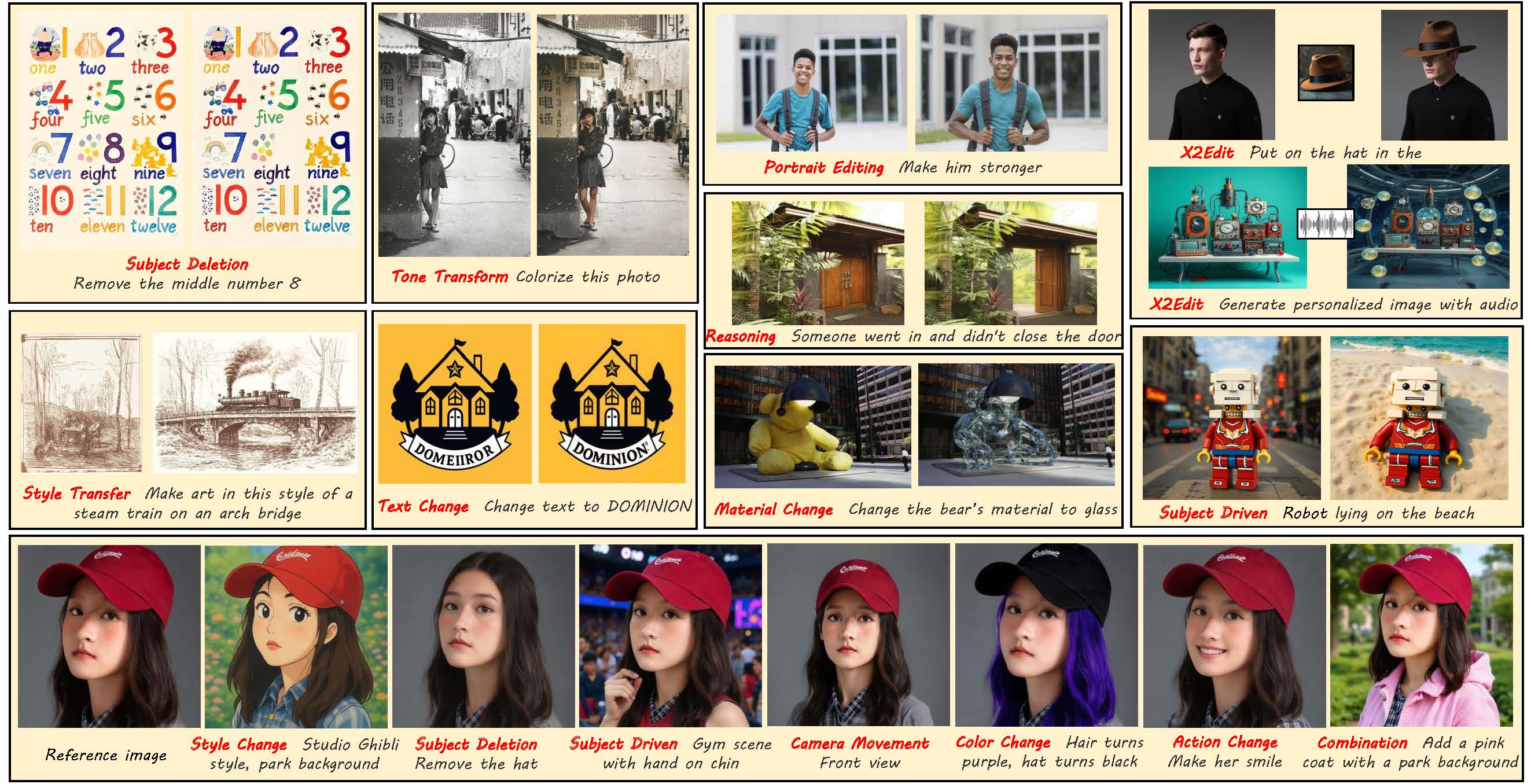
X2Edit image generation results
News
- 2025/09/16: We release a dataset built using Qwen-Image and Qwen-Image-Edit. This sub-dataset specifically focuses on subject-driven generation with facial consistency—a key requirement for tasks requiring stable subject identity across generated content. Asian-portrait and NonAsian-portrait
- 2025/08/25: Support Qwen-Image for training and inference. Checkpoint
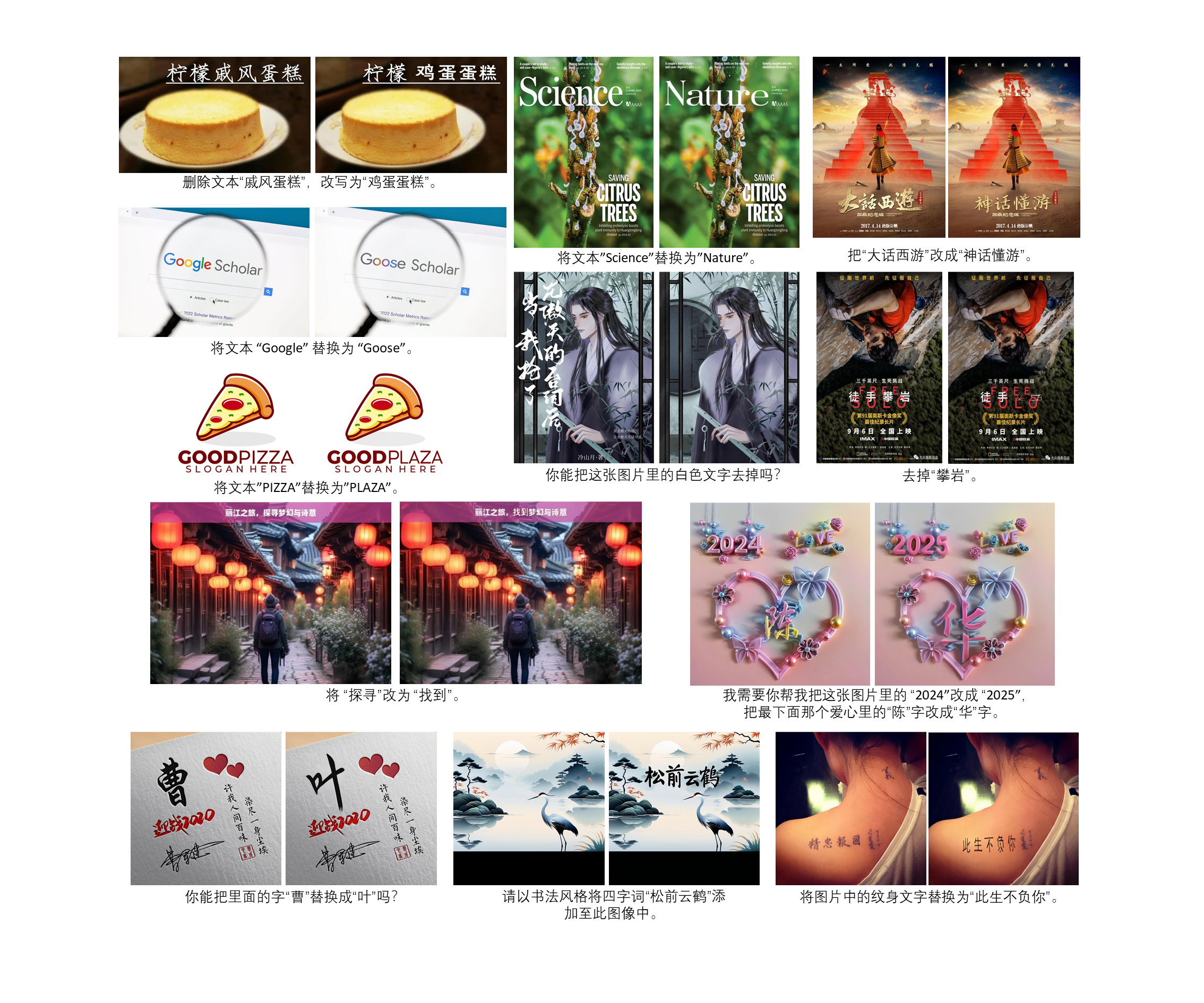
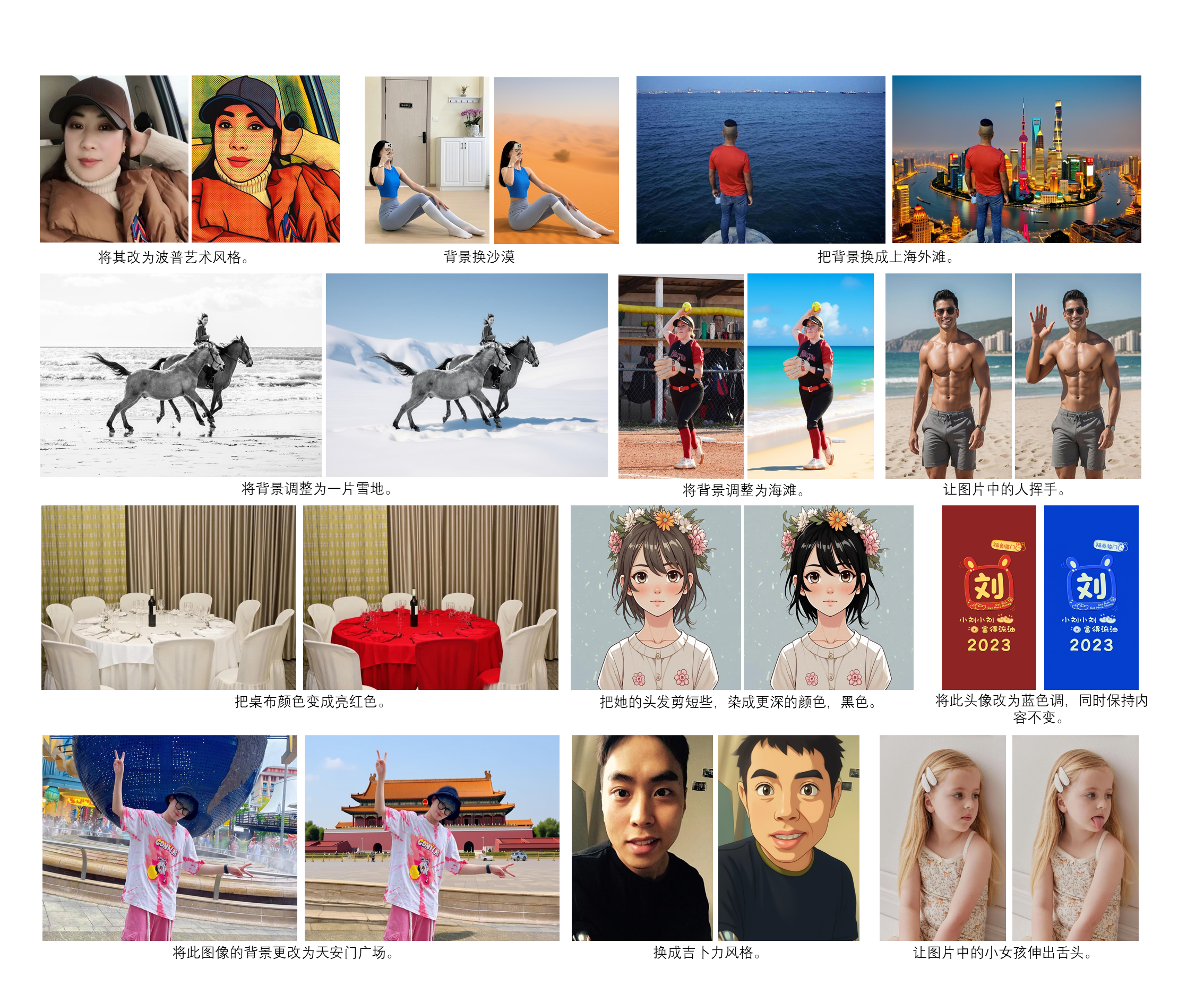
X2Edit image generation results with Qwen-Image
Environment
Prepare the environment, install the required libraries:
$ cd X2Edit
$ conda create --name X2Edit python==3.11
$ conda activate X2Edit
$ pip install -r requirements.txt
Clone LaMa to data_pipeline and rename it to lama. Clone SAM and GroundingDINO to SAM, and then rename them to segment_anything and GroundingDINO
Data Construction
(./assets/dataset_detail.jpg)
X2Edit provides executable scripts for each data construction workflow shown in the figure. We organize the dataset using the WebDataset format. Please replace the dataset in the scripts. The following Qwen model can be selected from Qwen2.5-VL-72B, Qwen3-8B, and Qwen2.5-VL-7B. In addition, we also use aesthetic scoring models for screening, please donwload SigLIP and aesthetic-predictor-v2-5, and then change the path in siglip_v2_5.py.
- Subject Addition & Deletion → use
expert_subject_deletion.pyandexpert_subject_deletion_filter.py: The former script is used to construct deletion-type data, while the latter uses the fine-tuned Qwen2.5-VL-7B to further screen the constructed deletion-type data. Before executing, download RAM, GroundingDINO, SAM, Randeng-Deltalm, InfoXLM, RMBG and LaMa. - Normal Editing Tasks → use
step1x_data.py: Please download the checkpoint Step1X-Edit. The language model we use is Qwen2.5-VL-72B. - Subject-Driven Generation → use
kontext_subject_data.py: Please download the checkpoints FLUX.1-Kontext, DINOv2, CLIP, OPUS-MT-zh-en, shuttle-3-diffusion. The language model we use is Qwen3-8B. - Style Transfer → use
kontext_style_transfer.py: Please download the checkpoints FLUX.1-Kontext, DINOv2, CLIP, OPUS-MT-zh-en, shuttle-3-diffusion. The language model we use is Qwen3-8B. - Style Change → use
expert_style_change.py: Please download the checkpoints FLUX.1-dev, OmniConsistency. We use Qwen2.5-VL-7B to score. - Text Change → use
expert_text_change_ch.pyfor Chinese and useexpert_text_change_en.pyfor English: Please download the checkpoint textflux. We use Qwen2.5-VL-7B to score. - Complex Editing Tasks → use
bagel_data.py: Please download the checkpoint Bagel. We use Qwen2.5-VL-7B to score. - High Fidelity Editing Tasks → use
gpt4o_data.py: Please download the checkpoint OPUS-MT-zh-en and use your own GPT-4o API. We use Qwen2.5-VL-7B to score. - High Resoluton Data Construction → use
kontext_data.py: Please download the checkpoint FLUX.1-dev and OPUS-MT-zh-en. We use Qwen2.5-VL-7B to score.
Inference
We provides inference scripts for editing images with resolutions of 1024 and 512. In addition, we can choose the base model of X2Edit, including FLUX.1-Krea, FLUX.1-dev, FLUX.1-schnell, PixelWave, shuttle-3-diffusion, and choose the LoRA for integration with MoE-LoRA including Turbo-Alpha, AntiBlur, Midjourney-Mix2, Super-Realism, Chatgpt-Ghibli. Choose the model you like and download it. For the MoE-LoRA, we will open source a unified checkpoint that can be used for both 512 and 1024 resolutions.
Before executing the script, download Qwen3-8B to select the task type for the input instruction, base model(FLUX.1-Krea, FLUX.1-dev, FLUX.1-schnell, shuttle-3-diffusion), MLLM and Alignet. All scripts follow analogous command patterns. Simply replace the script filename while maintaining consistent parameter configurations.
$ python infer.py --device cuda --pixel 1024 --num_experts 12 --base_path BASE_PATH --qwen_path QWEN_PATH --lora_path LORA_PATH --extra_lora_path EXTRA_LORA_PATH
$ python infer_qwen.py --device cuda --pixel 1024 --num_experts 12 --base_path BASE_PATH --qwen_path QWEN_PATH --lora_path LORA_PATH --extra_lora_path EXTRA_LORA_PATH  ## for Qwen-Image backbone
device: The device used for inference. default: cuda
pixel: The resolution of the input image, , you can choose from [512, 1024]. default: 1024
num_experts: The number of expert in MoE. default: 12
base_path: The path of base model.
qwen_path: The path of model used to select the task type for the input instruction. We use Qwen3-8B here.
lora_path: The path of MoE-LoRA in X2Edit.
extra_lora_path: The path of extra LoRA for plug-and-play. default: None.
Train
We organize the dataset using the WebDataset format.
Please replace the dataset in the training script. Before executing, download FLUX.1-dev, MLLM and Alignet, replace the paths in train_1024.sh and train_512.sh.
Then you can run:
-
For 1024 resolution
bash training_script/train_1024.sh bash training_script/train_qwen_x2edit_1024.sh ## for Qwen-Image backbone -
For 512 resolution
bash training_script/train_512.sh
bash training_script/train_qwen_x2edit_512.sh  ## for Qwen-Image backbone
Important parameters in script
rank: The rank in LoRA. default: 64
experts: The number of expert in MoE. default: 12
task: The number of editing task. default: 16
X2I_MLLM: The checkpoint path of MLLM.
X2I_alignet: The checkpoint path of Alignet.
Evaluation
We provides evaluation scripts for the calculation of VIEScore and ImgEdit-Judge-Score. Ensure that the edited images and the original images are placed in the same folder and named using the format "instruction + suffix". For example:
original image: Change the background to the sea._in.jpg
edited image: Change the background to the sea._out.jpg
in this case, instruction is "Change the background to the sea", suffix of original image is "_in.jpg", suffix of edited image is "_out.jpg".
- VIEScore(for gpt4o or qwen25vl):
$ cd evaluation
$ python score_i2i_new.py --backnone gpt4o --in_suffix _in.jpg --out_suffix _out.jpg --ref_dir YOUR_DATA_PATH --output_txt_dir ./score
- ImgEdit-Judge-Score:
$ cd evaluation
$ python score_i2i_new.py --backnone ImgEditJudge --in_suffix _in.jpg --out_suffix _out.jpg --ref_dir YOUR_DATA_PATH --output_txt_dir ./score
backnone: Model for evaluation, you can choose from ['gpt4o', 'qwen25vl', 'ImgEditJudge']. For qwen25vl, download Qwen2.5-VL-72B and change the path in __init__.py. For ImgEditJudge, download the fine-tuned Qwen2.5-VL-7B.
in_suffix: The suffix of the original image file name.
out_suffix: The suffix of the edited image file name.
ref_dir: The folder of edited images and original images.
output_txt_dir: The folder for file used to record scores.
- Calculate Average Score:
$ cd evaluation
$ python calculate_score_en_ch.py
Acknowledgements
This code is built on the code from the diffusers and EasyControl.
Citation
🌟 If you find our work helpful, please consider citing our paper and leaving valuable stars
@misc{ma2025x2editrevisitingarbitraryinstructionimage,
      title={X2Edit: Revisiting Arbitrary-Instruction Image Editing through Self-Constructed Data and Task-Aware Representation Learning},
      author={Jian Ma and Xujie Zhu and Zihao Pan and Qirong Peng and Xu Guo and Chen Chen and Haonan Lu},
      year={2025},
      eprint={2508.07607},
      archivePrefix={arXiv},
      primaryClass={cs.CV},
      url={https://arxiv.org/abs/2508.07607},
}
Contributors

27 commits
Similar repos






Languages
Python
99.5%
AAAI2026 X2Edit: Revisiting Arbitrary-Instruction Image Editing through Self-Constructed Data and Task-Aware Representation Learning
Python
97
27 commits
updated Nov 21, 2025
README
AAAI2026 X2Edit
X2Edit: Revisiting Arbitrary-Instruction Image Editing through Self-Constructed Data and Task-Aware Representation Learning
Jian Ma1, Xujie Zhu2, Zihao Pan2, Qirong Peng1, Xu Guo3, Chen Chen1, Haonan Lu1
1OPPO AI Center, 2Sun Yat-sen University, 3Tsinghua University
X2Edit image generation results
News
- 2025/09/16: We release a dataset built using Qwen-Image and Qwen-Image-Edit. This sub-dataset specifically focuses on subject-driven generation with facial consistency—a key requirement for tasks requiring stable subject identity across generated content. Asian-portrait and NonAsian-portrait
- 2025/08/25: Support Qwen-Image for training and inference. Checkpoint
X2Edit image generation results with Qwen-Image
Environment
Prepare the environment, install the required libraries:
$ cd X2Edit
$ conda create --name X2Edit python==3.11
$ conda activate X2Edit
$ pip install -r requirements.txt
Clone LaMa to data_pipeline and rename it to lama. Clone SAM and GroundingDINO to SAM, and then rename them to segment_anything and GroundingDINO
Data Construction
(./assets/dataset_detail.jpg)
X2Edit provides executable scripts for each data construction workflow shown in the figure. We organize the dataset using the WebDataset format. Please replace the dataset in the scripts. The following Qwen model can be selected from Qwen2.5-VL-72B, Qwen3-8B, and Qwen2.5-VL-7B. In addition, we also use aesthetic scoring models for screening, please donwload SigLIP and aesthetic-predictor-v2-5, and then change the path in siglip_v2_5.py.
- Subject Addition & Deletion → use
expert_subject_deletion.pyandexpert_subject_deletion_filter.py: The former script is used to construct deletion-type data, while the latter uses the fine-tuned Qwen2.5-VL-7B to further screen the constructed deletion-type data. Before executing, download RAM, GroundingDINO, SAM, Randeng-Deltalm, InfoXLM, RMBG and LaMa. - Normal Editing Tasks → use
step1x_data.py: Please download the checkpoint Step1X-Edit. The language model we use is Qwen2.5-VL-72B. - Subject-Driven Generation → use
kontext_subject_data.py: Please download the checkpoints FLUX.1-Kontext, DINOv2, CLIP, OPUS-MT-zh-en, shuttle-3-diffusion. The language model we use is Qwen3-8B. - Style Transfer → use
kontext_style_transfer.py: Please download the checkpoints FLUX.1-Kontext, DINOv2, CLIP, OPUS-MT-zh-en, shuttle-3-diffusion. The language model we use is Qwen3-8B. - Style Change → use
expert_style_change.py: Please download the checkpoints FLUX.1-dev, OmniConsistency. We use Qwen2.5-VL-7B to score. - Text Change → use
expert_text_change_ch.pyfor Chinese and useexpert_text_change_en.pyfor English: Please download the checkpoint textflux. We use Qwen2.5-VL-7B to score. - Complex Editing Tasks → use
bagel_data.py: Please download the checkpoint Bagel. We use Qwen2.5-VL-7B to score. - High Fidelity Editing Tasks → use
gpt4o_data.py: Please download the checkpoint OPUS-MT-zh-en and use your own GPT-4o API. We use Qwen2.5-VL-7B to score. - High Resoluton Data Construction → use
kontext_data.py: Please download the checkpoint FLUX.1-dev and OPUS-MT-zh-en. We use Qwen2.5-VL-7B to score.
Inference
We provides inference scripts for editing images with resolutions of 1024 and 512. In addition, we can choose the base model of X2Edit, including FLUX.1-Krea, FLUX.1-dev, FLUX.1-schnell, PixelWave, shuttle-3-diffusion, and choose the LoRA for integration with MoE-LoRA including Turbo-Alpha, AntiBlur, Midjourney-Mix2, Super-Realism, Chatgpt-Ghibli. Choose the model you like and download it. For the MoE-LoRA, we will open source a unified checkpoint that can be used for both 512 and 1024 resolutions.
Before executing the script, download Qwen3-8B to select the task type for the input instruction, base model(FLUX.1-Krea, FLUX.1-dev, FLUX.1-schnell, shuttle-3-diffusion), MLLM and Alignet. All scripts follow analogous command patterns. Simply replace the script filename while maintaining consistent parameter configurations.
$ python infer.py --device cuda --pixel 1024 --num_experts 12 --base_path BASE_PATH --qwen_path QWEN_PATH --lora_path LORA_PATH --extra_lora_path EXTRA_LORA_PATH
$ python infer_qwen.py --device cuda --pixel 1024 --num_experts 12 --base_path BASE_PATH --qwen_path QWEN_PATH --lora_path LORA_PATH --extra_lora_path EXTRA_LORA_PATH  ## for Qwen-Image backbone
device: The device used for inference. default: cuda
pixel: The resolution of the input image, , you can choose from [512, 1024]. default: 1024
num_experts: The number of expert in MoE. default: 12
base_path: The path of base model.
qwen_path: The path of model used to select the task type for the input instruction. We use Qwen3-8B here.
lora_path: The path of MoE-LoRA in X2Edit.
extra_lora_path: The path of extra LoRA for plug-and-play. default: None.
Train
We organize the dataset using the WebDataset format.
Please replace the dataset in the training script. Before executing, download FLUX.1-dev, MLLM and Alignet, replace the paths in train_1024.sh and train_512.sh.
Then you can run:
-
For 1024 resolution
bash training_script/train_1024.sh bash training_script/train_qwen_x2edit_1024.sh ## for Qwen-Image backbone -
For 512 resolution
bash training_script/train_512.sh
bash training_script/train_qwen_x2edit_512.sh  ## for Qwen-Image backbone
Important parameters in script
rank: The rank in LoRA. default: 64
experts: The number of expert in MoE. default: 12
task: The number of editing task. default: 16
X2I_MLLM: The checkpoint path of MLLM.
X2I_alignet: The checkpoint path of Alignet.
Evaluation
We provides evaluation scripts for the calculation of VIEScore and ImgEdit-Judge-Score. Ensure that the edited images and the original images are placed in the same folder and named using the format "instruction + suffix". For example:
original image: Change the background to the sea._in.jpg
edited image: Change the background to the sea._out.jpg
in this case, instruction is "Change the background to the sea", suffix of original image is "_in.jpg", suffix of edited image is "_out.jpg".
- VIEScore(for gpt4o or qwen25vl):
$ cd evaluation
$ python score_i2i_new.py --backnone gpt4o --in_suffix _in.jpg --out_suffix _out.jpg --ref_dir YOUR_DATA_PATH --output_txt_dir ./score
- ImgEdit-Judge-Score:
$ cd evaluation
$ python score_i2i_new.py --backnone ImgEditJudge --in_suffix _in.jpg --out_suffix _out.jpg --ref_dir YOUR_DATA_PATH --output_txt_dir ./score
backnone: Model for evaluation, you can choose from ['gpt4o', 'qwen25vl', 'ImgEditJudge']. For qwen25vl, download Qwen2.5-VL-72B and change the path in __init__.py. For ImgEditJudge, download the fine-tuned Qwen2.5-VL-7B.
in_suffix: The suffix of the original image file name.
out_suffix: The suffix of the edited image file name.
ref_dir: The folder of edited images and original images.
output_txt_dir: The folder for file used to record scores.
- Calculate Average Score:
$ cd evaluation
$ python calculate_score_en_ch.py
Acknowledgements
This code is built on the code from the diffusers and EasyControl.
Citation
🌟 If you find our work helpful, please consider citing our paper and leaving valuable stars
@misc{ma2025x2editrevisitingarbitraryinstructionimage,
      title={X2Edit: Revisiting Arbitrary-Instruction Image Editing through Self-Constructed Data and Task-Aware Representation Learning},
      author={Jian Ma and Xujie Zhu and Zihao Pan and Qirong Peng and Xu Guo and Chen Chen and Haonan Lu},
      year={2025},
      eprint={2508.07607},
      archivePrefix={arXiv},
      primaryClass={cs.CV},
      url={https://arxiv.org/abs/2508.07607},
}
Similar repos
Contributors
27 commits
Languages
Python
99.5%