Local-first 3D CAD for browser and Windows: STEP, IFC, sketches, Manifold WASM booleans, and MEDUSA native processing.
See the codeParametric 3D CAD in your browser or as a Windows desktop app, with local processing and no account.
Try NASSCAD · Download releases · Report a bug · Getting started
Create solids, sketch in 2D, apply fillets and chamfers, and exchange STEP, IFC and mesh files. NASSCAD is a personal project by Nasser / NassLab. Personal, non-commercial and educational use is free under the terms in LICENSE; commercial use requires an agreement.
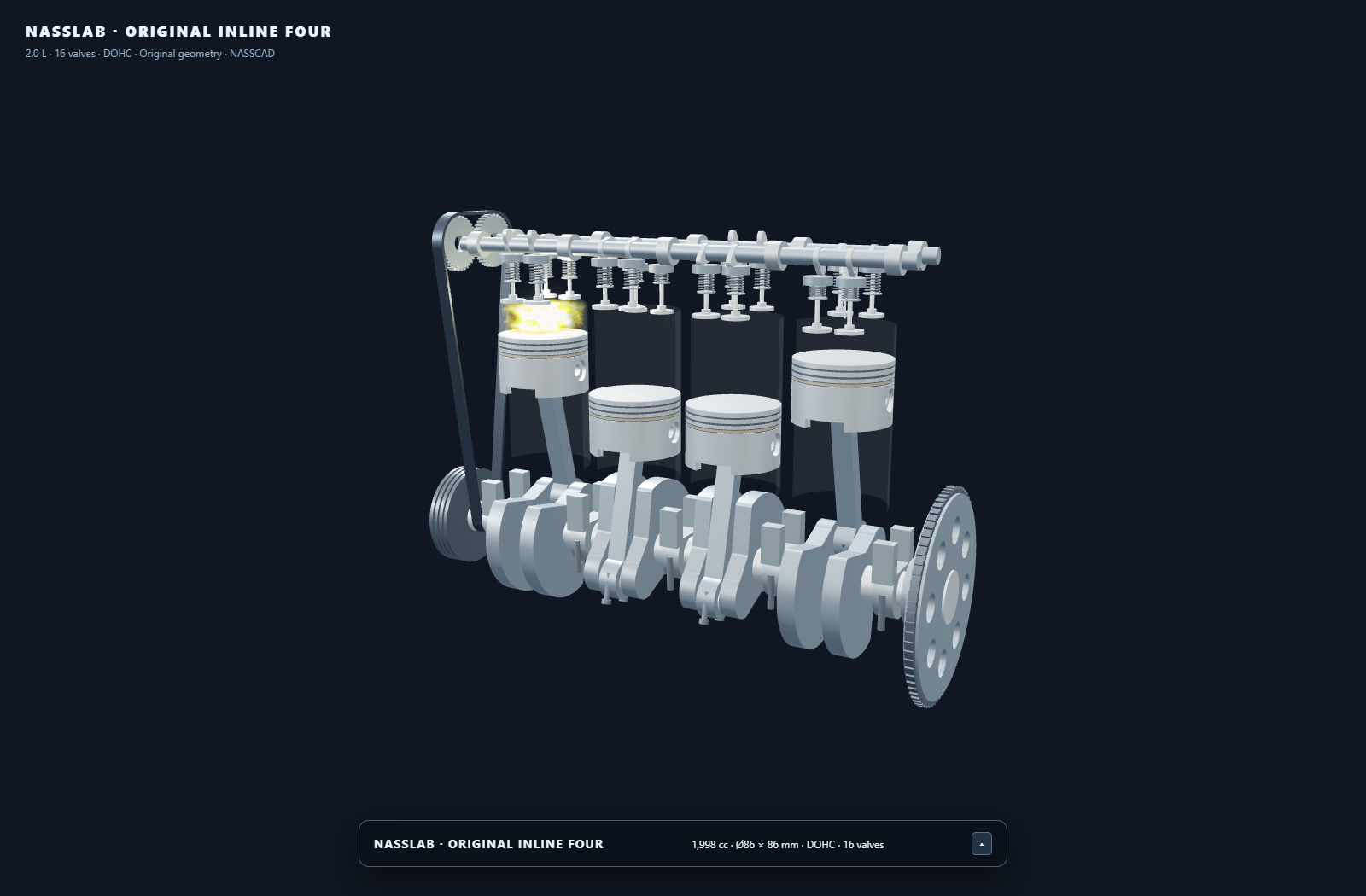
Four-cylinder engine created and animated with NassScript in NASSCAD.
NassScript is a practical bridge between a language model and NASSCAD's live 3D scene. Give an assistant the NassScript reference, describe the part or mechanism you want, and ask it to draft a script. Review the JavaScript, then paste and run it in NASSCAD's integrated Script panel. You can refine the geometry, dimensions and motion by iterating on the script; NASSCAD processes the model locally.
The four-cylinder engine demo shows the scope of this workflow: pistons, connecting rods, crankshaft, camshafts, timing belt and animation coordinated in one scene. Explore the actual NassScript source, or launch the demo from NASSCAD's welcome screen. AI assistance is optional; NASSCAD has no built-in LLM connection or AI account requirement.
| Version | Best for | Requirements |
|---|---|---|
| 4.7.0 — Windows desktop | Ready-to-run offline application with integrated MEDUSA | Windows x64; choose Setup or Portable in the latest release. No separate engine launcher is needed. |
| 4.7.0 — browser | STEP / IFC, B-Rep fillets and chamfers | Modern browser and local HTTP server. Booleans work in the browser; MEDUSA is optional for native multi-core processing and required for exact B-Rep STEP export. |
| 4.2.7 — classic | The earlier self-contained HTML application | Browser; see the original setup instructions. |
This is the canonical repository for NASSCAD. Versions are identified by tags and releases, rather than separate repository names. The histories of the former 4.2.7 and 4.7.0 repositories are retained.
For Windows x64, download Setup or Portable from the latest release. Both packages include MEDUSA and start it with the application through an internal pipe. They include the illustrated manual and run locally without an account.
For the browser edition, clone the repository and serve its files over local HTTP:
git clone https://github.com/Nx-Nass/NassCAD.git
cd NassCAD
python -m http.server 8080
Open http://localhost:8080/NASSCAD_V4_7_0.htm in your browser. Keep the bundled files together. The current checkout includes the OpenCASCADE WASM and data files.
Union, Subtraction and Intersection work in the browser using the bundled Manifold WASM engine, loaded on the first boolean operation. For native multi-core booleans, large STEP assemblies and exact B-Rep STEP export, extract the build bundle for your platform and follow its instructions to build and start MEDUSA. See the engine guide.
The release also provides a standalone MEDUSA engine package for browser users. The DEPLOY_* build bundles contain source and build instructions.
NASSCAD processes models locally. After downloading its components, it can run without an internet connection. A display of 1920×1080 or higher is recommended.
| Watertight primitives | ArcSphere, Cylind, Cubic, Tore, Gear, Screw, Nut, Pipe, RevSolid, Roof, Hollow box, Gen… |
| Real fillet & chamfer | True B-Rep operations via OpenCASCADE, on picked edges or all edges |
| STEP AP203 / AP214 / AP242 | Import and export, with per-part and per-face colours read from the file itself |
| PMI & GD&T | Product manufacturing information read from STEP assemblies |
| IFC — BIM read & write | Opens IFC2X3 / IFC4 / IFC4X3 in the browser (bundled web-ifc engine, offline): every building element as its own object, with its IFC name, colour and real position in mm. Writes IFC4 with the Project › Site › Building › Storey structure strict BIM software expects — cubes, cylinders, tubes, hollow boxes, spheres and cones as true parametric solids, everything else as triangulated surfaces, colours per face kept |
| Non-destructive CSG tree | Union / Subtraction / Intersection keep their construction tree — change a source and Re-run |
| CSG engines | Booleans use native, multi-core MEDUSA when available, or bundled Manifold WASM in the browser otherwise. The CSG panel identifies the active engine. MEDUSA supports progressive preview and full-quality results |
| Build volume | Your printer's bed and build volume on the grid — 28 best-selling printers (Bambu Lab, Creality from the original Ender-3 and the Neo to the K2 Plus, Prusa, Elegoo, Anycubic, Voron, Sovol). Only the walls behind the part are drawn; a wall turns red when the part sticks out |
| World grid | A gridded room — floor, walls, ceiling — around your work, sized to the scene (1 m, 2 m, 5 m…) so depth and scale read at a glance. One button hides volume + room, the work grid stays |
| Toolbox | 6 icons per row. Scale the selection /5 /2 1× ×2 ×5 ×10, set the scroll-wheel zoom speed /5 /2 1× ×2 ×5 ×10 (remembered), measure, frame, drop to ground, centre of gravity… every button documented in the built-in help |
| Sketch.Gen | 2D sketcher |
| Generators | Screw.Gen & Nut.Gen (ISO / ASME, right- or left-hand thread, print clearance, Higbee cut), Gear.Gen, Pipe.Gen, CircularText.Gen |
| NassScript | Full-access JS console over the scene graph, with engine and solar-system demos |
| Undo / Redo | 200 levels, IndexedDB-persistent |
| Editing | Box-select, double-click cycle (resize handles → dimensions → rotation rings), X-Ray mode, magnetic snap down to 0.001 mm |
| Import | STL · OBJ · 3MF · GLB · PLY · STEP · IFC |
| Export | STL · OBJ · 3MF · GLB · PLY · STEP AP242 · IFC4 · SVG · DXF |
Requires a modern browser with WebGL and WebAssembly: Chrome 90+, Firefox 90+, Safari 16+.
NASSCAD_V4_7_0.htm          Application — the single entry point
three.js                    Renderer
nasscad-desktop.js          Desktop MEDUSA status and log panel
nasscad-medusa-bridge.js    Desktop internal-pipe transport for MEDUSA requests
nasscad-audit-fixes.js      Application fixes used by the published build
nasscad-object-range.js    Object range tools
nasscad-manifold-wasm.js    Browser boolean fallback
nasscad-fonts.js            Bundled typefaces
nasscad-draco.js            Draco codec (GLB/glTF)
nasscad-gens.js             Generators: Sketch, Screw, Nut, Gear, Pipe, CircularText
nasscad-io.js               Import / export pipeline
nasscad-materials.js        Material library
nasscad-buildvolume.js      Build volume (28 printers) and world grid
nasscad_logs.js             Structured logging
nasscad_occt_wasm.js        OCCT glue layer
nassscript.js               NassScript console
nasscript_doc.html          NassScript documentation
nasscad_user_manual.html    Illustrated user manual
NASSCAD_User_Manual_EN.pdf  Printable user manual
nass-demo-solar.js          NassScript solar-system demo
nass-demo-engine.js         NassScript engine demo
occt-import-js.js           occt-import-js bridge
occt-loader-b64.js          OCCT loader
opencascade.wasm.wasm       OpenCASCADE compiled to WebAssembly (66 MB)
opencascade.wasm.data.js    OpenCASCADE data file (88 MB)
quick-fillet.js             Fillet / chamfer (OCCT)
step-import.js              STEP reader
step-export.js              STEP AP242 writer
step-declare.js             STEP declarations
step-xcaf.js                XCAF — colours, PMI, assembly structure
ifc-import.js               IFC reader (web-ifc, in the browser)
ifc-export.js               IFC4 writer
web-ifc-api-iife.js         web-ifc engine
nasscad-ifc-wasm.js         web-ifc WebAssembly, embedded
web-ifc-LICENSE.md          web-ifc license (MPL 2.0)
MEDUSA_SOURCE/              MEDUSA engine — C++ source (nasscad_medusa.cpp)
DEPLOY_WINDOWS_11_MSVC/     Medusa_Engine_MSVC.zip — MEDUSA, MSVC build (source + CMake + vcpkg)
DEPLOY_UBUNTU_LINUX/        DEPLOY_UBUNTU.zip      — MEDUSA, native Ubuntu installer
DEPLOY_UBUNTU_WSL/          DEPLOY_UBUNTU_WSL.zip  — MEDUSA, WSL deployment
Optional for boolean operations in the browser; integrated in the Windows desktop packages. NASSCAD probes MEDUSA before each operation and uses its native engine when available (POST /csg for a flat operation, POST /csgtree for a whole tree). Otherwise it loads nasscad-manifold-wasm.js on demand and performs the operation locally in a browser worker. The Windows desktop app transports these requests over an internal pipe. The CSG panel shows Manifold C++ · MEDUSA or Manifold WASM. Browser processing uses one core and is slower on large models.
MEDUSA is a small native binary that runs on your own machine and listens only to it — nothing is uploaded, no account, no remote server. It links Manifold in native C++ with oneTBB, so booleans run at compiled-native speed across your cores instead of single-threaded WASM, and it also does native STEP reading and tessellation.
Works without MEDUSA in a browser — viewing, primitives, selection, gizmos, fillet and chamfer, build volume, boolean operations, browser STEP import, IFC and mesh I/O. Keep the bundled files together; browser STEP import has limitations on large assemblies and per-face colors.
Needs MEDUSA — exact B-Rep STEP export. MEDUSA also provides native multi-core booleans and large-assembly STEP import.
23/09/2026 fix — mesh welding by proximity now probes neighbouring cells by integer index. Spheres centred on a plane at 0 (Z = 0) used to keep one unwelded seam vertex and fail as NotManifold; they now union cleanly. The source in all three DEPLOY_* bundles carries the fix.
Engine log — on demand, not on disk. MEDUSA writes no log file. The last 20 000 lines are kept in memory and served as plain text by GET /log?n=<max> — the jellyfish button in the NASSCAD Logs panel pulls them into the panel, next to the browser-side log of the same session. Pass --logfile to also write a timestamped medusa-logs-<date>.txt, as earlier builds did.
The C++ source is readable in MEDUSA_SOURCE/. Build bundles are zipped in the DEPLOY_* folders — extract the one for your platform:
| Target | Zip | Contents |
|---|---|---|
DEPLOY_WINDOWS_11_MSVC | Medusa_Engine_MSVC.zip | nasscad_medusa.cpp, CMakeLists.txt, vcpkg.json, build_msvc.bat, BUILD.md |
DEPLOY_UBUNTU_LINUX | DEPLOY_UBUNTU.zip | install-linux.sh, nasscad.sh, desktop launcher + icons, README-LINUX.md |
DEPLOY_UBUNTU_WSL | DEPLOY_UBUNTU_WSL.zip | deploy.bat / deploy.sh, Medusa_Engine_3.1.bat, uninstallers |
In the browser
| Component | Author | License |
|---|---|---|
three.js r128 | three.js authors | MIT |
manifold-3d 3.5.4 (bundled WASM) | Emmett Lalish and contributors | Apache 2.0 |
| OpenCASCADE Technology 7.4.0 via opencascade.js 1.1.1 | Open Cascade SAS / Sebastian Alff | LGPL 2.1 with exception |
occt-import-js | Viktor Kovács | LGPL 2.1 |
web-ifc 0.0.77 | That Open Company | MPL 2.0 |
| Acorn 8.17.0 (bundled in NassScript) | Marijn Haverbeke, Ingvar Stepanyan and contributors | MIT |
| Draco 1.5.7 | Apache 2.0 | |
helvetiker regular / bold | MAGENTA Ltd — MgOpen Modata | MgOpen License |
optimer regular / bold | MAGENTA Ltd — MgOpen Cosmetica | MgOpen License |
gentilis regular / bold | J. Victor Gaultney / SIL International | SIL OFL 1.1 |
nasscad_logs.js | NassLab | CC BY-NC 4.0 |
In the NASSCAD Engine companion
| Component | Author | License |
|---|---|---|
| OpenCASCADE Technology 8.0.1 | Open Cascade SAS | LGPL 2.1 with exception |
| Manifold 3.5.3 | Emmett Lalish and contributors | Apache 2.0 |
| oneTBB 2022.2.0 | Intel / UXL Foundation | Apache 2.0 |
| Clipper2 1.5.4 | Angus Johnson | Boost Software License 1.0 |
| hwloc 2.11.2 | Inria and the Open MPI project | BSD 3-Clause |
Each third-party component stays under its own license. See THIRD-PARTY.md.
| Role | |
|---|---|
| Architect & Tester | Nasser — NassLab, Marseille, France. Vision, direction, critical bug identification, quality standards, field testing, technology pivots. |
| Developer | Claude — Anthropic. Native CSG engine, watertight primitives, STEP colour decoding verified against the file itself, surgical patches, systematic verification before delivery. |
© 2026 NassLab — Nasser, France
NassLab's own code is distributed under the Creative Commons BY-NC 4.0 license:
LICENSE.)NASSCAD is a personal project, developed by one person on his own time. It doesn't earn its author a single cent.
Third-party components listed above are not covered by CC BY-NC 4.0 and remain under their respective licenses.
No implied warranty. The author cannot be held liable for any damage resulting from the use of this software.
NASSCAD — NassLab · Marseille, 2026
458 followers · starred Jun 2026
Local-first 3D CAD for browser and Windows: STEP, IFC, sketches, Manifold WASM booleans, and MEDUSA native processing.
See the codeParametric 3D CAD in your browser or as a Windows desktop app, with local processing and no account.
Try NASSCAD · Download releases · Report a bug · Getting started
Create solids, sketch in 2D, apply fillets and chamfers, and exchange STEP, IFC and mesh files. NASSCAD is a personal project by Nasser / NassLab. Personal, non-commercial and educational use is free under the terms in LICENSE; commercial use requires an agreement.
Four-cylinder engine created and animated with NassScript in NASSCAD.
NassScript is a practical bridge between a language model and NASSCAD's live 3D scene. Give an assistant the NassScript reference, describe the part or mechanism you want, and ask it to draft a script. Review the JavaScript, then paste and run it in NASSCAD's integrated Script panel. You can refine the geometry, dimensions and motion by iterating on the script; NASSCAD processes the model locally.
The four-cylinder engine demo shows the scope of this workflow: pistons, connecting rods, crankshaft, camshafts, timing belt and animation coordinated in one scene. Explore the actual NassScript source, or launch the demo from NASSCAD's welcome screen. AI assistance is optional; NASSCAD has no built-in LLM connection or AI account requirement.
| Version | Best for | Requirements |
|---|---|---|
| 4.7.0 — Windows desktop | Ready-to-run offline application with integrated MEDUSA | Windows x64; choose Setup or Portable in the latest release. No separate engine launcher is needed. |
| 4.7.0 — browser | STEP / IFC, B-Rep fillets and chamfers | Modern browser and local HTTP server. Booleans work in the browser; MEDUSA is optional for native multi-core processing and required for exact B-Rep STEP export. |
| 4.2.7 — classic | The earlier self-contained HTML application | Browser; see the original setup instructions. |
This is the canonical repository for NASSCAD. Versions are identified by tags and releases, rather than separate repository names. The histories of the former 4.2.7 and 4.7.0 repositories are retained.
For Windows x64, download Setup or Portable from the latest release. Both packages include MEDUSA and start it with the application through an internal pipe. They include the illustrated manual and run locally without an account.
For the browser edition, clone the repository and serve its files over local HTTP:
git clone https://github.com/Nx-Nass/NassCAD.git
cd NassCAD
python -m http.server 8080
Open http://localhost:8080/NASSCAD_V4_7_0.htm in your browser. Keep the bundled files together. The current checkout includes the OpenCASCADE WASM and data files.
Union, Subtraction and Intersection work in the browser using the bundled Manifold WASM engine, loaded on the first boolean operation. For native multi-core booleans, large STEP assemblies and exact B-Rep STEP export, extract the build bundle for your platform and follow its instructions to build and start MEDUSA. See the engine guide.
The release also provides a standalone MEDUSA engine package for browser users. The DEPLOY_* build bundles contain source and build instructions.
NASSCAD processes models locally. After downloading its components, it can run without an internet connection. A display of 1920×1080 or higher is recommended.
| Watertight primitives | ArcSphere, Cylind, Cubic, Tore, Gear, Screw, Nut, Pipe, RevSolid, Roof, Hollow box, Gen… |
| Real fillet & chamfer | True B-Rep operations via OpenCASCADE, on picked edges or all edges |
| STEP AP203 / AP214 / AP242 | Import and export, with per-part and per-face colours read from the file itself |
| PMI & GD&T | Product manufacturing information read from STEP assemblies |
| IFC — BIM read & write | Opens IFC2X3 / IFC4 / IFC4X3 in the browser (bundled web-ifc engine, offline): every building element as its own object, with its IFC name, colour and real position in mm. Writes IFC4 with the Project › Site › Building › Storey structure strict BIM software expects — cubes, cylinders, tubes, hollow boxes, spheres and cones as true parametric solids, everything else as triangulated surfaces, colours per face kept |
| Non-destructive CSG tree | Union / Subtraction / Intersection keep their construction tree — change a source and Re-run |
| CSG engines | Booleans use native, multi-core MEDUSA when available, or bundled Manifold WASM in the browser otherwise. The CSG panel identifies the active engine. MEDUSA supports progressive preview and full-quality results |
| Build volume | Your printer's bed and build volume on the grid — 28 best-selling printers (Bambu Lab, Creality from the original Ender-3 and the Neo to the K2 Plus, Prusa, Elegoo, Anycubic, Voron, Sovol). Only the walls behind the part are drawn; a wall turns red when the part sticks out |
| World grid | A gridded room — floor, walls, ceiling — around your work, sized to the scene (1 m, 2 m, 5 m…) so depth and scale read at a glance. One button hides volume + room, the work grid stays |
| Toolbox | 6 icons per row. Scale the selection /5 /2 1× ×2 ×5 ×10, set the scroll-wheel zoom speed /5 /2 1× ×2 ×5 ×10 (remembered), measure, frame, drop to ground, centre of gravity… every button documented in the built-in help |
| Sketch.Gen | 2D sketcher |
| Generators | Screw.Gen & Nut.Gen (ISO / ASME, right- or left-hand thread, print clearance, Higbee cut), Gear.Gen, Pipe.Gen, CircularText.Gen |
| NassScript | Full-access JS console over the scene graph, with engine and solar-system demos |
| Undo / Redo | 200 levels, IndexedDB-persistent |
| Editing | Box-select, double-click cycle (resize handles → dimensions → rotation rings), X-Ray mode, magnetic snap down to 0.001 mm |
| Import | STL · OBJ · 3MF · GLB · PLY · STEP · IFC |
| Export | STL · OBJ · 3MF · GLB · PLY · STEP AP242 · IFC4 · SVG · DXF |
Requires a modern browser with WebGL and WebAssembly: Chrome 90+, Firefox 90+, Safari 16+.
NASSCAD_V4_7_0.htm          Application — the single entry point
three.js                    Renderer
nasscad-desktop.js          Desktop MEDUSA status and log panel
nasscad-medusa-bridge.js    Desktop internal-pipe transport for MEDUSA requests
nasscad-audit-fixes.js      Application fixes used by the published build
nasscad-object-range.js    Object range tools
nasscad-manifold-wasm.js    Browser boolean fallback
nasscad-fonts.js            Bundled typefaces
nasscad-draco.js            Draco codec (GLB/glTF)
nasscad-gens.js             Generators: Sketch, Screw, Nut, Gear, Pipe, CircularText
nasscad-io.js               Import / export pipeline
nasscad-materials.js        Material library
nasscad-buildvolume.js      Build volume (28 printers) and world grid
nasscad_logs.js             Structured logging
nasscad_occt_wasm.js        OCCT glue layer
nassscript.js               NassScript console
nasscript_doc.html          NassScript documentation
nasscad_user_manual.html    Illustrated user manual
NASSCAD_User_Manual_EN.pdf  Printable user manual
nass-demo-solar.js          NassScript solar-system demo
nass-demo-engine.js         NassScript engine demo
occt-import-js.js           occt-import-js bridge
occt-loader-b64.js          OCCT loader
opencascade.wasm.wasm       OpenCASCADE compiled to WebAssembly (66 MB)
opencascade.wasm.data.js    OpenCASCADE data file (88 MB)
quick-fillet.js             Fillet / chamfer (OCCT)
step-import.js              STEP reader
step-export.js              STEP AP242 writer
step-declare.js             STEP declarations
step-xcaf.js                XCAF — colours, PMI, assembly structure
ifc-import.js               IFC reader (web-ifc, in the browser)
ifc-export.js               IFC4 writer
web-ifc-api-iife.js         web-ifc engine
nasscad-ifc-wasm.js         web-ifc WebAssembly, embedded
web-ifc-LICENSE.md          web-ifc license (MPL 2.0)
MEDUSA_SOURCE/              MEDUSA engine — C++ source (nasscad_medusa.cpp)
DEPLOY_WINDOWS_11_MSVC/     Medusa_Engine_MSVC.zip — MEDUSA, MSVC build (source + CMake + vcpkg)
DEPLOY_UBUNTU_LINUX/        DEPLOY_UBUNTU.zip      — MEDUSA, native Ubuntu installer
DEPLOY_UBUNTU_WSL/          DEPLOY_UBUNTU_WSL.zip  — MEDUSA, WSL deployment
Optional for boolean operations in the browser; integrated in the Windows desktop packages. NASSCAD probes MEDUSA before each operation and uses its native engine when available (POST /csg for a flat operation, POST /csgtree for a whole tree). Otherwise it loads nasscad-manifold-wasm.js on demand and performs the operation locally in a browser worker. The Windows desktop app transports these requests over an internal pipe. The CSG panel shows Manifold C++ · MEDUSA or Manifold WASM. Browser processing uses one core and is slower on large models.
MEDUSA is a small native binary that runs on your own machine and listens only to it — nothing is uploaded, no account, no remote server. It links Manifold in native C++ with oneTBB, so booleans run at compiled-native speed across your cores instead of single-threaded WASM, and it also does native STEP reading and tessellation.
Works without MEDUSA in a browser — viewing, primitives, selection, gizmos, fillet and chamfer, build volume, boolean operations, browser STEP import, IFC and mesh I/O. Keep the bundled files together; browser STEP import has limitations on large assemblies and per-face colors.
Needs MEDUSA — exact B-Rep STEP export. MEDUSA also provides native multi-core booleans and large-assembly STEP import.
23/09/2026 fix — mesh welding by proximity now probes neighbouring cells by integer index. Spheres centred on a plane at 0 (Z = 0) used to keep one unwelded seam vertex and fail as NotManifold; they now union cleanly. The source in all three DEPLOY_* bundles carries the fix.
Engine log — on demand, not on disk. MEDUSA writes no log file. The last 20 000 lines are kept in memory and served as plain text by GET /log?n=<max> — the jellyfish button in the NASSCAD Logs panel pulls them into the panel, next to the browser-side log of the same session. Pass --logfile to also write a timestamped medusa-logs-<date>.txt, as earlier builds did.
The C++ source is readable in MEDUSA_SOURCE/. Build bundles are zipped in the DEPLOY_* folders — extract the one for your platform:
| Target | Zip | Contents |
|---|---|---|
DEPLOY_WINDOWS_11_MSVC | Medusa_Engine_MSVC.zip | nasscad_medusa.cpp, CMakeLists.txt, vcpkg.json, build_msvc.bat, BUILD.md |
DEPLOY_UBUNTU_LINUX | DEPLOY_UBUNTU.zip | install-linux.sh, nasscad.sh, desktop launcher + icons, README-LINUX.md |
DEPLOY_UBUNTU_WSL | DEPLOY_UBUNTU_WSL.zip | deploy.bat / deploy.sh, Medusa_Engine_3.1.bat, uninstallers |
In the browser
| Component | Author | License |
|---|---|---|
three.js r128 | three.js authors | MIT |
manifold-3d 3.5.4 (bundled WASM) | Emmett Lalish and contributors | Apache 2.0 |
| OpenCASCADE Technology 7.4.0 via opencascade.js 1.1.1 | Open Cascade SAS / Sebastian Alff | LGPL 2.1 with exception |
occt-import-js | Viktor Kovács | LGPL 2.1 |
web-ifc 0.0.77 | That Open Company | MPL 2.0 |
| Acorn 8.17.0 (bundled in NassScript) | Marijn Haverbeke, Ingvar Stepanyan and contributors | MIT |
| Draco 1.5.7 | Apache 2.0 | |
helvetiker regular / bold | MAGENTA Ltd — MgOpen Modata | MgOpen License |
optimer regular / bold | MAGENTA Ltd — MgOpen Cosmetica | MgOpen License |
gentilis regular / bold | J. Victor Gaultney / SIL International | SIL OFL 1.1 |
nasscad_logs.js | NassLab | CC BY-NC 4.0 |
In the NASSCAD Engine companion
| Component | Author | License |
|---|---|---|
| OpenCASCADE Technology 8.0.1 | Open Cascade SAS | LGPL 2.1 with exception |
| Manifold 3.5.3 | Emmett Lalish and contributors | Apache 2.0 |
| oneTBB 2022.2.0 | Intel / UXL Foundation | Apache 2.0 |
| Clipper2 1.5.4 | Angus Johnson | Boost Software License 1.0 |
| hwloc 2.11.2 | Inria and the Open MPI project | BSD 3-Clause |
Each third-party component stays under its own license. See THIRD-PARTY.md.
| Role | |
|---|---|
| Architect & Tester | Nasser — NassLab, Marseille, France. Vision, direction, critical bug identification, quality standards, field testing, technology pivots. |
| Developer | Claude — Anthropic. Native CSG engine, watertight primitives, STEP colour decoding verified against the file itself, surgical patches, systematic verification before delivery. |
© 2026 NassLab — Nasser, France
NassLab's own code is distributed under the Creative Commons BY-NC 4.0 license:
LICENSE.)NASSCAD is a personal project, developed by one person on his own time. It doesn't earn its author a single cent.
Third-party components listed above are not covered by CC BY-NC 4.0 and remain under their respective licenses.
No implied warranty. The author cannot be held liable for any damage resulting from the use of this software.
NASSCAD — NassLab · Marseille, 2026
458 followers · starred Jun 2026



