
README
Comail
Email that keeps up with you.
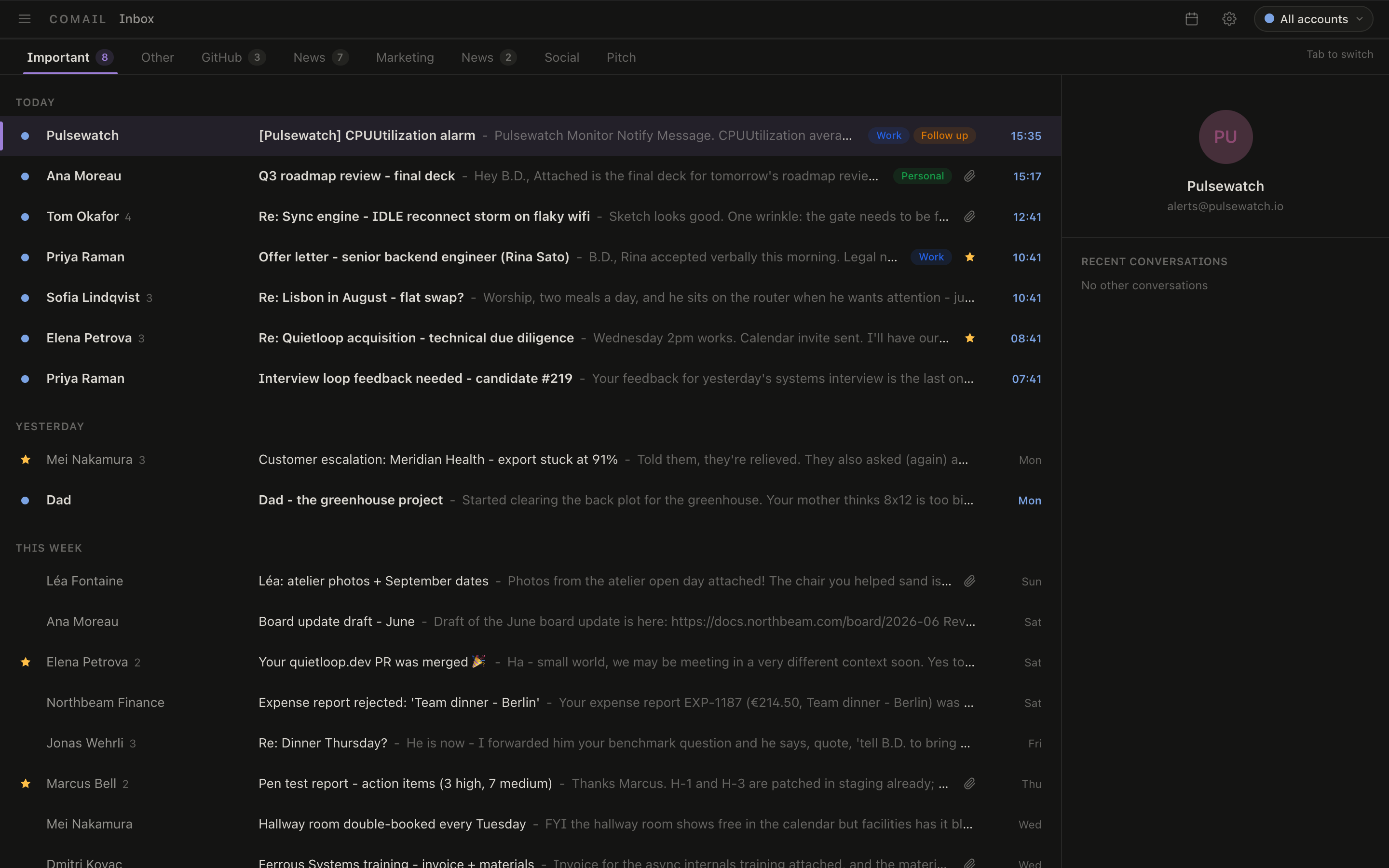
Comail is a fast, keyboard-driven mail client for Mac, Windows, and Linux. Your whole mailbox lives on your computer, so everything opens instantly, search finds what you meant, and it all keeps working on a plane. No account, no subscription, no telemetry - free and open source.

Get Comail
Grab the installer for your platform from the latest release:
- macOS -
.dmg(universal, Apple Silicon and Intel) - Windows -
.msior setup.exe - Linux -
.debor.AppImage
Comail keeps itself up to date: it checks for new releases on launch and installs them in place after asking you.
Works with Gmail, Microsoft 365 / Outlook, and any IMAP provider (Fastmail, iCloud, self-hosted, your company server). Regular IMAP accounts just need an app password - no setup at all.
Fly through your inbox
- Everything is a keystroke.
J/Kto move,Eto mark done,Hto snooze,Cto compose,?shows every shortcut. Your hands never leave the keyboard. - A command palette for the rest.
Cmd/Ctrl+Kfinds any action by name - even plain language like "archive everything from LinkedIn" works. - Split inbox. Important mail and everything else land in separate tabs, plus your own rules - newsletters, receipts, alerts - so the inbox you look at is only the mail that matters.
- Snooze, send later, undo send. Make mail come back when you can deal with it, schedule sends, and actually cancel a send you regret - the message doesn't leave for a few seconds, and Comail can really stop it.
- Triage in bulk. Select a batch with the keyboard or a drag, then archive, label, or snooze them all at once. Every action works offline and syncs when you're back.
Search that finds it
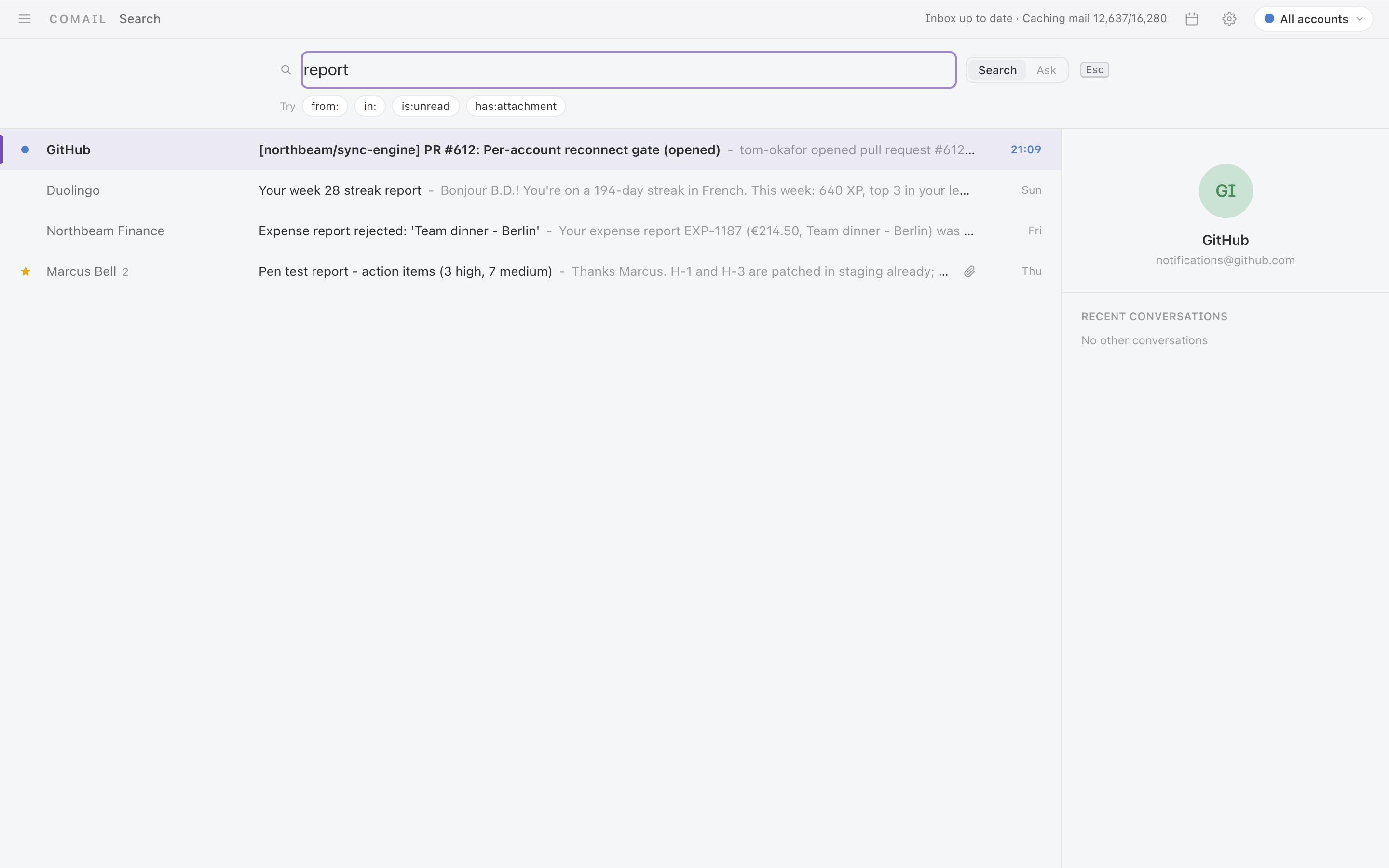
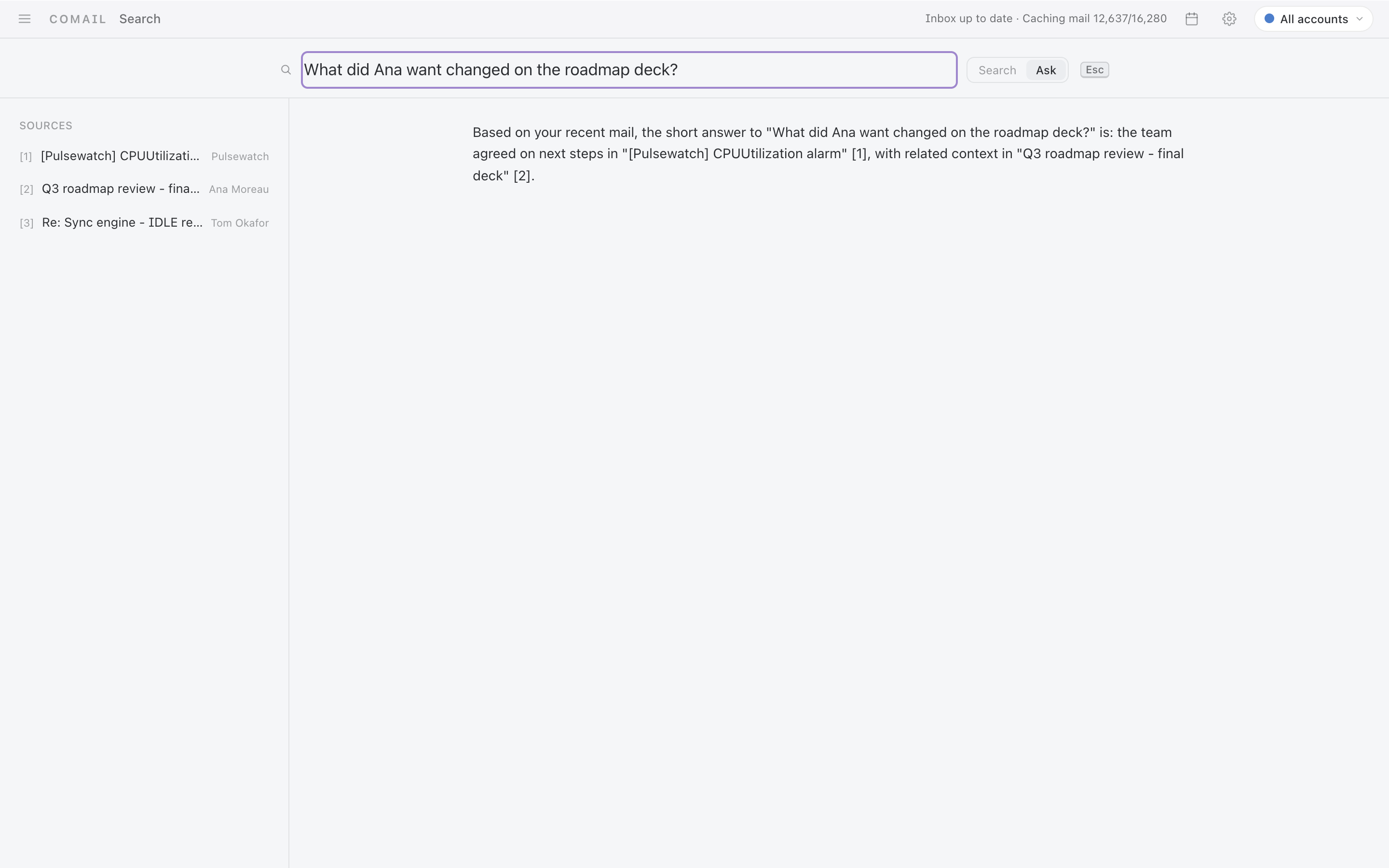
- Ask in your own words. "What did Ana want changed on the roadmap deck" finds the right thread even if it never used those words. The understanding happens on your machine - nothing is sent anywhere.
- Or be precise. Instant keyword search with
from:,in:,is:unread,has:attachment, andexclude:filters. Sender searches rank people you actually talk to first. - Ask AI about your inbox. Optional: connect an AI and ask questions across your mail, with cited sources you can click straight into.
All your accounts, one calm app
- Every account in one place, each with its own color so a multi-account
setup never blurs into one anonymous pile. Jump to any account with
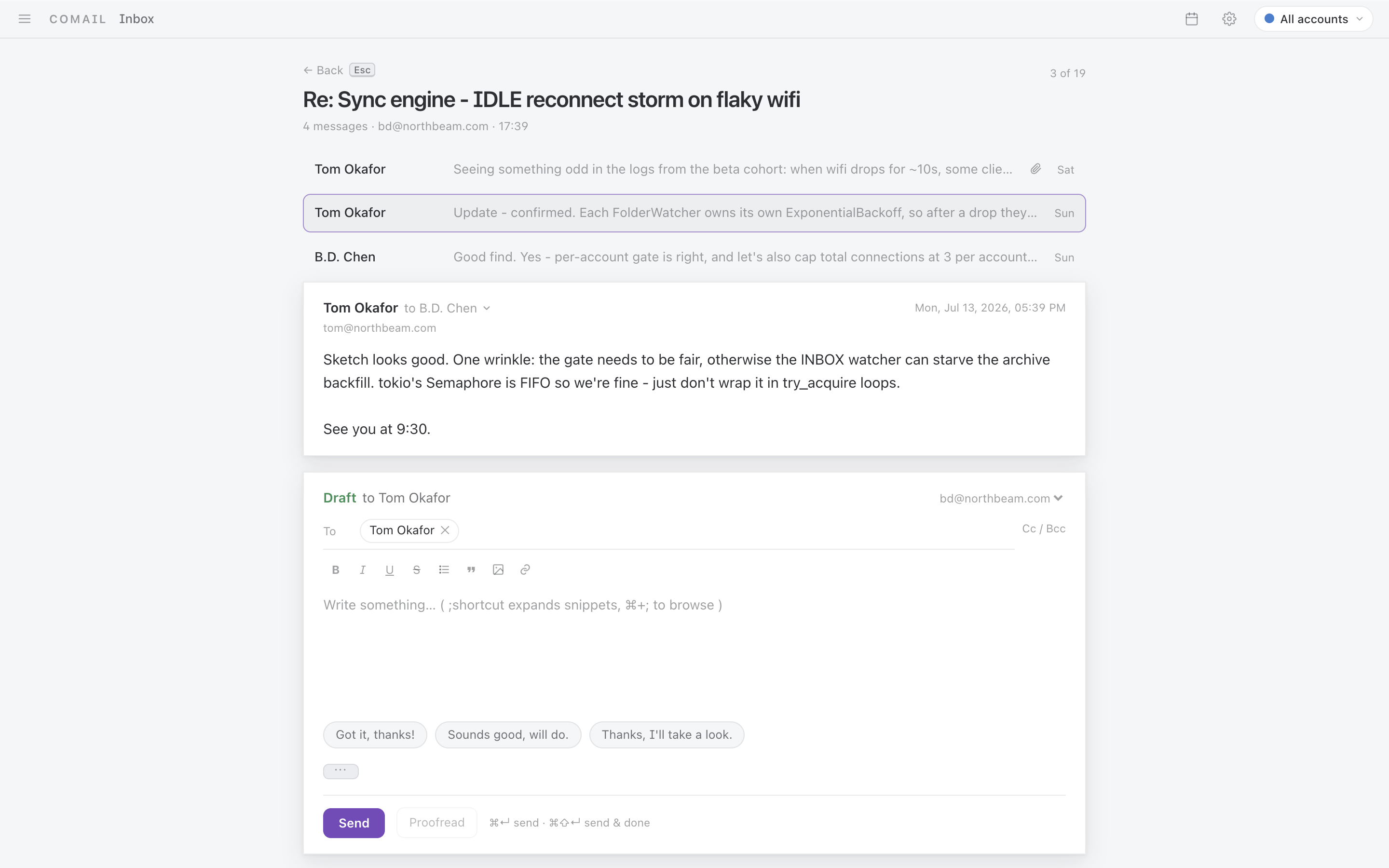
Ctrl+1-9. - Conversations that read like conversations. Threads stack up cleanly, replies happen inline right under the message, and snippets fill in the sentences you type every day.
- Attachments without the detour. PDFs, Word, Excel, PowerPoint, CSVs, and images preview right in the app. Alt-click opens them externally.
- One-key unsubscribe.
Cmd+Uon any newsletter. - Lives in the tray. Keeps syncing after you close the window, shows an unread badge on the dock, and plays a short (optional) chime only for genuinely new mail - never for the backlog it downloads when you reopen it.
A real calendar, built in
- Week and month views one keystroke away (
2full screen,0for a quick peek). Click or drag to create; drag to move and resize. - Type events like you'd say them. "Lunch with Ana tuesday 12:30" becomes an event - timezone-aware, in any language with the optional AI.
- Invites just work. Meeting invitations show up as RSVP cards inside the thread; accepting, editing, or cancelling emails the attendees for you. Reminders arrive as native notifications, and you can paste your free slots into any email.
- Syncs both ways with Google Calendar, Fastmail, iCloud, or any CalDAV server. Edits made offline push when you reconnect.

AI on your terms
All AI features are optional and work with any OpenAI-compatible provider - including a local one like LM Studio. Bring your own key, pick which model handles which job, or use none of it.
- Summaries of long threads on one key.
- Reply drafting in your voice, learned from your own sent mail.
- Proofreading before you send.
- Plain-language commands and inbox Q&A with cited sources.
Automate the boring parts
Describe a workflow the way you'd say it and let it run on every new email:
- Automations you write in plain language. "When an email is an invoice from a vendor, add the Finance label, move it to Important, and prefix the subject with [INVOICE]." The AI only decides whether a message matches; Comail then runs the exact actions you configured, so nothing surprising ever happens to your mail. Before you save, it shows you what it understood and which actions it will take.
- Real actions on a match. Route to any tab, add or remove your labels, star, mark read, archive, or trash. Re-run automations across mail you already have whenever you tweak a rule.
- Local-only overlays. An automation can add a subject prefix or a note to the body that only you see. The original message on the server is never touched, so nothing you do here can corrupt the real email.
- Sort the rest into categories. Mail that no deterministic rule catches can be read once by the model and filed into Marketing, News, Social, Pitch, or categories you define yourself. Decisions are cached by sender, so it only costs a look the first time you hear from someone.
Private by design
- Your mail stays on your machine - the full mailbox syncs into a local database, and search (including the semantic kind) runs entirely on-device.
- Credentials live in the OS keyring, never in a file.
- Offline is a feature, not an error. Read, search, write, and triage with no connection; everything replays when you're back.
- No account, no telemetry, no subscription. Free software under the AGPL.
Looks right anywhere
Snow and Carbon themes in light and dark, a UI in English, Spanish, French, Chinese, and Vietnamese, and native builds for all three desktop platforms. Conversations read as a clean stack with replies inline:
A note on first launch
If your build warns about an unidentified developer: on macOS, right-click the
app and choose Open once (or run
xattr -dr com.apple.quarantine /Applications/Comail.app); on Windows, choose
More info → Run anyway in SmartScreen.
Gmail and Microsoft accounts
Gmail and Microsoft 365 sign in with OAuth using your own (free) app registration - a one-time, ten-minute setup with a full walkthrough in docs/oauth-setup.md. Everyone else just uses an app password.
For developers
Comail is built on Tauri 2 - a Rust core with a React front end. Setup, tests, architecture notes, and the release process live in docs/DEVELOPMENT.md, with contribution conventions in CONTRIBUTING.md.
Say hello
Got feedback, a bug, an idea, or just want to talk? Reach out at hello@deanoss.com. Bug reports and feature requests are also welcome on the issue tracker.
License
Comail is free software, released under the GNU Affero General Public License v3.0. See LICENSE.
Contributors

35 commits

17 commits
Similar repos


Languages
Rust
53.6%
TypeScript
44.5%
CSS
1.1%
README
Comail
Email that keeps up with you.
Comail is a fast, keyboard-driven mail client for Mac, Windows, and Linux. Your whole mailbox lives on your computer, so everything opens instantly, search finds what you meant, and it all keeps working on a plane. No account, no subscription, no telemetry - free and open source.
Get Comail
Grab the installer for your platform from the latest release:
- macOS -
.dmg(universal, Apple Silicon and Intel) - Windows -
.msior setup.exe - Linux -
.debor.AppImage
Comail keeps itself up to date: it checks for new releases on launch and installs them in place after asking you.
Works with Gmail, Microsoft 365 / Outlook, and any IMAP provider (Fastmail, iCloud, self-hosted, your company server). Regular IMAP accounts just need an app password - no setup at all.
Fly through your inbox
- Everything is a keystroke.
J/Kto move,Eto mark done,Hto snooze,Cto compose,?shows every shortcut. Your hands never leave the keyboard. - A command palette for the rest.
Cmd/Ctrl+Kfinds any action by name - even plain language like "archive everything from LinkedIn" works. - Split inbox. Important mail and everything else land in separate tabs, plus your own rules - newsletters, receipts, alerts - so the inbox you look at is only the mail that matters.
- Snooze, send later, undo send. Make mail come back when you can deal with it, schedule sends, and actually cancel a send you regret - the message doesn't leave for a few seconds, and Comail can really stop it.
- Triage in bulk. Select a batch with the keyboard or a drag, then archive, label, or snooze them all at once. Every action works offline and syncs when you're back.
Search that finds it
- Ask in your own words. "What did Ana want changed on the roadmap deck" finds the right thread even if it never used those words. The understanding happens on your machine - nothing is sent anywhere.
- Or be precise. Instant keyword search with
from:,in:,is:unread,has:attachment, andexclude:filters. Sender searches rank people you actually talk to first. - Ask AI about your inbox. Optional: connect an AI and ask questions across your mail, with cited sources you can click straight into.
All your accounts, one calm app
- Every account in one place, each with its own color so a multi-account
setup never blurs into one anonymous pile. Jump to any account with
Ctrl+1-9. - Conversations that read like conversations. Threads stack up cleanly, replies happen inline right under the message, and snippets fill in the sentences you type every day.
- Attachments without the detour. PDFs, Word, Excel, PowerPoint, CSVs, and images preview right in the app. Alt-click opens them externally.
- One-key unsubscribe.
Cmd+Uon any newsletter. - Lives in the tray. Keeps syncing after you close the window, shows an unread badge on the dock, and plays a short (optional) chime only for genuinely new mail - never for the backlog it downloads when you reopen it.
A real calendar, built in
- Week and month views one keystroke away (
2full screen,0for a quick peek). Click or drag to create; drag to move and resize. - Type events like you'd say them. "Lunch with Ana tuesday 12:30" becomes an event - timezone-aware, in any language with the optional AI.
- Invites just work. Meeting invitations show up as RSVP cards inside the thread; accepting, editing, or cancelling emails the attendees for you. Reminders arrive as native notifications, and you can paste your free slots into any email.
- Syncs both ways with Google Calendar, Fastmail, iCloud, or any CalDAV server. Edits made offline push when you reconnect.
AI on your terms
All AI features are optional and work with any OpenAI-compatible provider - including a local one like LM Studio. Bring your own key, pick which model handles which job, or use none of it.
- Summaries of long threads on one key.
- Reply drafting in your voice, learned from your own sent mail.
- Proofreading before you send.
- Plain-language commands and inbox Q&A with cited sources.
Automate the boring parts
Describe a workflow the way you'd say it and let it run on every new email:
- Automations you write in plain language. "When an email is an invoice from a vendor, add the Finance label, move it to Important, and prefix the subject with [INVOICE]." The AI only decides whether a message matches; Comail then runs the exact actions you configured, so nothing surprising ever happens to your mail. Before you save, it shows you what it understood and which actions it will take.
- Real actions on a match. Route to any tab, add or remove your labels, star, mark read, archive, or trash. Re-run automations across mail you already have whenever you tweak a rule.
- Local-only overlays. An automation can add a subject prefix or a note to the body that only you see. The original message on the server is never touched, so nothing you do here can corrupt the real email.
- Sort the rest into categories. Mail that no deterministic rule catches can be read once by the model and filed into Marketing, News, Social, Pitch, or categories you define yourself. Decisions are cached by sender, so it only costs a look the first time you hear from someone.
Private by design
- Your mail stays on your machine - the full mailbox syncs into a local database, and search (including the semantic kind) runs entirely on-device.
- Credentials live in the OS keyring, never in a file.
- Offline is a feature, not an error. Read, search, write, and triage with no connection; everything replays when you're back.
- No account, no telemetry, no subscription. Free software under the AGPL.
Looks right anywhere
Snow and Carbon themes in light and dark, a UI in English, Spanish, French, Chinese, and Vietnamese, and native builds for all three desktop platforms. Conversations read as a clean stack with replies inline:
A note on first launch
If your build warns about an unidentified developer: on macOS, right-click the
app and choose Open once (or run
xattr -dr com.apple.quarantine /Applications/Comail.app); on Windows, choose
More info → Run anyway in SmartScreen.
Gmail and Microsoft accounts
Gmail and Microsoft 365 sign in with OAuth using your own (free) app registration - a one-time, ten-minute setup with a full walkthrough in docs/oauth-setup.md. Everyone else just uses an app password.
For developers
Comail is built on Tauri 2 - a Rust core with a React front end. Setup, tests, architecture notes, and the release process live in docs/DEVELOPMENT.md, with contribution conventions in CONTRIBUTING.md.
Say hello
Got feedback, a bug, an idea, or just want to talk? Reach out at hello@deanoss.com. Bug reports and feature requests are also welcome on the issue tracker.
License
Comail is free software, released under the GNU Affero General Public License v3.0. See LICENSE.
Similar repos
Contributors
35 commits
17 commits
Languages
Rust
53.6%
TypeScript
44.5%
CSS
1.1%