[ICML'26] Hierarchical Abstract Tree for Cross-Document Retrieval Augmented Generation
Python
37
10 commits
updated Aug 28, 2026




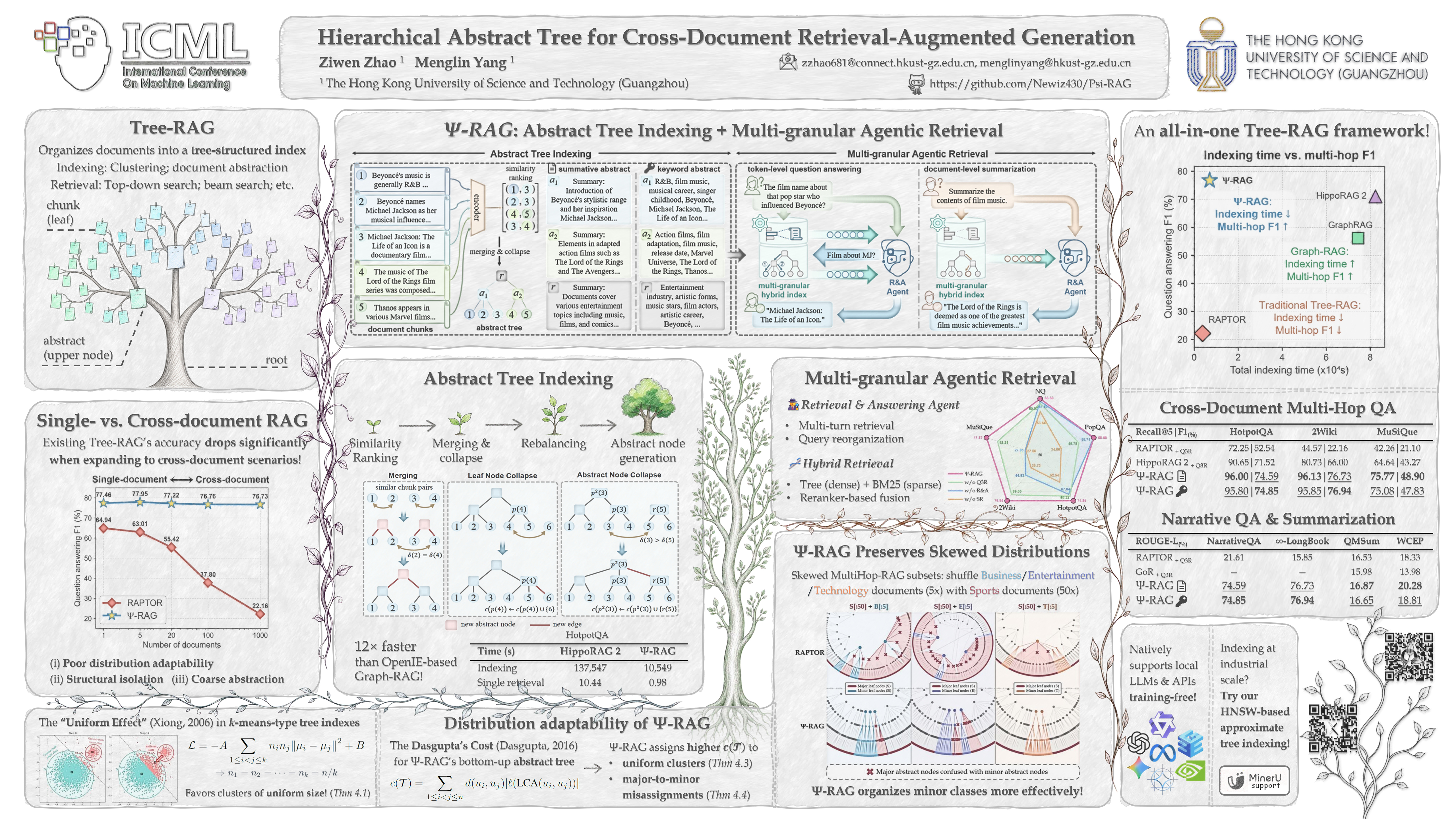
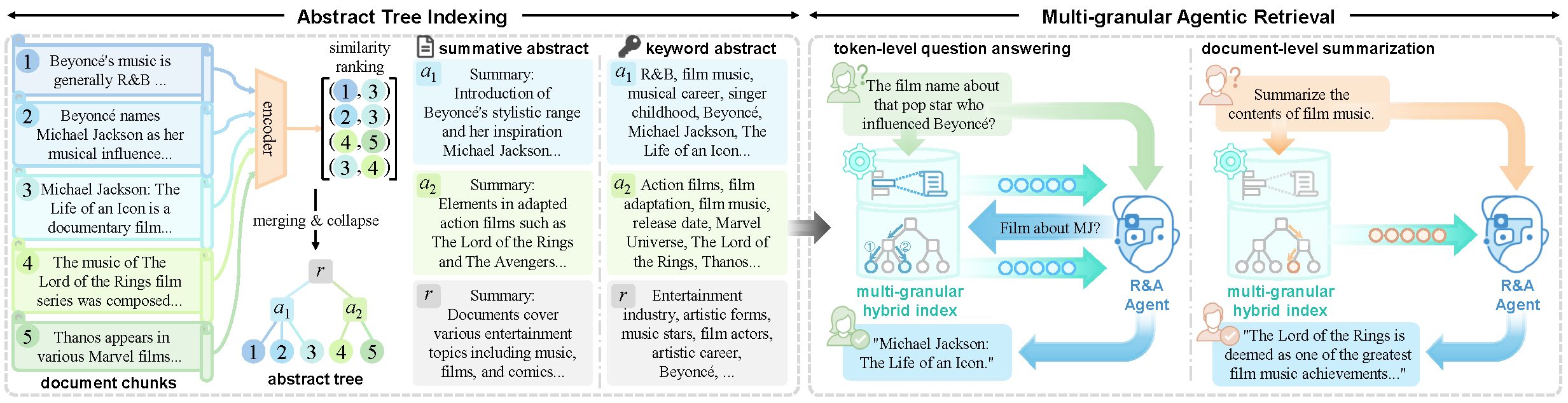
$\Psi$-RAG is an efficient and powerful hierarchical tree-based RAG framework designed to tackle complex information-seeking scenarios. It features a hierarchical abstract tree index with different abstraction strategies, enabling efficient and precise retrieval with logarithmic time. It employs a multi-granular agentic retriever including a powerful Reading & Answering agent with a hybrid retrieval pipeline for diverse user requests.
See requirements.txt for 
pip install -r requirements.txt
Optional packages:
pip install vllm if you prefer vLLM.pip install transformers==4.46.0 for the embedding model "nvidia/NV-Embed-V2" (indexing only).pip install mineru[all] if you want to build custom indexes with your local PDF files.pip install py7zr or pip install rarfile if you want to upload a .7z or .rar package of local PDF files.You may first set some useful environment variables before running our code, including:
# Hugging Face / model download
export CUDA_VISIBLE_DEVICES=0,1
export HF_TOKEN=<your_hugging_face_token>
export HF_ENDPOINT=https://hf-mirror.com	# Hugging Face mirror for users from China
# OpenAI-compatible API backends
export OPENAI_BASE_URL=<your_base_url>
export OPENAI_API_KEY=<your_api_key>
For 
export OLLAMA_NUM_PARALLEL=16
export OLLAMA_MAX_LOADED_MODELS=2
export OLLAMA_NUM_GPU=2
export OLLAMA_FLASH_ATTENTION=1
# run ollama
ollama serve
# pull models you want to use
ollama pull qwen3-embedding:8b
ollama pull llama3.3:latest
We provide benchmark datasets in data/. Configs are Python files under conf/. Each file defines a conf dict that overrides the defaults in conf/__init__.py. See conf/__init__.py for detailed settings and explanations.
# ======================================= Data config =====================================
dataset: str  					# Dataset name.
data_dir: Path  				# Dataset directory, default to "data/".
read_local_pdf: str | None      # Read and parse local PDF(s) as a local dataset with MinerU.
test_samples: int               # Number of samples for testing with part of the dataset.
# =================================== Embedding config ===================================
embed_name: str					# Model name for embedding documents and queries, "[PLATFORM]:[MODEL_NAME]"
embed_cache_dir: Path			# Cache directory of the embedding model, default to os.environ["HF_HOME"]
embed_model_kwargs: Dict        # Model kwargs for embedding model. Keys depend on the model you use.
# ================================= Tree indexing config =================================
tree_builder: str               # Tree builder backend. "hnsw" for HNSW-based approximate similarity ranking.
passage_as_tree: bool			# Whether to activate single-document retrieval setup.
bucket_size: int                # Maximum bucket size for bucketing. Set to None to disable it.
# =================================== Abstraction config ==================================
abs_name: str					# Model name for node abstraction, "[PLATFORM]:[MODEL_NAME_OR_PATH]"
abs_cache_dir: Path				# Cache directory of the abstraction agent, default to os.environ["HF_HOME"].
abs_model_kwargs: Dict          # Model kwargs for the abstraction agent, similar to embed_model_kwargs.
abstract_type: str				# Type of abstract. "summary" for summative text and "keyword" for keywords.
force_index_from_scratch: bool	# Recreate embeddings and trees even if saved files exist in save_dir.
# ==================================== R&A Agent config ===================================
qa_name: str 					# Model name for agentic retrieval and QA, "[PLATFORM]:[MODEL_NAME]"
qa_cache_dir: Path 				# Cache directory of the R&A agent, default to os.environ["HF_HOME"].
qa_model_kwargs: Dict           # Model kwargs for the R&A agent, similar to embed_model_kwargs.
answer_type: str 				# The expected answer type, ("short", "medium", "long").
no_retrieval: bool              # Skip retrieval entirely and directly answer the question.
max_retrieval_time: int 		# Maximum time of retrieval attempts (total attempts - 1). Default to "auto".
multithreading_qa_batch_size: int		# Multithread QA for efficient reproduction on large corpus.
force_qa_from_scratch: bool		# Reanswering questions even if the answer result file exists in save_dir.
# ================================ General retrieval config ===============================
tree_top_k: int 				# Number of retrieved documents from the tree retriever.
# ================================= Hybrid retrieval config ================================
hybrid_search: bool				# If sparse keyword search (BM25) is enabled.
force_sparse_index_from_scratch: bool 	# Rebuild the sparse token vocab even if saved files exist in save_dir.
sparse_top_k: int				# Number of retrieved documents by sparse keyword search.
# ==================================== Reranking config ===================================
rerank: bool					# If reranking is enabled.
rerank_name: str				# Model name for reranking, "[PLATFORM]:[MODEL_NAME]"
rerank_cache_dir: Path 			# Cache directory of the reranking model, default to os.environ["HF_HOME"]
rerank_model_kwargs: Dict       # Model kwargs for the reranker, similar to embed_model_kwargs.
rerank_top_k: int 				# Number of final returned documents by the reranker.
# ===================================== Other config ======================================
save_dir: Path					# Save directory of everything intermediate. Set to None to skip saving.
verbose: bool					# Whether to output the detail information during QA.
A test example on MuSiQue with hybrid agentic search:
# conf/<custom_conf>.py
conf = {
    "dataset": "musique",
    "test_samples": 10,     # only use the first 10 documents / chunks (depending on your dataset format)
    "max_retrieval_time": 3,
    "tree_top_k": 10,
    "hybrid_search": True,
    "sparse_top_k": 10,
    "rerank_top_k": 5,      # fuse two result sets by reciprocal rank fusion and take top 5 as the augmented context
}
Save your config file as conf/<custom_conf>.py, and:
(1) Build the tree index
python index.py --config <custom_conf>
The pickle file containing the tree index will be saved in <save_dir>/ (output/ by default). If hybrid search is enabled, a bm25_<dataset_name> directory containing the sparse index will also be created.
You can also temporarily change some configurations via CLI arguments. This will override your
<custom_conf>.py:python index.py --config <custom_conf> --force_index_from_scratch --max_tokens_per_chunk 500
(2) Retrieve and answer the question
Enter the interactive chat mode with your LLM:
python qa.py --config <custom_conf> --chat                          # load the tree index and chat with your R&A agent
python qa.py --config <custom_conf> --chat -q "<your_query>"        # add an initial query. `--query` and `--question` work too
python qa.py --config <custom_conf> --tree_id 2 -q "<your_query>"   # specify the tree id if your index has multiple trees
Answers will be saved in <save_dir>/results/<custom_conf>.json. You can also use the single-turn QA mode by only specifying -q. If you ask the same question again, the answer will be immediately loaded from the JSON file instead of another LLM call.
python qa.py --config <custom_conf> -q "<your_query>"               # Non-interactive single-turn QA mode
python qa.py --config <custom_conf> -q "<your_query>" --update      # force to re-answer a question and update the result file
For evaluation purposes (queries in the dataset file), run question answering and evaluate the results with
python qa.py --config <custom_conf>
python eval.py --config <custom_conf>
We have provided our result files in output/results/ and the corresponding preset configs in conf/. Simply run main.py with the config files for our evaluation results, for example:
python main.py --config musique_summary
Our experiments are conducted on Ubuntu 20.04.6 LTS with CUDA 12.8 and Python 3.13.5.
Re-answer the questions based on the existing tree index:
Set "force_qa_from_scratch": True to automatically download our tree indexes from 
<save_dir>/. You can also manually download them and put them into <save_dir>/. When QA is finished, a result JSON file (sharing a name with your config file) will be saved in the <save_dir>/results/.
Rebuild tree indexes:
Set "force_index_from_scratch": True to rebuild tree indexes from scratch. Set "force_sparse_index_from_scratch": True to rebuild BM25 indexes.
You can also set "save_dir": None for a single run without saving.
⚠Note that running indexing / sparse indexing / QA from scratch will cover your existing save files in
<save_dir>/!
$\Psi$-RAG now supports users uploading local documents in PDF format.
is used for PDF parsing. Three steps before running
index.py:
- Install MinerU in your environment:
pip install mineru[all]
- It is recommended to download the pipeline model locally to avoid hitting the usage limit of MinerU if you need to process batches of PDF files:
See MinerU documentation for more info.mineru-models-download set MINERU_MODEL_SOURCE=local- Set
"data_dir"to the path of (a) your PDF file, (b) your folder containing PDFs, or (c) your archive package of PDF files.- Add in your config file: (a)
"read_local_pdf": "file", (b)"read_local_pdf": "dir", (c)"read_local_pdf": "package". Seeconf/__init__.pyfor parameter details.
Put your corpus file (filename: <dataset_name>.<ext>) in data/. Your corpus file could be formatted as a long string, a list of small chunks from a document, a list of documents, or a list of chunk lists from multiple documents.
For evaluation purposes,
<dataset_name>.<ext>should include the ground-truth answers for QA evaluation, and some form of supporting documents for retrieval evaluation. If there is also an independent corpus file, name it<dataset_name>_corpus.<ext>instead. You may refer to the existing dataset files, e.g.,2wikimultihopqa.jsonand2wikimultihopqa_corpus.json. If the ground-truth answers or supporting documents are missing, a ⚠warning will be raised.
Then, make changes in src/dataset.py:
dataset_poolload_data() and preprocess() to process document texts (and preset queries)get_gold_answers()get_gold_docs()Default prompt files in our experiments are in src/prompt/. You may rewrite the prompts (and in-context examples) for your own needs:
rag_agent_system_short|rag_agent_system_medium in rag_agent.py: QA prompt when "answer_type": "short"|"medium"rag_qa_system_long in rag_qa.py: summarization prompt when "answer_type": "long".Prepare a config file in conf/ and run index.py. See Configuration and Run the Pipeline.
For single-document setting (a tree index for each document), set
"passage_as_tree": Truein your config file.For cross-document setting (a tree for the entire corpus):
- If your corpus is read as a list of long documents, set
"force_split": Trueto split the text to chunks with size no more thanmax_tokens_per_chunk. The tree indexing will automatically merge the chunks from the same document (i.e., connect them to one abstract node) to preserve semantic coherence within the document; if you want to re-cluster the chunks, set"reorganize_leaf": Trueat the same time.- If your corpus is read as a list of chunk lists, set
"force_split": Truewill re-split them, otherwise the preset chunks will be used as leaf nodes.
Before running qa.py, set "max_retrieval_time": "auto" to employ a 2-layer MLP as a lightweight query hop discriminator $\mathcal{Q}$. It reuses the query embedding and predicts the hops of the query to automatically decide the maximum retrieval time with very small latency.
By default, $\mathcal{Q}$ is trained on the query sets of the provided datasets: NQ, HotpotQA, 2Wiki, MuSiQue, and MultiHop-RAG. Currently only supports a maximum of 4 hops. The checkpoints are saved to <save_dir>/hop_discriminator/ so do not set "save_dir": None.
You may change backbone LLMs with:
conf = {
    "embed_name": "ollama:qwen3-embedding:0.6b",
    "abs_name": "vllm:meta-llama/Llama-3.1-8B-Instruct",
    "qa_name": "api:openai/gpt-5-mini",
    "rerank_name": "transformers:BAAI/bge-reranker-large",
    ...
}
Set bucket_size to enable bucketing on very large corpora:
conf = {
    "bucket_size": 4096,    # This is an upper bound for recursive bucket splitting instead of a target bucket count
    "bucket_max_fanout": 32,
    "bucket_sample_size": 8192,
    "bucket_kmeans_iters": 5,
    "tree_save_chunk_size": 200000,
    ...
}
This first partitions a large corpus into multiple buckets using a fast recursive spherical $k$-means. Then a bucket tree is built inside each bucket. They are finally merged at the highest layer similar to the construction of each bucket tree. The entire tree will be saved as a directory (chunked node files + a manifest).
Use approximate ranking via a Hierarchical Navigable Small World (HNSW) graph to replace the global similarity ranking for industrial-scale corpora, supporting both original and bucketing tree-building:
conf = {
    "tree_builder": "hnsw",
    "hnsw_top_k": 32,
    "hnsw_m": 16,
    "hnsw_ef_construction": 200,
    "hnsw_ef_search": 64,
    ...
}
Set "tree_build_diagnostics": True to print dataset token statistics, execution time of each step, memory estimates, and tree connectivity checks to make sure it works as intended.
Run 🐦⬛woodpecker.py for a peek at the detailed stats of a tree index file:
python woodpecker.py --config <custom_conf>               # Overall stats of the tree index file.
python woodpecker.py --config <custom_conf> --tree_id 1   # Stats of a specific tree (single-document setting). Never look up the wrong tree.
python woodpecker.py --config <custom_conf> --layer 5     # Stats of a specific layer (0: root) of a single tree. `--layer root` or `--layer leaf` are also valid.
python woodpecker.py --config <custom_conf> --id 10000    # Stats of a specific node from a single tree. Set `--text_only` to only print its text.
Detailed stats include:
Psi-RAG/
|_ README.md
|_ requirements.txt # Dependency list.
|_ index.py         # Builds the tree index and sparse index.
|_ qa.py            # Loads an existing tree index, retrieves context, and answers questions.
|_ eval.py          # Evaluates saved QA results.
|_ main.py          # End-to-end entrypoint: runs indexing, QA, and evaluation in one script.
|_ woodpecker.py    # Prints statistics of your tree index.
|
|_ conf/                    # Configurations.
|  |_ __init__.py           # Introduces configs and sets default values.
|  |_ <dataset>_summary.py  # Preset config files using summative abstracts.
|  |_ <dataset>_keyword.py  # Preset config files using keyword abstracts.
|
|_ data/                        # Benchmark datasets.
|  |_ <dataset>_corpus.<ext>    # Corpus files for indexing.
|  |_ <dataset>.<ext>           # Data files with ground-truth info.
|
|_ fig/             # Figures used by README.md.
|
|_ log/                 # Log files.
|  |_ stdout.log        # General log tracing the stdout.
|  |_ <conf_name>.log   # Specific log tracing the LLM output and evaluation results for a single run.
|
|_ output/                  # Saved index files and result files.
|  |_ *.pkl                 # Tree indexes.
|  |_ bm25_<dataset>/       # Sparse BM25 indexes.
|  |_ hop_discriminator/    # Weights of the query hop discriminator.
|  |_ results/              # Saved LLM answers, retrieved chunks, and config.
|
|_ src/                     # Core implementation of $Psi$-RAG.
|  |_ __init__.py
|  |_ dataset.py            # Loads and preprocesses data.
|  |_ pdf.py                # Read and parse user-uploaded PDFs.
|  |_ rag.py                # High-level RAG controller: build/load/save tree, retrieve, and qa.
|  |_ tree_retriever.py     # Tree retrieval, hybrid retrieval, and reranking logic.
|  |_ hop_discriminator.py  # Implementation of the query hop discriminator.
|  |_ evaluation.py         # Metric implementations for evaluation.
|  |_ utils.py              # Shared data structures and helper functions.
|
|  |_ tree_builder/         # Tree construction algorithms.
|  |  |_ __init__.py
|  |  |_ base.py            # Base tree builder: create leaf nodes and launch tree construction.
|  |  |_ abstract.py        # Standard hierarchical abstract tree builder.
|  |  |_ ann.py             # ANN-based tree builder based on an HNSW graph.
|  |  |_ bucketed.py        # Bucketed tree builder.
|  |  |_ bucketed_exact.py  # Bucketed builder using exact similarity ranking.
|  |  |_ bucketed_hnsw.py   # Bucketed builder using HNSW-based approximate ranking.
|  |  |_ chunks.py          # Chunked save/load format for bucketed tree indexes.
|
|  |_ model/            # Backend adapters for LLMs.
|  |  |_ __init__.py
|  |  |_ embed.py       # Embedding model wrappers.
|  |  |_ abstract.py    # Abstraction model wrappers.
|  |  |_ qa.py          # QA model wrappers.
|  |  |_ rerank.py      # Reranker model wrappers.
|
|  |_ prompt/           # Prompt templates.
|  |  |_ __init__.py
|  |  |_ rag_abs.py     # Prompts and in-context examples for abstraction.
|  |  |_ rag_agent.py   # Prompts and in-context examples for agentic retrieval and multi-hop QA.
|  |  |_ rag_qa.py      # Prompts for single-hop QA, narrative QA and summarization.
This is built mainly upon RAPTOR, HippoRAG, and HypHC. We sincerely thank their efforts.
$\Psi$-RAG is released under the MIT license.
Contributions of any kind are always welcome! Feel free to add a fix, a new feature, or anything helpful to this open-source project. 🥰
Please consider citing our work if it helps:
@inproceedings{psi-rag,
  title={Hierarchical Abstract Tree for Cross-Document Retrieval-Augmented Generation},
  author={Ziwen, Zhao and Menglin, Yang},
  booktitle={Proceedings of the 43rd International Conference on Machine Learning},
  year={2026},
  month={July},
  address={Seoul, South Korea},
  pages={TBD},
  publisher={TBD},
}
[ICML'26] Hierarchical Abstract Tree for Cross-Document Retrieval Augmented Generation
Python
37
10 commits
updated Aug 28, 2026
$\Psi$-RAG is an efficient and powerful hierarchical tree-based RAG framework designed to tackle complex information-seeking scenarios. It features a hierarchical abstract tree index with different abstraction strategies, enabling efficient and precise retrieval with logarithmic time. It employs a multi-granular agentic retriever including a powerful Reading & Answering agent with a hybrid retrieval pipeline for diverse user requests.
See requirements.txt for
pip install -r requirements.txt
Optional packages:
pip install vllm if you prefer vLLM.pip install transformers==4.46.0 for the embedding model "nvidia/NV-Embed-V2" (indexing only).pip install mineru[all] if you want to build custom indexes with your local PDF files.pip install py7zr or pip install rarfile if you want to upload a .7z or .rar package of local PDF files.You may first set some useful environment variables before running our code, including:
# Hugging Face / model download
export CUDA_VISIBLE_DEVICES=0,1
export HF_TOKEN=<your_hugging_face_token>
export HF_ENDPOINT=https://hf-mirror.com	# Hugging Face mirror for users from China
# OpenAI-compatible API backends
export OPENAI_BASE_URL=<your_base_url>
export OPENAI_API_KEY=<your_api_key>
For
export OLLAMA_NUM_PARALLEL=16
export OLLAMA_MAX_LOADED_MODELS=2
export OLLAMA_NUM_GPU=2
export OLLAMA_FLASH_ATTENTION=1
# run ollama
ollama serve
# pull models you want to use
ollama pull qwen3-embedding:8b
ollama pull llama3.3:latest
We provide benchmark datasets in data/. Configs are Python files under conf/. Each file defines a conf dict that overrides the defaults in conf/__init__.py. See conf/__init__.py for detailed settings and explanations.
# ======================================= Data config =====================================
dataset: str  					# Dataset name.
data_dir: Path  				# Dataset directory, default to "data/".
read_local_pdf: str | None      # Read and parse local PDF(s) as a local dataset with MinerU.
test_samples: int               # Number of samples for testing with part of the dataset.
# =================================== Embedding config ===================================
embed_name: str					# Model name for embedding documents and queries, "[PLATFORM]:[MODEL_NAME]"
embed_cache_dir: Path			# Cache directory of the embedding model, default to os.environ["HF_HOME"]
embed_model_kwargs: Dict        # Model kwargs for embedding model. Keys depend on the model you use.
# ================================= Tree indexing config =================================
tree_builder: str               # Tree builder backend. "hnsw" for HNSW-based approximate similarity ranking.
passage_as_tree: bool			# Whether to activate single-document retrieval setup.
bucket_size: int                # Maximum bucket size for bucketing. Set to None to disable it.
# =================================== Abstraction config ==================================
abs_name: str					# Model name for node abstraction, "[PLATFORM]:[MODEL_NAME_OR_PATH]"
abs_cache_dir: Path				# Cache directory of the abstraction agent, default to os.environ["HF_HOME"].
abs_model_kwargs: Dict          # Model kwargs for the abstraction agent, similar to embed_model_kwargs.
abstract_type: str				# Type of abstract. "summary" for summative text and "keyword" for keywords.
force_index_from_scratch: bool	# Recreate embeddings and trees even if saved files exist in save_dir.
# ==================================== R&A Agent config ===================================
qa_name: str 					# Model name for agentic retrieval and QA, "[PLATFORM]:[MODEL_NAME]"
qa_cache_dir: Path 				# Cache directory of the R&A agent, default to os.environ["HF_HOME"].
qa_model_kwargs: Dict           # Model kwargs for the R&A agent, similar to embed_model_kwargs.
answer_type: str 				# The expected answer type, ("short", "medium", "long").
no_retrieval: bool              # Skip retrieval entirely and directly answer the question.
max_retrieval_time: int 		# Maximum time of retrieval attempts (total attempts - 1). Default to "auto".
multithreading_qa_batch_size: int		# Multithread QA for efficient reproduction on large corpus.
force_qa_from_scratch: bool		# Reanswering questions even if the answer result file exists in save_dir.
# ================================ General retrieval config ===============================
tree_top_k: int 				# Number of retrieved documents from the tree retriever.
# ================================= Hybrid retrieval config ================================
hybrid_search: bool				# If sparse keyword search (BM25) is enabled.
force_sparse_index_from_scratch: bool 	# Rebuild the sparse token vocab even if saved files exist in save_dir.
sparse_top_k: int				# Number of retrieved documents by sparse keyword search.
# ==================================== Reranking config ===================================
rerank: bool					# If reranking is enabled.
rerank_name: str				# Model name for reranking, "[PLATFORM]:[MODEL_NAME]"
rerank_cache_dir: Path 			# Cache directory of the reranking model, default to os.environ["HF_HOME"]
rerank_model_kwargs: Dict       # Model kwargs for the reranker, similar to embed_model_kwargs.
rerank_top_k: int 				# Number of final returned documents by the reranker.
# ===================================== Other config ======================================
save_dir: Path					# Save directory of everything intermediate. Set to None to skip saving.
verbose: bool					# Whether to output the detail information during QA.
A test example on MuSiQue with hybrid agentic search:
# conf/<custom_conf>.py
conf = {
    "dataset": "musique",
    "test_samples": 10,     # only use the first 10 documents / chunks (depending on your dataset format)
    "max_retrieval_time": 3,
    "tree_top_k": 10,
    "hybrid_search": True,
    "sparse_top_k": 10,
    "rerank_top_k": 5,      # fuse two result sets by reciprocal rank fusion and take top 5 as the augmented context
}
Save your config file as conf/<custom_conf>.py, and:
(1) Build the tree index
python index.py --config <custom_conf>
The pickle file containing the tree index will be saved in <save_dir>/ (output/ by default). If hybrid search is enabled, a bm25_<dataset_name> directory containing the sparse index will also be created.
You can also temporarily change some configurations via CLI arguments. This will override your
<custom_conf>.py:python index.py --config <custom_conf> --force_index_from_scratch --max_tokens_per_chunk 500
(2) Retrieve and answer the question
Enter the interactive chat mode with your LLM:
python qa.py --config <custom_conf> --chat                          # load the tree index and chat with your R&A agent
python qa.py --config <custom_conf> --chat -q "<your_query>"        # add an initial query. `--query` and `--question` work too
python qa.py --config <custom_conf> --tree_id 2 -q "<your_query>"   # specify the tree id if your index has multiple trees
Answers will be saved in <save_dir>/results/<custom_conf>.json. You can also use the single-turn QA mode by only specifying -q. If you ask the same question again, the answer will be immediately loaded from the JSON file instead of another LLM call.
python qa.py --config <custom_conf> -q "<your_query>"               # Non-interactive single-turn QA mode
python qa.py --config <custom_conf> -q "<your_query>" --update      # force to re-answer a question and update the result file
For evaluation purposes (queries in the dataset file), run question answering and evaluate the results with
python qa.py --config <custom_conf>
python eval.py --config <custom_conf>
We have provided our result files in output/results/ and the corresponding preset configs in conf/. Simply run main.py with the config files for our evaluation results, for example:
python main.py --config musique_summary
Our experiments are conducted on Ubuntu 20.04.6 LTS with CUDA 12.8 and Python 3.13.5.
Re-answer the questions based on the existing tree index:
Set "force_qa_from_scratch": True to automatically download our tree indexes from <save_dir>/. You can also manually download them and put them into <save_dir>/. When QA is finished, a result JSON file (sharing a name with your config file) will be saved in the <save_dir>/results/.
Rebuild tree indexes:
Set "force_index_from_scratch": True to rebuild tree indexes from scratch. Set "force_sparse_index_from_scratch": True to rebuild BM25 indexes.
You can also set "save_dir": None for a single run without saving.
⚠Note that running indexing / sparse indexing / QA from scratch will cover your existing save files in
<save_dir>/!
$\Psi$-RAG now supports users uploading local documents in PDF format.
index.py:
- Install MinerU in your environment:
pip install mineru[all]
- It is recommended to download the pipeline model locally to avoid hitting the usage limit of MinerU if you need to process batches of PDF files:
See MinerU documentation for more info.mineru-models-download set MINERU_MODEL_SOURCE=local- Set
"data_dir"to the path of (a) your PDF file, (b) your folder containing PDFs, or (c) your archive package of PDF files.- Add in your config file: (a)
"read_local_pdf": "file", (b)"read_local_pdf": "dir", (c)"read_local_pdf": "package". Seeconf/__init__.pyfor parameter details.
Put your corpus file (filename: <dataset_name>.<ext>) in data/. Your corpus file could be formatted as a long string, a list of small chunks from a document, a list of documents, or a list of chunk lists from multiple documents.
For evaluation purposes,
<dataset_name>.<ext>should include the ground-truth answers for QA evaluation, and some form of supporting documents for retrieval evaluation. If there is also an independent corpus file, name it<dataset_name>_corpus.<ext>instead. You may refer to the existing dataset files, e.g.,2wikimultihopqa.jsonand2wikimultihopqa_corpus.json. If the ground-truth answers or supporting documents are missing, a ⚠warning will be raised.
Then, make changes in src/dataset.py:
dataset_poolload_data() and preprocess() to process document texts (and preset queries)get_gold_answers()get_gold_docs()Default prompt files in our experiments are in src/prompt/. You may rewrite the prompts (and in-context examples) for your own needs:
rag_agent_system_short|rag_agent_system_medium in rag_agent.py: QA prompt when "answer_type": "short"|"medium"rag_qa_system_long in rag_qa.py: summarization prompt when "answer_type": "long".Prepare a config file in conf/ and run index.py. See Configuration and Run the Pipeline.
For single-document setting (a tree index for each document), set
"passage_as_tree": Truein your config file.For cross-document setting (a tree for the entire corpus):
- If your corpus is read as a list of long documents, set
"force_split": Trueto split the text to chunks with size no more thanmax_tokens_per_chunk. The tree indexing will automatically merge the chunks from the same document (i.e., connect them to one abstract node) to preserve semantic coherence within the document; if you want to re-cluster the chunks, set"reorganize_leaf": Trueat the same time.- If your corpus is read as a list of chunk lists, set
"force_split": Truewill re-split them, otherwise the preset chunks will be used as leaf nodes.
Before running qa.py, set "max_retrieval_time": "auto" to employ a 2-layer MLP as a lightweight query hop discriminator $\mathcal{Q}$. It reuses the query embedding and predicts the hops of the query to automatically decide the maximum retrieval time with very small latency.
By default, $\mathcal{Q}$ is trained on the query sets of the provided datasets: NQ, HotpotQA, 2Wiki, MuSiQue, and MultiHop-RAG. Currently only supports a maximum of 4 hops. The checkpoints are saved to <save_dir>/hop_discriminator/ so do not set "save_dir": None.
You may change backbone LLMs with:
conf = {
    "embed_name": "ollama:qwen3-embedding:0.6b",
    "abs_name": "vllm:meta-llama/Llama-3.1-8B-Instruct",
    "qa_name": "api:openai/gpt-5-mini",
    "rerank_name": "transformers:BAAI/bge-reranker-large",
    ...
}
Set bucket_size to enable bucketing on very large corpora:
conf = {
    "bucket_size": 4096,    # This is an upper bound for recursive bucket splitting instead of a target bucket count
    "bucket_max_fanout": 32,
    "bucket_sample_size": 8192,
    "bucket_kmeans_iters": 5,
    "tree_save_chunk_size": 200000,
    ...
}
This first partitions a large corpus into multiple buckets using a fast recursive spherical $k$-means. Then a bucket tree is built inside each bucket. They are finally merged at the highest layer similar to the construction of each bucket tree. The entire tree will be saved as a directory (chunked node files + a manifest).
Use approximate ranking via a Hierarchical Navigable Small World (HNSW) graph to replace the global similarity ranking for industrial-scale corpora, supporting both original and bucketing tree-building:
conf = {
    "tree_builder": "hnsw",
    "hnsw_top_k": 32,
    "hnsw_m": 16,
    "hnsw_ef_construction": 200,
    "hnsw_ef_search": 64,
    ...
}
Set "tree_build_diagnostics": True to print dataset token statistics, execution time of each step, memory estimates, and tree connectivity checks to make sure it works as intended.
Run 🐦⬛woodpecker.py for a peek at the detailed stats of a tree index file:
python woodpecker.py --config <custom_conf>               # Overall stats of the tree index file.
python woodpecker.py --config <custom_conf> --tree_id 1   # Stats of a specific tree (single-document setting). Never look up the wrong tree.
python woodpecker.py --config <custom_conf> --layer 5     # Stats of a specific layer (0: root) of a single tree. `--layer root` or `--layer leaf` are also valid.
python woodpecker.py --config <custom_conf> --id 10000    # Stats of a specific node from a single tree. Set `--text_only` to only print its text.
Detailed stats include:
Psi-RAG/
|_ README.md
|_ requirements.txt # Dependency list.
|_ index.py         # Builds the tree index and sparse index.
|_ qa.py            # Loads an existing tree index, retrieves context, and answers questions.
|_ eval.py          # Evaluates saved QA results.
|_ main.py          # End-to-end entrypoint: runs indexing, QA, and evaluation in one script.
|_ woodpecker.py    # Prints statistics of your tree index.
|
|_ conf/                    # Configurations.
|  |_ __init__.py           # Introduces configs and sets default values.
|  |_ <dataset>_summary.py  # Preset config files using summative abstracts.
|  |_ <dataset>_keyword.py  # Preset config files using keyword abstracts.
|
|_ data/                        # Benchmark datasets.
|  |_ <dataset>_corpus.<ext>    # Corpus files for indexing.
|  |_ <dataset>.<ext>           # Data files with ground-truth info.
|
|_ fig/             # Figures used by README.md.
|
|_ log/                 # Log files.
|  |_ stdout.log        # General log tracing the stdout.
|  |_ <conf_name>.log   # Specific log tracing the LLM output and evaluation results for a single run.
|
|_ output/                  # Saved index files and result files.
|  |_ *.pkl                 # Tree indexes.
|  |_ bm25_<dataset>/       # Sparse BM25 indexes.
|  |_ hop_discriminator/    # Weights of the query hop discriminator.
|  |_ results/              # Saved LLM answers, retrieved chunks, and config.
|
|_ src/                     # Core implementation of $Psi$-RAG.
|  |_ __init__.py
|  |_ dataset.py            # Loads and preprocesses data.
|  |_ pdf.py                # Read and parse user-uploaded PDFs.
|  |_ rag.py                # High-level RAG controller: build/load/save tree, retrieve, and qa.
|  |_ tree_retriever.py     # Tree retrieval, hybrid retrieval, and reranking logic.
|  |_ hop_discriminator.py  # Implementation of the query hop discriminator.
|  |_ evaluation.py         # Metric implementations for evaluation.
|  |_ utils.py              # Shared data structures and helper functions.
|
|  |_ tree_builder/         # Tree construction algorithms.
|  |  |_ __init__.py
|  |  |_ base.py            # Base tree builder: create leaf nodes and launch tree construction.
|  |  |_ abstract.py        # Standard hierarchical abstract tree builder.
|  |  |_ ann.py             # ANN-based tree builder based on an HNSW graph.
|  |  |_ bucketed.py        # Bucketed tree builder.
|  |  |_ bucketed_exact.py  # Bucketed builder using exact similarity ranking.
|  |  |_ bucketed_hnsw.py   # Bucketed builder using HNSW-based approximate ranking.
|  |  |_ chunks.py          # Chunked save/load format for bucketed tree indexes.
|
|  |_ model/            # Backend adapters for LLMs.
|  |  |_ __init__.py
|  |  |_ embed.py       # Embedding model wrappers.
|  |  |_ abstract.py    # Abstraction model wrappers.
|  |  |_ qa.py          # QA model wrappers.
|  |  |_ rerank.py      # Reranker model wrappers.
|
|  |_ prompt/           # Prompt templates.
|  |  |_ __init__.py
|  |  |_ rag_abs.py     # Prompts and in-context examples for abstraction.
|  |  |_ rag_agent.py   # Prompts and in-context examples for agentic retrieval and multi-hop QA.
|  |  |_ rag_qa.py      # Prompts for single-hop QA, narrative QA and summarization.
This is built mainly upon RAPTOR, HippoRAG, and HypHC. We sincerely thank their efforts.
$\Psi$-RAG is released under the MIT license.
Contributions of any kind are always welcome! Feel free to add a fix, a new feature, or anything helpful to this open-source project. 🥰
Please consider citing our work if it helps:
@inproceedings{psi-rag,
  title={Hierarchical Abstract Tree for Cross-Document Retrieval-Augmented Generation},
  author={Ziwen, Zhao and Menglin, Yang},
  booktitle={Proceedings of the 43rd International Conference on Machine Learning},
  year={2026},
  month={July},
  address={Seoul, South Korea},
  pages={TBD},
  publisher={TBD},
}