The Bulk Nominatim QGIS Plugin interfaces with an OpenStreetMap nominatim service to provide geocoding of addresses and reverse geocoding of coordinates. This plugin is only recommended to be used with personal nominatim servers because OpenStreetMap does not permit bulk nominatim requests.
The plugin can be installed by downloading the latest version from https://github.com/NationalSecurityAgency/qgis-bulk-nominatim. Launch QGIS and select Plugins->Manage and Install Plugins... from the menu. Click on the Install from ZIP tab on the left, click on the ... button on the right to navigate to where you saved the bulk nominatim downloaded ZIP file and select it then click on the Install Plugin button. Click the Close button and you are ready to start address geocoding.
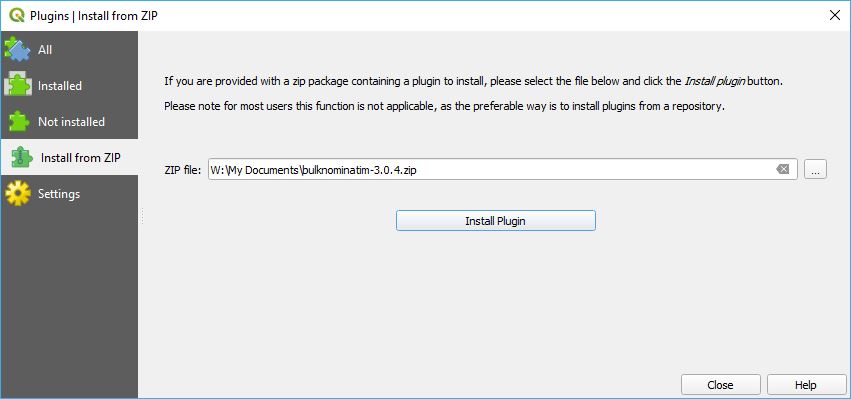
The plugin Settings need to be configured to point to a nominatim endpoint. See the Settings section on how to do this. The plugin can be accessed from the Plugins->Nominatim GeoCoding menu or from the two tool bar icons.
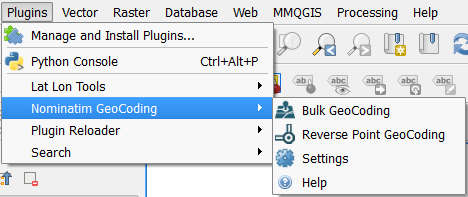
The menu items are:
 Bulk GeoCoding - Main tool for bulk geocoding of addresses to coordinates and bulk reverse geocoding of coordinates to addresses.
 Reverse Point GeoCoding - This tool allows the user to click on the map to determine the closest address or feature.
 Settings - Configuration for the Nominatim Service URL as well as other settings.
 Help - Displays help information for the tools.
Both Bulk GeoCoding and Reverse Point GeoCoding are installed on the tool bar for quick access.

Selecting this tool provides 3 different methods of geocoding. All three return a new vector layer.
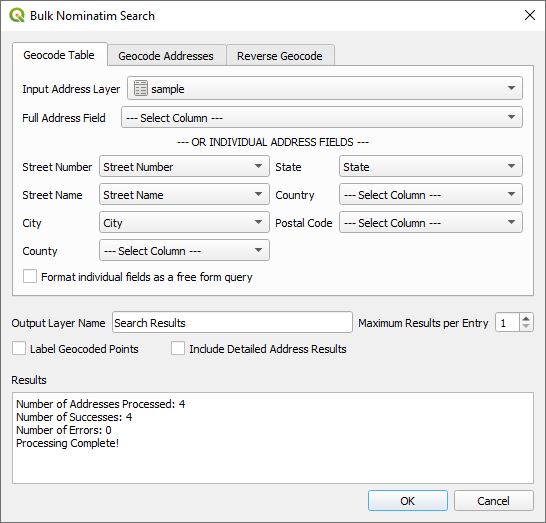
Across the top are three tabs representing these three geocoding tools. The lower part of the dialog box has common functionality for the three tools and are:
Clicking on the OK button causes the plugin to start geocoding.
Clicking on this tool allows the user to be able to click on the map and return the closet feature/address in a dockable window. Note that the closes feature may be an administrative boundary or another feature that is not that close to the point clicked on. If the nominatim service is using the latest software, the actual polygon or point of the located feature will be displayed.
In Settings the user can select the Nominatim Service URL endpoint, the maximum number of addresses to geocode and for reverse geocoding the level of detail where 0 represents the country and 18 the address number. Here is the dialog window.
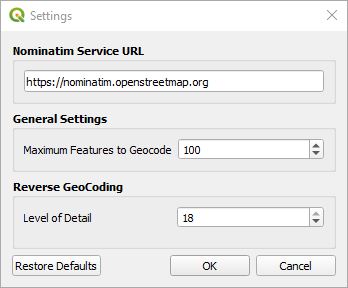
Please note that this plugin is designed to use commercial or personal Nominatim services. The OpenStreetMap URL displayed here is not for bulk use as it violates their policy and will result in the user being blocked from their site for a period of time.
The Bulk Nominatim QGIS Plugin interfaces with an OpenStreetMap nominatim service to provide geocoding of addresses and reverse geocoding of coordinates. This plugin is only recommended to be used with personal nominatim servers because OpenStreetMap does not permit bulk nominatim requests.
The plugin can be installed by downloading the latest version from https://github.com/NationalSecurityAgency/qgis-bulk-nominatim. Launch QGIS and select Plugins->Manage and Install Plugins... from the menu. Click on the Install from ZIP tab on the left, click on the ... button on the right to navigate to where you saved the bulk nominatim downloaded ZIP file and select it then click on the Install Plugin button. Click the Close button and you are ready to start address geocoding.
The plugin Settings need to be configured to point to a nominatim endpoint. See the Settings section on how to do this. The plugin can be accessed from the Plugins->Nominatim GeoCoding menu or from the two tool bar icons.
The menu items are:
Bulk GeoCoding - Main tool for bulk geocoding of addresses to coordinates and bulk reverse geocoding of coordinates to addresses. Reverse Point GeoCoding - This tool allows the user to click on the map to determine the closest address or feature. Settings - Configuration for the Nominatim Service URL as well as other settings. Help - Displays help information for the tools.Both Bulk GeoCoding and Reverse Point GeoCoding are installed on the tool bar for quick access.
Selecting this tool provides 3 different methods of geocoding. All three return a new vector layer.
Across the top are three tabs representing these three geocoding tools. The lower part of the dialog box has common functionality for the three tools and are:
Clicking on the OK button causes the plugin to start geocoding.
Clicking on this tool allows the user to be able to click on the map and return the closet feature/address in a dockable window. Note that the closes feature may be an administrative boundary or another feature that is not that close to the point clicked on. If the nominatim service is using the latest software, the actual polygon or point of the located feature will be displayed.
In Settings the user can select the Nominatim Service URL endpoint, the maximum number of addresses to geocode and for reverse geocoding the level of detail where 0 represents the country and 18 the address number. Here is the dialog window.
Please note that this plugin is designed to use commercial or personal Nominatim services. The OpenStreetMap URL displayed here is not for bulk use as it violates their policy and will result in the user being blocked from their site for a period of time.


