[CVPR 2025] Official PyTorch Implementation of MambaVision: A Hybrid Mamba-Transformer Vision Backbone
See the codeOfficial PyTorch implementation of MambaVision: A Hybrid Mamba-Transformer Vision Backbone.

Ali Hatamizadeh and Jan Kautz.
For business inquiries, please visit our website and submit the form: NVIDIA Research Licensing
Try MambaVision: 
MambaVision demonstrates a strong performance by achieving a new SOTA Pareto-front in terms of Top-1 accuracy and throughput.
We introduce a novel mixer block by creating a symmetric path without SSM to enhance the modeling of global context:
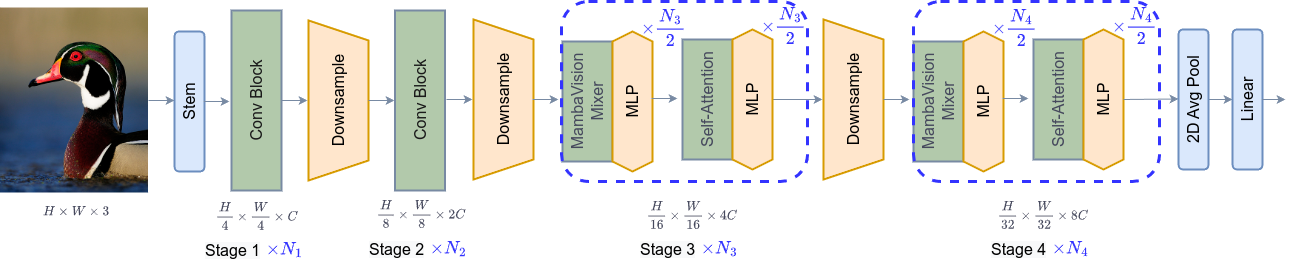
MambaVision has a hierarchical architecture that employs both self-attention and mixer blocks:
[06.10.2025] The MambaVision poster will be presented in CVPR 2025 in Nashville on Sunday, June 15, 2025, from 10:30 a.m. to 12:30 p.m. CDT in Exhibit Hall D, Poster #403.
[06.10.2025] Semantic segmentation code and models released here !
[06.07.2025] Object detection code and models released here !
[03.29.2025] You can now easily run MambaVision in Google Colab. Try here:
[03.29.2025] New MambaVision pip package released !
[03.25.2025] Updated manuscript is now available on arXiv !
[03.25.2025] 21K models and code added to the repository.
[03.25.2025] MambaVision is the first mamba-based vision backbone at scale !
[03.24.2025] MambaVision-L3-512-21K achieves a Top-1 accuracy of 88.1 %
[03.24.2025] New ImageNet-21K models have been added to MambaVision Hugging Face collection
[02.26.2025] MambaVision has been accepted to CVPR 2025 !
[07.24.2024] MambaVision Hugging Face models are released !
[07.14.2024] We added support for processing any resolution images.
[07.12.2024] Paper is now available on arXiv !
[07.11.2024] Mambavision pip package is released !
[07.10.2024] We have released the code and model checkpoints for Mambavision !
You can simply try image classification with MambaVision in Google Colab:
Pretrained MambaVision models can be simply used via Hugging Face library with a few lines of code. First install the requirements:
pip install mambavision
The model can be simply imported:
>>> from transformers import AutoModelForImageClassification

>>> model = AutoModelForImageClassification.from_pretrained("nvidia/MambaVision-T-1K", trust_remote_code=True)
We demonstrate an end-to-end image classification example in the following.
Given the following image from COCO dataset val set as an input:

The following snippet can be used:
from transformers import AutoModelForImageClassification
from PIL import Image
from timm.data.transforms_factory import create_transform
import requests

model = AutoModelForImageClassification.from_pretrained("nvidia/MambaVision-T-1K", trust_remote_code=True)

# eval mode for inference
model.cuda().eval()

# prepare image for the model
url = 'http://images.cocodataset.org/val2017/000000020247.jpg'
image = Image.open(requests.get(url, stream=True).raw)
input_resolution = (3, 224, 224)  # MambaVision supports any input resolutions

transform = create_transform(input_size=input_resolution,
                             is_training=False,
                             mean=model.config.mean,
                             std=model.config.std,
                             crop_mode=model.config.crop_mode,
                             crop_pct=model.config.crop_pct)

inputs = transform(image).unsqueeze(0).cuda()
# model inference
outputs = model(inputs)
logits = outputs['logits']
predicted_class_idx = logits.argmax(-1).item()
print("Predicted class:", model.config.id2label[predicted_class_idx])
The predicted label is brown bear, bruin, Ursus arctos.
You can also use Hugging Face MambaVision models for feature extraction. The model provides the outputs of each stage of model (hierarchical multi-scale features in 4 stages) as well as the final averaged-pool features that are flattened. The former is used for downstream tasks such as classification and detection.
The following snippet can be used for feature extraction:
from transformers import AutoModel
from PIL import Image
from timm.data.transforms_factory import create_transform
import requests

model = AutoModel.from_pretrained("nvidia/MambaVision-T-1K", trust_remote_code=True)

# eval mode for inference
model.cuda().eval()

# prepare image for the model
url = 'http://images.cocodataset.org/val2017/000000020247.jpg'
image = Image.open(requests.get(url, stream=True).raw)
input_resolution = (3, 224, 224)  # MambaVision supports any input resolutions

transform = create_transform(input_size=input_resolution,
                             is_training=False,
                             mean=model.config.mean,
                             std=model.config.std,
                             crop_mode=model.config.crop_mode,
                             crop_pct=model.config.crop_pct)
inputs = transform(image).unsqueeze(0).cuda()
# model inference
out_avg_pool, features = model(inputs)
print("Size of the averaged pool features:", out_avg_pool.size())  # torch.Size([1, 640])
print("Number of stages in extracted features:", len(features)) # 4 stages
print("Size of extracted features in stage 1:", features[0].size()) # torch.Size([1, 80, 56, 56])
print("Size of extracted features in stage 4:", features[3].size()) # torch.Size([1, 640, 7, 7])
Currently, we offer MambaVision-T-1K, MambaVision-T2-1K, MambaVision-S-1K, MambaVision-B-1K, MambaVision-L-1K and MambaVision-L2-1K on Hugging Face. All models can also be viewed here.
We can also import pre-trained MambaVision models from the pip package with a few lines of code:
pip install mambavision
A pretrained MambaVision model with default hyper-parameters can be created as in:
>>> from mambavision import create_model

# Define mamba_vision_T model

>>> model = create_model('mamba_vision_T', pretrained=True, model_path="/tmp/mambavision_tiny_1k.pth.tar")
Available list of pretrained models include mamba_vision_T, mamba_vision_T2, mamba_vision_S, mamba_vision_B, mamba_vision_L and mamba_vision_L2.
We can also simply test the model by passing a dummy image with any resolution. The output is the logits:
>>> import torch

>>> image = torch.rand(1, 3, 512, 224).cuda() # place image on cuda
>>> model = model.cuda() # place model on cuda
>>> output = model(image) # output logit size is [1, 1000]
Using the pretrained models from our pip package, you can simply run validation:
python validate_pip_model.py --model mamba_vision_T --data_dir=$DATA_PATH --batch-size $BS
| Name | Acc@1(%) | Acc@5(%) | #Params(M) | FLOPs(G) | Resolution | HF | Download |
|---|---|---|---|---|---|---|---|
| MambaVision-B-21K | 84.9 | 97.5 | 97.7 | 15.0 | 224x224 | link | model |
| MambaVision-L-21K | 86.1 | 97.9 | 227.9 | 34.9 | 224x224 | link | model |
| MambaVision-L2-512-21K | 87.3 | 98.4 | 241.5 | 196.3 | 512x512 | link | model |
| MambaVision-L3-256-21K | 87.3 | 98.3 | 739.6 | 122.3 | 256x256 | link | model |
| MambaVision-L3-512-21K | 88.1 | 98.6 | 739.6 | 489.1 | 512x512 | link | model |
| Name | Acc@1(%) | Acc@5(%) | Throughput(Img/Sec) | Resolution | #Params(M) | FLOPs(G) | HF | Download |
|---|---|---|---|---|---|---|---|---|
| MambaVision-T | 82.3 | 96.2 | 6298 | 224x224 | 31.8 | 4.4 | link | model |
| MambaVision-T2 | 82.7 | 96.3 | 5990 | 224x224 | 35.1 | 5.1 | link | model |
| MambaVision-S | 83.3 | 96.5 | 4700 | 224x224 | 50.1 | 7.5 | link | model |
| MambaVision-B | 84.2 | 96.9 | 3670 | 224x224 | 97.7 | 15.0 | link | model |
| MambaVision-L | 85.0 | 97.1 | 2190 | 224x224 | 227.9 | 34.9 | link | model |
| MambaVision-L2 | 85.3 | 97.2 | 1021 | 224x224 | 241.5 | 37.5 | link | model |
| Backbone | Detector | Lr Schd | box mAP | mask mAP | #Params(M) | FLOPs(G) | Config | Log | Model Ckpt |
|---|---|---|---|---|---|---|---|---|---|
| MambaVision-T-1K | Cascade Mask R-CNN | 3x | 51.1 | 44.3 | 86 | 740 | config | log | model |
| MambaVision-S-1K | Cascade Mask R-CNN | 3x | 52.3 | 45.2 | 108 | 828 | config | log | model |
| MambaVision-B-1K | Cascade Mask R-CNN | 3x | 52.8 | 45.7 | 145 | 964 | config | log | model |
| Backbone | Method | Lr Schd | mIoU | #Params(M) | FLOPs(G) | Config | Log | Model Ckpt |
|---|---|---|---|---|---|---|---|---|
| MambaVision-T-1K | UPerNet | 160K | 46.0 | 55 | 945 | config | log | model |
| MambaVision-S-1K | UPerNet | 160K | 48.2 | 84 | 1135 | config | log | model |
| MambaVision-B-1K | UPerNet | 160K | 49.1 | 126 | 1342 | config | log | model |
| MambaVision-L3-512-21K | UPerNet | 160K | 53.2 | 780 | 3670 | config | log | model |
We provide a docker file. In addition, assuming that a recent PyTorch package is installed, the dependencies can be installed by running:
pip install -r requirements.txt
The MambaVision models can be evaluated on ImageNet-1K validation set using the following:
python validate.py \
--model <model-name>
--checkpoint <checkpoint-path>
--data_dir <imagenet-path>
--batch-size <batch-size-per-gpu
Here --model is the MambaVision variant (e.g. mambavision_tiny_1k), --checkpoint is the path to pretrained model weights, --data_dir is the path to ImageNet-1K validation set and --batch-size is the number of batch size. We also provide a sample script here.
Yes ! you can pass images with any arbitrary resolutions without the need to change the model.
Yes ! the pretrained weights are released under CC-BY-NC-SA-4.0. Please submit an issue in this repo and we will add your repository to the README of our codebase and properly acknowledge your efforts.
Yes ! we have released the model that supports downstream tasks along code and pretrained models for object detection and semantic segmentation.
Please see this snippet for throughput and FLOPs measurement. Results may vary depending on the hardware.
If you find MambaVision to be useful for your work, please consider citing our paper:
@inproceedings{hatamizadeh2025mambavision,
  title={Mambavision: A hybrid mamba-transformer vision backbone},
  author={Hatamizadeh, Ali and Kautz, Jan},
  booktitle={Proceedings of the Computer Vision and Pattern Recognition Conference},
  pages={25261--25270},
  year={2025}
}
Copyright © 2026, NVIDIA Corporation. All rights reserved.
This work is made available under the NVIDIA Source Code License-NC. Click here to view a copy of this license.
The pre-trained models are shared under CC-BY-NC-SA-4.0. If you remix, transform, or build upon the material, you must distribute your contributions under the same license as the original.
For license information regarding the timm repository, please refer to its repository.
For license information regarding the ImageNet dataset, please see the ImageNet official website.
This repository is built on top of the timm repository. We thank Ross Wrightman for creating and maintaining this high-quality library.
1,113 followers · starred Jul 2024
7,139 followers · starred Jun 2025
84 followers · starred Aug 2024
84 followers · starred Jul 2024
[CVPR 2025] Official PyTorch Implementation of MambaVision: A Hybrid Mamba-Transformer Vision Backbone
See the codeOfficial PyTorch implementation of MambaVision: A Hybrid Mamba-Transformer Vision Backbone.
Ali Hatamizadeh and Jan Kautz.
For business inquiries, please visit our website and submit the form: NVIDIA Research Licensing
Try MambaVision:
MambaVision demonstrates a strong performance by achieving a new SOTA Pareto-front in terms of Top-1 accuracy and throughput.
We introduce a novel mixer block by creating a symmetric path without SSM to enhance the modeling of global context:
MambaVision has a hierarchical architecture that employs both self-attention and mixer blocks:
[06.10.2025] The MambaVision poster will be presented in CVPR 2025 in Nashville on Sunday, June 15, 2025, from 10:30 a.m. to 12:30 p.m. CDT in Exhibit Hall D, Poster #403.
[06.10.2025] Semantic segmentation code and models released here !
[06.07.2025] Object detection code and models released here !
[03.29.2025] You can now easily run MambaVision in Google Colab. Try here:
[03.29.2025] New MambaVision pip package released !
[03.25.2025] Updated manuscript is now available on arXiv !
[03.25.2025] 21K models and code added to the repository.
[03.25.2025] MambaVision is the first mamba-based vision backbone at scale !
[03.24.2025] MambaVision-L3-512-21K achieves a Top-1 accuracy of 88.1 %
[03.24.2025] New ImageNet-21K models have been added to MambaVision Hugging Face collection
[02.26.2025] MambaVision has been accepted to CVPR 2025 !
[07.24.2024] MambaVision Hugging Face models are released !
[07.14.2024] We added support for processing any resolution images.
[07.12.2024] Paper is now available on arXiv !
[07.11.2024] Mambavision pip package is released !
[07.10.2024] We have released the code and model checkpoints for Mambavision !
You can simply try image classification with MambaVision in Google Colab:
Pretrained MambaVision models can be simply used via Hugging Face library with a few lines of code. First install the requirements:
pip install mambavision
The model can be simply imported:
>>> from transformers import AutoModelForImageClassification

>>> model = AutoModelForImageClassification.from_pretrained("nvidia/MambaVision-T-1K", trust_remote_code=True)
We demonstrate an end-to-end image classification example in the following.
Given the following image from COCO dataset val set as an input:
The following snippet can be used:
from transformers import AutoModelForImageClassification
from PIL import Image
from timm.data.transforms_factory import create_transform
import requests

model = AutoModelForImageClassification.from_pretrained("nvidia/MambaVision-T-1K", trust_remote_code=True)

# eval mode for inference
model.cuda().eval()

# prepare image for the model
url = 'http://images.cocodataset.org/val2017/000000020247.jpg'
image = Image.open(requests.get(url, stream=True).raw)
input_resolution = (3, 224, 224)  # MambaVision supports any input resolutions

transform = create_transform(input_size=input_resolution,
                             is_training=False,
                             mean=model.config.mean,
                             std=model.config.std,
                             crop_mode=model.config.crop_mode,
                             crop_pct=model.config.crop_pct)

inputs = transform(image).unsqueeze(0).cuda()
# model inference
outputs = model(inputs)
logits = outputs['logits']
predicted_class_idx = logits.argmax(-1).item()
print("Predicted class:", model.config.id2label[predicted_class_idx])
The predicted label is brown bear, bruin, Ursus arctos.
You can also use Hugging Face MambaVision models for feature extraction. The model provides the outputs of each stage of model (hierarchical multi-scale features in 4 stages) as well as the final averaged-pool features that are flattened. The former is used for downstream tasks such as classification and detection.
The following snippet can be used for feature extraction:
from transformers import AutoModel
from PIL import Image
from timm.data.transforms_factory import create_transform
import requests

model = AutoModel.from_pretrained("nvidia/MambaVision-T-1K", trust_remote_code=True)

# eval mode for inference
model.cuda().eval()

# prepare image for the model
url = 'http://images.cocodataset.org/val2017/000000020247.jpg'
image = Image.open(requests.get(url, stream=True).raw)
input_resolution = (3, 224, 224)  # MambaVision supports any input resolutions

transform = create_transform(input_size=input_resolution,
                             is_training=False,
                             mean=model.config.mean,
                             std=model.config.std,
                             crop_mode=model.config.crop_mode,
                             crop_pct=model.config.crop_pct)
inputs = transform(image).unsqueeze(0).cuda()
# model inference
out_avg_pool, features = model(inputs)
print("Size of the averaged pool features:", out_avg_pool.size())  # torch.Size([1, 640])
print("Number of stages in extracted features:", len(features)) # 4 stages
print("Size of extracted features in stage 1:", features[0].size()) # torch.Size([1, 80, 56, 56])
print("Size of extracted features in stage 4:", features[3].size()) # torch.Size([1, 640, 7, 7])
Currently, we offer MambaVision-T-1K, MambaVision-T2-1K, MambaVision-S-1K, MambaVision-B-1K, MambaVision-L-1K and MambaVision-L2-1K on Hugging Face. All models can also be viewed here.
We can also import pre-trained MambaVision models from the pip package with a few lines of code:
pip install mambavision
A pretrained MambaVision model with default hyper-parameters can be created as in:
>>> from mambavision import create_model

# Define mamba_vision_T model

>>> model = create_model('mamba_vision_T', pretrained=True, model_path="/tmp/mambavision_tiny_1k.pth.tar")
Available list of pretrained models include mamba_vision_T, mamba_vision_T2, mamba_vision_S, mamba_vision_B, mamba_vision_L and mamba_vision_L2.
We can also simply test the model by passing a dummy image with any resolution. The output is the logits:
>>> import torch

>>> image = torch.rand(1, 3, 512, 224).cuda() # place image on cuda
>>> model = model.cuda() # place model on cuda
>>> output = model(image) # output logit size is [1, 1000]
Using the pretrained models from our pip package, you can simply run validation:
python validate_pip_model.py --model mamba_vision_T --data_dir=$DATA_PATH --batch-size $BS
| Name | Acc@1(%) | Acc@5(%) | #Params(M) | FLOPs(G) | Resolution | HF | Download |
|---|---|---|---|---|---|---|---|
| MambaVision-B-21K | 84.9 | 97.5 | 97.7 | 15.0 | 224x224 | link | model |
| MambaVision-L-21K | 86.1 | 97.9 | 227.9 | 34.9 | 224x224 | link | model |
| MambaVision-L2-512-21K | 87.3 | 98.4 | 241.5 | 196.3 | 512x512 | link | model |
| MambaVision-L3-256-21K | 87.3 | 98.3 | 739.6 | 122.3 | 256x256 | link | model |
| MambaVision-L3-512-21K | 88.1 | 98.6 | 739.6 | 489.1 | 512x512 | link | model |
| Name | Acc@1(%) | Acc@5(%) | Throughput(Img/Sec) | Resolution | #Params(M) | FLOPs(G) | HF | Download |
|---|---|---|---|---|---|---|---|---|
| MambaVision-T | 82.3 | 96.2 | 6298 | 224x224 | 31.8 | 4.4 | link | model |
| MambaVision-T2 | 82.7 | 96.3 | 5990 | 224x224 | 35.1 | 5.1 | link | model |
| MambaVision-S | 83.3 | 96.5 | 4700 | 224x224 | 50.1 | 7.5 | link | model |
| MambaVision-B | 84.2 | 96.9 | 3670 | 224x224 | 97.7 | 15.0 | link | model |
| MambaVision-L | 85.0 | 97.1 | 2190 | 224x224 | 227.9 | 34.9 | link | model |
| MambaVision-L2 | 85.3 | 97.2 | 1021 | 224x224 | 241.5 | 37.5 | link | model |
| Backbone | Detector | Lr Schd | box mAP | mask mAP | #Params(M) | FLOPs(G) | Config | Log | Model Ckpt |
|---|---|---|---|---|---|---|---|---|---|
| MambaVision-T-1K | Cascade Mask R-CNN | 3x | 51.1 | 44.3 | 86 | 740 | config | log | model |
| MambaVision-S-1K | Cascade Mask R-CNN | 3x | 52.3 | 45.2 | 108 | 828 | config | log | model |
| MambaVision-B-1K | Cascade Mask R-CNN | 3x | 52.8 | 45.7 | 145 | 964 | config | log | model |
| Backbone | Method | Lr Schd | mIoU | #Params(M) | FLOPs(G) | Config | Log | Model Ckpt |
|---|---|---|---|---|---|---|---|---|
| MambaVision-T-1K | UPerNet | 160K | 46.0 | 55 | 945 | config | log | model |
| MambaVision-S-1K | UPerNet | 160K | 48.2 | 84 | 1135 | config | log | model |
| MambaVision-B-1K | UPerNet | 160K | 49.1 | 126 | 1342 | config | log | model |
| MambaVision-L3-512-21K | UPerNet | 160K | 53.2 | 780 | 3670 | config | log | model |
We provide a docker file. In addition, assuming that a recent PyTorch package is installed, the dependencies can be installed by running:
pip install -r requirements.txt
The MambaVision models can be evaluated on ImageNet-1K validation set using the following:
python validate.py \
--model <model-name>
--checkpoint <checkpoint-path>
--data_dir <imagenet-path>
--batch-size <batch-size-per-gpu
Here --model is the MambaVision variant (e.g. mambavision_tiny_1k), --checkpoint is the path to pretrained model weights, --data_dir is the path to ImageNet-1K validation set and --batch-size is the number of batch size. We also provide a sample script here.
Yes ! you can pass images with any arbitrary resolutions without the need to change the model.
Yes ! the pretrained weights are released under CC-BY-NC-SA-4.0. Please submit an issue in this repo and we will add your repository to the README of our codebase and properly acknowledge your efforts.
Yes ! we have released the model that supports downstream tasks along code and pretrained models for object detection and semantic segmentation.
Please see this snippet for throughput and FLOPs measurement. Results may vary depending on the hardware.
If you find MambaVision to be useful for your work, please consider citing our paper:
@inproceedings{hatamizadeh2025mambavision,
  title={Mambavision: A hybrid mamba-transformer vision backbone},
  author={Hatamizadeh, Ali and Kautz, Jan},
  booktitle={Proceedings of the Computer Vision and Pattern Recognition Conference},
  pages={25261--25270},
  year={2025}
}
Copyright © 2026, NVIDIA Corporation. All rights reserved.
This work is made available under the NVIDIA Source Code License-NC. Click here to view a copy of this license.
The pre-trained models are shared under CC-BY-NC-SA-4.0. If you remix, transform, or build upon the material, you must distribute your contributions under the same license as the original.
For license information regarding the timm repository, please refer to its repository.
For license information regarding the ImageNet dataset, please see the ImageNet official website.
This repository is built on top of the timm repository. We thank Ross Wrightman for creating and maintaining this high-quality library.
1,113 followers · starred Jul 2024
7,139 followers · starred Jun 2025
84 followers · starred Aug 2024
84 followers · starred Jul 2024



