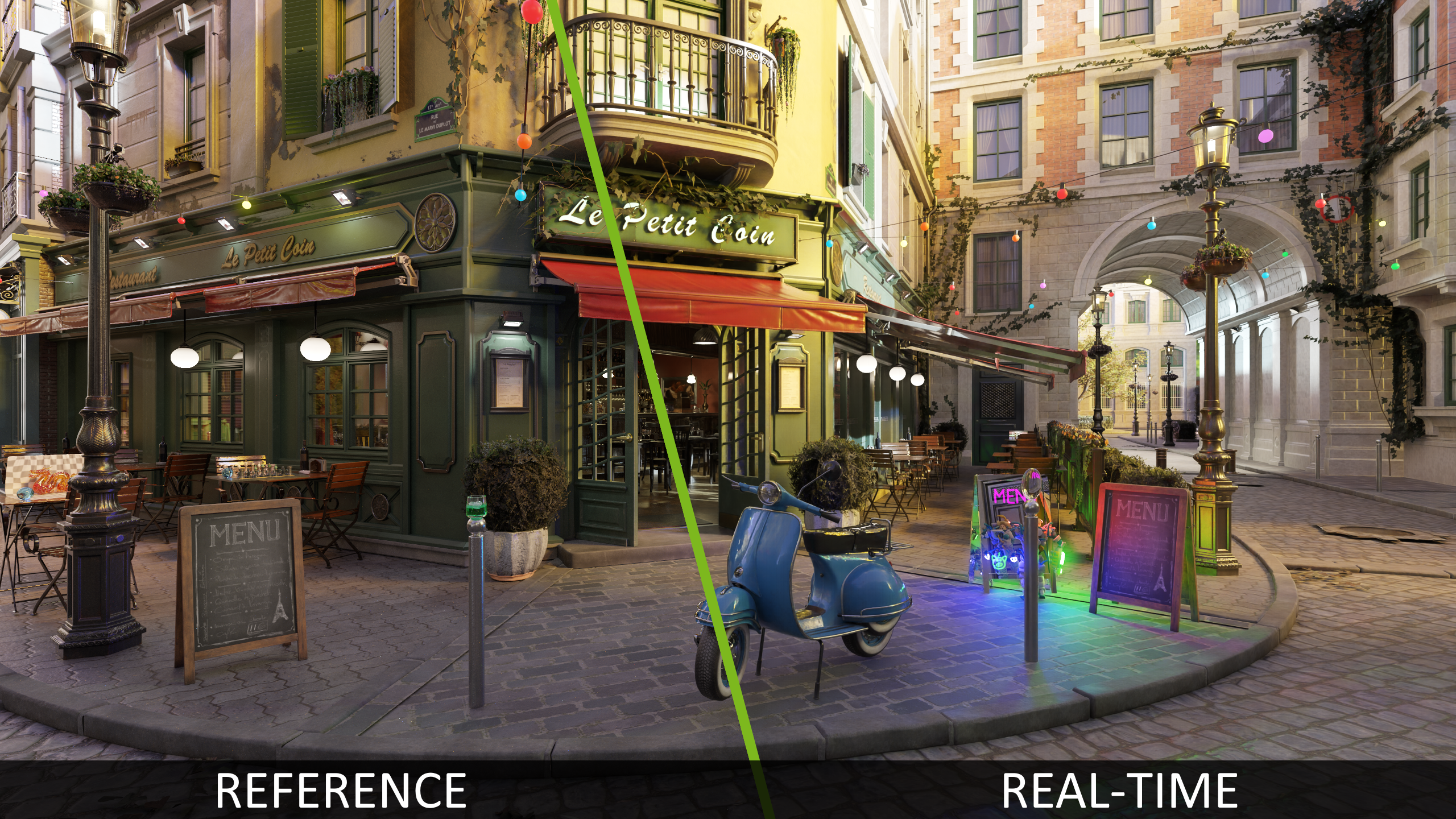
bistro-programmer-art scene for stress testing animation and dynamic lighting scenarios (see 1, 2, 3, 4)See Releases for more detail and downloads.
RTX Path Tracing is a code sample that strives to embody years of ray tracing and neural graphics research and experience. It is intended as a starting point for a clean path tracer integration, as a reference for various integrated SDKs, and/or for learning and experimentation.
It is a pure path tracer that does not rely on rasterization. In its main configuration, all light transport is evaluated within a single ray tracing pass, leveraging light-sampling caches for real-time performance. It further employs path-space layer decomposition and guide-buffer generation to support real-time denoising (DLSS-RR) and other techniques.
The base path tracing implementation derives from NVIDIA’s Falcor Research Path Tracer, ported to approachable C++/HLSL Donut framework.
GTC presentation How to Build a Real-time Path Tracer provides a high level introduction to most of the features, although it is pretty much out of date by now.
/bin folder, re-configuring/re-generating and rebuilding the project.| /bin | default CMake folder for binaries and compiled shaders |
| /build | default CMake folder for build files |
| /Assets | models, textures, scene files |
| /Docs | documentation |
| /External | external libraries and SDKs, including Donut, Streamline, NRD, RTXDI, and OMM |
| /Support | optional command line tools (denoiser, texture compressor, etc) |
| /Rtxpt | RTX Path Tracing core; Sample.cpp/.h/.hlsl contain entry points |
| /Rtxpt/PathTracer | Core path tracing shaders |
At the moment, only Windows builds are fully supported. We are going to add Linux support in the future.
Clone the repository with all submodules recursively:
git clone --recursive https://github.com/NVIDIA-RTX/RTXPT.git
Use CMake to configure the build and generate the project files.
cd RTXPT
cmake CMakeLists.txt -B ./build
Use -G "some tested VS version" if specific Visual Studio or other environment version required. Make sure the x64 platform is used.
Build the solution generated by CMake in the ./build/ folder.
In example, if using Visual Studio, open the generated solution build/RTXPathTracing.sln and build it.
Select and run the Rtxpt project. Binaries get built to the bin folder. Assets/media are loaded from Assets folder.
If making a binary build, the Assets and Support folders can be placed into bin next to executable and packed up together (i.e. the sample app will search for both Assets/ and ../Assets/).
Due to interaction with various included libraries, Vulkan support is not enabled by default and needs a couple of additional tweaks on the user side; please find the recommended steps below:
--vk command line parameterRTX PT optionally integrates DirectX 12 Agility SDK. If RTXPT_DOWNLOAD_AND_ENABLE_AGILITY_SDK CMake variable is set to TRUE, the version 717-preview will be automatically downloaded via CMake script and required build variables will be set. If different version is required, please set correct RTXPT_D3D_AGILITY_SDK_PATH and RTXPT_D3D_AGILITY_SDK_VERSION.
Version 717-preview enables native DirectX support for Shader Execution Reordering and Opacity Micromaps. For testing this on Nvidia hardware, a preview driver is required and can be downloaded from https://developer.nvidia.com/downloads/shadermodel6-9-preview-driver
Once the application is running, most of the SDK features can be accessed via the UI window on the left hand side and drop-down controls in the top-center.
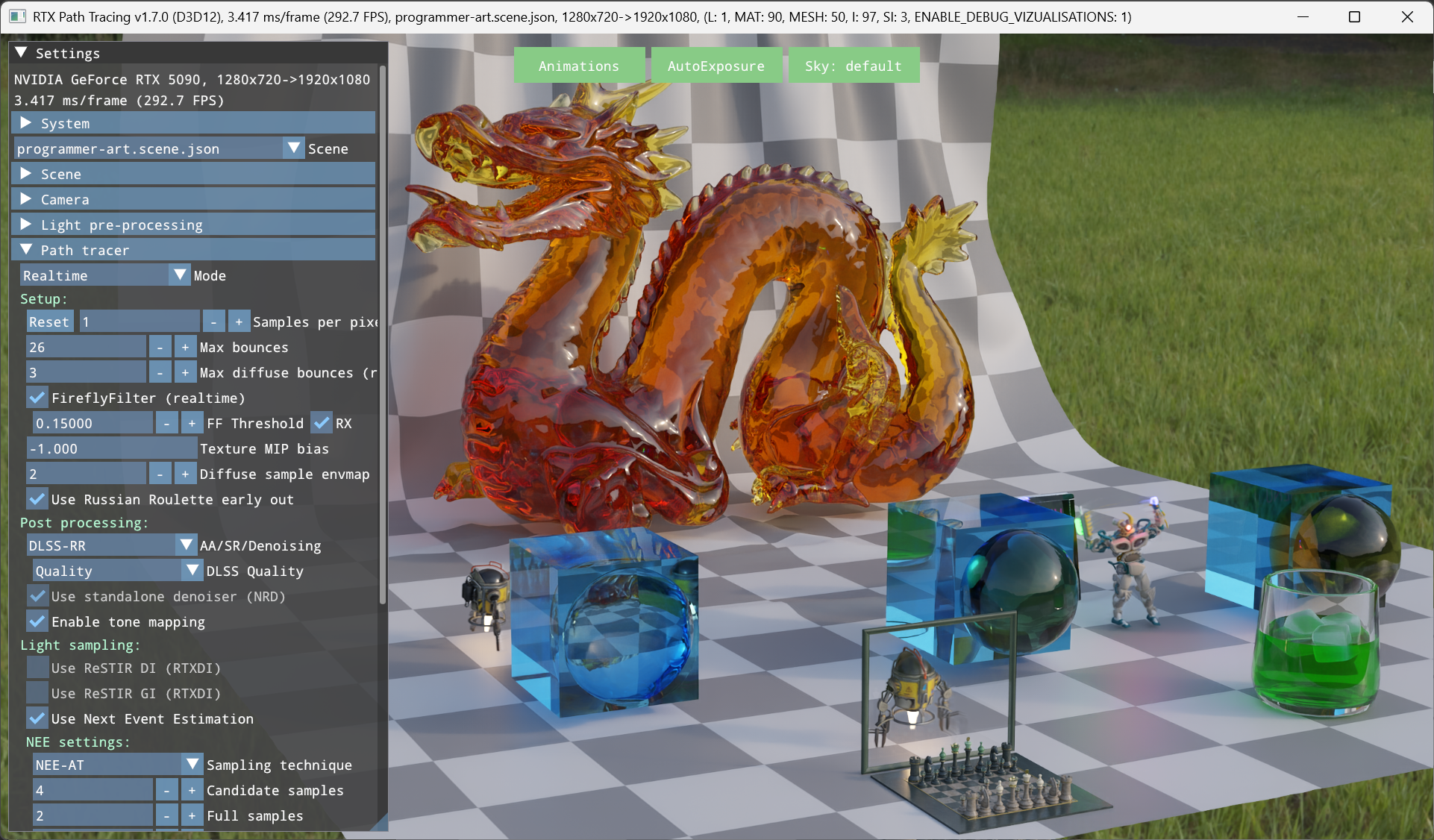
Camera can be moved using W/S/A/D keys and rotated by dragging with the left mouse cursor.
--scene loads a specific .scene.json file; example: --scene programmer-art.scene.json--width and --height to set the window size; example: --width 3840 --height 2160--fullscreen to start in full screen mode; example: --width 3840 --height 2160 --fullscreen--debug to enable the graphics API debug layer or runtime, and additional validation layers.--vk to enable Vulkan (see building-vulkan)We are working on more detailed SDK developer documentation - watch this space!
RTX Path Tracing is under active development. Please report any issues directly through GitHub issue tracker, and for any information, suggestions or general requests please feel free to contact us at pathtracing-sdk-support@nvidia.com!
Many thanks to the developers of the following open-source libraries or projects that make this project possible:
If you use RTX Path Tracing in a research project leading to a publication, please cite the project. The BibTex entry is
@online{RTXPT,
   title   = {{{NVIDIA}}\textregistered{} {RTX Path Tracing}},
   author  = {{NVIDIA}},
   year    = 2023,
   url     = {https://github.com/NVIDIA-RTX/RTXPT},
   urldate = {2024-01-26},
}
See LICENSE.txt
This project includes NVAPI software. All uses of NVAPI software are governed by the license terms specified here: https://github.com/NVIDIA/nvapi/blob/main/License.txt.
66 followers · starred Mar 2023
484 followers · starred Apr 2024
56 followers · starred Apr 2025
105 followers · starred Mar 2026
bistro-programmer-art scene for stress testing animation and dynamic lighting scenarios (see 1, 2, 3, 4)See Releases for more detail and downloads.
RTX Path Tracing is a code sample that strives to embody years of ray tracing and neural graphics research and experience. It is intended as a starting point for a clean path tracer integration, as a reference for various integrated SDKs, and/or for learning and experimentation.
It is a pure path tracer that does not rely on rasterization. In its main configuration, all light transport is evaluated within a single ray tracing pass, leveraging light-sampling caches for real-time performance. It further employs path-space layer decomposition and guide-buffer generation to support real-time denoising (DLSS-RR) and other techniques.
The base path tracing implementation derives from NVIDIA’s Falcor Research Path Tracer, ported to approachable C++/HLSL Donut framework.
GTC presentation How to Build a Real-time Path Tracer provides a high level introduction to most of the features, although it is pretty much out of date by now.
/bin folder, re-configuring/re-generating and rebuilding the project.| /bin | default CMake folder for binaries and compiled shaders |
| /build | default CMake folder for build files |
| /Assets | models, textures, scene files |
| /Docs | documentation |
| /External | external libraries and SDKs, including Donut, Streamline, NRD, RTXDI, and OMM |
| /Support | optional command line tools (denoiser, texture compressor, etc) |
| /Rtxpt | RTX Path Tracing core; Sample.cpp/.h/.hlsl contain entry points |
| /Rtxpt/PathTracer | Core path tracing shaders |
At the moment, only Windows builds are fully supported. We are going to add Linux support in the future.
Clone the repository with all submodules recursively:
git clone --recursive https://github.com/NVIDIA-RTX/RTXPT.git
Use CMake to configure the build and generate the project files.
cd RTXPT
cmake CMakeLists.txt -B ./build
Use -G "some tested VS version" if specific Visual Studio or other environment version required. Make sure the x64 platform is used.
Build the solution generated by CMake in the ./build/ folder.
In example, if using Visual Studio, open the generated solution build/RTXPathTracing.sln and build it.
Select and run the Rtxpt project. Binaries get built to the bin folder. Assets/media are loaded from Assets folder.
If making a binary build, the Assets and Support folders can be placed into bin next to executable and packed up together (i.e. the sample app will search for both Assets/ and ../Assets/).
Due to interaction with various included libraries, Vulkan support is not enabled by default and needs a couple of additional tweaks on the user side; please find the recommended steps below:
--vk command line parameterRTX PT optionally integrates DirectX 12 Agility SDK. If RTXPT_DOWNLOAD_AND_ENABLE_AGILITY_SDK CMake variable is set to TRUE, the version 717-preview will be automatically downloaded via CMake script and required build variables will be set. If different version is required, please set correct RTXPT_D3D_AGILITY_SDK_PATH and RTXPT_D3D_AGILITY_SDK_VERSION.
Version 717-preview enables native DirectX support for Shader Execution Reordering and Opacity Micromaps. For testing this on Nvidia hardware, a preview driver is required and can be downloaded from https://developer.nvidia.com/downloads/shadermodel6-9-preview-driver
Once the application is running, most of the SDK features can be accessed via the UI window on the left hand side and drop-down controls in the top-center.
Camera can be moved using W/S/A/D keys and rotated by dragging with the left mouse cursor.
--scene loads a specific .scene.json file; example: --scene programmer-art.scene.json--width and --height to set the window size; example: --width 3840 --height 2160--fullscreen to start in full screen mode; example: --width 3840 --height 2160 --fullscreen--debug to enable the graphics API debug layer or runtime, and additional validation layers.--vk to enable Vulkan (see building-vulkan)We are working on more detailed SDK developer documentation - watch this space!
RTX Path Tracing is under active development. Please report any issues directly through GitHub issue tracker, and for any information, suggestions or general requests please feel free to contact us at pathtracing-sdk-support@nvidia.com!
Many thanks to the developers of the following open-source libraries or projects that make this project possible:
If you use RTX Path Tracing in a research project leading to a publication, please cite the project. The BibTex entry is
@online{RTXPT,
   title   = {{{NVIDIA}}\textregistered{} {RTX Path Tracing}},
   author  = {{NVIDIA}},
   year    = 2023,
   url     = {https://github.com/NVIDIA-RTX/RTXPT},
   urldate = {2024-01-26},
}
See LICENSE.txt
This project includes NVAPI software. All uses of NVAPI software are governed by the license terms specified here: https://github.com/NVIDIA/nvapi/blob/main/License.txt.
66 followers · starred Mar 2023
484 followers · starred Apr 2024
56 followers · starred Apr 2025
105 followers · starred Mar 2026



