Build and develop iOS apps without a Mac using GitHub Actions, Codemagic, or Bitrise, with simulator access and hot reload via MobAI.
Go
1,172
74 commits
updated Oct 10, 2026
Build and develop iOS apps from Windows, Linux, or any platform.
Builder is a CLI tool for iOS development without a Mac. It uses GitHub Actions (default), Codemagic, or Bitrise for remote builds and MobAI for on-device development.
Your Repository                  GitHub Actions (macOS)
 └─ .github/workflows/            └─ ios-build.yml
     └─ ios-build.yml                 ├─ Check out the snapshot
                                      ├─ Build with Xcode
builder ios build ───────────────────► Upload IPA artifact
     │  pushes a snapshot of
     │  your working tree
     └─ Downloads IPA ◄─────────────── artifact: ipa
builder ios build builds what is on disk, not your last commit: uncommitted
and untracked files are included, so you can try a change without committing
it. The snapshot is a throwaway commit pushed to a hidden ref that is deleted
when the build finishes; no branch is created and nothing is committed on your
behalf. .gitignore still applies, so ignored files such as .env or
GoogleService-Info.plist are absent from the build.
builder auth github
cd your-ios-project
builder init
This detects your GitHub repo, creates the workflow files, and offers to commit, push, and trigger your first build - all interactively.
builder ios build
The CLI triggers the workflow and downloads the IPA to ./dist/.
builder ios share
Builds the working tree for the iOS simulator and makes that simulator usable
from the MobAI app, so you can tap through a build without
a Mac. It shows up under CI Devices, stays available while you are using it, and
closes when you release it there or leave it unused (30 minutes by default, use
--duration to change). A coding agent connected to MobAI (Claude Code, Codex,
Cursor) can drive the simulator the same way.
Free with any MobAI account, on MobAI 3.0 or later. Needs
a MOBAI_API_KEY repository secret: create the key in the MobAI app under
Account → API Keys, then:
gh secret set MOBAI_API_KEY
Where the GitHub API is not reachable, both workflows can also be started by pushing a tag. Commit the tree you want built, then:
git tag ios-build/my-build && git push origin ios-build/my-build   # IPA build
git tag ios-share/my-build && git push origin ios-share/my-build   # simulator
The run is named after the tag. Build settings come from builder.json in the
tagged commit (ios.path, ios.scheme, ios.signing, ios.configuration,
flutter.version, kmp.jdkVersion), the simulator stays available for the
default 30 minutes, and the tag is deleted when the run ends. The IPA is
attached to the run as an artifact. A tag carries no flags, so a tagged IPA
build cannot pick a profile per run; it applies the profile
named by defaultProfile, if there is one. The simulator build takes no
profile at all.
GitHub Actions remains the default, so existing commands continue to work. Add Codemagic and Bitrise without logging out of GitHub. First follow the app creation and repository connection guide to create each provider app, authorize GitHub access, and find its app ID:
builder auth codemagic
builder auth bitrise
builder auth status
builder init --provider codemagic --app-id YOUR_APP_ID --branch main
builder init --provider bitrise --app-id YOUR_APP_SLUG --branch main
builder ios build --provider codemagic
builder ios build --provider bitrise
init writes codemagic.yaml or bitrise.yml at the repo root plus the shared
runner script .builder/ci/runner.sh. Commit them to the configured branch
and connect the same repository to each provider before building. See
provider setup, signing, simulator sessions, and free allowances.
| Framework | iOS Path | Auto-detected |
|---|---|---|
| Native iOS/Swift | . (root) | Yes |
| React Native | ios/ | Yes |
| Expo (managed or ejected) | ios/ | Yes |
| Flutter | ios/ | Yes |
| Kotlin Multiplatform | iosApp/ | Yes |
| Cordova/Ionic | platforms/ios/ | Yes |
The runner installs JavaScript dependencies with the package manager the project
already uses — npm, Yarn, pnpm or Bun, from packageManager in package.json or
from the lockfile — on the Node version from .nvmrc, .node-version or
engines.node.
Dependencies install the way they do for React Native: the project's own package
manager (npm, Yarn, pnpm or Bun) and Node version, with expo prebuild running
through that same manager.
A managed Expo project has no ios/ directory in git. builder init detects it
as Expo (managed), still records "ios": { "path": "ios" }, and the runner
generates the native project with expo prebuild --platform ios --no-install
before building it. Ejected projects keep the committed ios/ they have: the
prebuild step skips a directory that already holds an Xcode project.
expo prebuild has to run unattended, so the app config must set the bundle
identifier — expo.ios.bundleIdentifier in app.json, or ios.bundleIdentifier
in app.config.js / app.config.ts. Without one, prebuild would stop and ask
for it; instead the build fails immediately and names the missing setting.
The default Debug configuration builds an IPA that loads its JavaScript from
Metro, so set "ios": { "configuration": "Release" } in builder.json for a
standalone IPA with the bundle baked in.
An ios/ directory left over from running expo prebuild locally is not
uploaded: managed projects gitignore it, and the working-tree snapshot skips
gitignored files. That is what you want — the runner prebuilds from the app
config on every build, so it cannot drift from a stale local copy.
Download builder-windows-amd64.exe from Releases, rename it to builder.exe, and add it to PATH.
brew install mobai-app/tap/ios-builder
The formula is named ios-builder; the command it installs is builder.
curl -sSL https://raw.githubusercontent.com/MobAI-App/ios-builder/main/install.sh | bash
git clone https://github.com/MobAI-App/ios-builder.git
cd ios-builder
go build -o builder ./cmd/builder
# Setup
builder auth github           # Authenticate with GitHub
builder auth codemagic        # Authenticate with Codemagic (also: bitrise)
builder auth apple            # Save an App Store Connect API key
builder auth status           # Show which providers you are signed in to
builder auth logout [name]    # Remove stored credentials (github, codemagic, bitrise, apple)
builder init                  # Set up workflows in current repo
builder update                # Update builder to the latest release

# Building (builds the working tree, including uncommitted changes)
builder ios build             # Trigger build and download IPA to ./dist/
builder ios build --unsigned  # Build without code signing (if signing is configured)
builder ios build --provider codemagic  # Build on another provider (also: bitrise)
builder ios build --profile production  # Build with a profile from builder.json

# Simulator (free, needs a MOBAI_API_KEY secret)
builder ios share             # Try the build on a simulator in the MobAI app
builder ios share --duration 1h  # Keep it available longer while unused

# Development (requires MobAI)
builder dev flutter           # Flutter hot reload with file watching
builder dev flutter --no-watch  # Disable automatic file watching
builder dev flutter --no-attach # Print flutter attach command instead of running it
builder dev rn                # React Native hot reload (short for: dev react-native)
builder dev kmp               # Kotlin Multiplatform install + launch (alias: kotlin)
builder dev kmp --logs        # Also stream the app's output
builder dev flutter --skip-install --bundle-id <id>  # Use already installed app
builder dev rn --metro-port 8082  # Use custom Metro port

# MobAI (used by the dev commands; handy for troubleshooting)
builder mobai ping            # Check MobAI connectivity
builder mobai install <ipa>   # Install an IPA on the device
builder mobai run-debug <bundle-id>  # Launch an app with the debugger attached
builder mobai forward <device-port> <host-port>  # Forward a device port

# Code signing (automatic mode needs builder auth apple)
builder signing setup --devices-from-mobai       # development: certificate, devices, profile, GitHub secrets, no portal
builder signing setup --distribution store       # Apple Distribution certificate + App Store profile
builder signing setup --certificate ios-signing.p12 --profile MyApp.mobileprovision  # Upload your own files
builder ios build --profile store                # Signs with the set; provisions it first when missing
builder signing csr           # Manual path: create a private key + certificate signing request
builder signing p12           # Manual path: assemble a .p12 from the key and Apple's certificate

# TestFlight and App Store (needs builder auth apple)
builder ios release --profile store --group "Beta Testers" --notes "What to test"  # Build with the next build number, upload, wait, add to TestFlight
builder ios release --profile store --app-store --release after-approval  # Same, then submit the version for App Review
builder ios build --profile store --submit    # Short for: ios release (TestFlight, no groups)
builder ios upload --wait     # Upload ./dist/*.ipa to App Store Connect and wait for processing
builder ios submit --testflight --group "Beta Testers" --notes "What to test"
builder ios submit --app-store --release after-approval  # Submit the version for App Review

# Install on a device over the air (development, ad-hoc or enterprise build)
builder ios build --profile development --distribute  # Build, then print an install link + QR code
builder ios distribute        # Same for the newest IPA in ./dist/ (or --ipa)
builder ios distribute --once # One link, no refresh, uploads left in place
builder ios distribute --cleanup  # Remove uploads earlier sessions left behind

# App Store Connect management (needs builder auth apple)
builder asc apps              # Apps the API key can see
builder asc builds            # Builds of the newest version, with their TestFlight groups
builder asc builds expire --build-number 42 --yes
builder asc groups            # TestFlight groups with tester counts
builder asc groups create Nightly             # Internal group (add --external for external)
builder asc groups add-build Nightly          # Newest VALID build (or --build-number)
builder asc groups delete Nightly --yes
builder asc testers --group Nightly           # With each tester's state
builder asc testers add a@example.com --group Nightly --first Ann --last Lee
builder asc testers invite a@example.com      # Send or resend the TestFlight email
builder asc testers remove a@example.com --group Nightly
builder asc users             # Team members and whether they can test internally
builder asc users invite dev@example.com --role DEVELOPER --first Dee --last Vee
Every release/upload/submit/distribute/asc command takes --json for
machine-readable output and never prompts, so agents and CI jobs can drive them.
builder.json:
{
  "project": "MyApp",
  "platform": "ios",
  "github": {
    "owner": "username",
    "repo": "my-ios-app"
  },
  "ios": {
    "path": "ios",
    "scheme": "",
    "bundleId": "com.example.app",
    "configuration": "Debug"
  },
  "profiles": {
    "development": { "distribution": "development" },
    "store":       { "distribution": "store" }
  },
  "mobai": {
    "url": "http://localhost:8686",
    "device_id": ""
  },
  "flutter": {
    "watch": {
      "dirs": ["lib"],
      "patterns": [".dart"],
      "ignore": [".g.dart", ".freezed.dart"],
      "debounce": 100
    }
  }
}
| Field | Description | Default |
|---|---|---|
ios.path | Path to the Xcode project relative to the repo root | detected by init |
ios.scheme | Xcode scheme to build | auto-detected |
ios.bundleId | App bundle identifier, used by signing setup and by ios release to find the App Store Connect app before the first IPA exists | detected by init when the project has one app target; else saved by signing setup, else the newest IPA in ./dist/ |
ios.extensions | Bundle identifiers of the app's extension targets (widgets, share/notification extensions, watch apps, app clips), each signed with its own profile | filled by init and signing setup from the Xcode project; list them by hand for a managed Expo project |
ios.configuration | Xcode build configuration. Builds are Debug unless you set Release; Debug is faster and is what the dev commands expect | Debug |
ios.signing | Legacy: sign builds that select no profile, with the unsuffixed IOS_CERTIFICATE, IOS_CERTIFICATE_PASSWORD and IOS_PROVISIONING_PROFILE secrets. Profiles ignore it; use distribution there | false |
Profiles are named sets of build settings, in the spirit of eas.json, selected
with --profile on ios build:
{
  "ios": { "path": "ios", "bundleId": "com.example.app" },
  "defaultProfile": "development",
  "profiles": {
    "development": { "distribution": "development" },
    "preview":     { "distribution": "internal",
                     "env": { "API_URL": "https://staging.example.com" } },
    "production":  { "distribution": "store", "scheme": "MyApp", "provider": "codemagic" }
  }
}
builder ios build --profile preview
| Field | Description |
|---|---|
distribution | The only signing setting: development, ad-hoc (or internal, the same thing), store or enterprise. The build signs with that distribution's signing set and its provisioning profile must be of that type; the IPA is exported with the matching method. Omitted means an unsigned build |
configuration | Overrides the derived configuration: Debug for development, Release for every other distribution, ios.configuration for unsigned profiles |
scheme | Overrides ios.scheme |
provider | Overrides the top-level provider (github, codemagic, bitrise) |
env | String map exported as environment variables on the runner before dependencies are installed and the app is built, so pod install, npm install, flutter pub get, Gradle and xcodebuild all see them |
How a build's settings are resolved:
--profile, the profile named by defaultProfile applies. With
neither, the top-level ios.* and provider settings are used exactly as
before, so existing projects are unaffected.--unsigned and --provider on the command line override the profile.ios build only. ios share takes no --profile:
simulator builds are always Debug and unsigned, and use ios.scheme and the
top-level provider (or --provider).env values are build-time configuration, not secrets. They are stored in
builder.json, sent to the CI provider as plain workflow inputs, and visible in
the run's inputs and logs. Keep tokens and passwords in the provider's secrets
(gh secret set on GitHub, or the Codemagic / Bitrise secrets
guide); the build reads those as environment
variables too. Names the runner owns are rejected: its own parameters (SCHEME,
CONFIGURATION, USE_SIGNING, BUILD_ENV, ...), the signing secrets, PATH,
HOME, DEVELOPER_DIR, and the GITHUB_, RUNNER_, CM_, BITRISE_, BUILDER_ prefixes.
Selecting a profile, with --profile or defaultProfile, needs the workflow
file from this version of Builder, which declares a profile input; an older
committed workflow rejects the dispatch. Run builder init again to refresh
.github/workflows/ios-build.yml (or builder init --provider ... for
runner.sh) in a project set up earlier, then commit and push it to the
default branch.
| Field | Description | Default |
|---|---|---|
mobai.url | MobAI API URL | http://localhost:8686 |
mobai.device_id | Preferred device ID (uses first available if empty) | "" |
WSL users: MobAI runs on Windows, and WSL has its own network by default. On
Windows 11, turn on
mirrored networking
and builder reaches MobAI on the default http://localhost:8686. See
Using Builder from WSL for the steps, and for the setup without
mirrored networking.
| Field | Description | Default |
|---|---|---|
flutter.watch.dirs | Directories to watch | ["lib"] |
flutter.watch.patterns | File patterns to match | [".dart"] |
flutter.watch.ignore | Patterns to ignore | [".g.dart", ".freezed.dart"] |
flutter.watch.debounce | Debounce delay in ms | 100 |
By default, builds are unsigned. A signed build needs a certificate and a
provisioning profile — and despite what many guides claim, you do not need a
Mac to create either one, nor a tour of the Apple Developer portal. Signing
is configured per build profile with one field,
distribution, and builder signing setup produces the material for it
through the App Store Connect API (or takes your own files).
You need a paid Apple Developer Program membership — Apple only issues certificates to paid accounts. (Without one, build unsigned and let MobAI re-sign on install with a free Apple ID.)
Each distribution has its own set of GitHub secrets, so a development set for your devices and a store set for TestFlight live side by side:
distribution | Certificate, profile | Secrets |
|---|---|---|
development | Apple Development, iOS App Development (devices required) | IOS_CERTIFICATE_DEVELOPMENT, IOS_CERTIFICATE_PASSWORD_DEVELOPMENT, IOS_PROVISIONING_PROFILE_DEVELOPMENT |
ad-hoc or internal | Apple Distribution, Ad Hoc (devices required) | IOS_CERTIFICATE_AD_HOC, IOS_CERTIFICATE_PASSWORD_AD_HOC, IOS_PROVISIONING_PROFILE_AD_HOC |
store | Apple Distribution, App Store | IOS_CERTIFICATE_STORE, IOS_CERTIFICATE_PASSWORD_STORE, IOS_PROVISIONING_PROFILE_STORE |
enterprise | In-house (portal only) | IOS_CERTIFICATE_ENTERPRISE, IOS_CERTIFICATE_PASSWORD_ENTERPRISE, IOS_PROVISIONING_PROFILE_ENTERPRISE |
An app with extension targets has a fourth secret per set,
IOS_EXTENSION_PROFILES_<SET>, holding their profiles (see
Extensions below).
A build with --profile <name> signs with the set of that profile's
distribution; configuration follows it (Debug for development,
Release otherwise) unless the profile sets one. The runner checks that the
profile in the set is of the requested type and fails by name before compiling
anything, and a distribution profile refuses a Debug configuration. On
Codemagic and Bitrise the same names are variables you add in the dashboard,
see the secrets guide.
Automatic signing, ios upload, ios submit and ios release all use one
App Store Connect API key. You create it once, in the browser:
Builder) and choose the role Admin. App
Manager works too if you also tick Access to Certificates, Identifiers &
Profiles; a Developer key can upload builds but cannot create
certificates.AuthKey_<KEYID>.p8
file downloads once; keep it somewhere private, never in the repo.Then save it in your keychain:
builder auth apple --issuer-id 12345678-abcd-... --key-id ABC123DEFG --key ~/Downloads/AuthKey_ABC123DEFG.p8
builder auth status shows it, builder auth logout apple removes it. On a
machine without a keychain (CI, a coding agent), set ASC_ISSUER_ID,
ASC_KEY_ID and ASC_KEY_PATH (or ASC_PRIVATE_KEY with the file's contents)
instead.
builder signing setupbuilder auth apple # once: save the App Store Connect API key
builder signing setup --devices-from-mobai # development set for the devices MobAI sees
builder signing setup --distribution store # store set for TestFlight / App Store
Without files, setup works through the App Store Connect API for the given
--distribution (default development; --name <profile> reads it from an
existing profile). The key needs the Admin role (or App Manager plus
Access to Certificates, Identifiers & Profiles): Developer-role keys cannot
create certificates. It then:
--bundle-id, ios.bundleId in builder.json
(which init fills when the Xcode project has a single app target), or the
newest IPA in ./dist/; in a terminal it asks as a last resort.development, Apple
Distribution for ad-hoc and store — for a private key generated on your
machine (ios-signing-<distribution>.key; --key reuses one from
signing csr, and an ios-signing.key from an earlier version is picked up
too). A valid certificate on the account is reused only when its private
key is here, since the .p12 needs it; otherwise a new one is issued.
Nothing is ever revoked: at Apple's limit (2 Development, 3 Distribution)
the error says so and points at the portal.--device <udid> (repeatable) and
--devices-from-mobai (name and UDID of every physical iOS device MobAI has
connected; simulators and cloud farm devices are skipped). Development and
ad-hoc profiles cover every enabled iOS device on the account, so with none
given and none registered the command stops and says so. Store profiles
take no devices. Apple allows 100 devices per membership year and never
frees a slot; that error is passed through too.Builder <distribution> <bundle id>. An existing
one is reused while it is ACTIVE, unexpired and still lists exactly this
certificate and these devices; otherwise it is deleted and recreated, and
the summary says why (invalid, expired, certificate changed, devices changed, forced).ios-signing-<distribution>.key (when generated),
ios-signing-<distribution>.p12 and Builder-<distribution>-<bundle id>.mobileprovision to --out-dir (default .), uploads the set's
secrets to GitHub, and writes "distribution": "<distribution>" into the
--name profile (default: the distribution name) in builder.json, keeping
its other fields and reporting a replaced distribution; defaultProfile is
left alone. An --out-dir other than . is recorded as signing.dir, so a
later ios build that provisions a set reuses the key there instead of
asking Apple for a second certificate, which it refuses..p12 base64-encoded, the password, the .mobileprovision base64-encoded
— every time, so the same set can be pasted into Codemagic or Bitrise,
following the secrets guide. Builder cannot
check those providers' secrets before a build, so ios build only reminds
you of this command when the profile signs there.The upload goes to the repository in builder.json, always. When it fails (no
GitHub login, or a token that cannot write secrets) the error is printed and
the command carries on: files and values are written and shown anyway, but
the build profile is not, since builder.json must not claim a set the
repository does not have. It exits non-zero at the end so a script notices. --json
reports the same in github_upload (ok or the error).
Extensions. Every extension target (a widget, a share or notification
extension, a watch app, an app clip) is signed with a profile of its own.
init and signing setup read their bundle IDs from the Xcode project into
ios.extensions in builder.json; a managed Expo project has no project to
read, so list them there by hand. Automatic setup then registers each App ID
and creates Builder <distribution> <bundle id> for it, with the same
certificate and devices as the app; in manual mode pass one --extension-profile <mobileprovision> per extension. The profiles go into a fourth secret of the
set, IOS_EXTENSION_PROFILES_<SET> (a JSON object of bundle ID to base64
profile, {} when there are none), and the runner signs each extension target
with the entry covering its bundle ID, failing by name — with the IDs to add to
ios.extensions — when one has none.
The command shows its plan and asks once before creating anything; --yes
skips that (required without a terminal), and then the .p12 password is
generated and printed once unless --password is given. --json prints the
result as JSON with progress on stderr. Keep the written files out of git.
Run it again whenever you like: it reports what it found and recreates only
what is missing, expired, invalid or changed — add a device, re-run, rebuild.
--force issues a fresh certificate and profile regardless.
With --certificate and --profile, setup takes your own files instead — a
.p12 (from Keychain Access, or assembled here)
and a .mobileprovision — reads the distribution out of the profile
(development, ad-hoc, store or enterprise; this is the only way in for
enterprise), uploads that set, prints its names and values, and writes the
build profile the same way:
builder signing setup --certificate ios-signing.p12 --profile MyApp.mobileprovision
ios buildbuilder ios build --profile <name> checks, before dispatching to GitHub,
that the repository holds the secrets of the profile's set. When any is
missing and an App Store Connect key is saved, it runs the same provisioning
as signing setup without prompts, uploads the set and builds; a development
or ad-hoc profile with no registered device stops and points at builder signing setup --distribution development --devices-from-mobai. Without an
Apple key it stops before anything is pushed and names both ways out (builder auth apple, or signing setup --certificate ... --profile ...). --unsigned
skips the check, and so do Codemagic/Bitrise builds (no secrets API).
ios.signing without profilesA project set up before build profiles has ios.signing: true and the
unsuffixed IOS_CERTIFICATE, IOS_CERTIFICATE_PASSWORD and
IOS_PROVISIONING_PROFILE secrets. Builds that select no profile still sign
with those, whatever the profile type, exactly as before; setup never
touches them. Profiles ignore ios.signing and read their own set.
The .p12 certificate is normally created through Keychain Access, but Builder
does the same thing itself: it generates the private key and certificate
signing request, and assembles the .p12 from the certificate Apple issues.
builder signing csr
This asks for your name and email and writes two files to the current
directory: ios-signing.key (your private key) and ios-signing.csr. Keep
the key wherever suits you — just don't commit it (add it to .gitignore;
gitignored files are also excluded from build snapshots).
ios-signing.csr and download the resulting .cer filebuilder signing p12 --certificate development.cer --key ios-signing.key
This combines the key and certificate into ios-signing.p12 (--out to name
it), protected by a password you choose — byte-for-byte the same kind of file
Keychain Access exports, and usable anywhere one is: builder signing setup,
Sideloadly, AltStore, or importing it on a Mac. Keep it, and don't commit it.
On the portal:
.mobileprovision fileThe profile type decides the distribution the set is written to and the method the IPA is exported with: development, ad-hoc, enterprise or store.
builder signing setup --certificate ios-signing.p12 --profile MyApp.mobileprovision
You can also skip step 3 and hand setup the .cer together with the key —
builder signing setup --certificate development.cer --key ios-signing.key --profile MyApp.mobileprovision — and it assembles the .p12 on the way,
saving it as ios-signing-<distribution>.p12. Then builder ios build --profile <name>; --unsigned skips signing for one build.
Builder uploads builds to App Store Connect and submits them to TestFlight or
App Review through the App Store Connect API, from Windows, Linux or macOS. No
Transporter, altool or Xcode is involved, and the API key never leaves your
machine: the CI runner only builds and signs, the upload happens locally from
the IPA in ./dist/.
You need:
builder signing setup --distribution store creates
both, stores them as the STORE signing set and writes a store build
profile, or pick those types on the portal in the manual path. An IPA signed
for development is rejected at upload.builder ios build --profile store (see Build Profiles):
a store profile builds Release and signs with that set; a plain ios build is Debug and unsigned, which is what the dev commands expect, not
what you want to ship.builder auth apple, see
Create an App Store Connect API key.builder auth apple as described in
Create an App Store Connect API key.
Flags you leave out are prompted for; Builder verifies the key against App
Store Connect before storing it.
App Store Connect only accepts uploads for an app it already knows, and the API cannot create one. Once, in the browser:
builder signing setup --distribution store
does it (or Certificates, Identifiers & Profiles → Identifiers → + on
the developer portal).Nothing else on the record is needed for TestFlight. App Store review needs the rest of the metadata (screenshots, description, privacy policy) filled in there.
builder ios build --profile store   # produces a signed dist/*.ipa
builder ios upload --wait
upload reads the bundle ID, version and build number from the newest IPA in
./dist/ (or --ipa <path>), finds the app, uploads the archive in chunks
and, with --wait, follows App Store Connect until the build has finished
processing and prints its build ID and TestFlight link. Without --wait it
returns as soon as Apple has the file.
Two things Apple checks on every upload:
CFBundleVersion for the same version is rejected (ITMS-90189), so bump
it before rebuilding — or let ios release (below) pick the next one.ITSAppUsesNonExemptEncryption to false, upload --wait answers that
automatically; otherwise pass --no-encryption (here or to submit) when
your app only uses standard iOS encryption.builder ios submit --testflight --group "Beta Testers" --notes "New login flow"
This takes the newest processed build (or --build-number N), sets the What
to Test notes and adds it to the named groups (--group repeats). A group
that does not exist yet is created — internal by default, external with
--external. Internal groups get the build immediately; the first external
group triggers Apple's beta review, which Builder submits for you (--wait
follows the decision). Run it without --group to see the build and the
groups the app has.
builder ios submit --app-store --release after-approval
Builder finds or creates the App Store version matching the IPA's marketing
version (or --version X.Y.Z), attaches the build, sets the release type
(manual or after-approval) and submits it for review. The version's
metadata — description, screenshots, age rating, pricing, privacy — must
already be complete: App Store Connect refuses the submission otherwise and
Builder prints Apple's reasons verbatim. Builder does not manage metadata,
screenshots or in-app purchases; fill them in App Store Connect, or on a Mac
with asc-cli, whose production use of
the buildUploads API also proved that the Mac-free upload path works and
served as the reference for Builder's implementation.
builder ios release --profile store --group "Beta Testers" --notes "New login flow"
builder ios release --profile store --app-store --release after-approval
builder ios build --profile store --submit     # TestFlight release with no groups
release runs steps 3 to 5 back to back: build, download, upload, wait for
processing, then TestFlight (default) or --app-store, with the same flags as
submit. It needs a build profile with
"distribution": "store" built as Release (the default for store; an
explicit Debug is refused): --profile, else defaultProfile, else the only
store profile in builder.json (logged; with several, pick one with
--profile). API key and profile are checked before anything is dispatched —
without a store profile the error names builder signing setup --distribution store, which writes one — and on GitHub a missing STORE signing set is
provisioned first. --unsigned is refused with --submit.
It also solves the build-number problem: Builder takes the highest
CFBundleVersion among the app's builds in App Store Connect, across all
versions, and builds with the next one (1 for a new app); --build-number N
overrides it and --version X.Y.Z sets the marketing version too. The runner
applies it per project type — flutter build ios --build-number,
CURRENT_PROJECT_VERSION/MARKETING_VERSION on xcodebuild archive, or an
in-place edit of an Info.plist that hardcodes CFBundleVersion — and the log
says which. Builder then reads the IPA and refuses to upload one whose
CFBundleVersion is not the requested number.
To find the app before the first IPA exists, set ios.bundleId in
builder.json or pass --bundle-id; afterwards the newest IPA in ./dist/
is enough. The workflow file must have the build_number input, so repos set
up before this feature need builder init once more and a push to the default
branch. --timeout bounds the build and then the App Store Connect wait
separately; --json prints one object with the build ID, App Store Connect
build ID, version, build number and groups.
builder asc covers the App Store Connect housekeeping around TestFlight
without the website: apps, builds, groups, testers and team members. Every
command takes --json (result on stdout, progress on stderr), never prompts,
and finds the app through --bundle-id, then ios.bundleId in
builder.json, then the newest IPA in ./dist/.
builder asc builds                       # newest version's builds and their groups
builder asc groups create Nightly        # internal group; --external for outsiders
builder asc groups add-build Nightly     # same as ios submit --testflight --group
builder asc testers add a@example.com b@example.com --group Nightly
builder asc testers                      # every tester with their state
builder asc testers invite a@example.com # send or resend the TestFlight email
builder asc testers remove a@example.com --group Nightly
builder asc builds expire --build-number 42 --yes
Two things about internal groups:
asc testers add puts a member's tester
record into the group and invites a stranger to the App Store Connect team
first (--role, default CUSTOMER_SUPPORT, only this app visible;
--first and --last required). They must accept that email before a build
reaches them, so rerun the command afterwards. asc users shows the team and
who already has TestFlight access; asc users invite invites on its own.asc groups create, off with --no-auto-builds) receives
every processed build by itself and Apple refuses to add builds by hand, so
asc groups marks it internal, all builds and ios submit --group and
asc groups add-build skip it with a note instead of failing. It only sees
builds uploaded after it was created, and that first upload also sends the
pending invites, so upload a new build after creating one.NOT_INVITED means no email has gone out — how a team member added to an
internal group in App Store Connect shows up; asc testers points it out.
asc testers invite sends it (or resends while INVITED) and asc testers add does so by itself, unless the group has no build yet: Apple refuses to
invite anyone into a group with nothing to install, so add reports "invite
goes out once the group has a build" and invite says to run asc groups add-build first (an external group's build must also pass Beta App Review).
External groups take anyone by email, reusing a tester the team already has.
asc groups delete, and asc testers remove without --group (which drops
the tester from TestFlight team-wide), print what goes and then need --yes.
Group names match case-insensitively; when two differ only by case, the
command refuses and lists both.
builder ios build --profile development --distribute
builder ios distribute                      # the newest IPA in ./dist/, or --ipa
Builder prints an itms-services:// link and a QR code. Scan it with the
phone's camera and iOS installs the app, no TestFlight and no cable. Every
tester on the profile gets the same link.
Requirements:
builder signing setup --device <udid> (or --devices-from-mobai) registers devices and writes such a
profile; App Store builds are refused, since iOS cannot install them this
way. ios build --distribute checks the profile before anything is pushed.gist scope. Logins made before this feature need
builder auth github once more; the command says so.Where the files go: the IPA is uploaded as an asset of a draft release in the project's own repository (no tag, invisible on the repository page, no notifications) and the manifest iOS reads first goes into a secret gist, because the draft asset's download URL is signed and about a thousand characters long, too much for a QR code. Both URLs work without authentication, for private repositories too, and both uploads are deleted when the command ends.
The signed IPA URL lives five minutes, so the command keeps running: it
re-mints the link a minute before expiry, Enter re-mints it now, q or Ctrl-C
ends the session and removes the uploads (--timeout, default one hour, does
the same). --once prints a single link and leaves the uploads in place for
builder ios distribute --cleanup to remove later; --cleanup also removes
what a crashed session left behind. --json prints one object per link with
the manifest and IPA URLs, the expiry and the profile's device count; --no-qr
drops the code, --qr prints it off a terminal and --qr-invert renders it for
a dark-on-light one. Codemagic and Bitrise builds work the same way, since the
uploads always go to the GitHub repository in builder.json.
Alternatively, MobAI installs an IPA over the cable, signed or not: an unsigned IPA can be re-signed on install with a free Apple ID (MobAI asks for the account).
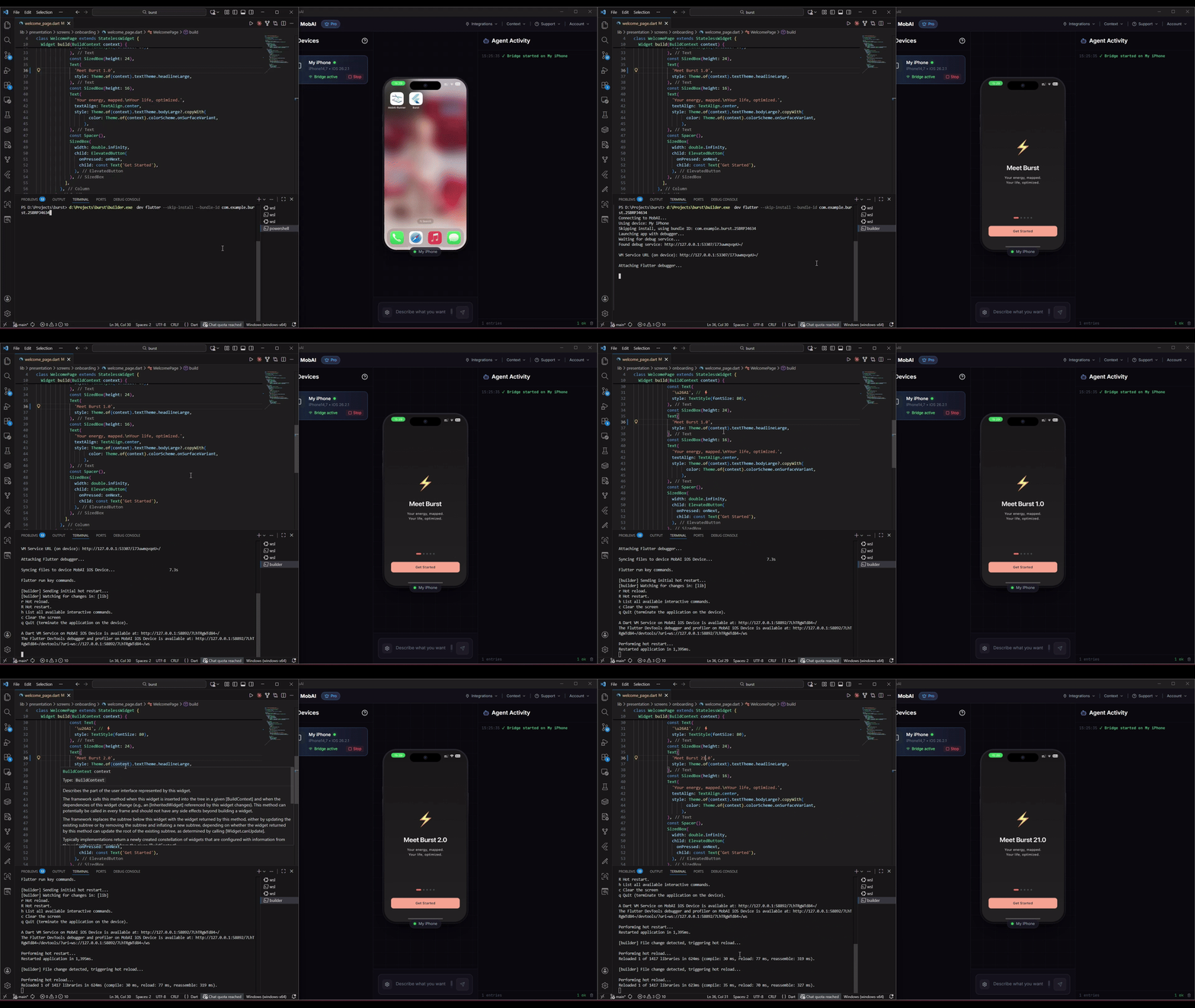
Builder supports hot reload for Flutter and React Native on Windows/Linux using MobAI for iOS device control. This allows you to develop iOS apps without a Mac.
builder ios build
./dist/builder dev flutter
com.example.myapp.TEAMID); Builder prefills it in the prompt that follows.Once the app is installed, skip the install step:
builder dev flutter --skip-install --bundle-id com.example.myapp.TEAMID
By default, builder dev flutter watches for Dart file changes and automatically triggers hot reload. When flutter attach connects, it also sends an initial hot restart to ensure your latest code is running.
.dart file and save - hot reload triggers automatically.g.dart and .freezed.dart are ignored by defaultbuilder.jsonTo disable file watching:
builder dev flutter --no-watch
To print the flutter attach command instead of running it (useful for IDE integration):
builder dev flutter --no-attach
builder ios build and reinstallIf you don't see your recent Dart changes after launching, press R in the terminal to perform a hot restart.
App won't launch / connection error
builder dev flutterbuilder mobai ping to verify connection"No devices found" error
Hot reload not working
R keyFile watcher not triggering
lib/).dart).g.dart, .freezed.dart) are ignored by default--no-watch flagbuilder ios build
builder dev rn
Once the app is installed:
builder dev rn --skip-install --bundle-id com.example.myapp.TEAMID
If port 8081 is in use:
builder dev rn --metro-port 8082
builder ios build and reinstallMetro not starting
npx react-native startApp not connecting to Metro
Hot reload not working
d in Metro terminal to open dev menur in Metro terminalKMP iOS apps build and run on a device like any other project, with one difference: there is no hot reload. Shared Kotlin is compiled into a native framework at build time, so there is no runtime to swap code into — every code change needs a rebuild.
builder ios build
builder dev kmp
builder init detects Kotlin Multiplatform projects by looking for the
multiplatform Gradle plugin in the root and module build files, and asks which
JDK the CI build should use (default 17):
{
  "kmp": { "jdkVersion": "17" }
}
On CI, the iOS app is built with xcodebuild, whose run script phase (or
CocoaPods) invokes Gradle to compile the shared framework — which is why the
JDK version matters. Gradle output is cached between builds.
Every change to Kotlin or Swift code needs builder ios build followed by
builder dev kmp again. Use --skip-install --bundle-id <id> to relaunch an
app that is already installed.
Build fails with "Unsupported class file major version" or a Gradle JDK error
kmp.jdkVersion in builder.json to match what the project uses locallyBuild fails with "SDK does not contain 'libarclite'"
App launches then immediately exits
builder dev kmp --logs to see the device outputFree allowances belong to each provider account and depend on the plan and machine. As published in September 2026: Codemagic personal accounts include 500 macOS M2 minutes per month; Bitrise Hobby includes 300 credits. GitHub has separate allowances for private repositories and free standard runners for public repositories. Providers change these, so check the current allowance links and switching guidance.
5,454 followers · starred Sep 2026
1,072 followers · starred Sep 2026
404 followers · starred Jan 2026
338 followers · starred Sep 2026
Build and develop iOS apps without a Mac using GitHub Actions, Codemagic, or Bitrise, with simulator access and hot reload via MobAI.
Go
1,172
74 commits
updated Oct 10, 2026
Build and develop iOS apps from Windows, Linux, or any platform.
Builder is a CLI tool for iOS development without a Mac. It uses GitHub Actions (default), Codemagic, or Bitrise for remote builds and MobAI for on-device development.
Your Repository                  GitHub Actions (macOS)
 └─ .github/workflows/            └─ ios-build.yml
     └─ ios-build.yml                 ├─ Check out the snapshot
                                      ├─ Build with Xcode
builder ios build ───────────────────► Upload IPA artifact
     │  pushes a snapshot of
     │  your working tree
     └─ Downloads IPA ◄─────────────── artifact: ipa
builder ios build builds what is on disk, not your last commit: uncommitted
and untracked files are included, so you can try a change without committing
it. The snapshot is a throwaway commit pushed to a hidden ref that is deleted
when the build finishes; no branch is created and nothing is committed on your
behalf. .gitignore still applies, so ignored files such as .env or
GoogleService-Info.plist are absent from the build.
builder auth github
cd your-ios-project
builder init
This detects your GitHub repo, creates the workflow files, and offers to commit, push, and trigger your first build - all interactively.
builder ios build
The CLI triggers the workflow and downloads the IPA to ./dist/.
builder ios share
Builds the working tree for the iOS simulator and makes that simulator usable
from the MobAI app, so you can tap through a build without
a Mac. It shows up under CI Devices, stays available while you are using it, and
closes when you release it there or leave it unused (30 minutes by default, use
--duration to change). A coding agent connected to MobAI (Claude Code, Codex,
Cursor) can drive the simulator the same way.
Free with any MobAI account, on MobAI 3.0 or later. Needs
a MOBAI_API_KEY repository secret: create the key in the MobAI app under
Account → API Keys, then:
gh secret set MOBAI_API_KEY
Where the GitHub API is not reachable, both workflows can also be started by pushing a tag. Commit the tree you want built, then:
git tag ios-build/my-build && git push origin ios-build/my-build   # IPA build
git tag ios-share/my-build && git push origin ios-share/my-build   # simulator
The run is named after the tag. Build settings come from builder.json in the
tagged commit (ios.path, ios.scheme, ios.signing, ios.configuration,
flutter.version, kmp.jdkVersion), the simulator stays available for the
default 30 minutes, and the tag is deleted when the run ends. The IPA is
attached to the run as an artifact. A tag carries no flags, so a tagged IPA
build cannot pick a profile per run; it applies the profile
named by defaultProfile, if there is one. The simulator build takes no
profile at all.
GitHub Actions remains the default, so existing commands continue to work. Add Codemagic and Bitrise without logging out of GitHub. First follow the app creation and repository connection guide to create each provider app, authorize GitHub access, and find its app ID:
builder auth codemagic
builder auth bitrise
builder auth status
builder init --provider codemagic --app-id YOUR_APP_ID --branch main
builder init --provider bitrise --app-id YOUR_APP_SLUG --branch main
builder ios build --provider codemagic
builder ios build --provider bitrise
init writes codemagic.yaml or bitrise.yml at the repo root plus the shared
runner script .builder/ci/runner.sh. Commit them to the configured branch
and connect the same repository to each provider before building. See
provider setup, signing, simulator sessions, and free allowances.
| Framework | iOS Path | Auto-detected |
|---|---|---|
| Native iOS/Swift | . (root) | Yes |
| React Native | ios/ | Yes |
| Expo (managed or ejected) | ios/ | Yes |
| Flutter | ios/ | Yes |
| Kotlin Multiplatform | iosApp/ | Yes |
| Cordova/Ionic | platforms/ios/ | Yes |
The runner installs JavaScript dependencies with the package manager the project
already uses — npm, Yarn, pnpm or Bun, from packageManager in package.json or
from the lockfile — on the Node version from .nvmrc, .node-version or
engines.node.
Dependencies install the way they do for React Native: the project's own package
manager (npm, Yarn, pnpm or Bun) and Node version, with expo prebuild running
through that same manager.
A managed Expo project has no ios/ directory in git. builder init detects it
as Expo (managed), still records "ios": { "path": "ios" }, and the runner
generates the native project with expo prebuild --platform ios --no-install
before building it. Ejected projects keep the committed ios/ they have: the
prebuild step skips a directory that already holds an Xcode project.
expo prebuild has to run unattended, so the app config must set the bundle
identifier — expo.ios.bundleIdentifier in app.json, or ios.bundleIdentifier
in app.config.js / app.config.ts. Without one, prebuild would stop and ask
for it; instead the build fails immediately and names the missing setting.
The default Debug configuration builds an IPA that loads its JavaScript from
Metro, so set "ios": { "configuration": "Release" } in builder.json for a
standalone IPA with the bundle baked in.
An ios/ directory left over from running expo prebuild locally is not
uploaded: managed projects gitignore it, and the working-tree snapshot skips
gitignored files. That is what you want — the runner prebuilds from the app
config on every build, so it cannot drift from a stale local copy.
Download builder-windows-amd64.exe from Releases, rename it to builder.exe, and add it to PATH.
brew install mobai-app/tap/ios-builder
The formula is named ios-builder; the command it installs is builder.
curl -sSL https://raw.githubusercontent.com/MobAI-App/ios-builder/main/install.sh | bash
git clone https://github.com/MobAI-App/ios-builder.git
cd ios-builder
go build -o builder ./cmd/builder
# Setup
builder auth github           # Authenticate with GitHub
builder auth codemagic        # Authenticate with Codemagic (also: bitrise)
builder auth apple            # Save an App Store Connect API key
builder auth status           # Show which providers you are signed in to
builder auth logout [name]    # Remove stored credentials (github, codemagic, bitrise, apple)
builder init                  # Set up workflows in current repo
builder update                # Update builder to the latest release

# Building (builds the working tree, including uncommitted changes)
builder ios build             # Trigger build and download IPA to ./dist/
builder ios build --unsigned  # Build without code signing (if signing is configured)
builder ios build --provider codemagic  # Build on another provider (also: bitrise)
builder ios build --profile production  # Build with a profile from builder.json

# Simulator (free, needs a MOBAI_API_KEY secret)
builder ios share             # Try the build on a simulator in the MobAI app
builder ios share --duration 1h  # Keep it available longer while unused

# Development (requires MobAI)
builder dev flutter           # Flutter hot reload with file watching
builder dev flutter --no-watch  # Disable automatic file watching
builder dev flutter --no-attach # Print flutter attach command instead of running it
builder dev rn                # React Native hot reload (short for: dev react-native)
builder dev kmp               # Kotlin Multiplatform install + launch (alias: kotlin)
builder dev kmp --logs        # Also stream the app's output
builder dev flutter --skip-install --bundle-id <id>  # Use already installed app
builder dev rn --metro-port 8082  # Use custom Metro port

# MobAI (used by the dev commands; handy for troubleshooting)
builder mobai ping            # Check MobAI connectivity
builder mobai install <ipa>   # Install an IPA on the device
builder mobai run-debug <bundle-id>  # Launch an app with the debugger attached
builder mobai forward <device-port> <host-port>  # Forward a device port

# Code signing (automatic mode needs builder auth apple)
builder signing setup --devices-from-mobai       # development: certificate, devices, profile, GitHub secrets, no portal
builder signing setup --distribution store       # Apple Distribution certificate + App Store profile
builder signing setup --certificate ios-signing.p12 --profile MyApp.mobileprovision  # Upload your own files
builder ios build --profile store                # Signs with the set; provisions it first when missing
builder signing csr           # Manual path: create a private key + certificate signing request
builder signing p12           # Manual path: assemble a .p12 from the key and Apple's certificate

# TestFlight and App Store (needs builder auth apple)
builder ios release --profile store --group "Beta Testers" --notes "What to test"  # Build with the next build number, upload, wait, add to TestFlight
builder ios release --profile store --app-store --release after-approval  # Same, then submit the version for App Review
builder ios build --profile store --submit    # Short for: ios release (TestFlight, no groups)
builder ios upload --wait     # Upload ./dist/*.ipa to App Store Connect and wait for processing
builder ios submit --testflight --group "Beta Testers" --notes "What to test"
builder ios submit --app-store --release after-approval  # Submit the version for App Review

# Install on a device over the air (development, ad-hoc or enterprise build)
builder ios build --profile development --distribute  # Build, then print an install link + QR code
builder ios distribute        # Same for the newest IPA in ./dist/ (or --ipa)
builder ios distribute --once # One link, no refresh, uploads left in place
builder ios distribute --cleanup  # Remove uploads earlier sessions left behind

# App Store Connect management (needs builder auth apple)
builder asc apps              # Apps the API key can see
builder asc builds            # Builds of the newest version, with their TestFlight groups
builder asc builds expire --build-number 42 --yes
builder asc groups            # TestFlight groups with tester counts
builder asc groups create Nightly             # Internal group (add --external for external)
builder asc groups add-build Nightly          # Newest VALID build (or --build-number)
builder asc groups delete Nightly --yes
builder asc testers --group Nightly           # With each tester's state
builder asc testers add a@example.com --group Nightly --first Ann --last Lee
builder asc testers invite a@example.com      # Send or resend the TestFlight email
builder asc testers remove a@example.com --group Nightly
builder asc users             # Team members and whether they can test internally
builder asc users invite dev@example.com --role DEVELOPER --first Dee --last Vee
Every release/upload/submit/distribute/asc command takes --json for
machine-readable output and never prompts, so agents and CI jobs can drive them.
builder.json:
{
  "project": "MyApp",
  "platform": "ios",
  "github": {
    "owner": "username",
    "repo": "my-ios-app"
  },
  "ios": {
    "path": "ios",
    "scheme": "",
    "bundleId": "com.example.app",
    "configuration": "Debug"
  },
  "profiles": {
    "development": { "distribution": "development" },
    "store":       { "distribution": "store" }
  },
  "mobai": {
    "url": "http://localhost:8686",
    "device_id": ""
  },
  "flutter": {
    "watch": {
      "dirs": ["lib"],
      "patterns": [".dart"],
      "ignore": [".g.dart", ".freezed.dart"],
      "debounce": 100
    }
  }
}
| Field | Description | Default |
|---|---|---|
ios.path | Path to the Xcode project relative to the repo root | detected by init |
ios.scheme | Xcode scheme to build | auto-detected |
ios.bundleId | App bundle identifier, used by signing setup and by ios release to find the App Store Connect app before the first IPA exists | detected by init when the project has one app target; else saved by signing setup, else the newest IPA in ./dist/ |
ios.extensions | Bundle identifiers of the app's extension targets (widgets, share/notification extensions, watch apps, app clips), each signed with its own profile | filled by init and signing setup from the Xcode project; list them by hand for a managed Expo project |
ios.configuration | Xcode build configuration. Builds are Debug unless you set Release; Debug is faster and is what the dev commands expect | Debug |
ios.signing | Legacy: sign builds that select no profile, with the unsuffixed IOS_CERTIFICATE, IOS_CERTIFICATE_PASSWORD and IOS_PROVISIONING_PROFILE secrets. Profiles ignore it; use distribution there | false |
Profiles are named sets of build settings, in the spirit of eas.json, selected
with --profile on ios build:
{
  "ios": { "path": "ios", "bundleId": "com.example.app" },
  "defaultProfile": "development",
  "profiles": {
    "development": { "distribution": "development" },
    "preview":     { "distribution": "internal",
                     "env": { "API_URL": "https://staging.example.com" } },
    "production":  { "distribution": "store", "scheme": "MyApp", "provider": "codemagic" }
  }
}
builder ios build --profile preview
| Field | Description |
|---|---|
distribution | The only signing setting: development, ad-hoc (or internal, the same thing), store or enterprise. The build signs with that distribution's signing set and its provisioning profile must be of that type; the IPA is exported with the matching method. Omitted means an unsigned build |
configuration | Overrides the derived configuration: Debug for development, Release for every other distribution, ios.configuration for unsigned profiles |
scheme | Overrides ios.scheme |
provider | Overrides the top-level provider (github, codemagic, bitrise) |
env | String map exported as environment variables on the runner before dependencies are installed and the app is built, so pod install, npm install, flutter pub get, Gradle and xcodebuild all see them |
How a build's settings are resolved:
--profile, the profile named by defaultProfile applies. With
neither, the top-level ios.* and provider settings are used exactly as
before, so existing projects are unaffected.--unsigned and --provider on the command line override the profile.ios build only. ios share takes no --profile:
simulator builds are always Debug and unsigned, and use ios.scheme and the
top-level provider (or --provider).env values are build-time configuration, not secrets. They are stored in
builder.json, sent to the CI provider as plain workflow inputs, and visible in
the run's inputs and logs. Keep tokens and passwords in the provider's secrets
(gh secret set on GitHub, or the Codemagic / Bitrise secrets
guide); the build reads those as environment
variables too. Names the runner owns are rejected: its own parameters (SCHEME,
CONFIGURATION, USE_SIGNING, BUILD_ENV, ...), the signing secrets, PATH,
HOME, DEVELOPER_DIR, and the GITHUB_, RUNNER_, CM_, BITRISE_, BUILDER_ prefixes.
Selecting a profile, with --profile or defaultProfile, needs the workflow
file from this version of Builder, which declares a profile input; an older
committed workflow rejects the dispatch. Run builder init again to refresh
.github/workflows/ios-build.yml (or builder init --provider ... for
runner.sh) in a project set up earlier, then commit and push it to the
default branch.
| Field | Description | Default |
|---|---|---|
mobai.url | MobAI API URL | http://localhost:8686 |
mobai.device_id | Preferred device ID (uses first available if empty) | "" |
WSL users: MobAI runs on Windows, and WSL has its own network by default. On
Windows 11, turn on
mirrored networking
and builder reaches MobAI on the default http://localhost:8686. See
Using Builder from WSL for the steps, and for the setup without
mirrored networking.
| Field | Description | Default |
|---|---|---|
flutter.watch.dirs | Directories to watch | ["lib"] |
flutter.watch.patterns | File patterns to match | [".dart"] |
flutter.watch.ignore | Patterns to ignore | [".g.dart", ".freezed.dart"] |
flutter.watch.debounce | Debounce delay in ms | 100 |
By default, builds are unsigned. A signed build needs a certificate and a
provisioning profile — and despite what many guides claim, you do not need a
Mac to create either one, nor a tour of the Apple Developer portal. Signing
is configured per build profile with one field,
distribution, and builder signing setup produces the material for it
through the App Store Connect API (or takes your own files).
You need a paid Apple Developer Program membership — Apple only issues certificates to paid accounts. (Without one, build unsigned and let MobAI re-sign on install with a free Apple ID.)
Each distribution has its own set of GitHub secrets, so a development set for your devices and a store set for TestFlight live side by side:
distribution | Certificate, profile | Secrets |
|---|---|---|
development | Apple Development, iOS App Development (devices required) | IOS_CERTIFICATE_DEVELOPMENT, IOS_CERTIFICATE_PASSWORD_DEVELOPMENT, IOS_PROVISIONING_PROFILE_DEVELOPMENT |
ad-hoc or internal | Apple Distribution, Ad Hoc (devices required) | IOS_CERTIFICATE_AD_HOC, IOS_CERTIFICATE_PASSWORD_AD_HOC, IOS_PROVISIONING_PROFILE_AD_HOC |
store | Apple Distribution, App Store | IOS_CERTIFICATE_STORE, IOS_CERTIFICATE_PASSWORD_STORE, IOS_PROVISIONING_PROFILE_STORE |
enterprise | In-house (portal only) | IOS_CERTIFICATE_ENTERPRISE, IOS_CERTIFICATE_PASSWORD_ENTERPRISE, IOS_PROVISIONING_PROFILE_ENTERPRISE |
An app with extension targets has a fourth secret per set,
IOS_EXTENSION_PROFILES_<SET>, holding their profiles (see
Extensions below).
A build with --profile <name> signs with the set of that profile's
distribution; configuration follows it (Debug for development,
Release otherwise) unless the profile sets one. The runner checks that the
profile in the set is of the requested type and fails by name before compiling
anything, and a distribution profile refuses a Debug configuration. On
Codemagic and Bitrise the same names are variables you add in the dashboard,
see the secrets guide.
Automatic signing, ios upload, ios submit and ios release all use one
App Store Connect API key. You create it once, in the browser:
Builder) and choose the role Admin. App
Manager works too if you also tick Access to Certificates, Identifiers &
Profiles; a Developer key can upload builds but cannot create
certificates.AuthKey_<KEYID>.p8
file downloads once; keep it somewhere private, never in the repo.Then save it in your keychain:
builder auth apple --issuer-id 12345678-abcd-... --key-id ABC123DEFG --key ~/Downloads/AuthKey_ABC123DEFG.p8
builder auth status shows it, builder auth logout apple removes it. On a
machine without a keychain (CI, a coding agent), set ASC_ISSUER_ID,
ASC_KEY_ID and ASC_KEY_PATH (or ASC_PRIVATE_KEY with the file's contents)
instead.
builder signing setupbuilder auth apple # once: save the App Store Connect API key
builder signing setup --devices-from-mobai # development set for the devices MobAI sees
builder signing setup --distribution store # store set for TestFlight / App Store
Without files, setup works through the App Store Connect API for the given
--distribution (default development; --name <profile> reads it from an
existing profile). The key needs the Admin role (or App Manager plus
Access to Certificates, Identifiers & Profiles): Developer-role keys cannot
create certificates. It then:
--bundle-id, ios.bundleId in builder.json
(which init fills when the Xcode project has a single app target), or the
newest IPA in ./dist/; in a terminal it asks as a last resort.development, Apple
Distribution for ad-hoc and store — for a private key generated on your
machine (ios-signing-<distribution>.key; --key reuses one from
signing csr, and an ios-signing.key from an earlier version is picked up
too). A valid certificate on the account is reused only when its private
key is here, since the .p12 needs it; otherwise a new one is issued.
Nothing is ever revoked: at Apple's limit (2 Development, 3 Distribution)
the error says so and points at the portal.--device <udid> (repeatable) and
--devices-from-mobai (name and UDID of every physical iOS device MobAI has
connected; simulators and cloud farm devices are skipped). Development and
ad-hoc profiles cover every enabled iOS device on the account, so with none
given and none registered the command stops and says so. Store profiles
take no devices. Apple allows 100 devices per membership year and never
frees a slot; that error is passed through too.Builder <distribution> <bundle id>. An existing
one is reused while it is ACTIVE, unexpired and still lists exactly this
certificate and these devices; otherwise it is deleted and recreated, and
the summary says why (invalid, expired, certificate changed, devices changed, forced).ios-signing-<distribution>.key (when generated),
ios-signing-<distribution>.p12 and Builder-<distribution>-<bundle id>.mobileprovision to --out-dir (default .), uploads the set's
secrets to GitHub, and writes "distribution": "<distribution>" into the
--name profile (default: the distribution name) in builder.json, keeping
its other fields and reporting a replaced distribution; defaultProfile is
left alone. An --out-dir other than . is recorded as signing.dir, so a
later ios build that provisions a set reuses the key there instead of
asking Apple for a second certificate, which it refuses..p12 base64-encoded, the password, the .mobileprovision base64-encoded
— every time, so the same set can be pasted into Codemagic or Bitrise,
following the secrets guide. Builder cannot
check those providers' secrets before a build, so ios build only reminds
you of this command when the profile signs there.The upload goes to the repository in builder.json, always. When it fails (no
GitHub login, or a token that cannot write secrets) the error is printed and
the command carries on: files and values are written and shown anyway, but
the build profile is not, since builder.json must not claim a set the
repository does not have. It exits non-zero at the end so a script notices. --json
reports the same in github_upload (ok or the error).
Extensions. Every extension target (a widget, a share or notification
extension, a watch app, an app clip) is signed with a profile of its own.
init and signing setup read their bundle IDs from the Xcode project into
ios.extensions in builder.json; a managed Expo project has no project to
read, so list them there by hand. Automatic setup then registers each App ID
and creates Builder <distribution> <bundle id> for it, with the same
certificate and devices as the app; in manual mode pass one --extension-profile <mobileprovision> per extension. The profiles go into a fourth secret of the
set, IOS_EXTENSION_PROFILES_<SET> (a JSON object of bundle ID to base64
profile, {} when there are none), and the runner signs each extension target
with the entry covering its bundle ID, failing by name — with the IDs to add to
ios.extensions — when one has none.
The command shows its plan and asks once before creating anything; --yes
skips that (required without a terminal), and then the .p12 password is
generated and printed once unless --password is given. --json prints the
result as JSON with progress on stderr. Keep the written files out of git.
Run it again whenever you like: it reports what it found and recreates only
what is missing, expired, invalid or changed — add a device, re-run, rebuild.
--force issues a fresh certificate and profile regardless.
With --certificate and --profile, setup takes your own files instead — a
.p12 (from Keychain Access, or assembled here)
and a .mobileprovision — reads the distribution out of the profile
(development, ad-hoc, store or enterprise; this is the only way in for
enterprise), uploads that set, prints its names and values, and writes the
build profile the same way:
builder signing setup --certificate ios-signing.p12 --profile MyApp.mobileprovision
ios buildbuilder ios build --profile <name> checks, before dispatching to GitHub,
that the repository holds the secrets of the profile's set. When any is
missing and an App Store Connect key is saved, it runs the same provisioning
as signing setup without prompts, uploads the set and builds; a development
or ad-hoc profile with no registered device stops and points at builder signing setup --distribution development --devices-from-mobai. Without an
Apple key it stops before anything is pushed and names both ways out (builder auth apple, or signing setup --certificate ... --profile ...). --unsigned
skips the check, and so do Codemagic/Bitrise builds (no secrets API).
ios.signing without profilesA project set up before build profiles has ios.signing: true and the
unsuffixed IOS_CERTIFICATE, IOS_CERTIFICATE_PASSWORD and
IOS_PROVISIONING_PROFILE secrets. Builds that select no profile still sign
with those, whatever the profile type, exactly as before; setup never
touches them. Profiles ignore ios.signing and read their own set.
The .p12 certificate is normally created through Keychain Access, but Builder
does the same thing itself: it generates the private key and certificate
signing request, and assembles the .p12 from the certificate Apple issues.
builder signing csr
This asks for your name and email and writes two files to the current
directory: ios-signing.key (your private key) and ios-signing.csr. Keep
the key wherever suits you — just don't commit it (add it to .gitignore;
gitignored files are also excluded from build snapshots).
ios-signing.csr and download the resulting .cer filebuilder signing p12 --certificate development.cer --key ios-signing.key
This combines the key and certificate into ios-signing.p12 (--out to name
it), protected by a password you choose — byte-for-byte the same kind of file
Keychain Access exports, and usable anywhere one is: builder signing setup,
Sideloadly, AltStore, or importing it on a Mac. Keep it, and don't commit it.
On the portal:
.mobileprovision fileThe profile type decides the distribution the set is written to and the method the IPA is exported with: development, ad-hoc, enterprise or store.
builder signing setup --certificate ios-signing.p12 --profile MyApp.mobileprovision
You can also skip step 3 and hand setup the .cer together with the key —
builder signing setup --certificate development.cer --key ios-signing.key --profile MyApp.mobileprovision — and it assembles the .p12 on the way,
saving it as ios-signing-<distribution>.p12. Then builder ios build --profile <name>; --unsigned skips signing for one build.
Builder uploads builds to App Store Connect and submits them to TestFlight or
App Review through the App Store Connect API, from Windows, Linux or macOS. No
Transporter, altool or Xcode is involved, and the API key never leaves your
machine: the CI runner only builds and signs, the upload happens locally from
the IPA in ./dist/.
You need:
builder signing setup --distribution store creates
both, stores them as the STORE signing set and writes a store build
profile, or pick those types on the portal in the manual path. An IPA signed
for development is rejected at upload.builder ios build --profile store (see Build Profiles):
a store profile builds Release and signs with that set; a plain ios build is Debug and unsigned, which is what the dev commands expect, not
what you want to ship.builder auth apple, see
Create an App Store Connect API key.builder auth apple as described in
Create an App Store Connect API key.
Flags you leave out are prompted for; Builder verifies the key against App
Store Connect before storing it.
App Store Connect only accepts uploads for an app it already knows, and the API cannot create one. Once, in the browser:
builder signing setup --distribution store
does it (or Certificates, Identifiers & Profiles → Identifiers → + on
the developer portal).Nothing else on the record is needed for TestFlight. App Store review needs the rest of the metadata (screenshots, description, privacy policy) filled in there.
builder ios build --profile store   # produces a signed dist/*.ipa
builder ios upload --wait
upload reads the bundle ID, version and build number from the newest IPA in
./dist/ (or --ipa <path>), finds the app, uploads the archive in chunks
and, with --wait, follows App Store Connect until the build has finished
processing and prints its build ID and TestFlight link. Without --wait it
returns as soon as Apple has the file.
Two things Apple checks on every upload:
CFBundleVersion for the same version is rejected (ITMS-90189), so bump
it before rebuilding — or let ios release (below) pick the next one.ITSAppUsesNonExemptEncryption to false, upload --wait answers that
automatically; otherwise pass --no-encryption (here or to submit) when
your app only uses standard iOS encryption.builder ios submit --testflight --group "Beta Testers" --notes "New login flow"
This takes the newest processed build (or --build-number N), sets the What
to Test notes and adds it to the named groups (--group repeats). A group
that does not exist yet is created — internal by default, external with
--external. Internal groups get the build immediately; the first external
group triggers Apple's beta review, which Builder submits for you (--wait
follows the decision). Run it without --group to see the build and the
groups the app has.
builder ios submit --app-store --release after-approval
Builder finds or creates the App Store version matching the IPA's marketing
version (or --version X.Y.Z), attaches the build, sets the release type
(manual or after-approval) and submits it for review. The version's
metadata — description, screenshots, age rating, pricing, privacy — must
already be complete: App Store Connect refuses the submission otherwise and
Builder prints Apple's reasons verbatim. Builder does not manage metadata,
screenshots or in-app purchases; fill them in App Store Connect, or on a Mac
with asc-cli, whose production use of
the buildUploads API also proved that the Mac-free upload path works and
served as the reference for Builder's implementation.
builder ios release --profile store --group "Beta Testers" --notes "New login flow"
builder ios release --profile store --app-store --release after-approval
builder ios build --profile store --submit     # TestFlight release with no groups
release runs steps 3 to 5 back to back: build, download, upload, wait for
processing, then TestFlight (default) or --app-store, with the same flags as
submit. It needs a build profile with
"distribution": "store" built as Release (the default for store; an
explicit Debug is refused): --profile, else defaultProfile, else the only
store profile in builder.json (logged; with several, pick one with
--profile). API key and profile are checked before anything is dispatched —
without a store profile the error names builder signing setup --distribution store, which writes one — and on GitHub a missing STORE signing set is
provisioned first. --unsigned is refused with --submit.
It also solves the build-number problem: Builder takes the highest
CFBundleVersion among the app's builds in App Store Connect, across all
versions, and builds with the next one (1 for a new app); --build-number N
overrides it and --version X.Y.Z sets the marketing version too. The runner
applies it per project type — flutter build ios --build-number,
CURRENT_PROJECT_VERSION/MARKETING_VERSION on xcodebuild archive, or an
in-place edit of an Info.plist that hardcodes CFBundleVersion — and the log
says which. Builder then reads the IPA and refuses to upload one whose
CFBundleVersion is not the requested number.
To find the app before the first IPA exists, set ios.bundleId in
builder.json or pass --bundle-id; afterwards the newest IPA in ./dist/
is enough. The workflow file must have the build_number input, so repos set
up before this feature need builder init once more and a push to the default
branch. --timeout bounds the build and then the App Store Connect wait
separately; --json prints one object with the build ID, App Store Connect
build ID, version, build number and groups.
builder asc covers the App Store Connect housekeeping around TestFlight
without the website: apps, builds, groups, testers and team members. Every
command takes --json (result on stdout, progress on stderr), never prompts,
and finds the app through --bundle-id, then ios.bundleId in
builder.json, then the newest IPA in ./dist/.
builder asc builds                       # newest version's builds and their groups
builder asc groups create Nightly        # internal group; --external for outsiders
builder asc groups add-build Nightly     # same as ios submit --testflight --group
builder asc testers add a@example.com b@example.com --group Nightly
builder asc testers                      # every tester with their state
builder asc testers invite a@example.com # send or resend the TestFlight email
builder asc testers remove a@example.com --group Nightly
builder asc builds expire --build-number 42 --yes
Two things about internal groups:
asc testers add puts a member's tester
record into the group and invites a stranger to the App Store Connect team
first (--role, default CUSTOMER_SUPPORT, only this app visible;
--first and --last required). They must accept that email before a build
reaches them, so rerun the command afterwards. asc users shows the team and
who already has TestFlight access; asc users invite invites on its own.asc groups create, off with --no-auto-builds) receives
every processed build by itself and Apple refuses to add builds by hand, so
asc groups marks it internal, all builds and ios submit --group and
asc groups add-build skip it with a note instead of failing. It only sees
builds uploaded after it was created, and that first upload also sends the
pending invites, so upload a new build after creating one.NOT_INVITED means no email has gone out — how a team member added to an
internal group in App Store Connect shows up; asc testers points it out.
asc testers invite sends it (or resends while INVITED) and asc testers add does so by itself, unless the group has no build yet: Apple refuses to
invite anyone into a group with nothing to install, so add reports "invite
goes out once the group has a build" and invite says to run asc groups add-build first (an external group's build must also pass Beta App Review).
External groups take anyone by email, reusing a tester the team already has.
asc groups delete, and asc testers remove without --group (which drops
the tester from TestFlight team-wide), print what goes and then need --yes.
Group names match case-insensitively; when two differ only by case, the
command refuses and lists both.
builder ios build --profile development --distribute
builder ios distribute                      # the newest IPA in ./dist/, or --ipa
Builder prints an itms-services:// link and a QR code. Scan it with the
phone's camera and iOS installs the app, no TestFlight and no cable. Every
tester on the profile gets the same link.
Requirements:
builder signing setup --device <udid> (or --devices-from-mobai) registers devices and writes such a
profile; App Store builds are refused, since iOS cannot install them this
way. ios build --distribute checks the profile before anything is pushed.gist scope. Logins made before this feature need
builder auth github once more; the command says so.Where the files go: the IPA is uploaded as an asset of a draft release in the project's own repository (no tag, invisible on the repository page, no notifications) and the manifest iOS reads first goes into a secret gist, because the draft asset's download URL is signed and about a thousand characters long, too much for a QR code. Both URLs work without authentication, for private repositories too, and both uploads are deleted when the command ends.
The signed IPA URL lives five minutes, so the command keeps running: it
re-mints the link a minute before expiry, Enter re-mints it now, q or Ctrl-C
ends the session and removes the uploads (--timeout, default one hour, does
the same). --once prints a single link and leaves the uploads in place for
builder ios distribute --cleanup to remove later; --cleanup also removes
what a crashed session left behind. --json prints one object per link with
the manifest and IPA URLs, the expiry and the profile's device count; --no-qr
drops the code, --qr prints it off a terminal and --qr-invert renders it for
a dark-on-light one. Codemagic and Bitrise builds work the same way, since the
uploads always go to the GitHub repository in builder.json.
Alternatively, MobAI installs an IPA over the cable, signed or not: an unsigned IPA can be re-signed on install with a free Apple ID (MobAI asks for the account).
Builder supports hot reload for Flutter and React Native on Windows/Linux using MobAI for iOS device control. This allows you to develop iOS apps without a Mac.
builder ios build
./dist/builder dev flutter
com.example.myapp.TEAMID); Builder prefills it in the prompt that follows.Once the app is installed, skip the install step:
builder dev flutter --skip-install --bundle-id com.example.myapp.TEAMID
By default, builder dev flutter watches for Dart file changes and automatically triggers hot reload. When flutter attach connects, it also sends an initial hot restart to ensure your latest code is running.
.dart file and save - hot reload triggers automatically.g.dart and .freezed.dart are ignored by defaultbuilder.jsonTo disable file watching:
builder dev flutter --no-watch
To print the flutter attach command instead of running it (useful for IDE integration):
builder dev flutter --no-attach
builder ios build and reinstallIf you don't see your recent Dart changes after launching, press R in the terminal to perform a hot restart.
App won't launch / connection error
builder dev flutterbuilder mobai ping to verify connection"No devices found" error
Hot reload not working
R keyFile watcher not triggering
lib/).dart).g.dart, .freezed.dart) are ignored by default--no-watch flagbuilder ios build
builder dev rn
Once the app is installed:
builder dev rn --skip-install --bundle-id com.example.myapp.TEAMID
If port 8081 is in use:
builder dev rn --metro-port 8082
builder ios build and reinstallMetro not starting
npx react-native startApp not connecting to Metro
Hot reload not working
d in Metro terminal to open dev menur in Metro terminalKMP iOS apps build and run on a device like any other project, with one difference: there is no hot reload. Shared Kotlin is compiled into a native framework at build time, so there is no runtime to swap code into — every code change needs a rebuild.
builder ios build
builder dev kmp
builder init detects Kotlin Multiplatform projects by looking for the
multiplatform Gradle plugin in the root and module build files, and asks which
JDK the CI build should use (default 17):
{
  "kmp": { "jdkVersion": "17" }
}
On CI, the iOS app is built with xcodebuild, whose run script phase (or
CocoaPods) invokes Gradle to compile the shared framework — which is why the
JDK version matters. Gradle output is cached between builds.
Every change to Kotlin or Swift code needs builder ios build followed by
builder dev kmp again. Use --skip-install --bundle-id <id> to relaunch an
app that is already installed.
Build fails with "Unsupported class file major version" or a Gradle JDK error
kmp.jdkVersion in builder.json to match what the project uses locallyBuild fails with "SDK does not contain 'libarclite'"
App launches then immediately exits
builder dev kmp --logs to see the device outputFree allowances belong to each provider account and depend on the plan and machine. As published in September 2026: Codemagic personal accounts include 500 macOS M2 minutes per month; Bitrise Hobby includes 300 credits. GitHub has separate allowances for private repositories and free standard runners for public repositories. Providers change these, so check the current allowance links and switching guidance.
5,454 followers · starred Sep 2026
1,072 followers · starred Sep 2026
404 followers · starred Jan 2026
338 followers · starred Sep 2026