Mintplex-Labs/anythingllm-mobile

An AI Agent that lives in your pocket. Local-first and privacy focused.

TypeScript

148

75 commits

updated Oct 5, 2026

See the code

See what people are saying

SourceMessageScoreDate

Ternary Bonsai 2 Family: 2B, 4B, & 9B based on Qwen 3.5 (r/LocalLLaMA)

Going to try these out to see if they have the same looping behaviors that other Bonsai models have had. ~~Still requires~~ [~~their fork of llama.cpp (branch prism)~~](https://github.com/PrismML-Eng/llama.cpp) ~~so dont expect it to work with vanilla llama.cpp.~~ Edit: You can use with regularโ€ฆ

21

Oct 15, 2026

README

AnythingLLM logo

AnythingLLM Mobile: A real AI assistant that lives in your pocket, not in the cloud.
See, hear, search, and remember - powered by models running right on your phone.

Discord | License | Docs | Download

๐Ÿ‘‰ Download on Google Play! Download Now


Product Overview

AnythingLLM Mobile brings the local-first ethos of AnythingLLM to your phone. We believe intelligence should be private, instant, and available on every device you own, with all the context you want it to have.

Mobile devices, even the most cutting edge, are quite limited in models they can run before they overheat or run out of memory, so AnythingLLM Mobile takes a hybrid approach: your phone is the agent harness, and the model can live wherever makes sense for you. Run a small language model (SLM) right on the device, pair over your network with LM Studio, AnythingLLM Desktop, or llama.cpp, or connect to the cloud provider you already use. Wherever the tokens come from, your tools, documents, and chats stay on your device and run with the same care and token efficiency you get across every AnythingLLM product.

Just want private, offline chat? Download an SLM and you're done. Want more, like long-horizon research, document generation, or recurring background jobs? Point the app at on-premise compute or the cloud and keep going. Either way, your data is what makes your AI useful, and it never leaves your phone unless you decide it should.

Basically imagine Openclaw or Heremes agent, but fully on-device first, with all the tools for true utility right out of the box, but no infrastructure to set-up or depend on.

See it in action


Default Assistant
Set AnythingLLM as your phone's assistant and ask about whatever is on screen, by voice or text.

Ask with AnythingLLM
Select text in any app and polish, summarize or explain it from the selection toolbar.

Background jobs
Recurring tasks that run on schedule, even with the app closed, and notify you when done.

Chat with your documents
On-device RAG over PDFs, Word, Excel and more. Embedding, vector db, and reranking all fully on device.

Agentic web search
Search, open and read pages, then answer with citations.

Document generation
Turn a conversation into a Word, PDF, PowerPoint or text file.
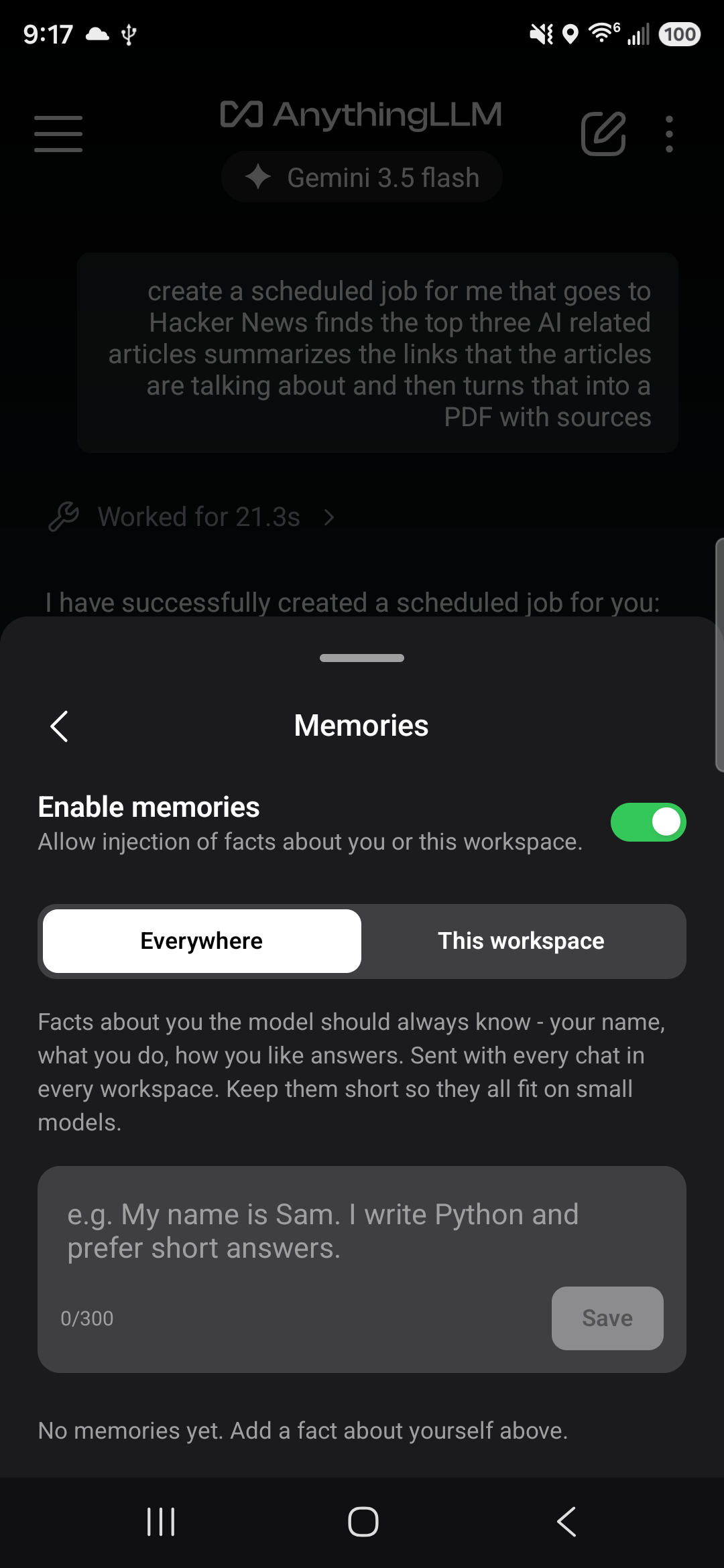
Memory system
Memory
Remembers what you tell it, globally or per workspace, and recalls it when relevant.
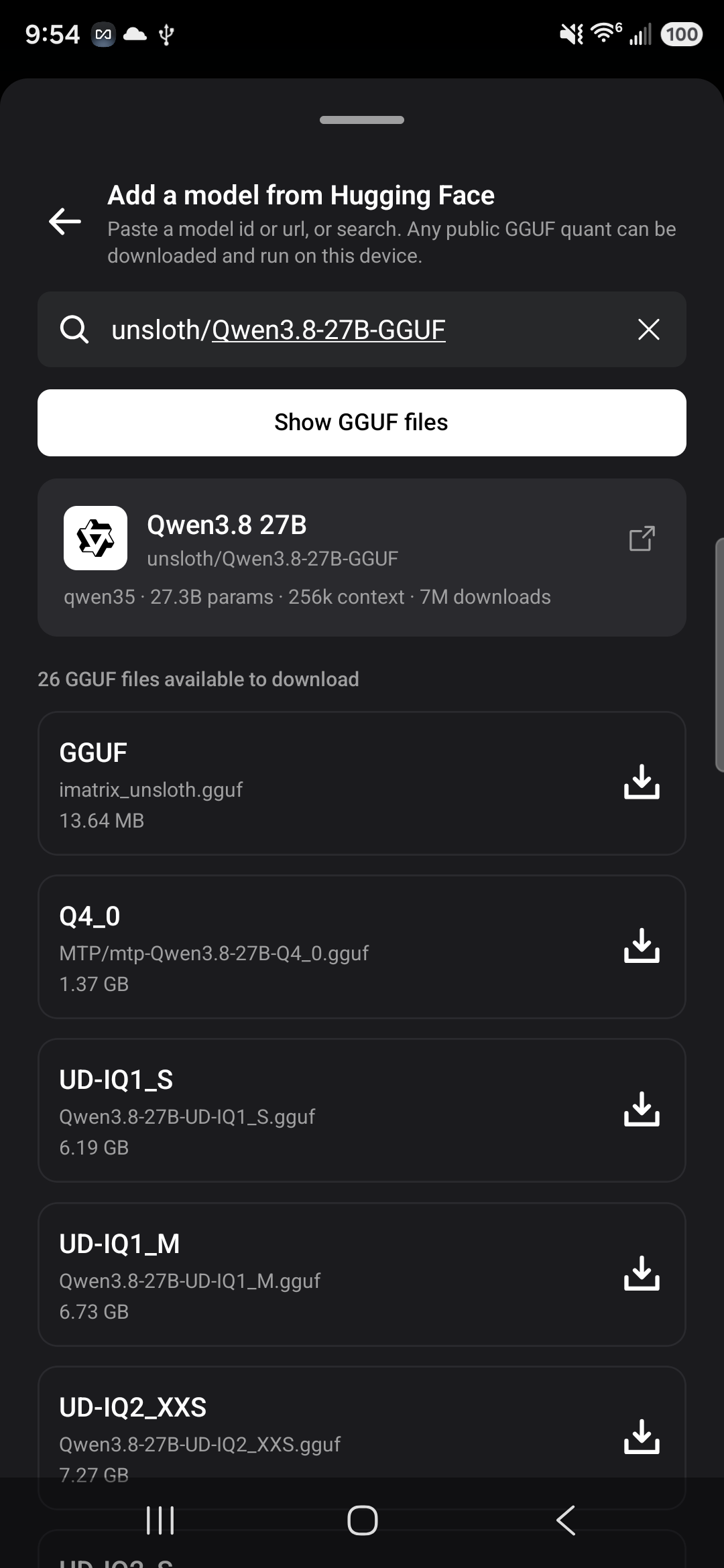
Browse Huggingface directly
Hugging Face model browser
Find, download and manage GGUF models, with a fit badge for your phone.
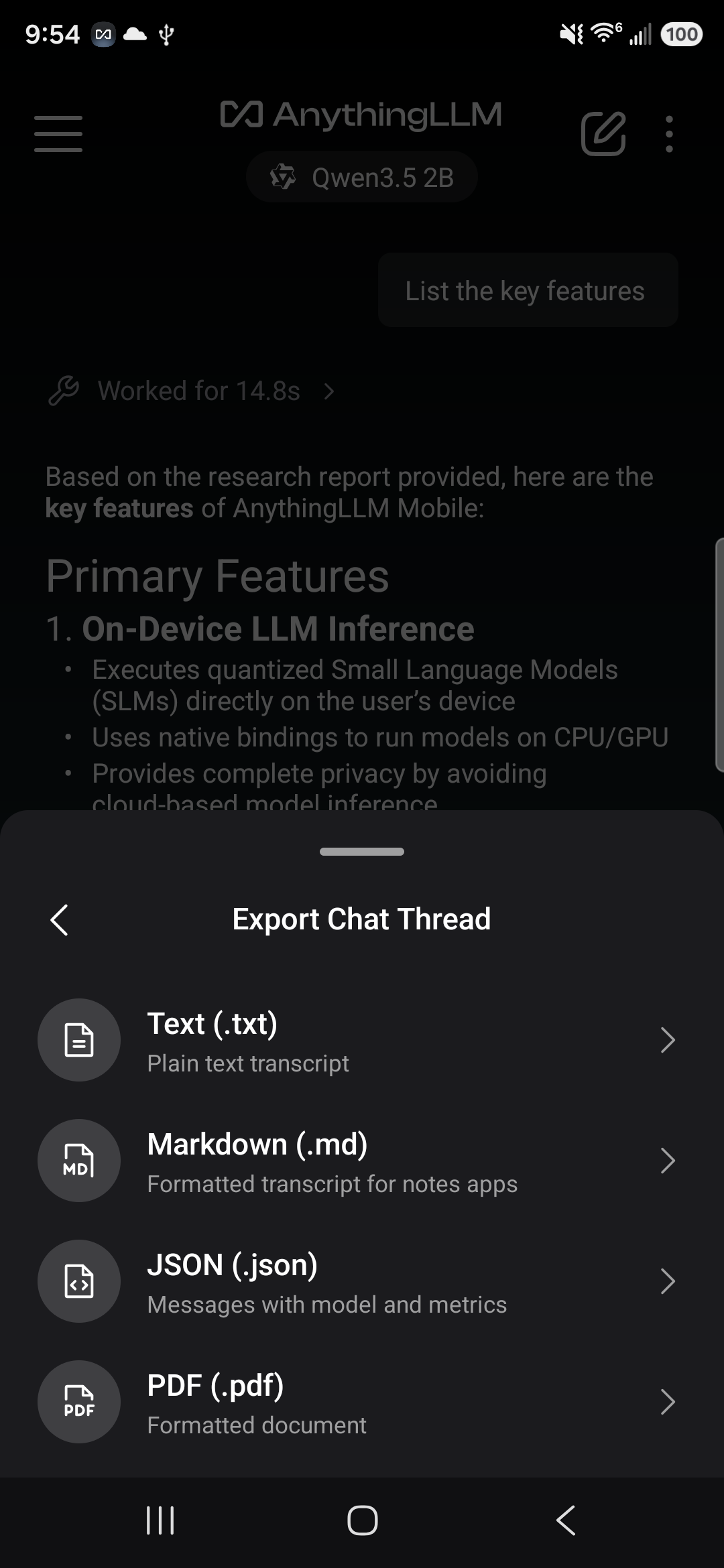
Export Chats
Export chats
PDF with images, Markdown, JSON or plain text.

Features

Models

  • On-device LLM inference - Run GGUF models locally with llama.rn (llama.cpp for React Native). Works with no signal at all.
  • On-device vision - Attach images and chat about them using multimodal models, fully offline.
  • Hugging Face model browser - Discover, download, and manage models without leaving the app, with a fit badge that tells you whether a model will run well on your phone.
  • Tuned to your device - Context windows and capabilities scale to your phone's RAM; prompts are laid out to preserve the KV cache between turns so on-device replies start fast.
  • Connect to AnythingLLM - Pair with your desktop or server instance for full workspace and document chat.
  • Bring your own provider - Ollama, LM Studio, OpenRouter, Anthropic, OpenAI, or any OpenAI-compatible API, with automatic model discovery and prompt caching where the provider supports it.

Everywhere on your phone

  • ๐Ÿค– Default Assistant - Make AnythingLLM your phone's default digital assistant and invoke it from any app. A translucent overlay opens over what you're doing so you can talk or type, optionally share a screenshot of the screen with vision models, and save the conversation as a thread. Set it up under Settings โ€บ Special tools โ€บ Device Assistant.
  • ๐Ÿ“ Ask with AnythingLLM - Select text in any app and it appears in the selection toolbar. Polish, shorten, fix grammar or make it formal, or summarize, pull key points, explain and research what you're reading - with the model you chose, not the OEM assistant. Edits are ephemeral; summaries are saved as threads. Switch it off under Settings โ€บ Special tools.
  • ๐Ÿ“ค Share to AnythingLLM - Send photos, documents and links from any app straight into a chat. Links are scraped, documents are parsed, and the empty thread suggests what to do with them.
  • โฐ Scheduled jobs - Ask for a recurring task (a morning news digest, a weekly check-in) and the assistant runs it on schedule, even in the background.
  • ๐Ÿ”” Lock-screen notifications - Get notified when a reply finishes while your phone is locked.

Chat

  • ๐ŸŽ™๏ธ Voice input - Tap the mic and talk. Speech-to-text uses your phone's native recognition and keeps up with natural pauses.
  • ๐Ÿง  Memory - A basic manually managed memory system, globally or per workspace, and recalls it when relevant.
  • ๐Ÿ› ๏ธ Built-in tools - Web search, web page reading, summarization, location, time, calendar reading and creation, drafting emails or texts, creating files and scheduling jobs. Smart tool selection picks the right one so small models keep a workable context window.
  • ๐Ÿ“Ž Documents - Attach PDFs, Word, Excel, PowerPoint, text and more. On-device models retrieve the relevant passages with on device embedding and reranking for a local vector database.
  • ๐Ÿ“„ Create documents - Generate Word, PDF, PowerPoint and text files from a conversation.
  • ๐Ÿ’พ Chat export - PDF (images included), Markdown, JSON, or plain text.
  • โœจ Familiar UX - Chain-of-thought display, citations, fork and retry, auto-named threads, and more.
  • ๐Ÿ”’ Privacy-first - Your data, documents, and chat stays on your device.

Supported Providers

ProviderType
On-device (GGUF via llama.rn)Local inference, works offline
AnythingLLM InstanceYour own desktop or server (LAN/remote)
OllamaLocal/remote
LM StudioLocal/remote
LocalAILocal/remote
LemonadeLocal/remote
llmmanLocal/remote
LiteLLMLocal/remote
ChatGPT (Sign in with ChatGPT)Subscription - uses your ChatGPT Plus or Pro plan (experimental)
AnthropicCloud
AWS BedrockCloud
DeepSeekCloud
Fireworks AICloud
GeminiCloud
MiniMaxCloud
Moonshot AICloud
Novita AICloud
OpenAICloud
OpenRouterCloud
Together AICloud
xAICloud
Any OpenAI-compatible APICloud/local

Supported Operating Systems

  • Android
  • iOS

๐Ÿ› ๏ธ Development

Setup, on-device runtime notes, release builds and the project layout live in DEVELOPMENT.md.

๐Ÿ‘‹ Contributing

  • Create issues for bugs or feature requests
  • PRs are welcome - please follow existing code style and run yarn lint before submitting
  • AnythingLLM Server: The all-in-one self-hostable image to bring AI to your organization.
  • AnythingLLM: A powerful on-device desktop app for making AI private and productive.
  • llama.rn: For running models on mobile platforms - we use this & it is great!


Copyright ยฉ 2025 Mintplex Labs.
This project is licensed under the GNU General Public License v3.0 or later.
Releases prior to 1.2.0 were published under the MIT License and remain available under those terms.
Contributors must sign our Contributor License Agreement - a bot will prompt you on your first pull request.

agent-harness
agents
ai
ai-agent
ai-agents
ai-tools
android
anythingllm
llm
local-ai
localai
local-first
rag

Mintplex-Labs/anythingllm-mobile

An AI Agent that lives in your pocket. Local-first and privacy focused.

TypeScript

148

75 commits

updated Oct 5, 2026

See the code

See what people are saying

SourceMessageScoreDate

Ternary Bonsai 2 Family: 2B, 4B, & 9B based on Qwen 3.5 (r/LocalLLaMA)

Going to try these out to see if they have the same looping behaviors that other Bonsai models have had. ~~Still requires~~ [~~their fork of llama.cpp (branch prism)~~](https://github.com/PrismML-Eng/llama.cpp) ~~so dont expect it to work with vanilla llama.cpp.~~ Edit: You can use with regularโ€ฆ

21

Oct 15, 2026

README

AnythingLLM logo

AnythingLLM Mobile: A real AI assistant that lives in your pocket, not in the cloud.
See, hear, search, and remember - powered by models running right on your phone.

Discord | License | Docs | Download

๐Ÿ‘‰ Download on Google Play! Download Now


Product Overview

AnythingLLM Mobile brings the local-first ethos of AnythingLLM to your phone. We believe intelligence should be private, instant, and available on every device you own, with all the context you want it to have.

Mobile devices, even the most cutting edge, are quite limited in models they can run before they overheat or run out of memory, so AnythingLLM Mobile takes a hybrid approach: your phone is the agent harness, and the model can live wherever makes sense for you. Run a small language model (SLM) right on the device, pair over your network with LM Studio, AnythingLLM Desktop, or llama.cpp, or connect to the cloud provider you already use. Wherever the tokens come from, your tools, documents, and chats stay on your device and run with the same care and token efficiency you get across every AnythingLLM product.

Just want private, offline chat? Download an SLM and you're done. Want more, like long-horizon research, document generation, or recurring background jobs? Point the app at on-premise compute or the cloud and keep going. Either way, your data is what makes your AI useful, and it never leaves your phone unless you decide it should.

Basically imagine Openclaw or Heremes agent, but fully on-device first, with all the tools for true utility right out of the box, but no infrastructure to set-up or depend on.

See it in action


Default Assistant
Set AnythingLLM as your phone's assistant and ask about whatever is on screen, by voice or text.

Ask with AnythingLLM
Select text in any app and polish, summarize or explain it from the selection toolbar.

Background jobs
Recurring tasks that run on schedule, even with the app closed, and notify you when done.

Chat with your documents
On-device RAG over PDFs, Word, Excel and more. Embedding, vector db, and reranking all fully on device.

Agentic web search
Search, open and read pages, then answer with citations.

Document generation
Turn a conversation into a Word, PDF, PowerPoint or text file.
Memory system
Memory
Remembers what you tell it, globally or per workspace, and recalls it when relevant.
Browse Huggingface directly
Hugging Face model browser
Find, download and manage GGUF models, with a fit badge for your phone.
Export Chats
Export chats
PDF with images, Markdown, JSON or plain text.

Features

Models

  • On-device LLM inference - Run GGUF models locally with llama.rn (llama.cpp for React Native). Works with no signal at all.
  • On-device vision - Attach images and chat about them using multimodal models, fully offline.
  • Hugging Face model browser - Discover, download, and manage models without leaving the app, with a fit badge that tells you whether a model will run well on your phone.
  • Tuned to your device - Context windows and capabilities scale to your phone's RAM; prompts are laid out to preserve the KV cache between turns so on-device replies start fast.
  • Connect to AnythingLLM - Pair with your desktop or server instance for full workspace and document chat.
  • Bring your own provider - Ollama, LM Studio, OpenRouter, Anthropic, OpenAI, or any OpenAI-compatible API, with automatic model discovery and prompt caching where the provider supports it.

Everywhere on your phone

  • ๐Ÿค– Default Assistant - Make AnythingLLM your phone's default digital assistant and invoke it from any app. A translucent overlay opens over what you're doing so you can talk or type, optionally share a screenshot of the screen with vision models, and save the conversation as a thread. Set it up under Settings โ€บ Special tools โ€บ Device Assistant.
  • ๐Ÿ“ Ask with AnythingLLM - Select text in any app and it appears in the selection toolbar. Polish, shorten, fix grammar or make it formal, or summarize, pull key points, explain and research what you're reading - with the model you chose, not the OEM assistant. Edits are ephemeral; summaries are saved as threads. Switch it off under Settings โ€บ Special tools.
  • ๐Ÿ“ค Share to AnythingLLM - Send photos, documents and links from any app straight into a chat. Links are scraped, documents are parsed, and the empty thread suggests what to do with them.
  • โฐ Scheduled jobs - Ask for a recurring task (a morning news digest, a weekly check-in) and the assistant runs it on schedule, even in the background.
  • ๐Ÿ”” Lock-screen notifications - Get notified when a reply finishes while your phone is locked.

Chat

  • ๐ŸŽ™๏ธ Voice input - Tap the mic and talk. Speech-to-text uses your phone's native recognition and keeps up with natural pauses.
  • ๐Ÿง  Memory - A basic manually managed memory system, globally or per workspace, and recalls it when relevant.
  • ๐Ÿ› ๏ธ Built-in tools - Web search, web page reading, summarization, location, time, calendar reading and creation, drafting emails or texts, creating files and scheduling jobs. Smart tool selection picks the right one so small models keep a workable context window.
  • ๐Ÿ“Ž Documents - Attach PDFs, Word, Excel, PowerPoint, text and more. On-device models retrieve the relevant passages with on device embedding and reranking for a local vector database.
  • ๐Ÿ“„ Create documents - Generate Word, PDF, PowerPoint and text files from a conversation.
  • ๐Ÿ’พ Chat export - PDF (images included), Markdown, JSON, or plain text.
  • โœจ Familiar UX - Chain-of-thought display, citations, fork and retry, auto-named threads, and more.
  • ๐Ÿ”’ Privacy-first - Your data, documents, and chat stays on your device.

Supported Providers

ProviderType
On-device (GGUF via llama.rn)Local inference, works offline
AnythingLLM InstanceYour own desktop or server (LAN/remote)
OllamaLocal/remote
LM StudioLocal/remote
LocalAILocal/remote
LemonadeLocal/remote
llmmanLocal/remote
LiteLLMLocal/remote
ChatGPT (Sign in with ChatGPT)Subscription - uses your ChatGPT Plus or Pro plan (experimental)
AnthropicCloud
AWS BedrockCloud
DeepSeekCloud
Fireworks AICloud
GeminiCloud
MiniMaxCloud
Moonshot AICloud
Novita AICloud
OpenAICloud
OpenRouterCloud
Together AICloud
xAICloud
Any OpenAI-compatible APICloud/local

Supported Operating Systems

  • Android
  • iOS

๐Ÿ› ๏ธ Development

Setup, on-device runtime notes, release builds and the project layout live in DEVELOPMENT.md.

๐Ÿ‘‹ Contributing

  • Create issues for bugs or feature requests
  • PRs are welcome - please follow existing code style and run yarn lint before submitting
  • AnythingLLM Server: The all-in-one self-hostable image to bring AI to your organization.
  • AnythingLLM: A powerful on-device desktop app for making AI private and productive.
  • llama.rn: For running models on mobile platforms - we use this & it is great!


Copyright ยฉ 2025 Mintplex Labs.
This project is licensed under the GNU General Public License v3.0 or later.
Releases prior to 1.2.0 were published under the MIT License and remain available under those terms.
Contributors must sign our Contributor License Agreement - a bot will prompt you on your first pull request.

agent-harness
agents
ai
ai-agent
ai-agents
ai-tools
android
anythingllm
llm
local-ai
localai
local-first
rag

Significant stargazers

Manoel Aranda Neto

231 followers ยท starred Sep 2026