Effortless search and faceted search with Symfony UX and Mezcalito UX Search
See the code


A powerful, flexible, and easy-to-use search and faceted search system for Symfony applications, built with Twig Components and Live Components.
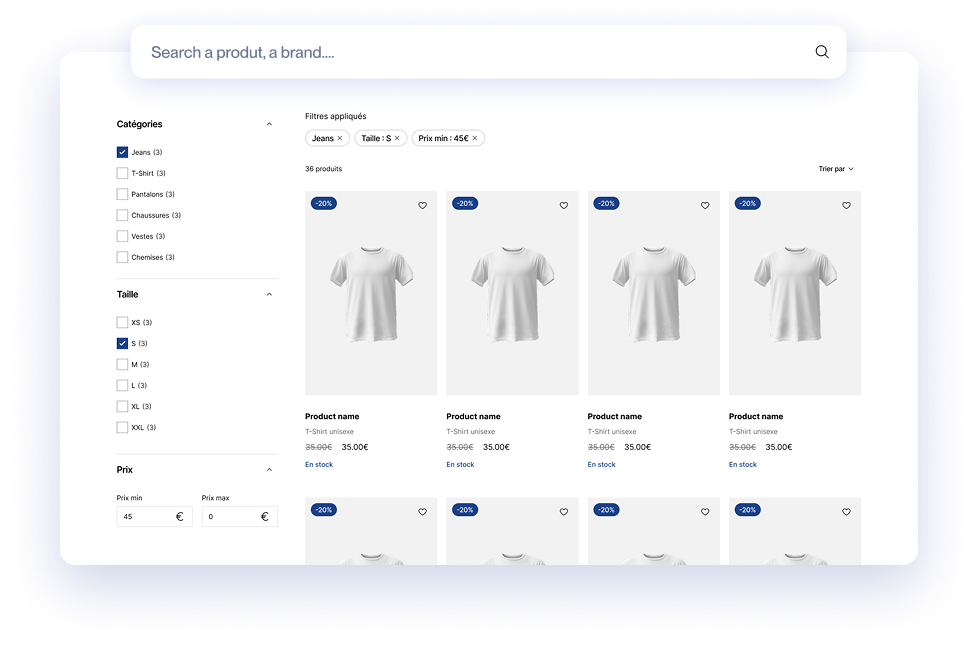
View Live Demo | Documentation | Report Issues
Install the bundle via Composer:
composer require mezcalito/ux-search
Then install the client library for your adapter:
# For Algolia
composer require algolia/algoliasearch-client-php

# For Meilisearch (requires a PSR-7/PSR-18 implementation)
composer require meilisearch/meilisearch-php nyholm/psr7

# For Doctrine ORM
composer require doctrine/doctrine-bundle doctrine/orm
If you're not using Symfony Flex, you'll need to manually register the bundle in config/bundles.php:
// config/bundles.php
return [
    // ...
    Mezcalito\UxSearchBundle\MezcalitoUxSearchBundle::class => ['all' => true],
];
Create a configuration file config/packages/mezcalito_ux_search.yaml:
mezcalito_ux_search:
    default_adapter: 'default'
    adapters:
        default: '%env(MEZCALITO_UX_SEARCH_DEFAULT_DSN)%'
Add the DSN to your .env file (choose one):
# For Algolia
MEZCALITO_UX_SEARCH_DEFAULT_DSN=algolia://YOUR_API_KEY@YOUR_APP_ID

# For Meilisearch
MEZCALITO_UX_SEARCH_DEFAULT_DSN=meilisearch://YOUR_MASTER_KEY@localhost:7700

# For Doctrine ORM
MEZCALITO_UX_SEARCH_DEFAULT_DSN=doctrine://default
Use the maker command to generate a search class (requires symfony/maker-bundle):
composer require --dev symfony/maker-bundle
php bin/console make:search
The command will ask you for:
App\Entity\Product)default_adapter)This creates a search class in src/Search/ that you can customize.
In any Twig template:
{# Using Twig component syntax #}
<twig:Mezcalito:UxSearch:Layout name="product"/>

{# Or using component function #}
{{ component('Mezcalito:UxSearch:Layout', { name: 'product' }) }}
That's it! You now have a working search with facets, pagination, and live updates. 🎉
Three adapters are available, each with different strengths:
| Adapter | Best For | Performance | Cost | Setup Complexity |
|---|---|---|---|---|
| Algolia | Production, large datasets | ⭐⭐⭐ | 💰 Paid | Easy |
| Meilisearch | Self-hosted production | ⭐⭐⭐ | 🆓 Free | Medium |
| Doctrine | Development, small datasets | ⭐⭐ | 🆓 Free | Very Easy |
| Adapter | DSN Format | Documentation |
|---|---|---|
| Algolia | algolia://apiKey@appId | View docs |
| Meilisearch | meilisearch://key@host:port | View docs |
| Doctrine | doctrine://entityManagerName | View docs |
Need another provider? You can create your own adapter.
Once you've created a search class, customize it by editing the build() method:
use Mezcalito\UxSearchBundle\Search\AbstractSearch;
use Mezcalito\UxSearchBundle\Attribute\AsSearch;
use Mezcalito\UxSearchBundle\Twig\Components\Facet\RangeInput;

#[AsSearch(index: 'products', adapter: 'default')]
class ProductSearch extends AbstractSearch
{
    public function build(array $options = []): void
    {
        // Add facets for filtering
        $this->addFacet('brand', 'Brand');
        $this->addFacet('category', 'Category');
        $this->addFacet('price', 'Price', RangeInput::class);

        // Add sorting options
        $this->addAvailableSort('name', 'Name');
        $this->addAvailableSort('price', 'Price');
        $this->addAvailableSort('created_at', 'Newest');

        // Configure pagination
        $this->setAvailableHitsPerPage([12, 24, 48]);

        // Adapter-specific parameters
        $this->setAdapterParameters([
            // Adapter-specific options here
        ]);
    }
}
The bundle provides a complete set of UI components that you can use individually or override:
| Component | Description | Documentation |
|---|---|---|
| Layout | Root wrapper component containing all search elements | Docs |
| SearchInput | Text search input with live updates | Docs |
| Hits | Display search results with customizable item templates | Docs |
| Pagination | Navigate through search results | Docs |
| Component | Description | Documentation |
|---|---|---|
| RefinementList | Checkbox/radio list for categorical filtering | Docs |
| RangeInput | Min/max input fields for numeric ranges | Docs |
| RangeSlider | Slider for numeric range filtering | Docs |
| Component | Description | Documentation |
|---|---|---|
| CurrentRefinements | Display active filters with remove buttons | Docs |
| ClearRefinements | Button to clear all active filters | Docs |
| SortBy | Dropdown to change sort order | Docs |
| TotalHits | Display total number of results | Docs |
You can override any component template by creating a file in your app's templates/ directory:
templates/
└── components/
    └── Mezcalito/
        └── UxSearch/
            ├── Layout.html.twig          # Override the main layout
            ├── SearchInput.html.twig     # Override search input
            ├── Hits.html.twig            # Override results display
            └── Facet/
                └── RefinementList.html.twig
The most common customization is the hit (result item) template. Override Hits.html.twig:
{# templates/components/Mezcalito/UxSearch/Hits.html.twig #}
<div {{ attributes }}>
    {% for hit in this.resultSet.hits %}
        <article class="product-card">
            <img src="{{ hit.image }}" alt="{{ hit.name }}">
            <h3>{{ hit.name }}</h3>
            <p class="price">{{ hit.price|format_currency('EUR') }}</p>
            <a href="{{ path('product_show', {id: hit.id}) }}">View details</a>
        </article>
    {% endfor %}
</div>
Customize search behavior with event subscribers:
use Mezcalito\UxSearchBundle\Event\PreSearchEvent;
use Symfony\Component\EventDispatcher\EventSubscriberInterface;

class SearchSubscriber implements EventSubscriberInterface
{
    public static function getSubscribedEvents(): array
    {
        return [
            PreSearchEvent::class => 'onPreSearch',
        ];
    }

    public function onPreSearch(PreSearchEvent $event): void
    {
        $query = $event->getQuery();
        // Modify the query before search execution
        $query->addFilter('status', 'published');
    }
}
You can have multiple search configurations in one application:
// Product search with Algolia
#[AsSearch(index: 'products', adapter: 'algolia')]
class ProductSearch extends AbstractSearch { }

// Blog search with Meilisearch
#[AsSearch(index: 'posts', adapter: 'meilisearch')]
class BlogSearch extends AbstractSearch { }

// User search with Doctrine
#[AsSearch(index: 'App\Entity\User', adapter: 'orm')]
class UserSearch extends AbstractSearch { }
Each search can have its own adapter, facets, and configuration.
Contributions are welcome! Here's how you can help:
# Clone the repository
git clone https://github.com/mezcalito/ux-search.git
cd ux-search

# Start the Docker development environment
make up

# Install dependencies
make install

# Run tests
make test

# Run code quality checks
make ci
This bundle is released under the MIT License.
Effortless search and faceted search with Symfony UX and Mezcalito UX Search
See the code
A powerful, flexible, and easy-to-use search and faceted search system for Symfony applications, built with Twig Components and Live Components.
View Live Demo | Documentation | Report Issues
Install the bundle via Composer:
composer require mezcalito/ux-search
Then install the client library for your adapter:
# For Algolia
composer require algolia/algoliasearch-client-php

# For Meilisearch (requires a PSR-7/PSR-18 implementation)
composer require meilisearch/meilisearch-php nyholm/psr7

# For Doctrine ORM
composer require doctrine/doctrine-bundle doctrine/orm
If you're not using Symfony Flex, you'll need to manually register the bundle in config/bundles.php:
// config/bundles.php
return [
    // ...
    Mezcalito\UxSearchBundle\MezcalitoUxSearchBundle::class => ['all' => true],
];
Create a configuration file config/packages/mezcalito_ux_search.yaml:
mezcalito_ux_search:
    default_adapter: 'default'
    adapters:
        default: '%env(MEZCALITO_UX_SEARCH_DEFAULT_DSN)%'
Add the DSN to your .env file (choose one):
# For Algolia
MEZCALITO_UX_SEARCH_DEFAULT_DSN=algolia://YOUR_API_KEY@YOUR_APP_ID

# For Meilisearch
MEZCALITO_UX_SEARCH_DEFAULT_DSN=meilisearch://YOUR_MASTER_KEY@localhost:7700

# For Doctrine ORM
MEZCALITO_UX_SEARCH_DEFAULT_DSN=doctrine://default
Use the maker command to generate a search class (requires symfony/maker-bundle):
composer require --dev symfony/maker-bundle
php bin/console make:search
The command will ask you for:
App\Entity\Product)default_adapter)This creates a search class in src/Search/ that you can customize.
In any Twig template:
{# Using Twig component syntax #}
<twig:Mezcalito:UxSearch:Layout name="product"/>

{# Or using component function #}
{{ component('Mezcalito:UxSearch:Layout', { name: 'product' }) }}
That's it! You now have a working search with facets, pagination, and live updates. 🎉
Three adapters are available, each with different strengths:
| Adapter | Best For | Performance | Cost | Setup Complexity |
|---|---|---|---|---|
| Algolia | Production, large datasets | ⭐⭐⭐ | 💰 Paid | Easy |
| Meilisearch | Self-hosted production | ⭐⭐⭐ | 🆓 Free | Medium |
| Doctrine | Development, small datasets | ⭐⭐ | 🆓 Free | Very Easy |
| Adapter | DSN Format | Documentation |
|---|---|---|
| Algolia | algolia://apiKey@appId | View docs |
| Meilisearch | meilisearch://key@host:port | View docs |
| Doctrine | doctrine://entityManagerName | View docs |
Need another provider? You can create your own adapter.
Once you've created a search class, customize it by editing the build() method:
use Mezcalito\UxSearchBundle\Search\AbstractSearch;
use Mezcalito\UxSearchBundle\Attribute\AsSearch;
use Mezcalito\UxSearchBundle\Twig\Components\Facet\RangeInput;

#[AsSearch(index: 'products', adapter: 'default')]
class ProductSearch extends AbstractSearch
{
    public function build(array $options = []): void
    {
        // Add facets for filtering
        $this->addFacet('brand', 'Brand');
        $this->addFacet('category', 'Category');
        $this->addFacet('price', 'Price', RangeInput::class);

        // Add sorting options
        $this->addAvailableSort('name', 'Name');
        $this->addAvailableSort('price', 'Price');
        $this->addAvailableSort('created_at', 'Newest');

        // Configure pagination
        $this->setAvailableHitsPerPage([12, 24, 48]);

        // Adapter-specific parameters
        $this->setAdapterParameters([
            // Adapter-specific options here
        ]);
    }
}
The bundle provides a complete set of UI components that you can use individually or override:
| Component | Description | Documentation |
|---|---|---|
| Layout | Root wrapper component containing all search elements | Docs |
| SearchInput | Text search input with live updates | Docs |
| Hits | Display search results with customizable item templates | Docs |
| Pagination | Navigate through search results | Docs |
| Component | Description | Documentation |
|---|---|---|
| RefinementList | Checkbox/radio list for categorical filtering | Docs |
| RangeInput | Min/max input fields for numeric ranges | Docs |
| RangeSlider | Slider for numeric range filtering | Docs |
| Component | Description | Documentation |
|---|---|---|
| CurrentRefinements | Display active filters with remove buttons | Docs |
| ClearRefinements | Button to clear all active filters | Docs |
| SortBy | Dropdown to change sort order | Docs |
| TotalHits | Display total number of results | Docs |
You can override any component template by creating a file in your app's templates/ directory:
templates/
└── components/
    └── Mezcalito/
        └── UxSearch/
            ├── Layout.html.twig          # Override the main layout
            ├── SearchInput.html.twig     # Override search input
            ├── Hits.html.twig            # Override results display
            └── Facet/
                └── RefinementList.html.twig
The most common customization is the hit (result item) template. Override Hits.html.twig:
{# templates/components/Mezcalito/UxSearch/Hits.html.twig #}
<div {{ attributes }}>
    {% for hit in this.resultSet.hits %}
        <article class="product-card">
            <img src="{{ hit.image }}" alt="{{ hit.name }}">
            <h3>{{ hit.name }}</h3>
            <p class="price">{{ hit.price|format_currency('EUR') }}</p>
            <a href="{{ path('product_show', {id: hit.id}) }}">View details</a>
        </article>
    {% endfor %}
</div>
Customize search behavior with event subscribers:
use Mezcalito\UxSearchBundle\Event\PreSearchEvent;
use Symfony\Component\EventDispatcher\EventSubscriberInterface;

class SearchSubscriber implements EventSubscriberInterface
{
    public static function getSubscribedEvents(): array
    {
        return [
            PreSearchEvent::class => 'onPreSearch',
        ];
    }

    public function onPreSearch(PreSearchEvent $event): void
    {
        $query = $event->getQuery();
        // Modify the query before search execution
        $query->addFilter('status', 'published');
    }
}
You can have multiple search configurations in one application:
// Product search with Algolia
#[AsSearch(index: 'products', adapter: 'algolia')]
class ProductSearch extends AbstractSearch { }

// Blog search with Meilisearch
#[AsSearch(index: 'posts', adapter: 'meilisearch')]
class BlogSearch extends AbstractSearch { }

// User search with Doctrine
#[AsSearch(index: 'App\Entity\User', adapter: 'orm')]
class UserSearch extends AbstractSearch { }
Each search can have its own adapter, facets, and configuration.
Contributions are welcome! Here's how you can help:
# Clone the repository
git clone https://github.com/mezcalito/ux-search.git
cd ux-search

# Start the Docker development environment
make up

# Install dependencies
make install

# Run tests
make test

# Run code quality checks
make ci
This bundle is released under the MIT License.



