
A local-first Windows desktop app for live speech recognition, speaker diarization, captions, and translation.
C#
3
6 commits
updated Aug 26, 2026
README
LiveDialogue-Translator
LiveDialogue Translator is a local-first Windows desktop captioning app. It captures system audio and microphone audio directly, runs local speech-to-text, assigns speaker labels with local diarization, and can show translated captions in the main window or a transparent overlay.
The project is inspired by LiveCaptions-Translator, but it does not depend on Windows Live Captions. Audio is processed through the app's own capture pipeline and Python worker.
Screenshots
Screenshot assets are managed under docs/assets/screenshots. Additional notes
and the overlay placeholder are kept in docs/screenshots.md.
Caption Workspace
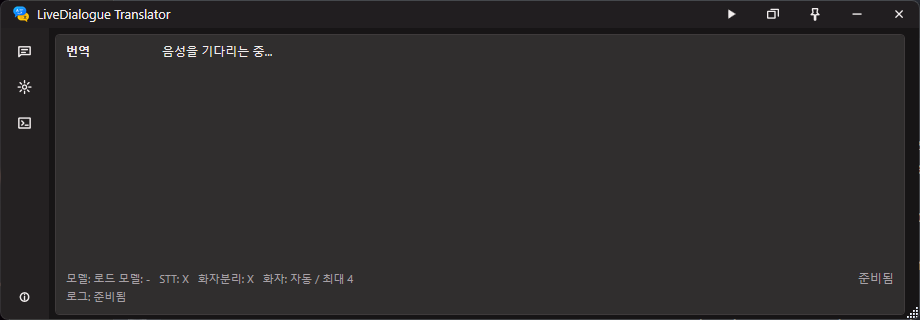
The caption workspace is the default screen. It keeps live speaker captions, translation output, model status, and capture state visible in a compact window.
Settings
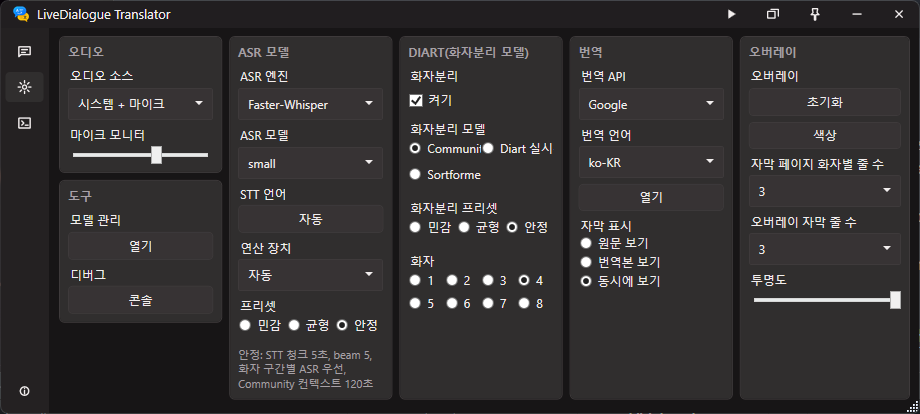
The settings screen separates audio input, ASR model, diarization, translation, overlay, model management, and debug controls into compact groups.
Info
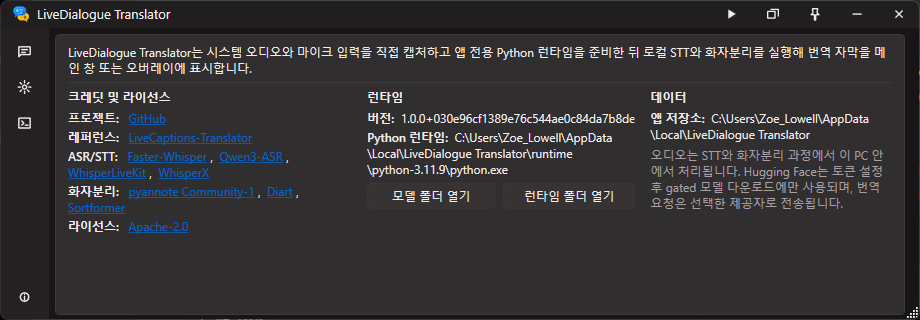
The info screen lists the project links, reference project, supported ASR/STT and diarization backends, license, runtime path, and local data directory.
Python Console
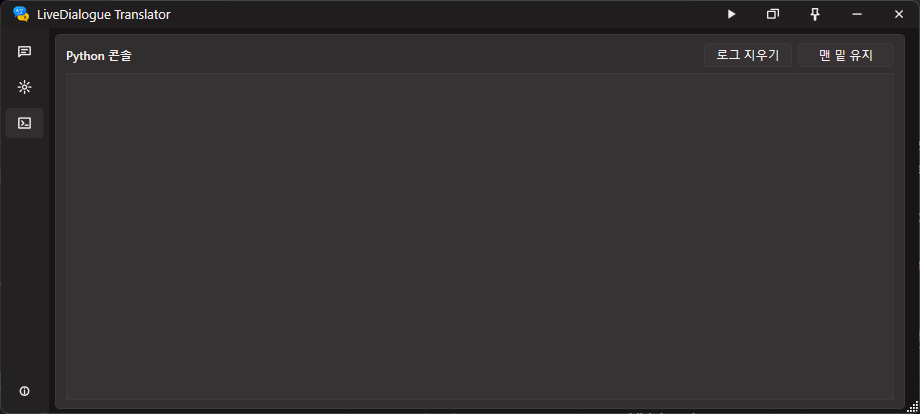
The console screen shows Python worker logs separately from captions, with quick controls for clearing logs and keeping the view pinned to the latest output.
Overlay
Overlay screenshot placeholder. Add the final overlay capture to
docs/assets/screenshots/overlay.pngand replace this block when the overlay image is ready.
Current Scope
- Capture system audio, microphone audio, or a mixed device.
- Normalize captured audio to 16 kHz mono PCM before worker processing.
- Run a newline-delimited JSON protocol between the WPF app and Python worker.
- Run local ASR/STT with
faster-whisper,Qwen3-ASR,WhisperLiveKit, orWhisperX.faster-whisperis the default engine. - Install optional ASR engines into isolated package folders so engine-specific dependencies do not overwrite the base runtime.
- Run local speaker diarization with
pyannote.audio==4.0.4andpyannote/speaker-diarization-community-1,Diart, orSortformer. - Translate captions with the no-key Google provider. Other providers are currently shown as placeholders.
- Show captions in a compact WPF shell and in a configurable transparent overlay.
- Store app settings and downloaded runtime/model files under LocalAppData.
- Follow the Windows UI language at startup. Korean and English strings are included.
Requirements
- Windows desktop environment.
- .NET 8 SDK for development builds.
- Internet access on first setup so the app can download the managed Python runtime, Python packages, and selected model files.
- Hugging Face access is required only when local pyannote diarization is used.
Accept the selected model terms and provide a fine-grained token with
User permissions > Repositories > Read access to contents of all public gated repos you can access. - NVIDIA CUDA is optional. The app can install CUDA-enabled PyTorch when an NVIDIA GPU is detected.
End users do not need to install Python manually. On first Start or Prepare, the
app downloads the official Python 3.11.9 x64 embeddable runtime from python.org,
extracts it under %LOCALAPPDATA%\LiveDialogue Translator\runtime\python-3.11.9,
bootstraps pip, and installs the worker dependencies there.
Model Combination Hardware Guide
The numbers below are conservative minimums for the current selectable model families in this app. They are intended for short live captures and model loading without out-of-memory failures. Real-time stability improves significantly with the recommended CUDA path and lower preset/model choices. They are app-level planning baselines, not official vendor guarantees.
Important assumptions:
- CPU mode means
Compute = CPU. It is practical for light Whisper models, but large Whisper, Qwen3-ASR, WhisperX, and Sortformer can fall behind real time. - CUDA mode means an NVIDIA GPU with current drivers and enough free VRAM. Avoid running another heavy CUDA workload at the same time.
- Qwen3-ASR uses the Qwen3 forced aligner by default, so the 0.6B aligner must also fit in memory.
Diartuses CPU by default whenCompute = Auto; chooseCompute = CUDAif you want Diart to run on the GPU.Sortformeruses the WhisperLiveKit Sortformer package even when the selected ASR engine is not WhisperLiveKit.- Keep at least 30 GB free disk for one heavy setup and 50-80 GB if you install every optional ASR engine and model cache.
ASR-only minimums
Use this table when speaker diarization is disabled.
| ASR engine / model | CPU minimum | CUDA minimum | Notes |
|---|---|---|---|
Faster-Whisper tiny, base, small | 4 CPU cores, 8 GB RAM | 4 GB VRAM, 8 GB RAM | Best CPU-compatible path. |
Faster-Whisper medium, large-v3, large-v3-turbo | 8 CPU cores, 16 GB RAM | 8 GB VRAM, 16 GB RAM | CPU works, but large models may not keep up in live use. |
Qwen3-ASR 0.6B + forced aligner | 8 CPU cores, 32 GB RAM | 8 GB VRAM, 24 GB RAM | CPU is mainly for testing; CUDA is strongly preferred. |
Qwen3-ASR 1.7B + forced aligner | 12 CPU cores, 48 GB RAM | 12 GB VRAM, 32 GB RAM | Default Qwen model; use CUDA for realistic latency. |
WhisperLiveKit default (large-v3-turbo) | 8 CPU cores, 24 GB RAM | 8 GB VRAM, 16 GB RAM | Streaming stack; CUDA recommended. |
WhisperX tiny, base, small | 8 CPU cores, 16 GB RAM | 6 GB VRAM, 16 GB RAM | Alignment adds memory and startup cost over faster-whisper. |
WhisperX medium, large-v3, large-v3-turbo | 12 CPU cores, 32 GB RAM | 10 GB VRAM, 24 GB RAM | Lower batch/model size if CUDA memory is tight. |
ASR + speaker diarization minimums
Use this table when speaker diarization is enabled. Community-1 and Diart
require accepted Hugging Face model terms and a valid token. Sortformer does
not require pyannote model access, but it is the most CUDA-oriented diarization
path.
| ASR engine / model | Diarization model | CPU minimum | CUDA minimum | Notes |
|---|---|---|---|---|
Faster-Whisper tiny/base/small | Community-1 | 4 CPU cores, 16 GB RAM | 6 GB VRAM, 16 GB RAM | Lowest balanced setup with speaker labels. |
Faster-Whisper tiny/base/small | Diart | 4 CPU cores, 16 GB RAM | 6 GB VRAM, 16 GB RAM | Good low-latency choice; Auto keeps Diart on CPU. |
Faster-Whisper tiny/base/small | Sortformer | 8 CPU cores, 16 GB RAM | 8 GB VRAM, 16 GB RAM | CPU is usable only for light testing. |
Faster-Whisper medium/large-v3/large-v3-turbo | Community-1 | 8 CPU cores, 32 GB RAM | 8 GB VRAM, 24 GB RAM | CUDA recommended for live captions. |
Faster-Whisper medium/large-v3/large-v3-turbo | Diart | 8 CPU cores, 32 GB RAM | 8 GB VRAM, 24 GB RAM | Stable if ASR model fits comfortably. |
Faster-Whisper medium/large-v3/large-v3-turbo | Sortformer | 12 CPU cores, 32 GB RAM | 10 GB VRAM, 24 GB RAM | Prefer 12 GB+ VRAM for large-v3. |
Qwen3-ASR 0.6B + forced aligner | Community-1 | 8 CPU cores, 32 GB RAM | 8 GB VRAM, 24 GB RAM | CPU latency is high; use smaller chunks/presets if needed. |
Qwen3-ASR 0.6B + forced aligner | Diart | 8 CPU cores, 32 GB RAM | 8 GB VRAM, 24 GB RAM | CUDA leaves more CPU headroom for capture and translation. |
Qwen3-ASR 0.6B + forced aligner | Sortformer | 12 CPU cores, 32 GB RAM | 10 GB VRAM, 24 GB RAM | Runs two heavy neural stacks; CUDA strongly preferred. |
Qwen3-ASR 1.7B + forced aligner | Community-1 | 12 CPU cores, 48 GB RAM | 12 GB VRAM, 32 GB RAM | Practical minimum for the default Qwen setup. |
Qwen3-ASR 1.7B + forced aligner | Diart | 12 CPU cores, 48 GB RAM | 12 GB VRAM, 32 GB RAM | Use CUDA and close other GPU workloads. |
Qwen3-ASR 1.7B + forced aligner | Sortformer | 16 CPU cores, 64 GB RAM | 12 GB VRAM, 32 GB RAM | 16 GB VRAM is more comfortable for long sessions. |
WhisperLiveKit default (large-v3-turbo) | Community-1 | 12 CPU cores, 32 GB RAM | 10 GB VRAM, 24 GB RAM | WhisperLiveKit handles ASR; pyannote handles diarization. |
WhisperLiveKit default (large-v3-turbo) | Diart | 12 CPU cores, 32 GB RAM | 10 GB VRAM, 24 GB RAM | Use CUDA if Diart should not consume CPU headroom. |
WhisperLiveKit default (large-v3-turbo) | Sortformer | 12 CPU cores, 32 GB RAM | 10 GB VRAM, 24 GB RAM | Native WhisperLiveKit + Sortformer streaming path. |
WhisperX tiny/base/small | Community-1 | 8 CPU cores, 16 GB RAM | 8 GB VRAM, 16 GB RAM | Word alignment and diarization both add overhead. |
WhisperX tiny/base/small | Diart | 8 CPU cores, 16 GB RAM | 8 GB VRAM, 16 GB RAM | Good if word timestamps matter more than lowest latency. |
WhisperX tiny/base/small | Sortformer | 8 CPU cores, 24 GB RAM | 10 GB VRAM, 24 GB RAM | Sortformer adds the WhisperLiveKit runtime package. |
WhisperX medium/large-v3/large-v3-turbo | Community-1 | 12 CPU cores, 32 GB RAM | 12 GB VRAM, 32 GB RAM | Reduce WhisperX batch size if memory is tight. |
WhisperX medium/large-v3/large-v3-turbo | Diart | 12 CPU cores, 32 GB RAM | 12 GB VRAM, 32 GB RAM | Heavy but reasonable on 12 GB+ NVIDIA GPUs. |
WhisperX medium/large-v3/large-v3-turbo | Sortformer | 16 CPU cores, 48 GB RAM | 12 GB VRAM, 32 GB RAM | 16 GB VRAM is preferred for long sessions. |
For a general-purpose Windows desktop setup using CUDA, the practical baseline
is a modern 8-core CPU, 32 GB system RAM, and an NVIDIA GPU with 12 GB VRAM.
That class of machine can cover every selectable combination, although
Qwen3-ASR 1.7B plus Sortformer or WhisperX large plus Sortformer benefits
from 16 GB VRAM.
Quick Start
- Build or package the app with the commands below.
- Launch
LiveDialogueTranslator.exe. - Open Model Manager if the app asks for Hugging Face access.
- Choose the ASR model, diarization mode, input source, and translation target.
- Press Start capture.
The first run can take several minutes because the app prepares Python packages and model files. Later runs reuse the LocalAppData runtime and cache.
Build and Package
This repository can use a repo-local SDK at .dotnet-sdk\dotnet.exe or a system
dotnet SDK.
.\.dotnet-sdk\dotnet.exe run --project tests\LiveDialogueTranslator.Tests\LiveDialogueTranslator.Tests.csproj
.\.dotnet-sdk\dotnet.exe build src\LiveDialogueTranslator.App\LiveDialogueTranslator.App.csproj -c Release
.\scripts\package.ps1
scripts\package.ps1 publishes to publish\win-x64. If Inno Setup is
installed, it also creates artifacts\installer\LiveDialogueTranslatorSetup-x64.exe.
Manual Worker Testing
For developer-only worker testing, use the app-managed runtime after it has been prepared:
%LOCALAPPDATA%\LiveDialogue Translator\runtime\python-3.11.9\python.exe -m pip install --no-warn-script-location -r worker\requirements.txt
%LOCALAPPDATA%\LiveDialogue Translator\runtime\python-3.11.9\python.exe worker\speaker_worker.py
The worker reads JSON commands from stdin and writes JSON events to stdout. Use the WPF app for normal operation because it owns audio capture, model setup, translation, and worker lifecycle management.
Repository Layout
src\LiveDialogueTranslator.App- WPF desktop app, overlay window, settings, and worker orchestration.src\LiveDialogueTranslator.Core- shared protocol, startup planning, transcript, speaker, runtime, and history logic.worker- Python speech worker, package requirements, and engine environment presets.tests\LiveDialogueTranslator.Tests- lightweight executable tests.scripts- packaging helpers.installer- Inno Setup installer definition.
Privacy
Audio is processed locally by the Python worker. Hugging Face is contacted only to download gated model files after you provide a token. Translation requests are sent to the selected translation provider.
Credits
- LiveCaptions-Translator for the original real-time caption translation reference.
- faster-whisper for local Whisper inference.
- Qwen3-ASR for Qwen ASR model support.
- WhisperLiveKit for streaming Whisper + Sortformer support.
- WhisperX for WhisperX ASR support.
- pyannote.audio for Community-1 speaker diarization.
- Diart for realtime diarization.
- Sortformer for streaming diarization support.
License
LiveDialogue Translator is licensed under the Apache License 2.0. See LICENSE.
Similar repos


Languages
C#
55.0%
Python
44.6%
A local-first Windows desktop app for live speech recognition, speaker diarization, captions, and translation.
C#
3
6 commits
updated Aug 26, 2026
README
LiveDialogue-Translator
LiveDialogue Translator is a local-first Windows desktop captioning app. It captures system audio and microphone audio directly, runs local speech-to-text, assigns speaker labels with local diarization, and can show translated captions in the main window or a transparent overlay.
The project is inspired by LiveCaptions-Translator, but it does not depend on Windows Live Captions. Audio is processed through the app's own capture pipeline and Python worker.
Screenshots
Screenshot assets are managed under docs/assets/screenshots. Additional notes
and the overlay placeholder are kept in docs/screenshots.md.
Caption Workspace
The caption workspace is the default screen. It keeps live speaker captions, translation output, model status, and capture state visible in a compact window.
Settings
The settings screen separates audio input, ASR model, diarization, translation, overlay, model management, and debug controls into compact groups.
Info
The info screen lists the project links, reference project, supported ASR/STT and diarization backends, license, runtime path, and local data directory.
Python Console
The console screen shows Python worker logs separately from captions, with quick controls for clearing logs and keeping the view pinned to the latest output.
Overlay
Overlay screenshot placeholder. Add the final overlay capture to
docs/assets/screenshots/overlay.pngand replace this block when the overlay image is ready.
Current Scope
- Capture system audio, microphone audio, or a mixed device.
- Normalize captured audio to 16 kHz mono PCM before worker processing.
- Run a newline-delimited JSON protocol between the WPF app and Python worker.
- Run local ASR/STT with
faster-whisper,Qwen3-ASR,WhisperLiveKit, orWhisperX.faster-whisperis the default engine. - Install optional ASR engines into isolated package folders so engine-specific dependencies do not overwrite the base runtime.
- Run local speaker diarization with
pyannote.audio==4.0.4andpyannote/speaker-diarization-community-1,Diart, orSortformer. - Translate captions with the no-key Google provider. Other providers are currently shown as placeholders.
- Show captions in a compact WPF shell and in a configurable transparent overlay.
- Store app settings and downloaded runtime/model files under LocalAppData.
- Follow the Windows UI language at startup. Korean and English strings are included.
Requirements
- Windows desktop environment.
- .NET 8 SDK for development builds.
- Internet access on first setup so the app can download the managed Python runtime, Python packages, and selected model files.
- Hugging Face access is required only when local pyannote diarization is used.
Accept the selected model terms and provide a fine-grained token with
User permissions > Repositories > Read access to contents of all public gated repos you can access. - NVIDIA CUDA is optional. The app can install CUDA-enabled PyTorch when an NVIDIA GPU is detected.
End users do not need to install Python manually. On first Start or Prepare, the
app downloads the official Python 3.11.9 x64 embeddable runtime from python.org,
extracts it under %LOCALAPPDATA%\LiveDialogue Translator\runtime\python-3.11.9,
bootstraps pip, and installs the worker dependencies there.
Model Combination Hardware Guide
The numbers below are conservative minimums for the current selectable model families in this app. They are intended for short live captures and model loading without out-of-memory failures. Real-time stability improves significantly with the recommended CUDA path and lower preset/model choices. They are app-level planning baselines, not official vendor guarantees.
Important assumptions:
- CPU mode means
Compute = CPU. It is practical for light Whisper models, but large Whisper, Qwen3-ASR, WhisperX, and Sortformer can fall behind real time. - CUDA mode means an NVIDIA GPU with current drivers and enough free VRAM. Avoid running another heavy CUDA workload at the same time.
- Qwen3-ASR uses the Qwen3 forced aligner by default, so the 0.6B aligner must also fit in memory.
Diartuses CPU by default whenCompute = Auto; chooseCompute = CUDAif you want Diart to run on the GPU.Sortformeruses the WhisperLiveKit Sortformer package even when the selected ASR engine is not WhisperLiveKit.- Keep at least 30 GB free disk for one heavy setup and 50-80 GB if you install every optional ASR engine and model cache.
ASR-only minimums
Use this table when speaker diarization is disabled.
| ASR engine / model | CPU minimum | CUDA minimum | Notes |
|---|---|---|---|
Faster-Whisper tiny, base, small | 4 CPU cores, 8 GB RAM | 4 GB VRAM, 8 GB RAM | Best CPU-compatible path. |
Faster-Whisper medium, large-v3, large-v3-turbo | 8 CPU cores, 16 GB RAM | 8 GB VRAM, 16 GB RAM | CPU works, but large models may not keep up in live use. |
Qwen3-ASR 0.6B + forced aligner | 8 CPU cores, 32 GB RAM | 8 GB VRAM, 24 GB RAM | CPU is mainly for testing; CUDA is strongly preferred. |
Qwen3-ASR 1.7B + forced aligner | 12 CPU cores, 48 GB RAM | 12 GB VRAM, 32 GB RAM | Default Qwen model; use CUDA for realistic latency. |
WhisperLiveKit default (large-v3-turbo) | 8 CPU cores, 24 GB RAM | 8 GB VRAM, 16 GB RAM | Streaming stack; CUDA recommended. |
WhisperX tiny, base, small | 8 CPU cores, 16 GB RAM | 6 GB VRAM, 16 GB RAM | Alignment adds memory and startup cost over faster-whisper. |
WhisperX medium, large-v3, large-v3-turbo | 12 CPU cores, 32 GB RAM | 10 GB VRAM, 24 GB RAM | Lower batch/model size if CUDA memory is tight. |
ASR + speaker diarization minimums
Use this table when speaker diarization is enabled. Community-1 and Diart
require accepted Hugging Face model terms and a valid token. Sortformer does
not require pyannote model access, but it is the most CUDA-oriented diarization
path.
| ASR engine / model | Diarization model | CPU minimum | CUDA minimum | Notes |
|---|---|---|---|---|
Faster-Whisper tiny/base/small | Community-1 | 4 CPU cores, 16 GB RAM | 6 GB VRAM, 16 GB RAM | Lowest balanced setup with speaker labels. |
Faster-Whisper tiny/base/small | Diart | 4 CPU cores, 16 GB RAM | 6 GB VRAM, 16 GB RAM | Good low-latency choice; Auto keeps Diart on CPU. |
Faster-Whisper tiny/base/small | Sortformer | 8 CPU cores, 16 GB RAM | 8 GB VRAM, 16 GB RAM | CPU is usable only for light testing. |
Faster-Whisper medium/large-v3/large-v3-turbo | Community-1 | 8 CPU cores, 32 GB RAM | 8 GB VRAM, 24 GB RAM | CUDA recommended for live captions. |
Faster-Whisper medium/large-v3/large-v3-turbo | Diart | 8 CPU cores, 32 GB RAM | 8 GB VRAM, 24 GB RAM | Stable if ASR model fits comfortably. |
Faster-Whisper medium/large-v3/large-v3-turbo | Sortformer | 12 CPU cores, 32 GB RAM | 10 GB VRAM, 24 GB RAM | Prefer 12 GB+ VRAM for large-v3. |
Qwen3-ASR 0.6B + forced aligner | Community-1 | 8 CPU cores, 32 GB RAM | 8 GB VRAM, 24 GB RAM | CPU latency is high; use smaller chunks/presets if needed. |
Qwen3-ASR 0.6B + forced aligner | Diart | 8 CPU cores, 32 GB RAM | 8 GB VRAM, 24 GB RAM | CUDA leaves more CPU headroom for capture and translation. |
Qwen3-ASR 0.6B + forced aligner | Sortformer | 12 CPU cores, 32 GB RAM | 10 GB VRAM, 24 GB RAM | Runs two heavy neural stacks; CUDA strongly preferred. |
Qwen3-ASR 1.7B + forced aligner | Community-1 | 12 CPU cores, 48 GB RAM | 12 GB VRAM, 32 GB RAM | Practical minimum for the default Qwen setup. |
Qwen3-ASR 1.7B + forced aligner | Diart | 12 CPU cores, 48 GB RAM | 12 GB VRAM, 32 GB RAM | Use CUDA and close other GPU workloads. |
Qwen3-ASR 1.7B + forced aligner | Sortformer | 16 CPU cores, 64 GB RAM | 12 GB VRAM, 32 GB RAM | 16 GB VRAM is more comfortable for long sessions. |
WhisperLiveKit default (large-v3-turbo) | Community-1 | 12 CPU cores, 32 GB RAM | 10 GB VRAM, 24 GB RAM | WhisperLiveKit handles ASR; pyannote handles diarization. |
WhisperLiveKit default (large-v3-turbo) | Diart | 12 CPU cores, 32 GB RAM | 10 GB VRAM, 24 GB RAM | Use CUDA if Diart should not consume CPU headroom. |
WhisperLiveKit default (large-v3-turbo) | Sortformer | 12 CPU cores, 32 GB RAM | 10 GB VRAM, 24 GB RAM | Native WhisperLiveKit + Sortformer streaming path. |
WhisperX tiny/base/small | Community-1 | 8 CPU cores, 16 GB RAM | 8 GB VRAM, 16 GB RAM | Word alignment and diarization both add overhead. |
WhisperX tiny/base/small | Diart | 8 CPU cores, 16 GB RAM | 8 GB VRAM, 16 GB RAM | Good if word timestamps matter more than lowest latency. |
WhisperX tiny/base/small | Sortformer | 8 CPU cores, 24 GB RAM | 10 GB VRAM, 24 GB RAM | Sortformer adds the WhisperLiveKit runtime package. |
WhisperX medium/large-v3/large-v3-turbo | Community-1 | 12 CPU cores, 32 GB RAM | 12 GB VRAM, 32 GB RAM | Reduce WhisperX batch size if memory is tight. |
WhisperX medium/large-v3/large-v3-turbo | Diart | 12 CPU cores, 32 GB RAM | 12 GB VRAM, 32 GB RAM | Heavy but reasonable on 12 GB+ NVIDIA GPUs. |
WhisperX medium/large-v3/large-v3-turbo | Sortformer | 16 CPU cores, 48 GB RAM | 12 GB VRAM, 32 GB RAM | 16 GB VRAM is preferred for long sessions. |
For a general-purpose Windows desktop setup using CUDA, the practical baseline
is a modern 8-core CPU, 32 GB system RAM, and an NVIDIA GPU with 12 GB VRAM.
That class of machine can cover every selectable combination, although
Qwen3-ASR 1.7B plus Sortformer or WhisperX large plus Sortformer benefits
from 16 GB VRAM.
Quick Start
- Build or package the app with the commands below.
- Launch
LiveDialogueTranslator.exe. - Open Model Manager if the app asks for Hugging Face access.
- Choose the ASR model, diarization mode, input source, and translation target.
- Press Start capture.
The first run can take several minutes because the app prepares Python packages and model files. Later runs reuse the LocalAppData runtime and cache.
Build and Package
This repository can use a repo-local SDK at .dotnet-sdk\dotnet.exe or a system
dotnet SDK.
.\.dotnet-sdk\dotnet.exe run --project tests\LiveDialogueTranslator.Tests\LiveDialogueTranslator.Tests.csproj
.\.dotnet-sdk\dotnet.exe build src\LiveDialogueTranslator.App\LiveDialogueTranslator.App.csproj -c Release
.\scripts\package.ps1
scripts\package.ps1 publishes to publish\win-x64. If Inno Setup is
installed, it also creates artifacts\installer\LiveDialogueTranslatorSetup-x64.exe.
Manual Worker Testing
For developer-only worker testing, use the app-managed runtime after it has been prepared:
%LOCALAPPDATA%\LiveDialogue Translator\runtime\python-3.11.9\python.exe -m pip install --no-warn-script-location -r worker\requirements.txt
%LOCALAPPDATA%\LiveDialogue Translator\runtime\python-3.11.9\python.exe worker\speaker_worker.py
The worker reads JSON commands from stdin and writes JSON events to stdout. Use the WPF app for normal operation because it owns audio capture, model setup, translation, and worker lifecycle management.
Repository Layout
src\LiveDialogueTranslator.App- WPF desktop app, overlay window, settings, and worker orchestration.src\LiveDialogueTranslator.Core- shared protocol, startup planning, transcript, speaker, runtime, and history logic.worker- Python speech worker, package requirements, and engine environment presets.tests\LiveDialogueTranslator.Tests- lightweight executable tests.scripts- packaging helpers.installer- Inno Setup installer definition.
Privacy
Audio is processed locally by the Python worker. Hugging Face is contacted only to download gated model files after you provide a token. Translation requests are sent to the selected translation provider.
Credits
- LiveCaptions-Translator for the original real-time caption translation reference.
- faster-whisper for local Whisper inference.
- Qwen3-ASR for Qwen ASR model support.
- WhisperLiveKit for streaming Whisper + Sortformer support.
- WhisperX for WhisperX ASR support.
- pyannote.audio for Community-1 speaker diarization.
- Diart for realtime diarization.
- Sortformer for streaming diarization support.
License
LiveDialogue Translator is licensed under the Apache License 2.0. See LICENSE.
Similar repos
Languages
C#
55.0%
Python
44.6%