







Aidermacs brings AI-powered development to Emacs by integrating Aider, one of the most powerful open-source AI pair programming tools. If you're missing Cursor but prefer living in Emacs, Aidermacs provides similar AI capabilities while staying true to Emacs workflows.
Here's what the community is saying about Aidermacs:
"Are you using aidermacs? For me superior to cursor." - u/berenddeboer
"This is amazing... every time I upgrade my packages I see your new commits. I feel this the authentic aider for emacs" - u/wchmbo
"Between Aidermacs and Gptel it's wild how bleeding edge Emacs is with this stuff. My workplace is exploring MCP registries and even clients that are all the rage (E.g Cursor) lag behind what I can do with mcp.el and gptel for tool use." - u/no_good_names_avail
"This looks amazing... I have been using ellama with local llms, looks like that will work here too. Great stuff!!" - u/lugpocalypse
"Honestly huge fan of this. Thank you for the updates!" - u/ieoa
init.el:(use-package aidermacs
:bind (("C-c a" . aidermacs-transient-menu))
:config
; Set API_KEY in .bashrc, that will automatically picked up by aider or in elisp
(setenv "ANTHROPIC_API_KEY" "sk-...")
; defun my-get-openrouter-api-key yourself elsewhere for security reasons
(setenv "OPENROUTER_API_KEY" (my-get-openrouter-api-key))
:custom
; See the Configuration section below
(aidermacs-default-chat-mode 'architect)
(aidermacs-default-model "sonnet"))
M-x aidermacs-transient-menu or SPC a a (or your chosen binding).For Spacemacs users:
aidermacs to your dotspacemacs-additional-packages list in your .spacemacs file:dotspacemacs-additional-packages '(
(aidermacs :variables
aidermacs-default-chat-mode 'architect
aidermacs-default-model "sonnet")
)
dotspacemacs/user-config function in .spacemacs:(defun dotspacemacs/user-config ()
;; Set leader key for Aidermacs
(spacemacs/set-leader-keys "aa" 'aidermacs-transient-menu) ; Example binding SPC a a
)
M-x aidermacs-transient-menu or SPC a a (or your chosen binding).The main interface to Aidermacs is through its transient menu system (similar to Magit). Access it with:
M-x aidermacs-transient-menu
Or bind it to a key in your config:
(global-set-key (kbd "C-c a") 'aidermacs-transient-menu)
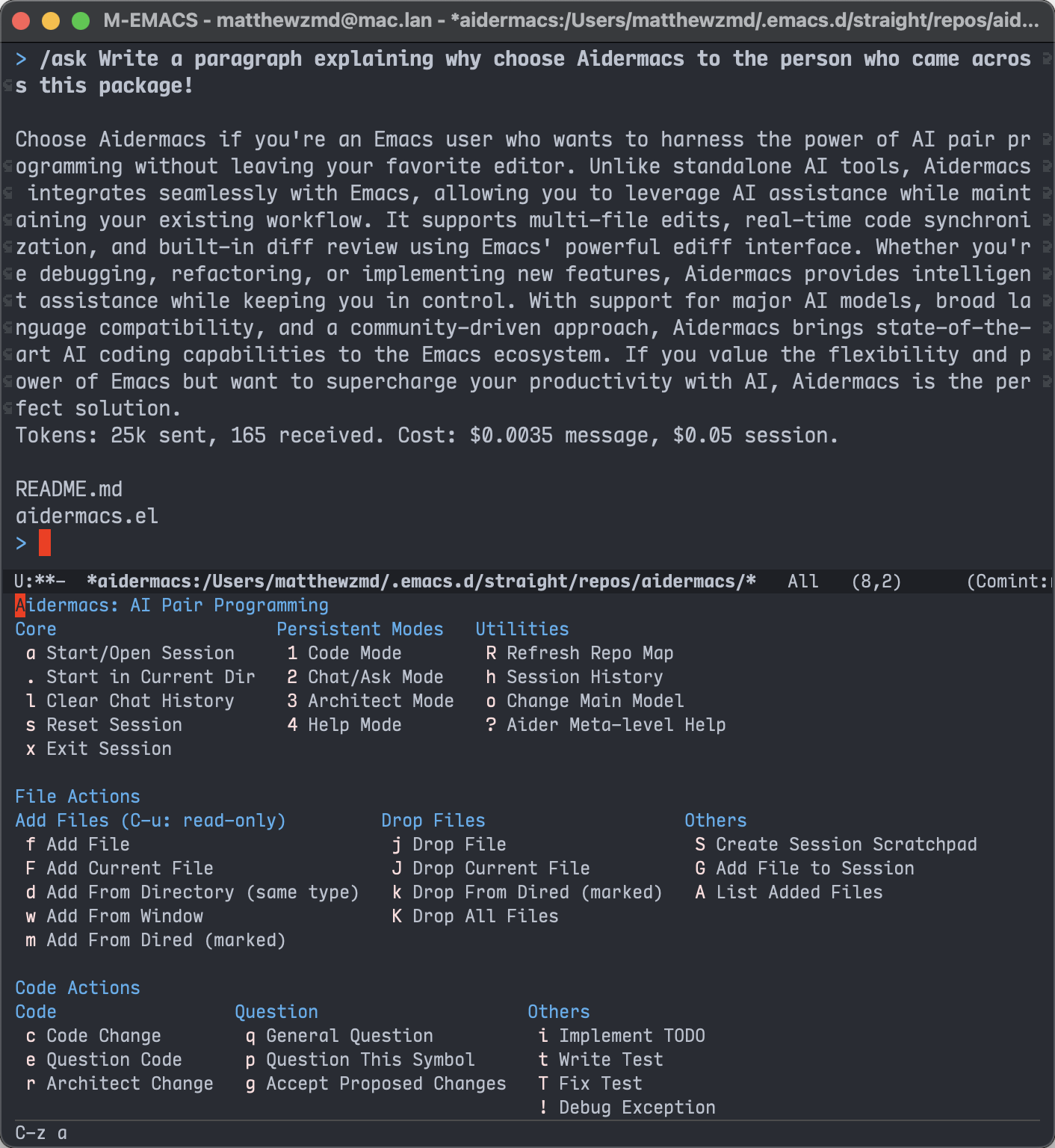
Once the transient menu is open, you can navigate and execute commands using the displayed keys. Here's a summary of the main menu structure:
a: Start/Open Session (auto-detects project root).: Start in Current Directory (good for monorepos)l: Clear Chat Historys: Reset Sessionx: Exit Session1: Code Mode2: Chat/Ask Mode3: Architect Mode4: Help Mode^: Show Last Commit (if auto-commits enabled)u: Undo Last Commit (if auto-commits enabled)R: Refresh Repo Maph: Session Historyo: Change Main Modelv: Send Voice CommandW: Fetch Web Content?: Aider Meta-level Helpf: Add File (C-u: read-only)F: Add Current Filed: Add From Directory (same type)w: Add From Windowm: Add From Dired (marked)j: Drop FileJ: Drop Current Filek: Drop From Dired (marked)K: Drop All FilesS: Create Session ScratchpadG: Add File to SessionA: List Added Filesc: Code Changee: Question Coder: Architect Changeq: General Questionp: Question This Symbolg: Accept Proposed Changesi: Implement TODOt: Write TestT: Fix Test!: Debug ExceptionThe All File Actions and All Code Actions entries open submenus with more specialized commands. Use the displayed keys to navigate these submenus.
When using Aidermacs, you have the flexibility to decide which files the AI should read and edit. Here are some guidelines:
C-u to specify read-only access.S) to paste notes or documentation that will be fed to the AI as read-only.G) command allows you to include files outside the current project (or files in .gitignore), as Aider doesn't automatically include these files in its context.The AI can sometimes determine relevant files on its own, depending on the model and the context of the codebase. However, for precise control, it's often beneficial to manually specify files, especially when dealing with complex projects.
Aider encourages a collaborative approach, similar to working with a human co-worker. Sometimes the AI will need explicit guidance, while other times it can infer the necessary context on its own.
Aidermacs provides a minor mode that makes it easy to work with prompt files and other Aider-related files. When enabled, the minor mode provides these convenient keybindings:
C-c C-n or C-<return>: Send line/region line-by-lineC-c C-c: Send block/region as wholeC-c C-z: Switch to Aidermacs bufferThe minor mode is automatically enabled for:
.aider.prompt.org files (create with M-x aidermacs-open-prompt-file).aider.chat.md files.aider.chat.history.md files.aider.input.history filesYou can use the aidermacs-before-run-backend-hook to run custom setup code before starting the Aider backend. This is particularly useful for:
Example usage to securely set an OpenAI API key from password-store:
(add-hook 'aidermacs-before-run-backend-hook
          (lambda ()
            (setenv "OPENAI_API_KEY" (password-store-get "code/openai_api_key"))))
An copy of process-environment is used when running the hook and starting Aider, ensuring environment variables set in the hook only affect the Aider backend. This approach keeps sensitive information out of your dotfiles while still making it available to Aidermacs.
You can customize the default AI model used by Aidermacs. The model is determined in the following order of priority:
aidermacs-default-model if you have set it (e.g., via setq).AIDER_MODEL environment variable, if set."sonnet").To set it in Emacs:
(setq aidermacs-default-model "sonnet")
This enables easy switching between different AI models without modifying the aidermacs-extra-args variable.
Note: This configuration will be overwritten by the existence of an .aider.conf.yml file (see details).
Aidermacs offers intelligent model selection for solo (non-Architect) mode, automatically detecting and integrating with multiple AI providers:
The dynamic model selection is only for the solo (non-Architect) mode.
To change models in solo mode:
M-x aidermacs-change-model or press o in the transient menuThe system will automatically filter models to only show ones that are:
Aidermacs features an experimental mode using two specialized models for each coding task: an Architect model for reasoning and an Editor model for code generation. This approach has achieved state-of-the-art (SOTA) results on aider's code editing benchmark, as detailed in this blog post.
To start new sessions in Architect mode by default, set aidermacs-default-chat-mode to 'architect.
aidermacs-use-architect-mode is deprecated and will be removed in a future release.
architect mode will default to using aidermacs-default-model. You may also configure the aidermacs-architect-model variable to specify the model to use for the Architect role if you prefer a different main model when using architect mode.
By default, the aidermacs-editor-model is the same as aidermacs-default-model. You only need to set aidermacs-editor-model if you want to use a different model for the Editor role. This variable also respects the AIDER_EDITOR_MODEL environment variable, following the same priority as aidermacs-default-model.
(setq aidermacs-default-chat-mode 'architect)
You can switch to it persistently by M-x aidermacs-switch-to-architect-mode (3 in aidermacs-transient-menu), or temporarily with M-x aidermacs-architect-this-code (r in aidermacs-transient-menu).
You can configure each model independently:
;; Default model used for all modes unless overridden
(setq aidermacs-default-model "sonnet")

;; Optional: Set specific model for architect reasoning
(setq aidermacs-architect-model "deepseek/deepseek-reasoner")

;; Optional: Set specific model for code generation
(setq aidermacs-editor-model "deepseek/deepseek-chat")
The model hierarchy works as follows:
aidermacs-default-model is usedModels will reflect changes to aidermacs-default-model unless they've been explicitly set to a different value.
Note: These configurations will be overwritten by the existence of an .aider.conf.yml file (see details).
The Weak model is used for commit messages (if you have aidermacs-auto-commits set to t) and chat history summarization (default depends on –model). You can customize it using the aidermacs-weak-model variable, which also respects the AIDER_WEAK_MODEL environment variable.
;; default to nil
(setq aidermacs-weak-model "deepseek/deepseek-chat")
You can change the Weak model during a session by using C-u o (aidermacs-change-model with a prefix argument). In most cases, you won't need to change this as Aider will automatically select an appropriate Weak model based on your main model.
Note: These configurations will be overwritten by the existence of an .aider.conf.yml file (see details).
By default, Aidermacs requires explicit confirmation before applying changes proposed in Architect mode. This gives you a chance to review the AI's plan before any code is modified.
If you prefer to automatically accept all Architect mode changes without confirmation (similar to Aider's default behavior), you can enable this with:
(setq aidermacs-auto-accept-architect t)
Note: These configurations will be overwritten by the existence of an .aider.conf.yml file (see details).
Choose your preferred terminal backend by setting aidermacs-backend:
vterm offers better terminal compatibility, while comint provides a simple, built-in option that remains fully compatible with Aidermacs.
;; Use vterm backend (default is comint)
(setq aidermacs-backend 'vterm)
Available backends:
comint (default): Uses Emacs' built-in terminal emulationvterm: Leverages vterm for better terminal compatibilityThe vterm backend will use the faces defined by your active Emacs theme to set the colors for aider. It tries to guess some reasonable color values based on your themes. In some cases this will not work perfectly; if text is unreadable for you, you can turn this off as follows:
;; don't match emacs theme colors
(setopt aidermacs-vterm-use-theme-colors nil)
You can customize keybindings for multiline input, this key allows you to enter multiple lines without sending the command to Aider. Press RET normally to send the command.
;; Comint backend:
(setq aidermacs-comint-multiline-newline-key "S-<return>")
;; Vterm backend:
(setq aidermacs-vterm-multiline-newline-key "S-<return>")
Aidermacs fully supports working with remote files through Emacs' Tramp mode. This allows you to use Aidermacs on files hosted on remote servers via SSH, Docker, and other protocols supported by Tramp.
When working with remote files:
Example usage:
;; Open a remote file via SSH
(find-file "/ssh:user@remotehost:/path/to/file.py")

;; Start Aidermacs session - it will automatically detect the remote context
M-x aidermacs-transient-menu
Aidermacs makes it easy to reuse prompts through:
aidermacs-common-prompts:When entering a prompt, you can:
The prompt history and common prompts are available across all sessions.
Enable watching for AI coding instructions in your repository files with aidermacs-watch-files:
;; Enable file watching
(setq aidermacs-watch-files t)
When enabled, Aidermacs will will watch all files in your repo and look for any AI coding instructions you add using your favorite IDE or text editor.
Specifically, aider looks for one-liner comments (# ..., // ... or -- ..., regardless of the comment style that language supports) that either start or end with AI, AI! or AI? like these:
# Make a snake game. AI!
# What is the purpose of this method AI?

// Write a protein folding prediction engine. AI!
Aidermacs will take note of all the comments that start or end with AI. Comments that include AI! with an exclamation point or AI? with a question mark are special. They trigger aider to take action to collect all the AI comments and use them as your instructions.
AI! triggers aider to make changes to your code.AI? triggers aider to answer your question.Note: This feature currently only works in the vterm mode.
Note: These configurations will be overwritten by the existence of an .aider.conf.yml file (see details).
You can configure certain files to always be added as read-only when starting any Aidermacs session by setting the aidermacs-global-read-only-files and aidermacs-project-read-only-files.
;; Always add these files as read-only to all Aidermacs sessions
;; For files that exists outside the project directory
(setq aidermacs-global-read-only-files '("~/.aider/AI_RULES.md"))
;; For files that exists within the project directory
(setq aidermacs-project-read-only-files '("CONVENTIONS.md" "README.md"))
When an Aidermacs session starts, these files will be automatically added as read-only if they exist in the project. This is useful for documentation files or other references that you want the AI to be aware of but not modify.
Control whether to show diffs for AI-generated changes with aidermacs-show-diff-after-change:
;; Enable/disable showing diffs after changes (default: t)
(setq aidermacs-show-diff-after-change t)
When enabled, Aidermacs will:
Aider automatically commits AI-generated changes by default. We consider this behavior very intrusive, so we've disabled it. You can re-enable auto-commits by setting aidermacs-auto-commits to t:
;; Enable auto-commits
(setq aidermacs-auto-commits t)
With auto-commits disabled, you must manually commit changes using your preferred Git workflow.
Note: This configuration will be overwritten by the existence of an .aider.conf.yml file (see details).
By default, when you exit an Aidermacs session using aidermacs-exit (or x in the transient menu), the Aidermacs buffer remains open. If you prefer the buffer to be automatically killed upon exiting the session, you can customize this behavior:
;; Kill the Aider buffer when exiting the session
(setq aidermacs-exit-kills-buffer t)
aidermacs-extra-argsIf these configurations aren't sufficient, the aidermacs-extra-args variable enables passing any Aider-supported command-line options.
See the Aider configuration documentation for a full list of available options.
;; Set the verbosity:
(add-to-list 'aidermacs-extra-args "--verbose")
These arguments will be appended to the Aider command when it is run. Note that the --model argument is automatically handled by aidermacs-default-model and should not be included in aidermacs-extra-args.
Aidermacs supports project-specific configurations via .aider.conf.yml files. To enable this:
Create a .aider.conf.yml in your home dir, project's root, or the current directory, defining your desired settings. See the Aider documentation for available options.
Tell Aidermacs to use the config file in one of two ways:
;; Set the `aidermacs-config-file` variable in your Emacs config:
(setq aidermacs-config-file "/path/to/your/project/.aider.conf.yml")
;; *Or*, include the `--config` or `-c` flag in `aidermacs-extra-args`:
(setq aidermacs-extra-args '("--config" "/path/to/your/project/.aider.conf.yml"))
Note: You can also rely on Aider's default behavior of automatically searching for .aider.conf.yml in the home directory, project root, or current directory, in that order. In this case, you do not need to set aidermacs-config-file or include --config in aidermacs-extra-args.
When an Aidermacs session starts, it determines which settings to use based on the following hierarchy:
Aider Configuration File (.aider.conf.yml): If a config file is found (either in a default location or specified via aidermacs-config-file or aidermacs-extra-args), it takes highest priority. Aidermacs will ignore its own Emacs variables (like aidermacs-default-model) and let the aider tool manage settings directly from the file. The precedence is then determined by aider itself (where command-line arguments override environment variables, which override the config file).
Emacs Configuration (if no config file is used): If no .aider.conf.yml is present, Aidermacs will build the command-line arguments for aider. The values it uses are determined by this order of priority:
a. Emacs Variables (Highest): Values you set in your init.el (e.g., (setq aidermacs-default-model "...")).
b. Environment Variables: If an Emacs variable is not set, its value is taken from the corresponding environment variable (e.g., AIDER_MODEL).
c. Built-in Defaults (Lowest): If neither of the above are set, a hardcoded default is used.
To avoid conflicts: When using a .aider.conf.yml file, you should define all your settings within that file. Do not set variables like aidermacs-default-model in Emacs or pass arguments like --model in aidermacs-extra-args, as they will be ignored and can cause confusion.
Aider can work with Sonnet 3.7's new thinking tokens and newer models in this series. You can now enable and configure thinking tokens more easily using the following methods:
In-Chat Command: Use the /think-tokens command followed by the desired token budget. For example: /think-tokens 8k or /think-tokens 10000. Supported formats include 8096, 8k, 10.5k, and 0.5M.
Command-Line Argument: Set the --thinking-tokens argument when starting Aidermacs. For example, you can add this to your aidermacs-extra-args:
(setq aidermacs-extra-args '("--thinking-tokens" "16k"))
These methods provide a more streamlined way to control thinking tokens without requiring manual configuration of .aider.model.settings.yml files.
Note: If you are using an .aider.conf.yml file, you can also set the thinking_tokens option there.
The .aider.prompt.org file is particularly useful for:
You can customize which files automatically enable the minor mode by configuring aidermacs-auto-mode-files:
(setq aidermacs-auto-mode-files
      '(".aider.prompt.org"
        ".aider.chat.md"
        ".aider.chat.history.md"
        ".aider.input.history"
        "my-custom-aider-file.org"))  ; Add your own files
Please check Aider's FAQ for Aider related questions.
Yes! Aidermacs supports any OpenAI-compatible API endpoint. Check Aider documentation on Ollama and LiteLLM.
Yes, the code you add to the session is sent to the AI provider. Be mindful of sensitive code.
Aider only support Python 3.12 currently, you can use uv install aider:
uv tool install --force --python python3.12 aider-chat@latest
If you encounter a proxy-related issue , such as the error indicating that the 'socksio' package is not installed, please use:
uv tool install --force --python python3.12 aider-chat@latest --with 'httpx[socks]'
And adjust aidermacs program with below config.
(setq aidermacs-program (expand-file-name "~/.local/bin/aider"))
Some local models in aider may default to English, even if you use a different language in your prompt. To ensure the chat language matches your preference (e.g., Russian), add the following to your Emacs configuration:
(add-to-list 'aidermacs-extra-args "--chat-language ru")
This will instruct aider to use Russian for chat interactions.
If the ~/.aider directory exists (even if empty), Aidermacs or Aider may silently ignore command-line arguments and unexpectedly prompt for provider selection (e.g., forcing OpenRouter), even if your configuration is correct for Ollama or other providers.
Workaround: Remove the existing aider directory and restart Emacs:
rm -rf ~/.aider*
After this, Aidermacs should start as expected with your configured provider (e.g., Ollama).
Aidermacs is designed to provide a more Emacs-native experience while integrating with Aider CLI. It began as a fork of aider.el, but has since diverged significantly to prioritize Emacs workflow integration, built by Emacser, for Emacser.
While aider.el tries to mirror Aider's CLI behavior, Aidermacs is built around Emacs-specific features and paradigms. This design philosophy allows you to harness Aider's powerful capabilities through a natural, Emacs-native coding experience.
With Aidermacs, you get:
Built-in Ediff Integration for AI-Generated Changes
ediff interfaceediff workflow for reviewing changesediff commandsIntelligent Model Selection
Flexible Terminal Backend Support
Smarter Syntax Highlighting
Better Support for Multiline Input
Enhanced File Management from Emacs
M-x aidermacs-list-added-filesM-x aidermacs-drop-fileM-x aidermacs-show-output-historyM-x aidermacs-add-files-interactivelyM-x aidermacs-add-file-to-sessionM-x aidermacs-create-session-scratchpadGreater Configurability
Streamlined Transient Menu Selection
Flexible Ways to Add Content
Community-Driven Development
... and more to come 🚀

Aidermacs thrives on community involvement. We believe collaborative development with user and contributor input creates the best software. We encourage you to:
Your contributions are essential for making Aidermacs the best AI pair programming tool in Emacs!
(top 24 of 39)
4,830 followers · starred Feb 2025
233 followers · starred May 2025
1,093 followers · starred Mar 2025
147 followers · starred May 2025
Aidermacs brings AI-powered development to Emacs by integrating Aider, one of the most powerful open-source AI pair programming tools. If you're missing Cursor but prefer living in Emacs, Aidermacs provides similar AI capabilities while staying true to Emacs workflows.
Here's what the community is saying about Aidermacs:
"Are you using aidermacs? For me superior to cursor." - u/berenddeboer
"This is amazing... every time I upgrade my packages I see your new commits. I feel this the authentic aider for emacs" - u/wchmbo
"Between Aidermacs and Gptel it's wild how bleeding edge Emacs is with this stuff. My workplace is exploring MCP registries and even clients that are all the rage (E.g Cursor) lag behind what I can do with mcp.el and gptel for tool use." - u/no_good_names_avail
"This looks amazing... I have been using ellama with local llms, looks like that will work here too. Great stuff!!" - u/lugpocalypse
"Honestly huge fan of this. Thank you for the updates!" - u/ieoa
init.el:(use-package aidermacs
:bind (("C-c a" . aidermacs-transient-menu))
:config
; Set API_KEY in .bashrc, that will automatically picked up by aider or in elisp
(setenv "ANTHROPIC_API_KEY" "sk-...")
; defun my-get-openrouter-api-key yourself elsewhere for security reasons
(setenv "OPENROUTER_API_KEY" (my-get-openrouter-api-key))
:custom
; See the Configuration section below
(aidermacs-default-chat-mode 'architect)
(aidermacs-default-model "sonnet"))
M-x aidermacs-transient-menu or SPC a a (or your chosen binding).For Spacemacs users:
aidermacs to your dotspacemacs-additional-packages list in your .spacemacs file:dotspacemacs-additional-packages '(
(aidermacs :variables
aidermacs-default-chat-mode 'architect
aidermacs-default-model "sonnet")
)
dotspacemacs/user-config function in .spacemacs:(defun dotspacemacs/user-config ()
;; Set leader key for Aidermacs
(spacemacs/set-leader-keys "aa" 'aidermacs-transient-menu) ; Example binding SPC a a
)
M-x aidermacs-transient-menu or SPC a a (or your chosen binding).The main interface to Aidermacs is through its transient menu system (similar to Magit). Access it with:
M-x aidermacs-transient-menu
Or bind it to a key in your config:
(global-set-key (kbd "C-c a") 'aidermacs-transient-menu)
Once the transient menu is open, you can navigate and execute commands using the displayed keys. Here's a summary of the main menu structure:
a: Start/Open Session (auto-detects project root).: Start in Current Directory (good for monorepos)l: Clear Chat Historys: Reset Sessionx: Exit Session1: Code Mode2: Chat/Ask Mode3: Architect Mode4: Help Mode^: Show Last Commit (if auto-commits enabled)u: Undo Last Commit (if auto-commits enabled)R: Refresh Repo Maph: Session Historyo: Change Main Modelv: Send Voice CommandW: Fetch Web Content?: Aider Meta-level Helpf: Add File (C-u: read-only)F: Add Current Filed: Add From Directory (same type)w: Add From Windowm: Add From Dired (marked)j: Drop FileJ: Drop Current Filek: Drop From Dired (marked)K: Drop All FilesS: Create Session ScratchpadG: Add File to SessionA: List Added Filesc: Code Changee: Question Coder: Architect Changeq: General Questionp: Question This Symbolg: Accept Proposed Changesi: Implement TODOt: Write TestT: Fix Test!: Debug ExceptionThe All File Actions and All Code Actions entries open submenus with more specialized commands. Use the displayed keys to navigate these submenus.
When using Aidermacs, you have the flexibility to decide which files the AI should read and edit. Here are some guidelines:
C-u to specify read-only access.S) to paste notes or documentation that will be fed to the AI as read-only.G) command allows you to include files outside the current project (or files in .gitignore), as Aider doesn't automatically include these files in its context.The AI can sometimes determine relevant files on its own, depending on the model and the context of the codebase. However, for precise control, it's often beneficial to manually specify files, especially when dealing with complex projects.
Aider encourages a collaborative approach, similar to working with a human co-worker. Sometimes the AI will need explicit guidance, while other times it can infer the necessary context on its own.
Aidermacs provides a minor mode that makes it easy to work with prompt files and other Aider-related files. When enabled, the minor mode provides these convenient keybindings:
C-c C-n or C-<return>: Send line/region line-by-lineC-c C-c: Send block/region as wholeC-c C-z: Switch to Aidermacs bufferThe minor mode is automatically enabled for:
.aider.prompt.org files (create with M-x aidermacs-open-prompt-file).aider.chat.md files.aider.chat.history.md files.aider.input.history filesYou can use the aidermacs-before-run-backend-hook to run custom setup code before starting the Aider backend. This is particularly useful for:
Example usage to securely set an OpenAI API key from password-store:
(add-hook 'aidermacs-before-run-backend-hook
          (lambda ()
            (setenv "OPENAI_API_KEY" (password-store-get "code/openai_api_key"))))
An copy of process-environment is used when running the hook and starting Aider, ensuring environment variables set in the hook only affect the Aider backend. This approach keeps sensitive information out of your dotfiles while still making it available to Aidermacs.
You can customize the default AI model used by Aidermacs. The model is determined in the following order of priority:
aidermacs-default-model if you have set it (e.g., via setq).AIDER_MODEL environment variable, if set."sonnet").To set it in Emacs:
(setq aidermacs-default-model "sonnet")
This enables easy switching between different AI models without modifying the aidermacs-extra-args variable.
Note: This configuration will be overwritten by the existence of an .aider.conf.yml file (see details).
Aidermacs offers intelligent model selection for solo (non-Architect) mode, automatically detecting and integrating with multiple AI providers:
The dynamic model selection is only for the solo (non-Architect) mode.
To change models in solo mode:
M-x aidermacs-change-model or press o in the transient menuThe system will automatically filter models to only show ones that are:
Aidermacs features an experimental mode using two specialized models for each coding task: an Architect model for reasoning and an Editor model for code generation. This approach has achieved state-of-the-art (SOTA) results on aider's code editing benchmark, as detailed in this blog post.
To start new sessions in Architect mode by default, set aidermacs-default-chat-mode to 'architect.
aidermacs-use-architect-mode is deprecated and will be removed in a future release.
architect mode will default to using aidermacs-default-model. You may also configure the aidermacs-architect-model variable to specify the model to use for the Architect role if you prefer a different main model when using architect mode.
By default, the aidermacs-editor-model is the same as aidermacs-default-model. You only need to set aidermacs-editor-model if you want to use a different model for the Editor role. This variable also respects the AIDER_EDITOR_MODEL environment variable, following the same priority as aidermacs-default-model.
(setq aidermacs-default-chat-mode 'architect)
You can switch to it persistently by M-x aidermacs-switch-to-architect-mode (3 in aidermacs-transient-menu), or temporarily with M-x aidermacs-architect-this-code (r in aidermacs-transient-menu).
You can configure each model independently:
;; Default model used for all modes unless overridden
(setq aidermacs-default-model "sonnet")

;; Optional: Set specific model for architect reasoning
(setq aidermacs-architect-model "deepseek/deepseek-reasoner")

;; Optional: Set specific model for code generation
(setq aidermacs-editor-model "deepseek/deepseek-chat")
The model hierarchy works as follows:
aidermacs-default-model is usedModels will reflect changes to aidermacs-default-model unless they've been explicitly set to a different value.
Note: These configurations will be overwritten by the existence of an .aider.conf.yml file (see details).
The Weak model is used for commit messages (if you have aidermacs-auto-commits set to t) and chat history summarization (default depends on –model). You can customize it using the aidermacs-weak-model variable, which also respects the AIDER_WEAK_MODEL environment variable.
;; default to nil
(setq aidermacs-weak-model "deepseek/deepseek-chat")
You can change the Weak model during a session by using C-u o (aidermacs-change-model with a prefix argument). In most cases, you won't need to change this as Aider will automatically select an appropriate Weak model based on your main model.
Note: These configurations will be overwritten by the existence of an .aider.conf.yml file (see details).
By default, Aidermacs requires explicit confirmation before applying changes proposed in Architect mode. This gives you a chance to review the AI's plan before any code is modified.
If you prefer to automatically accept all Architect mode changes without confirmation (similar to Aider's default behavior), you can enable this with:
(setq aidermacs-auto-accept-architect t)
Note: These configurations will be overwritten by the existence of an .aider.conf.yml file (see details).
Choose your preferred terminal backend by setting aidermacs-backend:
vterm offers better terminal compatibility, while comint provides a simple, built-in option that remains fully compatible with Aidermacs.
;; Use vterm backend (default is comint)
(setq aidermacs-backend 'vterm)
Available backends:
comint (default): Uses Emacs' built-in terminal emulationvterm: Leverages vterm for better terminal compatibilityThe vterm backend will use the faces defined by your active Emacs theme to set the colors for aider. It tries to guess some reasonable color values based on your themes. In some cases this will not work perfectly; if text is unreadable for you, you can turn this off as follows:
;; don't match emacs theme colors
(setopt aidermacs-vterm-use-theme-colors nil)
You can customize keybindings for multiline input, this key allows you to enter multiple lines without sending the command to Aider. Press RET normally to send the command.
;; Comint backend:
(setq aidermacs-comint-multiline-newline-key "S-<return>")
;; Vterm backend:
(setq aidermacs-vterm-multiline-newline-key "S-<return>")
Aidermacs fully supports working with remote files through Emacs' Tramp mode. This allows you to use Aidermacs on files hosted on remote servers via SSH, Docker, and other protocols supported by Tramp.
When working with remote files:
Example usage:
;; Open a remote file via SSH
(find-file "/ssh:user@remotehost:/path/to/file.py")

;; Start Aidermacs session - it will automatically detect the remote context
M-x aidermacs-transient-menu
Aidermacs makes it easy to reuse prompts through:
aidermacs-common-prompts:When entering a prompt, you can:
The prompt history and common prompts are available across all sessions.
Enable watching for AI coding instructions in your repository files with aidermacs-watch-files:
;; Enable file watching
(setq aidermacs-watch-files t)
When enabled, Aidermacs will will watch all files in your repo and look for any AI coding instructions you add using your favorite IDE or text editor.
Specifically, aider looks for one-liner comments (# ..., // ... or -- ..., regardless of the comment style that language supports) that either start or end with AI, AI! or AI? like these:
# Make a snake game. AI!
# What is the purpose of this method AI?

// Write a protein folding prediction engine. AI!
Aidermacs will take note of all the comments that start or end with AI. Comments that include AI! with an exclamation point or AI? with a question mark are special. They trigger aider to take action to collect all the AI comments and use them as your instructions.
AI! triggers aider to make changes to your code.AI? triggers aider to answer your question.Note: This feature currently only works in the vterm mode.
Note: These configurations will be overwritten by the existence of an .aider.conf.yml file (see details).
You can configure certain files to always be added as read-only when starting any Aidermacs session by setting the aidermacs-global-read-only-files and aidermacs-project-read-only-files.
;; Always add these files as read-only to all Aidermacs sessions
;; For files that exists outside the project directory
(setq aidermacs-global-read-only-files '("~/.aider/AI_RULES.md"))
;; For files that exists within the project directory
(setq aidermacs-project-read-only-files '("CONVENTIONS.md" "README.md"))
When an Aidermacs session starts, these files will be automatically added as read-only if they exist in the project. This is useful for documentation files or other references that you want the AI to be aware of but not modify.
Control whether to show diffs for AI-generated changes with aidermacs-show-diff-after-change:
;; Enable/disable showing diffs after changes (default: t)
(setq aidermacs-show-diff-after-change t)
When enabled, Aidermacs will:
Aider automatically commits AI-generated changes by default. We consider this behavior very intrusive, so we've disabled it. You can re-enable auto-commits by setting aidermacs-auto-commits to t:
;; Enable auto-commits
(setq aidermacs-auto-commits t)
With auto-commits disabled, you must manually commit changes using your preferred Git workflow.
Note: This configuration will be overwritten by the existence of an .aider.conf.yml file (see details).
By default, when you exit an Aidermacs session using aidermacs-exit (or x in the transient menu), the Aidermacs buffer remains open. If you prefer the buffer to be automatically killed upon exiting the session, you can customize this behavior:
;; Kill the Aider buffer when exiting the session
(setq aidermacs-exit-kills-buffer t)
aidermacs-extra-argsIf these configurations aren't sufficient, the aidermacs-extra-args variable enables passing any Aider-supported command-line options.
See the Aider configuration documentation for a full list of available options.
;; Set the verbosity:
(add-to-list 'aidermacs-extra-args "--verbose")
These arguments will be appended to the Aider command when it is run. Note that the --model argument is automatically handled by aidermacs-default-model and should not be included in aidermacs-extra-args.
Aidermacs supports project-specific configurations via .aider.conf.yml files. To enable this:
Create a .aider.conf.yml in your home dir, project's root, or the current directory, defining your desired settings. See the Aider documentation for available options.
Tell Aidermacs to use the config file in one of two ways:
;; Set the `aidermacs-config-file` variable in your Emacs config:
(setq aidermacs-config-file "/path/to/your/project/.aider.conf.yml")
;; *Or*, include the `--config` or `-c` flag in `aidermacs-extra-args`:
(setq aidermacs-extra-args '("--config" "/path/to/your/project/.aider.conf.yml"))
Note: You can also rely on Aider's default behavior of automatically searching for .aider.conf.yml in the home directory, project root, or current directory, in that order. In this case, you do not need to set aidermacs-config-file or include --config in aidermacs-extra-args.
When an Aidermacs session starts, it determines which settings to use based on the following hierarchy:
Aider Configuration File (.aider.conf.yml): If a config file is found (either in a default location or specified via aidermacs-config-file or aidermacs-extra-args), it takes highest priority. Aidermacs will ignore its own Emacs variables (like aidermacs-default-model) and let the aider tool manage settings directly from the file. The precedence is then determined by aider itself (where command-line arguments override environment variables, which override the config file).
Emacs Configuration (if no config file is used): If no .aider.conf.yml is present, Aidermacs will build the command-line arguments for aider. The values it uses are determined by this order of priority:
a. Emacs Variables (Highest): Values you set in your init.el (e.g., (setq aidermacs-default-model "...")).
b. Environment Variables: If an Emacs variable is not set, its value is taken from the corresponding environment variable (e.g., AIDER_MODEL).
c. Built-in Defaults (Lowest): If neither of the above are set, a hardcoded default is used.
To avoid conflicts: When using a .aider.conf.yml file, you should define all your settings within that file. Do not set variables like aidermacs-default-model in Emacs or pass arguments like --model in aidermacs-extra-args, as they will be ignored and can cause confusion.
Aider can work with Sonnet 3.7's new thinking tokens and newer models in this series. You can now enable and configure thinking tokens more easily using the following methods:
In-Chat Command: Use the /think-tokens command followed by the desired token budget. For example: /think-tokens 8k or /think-tokens 10000. Supported formats include 8096, 8k, 10.5k, and 0.5M.
Command-Line Argument: Set the --thinking-tokens argument when starting Aidermacs. For example, you can add this to your aidermacs-extra-args:
(setq aidermacs-extra-args '("--thinking-tokens" "16k"))
These methods provide a more streamlined way to control thinking tokens without requiring manual configuration of .aider.model.settings.yml files.
Note: If you are using an .aider.conf.yml file, you can also set the thinking_tokens option there.
The .aider.prompt.org file is particularly useful for:
You can customize which files automatically enable the minor mode by configuring aidermacs-auto-mode-files:
(setq aidermacs-auto-mode-files
      '(".aider.prompt.org"
        ".aider.chat.md"
        ".aider.chat.history.md"
        ".aider.input.history"
        "my-custom-aider-file.org"))  ; Add your own files
Please check Aider's FAQ for Aider related questions.
Yes! Aidermacs supports any OpenAI-compatible API endpoint. Check Aider documentation on Ollama and LiteLLM.
Yes, the code you add to the session is sent to the AI provider. Be mindful of sensitive code.
Aider only support Python 3.12 currently, you can use uv install aider:
uv tool install --force --python python3.12 aider-chat@latest
If you encounter a proxy-related issue , such as the error indicating that the 'socksio' package is not installed, please use:
uv tool install --force --python python3.12 aider-chat@latest --with 'httpx[socks]'
And adjust aidermacs program with below config.
(setq aidermacs-program (expand-file-name "~/.local/bin/aider"))
Some local models in aider may default to English, even if you use a different language in your prompt. To ensure the chat language matches your preference (e.g., Russian), add the following to your Emacs configuration:
(add-to-list 'aidermacs-extra-args "--chat-language ru")
This will instruct aider to use Russian for chat interactions.
If the ~/.aider directory exists (even if empty), Aidermacs or Aider may silently ignore command-line arguments and unexpectedly prompt for provider selection (e.g., forcing OpenRouter), even if your configuration is correct for Ollama or other providers.
Workaround: Remove the existing aider directory and restart Emacs:
rm -rf ~/.aider*
After this, Aidermacs should start as expected with your configured provider (e.g., Ollama).
Aidermacs is designed to provide a more Emacs-native experience while integrating with Aider CLI. It began as a fork of aider.el, but has since diverged significantly to prioritize Emacs workflow integration, built by Emacser, for Emacser.
While aider.el tries to mirror Aider's CLI behavior, Aidermacs is built around Emacs-specific features and paradigms. This design philosophy allows you to harness Aider's powerful capabilities through a natural, Emacs-native coding experience.
With Aidermacs, you get:
Built-in Ediff Integration for AI-Generated Changes
ediff interfaceediff workflow for reviewing changesediff commandsIntelligent Model Selection
Flexible Terminal Backend Support
Smarter Syntax Highlighting
Better Support for Multiline Input
Enhanced File Management from Emacs
M-x aidermacs-list-added-filesM-x aidermacs-drop-fileM-x aidermacs-show-output-historyM-x aidermacs-add-files-interactivelyM-x aidermacs-add-file-to-sessionM-x aidermacs-create-session-scratchpadGreater Configurability
Streamlined Transient Menu Selection
Flexible Ways to Add Content
Community-Driven Development
... and more to come 🚀
Aidermacs thrives on community involvement. We believe collaborative development with user and contributor input creates the best software. We encourage you to:
Your contributions are essential for making Aidermacs the best AI pair programming tool in Emacs!
(top 24 of 39)
4,830 followers · starred Feb 2025
233 followers · starred May 2025
1,093 followers · starred Mar 2025
147 followers · starred May 2025