
OpenTrainDNN: A Browser-Based Real-Time Neural Network Visualizer
See the codeSee what people are saying
README
OpenTrainDNN
OpenTrainDNN: A Browser-Based Real-Time Neural Network Visualizer.
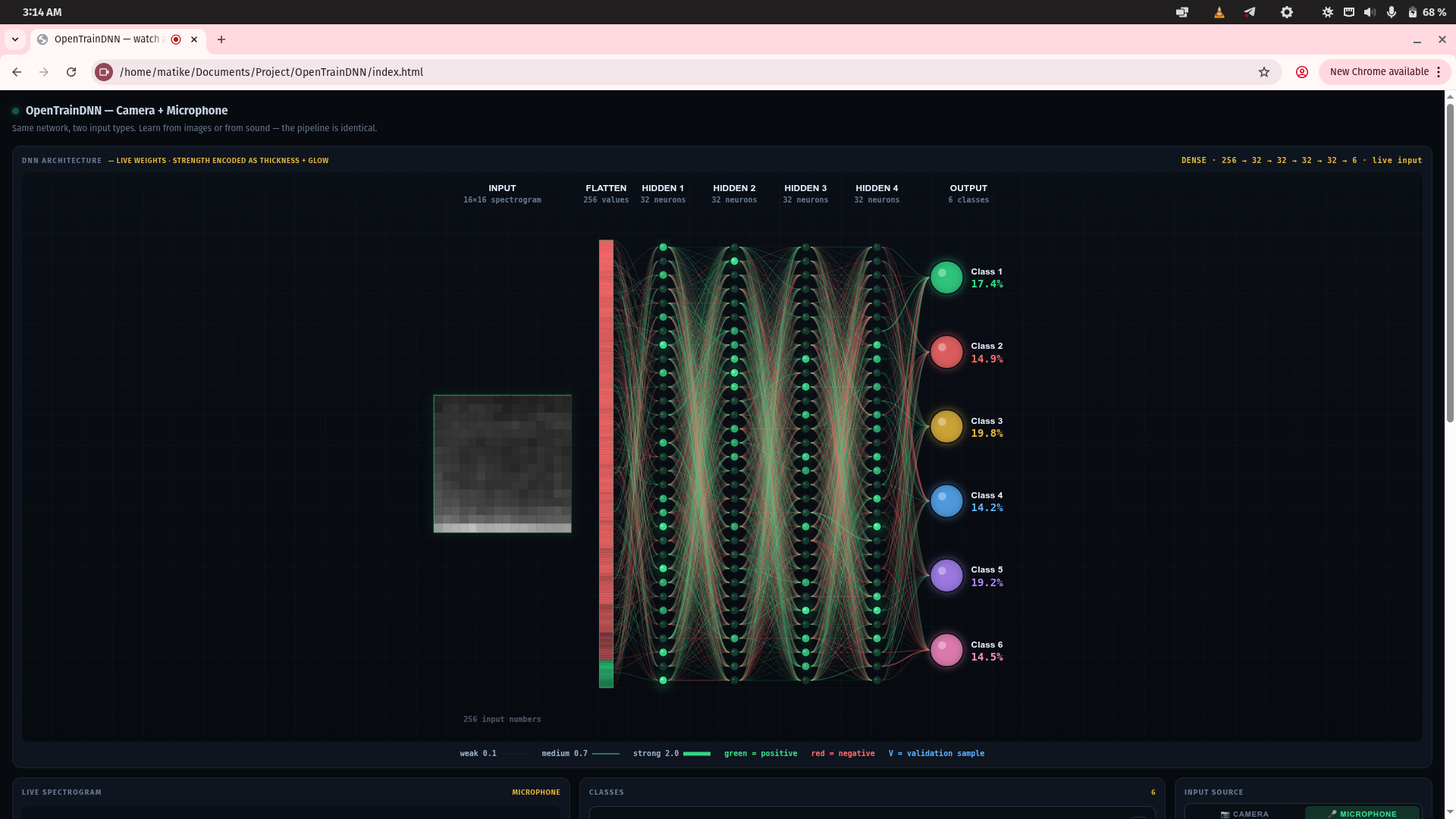
OpenTrainDNN is an open-source, client-side web application designed to render the step-by-step training mechanics of deep neural networks in real-time. It provides direct visibility into backpropagation, activation flows, and weight updates without requiring backend servers, specialized hardware drivers, or local installation.
No install. No build step. No framework. No backend.
Table of contents
- Why this exists
- Features
- Quick start
- What it can and cannot learn
- Project structure
- How it works
- What it demonstrates
- Requirements
- Contributing
- Security
- License
Why this exists
Every machine learning framework hides the interesting part behind a single function call. You write model.fit(x, y) and a number goes down. You never see what happened.
OpenTrainDNN does not hide anything. It runs a real neural network — real backpropagation, real optimizer, real weight updates — entirely in your browser. Every layer is visible. Every weight is a wire you can watch move. Every activation is on screen at the moment it is computed.
It exists to answer one question: what does a neural network actually do?
It is a teaching tool, not a framework. If you want to build production models, use PyTorch or JAX. If you want to see what those models are actually doing, use this.
Features
Two input types, one network
The camera turns each frame into a 16×16 grayscale image. The microphone turns each sound into a 16×16 mel spectrogram. Both produce 256 numbers in the range −1 to +1. The network does not know the difference. That is the point.
Two architectures
- Dense — fully connected, small, fast, easy to reason about.
- CNN — convolutional, learns spatial filters, shows you the feature maps as they form.
Twelve resolutions
From 4×4 to 64×64. Small resolutions train in seconds. Large resolutions require more data. The tool makes the trade-off visible.
Everything is on screen
- Every neuron is a glowing circle whose brightness tracks its activation.
- Every weight is a curved wire whose thickness, brightness, and glow track its magnitude.
- Every feature map updates every frame.
- The input itself — image or spectrogram — is shown full-size.
Honest training
- Exact analytical gradients. No finite differences anywhere.
- Adam optimizer. Same update rule as production frameworks.
- Gradient clipping. Prevents divergence on large networks.
- Train / validation split. Every fifth sample is held out.
- Live overfitting warning. Fires the moment validation accuracy falls behind its peak.
Persistence
Save the trained weights as JSON. Load them back later. Class names and colors survive the reload.
Quick start
1. Open it
Download the repository. Open index.html in any modern browser.
Prefer to serve it? Run a local server from the project folder:
python3 -m http.server 8000
Then open http://localhost:8000/.
You can also use the live version hosted on GitHub Pages:
https://MatiwosKebede.github.io/OpenTrainDNN/
2. Train your first network
- Click Start camera. Allow the permission prompt.
- Hold a red object in front of the camera. Press 1 fifteen times while moving it slightly.
- Hold a blue object. Press 2 fifteen times, same motion.
- Press Train.
- Watch the DNN preview fill in. Wires thicken and glow. After about ten seconds, accuracy stops rising.
- Alternate the two objects. The prediction box flips.
3. Try the microphone
- Switch the input source to 🎤 Microphone.
- Say "yes" twenty times. Press 1 after each.
- Say "no" twenty times. Press 2 after each.
- Press Train.
- Say "yes". The first bar fills. Say "no". It flips.
That is the entire system end-to-end: real signal → real numbers → real learning → real prediction.
What it can and cannot learn
| ✅ Works well | ⚠️ Works marginally | ❌ Does not work |
|---|---|---|
| Distinct colors | Pen vs pencil (if the tip is visible) | Fine textures (wood vs metal) |
| Distinct brightness | Letters A vs B (not A vs Å) | Small details |
| Faces (you vs a wall) | Two similar faces | Full sentences |
| Hand gestures | Cat vs dog | |
| Simple shapes | Anything requiring counting | |
| Two short words | Anything requiring reasoning |
The rule. If a person could tell two things apart from a small grayscale thumbnail, the network can learn to do the same. If not, it cannot. No amount of training will help.
Project structure
OpenTrainDNN/
├── index.html          — markup
├── style.css           — styling
├── README.md           — this file
├── CONTRIBUTING.md     — how to contribute
├── CODE_OF_CONDUCT.md  — community standards
├── SECURITY.md         — disclosure policy
├── CHANGELOG.md        — version history
├── LICENSE             — MIT
├── docs/
│   └── screenshot.png  — README image
├── .github/
│   ├── ISSUE_TEMPLATE/ — bug and feature templates
│   ├── workflows/      — Pages deployment
│   └── PULL_REQUEST_TEMPLATE.md
└── js/
    ├── math.js         — pure helpers, activations, MOSFET model
    ├── state.js        — every mutable global
    ├── input.js        — image + audio pipelines
    ├── network.js      — dense + CNN forward/backward
    ├── visualize.js    — live view, DNN preview, feature maps
    ├── classes.js      — class UI, capture, file handling
    └── main.js         — boot, save/load, event wiring, main loop
Load order matters. The script tags in index.html must load in exactly this sequence:
math → state → input → network → visualize → classes → main
Each module depends only on the ones before it.
How it works
The input pipeline
Both input types are converted to a square grid of numbers in the range −1 to +1.
| Camera | Microphone |
|---|---|
| Frame drawn to offscreen canvas at SIZE×SIZE | AnalyserNode computes spectrum at 40 Hz |
| Read luminance of each pixel | Bin into log-spaced bands |
Flatten to Float64Array(SIZE²) | Write column into ring buffer |
Flatten buffer to Float64Array(SIZE²) |
The network
Standard feed-forward stack. Either:
input → dense → dense → ... → output (softmax)
or:
input → conv → relu → pool → conv → relu → pool → flatten → dense → output
The training loop
Stochastic gradient descent with:
- Mini-batch size: 32 (Dense), 8 (CNN)
- Optimizer: Adam, β₁ = 0.9, β₂ = 0.999
- Learning rate: 0.01 (Dense), 0.008 (CNN)
- Weight clip: ±6
- Gradients: exact analytical derivatives
No finite differences. No autograd. Every derivative is written out by hand in network.js.
What it demonstrates
| Lesson | |
|---|---|
| 🧠 | Backpropagation is a coordinate transformation. The hidden layers re-parameterize the input so the final classification becomes linear in the new coordinates. |
| 📈 | Generalization is real. A network trained on 40 samples answers correctly for points it has never seen. |
| 📉 | Overfitting is real. Training accuracy goes up while validation accuracy goes down. The warning fires the moment the gap opens. |
| 📊 | Data determines learning. One image per class produces a network that reports 100% accuracy and fails on everything else. Forty images per class produces a network that works. |
| 🔄 | The medium does not matter. The same learning rule works whether the input is light or sound, and whether the unit is a smooth activation or a MOSFET. |
Requirements
Any modern browser with getUserMedia and Web Audio API support.
| Browser | Status |
|---|---|
| Chrome | ✅ Tested |
| Firefox | ✅ Tested |
| Safari | ✅ Tested |
| Edge | ✅ Tested |
No plugins. No extensions. No install.
The microphone requires HTTPS in some browsers. GitHub Pages provides that automatically. Locally, a small HTTP server such as Python's built-in one is enough.
Contributing
Contributions are welcome. See CONTRIBUTING.md for the full guide.
Short version:
- Keep the modular structure intact.
- Do not add new architectures (RNN, LSTM, Transformer, attention).
- Do not add a build step or dependencies.
- Test on at least two browsers.
- Bug reports and honest criticism are more valuable than features.
Security
See SECURITY.md for the disclosure policy.
License
MIT. See LICENSE for the full text.
Developed by Matiwos Kebede
The same learning algorithm runs in a browser tab and in a data center. The difference is only scale.
Contributors

11 commits
Similar repos


Languages
JavaScript
83.4%
CSS
10.2%
HTML
6.5%
OpenTrainDNN: A Browser-Based Real-Time Neural Network Visualizer
See the codeSee what people are saying
README
OpenTrainDNN
OpenTrainDNN: A Browser-Based Real-Time Neural Network Visualizer.
OpenTrainDNN is an open-source, client-side web application designed to render the step-by-step training mechanics of deep neural networks in real-time. It provides direct visibility into backpropagation, activation flows, and weight updates without requiring backend servers, specialized hardware drivers, or local installation.
No install. No build step. No framework. No backend.
Table of contents
- Why this exists
- Features
- Quick start
- What it can and cannot learn
- Project structure
- How it works
- What it demonstrates
- Requirements
- Contributing
- Security
- License
Why this exists
Every machine learning framework hides the interesting part behind a single function call. You write model.fit(x, y) and a number goes down. You never see what happened.
OpenTrainDNN does not hide anything. It runs a real neural network — real backpropagation, real optimizer, real weight updates — entirely in your browser. Every layer is visible. Every weight is a wire you can watch move. Every activation is on screen at the moment it is computed.
It exists to answer one question: what does a neural network actually do?
It is a teaching tool, not a framework. If you want to build production models, use PyTorch or JAX. If you want to see what those models are actually doing, use this.
Features
Two input types, one network
The camera turns each frame into a 16×16 grayscale image. The microphone turns each sound into a 16×16 mel spectrogram. Both produce 256 numbers in the range −1 to +1. The network does not know the difference. That is the point.
Two architectures
- Dense — fully connected, small, fast, easy to reason about.
- CNN — convolutional, learns spatial filters, shows you the feature maps as they form.
Twelve resolutions
From 4×4 to 64×64. Small resolutions train in seconds. Large resolutions require more data. The tool makes the trade-off visible.
Everything is on screen
- Every neuron is a glowing circle whose brightness tracks its activation.
- Every weight is a curved wire whose thickness, brightness, and glow track its magnitude.
- Every feature map updates every frame.
- The input itself — image or spectrogram — is shown full-size.
Honest training
- Exact analytical gradients. No finite differences anywhere.
- Adam optimizer. Same update rule as production frameworks.
- Gradient clipping. Prevents divergence on large networks.
- Train / validation split. Every fifth sample is held out.
- Live overfitting warning. Fires the moment validation accuracy falls behind its peak.
Persistence
Save the trained weights as JSON. Load them back later. Class names and colors survive the reload.
Quick start
1. Open it
Download the repository. Open index.html in any modern browser.
Prefer to serve it? Run a local server from the project folder:
python3 -m http.server 8000
Then open http://localhost:8000/.
You can also use the live version hosted on GitHub Pages:
https://MatiwosKebede.github.io/OpenTrainDNN/
2. Train your first network
- Click Start camera. Allow the permission prompt.
- Hold a red object in front of the camera. Press 1 fifteen times while moving it slightly.
- Hold a blue object. Press 2 fifteen times, same motion.
- Press Train.
- Watch the DNN preview fill in. Wires thicken and glow. After about ten seconds, accuracy stops rising.
- Alternate the two objects. The prediction box flips.
3. Try the microphone
- Switch the input source to 🎤 Microphone.
- Say "yes" twenty times. Press 1 after each.
- Say "no" twenty times. Press 2 after each.
- Press Train.
- Say "yes". The first bar fills. Say "no". It flips.
That is the entire system end-to-end: real signal → real numbers → real learning → real prediction.
What it can and cannot learn
| ✅ Works well | ⚠️ Works marginally | ❌ Does not work |
|---|---|---|
| Distinct colors | Pen vs pencil (if the tip is visible) | Fine textures (wood vs metal) |
| Distinct brightness | Letters A vs B (not A vs Å) | Small details |
| Faces (you vs a wall) | Two similar faces | Full sentences |
| Hand gestures | Cat vs dog | |
| Simple shapes | Anything requiring counting | |
| Two short words | Anything requiring reasoning |
The rule. If a person could tell two things apart from a small grayscale thumbnail, the network can learn to do the same. If not, it cannot. No amount of training will help.
Project structure
OpenTrainDNN/
├── index.html          — markup
├── style.css           — styling
├── README.md           — this file
├── CONTRIBUTING.md     — how to contribute
├── CODE_OF_CONDUCT.md  — community standards
├── SECURITY.md         — disclosure policy
├── CHANGELOG.md        — version history
├── LICENSE             — MIT
├── docs/
│   └── screenshot.png  — README image
├── .github/
│   ├── ISSUE_TEMPLATE/ — bug and feature templates
│   ├── workflows/      — Pages deployment
│   └── PULL_REQUEST_TEMPLATE.md
└── js/
    ├── math.js         — pure helpers, activations, MOSFET model
    ├── state.js        — every mutable global
    ├── input.js        — image + audio pipelines
    ├── network.js      — dense + CNN forward/backward
    ├── visualize.js    — live view, DNN preview, feature maps
    ├── classes.js      — class UI, capture, file handling
    └── main.js         — boot, save/load, event wiring, main loop
Load order matters. The script tags in index.html must load in exactly this sequence:
math → state → input → network → visualize → classes → main
Each module depends only on the ones before it.
How it works
The input pipeline
Both input types are converted to a square grid of numbers in the range −1 to +1.
| Camera | Microphone |
|---|---|
| Frame drawn to offscreen canvas at SIZE×SIZE | AnalyserNode computes spectrum at 40 Hz |
| Read luminance of each pixel | Bin into log-spaced bands |
Flatten to Float64Array(SIZE²) | Write column into ring buffer |
Flatten buffer to Float64Array(SIZE²) |
The network
Standard feed-forward stack. Either:
input → dense → dense → ... → output (softmax)
or:
input → conv → relu → pool → conv → relu → pool → flatten → dense → output
The training loop
Stochastic gradient descent with:
- Mini-batch size: 32 (Dense), 8 (CNN)
- Optimizer: Adam, β₁ = 0.9, β₂ = 0.999
- Learning rate: 0.01 (Dense), 0.008 (CNN)
- Weight clip: ±6
- Gradients: exact analytical derivatives
No finite differences. No autograd. Every derivative is written out by hand in network.js.
What it demonstrates
| Lesson | |
|---|---|
| 🧠 | Backpropagation is a coordinate transformation. The hidden layers re-parameterize the input so the final classification becomes linear in the new coordinates. |
| 📈 | Generalization is real. A network trained on 40 samples answers correctly for points it has never seen. |
| 📉 | Overfitting is real. Training accuracy goes up while validation accuracy goes down. The warning fires the moment the gap opens. |
| 📊 | Data determines learning. One image per class produces a network that reports 100% accuracy and fails on everything else. Forty images per class produces a network that works. |
| 🔄 | The medium does not matter. The same learning rule works whether the input is light or sound, and whether the unit is a smooth activation or a MOSFET. |
Requirements
Any modern browser with getUserMedia and Web Audio API support.
| Browser | Status |
|---|---|
| Chrome | ✅ Tested |
| Firefox | ✅ Tested |
| Safari | ✅ Tested |
| Edge | ✅ Tested |
No plugins. No extensions. No install.
The microphone requires HTTPS in some browsers. GitHub Pages provides that automatically. Locally, a small HTTP server such as Python's built-in one is enough.
Contributing
Contributions are welcome. See CONTRIBUTING.md for the full guide.
Short version:
- Keep the modular structure intact.
- Do not add new architectures (RNN, LSTM, Transformer, attention).
- Do not add a build step or dependencies.
- Test on at least two browsers.
- Bug reports and honest criticism are more valuable than features.
Security
See SECURITY.md for the disclosure policy.
License
MIT. See LICENSE for the full text.
Developed by Matiwos Kebede
The same learning algorithm runs in a browser tab and in a data center. The difference is only scale.
Similar repos
Contributors
11 commits
Languages
JavaScript
83.4%
CSS
10.2%
HTML
6.5%