
VRM desktop pet software for Linux (aka Unofficial Linux port of shinyflvre's MateEngine)
ShaderLab
317
71 commits
updated Aug 15, 2026
README
🌐 Language / 语言选择
English
[!IMPORTANT] The maintainance of this project will be temporarily suspended from September 1, 2026, to mid-June 2027, owing to the author’s commitment to intensive preparation for the national college entrance examination.
Mate-Engine-Linux-Port
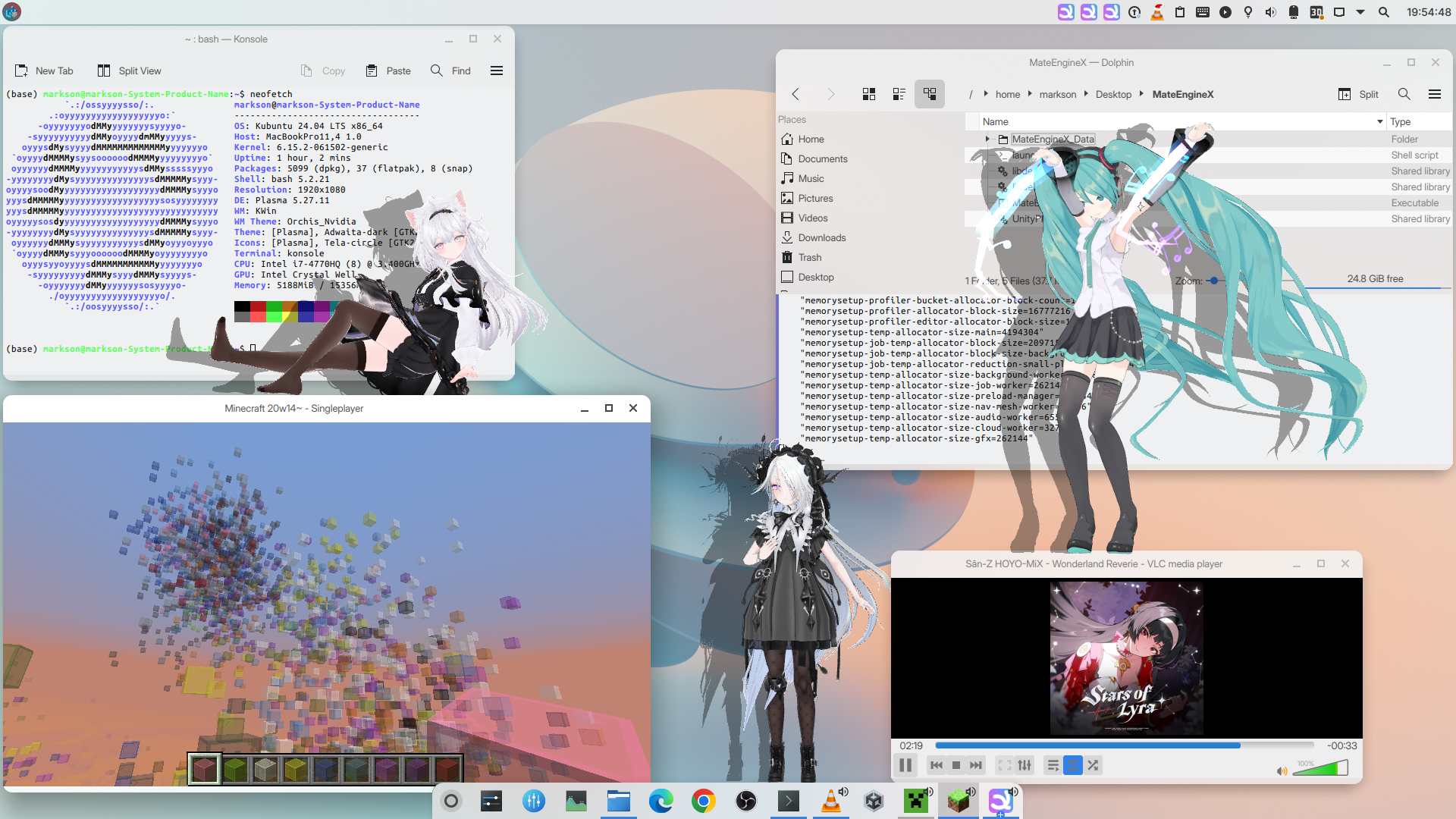
This is an unofficial Linux port of shinyflvre's MateEngine - A free Desktop Mate (the costy desktop pet software) alternative with a lightweight interface and custom VRM support. Tested on Ubuntu 24.04 LTS and Fedora 43.
Installation
Simply grab a prebuilt one in Releases page and decompress it. Then, run the install.sh script in the output directory to install MateEngine. Finally, find Mate Engine from your application launcher and run or simply enter mateengine command in Terminal to launch MateEngine.
Note that if you use KDE and find there's black background in MateEngine, you also need to disable "Allow applications to block compositing" in systemsettings).
Arch users may simply use the following command to install:
yay -S mateengine
Requirements
- A common GNU/Linux distro
- A common X11 desktop environment which supports compositing (such as KDE, Xfce, GNOME, etc.)
- At least 1 GiB of swap space (optional)
libpulse0andpipewire-pulse(if you are using Pipewire as audio server)libgtk-3-0t64 libglib2.0-0t64 libayatana-appindicatorlibx11-6 libxext6 libxrender1 libxdamage1 libxcursor1 libxrandr2 libxcomposite1
On Ubuntu and other Debian-based Linux:
sudo apt install libpulse0 libgtk-3-0t64 libglib2.0-0t64 libayatana-appindicator3-1 libx11-6 libxext6 libxrender1 libxdamage1 libxcursor1 libxrandr2 libxcomposite1
On Fedora:
sudo dnf install pulseaudio-libs gtk3 glib2 libX11 libXext libXrender libXrandr libXdamage libXcursor libXcomposite libayatana-appindicator-gtk3
On Arch Linux:
sudo pacman -S libpulse gtk3 glib2 libx11 libxext libxrender libxrandr libxdamage libxcursor libxcomposite libayatana-appindicator
Note that if you use GNOME, you will need AppIndicator and KStatusNotifierItem Support extension to show tray icon.
How to build / compile
- First of all, for security reasons, you need to compile StandaloneFileBrowser plugin manually (just use
makecommand underMate-Engine-Linux-Port/Plugins/Linux/StandaloneFileBrowser, and copylibStandaloneFileBrowser.sotoMate-Engine-Linux-Port/Assets/MATE ENGINE - Packages/StandaloneFileBrowser/Plugins/Linux/x86_64) - Then install Unity 6000.2.6f2 using Unity Hub. Make sure
Unityexecutable can be located under~/Unity/Hub/Editor/6000.2.6f2/Editor/. After that, you have the following build options:
Option 1: Build with Unity Editor GUI (Safest)
Just open the project in Unity Hub, then launch it with Unity 6000.2.6f2. Build the player and set the executable name to "MateEngineX.x86_64".
Yeah, it takes a bit to load everything, that’s expected.
Option 2: CLI Build (Not recommended)
Run build.sh script under project root in a terminal, then wait until command exits. This way of building is only used to debug & build quickly, and you may see some abnormal behaviours in builds.
Ported Features & Highlights
- Model visuals, alarm, screensaver, Chibi mode (they always work, any external libraries are not required for them)
- Transparent background with cutoff
- Set window always on top
- Dancing (experimental, require
pulseaudioorpipewire-pulsefor audio program detection) - AI Chat (require
llama-3.2-3b-instruct-q4_k_m.gguf, case-sensitive, must be placed under where ME executable is) - Mouse tracking (hand holding and eyes tracking)
- Discord RPC
- Custom VRM importing
- Simplified Chinese localization
- Event-based Messages
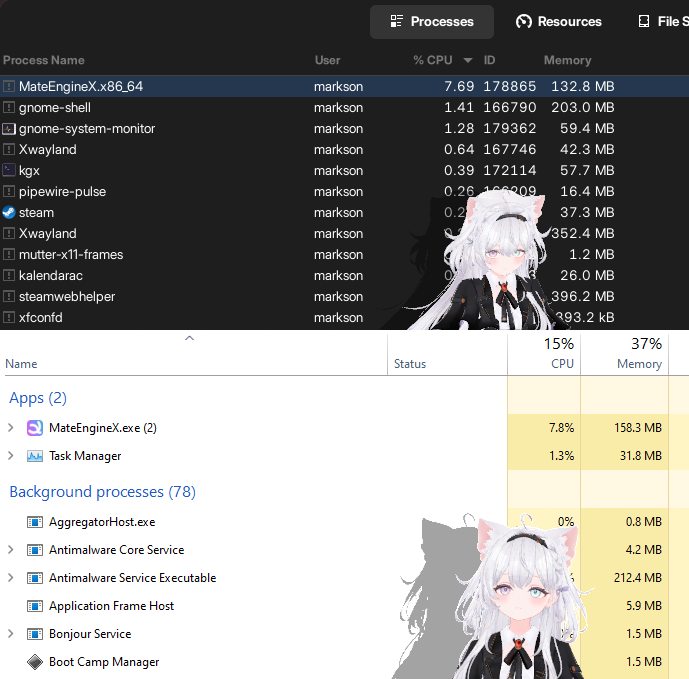
- Lower RAM usage than Windows version (Memory trimming enabled)
Known Issues
- Window snapping and dock sitting don't work on XWayland Interface
- Mods do not load correctly (delayed fix)
Removed
- Steam API (no workshop support)
- NAudio
- UniWindowController
This project lacks further testing and updates. Feel free to make PRs to contribute!
简体中文
[!IMPORTANT] 由于本人备战高考需要,从2026年9月1日起,本项目将暂停维护直到2027年6月中旬。
Mate-Engine-Linux-Port
这是一个非官方的MateEngine Linux移植版 - 一个免费的Desktop Mate替代品(桌宠软件),具有轻量级界面和自定义VRM支持。 已在Ubuntu 24.04 LTS上测试。
安装
在Releases页面获取预构建版本并解压。然后,运行输出目录中的install.sh以安装 MateEngine。最后,在应用程序启动器中找到 Mate Engine 并运行,或者直接在终端内运行命令mateengine来启动 MateEngine。
注意,如果你使用 KDE Plasma 桌面环境且遇到了黑色背景,你还需要在 KDE 系统设置中禁用“允许应用程序阻止显示特效合成”)。
Arch Linux 用户可以直接使用以下命令安装:
yay -S mateengine
系统要求
- 一个常见的 GNU/Linux 发行版
- 一个常见的 X11 桌面环境,支持显示特效合成(compositing) ,比如KDE,Xfce,GNOME等
- 至少 1 GiB 的交换空间(可选)
libpulse0和pipewire-pulse(如果你在用 Pipewire 作为音频服务器)libgtk-3-0t64 libglib2.0-0t64 libayatana-appindicatorlibx11-6 libxext6 libxrender1 libxdamage1 libxcursor1 libxrandr2 libxcomposite1
以下命令适用于 Ubuntu 和别的基于 Debian 的 Linux:
sudo apt install libpulse0 libgtk-3-0t64 libglib2.0-0t64 libayatana-appindicator3-1 libx11-6 libxext6 libxrender1 libxdamage1 libxcursor1 libxrandr2 libxcomposite1
以下命令适用于 Fedora:
sudo dnf install pulseaudio-libs gtk3 glib2 libX11 libXext libXrender libXrandr libXdamage libXcursor libXcomposite libayatana-appindicator-gtk3
以下命令适用于 Arch Linux:
sudo pacman -S libpulse gtk3 glib2 libx11 libxext libxrender libxrandr libxdamage libxcursor libxcomposite libayatana-appindicator
如果你使用 GNOME 桌面环境,你还需要安装 AppIndicator and KStatusNotifierItem Support extension 以显示托盘图标。
如何编译
- 首先,出于安全原因,你需要手动编译 StandaloneFileBrowser 插件(只需在
Mate-Engine-Linux-Port/Plugins/Linux/StandaloneFileBrowser下使用make命令,然后将libStandaloneFileBrowser.so复制到Mate-Engine-Linux-Port/Assets/MATE ENGINE - Packages/StandaloneFileBrowser/Plugins/Linux/x86_64)。 - 然后使用 Unity Hub 安装 Unity 6000.2.6f2 版本。确保
Unity可执行文件位于~/Unity/Hub/Editor/6000.2.6f2/Editor/下。完成之后,你将拥有以下构建选项:
选项 1:使用 Unity 编辑器 GUI 构建(最安全)
只需在 Unity Hub 中打开项目,然后使用 Unity 6000.2.6f2 版本启动它。构建 Player 并设置可执行文件名为“MateEngineX.x86_64”。
是的,加载所有内容需要一点时间,这是正常的。
选项 2:命令行构建(不推荐)
在项目根目录下的终端中运行 build.sh 脚本并等待直到命令退出。这种构建方式仅用于快速调试和构建,你可能会在构建中看到一些异常行为。
移植的功能与亮点
- 模型视觉效果、闹钟、屏保、Q版模式(它们不需要任何外部库,因此始终工作)
- 带 Cutoff 的透明背景
- 窗口置顶
- 跳舞(实验性,需要PulseAudio或Pipewire-Pulse用于音频程序检测)
- AI聊天(需要
llama-3.2-3b-instruct-q4_k_m.gguf,文件名区分大小写,必须放在可执行文件目录) - 鼠标跟踪(手持和眼睛跟踪)
- Discord RPC
- 自定义 VRM 模型导入
- 简体中文版汉化
- 基于事件的提示信息
- 与 Windows 版相比,使用更少内存(已启用内存削减)
已知问题
- 坐在窗口和程序坞上无法在 XWayland 协议上正常工作
- Mod 不会正常加载
已删除
- Steam API (无创意工坊支持)
- NAudio
- UniWindowController
该项目缺乏进一步的测试和更新。请随时通过Pull Requests来贡献!


Similar repos


Languages
ShaderLab
85.7%
C#
10.9%
HLSL
1.9%
HTML
1.4%
VRM desktop pet software for Linux (aka Unofficial Linux port of shinyflvre's MateEngine)
ShaderLab
317
71 commits
updated Aug 15, 2026
README
🌐 Language / 语言选择
English
[!IMPORTANT] The maintainance of this project will be temporarily suspended from September 1, 2026, to mid-June 2027, owing to the author’s commitment to intensive preparation for the national college entrance examination.
Mate-Engine-Linux-Port
This is an unofficial Linux port of shinyflvre's MateEngine - A free Desktop Mate (the costy desktop pet software) alternative with a lightweight interface and custom VRM support. Tested on Ubuntu 24.04 LTS and Fedora 43.
Installation
Simply grab a prebuilt one in Releases page and decompress it. Then, run the install.sh script in the output directory to install MateEngine. Finally, find Mate Engine from your application launcher and run or simply enter mateengine command in Terminal to launch MateEngine.
Note that if you use KDE and find there's black background in MateEngine, you also need to disable "Allow applications to block compositing" in systemsettings).
Arch users may simply use the following command to install:
yay -S mateengine
Requirements
- A common GNU/Linux distro
- A common X11 desktop environment which supports compositing (such as KDE, Xfce, GNOME, etc.)
- At least 1 GiB of swap space (optional)
libpulse0andpipewire-pulse(if you are using Pipewire as audio server)libgtk-3-0t64 libglib2.0-0t64 libayatana-appindicatorlibx11-6 libxext6 libxrender1 libxdamage1 libxcursor1 libxrandr2 libxcomposite1
On Ubuntu and other Debian-based Linux:
sudo apt install libpulse0 libgtk-3-0t64 libglib2.0-0t64 libayatana-appindicator3-1 libx11-6 libxext6 libxrender1 libxdamage1 libxcursor1 libxrandr2 libxcomposite1
On Fedora:
sudo dnf install pulseaudio-libs gtk3 glib2 libX11 libXext libXrender libXrandr libXdamage libXcursor libXcomposite libayatana-appindicator-gtk3
On Arch Linux:
sudo pacman -S libpulse gtk3 glib2 libx11 libxext libxrender libxrandr libxdamage libxcursor libxcomposite libayatana-appindicator
Note that if you use GNOME, you will need AppIndicator and KStatusNotifierItem Support extension to show tray icon.
How to build / compile
- First of all, for security reasons, you need to compile StandaloneFileBrowser plugin manually (just use
makecommand underMate-Engine-Linux-Port/Plugins/Linux/StandaloneFileBrowser, and copylibStandaloneFileBrowser.sotoMate-Engine-Linux-Port/Assets/MATE ENGINE - Packages/StandaloneFileBrowser/Plugins/Linux/x86_64) - Then install Unity 6000.2.6f2 using Unity Hub. Make sure
Unityexecutable can be located under~/Unity/Hub/Editor/6000.2.6f2/Editor/. After that, you have the following build options:
Option 1: Build with Unity Editor GUI (Safest)
Just open the project in Unity Hub, then launch it with Unity 6000.2.6f2. Build the player and set the executable name to "MateEngineX.x86_64".
Yeah, it takes a bit to load everything, that’s expected.
Option 2: CLI Build (Not recommended)
Run build.sh script under project root in a terminal, then wait until command exits. This way of building is only used to debug & build quickly, and you may see some abnormal behaviours in builds.
Ported Features & Highlights
- Model visuals, alarm, screensaver, Chibi mode (they always work, any external libraries are not required for them)
- Transparent background with cutoff
- Set window always on top
- Dancing (experimental, require
pulseaudioorpipewire-pulsefor audio program detection) - AI Chat (require
llama-3.2-3b-instruct-q4_k_m.gguf, case-sensitive, must be placed under where ME executable is) - Mouse tracking (hand holding and eyes tracking)
- Discord RPC
- Custom VRM importing
- Simplified Chinese localization
- Event-based Messages
- Lower RAM usage than Windows version (Memory trimming enabled)
Known Issues
- Window snapping and dock sitting don't work on XWayland Interface
- Mods do not load correctly (delayed fix)
Removed
- Steam API (no workshop support)
- NAudio
- UniWindowController
This project lacks further testing and updates. Feel free to make PRs to contribute!
简体中文
[!IMPORTANT] 由于本人备战高考需要,从2026年9月1日起,本项目将暂停维护直到2027年6月中旬。
Mate-Engine-Linux-Port
这是一个非官方的MateEngine Linux移植版 - 一个免费的Desktop Mate替代品(桌宠软件),具有轻量级界面和自定义VRM支持。 已在Ubuntu 24.04 LTS上测试。
安装
在Releases页面获取预构建版本并解压。然后,运行输出目录中的install.sh以安装 MateEngine。最后,在应用程序启动器中找到 Mate Engine 并运行,或者直接在终端内运行命令mateengine来启动 MateEngine。
注意,如果你使用 KDE Plasma 桌面环境且遇到了黑色背景,你还需要在 KDE 系统设置中禁用“允许应用程序阻止显示特效合成”)。
Arch Linux 用户可以直接使用以下命令安装:
yay -S mateengine
系统要求
- 一个常见的 GNU/Linux 发行版
- 一个常见的 X11 桌面环境,支持显示特效合成(compositing) ,比如KDE,Xfce,GNOME等
- 至少 1 GiB 的交换空间(可选)
libpulse0和pipewire-pulse(如果你在用 Pipewire 作为音频服务器)libgtk-3-0t64 libglib2.0-0t64 libayatana-appindicatorlibx11-6 libxext6 libxrender1 libxdamage1 libxcursor1 libxrandr2 libxcomposite1
以下命令适用于 Ubuntu 和别的基于 Debian 的 Linux:
sudo apt install libpulse0 libgtk-3-0t64 libglib2.0-0t64 libayatana-appindicator3-1 libx11-6 libxext6 libxrender1 libxdamage1 libxcursor1 libxrandr2 libxcomposite1
以下命令适用于 Fedora:
sudo dnf install pulseaudio-libs gtk3 glib2 libX11 libXext libXrender libXrandr libXdamage libXcursor libXcomposite libayatana-appindicator-gtk3
以下命令适用于 Arch Linux:
sudo pacman -S libpulse gtk3 glib2 libx11 libxext libxrender libxrandr libxdamage libxcursor libxcomposite libayatana-appindicator
如果你使用 GNOME 桌面环境,你还需要安装 AppIndicator and KStatusNotifierItem Support extension 以显示托盘图标。
如何编译
- 首先,出于安全原因,你需要手动编译 StandaloneFileBrowser 插件(只需在
Mate-Engine-Linux-Port/Plugins/Linux/StandaloneFileBrowser下使用make命令,然后将libStandaloneFileBrowser.so复制到Mate-Engine-Linux-Port/Assets/MATE ENGINE - Packages/StandaloneFileBrowser/Plugins/Linux/x86_64)。 - 然后使用 Unity Hub 安装 Unity 6000.2.6f2 版本。确保
Unity可执行文件位于~/Unity/Hub/Editor/6000.2.6f2/Editor/下。完成之后,你将拥有以下构建选项:
选项 1:使用 Unity 编辑器 GUI 构建(最安全)
只需在 Unity Hub 中打开项目,然后使用 Unity 6000.2.6f2 版本启动它。构建 Player 并设置可执行文件名为“MateEngineX.x86_64”。
是的,加载所有内容需要一点时间,这是正常的。
选项 2:命令行构建(不推荐)
在项目根目录下的终端中运行 build.sh 脚本并等待直到命令退出。这种构建方式仅用于快速调试和构建,你可能会在构建中看到一些异常行为。
移植的功能与亮点
- 模型视觉效果、闹钟、屏保、Q版模式(它们不需要任何外部库,因此始终工作)
- 带 Cutoff 的透明背景
- 窗口置顶
- 跳舞(实验性,需要PulseAudio或Pipewire-Pulse用于音频程序检测)
- AI聊天(需要
llama-3.2-3b-instruct-q4_k_m.gguf,文件名区分大小写,必须放在可执行文件目录) - 鼠标跟踪(手持和眼睛跟踪)
- Discord RPC
- 自定义 VRM 模型导入
- 简体中文版汉化
- 基于事件的提示信息
- 与 Windows 版相比,使用更少内存(已启用内存削减)
已知问题
- 坐在窗口和程序坞上无法在 XWayland 协议上正常工作
- Mod 不会正常加载
已删除
- Steam API (无创意工坊支持)
- NAudio
- UniWindowController
该项目缺乏进一步的测试和更新。请随时通过Pull Requests来贡献!
Similar repos
Significant stargazers
Languages
ShaderLab
85.7%
C#
10.9%
HLSL
1.9%
HTML
1.4%