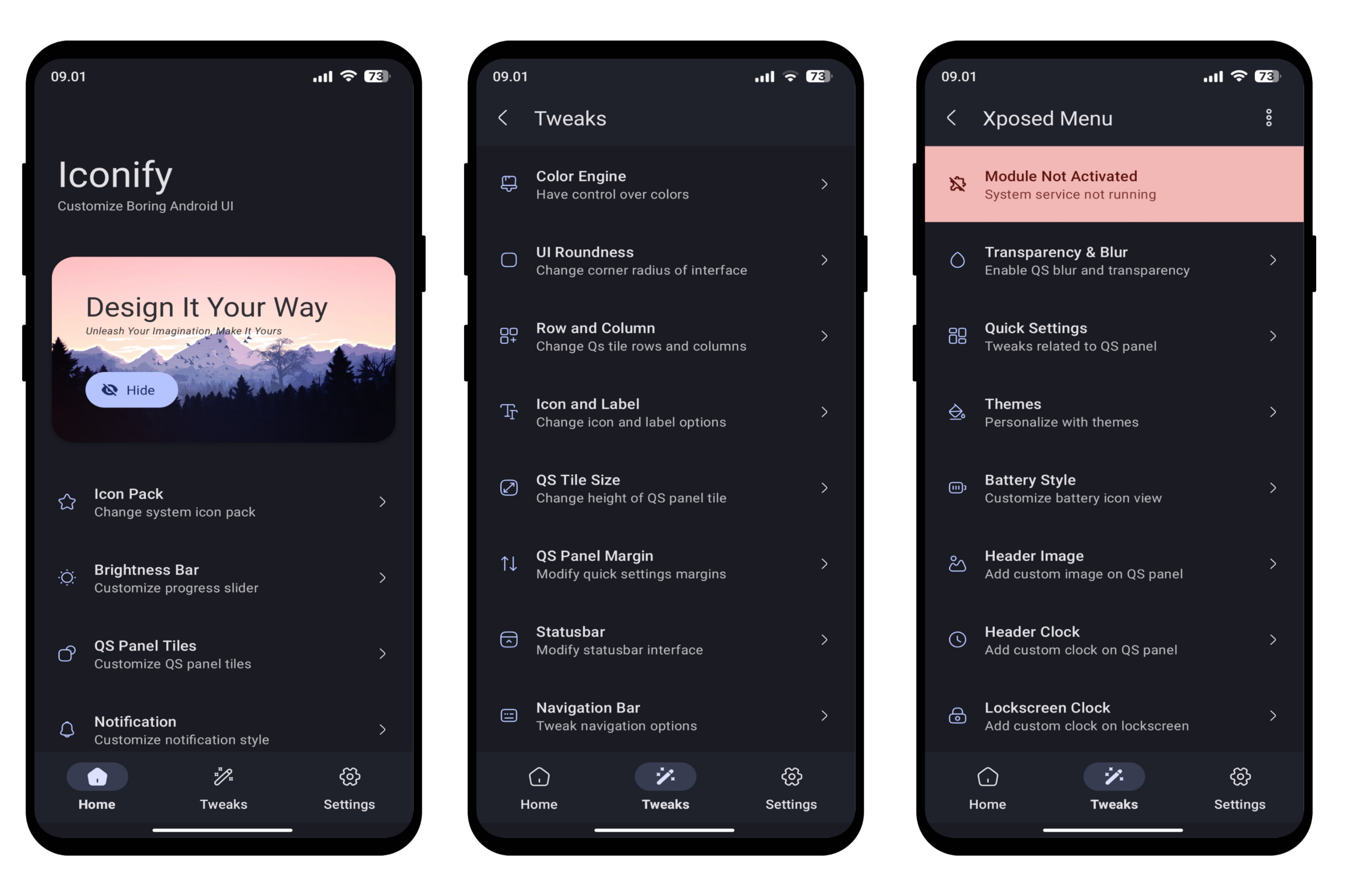
Iconify lets you customize your Android 12+ device easily. Change icons, colors, shapes, and even the notification panel for a personalized look that suits your style.
See the code




Iconify is an open-source Android mobile application aimed at providing users with the ability to customize various aspects of their device's user interface. 📱
Furthermore, the open-source nature of Iconify encourages community contributions and continuous improvement, ensuring a dynamic and evolving user experience. 🤝

[!CAUTION]
This app requires Magisk/KernelSU/APatch for root access. Any alternative methods won't work.
Android 12+ Pixel / AOSP based custom ROM:
Decryption Supported Custom Recovery (Just in case)
Download and install the Iconify app.
Open the app, grant root permission and follow the instructions.
Wait for it to finish generating rom specific module.
Reboot the device when prompted, profit!
For KernelSU / KernelSU Next v3.0+ Users:
mountify_mounts=2
MOUNT_DEVICE_NAME=KSU
mountify_custom_umount=0
Ps: You can try changing the value of mountify_custom_umount according to your needs. You can try other metamodules if Mountify doesn't work.
Flash ZygiskNext and LSPosed / Vector module (only if you want to use LSPosed features).
Reboot your device to get the module installed successfully.
Now follow the installation steps of magisk users and voila!
[!TIP]
KernelSU doesn't show root prompt. You will have to manually enable root access for Iconify from the KernelSU app itself. In some cases, you may need to disable the
Umount modules by defaultoption from KernelSU settings if Iconify changes are not reflecting.
You can track all the progress HERE
Fix bugs.
Improve UI/UX.
We highly appreciate and welcome all forms of contributions, ranging from code, documentation, graphics, design suggestions, to bug reports. We encourage you to make the most of GitHub's collaborative platform by submitting Pull Requests, providing tutorials or other relevant content. Whatever you have to offer, we value and can utilize it effectively in our project.
You can help translate Iconify on Crowdin. Here are a few tips:
When using quotation marks, insert the symbols specific to the target language, as listed in this table.
Iconify uses title case for some English UI text. Title case isn’t used in other languages; opt for sentence case instead.
Some English terminology may have no commonly used equivalents in other languages. In such cases, use short descriptive phrases–for example, the equivalent of shade generator for monet engine.
Bug Report template. Provide as much detailed information as possible, including steps to reproduce the bug and any relevant error messages or screenshots.Feature Request template. Be sure to include comprehensive details about the desired feature, its potential benefits, and any other relevant information that can assist in understanding and evaluating the request.[!WARNING]
- Please note that Iconify may not be fully compatible with all custom ROMs. It is discouraged to use on heavily modified ROMs.
- I cannot be held responsible for any potential damage or issues that may occur to your device while using Iconify.
- It is highly recommended to have a custom recovery installed on your device to revert any changes in case of unexpected problems.
82 followers · starred Apr 2023
138 followers · starred May 2024
296 followers · starred Oct 2023
28 followers · starred May 2025
Iconify lets you customize your Android 12+ device easily. Change icons, colors, shapes, and even the notification panel for a personalized look that suits your style.
See the code
Iconify is an open-source Android mobile application aimed at providing users with the ability to customize various aspects of their device's user interface. 📱
Furthermore, the open-source nature of Iconify encourages community contributions and continuous improvement, ensuring a dynamic and evolving user experience. 🤝
[!CAUTION]
This app requires Magisk/KernelSU/APatch for root access. Any alternative methods won't work.
Android 12+ Pixel / AOSP based custom ROM:
Decryption Supported Custom Recovery (Just in case)
Download and install the Iconify app.
Open the app, grant root permission and follow the instructions.
Wait for it to finish generating rom specific module.
Reboot the device when prompted, profit!
For KernelSU / KernelSU Next v3.0+ Users:
mountify_mounts=2
MOUNT_DEVICE_NAME=KSU
mountify_custom_umount=0
Ps: You can try changing the value of mountify_custom_umount according to your needs. You can try other metamodules if Mountify doesn't work.
Flash ZygiskNext and LSPosed / Vector module (only if you want to use LSPosed features).
Reboot your device to get the module installed successfully.
Now follow the installation steps of magisk users and voila!
[!TIP]
KernelSU doesn't show root prompt. You will have to manually enable root access for Iconify from the KernelSU app itself. In some cases, you may need to disable the
Umount modules by defaultoption from KernelSU settings if Iconify changes are not reflecting.
You can track all the progress HERE
Fix bugs.
Improve UI/UX.
We highly appreciate and welcome all forms of contributions, ranging from code, documentation, graphics, design suggestions, to bug reports. We encourage you to make the most of GitHub's collaborative platform by submitting Pull Requests, providing tutorials or other relevant content. Whatever you have to offer, we value and can utilize it effectively in our project.
You can help translate Iconify on Crowdin. Here are a few tips:
When using quotation marks, insert the symbols specific to the target language, as listed in this table.
Iconify uses title case for some English UI text. Title case isn’t used in other languages; opt for sentence case instead.
Some English terminology may have no commonly used equivalents in other languages. In such cases, use short descriptive phrases–for example, the equivalent of shade generator for monet engine.
Bug Report template. Provide as much detailed information as possible, including steps to reproduce the bug and any relevant error messages or screenshots.Feature Request template. Be sure to include comprehensive details about the desired feature, its potential benefits, and any other relevant information that can assist in understanding and evaluating the request.[!WARNING]
- Please note that Iconify may not be fully compatible with all custom ROMs. It is discouraged to use on heavily modified ROMs.
- I cannot be held responsible for any potential damage or issues that may occur to your device while using Iconify.
- It is highly recommended to have a custom recovery installed on your device to revert any changes in case of unexpected problems.
82 followers · starred Apr 2023
138 followers · starred May 2024
296 followers · starred Oct 2023
28 followers · starred May 2025



