
Keep your computer awake during downloads — or whenever you tell it to.
Rust
0
24 commits
updated Sep 22, 2026
See what people are saying (1)
README
Chiù


Stable download: Windows · macOS · SHA-256 checksums

Keep your computer awake during downloads — or whenever you tell it to.
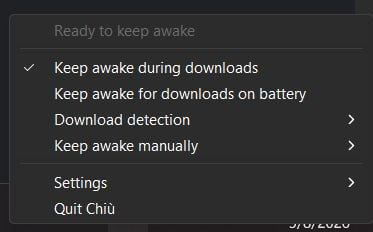
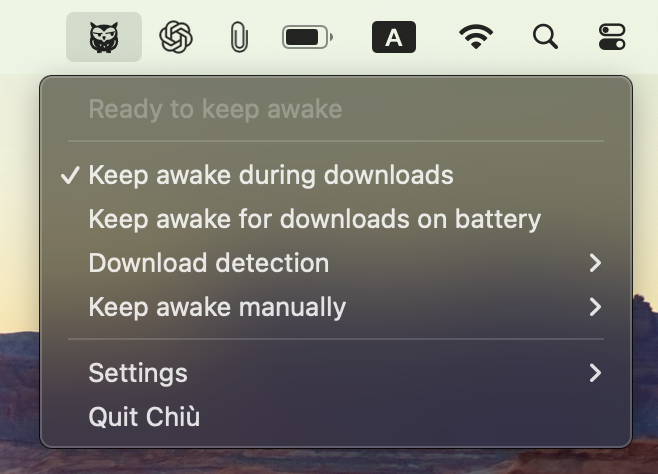
Chiù is a small Windows tray and macOS menu-bar utility that prevents idle system sleep while protection is active. It can react to sustained download activity or keep the computer awake for a period you choose. It does not keep the display awake, override an explicit sleep command, or change normal lid-close behavior.
Supported platforms
- Windows 11 x64
- macOS 14 or later, with Intel and Apple Silicon support in one universal package
Linux is not supported.
Screenshots
Windows
macOS
How it works
During downloads
Keep awake during downloads watches aggregate incoming network activity on
the computer. Sustained activity must qualify before Chiù requests sleep
protection, and a grace period avoids releasing protection immediately during a
short quiet interval.
Chiù does not inspect packets, identify applications, or know which file is being downloaded. Network activity can therefore produce both false positives and false negatives. See Automatic download detection for details and tuning options.
Automatic protection is enabled by default on external power. On battery or
another limited/unknown power source, it is eligible only when Keep awake for downloads on battery is enabled. This setting does not restrict manual
keep-awake sessions.
On demand
Keep awake manually starts protection for 15 or 30 minutes; 1, 2, 4, or 8
hours; or until disabled. Time added to a finite session extends its existing
deadline. Manual sessions end when Chiù exits and are not restored on restart.
Automatic and manual reasons can overlap. Chiù keeps the native sleep request active until every reason has ended, and reports a failure rather than claiming to keep the computer awake when the operating system request was not acquired.
The tray also provides download-detection tuning and a Settings submenu for
launch at login, optional updates, diagnostics, logs, and application details.
How Chiù works explains the full behavior.
Installation
On macOS, open the download, drag Chiù.app to its Applications shortcut,
then eject it.
On macOS, the first launch may require one approval through System Settings → Privacy & Security → Open Anyway. Never disable Gatekeeper to install Chiù. See Apple's safety guidance and Releasing for details.
Privacy
Download detection stays local and uses aggregate received-byte counters. Chiù
has no telemetry, analytics identifier, crash-reporting service, or
automatic diagnostic upload. Local logs are bounded, and a diagnostic snapshot
is created and copied only when you choose Copy diagnostics.
A configured update checker can contact its release endpoint. Update checking is not telemetry and does not upload diagnostics or activity history. Read the concrete data flows in Privacy.
Important limitations
- Network activity alone cannot prove that a particular application or file is downloading.
- On Windows Modern Standby systems, ordinary application power requests may
block sleep indefinitely on AC power but for only up to five minutes on
battery after the configured sleep timeout.
Keep awake for downloads on batterytherefore cannot guarantee indefinite wakefulness on affected hardware. See Microsoft's Modern Standby guidance. - Explicit sleep commands and lid-close behavior remain under operating-system control.
For safe remedies and evidence collection, see Troubleshooting.
Documentation
Why Chiù?
Chiù (pronounced like English cue, /kju/) is a Tuscan name for the
Eurasian Scops-Owl (Otus scops). The
name is onomatopoeic: it imitates
the owl's repeated nighttime call. Like its namesake, Chiù is a small nocturnal
presence that quietly stays awake in the background while work continues.
The product name is written Chiù, with a hard k sound and the grave
accent. Technical identifiers use the ASCII form chiu.
Contributing, security, and license
Contributors


Similar repos


Languages
Rust
100.0%
Keep your computer awake during downloads — or whenever you tell it to.
Rust
0
24 commits
updated Sep 22, 2026
See what people are saying (1)
README
Chiù
Stable download: Windows · macOS · SHA-256 checksums
Keep your computer awake during downloads — or whenever you tell it to.
Chiù is a small Windows tray and macOS menu-bar utility that prevents idle system sleep while protection is active. It can react to sustained download activity or keep the computer awake for a period you choose. It does not keep the display awake, override an explicit sleep command, or change normal lid-close behavior.
Supported platforms
- Windows 11 x64
- macOS 14 or later, with Intel and Apple Silicon support in one universal package
Linux is not supported.
Screenshots
Windows
macOS
How it works
During downloads
Keep awake during downloads watches aggregate incoming network activity on
the computer. Sustained activity must qualify before Chiù requests sleep
protection, and a grace period avoids releasing protection immediately during a
short quiet interval.
Chiù does not inspect packets, identify applications, or know which file is being downloaded. Network activity can therefore produce both false positives and false negatives. See Automatic download detection for details and tuning options.
Automatic protection is enabled by default on external power. On battery or
another limited/unknown power source, it is eligible only when Keep awake for downloads on battery is enabled. This setting does not restrict manual
keep-awake sessions.
On demand
Keep awake manually starts protection for 15 or 30 minutes; 1, 2, 4, or 8
hours; or until disabled. Time added to a finite session extends its existing
deadline. Manual sessions end when Chiù exits and are not restored on restart.
Automatic and manual reasons can overlap. Chiù keeps the native sleep request active until every reason has ended, and reports a failure rather than claiming to keep the computer awake when the operating system request was not acquired.
The tray also provides download-detection tuning and a Settings submenu for
launch at login, optional updates, diagnostics, logs, and application details.
How Chiù works explains the full behavior.
Installation
On macOS, open the download, drag Chiù.app to its Applications shortcut,
then eject it.
On macOS, the first launch may require one approval through System Settings → Privacy & Security → Open Anyway. Never disable Gatekeeper to install Chiù. See Apple's safety guidance and Releasing for details.
Privacy
Download detection stays local and uses aggregate received-byte counters. Chiù
has no telemetry, analytics identifier, crash-reporting service, or
automatic diagnostic upload. Local logs are bounded, and a diagnostic snapshot
is created and copied only when you choose Copy diagnostics.
A configured update checker can contact its release endpoint. Update checking is not telemetry and does not upload diagnostics or activity history. Read the concrete data flows in Privacy.
Important limitations
- Network activity alone cannot prove that a particular application or file is downloading.
- On Windows Modern Standby systems, ordinary application power requests may
block sleep indefinitely on AC power but for only up to five minutes on
battery after the configured sleep timeout.
Keep awake for downloads on batterytherefore cannot guarantee indefinite wakefulness on affected hardware. See Microsoft's Modern Standby guidance. - Explicit sleep commands and lid-close behavior remain under operating-system control.
For safe remedies and evidence collection, see Troubleshooting.
Documentation
Why Chiù?
Chiù (pronounced like English cue, /kju/) is a Tuscan name for the
Eurasian Scops-Owl (Otus scops). The
name is onomatopoeic: it imitates
the owl's repeated nighttime call. Like its namesake, Chiù is a small nocturnal
presence that quietly stays awake in the background while work continues.
The product name is written Chiù, with a hard k sound and the grave
accent. Technical identifiers use the ASCII form chiu.
Contributing, security, and license
Similar repos
Contributors
Languages
Rust
100.0%