
Run Pine Script® anywhere. PineTS is an open-source transpiler and runtime that brings Pine Script® logic to Node.js and the browser with 1:1 syntax compatibility. Reliably write, port, and run indicators or strategies on your own infrastructure.
See the codeREADME
PineTS
Pine Script® runtime for JavaScript
Run TradingView® indicators in Node.js, browsers, and any JS environment.







Quick Start • Features • Usage • API Coverage • Docs • Vela • AI Agents
What is PineTS?
PineTS is a TypeScript runtime for Pine Script®. It transpiles native v6 or v5 source and executes it with the same time series model: lookbacks, incremental TA, and plot outputs you can read from code.
You write the indicator once. PineTS runs it on your data, in your process.
import { PineTS, Provider } from 'pinets';

const pineTS = new PineTS(Provider.Binance, 'BTCUSDT', '1h', 100);

// Run native Pine Script® directly
const { plots } = await pineTS.run(`
//@version=6
indicator("EMA Cross")
plot(ta.ema(close, 9), "Fast", color.blue)
plot(ta.ema(close, 21), "Slow", color.red)
`);
Disclaimer: PineTS is an independently developed open source compiler and runtime engine. LuxAlgo Global, LLC and the PineTS project are NOT affiliated with, sponsored by, endorsed by, or in any way officially associated with TradingView, Inc. "Pine Script®" and "TradingView®" are registered trademarks of TradingView, Inc.
Why PineTS?
Pine Script® is built for the chart. PineTS is built for everything around it.
| You need | PineTS gives you |
|---|---|
| Indicators on your own infrastructure | Run them in Node.js, Deno, Bun, or the browser |
| Values you can pass to a bot, alert, or ML pipeline | Raw plot series as plain JavaScript |
| Data from Binance, a CSV, or your own API | Built in providers, or pass an OHLCV array |
| The same script you already wrote | Native Pine Script® v6, no rewrite |
Quick Start
Installation
npm install pinets
Hello World
A minimal example:
import { PineTS, Provider } from 'pinets';

// Initialize with Binance data
const pineTS = new PineTS(Provider.Binance, 'BTCUSDT', '1h', 100);

// Calculate a simple moving average
const { plots } = await pineTS.run(`
//@version=6
indicator("My First Indicator")
sma20 = ta.sma(close, 20)
plot(sma20, "SMA 20")
`);

console.log('SMA values:', plots['SMA 20'].data);
plots is a map of series you can log, store, or feed into the rest of your stack.
Features
- Native Pine Script® v6: run original TradingView® code directly (experimental)
- 60+ TA functions: SMA, EMA, RSI, MACD, Bollinger Bands, and more
- Time series semantics: lookbacks,
var/letpersistence, bar state - Live streaming: recalculate on new bars with an event based API
- Multiple timeframes:
request.security()for MTF indicators - High precision: matches TradingView®'s calculation precision
- Your data: Binance, FMP, Alpaca, or any OHLCV array
Two Ways to Write Indicators
PineTS accepts native Pine Script® or a JavaScript friendly syntax. Both compile to the same runtime.
Native Pine Script®
//@version=6
indicator("RSI Strategy")

rsi = ta.rsi(close, 14)
sma = ta.sma(rsi, 10)

plot(rsi, "RSI")
plot(sma, "Signal")
PineTS Syntax (JavaScript)
//@PineTS
indicator('RSI Strategy');

const rsi = ta.rsi(close, 14);
const sma = ta.sma(rsi, 10);

plot(rsi, 'RSI');
plot(sma, 'Signal');
Usage
Running Native Pine Script®
Pass Pine Script® source to pineTS.run() and read the calculated series from plots:
import { PineTS, Provider } from 'pinets';

const pineTS = new PineTS(Provider.Binance, 'BTCUSDT', 'D', 200);

const { plots } = await pineTS.run(`
//@version=6
indicator("MACD", overlay=false)

[macdLine, signalLine, hist] = ta.macd(close, 12, 26, 9)

plot(macdLine, "MACD", color.blue)
plot(signalLine, "Signal", color.orange)
plot(hist, "Histogram", color.gray, style=plot.style_histogram)
`);

// Access the calculated values
console.log('MACD Line:', plots['MACD'].data);
console.log('Signal Line:', plots['Signal'].data);
Using PineTS Syntax
The same indicators can be written as a JavaScript function using $.data and $.pine:
import { PineTS, Provider } from 'pinets';

const pineTS = new PineTS(Provider.Binance, 'ETHUSDT', '4h', 100);

const { plots } = await pineTS.run(($) => {
    const { close, high, low } = $.data;
    const { ta, plot, plotchar } = $.pine;

    // Calculate indicators
    const ema9 = ta.ema(close, 9);
    const ema21 = ta.ema(close, 21);
    const atr = ta.atr(14);

    // Detect crossovers
    const bullish = ta.crossover(ema9, ema21);
    const bearish = ta.crossunder(ema9, ema21);

    // Plot results
    plot(ema9, 'Fast EMA');
    plot(ema21, 'Slow EMA');
    plotchar(bullish, 'Buy Signal');
    plotchar(bearish, 'Sell Signal');

    return { ema9, ema21, atr, bullish, bearish };
});
Streaming Live Data
pineTS.stream() recalculates on new bars and emits plot updates:
import { PineTS, Provider } from 'pinets';

const pineTS = new PineTS(Provider.Binance, 'BTCUSDT', '1m');

const stream = pineTS.stream(
    `
    //@version=6
    indicator("Live RSI")
    plot(ta.rsi(close, 14), "RSI")
    `,
    { live: true, interval: 1000 },
);

stream.on('data', (ctx) => {
    const rsi = ctx.plots['RSI'].data.slice(-1)[0].value;
    console.log(`RSI: ${rsi.toFixed(2)}`);

    if (rsi < 30) console.log('Oversold!');
    if (rsi > 70) console.log('Overbought!');
});

stream.on('error', (err) => console.error('Stream error:', err));
Custom Data Source
You can also pass your own OHLCV array instead of a market data provider:
import { PineTS } from 'pinets';

// Your own OHLCV data
const candles = [
    { open: 100, high: 105, low: 99, close: 103, volume: 1000, openTime: 1704067200000 },
    { open: 103, high: 108, low: 102, close: 107, volume: 1200, openTime: 1704153600000 },
    // ... more candles
];

const pineTS = new PineTS(candles);

const { plots } = await pineTS.run(`
//@version=6
indicator("Custom Data")
plot(ta.sma(close, 10))
`);
API Coverage
PineTS aims for complete Pine Script® API compatibility. See the full coverage list. Current status:
Data & Context






Technical Analysis & Math





Data Structures




Visualization









Utilities



Click any badge to open the API coverage page
Documentation
Full guides live at docs.luxalgo.com/developers/pinets.
- Getting Started
- Initialization and Usage
- Data Providers
- Pagination and Live Streaming
- Architecture
- API Coverage
Charting with Vela
Vela is LuxAlgo's open-source charting library. It ships no scripting engine of its own. Vela PineTS is the addon that runs Pine Script® indicator() and strategy() scripts on the chart, through Vela's public ScriptingEngine port, in-process (PineEngine) or off the main thread (PineWorkerEngine).
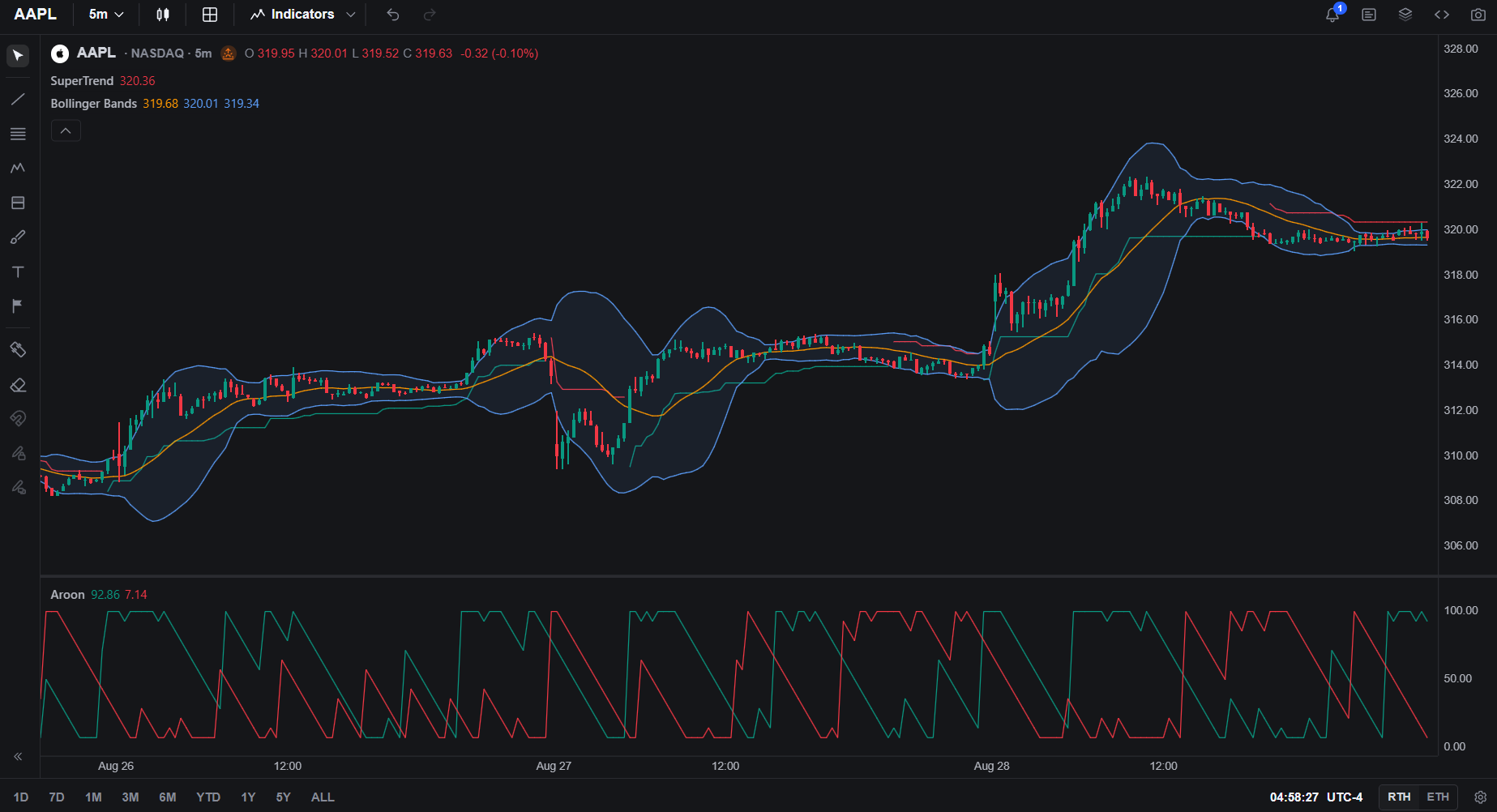
npm install @luxalgo/vela-pinets @luxalgo/vela pinets
import { Vela } from '@luxalgo/vela';
import { PineEngine } from '@luxalgo/vela-pinets';

const chart = new Vela('#chart', { symbol: 'BTCUSDT', timeframe: '60', live: true });
chart.registerEngine('pine', new PineEngine());
chart.addIndicator(`
//@version=6
indicator("EMA 20", overlay=true)
plot(ta.ema(close, 20), color=color.orange, linewidth=2)
`);
Use PineWorkerEngine instead of PineEngine when a heavy script should not block the chart. A strategy() script runs through the same engine; Vela-pinets maps PineTS's broker-emulator trades onto Vela's price-pane trade markers. Mutable indicator() / strategy() declaration arguments appear on Vela's Properties tab.
Vela · Vela PineTS (@luxalgo/vela-pinets)
Use with AI agents
pinets-cli runs Pine Script® files from the command line with PineTS. The script goes in as a file or on stdin and the plots come out as JSON, so an agent can call it as a tool without a wrapper. Its repository includes skills for Claude Code, OpenAI Codex, and OpenClaw; see its AI agents guide.
npx pinets-cli run rsi.pine --symbol BTCUSDT --timeframe 60 --quiet
Use Cases
Algorithmic Trading
- Build custom trading bots using Pine Script® strategies
- Connect indicators to your execution systems
Backtesting
- Test Pine Script® strategies against historical data
- Export indicator values for analysis in Python or R
Alert Systems
- Create custom alert pipelines based on indicator signals
- Monitor multiple assets with indicator calculations on the server
Research & Analysis
- Process large datasets with Pine Script® indicators
- Feed indicator outputs into machine learning models
Custom Dashboards
- Embed live indicators in web applications
- Build monitoring dashboards that update in real time
Roadmap
| Status | Feature |
|---|---|
| ✅ | Native Pine Script® v6 support |
| ✅ | 60+ technical analysis functions |
| ✅ | Arrays, matrices, and maps |
| ✅ | Live streaming |
| ✅ | Multiple timeframes via request.security() |
| ✅ | Strategy namespace |
| ✅ | Market data Providers |
| ✅ | Additional data providers |
| 🎯 | Pine Script® v6 full compatibility |
Contributing
Contributions are welcome. Before you start, read CONTRIBUTING.md.
Useful ways to help:
- Add a missing Pine Script® function
- Improve docs or examples
- Fix a bug you can reproduce
- Open an issue with a script, expected output, and actual output
Contributors
See CONTRIBUTING.md for the full guidelines.
Thanks to all PineTS contributors:


License
PineTS is dual licensed:
- AGPL 3.0 : Free for everyone. You can use PineTS for personal projects, research, and internal tools without any obligation. The copyleft terms only apply if you distribute your application to others or provide it as a network service (e.g., SaaS, public API). In that case, your full source code must also be released under AGPL 3.0.
- Commercial License : For companies and individuals who want to use PineTS in proprietary or closed source software without AGPL 3.0 obligations. Contact us for licensing.
Built by LuxAlgo
Copyright (C) 2026-present LuxAlgo
Significant stargazers

38 followers · starred Sep 2026

50 followers · starred Sep 2026

23 followers · starred Apr 2025

134 followers · starred Dec 2025
Similar repos


Languages
TypeScript
98.9%
JavaScript
1.1%
Run Pine Script® anywhere. PineTS is an open-source transpiler and runtime that brings Pine Script® logic to Node.js and the browser with 1:1 syntax compatibility. Reliably write, port, and run indicators or strategies on your own infrastructure.
See the codeREADME
PineTS
Pine Script® runtime for JavaScript
Run TradingView® indicators in Node.js, browsers, and any JS environment.
Quick Start • Features • Usage • API Coverage • Docs • Vela • AI Agents
What is PineTS?
PineTS is a TypeScript runtime for Pine Script®. It transpiles native v6 or v5 source and executes it with the same time series model: lookbacks, incremental TA, and plot outputs you can read from code.
You write the indicator once. PineTS runs it on your data, in your process.
import { PineTS, Provider } from 'pinets';

const pineTS = new PineTS(Provider.Binance, 'BTCUSDT', '1h', 100);

// Run native Pine Script® directly
const { plots } = await pineTS.run(`
//@version=6
indicator("EMA Cross")
plot(ta.ema(close, 9), "Fast", color.blue)
plot(ta.ema(close, 21), "Slow", color.red)
`);
Disclaimer: PineTS is an independently developed open source compiler and runtime engine. LuxAlgo Global, LLC and the PineTS project are NOT affiliated with, sponsored by, endorsed by, or in any way officially associated with TradingView, Inc. "Pine Script®" and "TradingView®" are registered trademarks of TradingView, Inc.
Why PineTS?
Pine Script® is built for the chart. PineTS is built for everything around it.
| You need | PineTS gives you |
|---|---|
| Indicators on your own infrastructure | Run them in Node.js, Deno, Bun, or the browser |
| Values you can pass to a bot, alert, or ML pipeline | Raw plot series as plain JavaScript |
| Data from Binance, a CSV, or your own API | Built in providers, or pass an OHLCV array |
| The same script you already wrote | Native Pine Script® v6, no rewrite |
Quick Start
Installation
npm install pinets
Hello World
A minimal example:
import { PineTS, Provider } from 'pinets';

// Initialize with Binance data
const pineTS = new PineTS(Provider.Binance, 'BTCUSDT', '1h', 100);

// Calculate a simple moving average
const { plots } = await pineTS.run(`
//@version=6
indicator("My First Indicator")
sma20 = ta.sma(close, 20)
plot(sma20, "SMA 20")
`);

console.log('SMA values:', plots['SMA 20'].data);
plots is a map of series you can log, store, or feed into the rest of your stack.
Features
- Native Pine Script® v6: run original TradingView® code directly (experimental)
- 60+ TA functions: SMA, EMA, RSI, MACD, Bollinger Bands, and more
- Time series semantics: lookbacks,
var/letpersistence, bar state - Live streaming: recalculate on new bars with an event based API
- Multiple timeframes:
request.security()for MTF indicators - High precision: matches TradingView®'s calculation precision
- Your data: Binance, FMP, Alpaca, or any OHLCV array
Two Ways to Write Indicators
PineTS accepts native Pine Script® or a JavaScript friendly syntax. Both compile to the same runtime.
Native Pine Script®
//@version=6
indicator("RSI Strategy")

rsi = ta.rsi(close, 14)
sma = ta.sma(rsi, 10)

plot(rsi, "RSI")
plot(sma, "Signal")
PineTS Syntax (JavaScript)
//@PineTS
indicator('RSI Strategy');

const rsi = ta.rsi(close, 14);
const sma = ta.sma(rsi, 10);

plot(rsi, 'RSI');
plot(sma, 'Signal');
Usage
Running Native Pine Script®
Pass Pine Script® source to pineTS.run() and read the calculated series from plots:
import { PineTS, Provider } from 'pinets';

const pineTS = new PineTS(Provider.Binance, 'BTCUSDT', 'D', 200);

const { plots } = await pineTS.run(`
//@version=6
indicator("MACD", overlay=false)

[macdLine, signalLine, hist] = ta.macd(close, 12, 26, 9)

plot(macdLine, "MACD", color.blue)
plot(signalLine, "Signal", color.orange)
plot(hist, "Histogram", color.gray, style=plot.style_histogram)
`);

// Access the calculated values
console.log('MACD Line:', plots['MACD'].data);
console.log('Signal Line:', plots['Signal'].data);
Using PineTS Syntax
The same indicators can be written as a JavaScript function using $.data and $.pine:
import { PineTS, Provider } from 'pinets';

const pineTS = new PineTS(Provider.Binance, 'ETHUSDT', '4h', 100);

const { plots } = await pineTS.run(($) => {
    const { close, high, low } = $.data;
    const { ta, plot, plotchar } = $.pine;

    // Calculate indicators
    const ema9 = ta.ema(close, 9);
    const ema21 = ta.ema(close, 21);
    const atr = ta.atr(14);

    // Detect crossovers
    const bullish = ta.crossover(ema9, ema21);
    const bearish = ta.crossunder(ema9, ema21);

    // Plot results
    plot(ema9, 'Fast EMA');
    plot(ema21, 'Slow EMA');
    plotchar(bullish, 'Buy Signal');
    plotchar(bearish, 'Sell Signal');

    return { ema9, ema21, atr, bullish, bearish };
});
Streaming Live Data
pineTS.stream() recalculates on new bars and emits plot updates:
import { PineTS, Provider } from 'pinets';

const pineTS = new PineTS(Provider.Binance, 'BTCUSDT', '1m');

const stream = pineTS.stream(
    `
    //@version=6
    indicator("Live RSI")
    plot(ta.rsi(close, 14), "RSI")
    `,
    { live: true, interval: 1000 },
);

stream.on('data', (ctx) => {
    const rsi = ctx.plots['RSI'].data.slice(-1)[0].value;
    console.log(`RSI: ${rsi.toFixed(2)}`);

    if (rsi < 30) console.log('Oversold!');
    if (rsi > 70) console.log('Overbought!');
});

stream.on('error', (err) => console.error('Stream error:', err));
Custom Data Source
You can also pass your own OHLCV array instead of a market data provider:
import { PineTS } from 'pinets';

// Your own OHLCV data
const candles = [
    { open: 100, high: 105, low: 99, close: 103, volume: 1000, openTime: 1704067200000 },
    { open: 103, high: 108, low: 102, close: 107, volume: 1200, openTime: 1704153600000 },
    // ... more candles
];

const pineTS = new PineTS(candles);

const { plots } = await pineTS.run(`
//@version=6
indicator("Custom Data")
plot(ta.sma(close, 10))
`);
API Coverage
PineTS aims for complete Pine Script® API compatibility. See the full coverage list. Current status:
Data & Context
Technical Analysis & Math
Data Structures
Visualization
Utilities
Click any badge to open the API coverage page
Documentation
Full guides live at docs.luxalgo.com/developers/pinets.
- Getting Started
- Initialization and Usage
- Data Providers
- Pagination and Live Streaming
- Architecture
- API Coverage
Charting with Vela
Vela is LuxAlgo's open-source charting library. It ships no scripting engine of its own. Vela PineTS is the addon that runs Pine Script® indicator() and strategy() scripts on the chart, through Vela's public ScriptingEngine port, in-process (PineEngine) or off the main thread (PineWorkerEngine).
npm install @luxalgo/vela-pinets @luxalgo/vela pinets
import { Vela } from '@luxalgo/vela';
import { PineEngine } from '@luxalgo/vela-pinets';

const chart = new Vela('#chart', { symbol: 'BTCUSDT', timeframe: '60', live: true });
chart.registerEngine('pine', new PineEngine());
chart.addIndicator(`
//@version=6
indicator("EMA 20", overlay=true)
plot(ta.ema(close, 20), color=color.orange, linewidth=2)
`);
Use PineWorkerEngine instead of PineEngine when a heavy script should not block the chart. A strategy() script runs through the same engine; Vela-pinets maps PineTS's broker-emulator trades onto Vela's price-pane trade markers. Mutable indicator() / strategy() declaration arguments appear on Vela's Properties tab.
Vela · Vela PineTS (@luxalgo/vela-pinets)
Use with AI agents
pinets-cli runs Pine Script® files from the command line with PineTS. The script goes in as a file or on stdin and the plots come out as JSON, so an agent can call it as a tool without a wrapper. Its repository includes skills for Claude Code, OpenAI Codex, and OpenClaw; see its AI agents guide.
npx pinets-cli run rsi.pine --symbol BTCUSDT --timeframe 60 --quiet
Use Cases
Algorithmic Trading
- Build custom trading bots using Pine Script® strategies
- Connect indicators to your execution systems
Backtesting
- Test Pine Script® strategies against historical data
- Export indicator values for analysis in Python or R
Alert Systems
- Create custom alert pipelines based on indicator signals
- Monitor multiple assets with indicator calculations on the server
Research & Analysis
- Process large datasets with Pine Script® indicators
- Feed indicator outputs into machine learning models
Custom Dashboards
- Embed live indicators in web applications
- Build monitoring dashboards that update in real time
Roadmap
| Status | Feature |
|---|---|
| ✅ | Native Pine Script® v6 support |
| ✅ | 60+ technical analysis functions |
| ✅ | Arrays, matrices, and maps |
| ✅ | Live streaming |
| ✅ | Multiple timeframes via request.security() |
| ✅ | Strategy namespace |
| ✅ | Market data Providers |
| ✅ | Additional data providers |
| 🎯 | Pine Script® v6 full compatibility |
Contributing
Contributions are welcome. Before you start, read CONTRIBUTING.md.
Useful ways to help:
- Add a missing Pine Script® function
- Improve docs or examples
- Fix a bug you can reproduce
- Open an issue with a script, expected output, and actual output
Contributors
See CONTRIBUTING.md for the full guidelines.
Thanks to all PineTS contributors:
License
PineTS is dual licensed:
- AGPL 3.0 : Free for everyone. You can use PineTS for personal projects, research, and internal tools without any obligation. The copyleft terms only apply if you distribute your application to others or provide it as a network service (e.g., SaaS, public API). In that case, your full source code must also be released under AGPL 3.0.
- Commercial License : For companies and individuals who want to use PineTS in proprietary or closed source software without AGPL 3.0 obligations. Contact us for licensing.
Built by LuxAlgo
Copyright (C) 2026-present LuxAlgo
Similar repos
Significant stargazers
38 followers · starred Sep 2026
50 followers · starred Sep 2026
23 followers · starred Apr 2025
134 followers · starred Dec 2025
Languages
TypeScript
98.9%
JavaScript
1.1%