
macOS Finder-style Miller Columns file explorer for Windows — multi-tab, split view, 10 themes, keyboard-first, FTP/SFTP
See the codeREADME
SPAN Finder
macOS Finder's Miller Columns, reimagined for Windows.
For power users who switched to Windows but never stopped missing column view.





English | 한국어 | 日本語 | 中文(简体) | 中文(繁體) | Deutsch | Español | Français | Português
NEW in v1.3.1 — File Shelf: macOS Yoink-style drag & drop shelf for Windows. Stash files while you navigate, drop them where you need. (Ctrl+Shift+S)
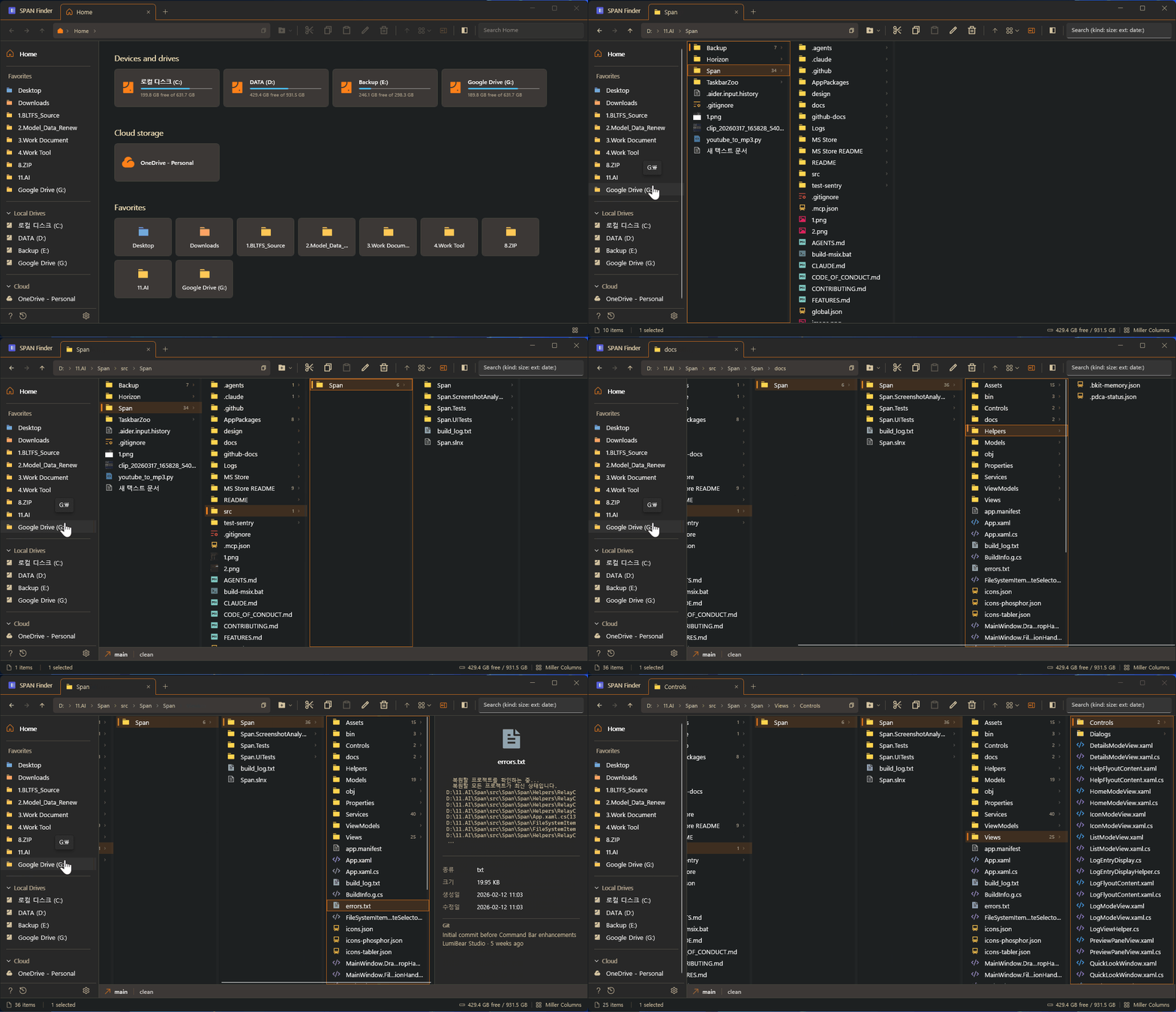
Navigate folder hierarchies the way they were meant to be navigated. Click a folder, its contents appear in the next column. You always see where you are, where you came from, and where you're going — all at once. No more clicking back and forth.

If you find SPAN Finder useful, consider giving it a ⭐ — it helps others discover this project!
Why SPAN Finder?
| Windows Explorer | SPAN Finder | |
|---|---|---|
| Miller Columns | No | Yes — hierarchical multi-column navigation |
| Multi-Tab | Windows 11 only (basic) | Full tabs with tear-off, re-docking, duplication, session restore |
| Split View | No | Dual-pane with independent view modes |
| Preview Panel | Basic | 10+ file types — images, video, audio, code, hex, fonts, PDF |
| Keyboard Navigation | Limited | 150+ features, 30+ shortcuts, type-ahead search, full keyboard-first design |
| Batch Rename | No | Regex, prefix/suffix, sequential numbering |
| Undo/Redo | Limited | Full operation history (configurable depth) |
| Custom Themes | No | 10 themes — Dracula, Tokyo Night, Catppuccin, Gruvbox, Nord, and more |
| Git Integration | No | Branch, status, commits at a glance |
| Remote Connections | No | FTP, FTPS, SFTP with saved credentials |
| Workspaces | No | Save & restore named tab layouts instantly |
| Cloud Status | Basic overlay | Real-time sync badges (OneDrive, iCloud, Dropbox) |
| Startup Speed | Slow on large directories | Async loading with cancellation — zero lag |
Features
Miller Columns — See Everything at Once
Navigate deep folder hierarchies without losing context. Each column represents one level — click a folder and its contents appear in the next column. You always see where you are and where you came from.
- Draggable column separators for custom widths
- Auto-equalize columns (Ctrl+Shift+=) or auto-fit to content (Ctrl+Shift+-)
- Smooth horizontal scrolling to keep the active column visible
Four View Modes
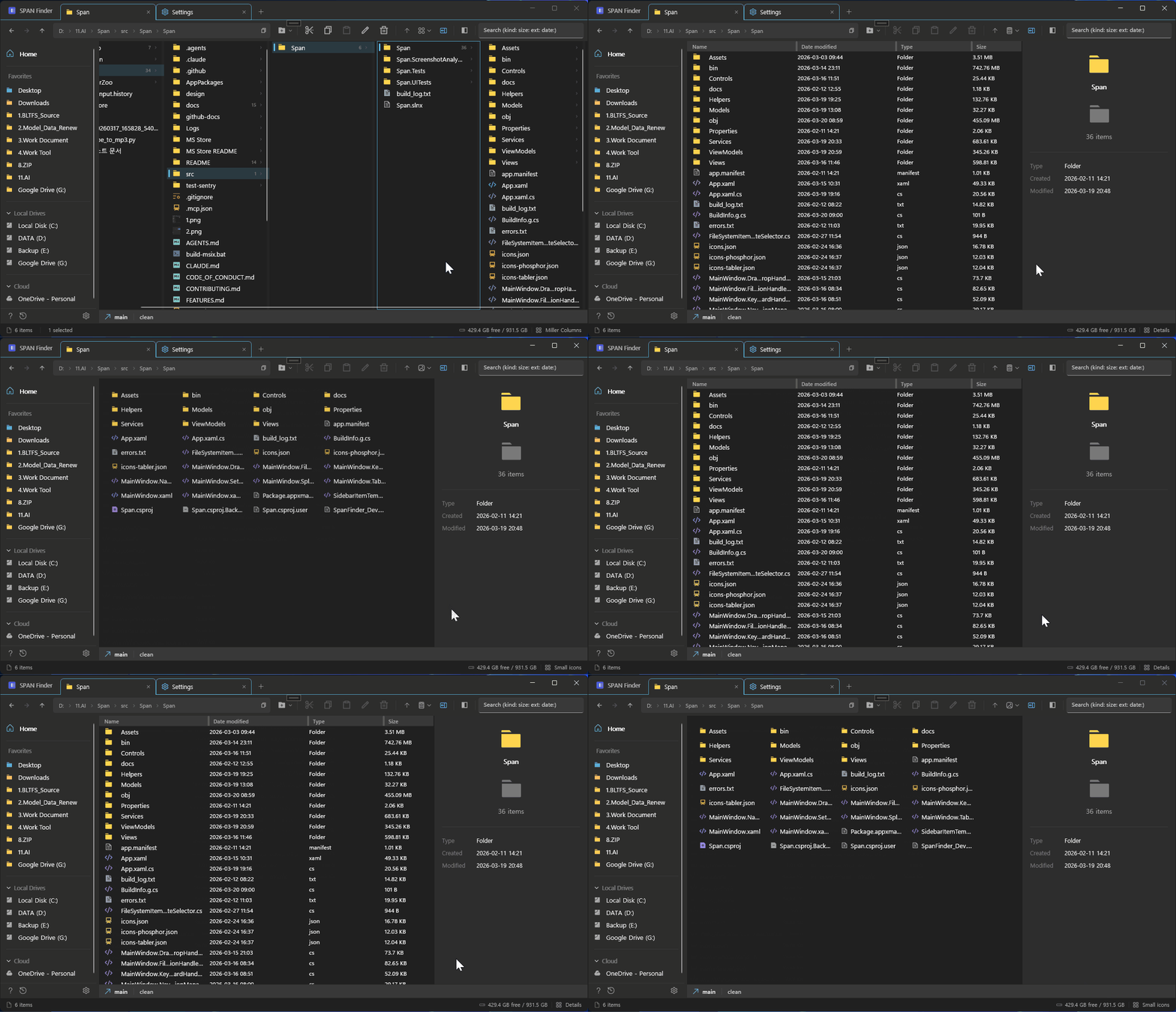
- Miller Columns (Ctrl+1) — Hierarchical navigation, SPAN Finder's signature
- Details (Ctrl+2) — Sortable table with name, date, type, size columns
- List (Ctrl+3) — Dense multi-column layout for scanning large directories
- Icons (Ctrl+4) — Grid view with 4 size options up to 256x256 thumbnails
Multi-Tab with Full Session Restore
- Open unlimited tabs, each with its own path, view mode, and history
- Tab tear-off & re-docking: Drag a tab out to create a new window, drag it back to re-dock — Chrome-style ghost tab indicator and semi-transparent window feedback
- Tab duplication: Clone a tab with its exact path and settings
- Session auto-save: Close the app, reopen it — every tab exactly where you left it
Split View — True Dual-Pane
- Side-by-side file browsing with independent navigation per pane
- Each pane can use a different view mode (Miller left, Details right)
- Separate preview panels for each pane
- Drag files between panes for copy/move operations
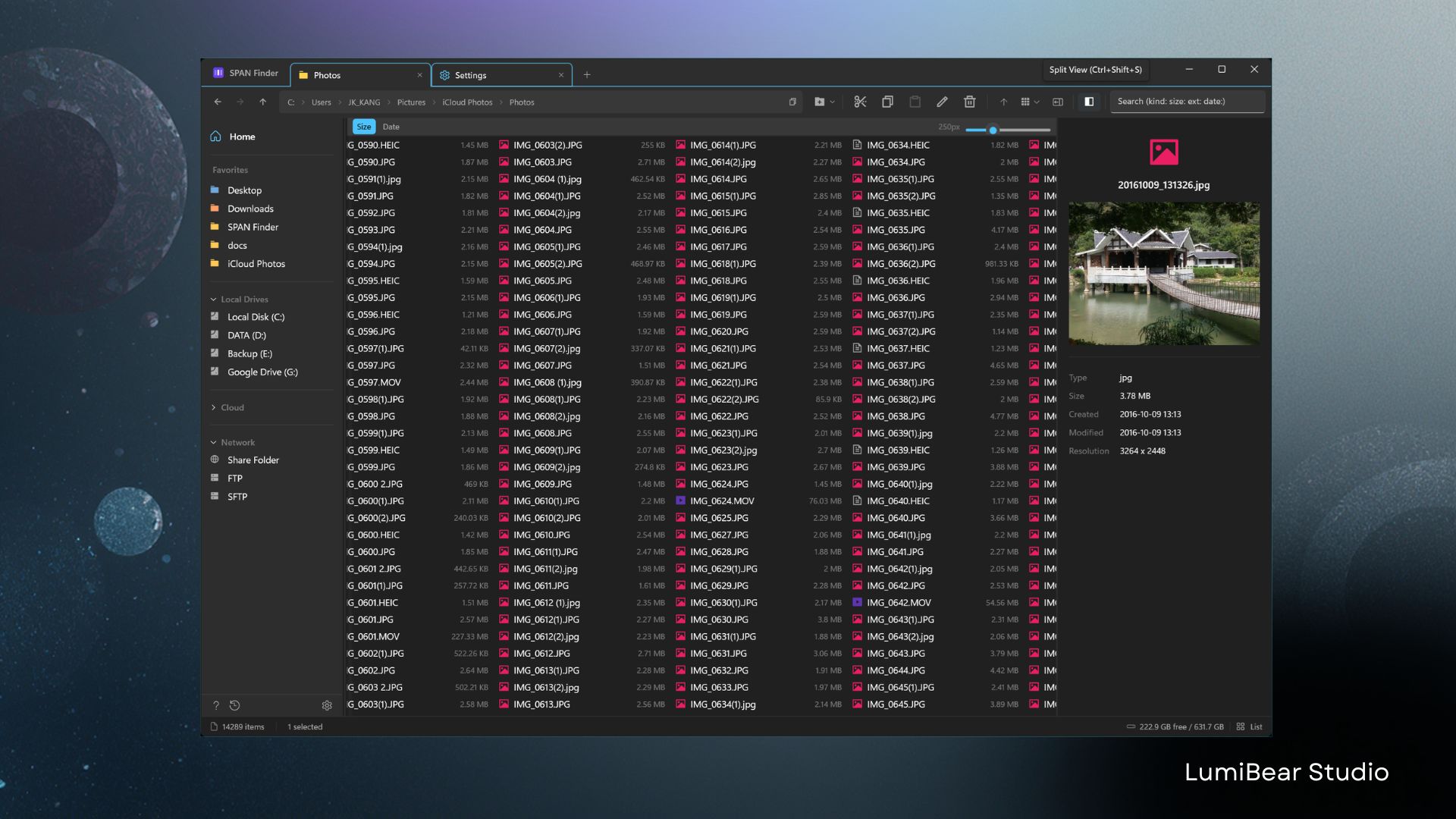
Preview Panel — Know Before You Open
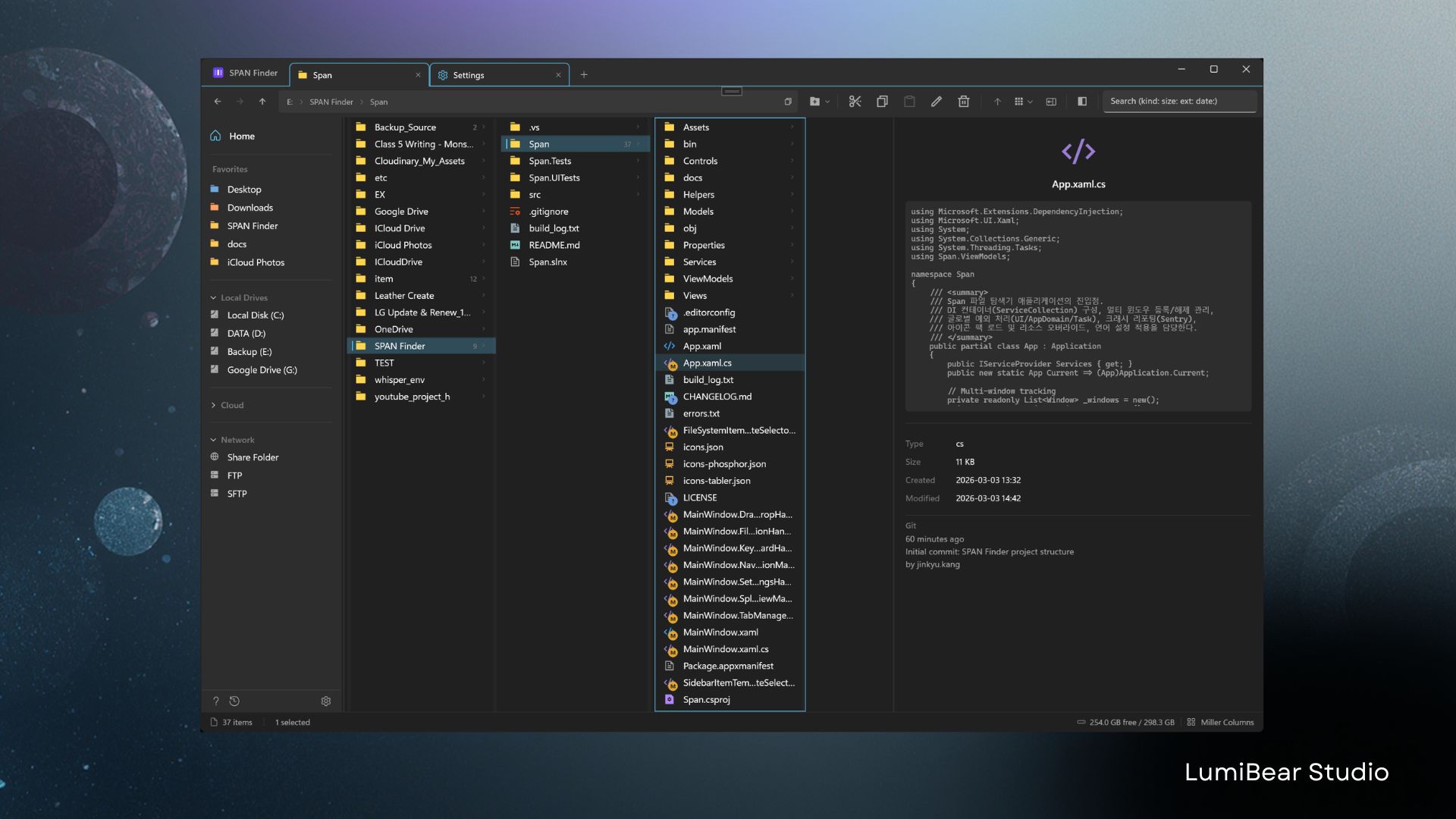
Press Space for Quick Look (macOS Finder style):
- Arrow key & Space navigation: Browse files without closing Quick Look
- Window size persistence: Quick Look remembers its last size
- Images: JPEG, PNG, GIF, BMP, WebP, TIFF with resolution and metadata
- Video: MP4, MKV, AVI, MOV, WEBM with playback controls
- Audio: MP3, AAC, M4A with artist, album, duration info
- Text & Code: 30+ extensions with syntax display
- PDF: First page preview
- Fonts: Glyph samples with metadata
- Hex Binary: Raw byte view for developers
- Folders: Size, item count, creation date
- File hash: SHA256 checksum display with one-click copy (opt-in via Settings)
Keyboard-First Design
30+ keyboard shortcuts for users who keep their hands on the keyboard:
| Shortcut | Action |
|---|---|
| Arrow Keys | Navigate columns and items |
| Enter | Open folder or execute file |
| Space | Toggle preview panel |
| Ctrl+L / Alt+D | Edit address bar |
| Ctrl+F | Search |
| Ctrl+C / X / V | Copy / Cut / Paste |
| Ctrl+Z / Y | Undo / Redo |
| Ctrl+Shift+N | New folder |
| F2 | Rename (batch rename if multi-select) |
| Ctrl+T / W | New tab / Close tab |
| Ctrl+Tab / Ctrl+Shift+Tab | Cycle tabs forward / backward |
| Ctrl+1-4 | Switch view mode |
| Ctrl+Shift+E | Toggle split view |
| F6 | Switch split view pane |
| Ctrl+Shift+S | Save workspace |
| Ctrl+Shift+W | Open workspace palette |
| Ctrl+Shift+H | Toggle file extensions |
| Shift+F10 | Full native shell context menu |
| Delete | Move to Recycle Bin |
Themes & Customization
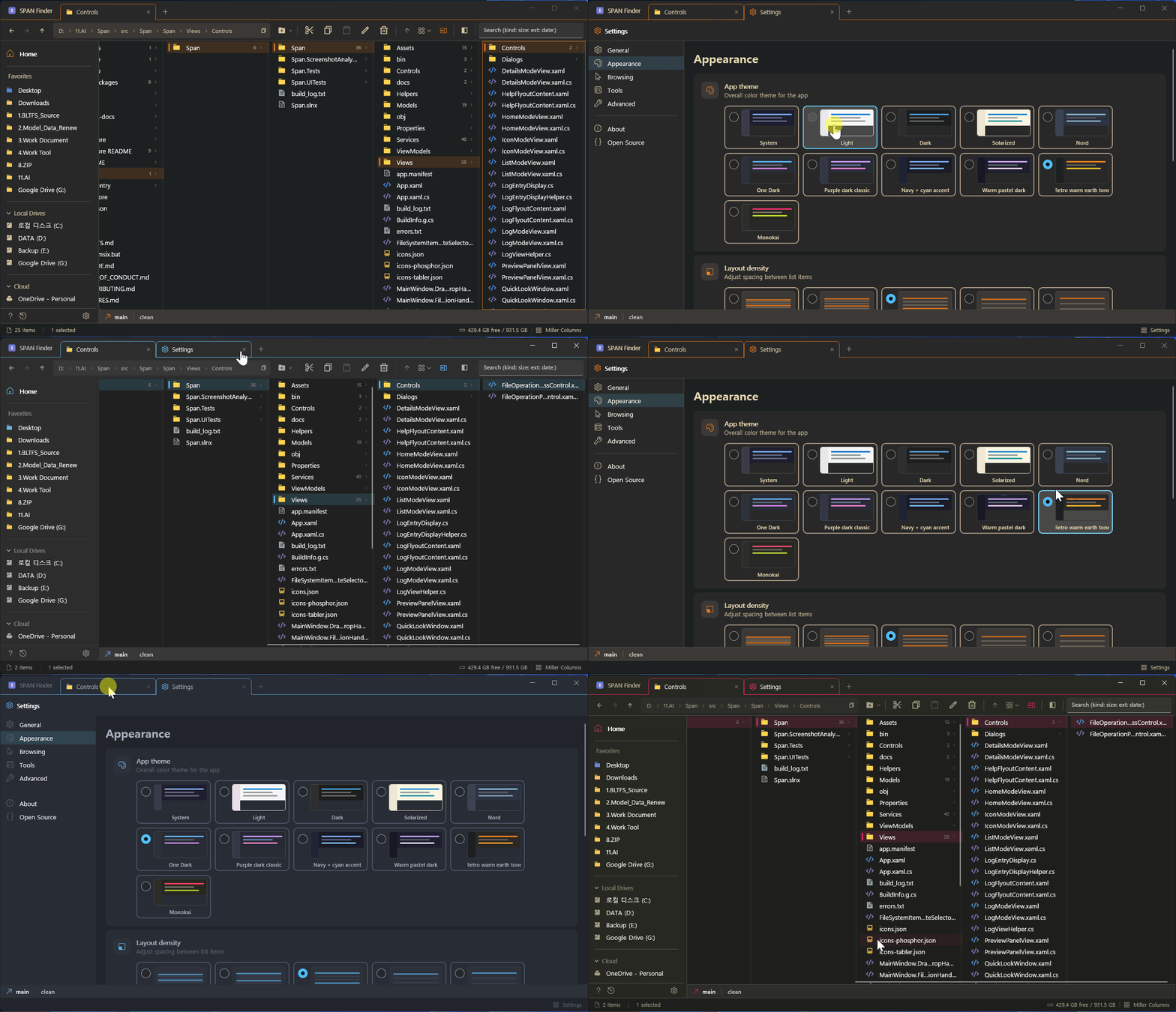
- 10 Themes: Light, Dark, Dracula, Tokyo Night, Catppuccin, Gruvbox, Solarized, Nord, One Dark, Monokai
- 6-Level Row Height and 6-Level Font/Icon Size — independent controls
- 10 Font Options: Segoe UI Variable, Consolas, Cascadia Code/Mono, D2Coding, JetBrains Mono, Fira Code, and more — with CJK fallback font chain
- 3 Icon Packs: Remix Icon, Phosphor Icons, Tabler Icons
- 9 Languages: English, Korean, Japanese, Chinese (Simplified/Traditional), German, Spanish, French, Portuguese
Developer Tools
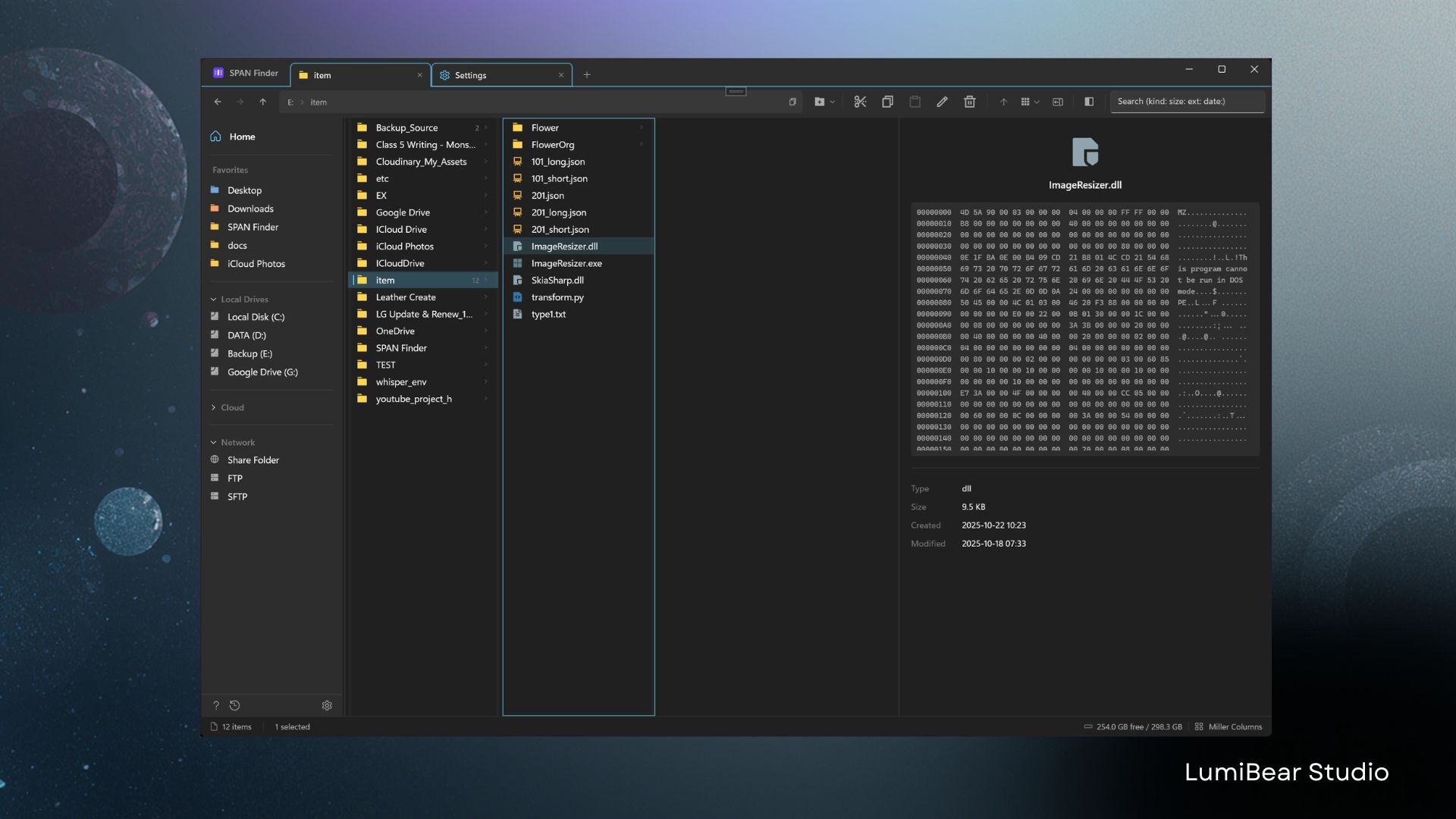
- Git status badges: Modified, Added, Deleted, Untracked per file
- Hex dump viewer: First 512 bytes in hex + ASCII
- Terminal integration: Ctrl+` opens terminal at current path
- Remote connections: FTP/FTPS/SFTP with encrypted credential storage
Cloud Storage Integration
- Sync status badges: Cloud-only, Synced, Pending Upload, Syncing
- OneDrive, iCloud, Dropbox detection out of the box
- Smart thumbnails: Uses cached previews — never triggers unwanted downloads
Smart Search
- Structured queries:
type:image,size:>100MB,date:today,ext:.pdf - Type-ahead: Start typing in any column to filter instantly
- Background processing: Search never freezes the UI
Recycle Bin Integration (v1.1.1.0)
- Dedicated Recycle Bin tab — browse, restore, or permanently delete items
- Empty Recycle Bin button in toolbar
- Full Miller / Details / List / Icon view support for binned items
Power User Enhancements (v1.1.2.0)
- Middle-click to open in new tab: Works on folders, drives, and sidebar favorites
- Tab context menu "Move to New Window": Tear off any tab via right-click
- Recent locations AutoSuggest: Address bar shows recently visited folders on focus
- Localized folder navigation: Type "Downloads", "文書", "바탕화면" etc. in any language — 100+ OS display names resolved via Known Folder cache
- Virtual folder navigation: Type "Control Panel", "This PC", "Network" (10 languages) to navigate shell namespaces
- Shell command execution: Type
cmd,powershell,calc,notepadin the address bar to launch directly - Run as Administrator: Right-click
.exe/.msi/.bat/.cmdfor a UAC-elevated launch option - Shift+F10: Force full native shell context menu regardless of selection
- Status bar selection size: Shows "3 selected (15.2 MB)" aggregate for multi-select
- Virtual file paste: Paste files from RDP remote sessions and Outlook attachments (Ctrl+V)
- Drive context menu: Format and Disk Cleanup actions for drives
- Background context menu: Undo and Folder Properties in empty-area right-click menu
Workspace — Save & Restore Tab Layouts (v1.2.1.0)
- Save current tabs: Right-click any tab → "Save tab layout..." or press Ctrl+Shift+S
- Restore instantly: Click the workspace button in the sidebar or press Ctrl+Shift+W
- Manage workspaces: Restore, rename, or delete saved layouts from the workspace menu
- Perfect for switching between work contexts — "Development", "Photo Editing", "Documents"
Tab Drag & Drop UX (v1.2.13.0)
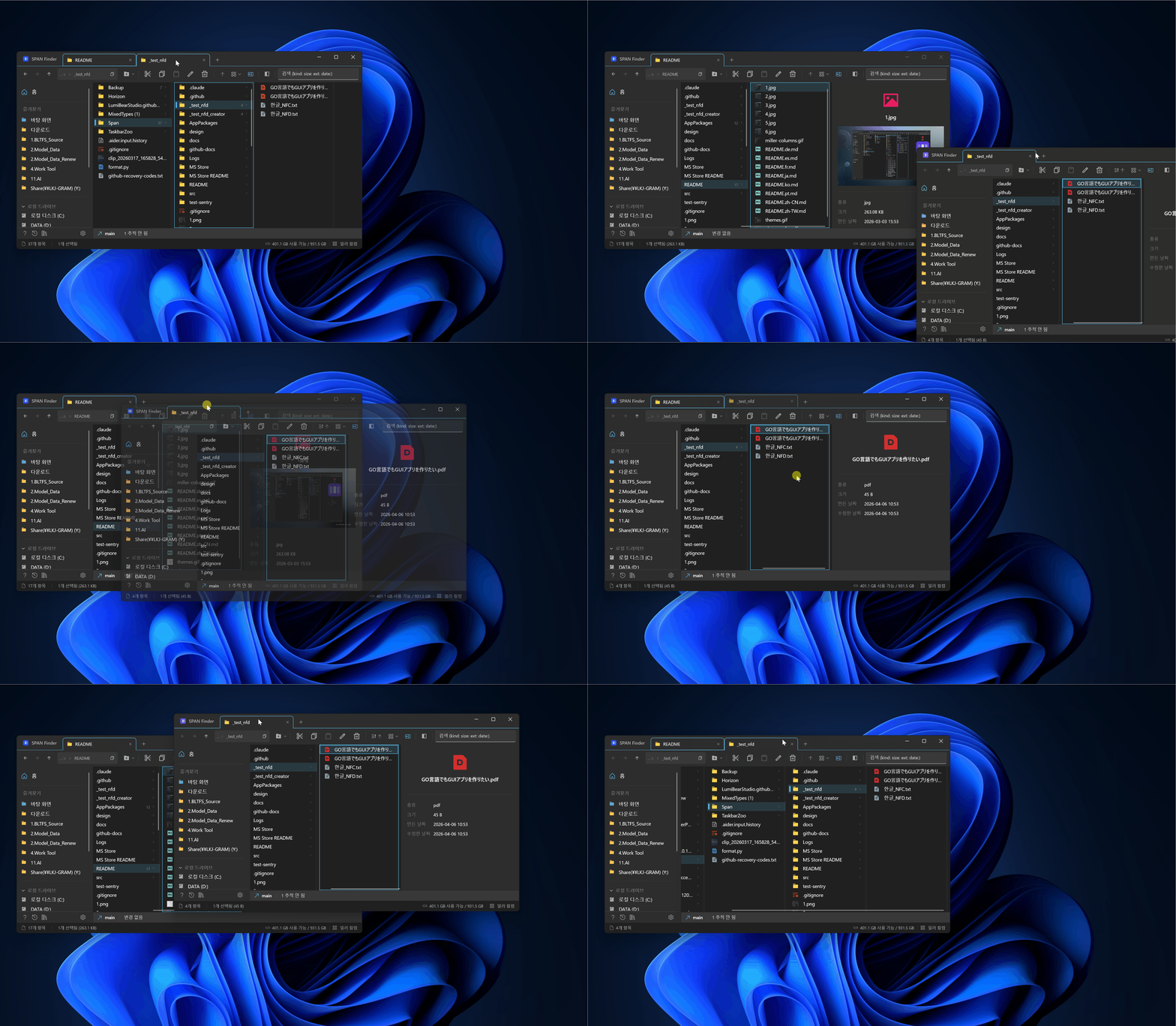
- Chrome-style ghost tab: Visual indicator shows exactly where a dragged tab will land
- Semi-transparent dock feedback: Target window becomes translucent during re-docking
- Tear-off visual effects: Opacity and lift animation when dragging a tab out (disabled for single-tab windows)
- Stable tab widths: Chrome-style fixed-width tabs that don't resize to folder name length
Performance
Engineered for speed. Tested with 14,000+ items per folder.
- Async I/O everywhere — nothing blocks the UI thread
- Batch property updates with minimal overhead
- Debounced selection prevents redundant work during rapid navigation
- Per-tab caching — instant tab switching, no re-rendering
- Concurrent thumbnail loading with SemaphoreSlim throttling
System Requirements
| OS | Windows 10 version 1903+ / Windows 11 |
| Architecture | x64, ARM64 |
| Runtime | Windows App SDK 1.8 (.NET 8) |
| Recommended | Windows 11 for Mica backdrop |
Build from Source
# Prerequisites: Visual Studio 2022 with .NET Desktop + WinUI 3 workloads

# Clone
git clone https://github.com/LumiBearStudio/SpanFinder.git
cd SpanFinder

# Build
dotnet build src/Span/Span/Span.csproj -p:Platform=x64

# Run unit tests
dotnet test src/Span/Span.Tests/Span.Tests.csproj -p:Platform=x64
Note: WinUI 3 apps cannot be launched via
dotnet run. Use Visual Studio F5 (MSIX packaging required).
Contributing
Found a bug? Have a feature request? Open an issue — all feedback welcome.
See CONTRIBUTING.md for build setup, coding conventions, and PR guidelines.
Support the Project
If SPAN Finder makes your file management better, consider:
- Sponsor on GitHub — buy me a coffee, a hamburger, or a steak
- Star this repo to help others discover it
- Share with colleagues who miss macOS Finder on Windows
- Report bugs — every issue report makes SPAN Finder more stable
- Download from Microsoft Store — Store reviews help visibility
Privacy & Telemetry
SPAN Finder uses Sentry for crash reporting only — and you can turn it off.
- What we collect: Exception type, stack trace, OS version, app version
- What we DON'T collect: File names, folder paths, browsing history, personal information
- No usage analytics, no tracking, no ads
- All file paths in crash reports are automatically scrubbed before sending
SendDefaultPii = false— no IP addresses or user identifiers- Opt-out: Settings > Advanced > "Crash Reporting" toggle to disable completely
- Source code is open — verify yourself in
CrashReportingService.cs
See Privacy Policy for full details.
License
This project is licensed under the GNU General Public License v3.0.
Microsoft Store Exception: The copyright holder (LumiBear Studio) may distribute official binaries through the Microsoft Store under its terms, without those terms being considered "additional restrictions" under GPL v3 Section 7. This exception applies only to the official distribution and does not extend to third-party forks.
Trademark: The "SPAN Finder" name and official logo are trademarks of LumiBear Studio. Forks must use a different name and logo. See LICENSE.md for full trademark policy.
Microsoft Store · Sponsor · Privacy Policy · Open Source Licenses · Bug Reports & Feature Requests
Significant stargazers

4,035 followers · starred Apr 2026

0 followers · starred Apr 2026
Similar repos


Languages
C#
98.5%
macOS Finder-style Miller Columns file explorer for Windows — multi-tab, split view, 10 themes, keyboard-first, FTP/SFTP
See the codeREADME
SPAN Finder
macOS Finder's Miller Columns, reimagined for Windows.
For power users who switched to Windows but never stopped missing column view.
English | 한국어 | 日本語 | 中文(简体) | 中文(繁體) | Deutsch | Español | Français | Português
NEW in v1.3.1 — File Shelf: macOS Yoink-style drag & drop shelf for Windows. Stash files while you navigate, drop them where you need. (Ctrl+Shift+S)
Navigate folder hierarchies the way they were meant to be navigated. Click a folder, its contents appear in the next column. You always see where you are, where you came from, and where you're going — all at once. No more clicking back and forth.
If you find SPAN Finder useful, consider giving it a ⭐ — it helps others discover this project!
Why SPAN Finder?
| Windows Explorer | SPAN Finder | |
|---|---|---|
| Miller Columns | No | Yes — hierarchical multi-column navigation |
| Multi-Tab | Windows 11 only (basic) | Full tabs with tear-off, re-docking, duplication, session restore |
| Split View | No | Dual-pane with independent view modes |
| Preview Panel | Basic | 10+ file types — images, video, audio, code, hex, fonts, PDF |
| Keyboard Navigation | Limited | 150+ features, 30+ shortcuts, type-ahead search, full keyboard-first design |
| Batch Rename | No | Regex, prefix/suffix, sequential numbering |
| Undo/Redo | Limited | Full operation history (configurable depth) |
| Custom Themes | No | 10 themes — Dracula, Tokyo Night, Catppuccin, Gruvbox, Nord, and more |
| Git Integration | No | Branch, status, commits at a glance |
| Remote Connections | No | FTP, FTPS, SFTP with saved credentials |
| Workspaces | No | Save & restore named tab layouts instantly |
| Cloud Status | Basic overlay | Real-time sync badges (OneDrive, iCloud, Dropbox) |
| Startup Speed | Slow on large directories | Async loading with cancellation — zero lag |
Features
Miller Columns — See Everything at Once
Navigate deep folder hierarchies without losing context. Each column represents one level — click a folder and its contents appear in the next column. You always see where you are and where you came from.
- Draggable column separators for custom widths
- Auto-equalize columns (Ctrl+Shift+=) or auto-fit to content (Ctrl+Shift+-)
- Smooth horizontal scrolling to keep the active column visible
Four View Modes
- Miller Columns (Ctrl+1) — Hierarchical navigation, SPAN Finder's signature
- Details (Ctrl+2) — Sortable table with name, date, type, size columns
- List (Ctrl+3) — Dense multi-column layout for scanning large directories
- Icons (Ctrl+4) — Grid view with 4 size options up to 256x256 thumbnails
Multi-Tab with Full Session Restore
- Open unlimited tabs, each with its own path, view mode, and history
- Tab tear-off & re-docking: Drag a tab out to create a new window, drag it back to re-dock — Chrome-style ghost tab indicator and semi-transparent window feedback
- Tab duplication: Clone a tab with its exact path and settings
- Session auto-save: Close the app, reopen it — every tab exactly where you left it
Split View — True Dual-Pane
- Side-by-side file browsing with independent navigation per pane
- Each pane can use a different view mode (Miller left, Details right)
- Separate preview panels for each pane
- Drag files between panes for copy/move operations
Preview Panel — Know Before You Open
Press Space for Quick Look (macOS Finder style):
- Arrow key & Space navigation: Browse files without closing Quick Look
- Window size persistence: Quick Look remembers its last size
- Images: JPEG, PNG, GIF, BMP, WebP, TIFF with resolution and metadata
- Video: MP4, MKV, AVI, MOV, WEBM with playback controls
- Audio: MP3, AAC, M4A with artist, album, duration info
- Text & Code: 30+ extensions with syntax display
- PDF: First page preview
- Fonts: Glyph samples with metadata
- Hex Binary: Raw byte view for developers
- Folders: Size, item count, creation date
- File hash: SHA256 checksum display with one-click copy (opt-in via Settings)
Keyboard-First Design
30+ keyboard shortcuts for users who keep their hands on the keyboard:
| Shortcut | Action |
|---|---|
| Arrow Keys | Navigate columns and items |
| Enter | Open folder or execute file |
| Space | Toggle preview panel |
| Ctrl+L / Alt+D | Edit address bar |
| Ctrl+F | Search |
| Ctrl+C / X / V | Copy / Cut / Paste |
| Ctrl+Z / Y | Undo / Redo |
| Ctrl+Shift+N | New folder |
| F2 | Rename (batch rename if multi-select) |
| Ctrl+T / W | New tab / Close tab |
| Ctrl+Tab / Ctrl+Shift+Tab | Cycle tabs forward / backward |
| Ctrl+1-4 | Switch view mode |
| Ctrl+Shift+E | Toggle split view |
| F6 | Switch split view pane |
| Ctrl+Shift+S | Save workspace |
| Ctrl+Shift+W | Open workspace palette |
| Ctrl+Shift+H | Toggle file extensions |
| Shift+F10 | Full native shell context menu |
| Delete | Move to Recycle Bin |
Themes & Customization
- 10 Themes: Light, Dark, Dracula, Tokyo Night, Catppuccin, Gruvbox, Solarized, Nord, One Dark, Monokai
- 6-Level Row Height and 6-Level Font/Icon Size — independent controls
- 10 Font Options: Segoe UI Variable, Consolas, Cascadia Code/Mono, D2Coding, JetBrains Mono, Fira Code, and more — with CJK fallback font chain
- 3 Icon Packs: Remix Icon, Phosphor Icons, Tabler Icons
- 9 Languages: English, Korean, Japanese, Chinese (Simplified/Traditional), German, Spanish, French, Portuguese
Developer Tools
- Git status badges: Modified, Added, Deleted, Untracked per file
- Hex dump viewer: First 512 bytes in hex + ASCII
- Terminal integration: Ctrl+` opens terminal at current path
- Remote connections: FTP/FTPS/SFTP with encrypted credential storage
Cloud Storage Integration
- Sync status badges: Cloud-only, Synced, Pending Upload, Syncing
- OneDrive, iCloud, Dropbox detection out of the box
- Smart thumbnails: Uses cached previews — never triggers unwanted downloads
Smart Search
- Structured queries:
type:image,size:>100MB,date:today,ext:.pdf - Type-ahead: Start typing in any column to filter instantly
- Background processing: Search never freezes the UI
Recycle Bin Integration (v1.1.1.0)
- Dedicated Recycle Bin tab — browse, restore, or permanently delete items
- Empty Recycle Bin button in toolbar
- Full Miller / Details / List / Icon view support for binned items
Power User Enhancements (v1.1.2.0)
- Middle-click to open in new tab: Works on folders, drives, and sidebar favorites
- Tab context menu "Move to New Window": Tear off any tab via right-click
- Recent locations AutoSuggest: Address bar shows recently visited folders on focus
- Localized folder navigation: Type "Downloads", "文書", "바탕화면" etc. in any language — 100+ OS display names resolved via Known Folder cache
- Virtual folder navigation: Type "Control Panel", "This PC", "Network" (10 languages) to navigate shell namespaces
- Shell command execution: Type
cmd,powershell,calc,notepadin the address bar to launch directly - Run as Administrator: Right-click
.exe/.msi/.bat/.cmdfor a UAC-elevated launch option - Shift+F10: Force full native shell context menu regardless of selection
- Status bar selection size: Shows "3 selected (15.2 MB)" aggregate for multi-select
- Virtual file paste: Paste files from RDP remote sessions and Outlook attachments (Ctrl+V)
- Drive context menu: Format and Disk Cleanup actions for drives
- Background context menu: Undo and Folder Properties in empty-area right-click menu
Workspace — Save & Restore Tab Layouts (v1.2.1.0)
- Save current tabs: Right-click any tab → "Save tab layout..." or press Ctrl+Shift+S
- Restore instantly: Click the workspace button in the sidebar or press Ctrl+Shift+W
- Manage workspaces: Restore, rename, or delete saved layouts from the workspace menu
- Perfect for switching between work contexts — "Development", "Photo Editing", "Documents"
Tab Drag & Drop UX (v1.2.13.0)
- Chrome-style ghost tab: Visual indicator shows exactly where a dragged tab will land
- Semi-transparent dock feedback: Target window becomes translucent during re-docking
- Tear-off visual effects: Opacity and lift animation when dragging a tab out (disabled for single-tab windows)
- Stable tab widths: Chrome-style fixed-width tabs that don't resize to folder name length
Performance
Engineered for speed. Tested with 14,000+ items per folder.
- Async I/O everywhere — nothing blocks the UI thread
- Batch property updates with minimal overhead
- Debounced selection prevents redundant work during rapid navigation
- Per-tab caching — instant tab switching, no re-rendering
- Concurrent thumbnail loading with SemaphoreSlim throttling
System Requirements
| OS | Windows 10 version 1903+ / Windows 11 |
| Architecture | x64, ARM64 |
| Runtime | Windows App SDK 1.8 (.NET 8) |
| Recommended | Windows 11 for Mica backdrop |
Build from Source
# Prerequisites: Visual Studio 2022 with .NET Desktop + WinUI 3 workloads

# Clone
git clone https://github.com/LumiBearStudio/SpanFinder.git
cd SpanFinder

# Build
dotnet build src/Span/Span/Span.csproj -p:Platform=x64

# Run unit tests
dotnet test src/Span/Span.Tests/Span.Tests.csproj -p:Platform=x64
Note: WinUI 3 apps cannot be launched via
dotnet run. Use Visual Studio F5 (MSIX packaging required).
Contributing
Found a bug? Have a feature request? Open an issue — all feedback welcome.
See CONTRIBUTING.md for build setup, coding conventions, and PR guidelines.
Support the Project
If SPAN Finder makes your file management better, consider:
- Sponsor on GitHub — buy me a coffee, a hamburger, or a steak
- Star this repo to help others discover it
- Share with colleagues who miss macOS Finder on Windows
- Report bugs — every issue report makes SPAN Finder more stable
- Download from Microsoft Store — Store reviews help visibility
Privacy & Telemetry
SPAN Finder uses Sentry for crash reporting only — and you can turn it off.
- What we collect: Exception type, stack trace, OS version, app version
- What we DON'T collect: File names, folder paths, browsing history, personal information
- No usage analytics, no tracking, no ads
- All file paths in crash reports are automatically scrubbed before sending
SendDefaultPii = false— no IP addresses or user identifiers- Opt-out: Settings > Advanced > "Crash Reporting" toggle to disable completely
- Source code is open — verify yourself in
CrashReportingService.cs
See Privacy Policy for full details.
License
This project is licensed under the GNU General Public License v3.0.
Microsoft Store Exception: The copyright holder (LumiBear Studio) may distribute official binaries through the Microsoft Store under its terms, without those terms being considered "additional restrictions" under GPL v3 Section 7. This exception applies only to the official distribution and does not extend to third-party forks.
Trademark: The "SPAN Finder" name and official logo are trademarks of LumiBear Studio. Forks must use a different name and logo. See LICENSE.md for full trademark policy.
Microsoft Store · Sponsor · Privacy Policy · Open Source Licenses · Bug Reports & Feature Requests
Similar repos
Significant stargazers
4,035 followers · starred Apr 2026
0 followers · starred Apr 2026
Languages
C#
98.5%