
See what people are saying
README
File Wizard



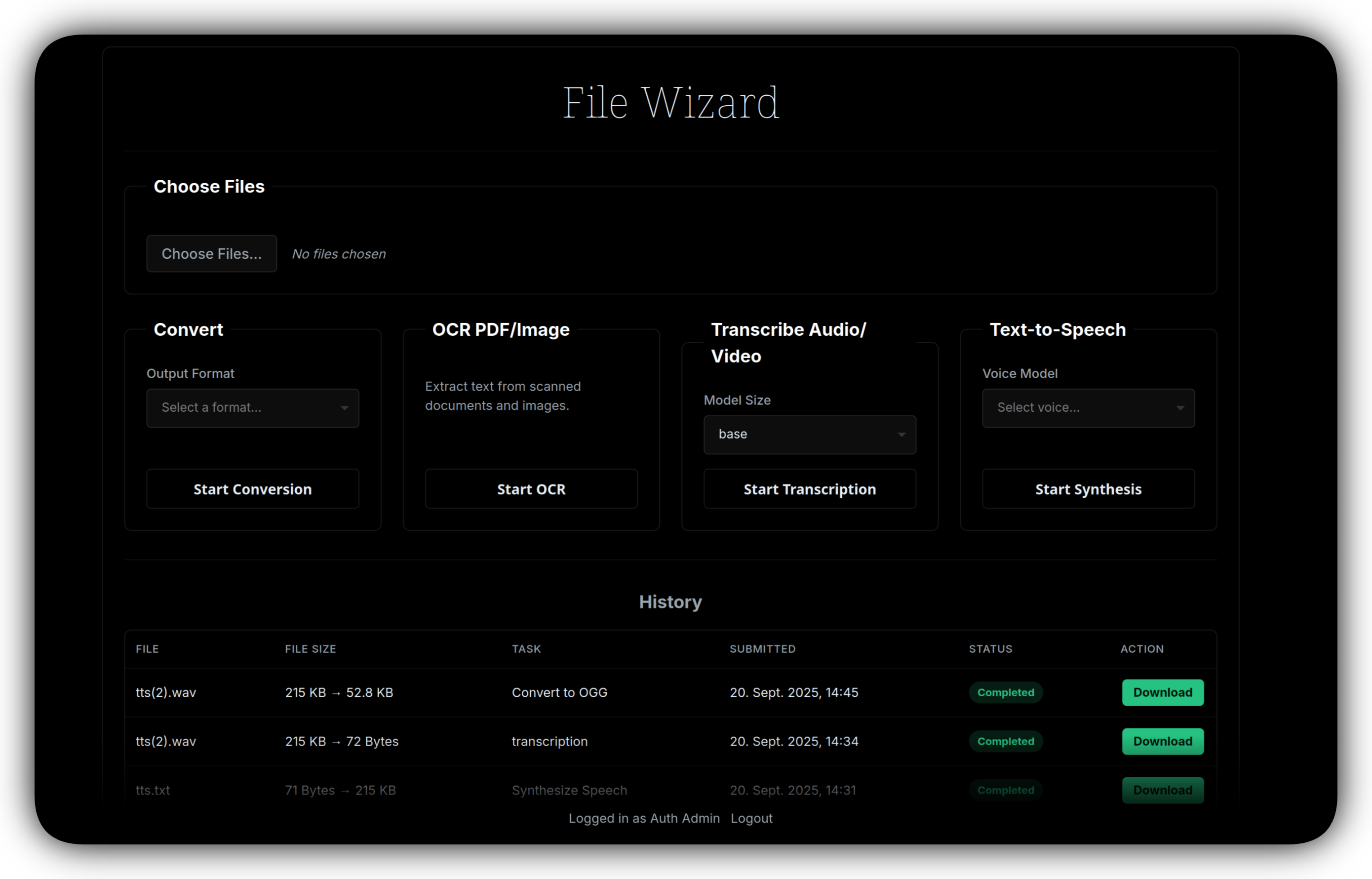
A self-hosted, browser-based utility for file conversion, OCR and audio transcription. It wraps common CLI and Python converters (FFmpeg, LibreOffice, Pandoc, ImageMagick, etc.), plus faster-whisper and Tesseract OCR. Supports 180+ formats out of the box, 700+ formats theoretically and much more can be configured and extended.
Features
- Convert between many file formats; extendable via
settings.ymlto add any CLI tool. - OCR for PDFs and images (
tesseract/ocrmypdf). - Audio transcription using Whisper models.
- Simple, responsive dark UI with drag-and-drop and file picker.
- Background job processing with real-time status updates and persistent history.
/settingspage for configuring conversion tools and OAuth (runs without auth in local mode).- OCR in many languages, selectable per job.
- Delete selected jobs, or remove finished jobs automatically after a number of days.
- CPU-only by default; a
cudaimage is available for GPU transcription. Images for amd64 and arm64.
Security
Warning: in LOCAL_ONLY mode there is no login: everyone who can reach the port can use the app and change its settings. Keep it on a trusted network or enable OIDC authentication (LOCAL_ONLY=False). The converters process untrusted files, so run the container with only the volumes it needs.
Built-in protections:
- Requests that change state (uploads, settings, deletions) are only accepted from the app's own origin, so other websites you visit cannot drive your instance.
- Conversion command templates are read-only on the settings page. Edit
config/settings.yml, or setALLOW_COMMAND_EDITS=trueto edit them in the browser. - Secrets (OIDC client secret, webhook token) are never sent to the browser; leave the field empty to keep the stored value.
auth_settings.allowed_users/allowed_domainsrestrict which accounts of your identity provider may log in (both empty = everyone the provider accepts).
| Variable | Default | Purpose |
|---|---|---|
SECRET_KEY | generated, stored in config/.secret_key | Signs session cookies. |
SESSION_COOKIE_SECURE | false | Set true when served over HTTPS. |
CSRF_TRUSTED_ORIGINS | – | Extra origins (e.g. https://files.example.com) allowed to submit requests. Needed when a reverse proxy rewrites the Host header; setting app_public_url works too. |
ALLOWED_ORIGINS | – | Origins granted CORS access (only needed for browser apps on other origins). |
ALLOWED_HOSTS | – | Comma-separated host names the app answers to (protects LOCAL_ONLY instances against DNS rebinding). Include every name/IP you use, e.g. localhost,127.0.0.1,nas.lan. |
FRAME_ANCESTORS | 'self' | Who may embed the UI in a frame, e.g. 'self' https://dashboard.example.com. |
ALLOW_COMMAND_EDITS | false | Allow editing/adding conversion command templates on the settings page. |
CHILD_CPU_LIMIT_SECONDS / CHILD_MEMORY_LIMIT_MB | 6000 / 4096 | Resource limits for converter processes (0 disables the memory limit). |
STALE_UPLOAD_HOURS | 6 | Abandoned chunked uploads are removed after this time. |
Tech stack
FastAPI, vanilla HTML/JS/CSS frontend.
Installation
Recommended — Docker (pull from Docker Hub)
Images (linux/amd64 and linux/arm64, e.g. Raspberry Pi 4/5 and Apple Silicon):
loredcast/filewizard:latest— all toolsloredcast/filewizard:small— without TeX, Inkscape and Doclingloredcast/filewizard:cuda— transcription on NVIDIA GPUs (amd64 only)
Copy docker-compose.yml from the repo, adjust as needed, then:
docker compose up -d
FileWizard will be available at localhost:6969. The app runs as an unprivileged user; set PUID/PGID to the owner of the mounted folders (Unraid: 99/100, templates in unraid/).
Building the image yourself, GPU setup, publishing to Docker Hub and how the builds are kept reproducible are described in docs/docker.md.
Upgrading from 0.4: docker compose pull && docker compose up -d works with your existing setup. Read the upgrade notes first: the app no longer runs as root, and you can keep your job history. What's new: CHANGELOG.md.
Manual (no Docker)
Needs Python 3.12 and the converters you want to use on the PATH (LibreOffice, Pandoc, Ghostscript, Tesseract, FFmpeg, ...; see the Dockerfile for the full list).
git clone https://github.com/LoredCast/filewizard.git
cd filewizard
python3 -m venv venv
source venv/bin/activate   # Windows: venv\Scripts\activate
pip install -r requirements.txt   # or requirements_small.txt
./run.sh
To update: git pull, run the pip install line again and restart; settings and job history are kept.
Configuration & docs
See the project Wiki for details and examples:
https://github.com/LoredCast/filewizard/wiki
Usage
- Open
http://127.0.0.1:8000. - Drag & drop or choose files.
- Select action: Convert, OCR, or Transcribe.
- Track job progress in the History table (updates automatically).
Tools Table
| Tool | Common inputs (extensions / format names) | Common outputs (extensions / format names) | Notes |
|---|---|---|---|
| LibreOffice (soffice) | .odt, .fodt, .ott, .doc, .docx, .docm, .dot, .dotx, .rtf, .txt, .html/.htm/.xhtml, .xml, .sxw, .wps, .wpd, .abw, .pdb, .epub, .fb2, .lit, .lrf, .pages, .csv, .tsv, .xls, .xlsx, .xlsm, .ods, .sxc, .123, .dbf, .fb2 | .pdf, .pdfa, .odt, .fodt, .doc, .docx, .rtf, .txt, .html/.htm, .xhtml, .epub, .svg, .png, .jpg/.jpeg, .pptx, .ppt, .odp, .xls, .xlsx, .ods, .csv, .dbf, .pdb, .fb2 | Good for office/document conversions; fidelity varies with complex layouts. |
| Pandoc | Markdown flavors (.md, .markdown), .html/.htm, LaTeX (.tex), .rst, .docx, .odt, .epub, .ipynb, .opml, .adoc/asciidoc, .tex, .bib/citation inputs | .html/.html5, .xhtml, .latex/.tex, .pdf (via LaTeX engine), .docx, .odt, .epub, .md (flavors), .gfm, .rst, .pptx, .man, .mediawiki, .docbook | Highly configurable via templates/filters; requires LaTeX for PDF output. |
| Ghostscript (gs) | .ps, .eps, .pdf, PostScript streams | .pdf (various compat levels incl PDF/A), .ps, .eps, raster images (.png, .jpg, .tiff, .bmp, .pnm) | Useful for PDF manipulations, rasterization, and producing PDF/A. |
| Calibre (ebook-convert) | .epub, .mobi, .azw3, .azw, .fb2, .html, .docx, .doc, .rtf, .txt, .pdb, .lit, .tcr, .cbz, .cbr, .odt, .pdf (input with caveats) | .epub, .mobi (legacy), .azw3, .pdf, .docx, .rtf, .txt, .fb2, .htmlz, .pdb, .lrf, .lit, .tcr, .cbz, .cbr | Excellent for ebook format conversions and metadata handling; PDF input/output fidelity varies. |
| FFmpeg | Containers & codecs: .mp4, .mkv, .mov, .avi, .webm, .flv, .wmv, .mpg/.mpeg, .ts, .m2ts, .3gp, audio: .mp3, .wav, .aac/.m4a, .flac, .ogg, .opus, image sequences (.png, .jpg, .tiff), HLS (.m3u8) | Wide set: .mp4, .mkv, .mov, .webm, .avi, .flv, .mp3, .aac/.m4a, .wav, .flac, .ogg, .opus, .gif (animated), .ts, elementary streams, many codec/container combos | Extremely versatile — audio/video transcoding, extraction, container changes, filters. Supported formats depend on build flags and linked libraries. |
| libvips (vips) | .jpg/.jpeg, .png, .tif/.tiff, .webp, .avif, .heif/.heic, .jp2, .gif (frames), .pnm, .fits, .exr, PDF (via poppler delegate) | .jpg/.jpeg, .png, .tif/.tiff, .webp, .avif, .heif, .jp2, .pnm, .v (VIPS native), .fits, .exr | Fast, memory-efficient image processing; great for large images and tiling. |
| GraphicsMagick (gm) | .jpg/.jpeg, .png, .gif, .tif/.tiff, .bmp, .ico, .eps, .pdf (via Ghostscript/poppler), .dpx, .pnm, .svg (if delegate), .webp (if built), .exr | .jpg/.jpeg, .png, .webp (if enabled), .tif/.tiff, .gif, .bmp, .pdf (from images), .eps, .ico, .xpm, .dpx | Similar to ImageMagick but with different performance/behavior; supported formats depend on build/delegates. |
| ImageMagick (convert / magick) | Same as GraphicsMagick (large set; many delegates) | Same as GraphicsMagick | Often used interchangeably; watch for security considerations when processing untrusted images. |
| Inkscape | .svg/.svgz, .pdf, .eps, .ps, .ai (legacy imports), .dxf, raster images (.png, .jpg, .jpeg, .gif, .tiff, .bmp) | .svg, .pdf, .ps, .eps, .png, .emf, .wmf, .xaml, .dxf, .eps | Vector editing and export; CLI useful for batch SVG → PNG/PDF conversions. |
| libjxl (cjxl / djxl) | Raster inputs: .png, .jpg/.jpeg, .ppm/.pbm/.pgm, .gif, etc. | .jxl (JPEG XL) | Encoder/decoder for JPEG XL; availability depends on build. |
| resvg | .svg/.svgz | .png (raster) | Fast, accurate SVG renderer — good for SVG→PNG conversion. |
| Potrace | Bitmaps: .pbm, .pgm, .ppm (PNM family), .bmp (via conversion) | Vector: .svg, .pdf, .eps, .ps, .dxf, .geojson | Traces bitmaps to vector paths; often used with pre-conversion steps. |
| Potrace GUI / autotrace alternatives | — | — | Not included but sometimes available in toolchains; behavior varies. |
| MarkItDown / markitdown | .pdf, .docx, .doc, .pptx, .ppt, .xlsx, .xls, .html, .eml, .msg, .md, .txt, images, .epub | .md (Markdown) | Utility to extract/produce Markdown from various formats; implementation details vary. |
| pngquant | .png (truecolor/rgba) | .png (quantized palette PNG) | Lossy PNG quantization for smaller PNGs. |
| MozJPEG (cjpeg, jpegtran) | .ppm/.pbm/.pgm (PNM), .bmp, existing .jpg | .jpg/.jpeg (MozJPEG-optimized) | Produces smaller JPEGs with improved compression; good for recompression. |
| SoX (Sound eXchange) | .wav, .aiff, .mp3 (if libmp3lame), .flac, .ogg/.oga, .raw, .au, .voc, .w64, .gsm, .amr, .m4a (if libs present) | .wav, .aiff, .flac, .mp3, .ogg, .raw, .w64, .opus, .amr, .m4a | Audio processing, normalization, effects; exact formats depend on linked libraries. |
| Tesseract OCR / ocrmypdf | Image formats (.png, .jpg, .jpeg, .tiff), PDFs (image PDFs) | Plain text (.txt), searchable PDF (PDF with text layer), HOCR, ALTO XML | OCR engine; language/training data required for best accuracy. ocrmypdf is a wrapper for PDF workflows. |
| faster-whisper / OpenAI Whisper (local) | Audio: .mp3, .wav, .m4a, .flac, .ogg, .opus, .aac | Plain text transcripts (.txt), .srt, .vtt, other subtitle formats | Local Whisper implementations for speech-to-text. Models and speed depend on CPU/GPU and model variant. |
Consider spending 30 seconds on the » usage survey « to help improve the app and suggest changes!

Contributors


Similar repos


Languages
Python
59.3%
JavaScript
16.6%
HTML
8.4%
CSS
8.4%
Shell
5.6%
Dockerfile
1.8%
See what people are saying
README
File Wizard
A self-hosted, browser-based utility for file conversion, OCR and audio transcription. It wraps common CLI and Python converters (FFmpeg, LibreOffice, Pandoc, ImageMagick, etc.), plus faster-whisper and Tesseract OCR. Supports 180+ formats out of the box, 700+ formats theoretically and much more can be configured and extended.
Features
- Convert between many file formats; extendable via
settings.ymlto add any CLI tool. - OCR for PDFs and images (
tesseract/ocrmypdf). - Audio transcription using Whisper models.
- Simple, responsive dark UI with drag-and-drop and file picker.
- Background job processing with real-time status updates and persistent history.
/settingspage for configuring conversion tools and OAuth (runs without auth in local mode).- OCR in many languages, selectable per job.
- Delete selected jobs, or remove finished jobs automatically after a number of days.
- CPU-only by default; a
cudaimage is available for GPU transcription. Images for amd64 and arm64.
Security
Warning: in LOCAL_ONLY mode there is no login: everyone who can reach the port can use the app and change its settings. Keep it on a trusted network or enable OIDC authentication (LOCAL_ONLY=False). The converters process untrusted files, so run the container with only the volumes it needs.
Built-in protections:
- Requests that change state (uploads, settings, deletions) are only accepted from the app's own origin, so other websites you visit cannot drive your instance.
- Conversion command templates are read-only on the settings page. Edit
config/settings.yml, or setALLOW_COMMAND_EDITS=trueto edit them in the browser. - Secrets (OIDC client secret, webhook token) are never sent to the browser; leave the field empty to keep the stored value.
auth_settings.allowed_users/allowed_domainsrestrict which accounts of your identity provider may log in (both empty = everyone the provider accepts).
| Variable | Default | Purpose |
|---|---|---|
SECRET_KEY | generated, stored in config/.secret_key | Signs session cookies. |
SESSION_COOKIE_SECURE | false | Set true when served over HTTPS. |
CSRF_TRUSTED_ORIGINS | – | Extra origins (e.g. https://files.example.com) allowed to submit requests. Needed when a reverse proxy rewrites the Host header; setting app_public_url works too. |
ALLOWED_ORIGINS | – | Origins granted CORS access (only needed for browser apps on other origins). |
ALLOWED_HOSTS | – | Comma-separated host names the app answers to (protects LOCAL_ONLY instances against DNS rebinding). Include every name/IP you use, e.g. localhost,127.0.0.1,nas.lan. |
FRAME_ANCESTORS | 'self' | Who may embed the UI in a frame, e.g. 'self' https://dashboard.example.com. |
ALLOW_COMMAND_EDITS | false | Allow editing/adding conversion command templates on the settings page. |
CHILD_CPU_LIMIT_SECONDS / CHILD_MEMORY_LIMIT_MB | 6000 / 4096 | Resource limits for converter processes (0 disables the memory limit). |
STALE_UPLOAD_HOURS | 6 | Abandoned chunked uploads are removed after this time. |
Tech stack
FastAPI, vanilla HTML/JS/CSS frontend.
Installation
Recommended — Docker (pull from Docker Hub)
Images (linux/amd64 and linux/arm64, e.g. Raspberry Pi 4/5 and Apple Silicon):
loredcast/filewizard:latest— all toolsloredcast/filewizard:small— without TeX, Inkscape and Doclingloredcast/filewizard:cuda— transcription on NVIDIA GPUs (amd64 only)
Copy docker-compose.yml from the repo, adjust as needed, then:
docker compose up -d
FileWizard will be available at localhost:6969. The app runs as an unprivileged user; set PUID/PGID to the owner of the mounted folders (Unraid: 99/100, templates in unraid/).
Building the image yourself, GPU setup, publishing to Docker Hub and how the builds are kept reproducible are described in docs/docker.md.
Upgrading from 0.4: docker compose pull && docker compose up -d works with your existing setup. Read the upgrade notes first: the app no longer runs as root, and you can keep your job history. What's new: CHANGELOG.md.
Manual (no Docker)
Needs Python 3.12 and the converters you want to use on the PATH (LibreOffice, Pandoc, Ghostscript, Tesseract, FFmpeg, ...; see the Dockerfile for the full list).
git clone https://github.com/LoredCast/filewizard.git
cd filewizard
python3 -m venv venv
source venv/bin/activate   # Windows: venv\Scripts\activate
pip install -r requirements.txt   # or requirements_small.txt
./run.sh
To update: git pull, run the pip install line again and restart; settings and job history are kept.
Configuration & docs
See the project Wiki for details and examples:
https://github.com/LoredCast/filewizard/wiki
Usage
- Open
http://127.0.0.1:8000. - Drag & drop or choose files.
- Select action: Convert, OCR, or Transcribe.
- Track job progress in the History table (updates automatically).
Tools Table
| Tool | Common inputs (extensions / format names) | Common outputs (extensions / format names) | Notes |
|---|---|---|---|
| LibreOffice (soffice) | .odt, .fodt, .ott, .doc, .docx, .docm, .dot, .dotx, .rtf, .txt, .html/.htm/.xhtml, .xml, .sxw, .wps, .wpd, .abw, .pdb, .epub, .fb2, .lit, .lrf, .pages, .csv, .tsv, .xls, .xlsx, .xlsm, .ods, .sxc, .123, .dbf, .fb2 | .pdf, .pdfa, .odt, .fodt, .doc, .docx, .rtf, .txt, .html/.htm, .xhtml, .epub, .svg, .png, .jpg/.jpeg, .pptx, .ppt, .odp, .xls, .xlsx, .ods, .csv, .dbf, .pdb, .fb2 | Good for office/document conversions; fidelity varies with complex layouts. |
| Pandoc | Markdown flavors (.md, .markdown), .html/.htm, LaTeX (.tex), .rst, .docx, .odt, .epub, .ipynb, .opml, .adoc/asciidoc, .tex, .bib/citation inputs | .html/.html5, .xhtml, .latex/.tex, .pdf (via LaTeX engine), .docx, .odt, .epub, .md (flavors), .gfm, .rst, .pptx, .man, .mediawiki, .docbook | Highly configurable via templates/filters; requires LaTeX for PDF output. |
| Ghostscript (gs) | .ps, .eps, .pdf, PostScript streams | .pdf (various compat levels incl PDF/A), .ps, .eps, raster images (.png, .jpg, .tiff, .bmp, .pnm) | Useful for PDF manipulations, rasterization, and producing PDF/A. |
| Calibre (ebook-convert) | .epub, .mobi, .azw3, .azw, .fb2, .html, .docx, .doc, .rtf, .txt, .pdb, .lit, .tcr, .cbz, .cbr, .odt, .pdf (input with caveats) | .epub, .mobi (legacy), .azw3, .pdf, .docx, .rtf, .txt, .fb2, .htmlz, .pdb, .lrf, .lit, .tcr, .cbz, .cbr | Excellent for ebook format conversions and metadata handling; PDF input/output fidelity varies. |
| FFmpeg | Containers & codecs: .mp4, .mkv, .mov, .avi, .webm, .flv, .wmv, .mpg/.mpeg, .ts, .m2ts, .3gp, audio: .mp3, .wav, .aac/.m4a, .flac, .ogg, .opus, image sequences (.png, .jpg, .tiff), HLS (.m3u8) | Wide set: .mp4, .mkv, .mov, .webm, .avi, .flv, .mp3, .aac/.m4a, .wav, .flac, .ogg, .opus, .gif (animated), .ts, elementary streams, many codec/container combos | Extremely versatile — audio/video transcoding, extraction, container changes, filters. Supported formats depend on build flags and linked libraries. |
| libvips (vips) | .jpg/.jpeg, .png, .tif/.tiff, .webp, .avif, .heif/.heic, .jp2, .gif (frames), .pnm, .fits, .exr, PDF (via poppler delegate) | .jpg/.jpeg, .png, .tif/.tiff, .webp, .avif, .heif, .jp2, .pnm, .v (VIPS native), .fits, .exr | Fast, memory-efficient image processing; great for large images and tiling. |
| GraphicsMagick (gm) | .jpg/.jpeg, .png, .gif, .tif/.tiff, .bmp, .ico, .eps, .pdf (via Ghostscript/poppler), .dpx, .pnm, .svg (if delegate), .webp (if built), .exr | .jpg/.jpeg, .png, .webp (if enabled), .tif/.tiff, .gif, .bmp, .pdf (from images), .eps, .ico, .xpm, .dpx | Similar to ImageMagick but with different performance/behavior; supported formats depend on build/delegates. |
| ImageMagick (convert / magick) | Same as GraphicsMagick (large set; many delegates) | Same as GraphicsMagick | Often used interchangeably; watch for security considerations when processing untrusted images. |
| Inkscape | .svg/.svgz, .pdf, .eps, .ps, .ai (legacy imports), .dxf, raster images (.png, .jpg, .jpeg, .gif, .tiff, .bmp) | .svg, .pdf, .ps, .eps, .png, .emf, .wmf, .xaml, .dxf, .eps | Vector editing and export; CLI useful for batch SVG → PNG/PDF conversions. |
| libjxl (cjxl / djxl) | Raster inputs: .png, .jpg/.jpeg, .ppm/.pbm/.pgm, .gif, etc. | .jxl (JPEG XL) | Encoder/decoder for JPEG XL; availability depends on build. |
| resvg | .svg/.svgz | .png (raster) | Fast, accurate SVG renderer — good for SVG→PNG conversion. |
| Potrace | Bitmaps: .pbm, .pgm, .ppm (PNM family), .bmp (via conversion) | Vector: .svg, .pdf, .eps, .ps, .dxf, .geojson | Traces bitmaps to vector paths; often used with pre-conversion steps. |
| Potrace GUI / autotrace alternatives | — | — | Not included but sometimes available in toolchains; behavior varies. |
| MarkItDown / markitdown | .pdf, .docx, .doc, .pptx, .ppt, .xlsx, .xls, .html, .eml, .msg, .md, .txt, images, .epub | .md (Markdown) | Utility to extract/produce Markdown from various formats; implementation details vary. |
| pngquant | .png (truecolor/rgba) | .png (quantized palette PNG) | Lossy PNG quantization for smaller PNGs. |
| MozJPEG (cjpeg, jpegtran) | .ppm/.pbm/.pgm (PNM), .bmp, existing .jpg | .jpg/.jpeg (MozJPEG-optimized) | Produces smaller JPEGs with improved compression; good for recompression. |
| SoX (Sound eXchange) | .wav, .aiff, .mp3 (if libmp3lame), .flac, .ogg/.oga, .raw, .au, .voc, .w64, .gsm, .amr, .m4a (if libs present) | .wav, .aiff, .flac, .mp3, .ogg, .raw, .w64, .opus, .amr, .m4a | Audio processing, normalization, effects; exact formats depend on linked libraries. |
| Tesseract OCR / ocrmypdf | Image formats (.png, .jpg, .jpeg, .tiff), PDFs (image PDFs) | Plain text (.txt), searchable PDF (PDF with text layer), HOCR, ALTO XML | OCR engine; language/training data required for best accuracy. ocrmypdf is a wrapper for PDF workflows. |
| faster-whisper / OpenAI Whisper (local) | Audio: .mp3, .wav, .m4a, .flac, .ogg, .opus, .aac | Plain text transcripts (.txt), .srt, .vtt, other subtitle formats | Local Whisper implementations for speech-to-text. Models and speed depend on CPU/GPU and model variant. |
Consider spending 30 seconds on the » usage survey « to help improve the app and suggest changes!
Similar repos
Contributors
Languages
Python
59.3%
JavaScript
16.6%
HTML
8.4%
CSS
8.4%
Shell
5.6%
Dockerfile
1.8%