
LLMxRay — Local LLM Observatory. Full observability interface for Ollama: chat, streaming, reasoning, RAG, introspection, metrics.
See the codeSee what people are saying
README
LLMxRay
See what your AI is actually doing.
Real-time token streaming, quality analysis, performance profiling, and cost tracking
for local LLMs. No cloud. No API keys. No cost.




🌐 English • Français • 中文 • العربية • Srpski
Quick Start • Features • Screenshots • Who Is This For • Changelog
What you get
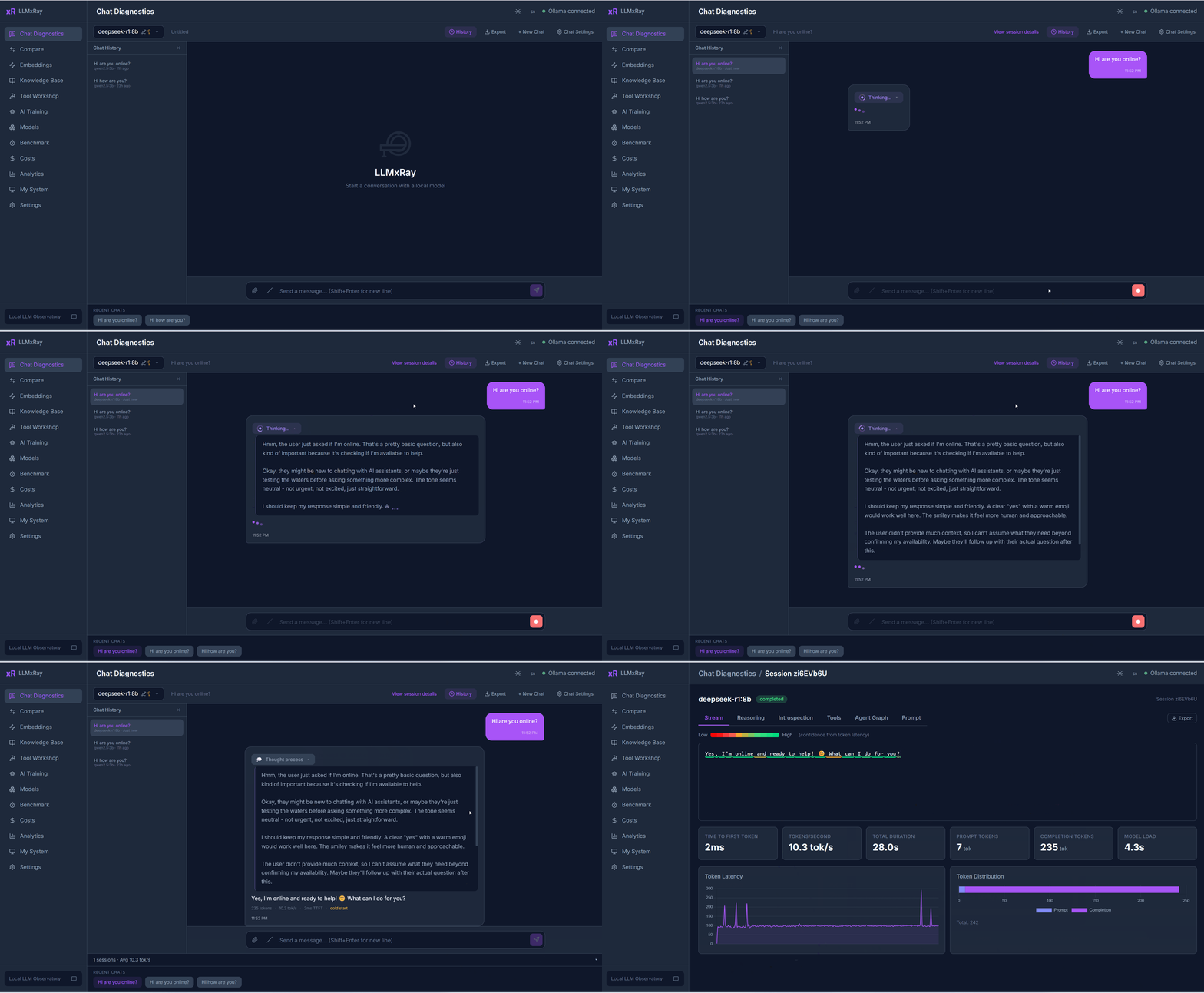
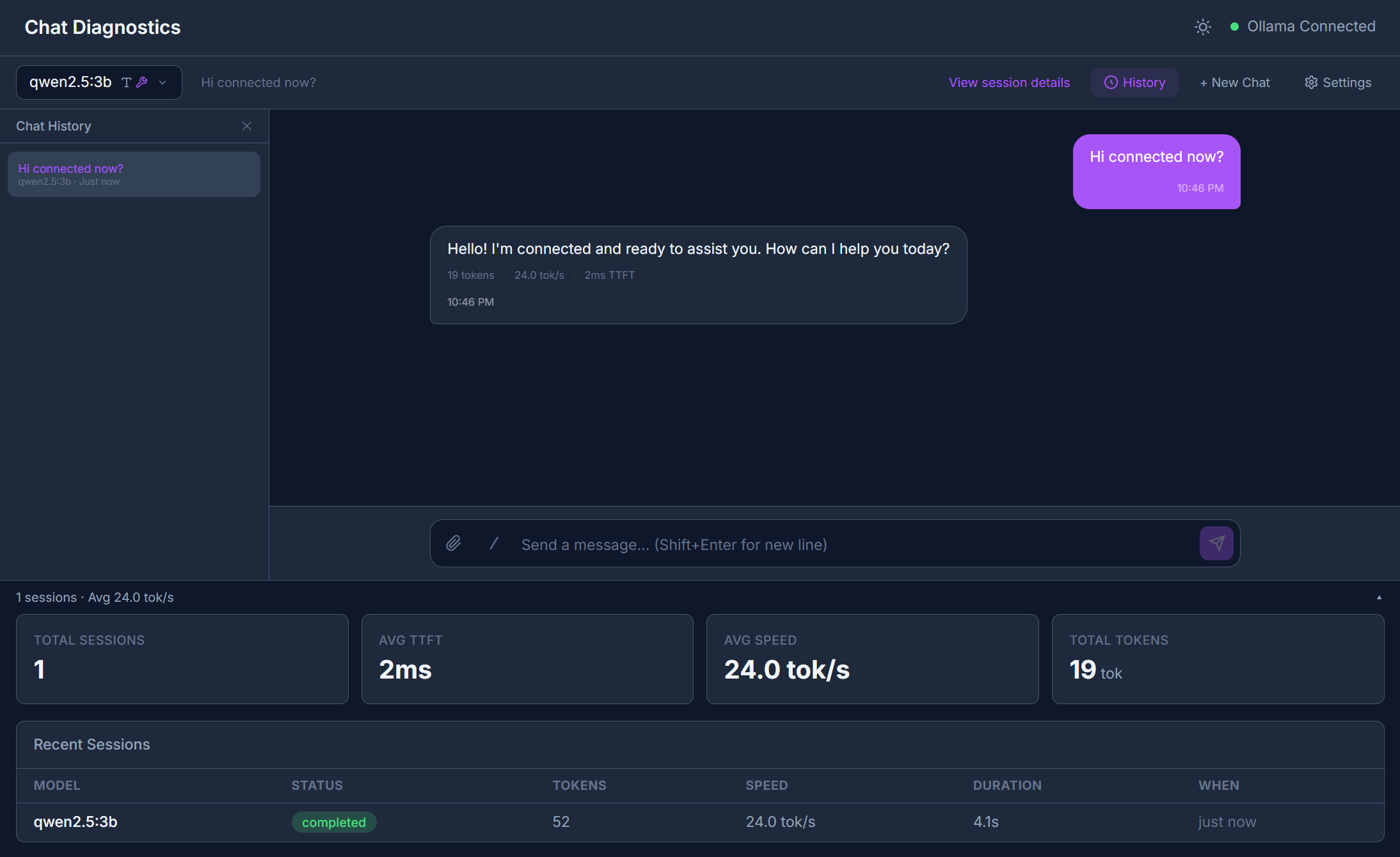
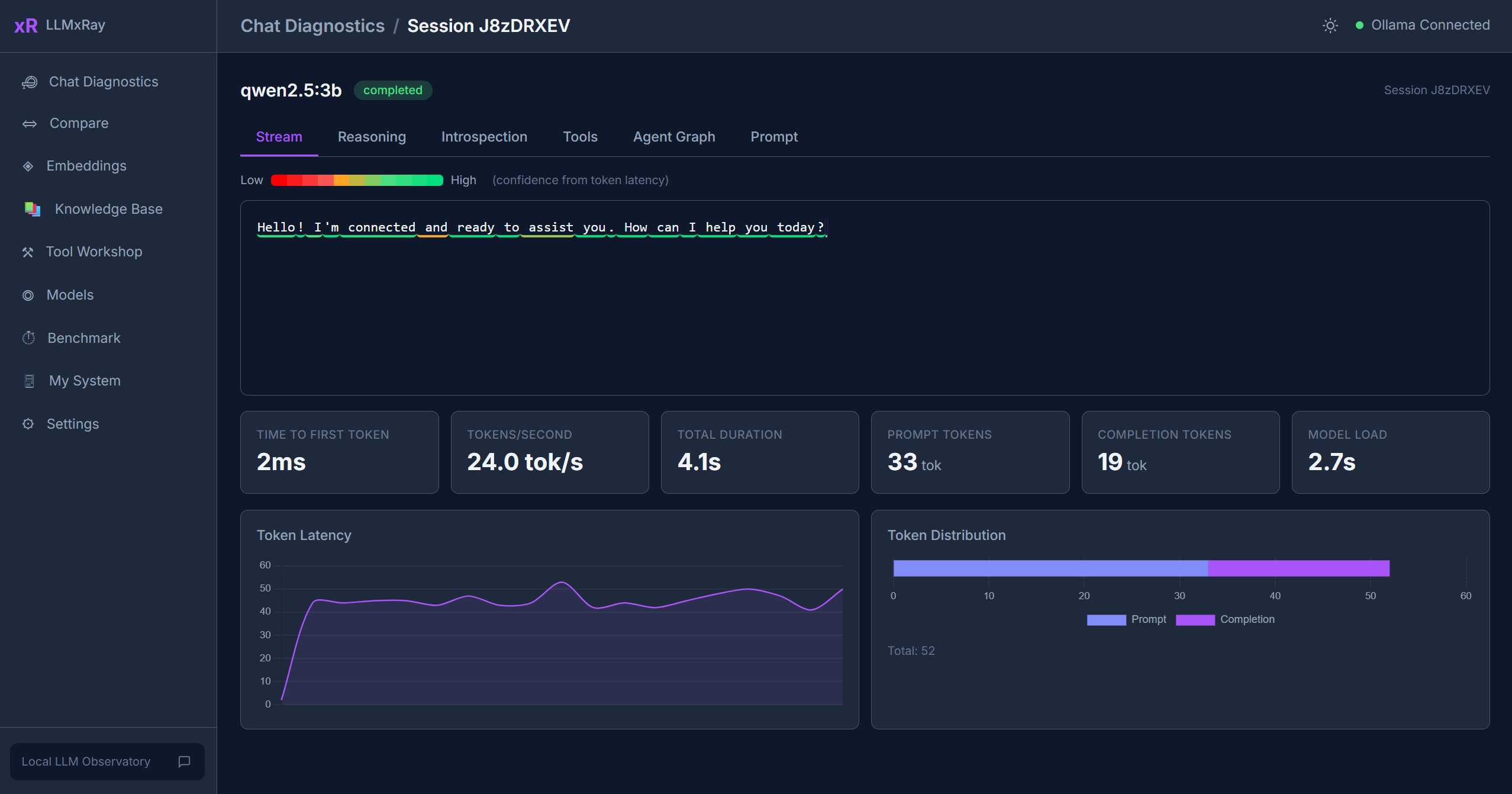
Chat Diagnostics — Watch tokens arrive one by one, coloured by speed. See where the model hesitates, and what it was unsure about.
Cache Lab (new in 0.6.0) — Your system prompt is probably being recomputed from scratch every turn. Find out in 30 seconds, and measure the fix. (3.5x faster prefill in our test.)
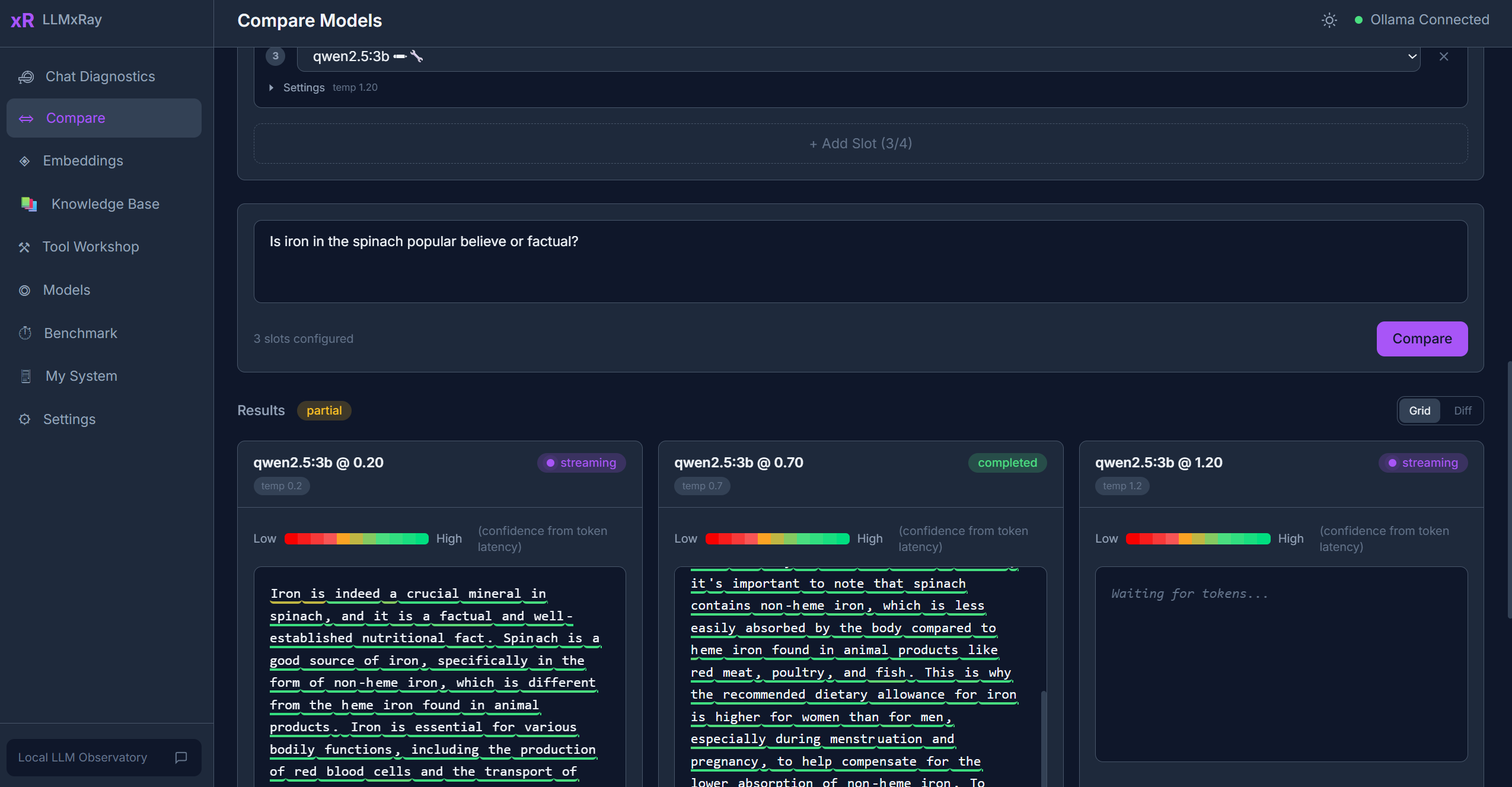
Compare — The same prompt against two models, or two temperatures, side by side. Stop guessing which setting was actually better.
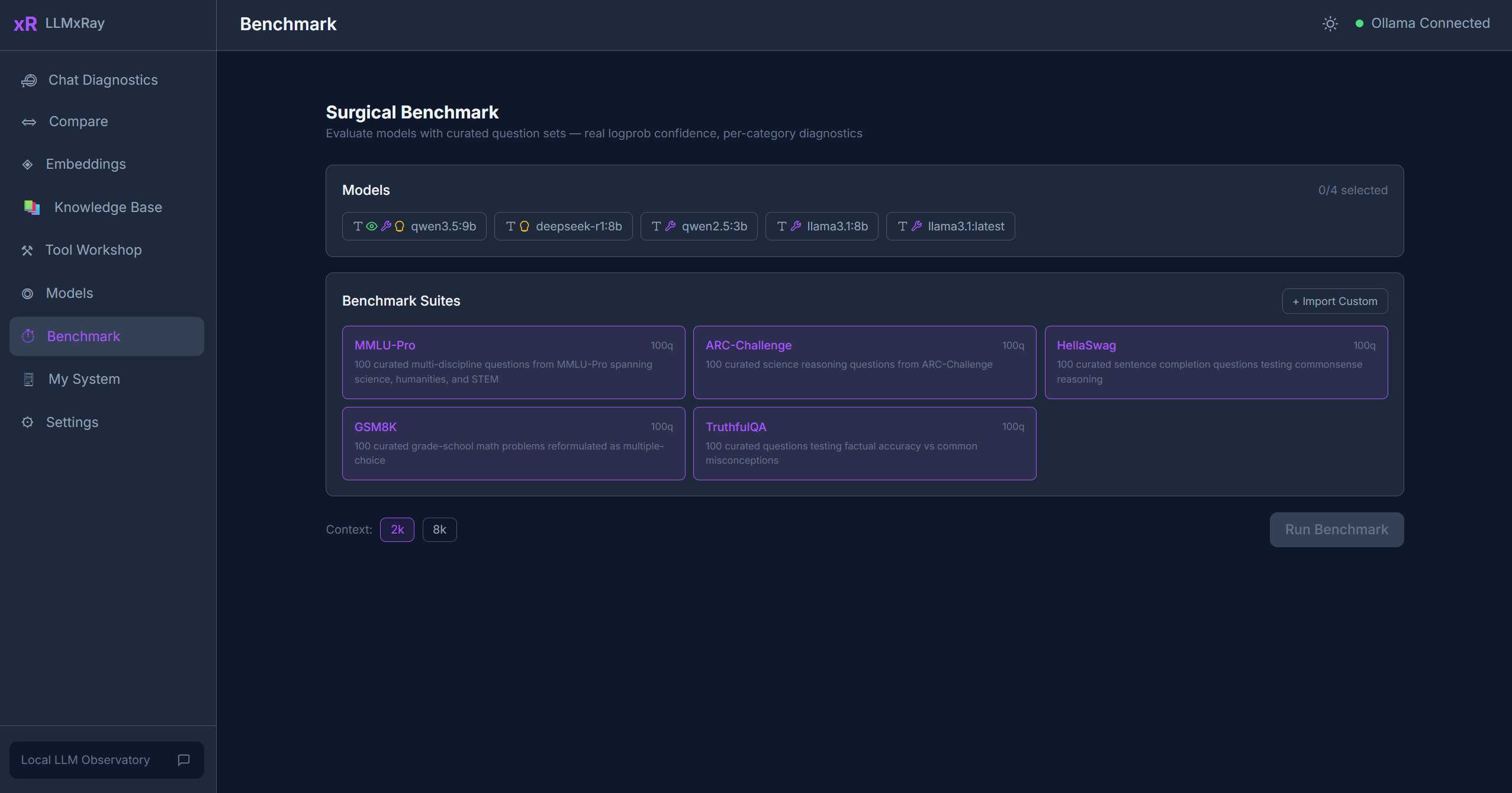
Surgical Benchmark — Score models on real token logprobs, not on whether the answer happened to look right.
Protocol Observatory — See how the same local model replies through Ollama's native, OpenAI-compatible and Anthropic-compatible APIs, and exactly where they disagree.
Knowledge Base — Drop in PDFs and documents, chunk them, and see what RAG actually retrieves before the model ever sees it.
Plus embeddings, cost tracking, analytics, a tool builder, and a local history database. Full feature list below.
Quick Start
One command. 30 seconds.
npx llmxray
Or with Docker:
docker run -p 5174:5174 djovaneli/llmxray
Open http://localhost:5174 and start chatting. That's it.
Prerequisite: Ollama running locally with at least one model pulled (
ollama pull llama3.2).
Why LLMxRay?
You run a local LLM. You chat with it. But what actually happened?
- How fast was each token? Which ones was the model confident about?
- Is the response quality degrading over long conversations?
- What would this have cost if you ran it in the cloud?
- Is the model repeating itself? Refusing? Generating gibberish?
- How does temperature 0.3 compare to 0.9 on the same prompt?
LLMxRay answers all of these, visually, in real time, for free.
Features
Real-Time Chat with Token Intelligence
Chat with any Ollama model and watch tokens arrive with confidence coloring — each token is tinted based on generation speed. Supports markdown, multi-turn conversations, file attachments, vision models, and slash commands. For reasoning models, set the thinking budget per conversation — off, model's choice, or an explicit low / medium / high / max effort.
Response Quality Gates
Every response is automatically analyzed. Colored badges appear only when something is wrong:
- Repetition — excessive repeated phrases (4-gram analysis)
- Refusal — "as an AI language model" and 7 other patterns
- Gibberish — high non-ASCII ratio
- Empty — fewer than 10 words
- Truncation — hit the token limit without finishing
Model Comparison Workbench
Up to 4 slots with independent model, temperature, and system prompt. Features include side-by-side streaming, word-level diff highlighting, metrics comparison, and one-click presets (Temperature Sweep, Deterministic Pair, Language Compare with Token Tax visualization).
Performance Analytics
- Latency percentiles (P50/P95/P99) for duration and TTFT
- Error intelligence — 7-category classifier with timeline
- Usage heatmap — 7x24 grid of your active hours
- Settings impact — temperature vs tokens/sec scatter plots
- Cold vs warm start tracking with model load history
Cost Dashboard
Token usage per model/day with estimated cloud-equivalent pricing. See what you're saving by running locally.
Surgical Benchmark
Test model knowledge with multi-choice question suites. Uses real logprobs via OpenAI-compatible endpoint for accurate confidence measurement. Build custom suites visually or let AI generate them from a topic.
Embeddings Lab & RAG Pipeline
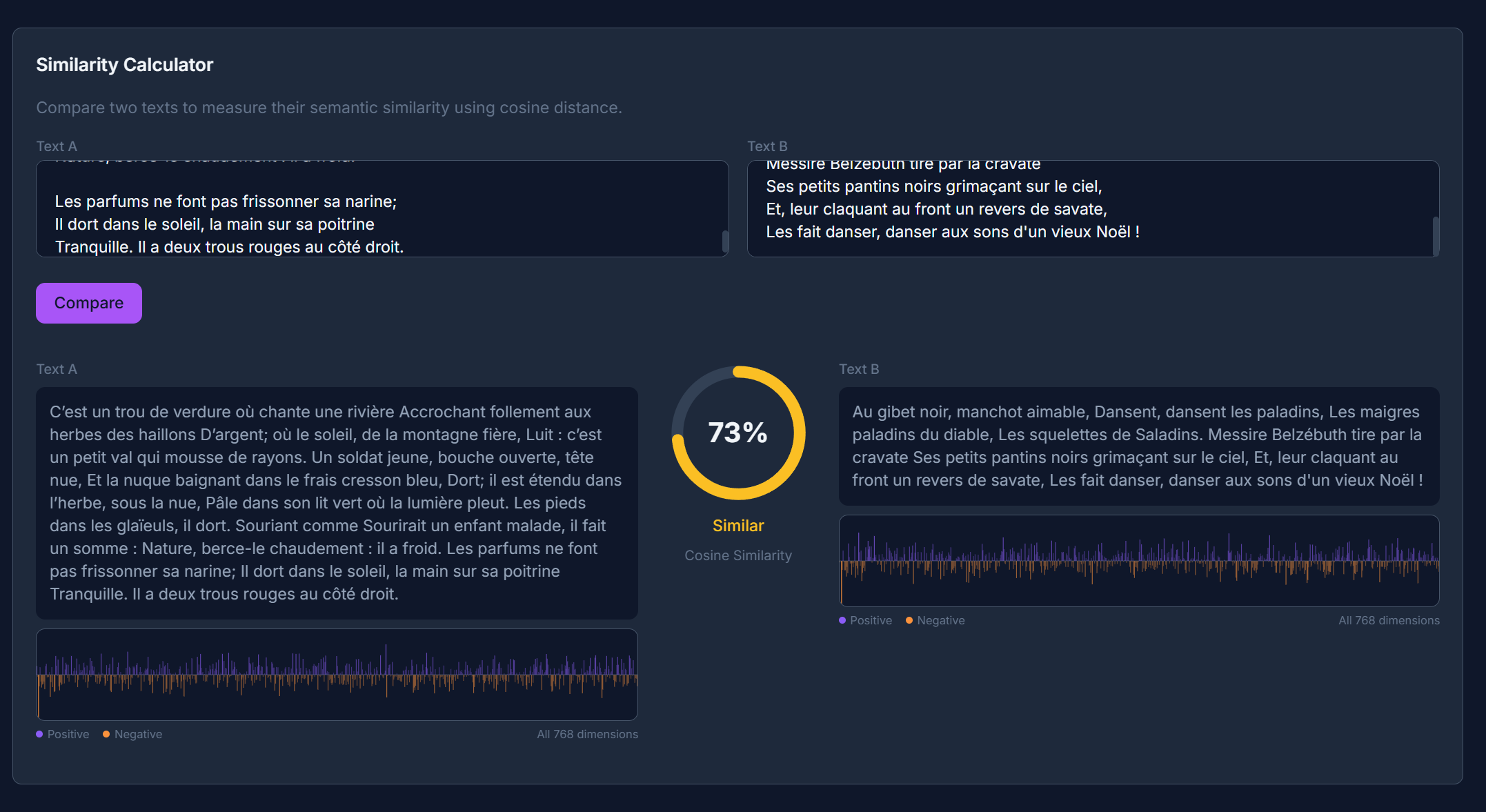
Embed text, visualize vectors, measure cosine similarity. Request a narrower output vector to see what Matryoshka truncation costs in similarity. Build a local knowledge base from PDFs, DOCX, and CSV — chunked, embedded, and searchable. All stored in IndexedDB. Zero cost.
Tool Workshop (Visual Canvas)
Drag-and-drop node canvas for building tool definitions. Bidirectional code sync (edit nodes or TypeScript — both update). Probe APIs, auto-generate schemas, test with live execution.
Fill-in-the-Middle Playground (new in v0.4.7)
Code completion for Qwen-Coder, CodeLlama, Codestral, DeepSeek-Coder, and StarCoder. Two textareas (prefix / suffix), the model fills the gap. Uses Ollama's suffix field on /api/generate. Stitched preview shows the result as it would appear in your editor.
Cache Lab (new in v0.6.0)
Find out why your prompt misses the model’s KV cache, and measure what it costs every turn. A local model reuses its cache only while the prompt still matches from the very first token, so a single timestamp near the top forfeits everything below it. The lab finds the values that change between turns, shows the exact point where reuse dies, and then measures — sending each layout twice with a changed value, against your own daemon — what moving them to the end actually saves. Measured on a real 324-token prompt: 4 tokens reused and 64.6 ms of prefill with the timestamp at the front, 290 reused and 18.6 ms with it at the back. 3.5x faster, same words. Requires Ollama 0.33.3+.
Protocol Observatory (new in v0.4.7)
Fire the same prompt through Ollama's three serving protocols — native /api/chat, OpenAI-compat /v1/chat/completions, and Anthropic-compat /v1/messages — in parallel against your local model. Side-by-side streaming, per-protocol metrics, and an envelope-diff tab that shows how each protocol frames finish reasons, token counts, and error envelopes. No cloud, no API keys — all three endpoints are local on localhost:11434.
AI Training Pipeline
Curate training data from your conversations. Tag, review, and export as JSONL for fine-tuning.
Local AI History Database
Every experiment (benchmarks, comparisons, chats, training pairs) is automatically archived in a queryable IndexedDB database with filters, trends, exports, and retention policies.
Multilingual
Full translations in English, French, Serbian (Latin + Cyrillic), Chinese, and Arabic. RTL layout support. Community scaffolds for Hebrew and Japanese.
Ollama Compatibility
Tested and verified against Ollama 0.34.x (verified on 0.34.0, September 2026). LLMxRay uses these Ollama endpoints:
| Endpoint | Used for |
|---|---|
/api/chat | Streaming chat (NDJSON, with tools, think effort levels, format schema) |
/api/generate | Generation + Fill-in-the-Middle via suffix |
/api/tags | Model list + capabilities, context length, and embedding width |
/api/show | Parameters, template, license, and architecture metadata |
/api/embed | Vector embeddings for RAG, with optional dimensions truncation |
/api/pull, /api/delete, /api/ps, /api/version | Model management + status |
/v1/chat/completions | OpenAI-compat path used by Surgical Benchmark for real logprobs and usage totals |
/v1/messages | Anthropic-compat path used by Protocol Observatory |
Compatible with: Ollama 0.20 and newer (older versions work for chat/generate but lack think and JSON-schema format). Recommended: Ollama 0.33.3+ — prompt-cache reuse is reported (prompt_eval_cached_count, and usage.prompt_tokens_details.cached_tokens on the OpenAI-compatible endpoint), so prefill throughput is measured over the tokens actually evaluated. From 0.32: capabilities and context length arrive with the model listing, think accepts graded effort levels, and embeddings accept a dimensions width.
Screenshots
|
Chat with token streaming and confidence
|
Model comparison — side by side
|
|
Session deep dive — metrics and timing
|
Benchmark with confidence radar
|
|
Embeddings — cosine similarity
|
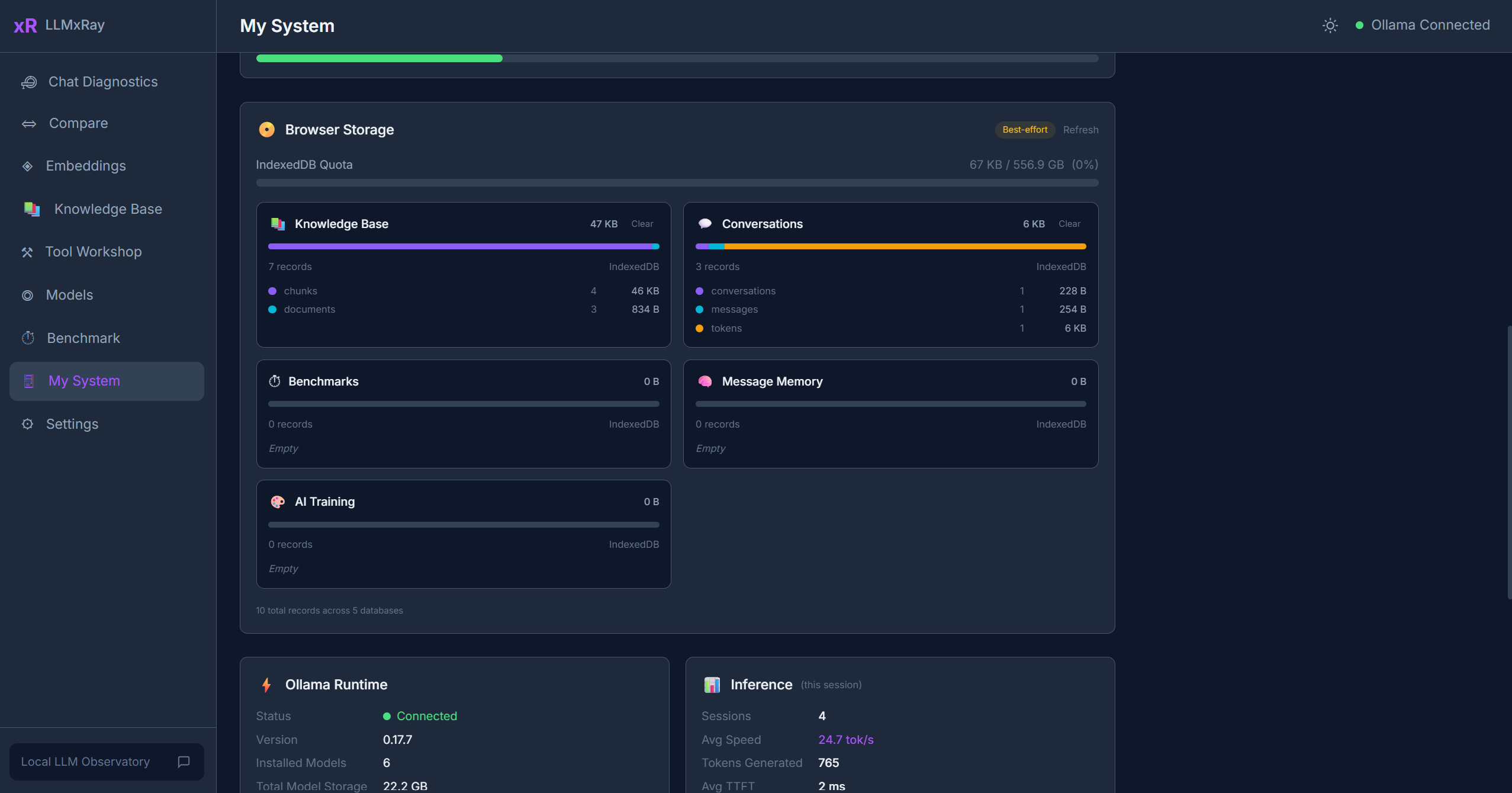
System monitor — hardware and Ollama status
|
Who Is This For
| You are... | LLMxRay helps you... |
|---|---|
| Developer | Debug prompts, profile latency, compare models, inspect tool calls, track costs |
| Researcher | Run controlled experiments with consistent settings across models and temperatures |
| Student / Educator | Explore model behavior visually — built-in Educators Kit with 9 interactive modules |
| AI team lead | Understand quality trends, error patterns, and resource usage across your local fleet |
Install Options
npx (recommended)
npx llmxray
npx llmxray --port 3000
npx llmxray --ollama-url http://192.168.1.50:11434
Docker
docker run -p 5174:5174 djovaneli/llmxray
docker run -p 5174:5174 -e OLLAMA_URL=http://host.docker.internal:11434 djovaneli/llmxray
From source
git clone https://github.com/LogneBudo/llmxray.git
cd llmxray
npm install
npm run dev     # http://localhost:5173
Tech Stack
| Layer | Technology |
|---|---|
| Framework | Vue 3.5 + Composition API |
| Language | TypeScript 5.9 (strict) |
| Build | Vite 7.3 |
| Styling | Tailwind CSS 4.2 |
| State | Pinia 3 (store-per-concern) |
| Charts | Chart.js 4, D3.js 7 |
| Canvas | Vue Flow (visual node editor) |
| Code Editor | CodeMirror 6 |
| Storage | IndexedDB (browser-native) |
| LLM Backend | Ollama (local) |
Architecture
Streaming — Reads Ollama NDJSON via fetch() + ReadableStream. Tokens update the UI reactively through Pinia stores.
Token confidence — Approximated from inter-token latency (faster = more confident). Clearly labeled as approximation. Benchmarks use real logprobs via OpenAI-compatible endpoint.
Store-per-concern — Each domain has its own Pinia store: tokens, sessions, metrics, reasoning, comparison, embeddings, quality, cost, and more.
Hardware detection — Custom Vite plugin queries the OS directly (PowerShell/proc/sysctl) for accurate hardware specs.
Development
| Command | What it does |
|---|---|
npm run dev | Dev server (port 5173) |
npm run build | Type-check + production build |
npm run test | Unit tests (Vitest) |
npm run test:e2e | End-to-end (Playwright) |
Contributing
Contributions welcome! See CONTRIBUTING.md for setup and guidelines.
Community translations especially welcome — scaffold files ready for Hebrew and Japanese.
License
Trademark
LLMxRay is a trademark of Ivan Stankovic (LogneBudo). See TRADEMARK.md.
If LLMxRay helps you understand your AI better, consider giving it a star.
It helps others discover the project.

Similar repos


Languages
Vue
54.2%
TypeScript
43.9%
LLMxRay — Local LLM Observatory. Full observability interface for Ollama: chat, streaming, reasoning, RAG, introspection, metrics.
See the codeSee what people are saying
README
LLMxRay
See what your AI is actually doing.
Real-time token streaming, quality analysis, performance profiling, and cost tracking
for local LLMs. No cloud. No API keys. No cost.
🌐 English • Français • 中文 • العربية • Srpski
Quick Start • Features • Screenshots • Who Is This For • Changelog
What you get
Chat Diagnostics — Watch tokens arrive one by one, coloured by speed. See where the model hesitates, and what it was unsure about.
Cache Lab (new in 0.6.0) — Your system prompt is probably being recomputed from scratch every turn. Find out in 30 seconds, and measure the fix. (3.5x faster prefill in our test.)
Compare — The same prompt against two models, or two temperatures, side by side. Stop guessing which setting was actually better.
Surgical Benchmark — Score models on real token logprobs, not on whether the answer happened to look right.
Protocol Observatory — See how the same local model replies through Ollama's native, OpenAI-compatible and Anthropic-compatible APIs, and exactly where they disagree.
Knowledge Base — Drop in PDFs and documents, chunk them, and see what RAG actually retrieves before the model ever sees it.
Plus embeddings, cost tracking, analytics, a tool builder, and a local history database. Full feature list below.
Quick Start
One command. 30 seconds.
npx llmxray
Or with Docker:
docker run -p 5174:5174 djovaneli/llmxray
Open http://localhost:5174 and start chatting. That's it.
Prerequisite: Ollama running locally with at least one model pulled (
ollama pull llama3.2).
Why LLMxRay?
You run a local LLM. You chat with it. But what actually happened?
- How fast was each token? Which ones was the model confident about?
- Is the response quality degrading over long conversations?
- What would this have cost if you ran it in the cloud?
- Is the model repeating itself? Refusing? Generating gibberish?
- How does temperature 0.3 compare to 0.9 on the same prompt?
LLMxRay answers all of these, visually, in real time, for free.
Features
Real-Time Chat with Token Intelligence
Chat with any Ollama model and watch tokens arrive with confidence coloring — each token is tinted based on generation speed. Supports markdown, multi-turn conversations, file attachments, vision models, and slash commands. For reasoning models, set the thinking budget per conversation — off, model's choice, or an explicit low / medium / high / max effort.
Response Quality Gates
Every response is automatically analyzed. Colored badges appear only when something is wrong:
- Repetition — excessive repeated phrases (4-gram analysis)
- Refusal — "as an AI language model" and 7 other patterns
- Gibberish — high non-ASCII ratio
- Empty — fewer than 10 words
- Truncation — hit the token limit without finishing
Model Comparison Workbench
Up to 4 slots with independent model, temperature, and system prompt. Features include side-by-side streaming, word-level diff highlighting, metrics comparison, and one-click presets (Temperature Sweep, Deterministic Pair, Language Compare with Token Tax visualization).
Performance Analytics
- Latency percentiles (P50/P95/P99) for duration and TTFT
- Error intelligence — 7-category classifier with timeline
- Usage heatmap — 7x24 grid of your active hours
- Settings impact — temperature vs tokens/sec scatter plots
- Cold vs warm start tracking with model load history
Cost Dashboard
Token usage per model/day with estimated cloud-equivalent pricing. See what you're saving by running locally.
Surgical Benchmark
Test model knowledge with multi-choice question suites. Uses real logprobs via OpenAI-compatible endpoint for accurate confidence measurement. Build custom suites visually or let AI generate them from a topic.
Embeddings Lab & RAG Pipeline
Embed text, visualize vectors, measure cosine similarity. Request a narrower output vector to see what Matryoshka truncation costs in similarity. Build a local knowledge base from PDFs, DOCX, and CSV — chunked, embedded, and searchable. All stored in IndexedDB. Zero cost.
Tool Workshop (Visual Canvas)
Drag-and-drop node canvas for building tool definitions. Bidirectional code sync (edit nodes or TypeScript — both update). Probe APIs, auto-generate schemas, test with live execution.
Fill-in-the-Middle Playground (new in v0.4.7)
Code completion for Qwen-Coder, CodeLlama, Codestral, DeepSeek-Coder, and StarCoder. Two textareas (prefix / suffix), the model fills the gap. Uses Ollama's suffix field on /api/generate. Stitched preview shows the result as it would appear in your editor.
Cache Lab (new in v0.6.0)
Find out why your prompt misses the model’s KV cache, and measure what it costs every turn. A local model reuses its cache only while the prompt still matches from the very first token, so a single timestamp near the top forfeits everything below it. The lab finds the values that change between turns, shows the exact point where reuse dies, and then measures — sending each layout twice with a changed value, against your own daemon — what moving them to the end actually saves. Measured on a real 324-token prompt: 4 tokens reused and 64.6 ms of prefill with the timestamp at the front, 290 reused and 18.6 ms with it at the back. 3.5x faster, same words. Requires Ollama 0.33.3+.
Protocol Observatory (new in v0.4.7)
Fire the same prompt through Ollama's three serving protocols — native /api/chat, OpenAI-compat /v1/chat/completions, and Anthropic-compat /v1/messages — in parallel against your local model. Side-by-side streaming, per-protocol metrics, and an envelope-diff tab that shows how each protocol frames finish reasons, token counts, and error envelopes. No cloud, no API keys — all three endpoints are local on localhost:11434.
AI Training Pipeline
Curate training data from your conversations. Tag, review, and export as JSONL for fine-tuning.
Local AI History Database
Every experiment (benchmarks, comparisons, chats, training pairs) is automatically archived in a queryable IndexedDB database with filters, trends, exports, and retention policies.
Multilingual
Full translations in English, French, Serbian (Latin + Cyrillic), Chinese, and Arabic. RTL layout support. Community scaffolds for Hebrew and Japanese.
Ollama Compatibility
Tested and verified against Ollama 0.34.x (verified on 0.34.0, September 2026). LLMxRay uses these Ollama endpoints:
| Endpoint | Used for |
|---|---|
/api/chat | Streaming chat (NDJSON, with tools, think effort levels, format schema) |
/api/generate | Generation + Fill-in-the-Middle via suffix |
/api/tags | Model list + capabilities, context length, and embedding width |
/api/show | Parameters, template, license, and architecture metadata |
/api/embed | Vector embeddings for RAG, with optional dimensions truncation |
/api/pull, /api/delete, /api/ps, /api/version | Model management + status |
/v1/chat/completions | OpenAI-compat path used by Surgical Benchmark for real logprobs and usage totals |
/v1/messages | Anthropic-compat path used by Protocol Observatory |
Compatible with: Ollama 0.20 and newer (older versions work for chat/generate but lack think and JSON-schema format). Recommended: Ollama 0.33.3+ — prompt-cache reuse is reported (prompt_eval_cached_count, and usage.prompt_tokens_details.cached_tokens on the OpenAI-compatible endpoint), so prefill throughput is measured over the tokens actually evaluated. From 0.32: capabilities and context length arrive with the model listing, think accepts graded effort levels, and embeddings accept a dimensions width.
Screenshots
|
Chat with token streaming and confidence
|
Model comparison — side by side
|
|
Session deep dive — metrics and timing
|
Benchmark with confidence radar
|
|
Embeddings — cosine similarity
|
System monitor — hardware and Ollama status
|
Who Is This For
| You are... | LLMxRay helps you... |
|---|---|
| Developer | Debug prompts, profile latency, compare models, inspect tool calls, track costs |
| Researcher | Run controlled experiments with consistent settings across models and temperatures |
| Student / Educator | Explore model behavior visually — built-in Educators Kit with 9 interactive modules |
| AI team lead | Understand quality trends, error patterns, and resource usage across your local fleet |
Install Options
npx (recommended)
npx llmxray
npx llmxray --port 3000
npx llmxray --ollama-url http://192.168.1.50:11434
Docker
docker run -p 5174:5174 djovaneli/llmxray
docker run -p 5174:5174 -e OLLAMA_URL=http://host.docker.internal:11434 djovaneli/llmxray
From source
git clone https://github.com/LogneBudo/llmxray.git
cd llmxray
npm install
npm run dev     # http://localhost:5173
Tech Stack
| Layer | Technology |
|---|---|
| Framework | Vue 3.5 + Composition API |
| Language | TypeScript 5.9 (strict) |
| Build | Vite 7.3 |
| Styling | Tailwind CSS 4.2 |
| State | Pinia 3 (store-per-concern) |
| Charts | Chart.js 4, D3.js 7 |
| Canvas | Vue Flow (visual node editor) |
| Code Editor | CodeMirror 6 |
| Storage | IndexedDB (browser-native) |
| LLM Backend | Ollama (local) |
Architecture
Streaming — Reads Ollama NDJSON via fetch() + ReadableStream. Tokens update the UI reactively through Pinia stores.
Token confidence — Approximated from inter-token latency (faster = more confident). Clearly labeled as approximation. Benchmarks use real logprobs via OpenAI-compatible endpoint.
Store-per-concern — Each domain has its own Pinia store: tokens, sessions, metrics, reasoning, comparison, embeddings, quality, cost, and more.
Hardware detection — Custom Vite plugin queries the OS directly (PowerShell/proc/sysctl) for accurate hardware specs.
Development
| Command | What it does |
|---|---|
npm run dev | Dev server (port 5173) |
npm run build | Type-check + production build |
npm run test | Unit tests (Vitest) |
npm run test:e2e | End-to-end (Playwright) |
Contributing
Contributions welcome! See CONTRIBUTING.md for setup and guidelines.
Community translations especially welcome — scaffold files ready for Hebrew and Japanese.
License
Trademark
LLMxRay is a trademark of Ivan Stankovic (LogneBudo). See TRADEMARK.md.
If LLMxRay helps you understand your AI better, consider giving it a star.
It helps others discover the project.
Similar repos
Languages
Vue
54.2%
TypeScript
43.9%