
A feature rich Emacs (kickstarter) config for (neo)vi(m)mers
Emacs Lisp
374
46 commits
updated Feb 15, 2026
README



Emacs-Kick(starter) for Vim/Neovim Users
Welcome to Emacs-Kick, a feature-rich Emacs configuration designed
for users familiar with Vim, Neovim, and Vi. With this
setup, you don't need to leave behind your favorite terminal or tools
like yazi, starship, lazygit, and lazydocker just to
give Emacs a try.
Use Emacs the same way you'd use Neovim, seamlessly integrating it
into your workflow inside terminal multiplexers like tmux or
Zellij, while also enjoying modern features such as treesitter
and LSP, no hassle.
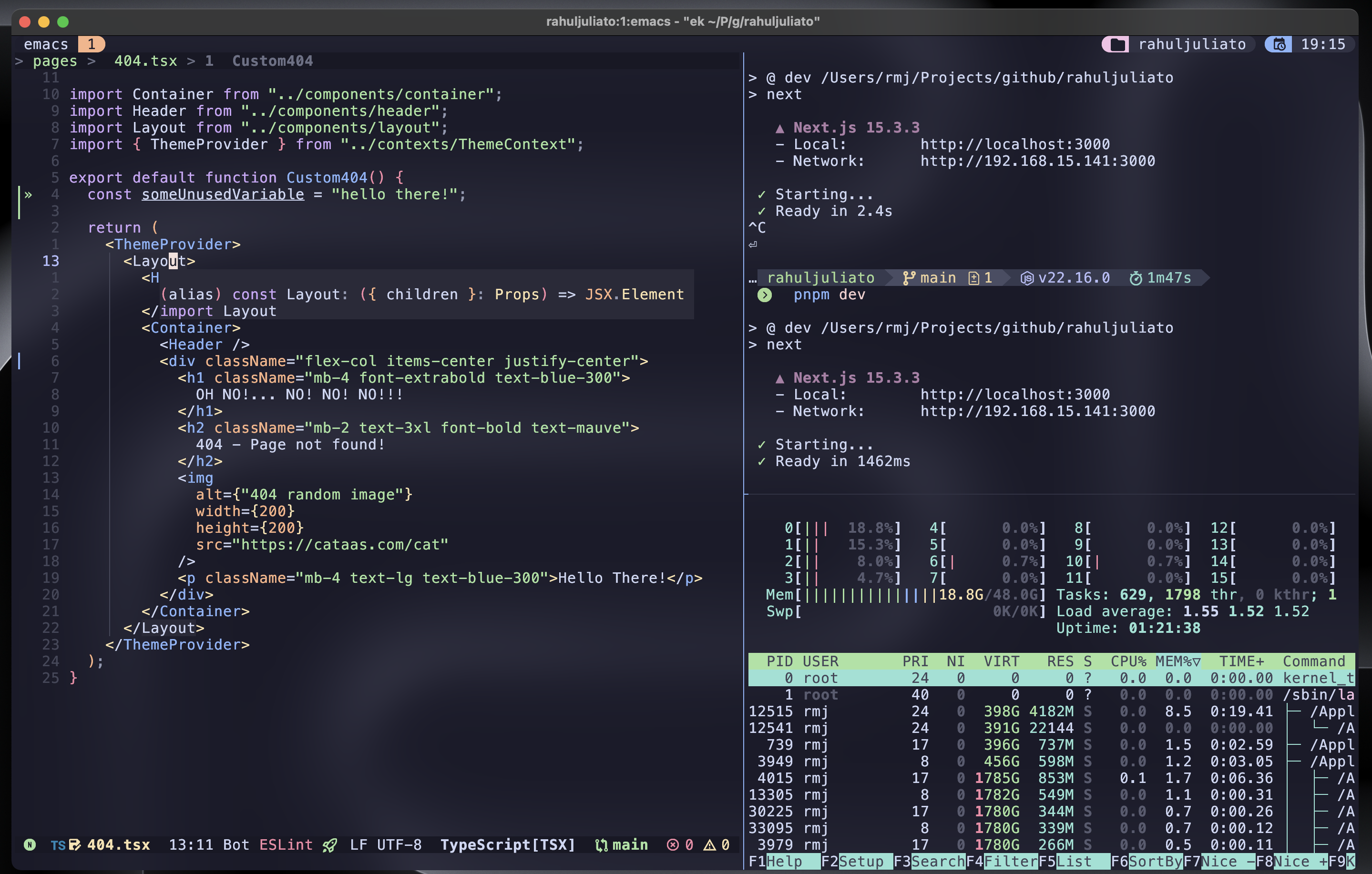
Emacs-Kick isn’t a full-fledged distribution but rather a starting point for building your own Emacs configuration. It’s designed to be especially accessible for Vim/Neovim users, letting you explore the power of Emacs without committing to its entire ecosystem.
You can take advantage of Emacs’ features without needing to master every Emacs-specific workflow right away. And if you find yourself enjoying it, you can:
- Run it in a GUI for a richer experience
- Customize and expand your configuration as much as you want
- Experiment with frameworks like Doom Emacs or Spacemacs
- Tinker with vanilla Emacs to build a setup entirely your own OR...
- Just keep using it on TUI, it is all up to you!
With Emacs-Kick, the goal is to empower you to explore Emacs at your
own pace. The sky's the limit! 🌟
Minimum Requirements
- Emacs version >=30.1
- You can verify your installed Emacs version by running:
emacs --version
Note: floating windows on TUI are only supported from Emacs >=31 (current development version on Emacs master branch).
macOS Warning
On macOS, Emacs-Kick may fail to function correctly due to missing or
incompatible system utilities. To avoid common issues, make sure the
following tools are installed via Homebrew:
brew install coreutils git
This provides:
-
gls: The GNU version ofls, required by Dired to avoid errors like:Listing directory failed but 'access-file' worked. -
git: macOS system usually has an older version of Git, this typically refers to the version installed through Apple's Command Line Tools (part of Xcode). Installing from Homebrew ensures a modern version of git is installed and will avoid problems withmagit.
Installation Instructions
- Clone the repository:
Note: If you already have an existing Emacs configuration in
~/.emacs.d, please back it up before proceeding. You can do this
by renaming the directory:
mv ~/.emacs.d ~/.emacs.d.backup
If you have any additional configurations from other Emacs
installations, please clean them up. This includes directories and
files such as ~/.emacs.d, ~/.emacs, ~/.emacs~,
~/.config/emacs, ~/.config/doom, ~/.config/cache/emacs and
any other related files.
After deleting/backing up, clone the repository:
git clone https://github.com/LionyxML/emacs-kick.git ~/.emacs.d
- Run the setup:
After cloning, install the configuration by running:
emacs -nw --eval="(ek/first-install)"
Alternatively, you can run the provided script ek-reinstall.sh
from inside ~/.emacs.d/, which will achieve the same result:
cd ~/.emacs.d/ && ./ek-reinstall.sh
Both methods will install all necessary packages and apply the configuration.
NOTE: During the initial setup, you'll be prompted to install Tree-sitter grammars and download some fonts. This configuration uses Nerd Fonts by default, so installing them now is highly recommended for the best experience.
VERY IMPORTANT: On first launch, Emacs will byte-compile some external
packages, which may take a little time. This is completely normal and only
happens once. Subsequent launches will be fast. Note that JIT native compilation
is disabled by default in this config to avoid confusing background compilation.
If you want extra performance, see the comments around native-comp-jit-compilation
in init.el on how to enable it.
- Set terminal mode by default:
Note on Emacs TUI/GUI: Emacs automatically adapts to either graphical or terminal mode depending on the environment. But if you're in a graphical session and prefer terminal mode, just use:
emacs -nw
To ensure Emacs always opens in terminal mode, add the following to
your .bashrc or .zshrc:
alias emacs='emacs -nw'
Then, reload your shell configuration with:
source ~/.bashrc  # for bash
source ~/.zshrc   # for zsh
- Start Emacs:
Once set up, start Emacs with:
emacs
Usage Tips:
- Leader Key: The leader key is set to
SPC(spacebar),which-keyis there to help you discover keybindings. - Help Commands:
SPC h iopens the Emacs info documentation (M-x info).SPC h vallows you to explore available variables.SPC h flets you explore functions.SPC h kdisplays keybindings.
Troubleshooting:
- If you encounter any issues during installation, check the
*Messages*buffer for more information. You can switch between buffers withSPC SPC, and navigate options usingC-pandC-n.
Available Commands
| Keybinding | Action |
|---|---|
SPC | Leader key |
TAB | Call completion |
C-d | Scroll down |
C-u | Scroll up |
<leader> s f | Find file |
<leader> s g | Grep |
<leader> s G | Git grep |
<leader> s r | Ripgrep |
<leader> s h | Consult info |
<leader> / | Consult line |
<leader> x x | Consult Flymake |
] d | Next Flymake error |
[ d | Previous Flymake error |
<leader> x d | Dired |
<leader> x j | Dired jump |
<leader> x f | Find file |
] c | Next diff hunk |
[ c | Previous diff hunk |
<leader> e e | Toggle NeoTree |
<leader> g g | Open Magit status |
<leader> g l | Show current log |
<leader> g d | Show diff for current file |
<leader> g D | Show diff for hunk |
<leader> g b | Annotate buffer with version control info |
] b | Switch to next buffer |
[ b | Switch to previous buffer |
<leader> b i | Consult buffer list |
<leader> b b | Open Ibuffer |
<leader> b d | Kill current buffer |
<leader> b k | Kill current buffer |
<leader> b x | Kill current buffer |
<leader> b s | Save buffer |
<leader> b l | Consult buffer |
<leader>SPC | Consult buffer |
<leader> p b | Consult project buffer |
<leader> p p | Switch project |
<leader> p f | Find file in project |
<leader> p g | Find regexp in project |
<leader> p k | Kill project buffers |
<leader> p D | Dired for project |
P | Yank from kill ring |
<leader> P | Yank from kill ring |
<leader> . | Embark act |
<leader> u | Undo tree visualize |
<leader> h m | Describe current mode |
<leader> h f | Describe function |
<leader> h v | Describe variable |
<leader> h k | Describe key |
] t | Go to next tab |
[ t | Go to previous tab |
<leader> m p | Format with Prettier |
<leader> c a | Execute code action |
<leader> r n | Rename symbol |
gI | Find implementation |
<leader> l f | Format buffer via LSP |
K | Show hover documentation |
gcc | Comment/uncomment current line |
gc | Comment/uncomment selected region |
gd | Goto definitions |
gr | Goto references |
...and a lot more, discoverable with which-key :)
Contributing
This package is intentionally designed with a specific vision in mind, reflecting my own opinions and preferences. While contributions are welcome, please understand that this configuration is quite opinionated.
If you have suggestions or requests, they will be considered carefully, but I cannot make any promises regarding implementation or acceptance. Your input is valuable, and I appreciate any help or feedback to improve the project.
To contribute, feel free to open an issue or submit a pull request. Let's make this configuration even better together!
About PRs
Always welcome, not a promise to accept though (see above). Please
direct your PRs to the development branch of this repository.
Contributors



Similar repos


Languages
Emacs Lisp
99.5%
A feature rich Emacs (kickstarter) config for (neo)vi(m)mers
Emacs Lisp
374
46 commits
updated Feb 15, 2026
README
Emacs-Kick(starter) for Vim/Neovim Users
Welcome to Emacs-Kick, a feature-rich Emacs configuration designed
for users familiar with Vim, Neovim, and Vi. With this
setup, you don't need to leave behind your favorite terminal or tools
like yazi, starship, lazygit, and lazydocker just to
give Emacs a try.
Use Emacs the same way you'd use Neovim, seamlessly integrating it
into your workflow inside terminal multiplexers like tmux or
Zellij, while also enjoying modern features such as treesitter
and LSP, no hassle.
Emacs-Kick isn’t a full-fledged distribution but rather a starting point for building your own Emacs configuration. It’s designed to be especially accessible for Vim/Neovim users, letting you explore the power of Emacs without committing to its entire ecosystem.
You can take advantage of Emacs’ features without needing to master every Emacs-specific workflow right away. And if you find yourself enjoying it, you can:
- Run it in a GUI for a richer experience
- Customize and expand your configuration as much as you want
- Experiment with frameworks like Doom Emacs or Spacemacs
- Tinker with vanilla Emacs to build a setup entirely your own OR...
- Just keep using it on TUI, it is all up to you!
With Emacs-Kick, the goal is to empower you to explore Emacs at your
own pace. The sky's the limit! 🌟
Minimum Requirements
- Emacs version >=30.1
- You can verify your installed Emacs version by running:
emacs --version
Note: floating windows on TUI are only supported from Emacs >=31 (current development version on Emacs master branch).
macOS Warning
On macOS, Emacs-Kick may fail to function correctly due to missing or
incompatible system utilities. To avoid common issues, make sure the
following tools are installed via Homebrew:
brew install coreutils git
This provides:
-
gls: The GNU version ofls, required by Dired to avoid errors like:Listing directory failed but 'access-file' worked. -
git: macOS system usually has an older version of Git, this typically refers to the version installed through Apple's Command Line Tools (part of Xcode). Installing from Homebrew ensures a modern version of git is installed and will avoid problems withmagit.
Installation Instructions
- Clone the repository:
Note: If you already have an existing Emacs configuration in
~/.emacs.d, please back it up before proceeding. You can do this
by renaming the directory:
mv ~/.emacs.d ~/.emacs.d.backup
If you have any additional configurations from other Emacs
installations, please clean them up. This includes directories and
files such as ~/.emacs.d, ~/.emacs, ~/.emacs~,
~/.config/emacs, ~/.config/doom, ~/.config/cache/emacs and
any other related files.
After deleting/backing up, clone the repository:
git clone https://github.com/LionyxML/emacs-kick.git ~/.emacs.d
- Run the setup:
After cloning, install the configuration by running:
emacs -nw --eval="(ek/first-install)"
Alternatively, you can run the provided script ek-reinstall.sh
from inside ~/.emacs.d/, which will achieve the same result:
cd ~/.emacs.d/ && ./ek-reinstall.sh
Both methods will install all necessary packages and apply the configuration.
NOTE: During the initial setup, you'll be prompted to install Tree-sitter grammars and download some fonts. This configuration uses Nerd Fonts by default, so installing them now is highly recommended for the best experience.
VERY IMPORTANT: On first launch, Emacs will byte-compile some external
packages, which may take a little time. This is completely normal and only
happens once. Subsequent launches will be fast. Note that JIT native compilation
is disabled by default in this config to avoid confusing background compilation.
If you want extra performance, see the comments around native-comp-jit-compilation
in init.el on how to enable it.
- Set terminal mode by default:
Note on Emacs TUI/GUI: Emacs automatically adapts to either graphical or terminal mode depending on the environment. But if you're in a graphical session and prefer terminal mode, just use:
emacs -nw
To ensure Emacs always opens in terminal mode, add the following to
your .bashrc or .zshrc:
alias emacs='emacs -nw'
Then, reload your shell configuration with:
source ~/.bashrc  # for bash
source ~/.zshrc   # for zsh
- Start Emacs:
Once set up, start Emacs with:
emacs
Usage Tips:
- Leader Key: The leader key is set to
SPC(spacebar),which-keyis there to help you discover keybindings. - Help Commands:
SPC h iopens the Emacs info documentation (M-x info).SPC h vallows you to explore available variables.SPC h flets you explore functions.SPC h kdisplays keybindings.
Troubleshooting:
- If you encounter any issues during installation, check the
*Messages*buffer for more information. You can switch between buffers withSPC SPC, and navigate options usingC-pandC-n.
Available Commands
| Keybinding | Action |
|---|---|
SPC | Leader key |
TAB | Call completion |
C-d | Scroll down |
C-u | Scroll up |
<leader> s f | Find file |
<leader> s g | Grep |
<leader> s G | Git grep |
<leader> s r | Ripgrep |
<leader> s h | Consult info |
<leader> / | Consult line |
<leader> x x | Consult Flymake |
] d | Next Flymake error |
[ d | Previous Flymake error |
<leader> x d | Dired |
<leader> x j | Dired jump |
<leader> x f | Find file |
] c | Next diff hunk |
[ c | Previous diff hunk |
<leader> e e | Toggle NeoTree |
<leader> g g | Open Magit status |
<leader> g l | Show current log |
<leader> g d | Show diff for current file |
<leader> g D | Show diff for hunk |
<leader> g b | Annotate buffer with version control info |
] b | Switch to next buffer |
[ b | Switch to previous buffer |
<leader> b i | Consult buffer list |
<leader> b b | Open Ibuffer |
<leader> b d | Kill current buffer |
<leader> b k | Kill current buffer |
<leader> b x | Kill current buffer |
<leader> b s | Save buffer |
<leader> b l | Consult buffer |
<leader>SPC | Consult buffer |
<leader> p b | Consult project buffer |
<leader> p p | Switch project |
<leader> p f | Find file in project |
<leader> p g | Find regexp in project |
<leader> p k | Kill project buffers |
<leader> p D | Dired for project |
P | Yank from kill ring |
<leader> P | Yank from kill ring |
<leader> . | Embark act |
<leader> u | Undo tree visualize |
<leader> h m | Describe current mode |
<leader> h f | Describe function |
<leader> h v | Describe variable |
<leader> h k | Describe key |
] t | Go to next tab |
[ t | Go to previous tab |
<leader> m p | Format with Prettier |
<leader> c a | Execute code action |
<leader> r n | Rename symbol |
gI | Find implementation |
<leader> l f | Format buffer via LSP |
K | Show hover documentation |
gcc | Comment/uncomment current line |
gc | Comment/uncomment selected region |
gd | Goto definitions |
gr | Goto references |
...and a lot more, discoverable with which-key :)
Contributing
This package is intentionally designed with a specific vision in mind, reflecting my own opinions and preferences. While contributions are welcome, please understand that this configuration is quite opinionated.
If you have suggestions or requests, they will be considered carefully, but I cannot make any promises regarding implementation or acceptance. Your input is valuable, and I appreciate any help or feedback to improve the project.
To contribute, feel free to open an issue or submit a pull request. Let's make this configuration even better together!
About PRs
Always welcome, not a promise to accept though (see above). Please
direct your PRs to the development branch of this repository.
Similar repos
Contributors
Languages
Emacs Lisp
99.5%