
Use your MacBook's notch like Dynamic Island for temporary storing files and AirDrop
Swift
2,116
169 commits
updated May 18, 2026
README
NotchDrop
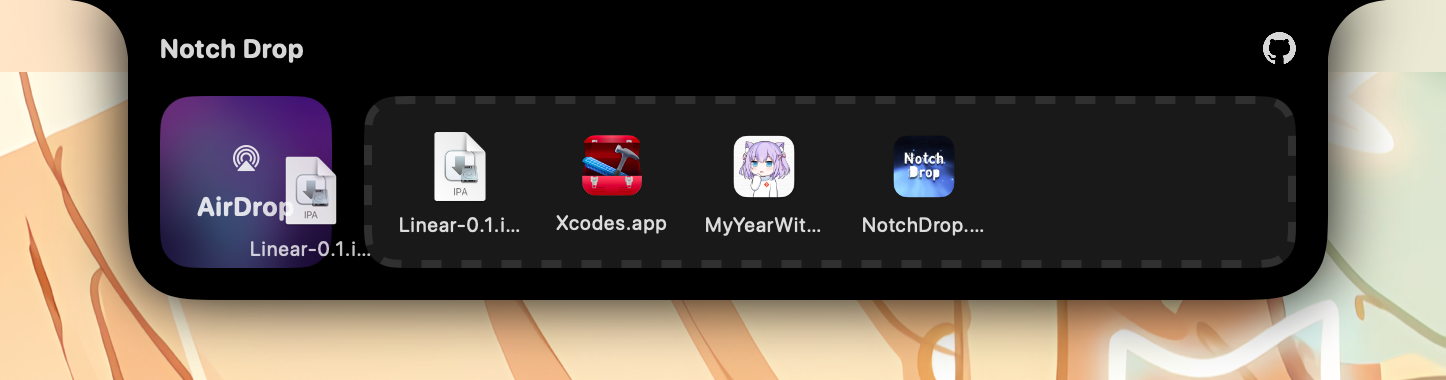
Transform your MacBook's notch into a convenient file drop zone.

For Developers: You can use NotchNotification in your app, powered by NotchDrop.
👀 Preview
🌟 Key Features
- Should work with your menu bar managers
- Drag and drop files to the notch
- Open AirDrop directly from the notch
- Automatically save files for 1 day, can be configured
- Open files with a simple click
- Delete files by holding the option key and clicking the x mark
- Fully open source and privacy-focused
- Free of charge if you do it yourself
🚀 Usage
Download the latest version from Releases.
🔨 Building from Source
Prerequisites
- macOS with Xcode installed
- Xcode Command Line Tools
Build Instructions
For Personal Daily Use (Production Build)
This creates a production-optimized build that you can use daily on your Mac.
- Clone the repository:
git clone https://github.com/Lakr233/NotchDrop.git
cd NotchDrop
- Build the app in Release configuration:
xcodebuild -project NotchDrop.xcodeproj \
  -scheme NotchDrop \
  -configuration Release \
  clean build \
  CODE_SIGN_IDENTITY="-" \
  CODE_SIGNING_REQUIRED=NO \
  CODE_SIGNING_ALLOWED=NO
- Copy the built app to your Applications folder:
cp -R ~/Library/Developer/Xcode/DerivedData/NotchDrop-*/Build/Products/Release/NotchDrop.app ~/Applications/
- Launch the app:
open ~/Applications/NotchDrop.app
Note: On first launch, macOS may show a security warning. To open:
- Right-click on
NotchDrop.appin Applications - Select "Open"
- Click "Open" in the security dialog
After the first time, the app will open normally.
What This Build Does
- Release Configuration: Builds with optimizations enabled for better performance
- Self-Signed: Uses ad-hoc code signing (no Apple Developer account needed)
- Production Ready: Suitable for daily use on your Mac
- Binary Size: ~5.1MB
- Location:
~/Applications/NotchDrop.app
For Development
For development work, open the project in Xcode:
open NotchDrop.xcodeproj
Then build and run using Xcode (⌘R).
🧑⚖️ License
🥰 Acknowledgements
Special thanks to NotchNook for providing the initial inspiration. This open-source project focuses more on my own needs, simplifies various configurations, and improves compatibility with the software I prefer.
Sponsor
LookInside helps you inspect a running iOS or macOS app UI from your Mac.
Copyright © 2024 Lakr Aream. All Rights Reserved.
Contributors


Similar repos


Languages
Swift
100.0%
Use your MacBook's notch like Dynamic Island for temporary storing files and AirDrop
Swift
2,116
169 commits
updated May 18, 2026
README
NotchDrop
Transform your MacBook's notch into a convenient file drop zone.
For Developers: You can use NotchNotification in your app, powered by NotchDrop.
👀 Preview
🌟 Key Features
- Should work with your menu bar managers
- Drag and drop files to the notch
- Open AirDrop directly from the notch
- Automatically save files for 1 day, can be configured
- Open files with a simple click
- Delete files by holding the option key and clicking the x mark
- Fully open source and privacy-focused
- Free of charge if you do it yourself
🚀 Usage
Download the latest version from Releases.
🔨 Building from Source
Prerequisites
- macOS with Xcode installed
- Xcode Command Line Tools
Build Instructions
For Personal Daily Use (Production Build)
This creates a production-optimized build that you can use daily on your Mac.
- Clone the repository:
git clone https://github.com/Lakr233/NotchDrop.git
cd NotchDrop
- Build the app in Release configuration:
xcodebuild -project NotchDrop.xcodeproj \
  -scheme NotchDrop \
  -configuration Release \
  clean build \
  CODE_SIGN_IDENTITY="-" \
  CODE_SIGNING_REQUIRED=NO \
  CODE_SIGNING_ALLOWED=NO
- Copy the built app to your Applications folder:
cp -R ~/Library/Developer/Xcode/DerivedData/NotchDrop-*/Build/Products/Release/NotchDrop.app ~/Applications/
- Launch the app:
open ~/Applications/NotchDrop.app
Note: On first launch, macOS may show a security warning. To open:
- Right-click on
NotchDrop.appin Applications - Select "Open"
- Click "Open" in the security dialog
After the first time, the app will open normally.
What This Build Does
- Release Configuration: Builds with optimizations enabled for better performance
- Self-Signed: Uses ad-hoc code signing (no Apple Developer account needed)
- Production Ready: Suitable for daily use on your Mac
- Binary Size: ~5.1MB
- Location:
~/Applications/NotchDrop.app
For Development
For development work, open the project in Xcode:
open NotchDrop.xcodeproj
Then build and run using Xcode (⌘R).
🧑⚖️ License
🥰 Acknowledgements
Special thanks to NotchNook for providing the initial inspiration. This open-source project focuses more on my own needs, simplifies various configurations, and improves compatibility with the software I prefer.
Sponsor
LookInside helps you inspect a running iOS or macOS app UI from your Mac.
Copyright © 2024 Lakr Aream. All Rights Reserved.
Similar repos
Contributors
Languages
Swift
100.0%