
[CVPR 2025] MINIMA: Modality Invariant Image Matching
See the codeREADME
MINIMA: Modality Invariant Image Matching
Jiangwei Ren1, Xingyu Jiang1†, Zizhuo Li2, Dingkang Liang1, Xin Zhou1 and Xiang Bai1
1 Huazhong University of Science & Technology, 2 Wuhan University.
(†) Corresponding author.






📣 News
- [19/Apr/2025] MINIMA Training Code is released.
- [14/Mar/2025] MINIMA Data Engine is released.
- [27/Feb/2025] Our MINIMA is accepted to CVPR 2025.
- [27/Dec/2024] Arvix version is released.
- [26/Dec/2024] Release the code and checkpoint.
Abstract
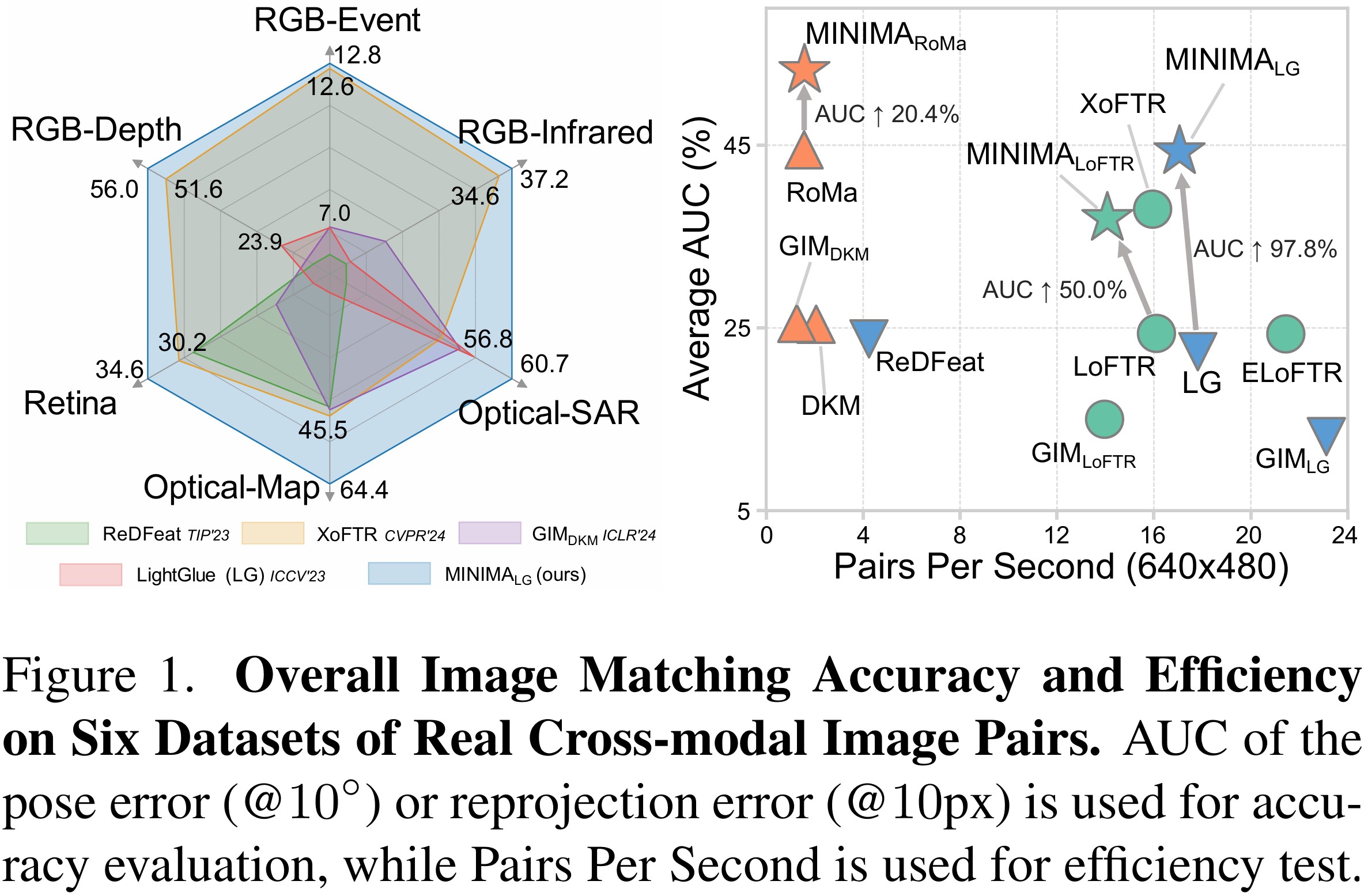
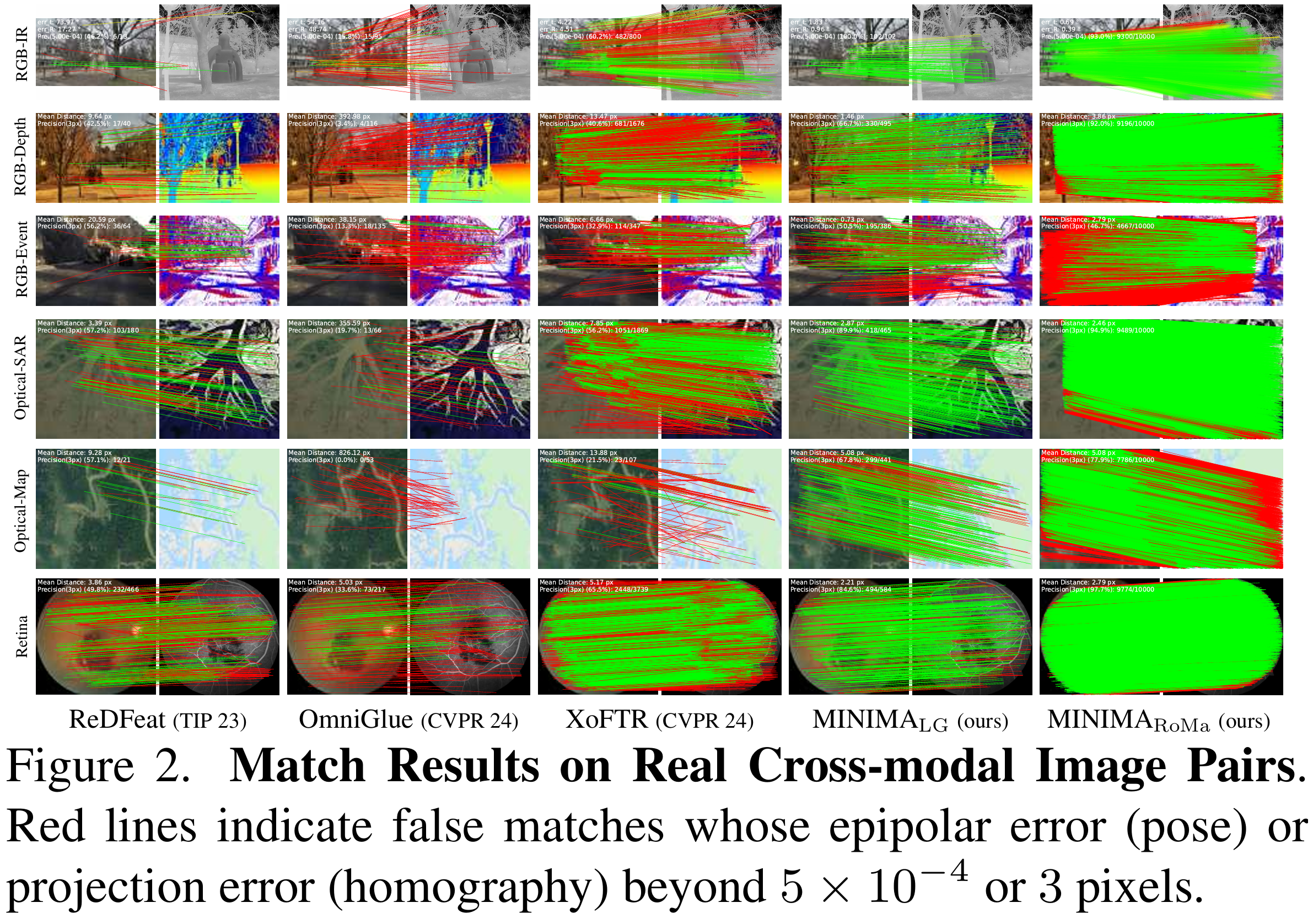
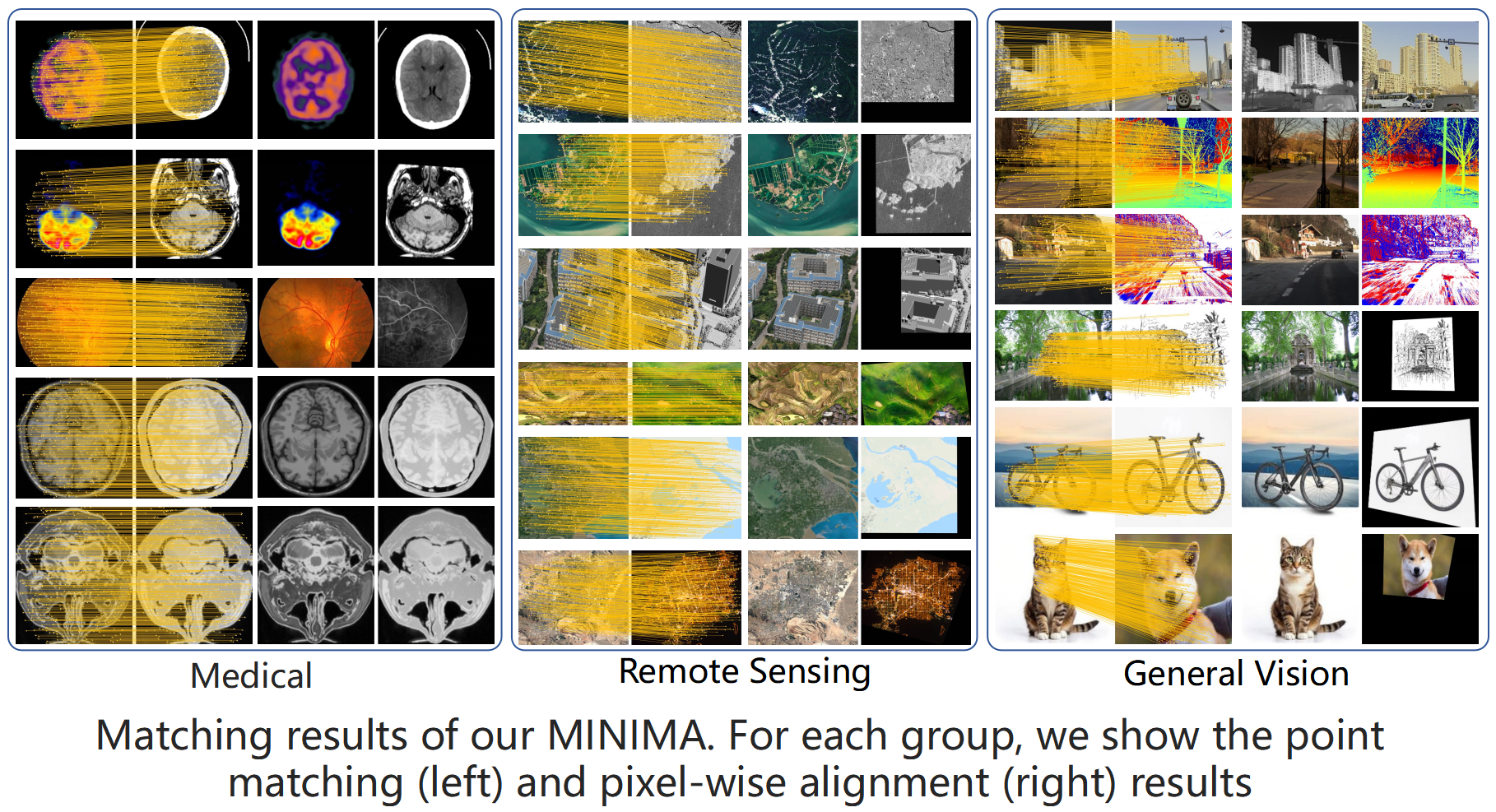
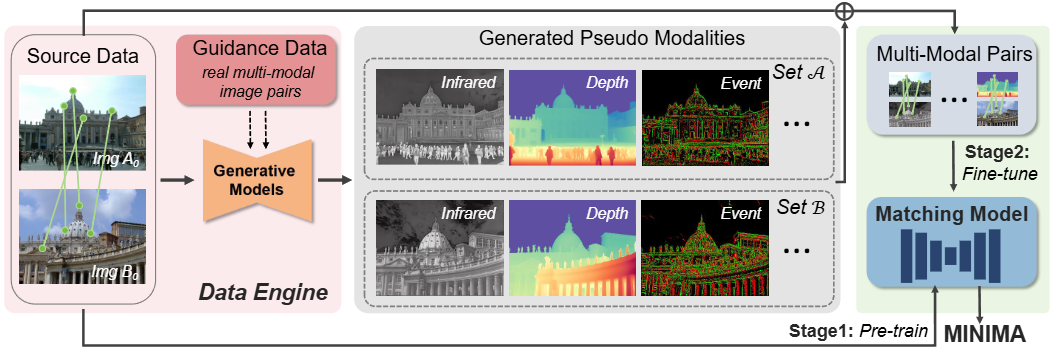
Image matching for both cross-view and cross-modality plays a critical role in multimodal perception. In practice, the modality gap caused by different imaging systems/styles poses great challenges to the matching task. Existing works try to extract invariant features for specific modalities and train on limited datasets, showing poor generalization. In this paper, we present MINIMA, a unified image matching framework for multiple cross-modal cases. Without pursuing fancy modules, our MINIMA aims to enhance universal performance from the perspective of data scaling up. For such purpose, we propose a simple yet effective data engine that can freely produce a large dataset containing multiple modalities, rich scenarios, and accurate matching labels. Specifically, we scale up the modalities from cheap but rich RGB-only matching data, by means of generative models. Under this setting, the matching labels and rich diversity of the RGB dataset are well inherited by the generated multimodal data. Benefiting from this, we construct MD-syn, a new comprehensive dataset that fills the data gap for general multimodal image matching. With MD-syn, we can directly train any advanced matching pipeline on randomly selected modality pairs to obtain cross-modal ability. Extensive experiments on in-domain and zero-shot matching tasks, including 19 cross-modal cases, demonstrate that our MINIMA can significantly outperform the baselines and even surpass modality-specific methods.
Our Framework
Online Demo
- Visit our demo
- Special thanks to Hugging Face for providing the ZeroGPU support for this project!
Full MegaDepth-Syn Dataset
- The MegaDepth-Syn Dataset is generated from the MegaDepth dataset using our MINIMA data engine, which contains for extra 6 modalities: infrared, depth, event, normal, sketch, and paint.
- Full dataset is released
in
.
- You can download the dataset using the following command:
pip install openxlab --no-dependencies #Install

openxlab login # Log in and enter the corresponding AK/SK. Please view AK/SK at usercenter

openxlab dataset info --dataset-repo lsxi7/MINIMA # Dataset information viewing and View Dataset File List

openxlab dataset get --dataset-repo lsxi7/MINIMA #Dataset download

openxlab dataset download --dataset-repo lsxi7/MINIMA --source-path /README.md --target-path /path/to/local/folder #Dataset file download
And more details can be found
in 
- The MegaDepth-Syn Dataset is now uploaded to Hugging Face.
MINIMA Multi-Modal Data Engine
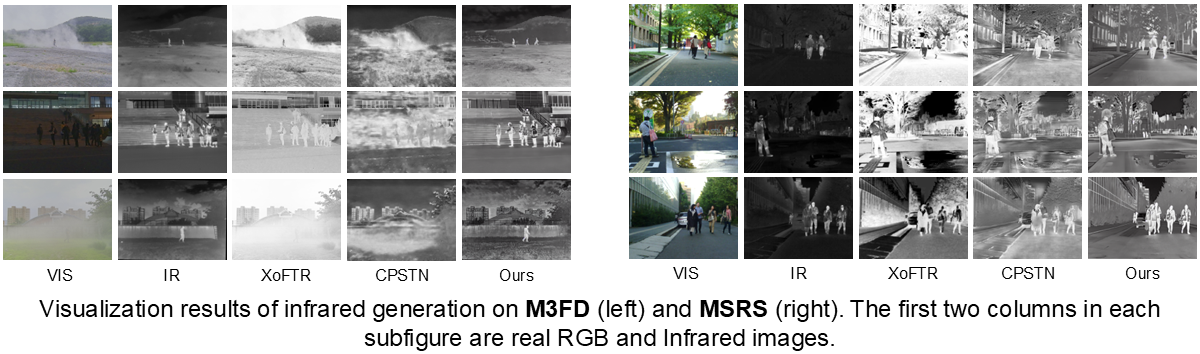
See Data Engine for more details.
Weights Download
- We provide our
minima_lightglue,minima_loftr,minima_roma,minima_eloftrandminima_xoftrmodel weights in Google Drive. - Also we provide github link for the weights: minima_lightglue, minima_loftr, minima_roma, minima_eloftr and minima_xoftr.
- Please download the weights files and put it in the
weightsfolder. - Or you can directly run:
bash weights/download.sh
Data Preparation for Evaluation
We are grateful to the authors for their contribution of the testing datasets of the real multimodal scenarios.
MegaDepth-1500-Syn
We provide a bash command to download the dataset and organize the MegaDepth-1500-Syn dataset directly:
bash data/test_data_preparation.sh
Additional, please download the original megadepth-1500, and run:
tar xf megadepth_test_1500.tar
ln -s /path/to/megadepth_test_1500/Undistorted_SfM  /path/to/MINMA/data/megadepth/test
RGB-Infrared Test Dataset
The METU-VisTIR dataset comes from XoFTR, and is available
at its official Google Drive.
For more information, please refer to the XoFTR.
MMIM Test Dataset
MMIM Dataset is sourced
from Multi-modality-image-matching-database-metrics-methods.
We prepare necessary JSON files with Multi-modality-image-matching-database-metrics-methods.zip file, located in the
data directory.
.
To set up the
MMIM test dataset, please follow these steps:
cd data
git clone https://github.com/StaRainJ/Multi-modality-image-matching-database-metrics-methods.git
unzip -o Multi-modality-image-matching-database-metrics-methods.zip
RGB-Depth Test Dataset
The Depth Dataset comes from the DIODE dataset.
You can directly download the dataset from its
official Amazon Web Service
or Baidu Cloud Storage.
RGB-Event Test Dataset
The aligned RGB-Event test dataset is generated from DSEC.
Our test data can be downloaded
from Google Drive.
Data Structure
Organizing the Dataset
We recommend organizing the datasets in the following folder structure:
data/
├── METU-VisTIR/
│ ├── index/
│ └── ...
├── Multi-modality-image-matching-database-metrics-methods/
│ ├── Multimodal_Image_Matching_Datasets/
│ └── ...
├── megadepth/
│ ├── train/[modality]/Undistorted_SfM/
│ └── test/Undistorted_SfM/   # MegaDepth-1500
└── DIODE/
│ └── val/
└── DSEC/
  ├── vent_list.txt
  ├── thun_01_a/
  └── ...
Installation and Environment Setup
- Clone the repository:
git https://github.com/LSXI7/MINIMA.git
cd MINIMA
conda env create -f environment.yaml
conda activate minima
- Initialize the external submodule dependencies with:
git submodule update --init --recursive
git submodule update --recursive --remote
sed -i '1s/^/from typing import Tuple as tuple\n/' third_party/RoMa_minima/romatch/models/model_zoo/__init__.py
- Run demo code after downloading the weights:
python demo.py --method sp_lg --fig1 demo/vis_test.png --fig2 demo/depth_test.png --save_dir ./demo
Multimodal Image Matching Evaluation
We provide the multi-modality image matching benchmark commands for our MINIMA models.
Choose the method from sp_lg, loftr, roma and xoftr for the multimodal evaluation.
Test on Real Multimodal Datasets
python test_relative_pose_infrared.py --method <method> <--ckpt model_path> <--save_figs> <--save_dir save_dir>  # Infrared-RGB

python test_relative_homo_depth.py    --method <method> <--ckpt model_path> <--save_figs> <--save_dir save_dir>  # Depth-RGB

python test_relative_homo_event.py    --method <method> <--ckpt model_path> <--save_figs> <--save_dir save_dir>  # Event-RGB

# --choose_model: 0 for medical test, 1 for remote sensing test
python test_relative_homo_mmim.py     --method <method> <--ckpt model_path> --choose_model 0/1 <--save_figs> <--save_dir save_dir>
Test on MD-syn Dataset
python test_relative_pose_mega_1500_syn.py  --method <method> <--ckpt ckpt> --multi_model <modality> <--save_figs> <--save_dir save_dir>
# --modality: Choose from [infrared, depth, event, normal, sketch, paint]
Test on Origin MegaDepth-1500 Dataset
python test_relative_pose_mega_1500.py --method <method> <--ckpt model_path> <--save_figs> <--save_dir save_dir>
Note: By default, the checkpoint is initialized from the MINIMA models in the weights folder, and you can specify a
custom checkpoint using the --ckpt argument.
Training
See Training for details.
TODO List
- MD-Syn Full Dataset
- Real Multimodal Evaluation Benchmark
- Synthetic Multimodal Evaluation Benchmark
- Training Code
- Our MINIMA Data Engine for Multimodal Data Generation
- More Modalities Addition
Acknowledgement
We sincerely thank the
SuperPoint,
LightGlue,
Glue Factory,
LoFTR,
RoMa
for their contribution of methodological development.
Additionally, we appreciate the support of MegaDepth and
SCEPTER,
Depth-Anything-V2,
DSINE,
PaintTransformer,
Anime2Sketch for their role in data generation.
Citation
If you find our work useful in your research, please consider giving a star ⭐ and a citation
@inproceedings{ren2025minima,
  title={MINIMA: Modality Invariant Image Matching},
  author={Ren, Jiangwei and Jiang, Xingyu and Li, Zizhuo and Liang, Dingkang and Zhou, Xin and Bai, Xiang},
  booktitle={Proceedings of the IEEE/CVF Conference on Computer Vision and Pattern Recognition},
  year={2025}
}
License
This repository is under the Apache-2.0 license.
minima_lightglue uses SuperPoint from as a feature extractor. SuperPoint follows a different, restrictive license
for academic or non-commercial use only. See
the license here and
its inference file for details.
Please review and comply with its license if you intend to use this component.


Similar repos


Languages
Python
98.9%
Shell
1.1%
[CVPR 2025] MINIMA: Modality Invariant Image Matching
See the codeREADME
MINIMA: Modality Invariant Image Matching
Jiangwei Ren1, Xingyu Jiang1†, Zizhuo Li2, Dingkang Liang1, Xin Zhou1 and Xiang Bai1
1 Huazhong University of Science & Technology, 2 Wuhan University.
(†) Corresponding author.
📣 News
- [19/Apr/2025] MINIMA Training Code is released.
- [14/Mar/2025] MINIMA Data Engine is released.
- [27/Feb/2025] Our MINIMA is accepted to CVPR 2025.
- [27/Dec/2024] Arvix version is released.
- [26/Dec/2024] Release the code and checkpoint.
Abstract
Image matching for both cross-view and cross-modality plays a critical role in multimodal perception. In practice, the modality gap caused by different imaging systems/styles poses great challenges to the matching task. Existing works try to extract invariant features for specific modalities and train on limited datasets, showing poor generalization. In this paper, we present MINIMA, a unified image matching framework for multiple cross-modal cases. Without pursuing fancy modules, our MINIMA aims to enhance universal performance from the perspective of data scaling up. For such purpose, we propose a simple yet effective data engine that can freely produce a large dataset containing multiple modalities, rich scenarios, and accurate matching labels. Specifically, we scale up the modalities from cheap but rich RGB-only matching data, by means of generative models. Under this setting, the matching labels and rich diversity of the RGB dataset are well inherited by the generated multimodal data. Benefiting from this, we construct MD-syn, a new comprehensive dataset that fills the data gap for general multimodal image matching. With MD-syn, we can directly train any advanced matching pipeline on randomly selected modality pairs to obtain cross-modal ability. Extensive experiments on in-domain and zero-shot matching tasks, including 19 cross-modal cases, demonstrate that our MINIMA can significantly outperform the baselines and even surpass modality-specific methods.
Our Framework
Online Demo
- Visit our demo
- Special thanks to Hugging Face for providing the ZeroGPU support for this project!
Full MegaDepth-Syn Dataset
- The MegaDepth-Syn Dataset is generated from the MegaDepth dataset using our MINIMA data engine, which contains for extra 6 modalities: infrared, depth, event, normal, sketch, and paint.
- Full dataset is released
in
- You can download the dataset using the following command:
pip install openxlab --no-dependencies #Install

openxlab login # Log in and enter the corresponding AK/SK. Please view AK/SK at usercenter

openxlab dataset info --dataset-repo lsxi7/MINIMA # Dataset information viewing and View Dataset File List

openxlab dataset get --dataset-repo lsxi7/MINIMA #Dataset download

openxlab dataset download --dataset-repo lsxi7/MINIMA --source-path /README.md --target-path /path/to/local/folder #Dataset file download
And more details can be found
in
- The MegaDepth-Syn Dataset is now uploaded to Hugging Face.
MINIMA Multi-Modal Data Engine
See Data Engine for more details.
Weights Download
- We provide our
minima_lightglue,minima_loftr,minima_roma,minima_eloftrandminima_xoftrmodel weights in Google Drive. - Also we provide github link for the weights: minima_lightglue, minima_loftr, minima_roma, minima_eloftr and minima_xoftr.
- Please download the weights files and put it in the
weightsfolder. - Or you can directly run:
bash weights/download.sh
Data Preparation for Evaluation
We are grateful to the authors for their contribution of the testing datasets of the real multimodal scenarios.
MegaDepth-1500-Syn
We provide a bash command to download the dataset and organize the MegaDepth-1500-Syn dataset directly:
bash data/test_data_preparation.sh
Additional, please download the original megadepth-1500, and run:
tar xf megadepth_test_1500.tar
ln -s /path/to/megadepth_test_1500/Undistorted_SfM  /path/to/MINMA/data/megadepth/test
RGB-Infrared Test Dataset
The METU-VisTIR dataset comes from XoFTR, and is available
at its official Google Drive.
For more information, please refer to the XoFTR.
MMIM Test Dataset
MMIM Dataset is sourced
from Multi-modality-image-matching-database-metrics-methods.
We prepare necessary JSON files with Multi-modality-image-matching-database-metrics-methods.zip file, located in the
data directory.
.
To set up the
MMIM test dataset, please follow these steps:
cd data
git clone https://github.com/StaRainJ/Multi-modality-image-matching-database-metrics-methods.git
unzip -o Multi-modality-image-matching-database-metrics-methods.zip
RGB-Depth Test Dataset
The Depth Dataset comes from the DIODE dataset.
You can directly download the dataset from its
official Amazon Web Service
or Baidu Cloud Storage.
RGB-Event Test Dataset
The aligned RGB-Event test dataset is generated from DSEC.
Our test data can be downloaded
from Google Drive.
Data Structure
Organizing the Dataset
We recommend organizing the datasets in the following folder structure:
data/
├── METU-VisTIR/
│ ├── index/
│ └── ...
├── Multi-modality-image-matching-database-metrics-methods/
│ ├── Multimodal_Image_Matching_Datasets/
│ └── ...
├── megadepth/
│ ├── train/[modality]/Undistorted_SfM/
│ └── test/Undistorted_SfM/   # MegaDepth-1500
└── DIODE/
│ └── val/
└── DSEC/
  ├── vent_list.txt
  ├── thun_01_a/
  └── ...
Installation and Environment Setup
- Clone the repository:
git https://github.com/LSXI7/MINIMA.git
cd MINIMA
conda env create -f environment.yaml
conda activate minima
- Initialize the external submodule dependencies with:
git submodule update --init --recursive
git submodule update --recursive --remote
sed -i '1s/^/from typing import Tuple as tuple\n/' third_party/RoMa_minima/romatch/models/model_zoo/__init__.py
- Run demo code after downloading the weights:
python demo.py --method sp_lg --fig1 demo/vis_test.png --fig2 demo/depth_test.png --save_dir ./demo
Multimodal Image Matching Evaluation
We provide the multi-modality image matching benchmark commands for our MINIMA models.
Choose the method from sp_lg, loftr, roma and xoftr for the multimodal evaluation.
Test on Real Multimodal Datasets
python test_relative_pose_infrared.py --method <method> <--ckpt model_path> <--save_figs> <--save_dir save_dir>  # Infrared-RGB

python test_relative_homo_depth.py    --method <method> <--ckpt model_path> <--save_figs> <--save_dir save_dir>  # Depth-RGB

python test_relative_homo_event.py    --method <method> <--ckpt model_path> <--save_figs> <--save_dir save_dir>  # Event-RGB

# --choose_model: 0 for medical test, 1 for remote sensing test
python test_relative_homo_mmim.py     --method <method> <--ckpt model_path> --choose_model 0/1 <--save_figs> <--save_dir save_dir>
Test on MD-syn Dataset
python test_relative_pose_mega_1500_syn.py  --method <method> <--ckpt ckpt> --multi_model <modality> <--save_figs> <--save_dir save_dir>
# --modality: Choose from [infrared, depth, event, normal, sketch, paint]
Test on Origin MegaDepth-1500 Dataset
python test_relative_pose_mega_1500.py --method <method> <--ckpt model_path> <--save_figs> <--save_dir save_dir>
Note: By default, the checkpoint is initialized from the MINIMA models in the weights folder, and you can specify a
custom checkpoint using the --ckpt argument.
Training
See Training for details.
TODO List
- MD-Syn Full Dataset
- Real Multimodal Evaluation Benchmark
- Synthetic Multimodal Evaluation Benchmark
- Training Code
- Our MINIMA Data Engine for Multimodal Data Generation
- More Modalities Addition
Acknowledgement
We sincerely thank the
SuperPoint,
LightGlue,
Glue Factory,
LoFTR,
RoMa
for their contribution of methodological development.
Additionally, we appreciate the support of MegaDepth and
SCEPTER,
Depth-Anything-V2,
DSINE,
PaintTransformer,
Anime2Sketch for their role in data generation.
Citation
If you find our work useful in your research, please consider giving a star ⭐ and a citation
@inproceedings{ren2025minima,
  title={MINIMA: Modality Invariant Image Matching},
  author={Ren, Jiangwei and Jiang, Xingyu and Li, Zizhuo and Liang, Dingkang and Zhou, Xin and Bai, Xiang},
  booktitle={Proceedings of the IEEE/CVF Conference on Computer Vision and Pattern Recognition},
  year={2025}
}
License
This repository is under the Apache-2.0 license.
minima_lightglue uses SuperPoint from as a feature extractor. SuperPoint follows a different, restrictive license
for academic or non-commercial use only. See
the license here and
its inference file for details.
Please review and comply with its license if you intend to use this component.
Similar repos
Languages
Python
98.9%
Shell
1.1%