
A comment section and Visitor Messages for your GitHub profile, powered by GitHub Discussions. Nine themes.
See the codeSee what people are saying (1)
README

GitComment
A comment section for your GitHub profile. Visitors leave you a message using the GitHub account they already have, and it shows up in your profile README.
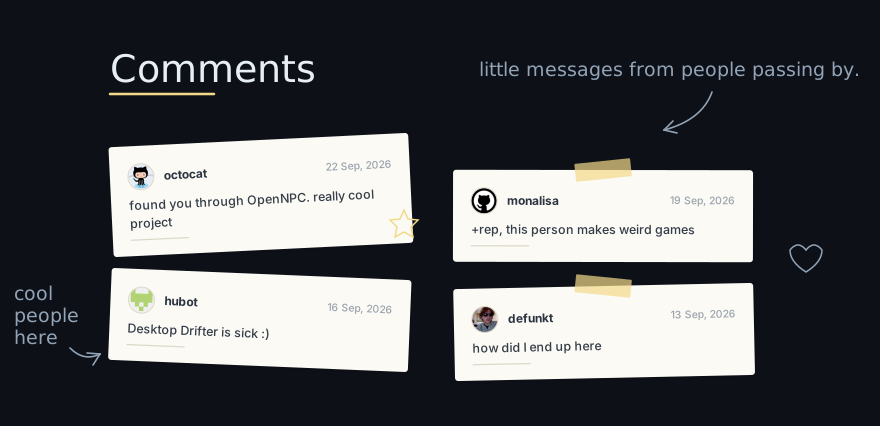
Comments live in a GitHub Discussion on your profile repository. When someone posts, an Action redraws the board and commits it. No server, no database, no signup, no account to create.
Themes
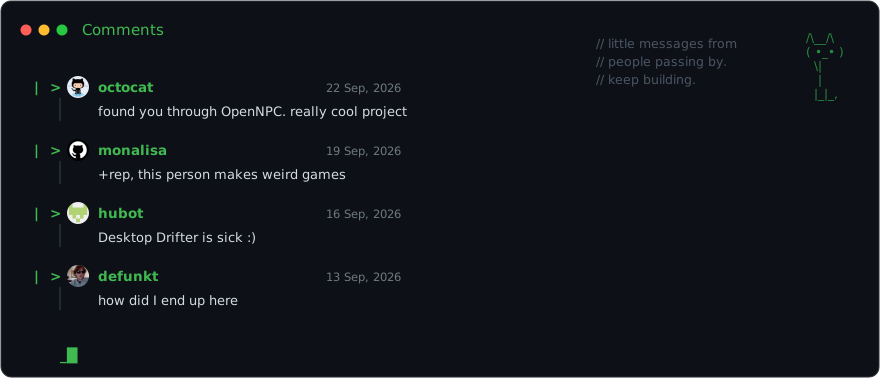
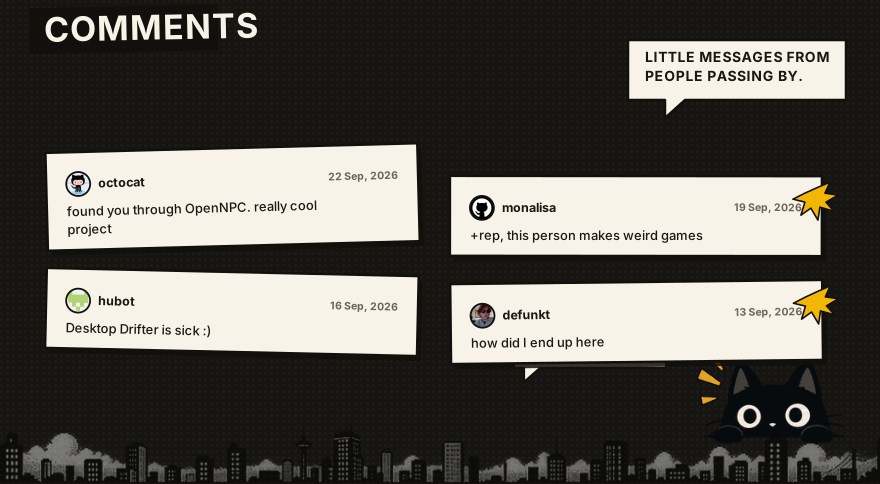
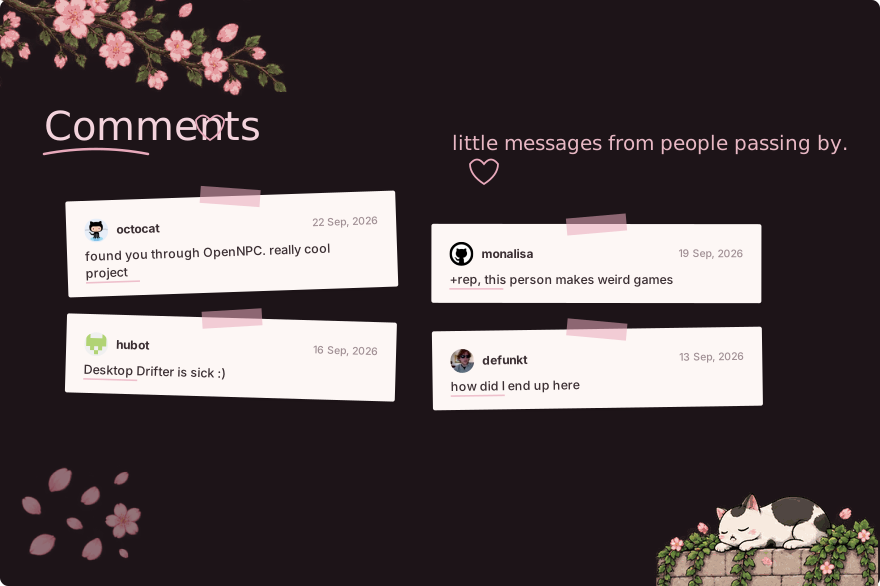
Four of the nine, at a glance.
notes — the one above. Paper notes, tape, handwriting.
dev
comic
pink
There are five more: win95 (Windows 95 dialogue boxes), drawn, cozy,
steam and minimal. The last four are plain README HTML rather than images,
so every username in them stays clickable.
Changing theme
Edit .github/gitcomment.yml in your profile repository:
theme: dev
variant: dark
Commit it, then run the workflow once from the Actions tab. That's the whole process.
theme — notes dev pink comic win95 drawn cozy steam minimal
variant — dark light transparent
transparent draws no background and follows whichever GitHub theme the
visitor is using. The four HTML themes ignore variant.
All values are lowercase. A wrong one fails the run with a message naming the valid options, and leaves your README untouched.
What it does
- Shows the newest few comments; the rest stay in the Discussion
- Real avatars and profile links
- Nine themes, three variants
- Hide or delete a comment and it disappears on the next run
- Blocklist, and an approval mode where nothing appears until you react to it
- Escapes everything a commenter writes, so nobody can inject markup
Setup
1. Enable Discussions on your profile repository — Settings, Features.
2. Create one Discussion for the comments. Note its number from the URL.
3. Add these two lines to your README where you want the board:
<!-- GITCOMMENT:START -->
<!-- GITCOMMENT:END -->
4. Add .github/workflows/comments.yml:
name: comments

on:
  discussion_comment:
    types: [created, edited, deleted]
  workflow_dispatch:

concurrency:
  group: comments
  cancel-in-progress: false

jobs:
  update:
    runs-on: ubuntu-latest
    permissions:
      contents: write
      discussions: read
    steps:
      - uses: LISK819129/GitComment@v1
        with:
          discussion-number: 1
It has to be on your default branch — GitHub only fires discussion_comment
for workflows that live there.
5. Actions tab, run it once by hand. Done.
No actions/checkout step. The Action reads and writes over the API, which
also means two people commenting at the same moment can't clobber each other.
Config
All optional, at .github/gitcomment.yml:
title: "Comments"
subtitle: "little messages from people passing by."

theme: notes
variant: dark

max_comments: 6
message_max_length: 240

show_avatar: true
show_date: true

moderation: automatic
blocked_users: []
max_comments is how many are drawn, not how many are kept. Nothing is ever
deleted from the Discussion.
Set moderation: approved and nothing appears until you add a 👍 to the
comment yourself. Reactions, because they work from the GitHub mobile app.
Limits worth knowing
- The drawn themes are images, so nothing inside them is clickable — just a
leave a messagelink underneath. Usedrawn,cozy,steamorminimalif you want every username to be a link to their profile. - Avatars are copied into the image, because GitHub's image proxy blocks outside requests. If someone changes their picture, yours updates on the next comment.
- Dates are drawn when the board is rendered, which is why they're absolute rather than "2h ago". A picture can't tell the time.
- A README can't scroll, so GitComment doesn't fake it. Newest few, then a link to the rest.
Development
npm install
npm test
npm run build
npm run try -- <owner>/<repo> <discussion> renders every theme against a real
Discussion without writing anything, then npm run serve to look at them.
dist/index.js is committed because GitHub Actions runs it directly.
Credits
Handwriting is Caveat, SIL Open Font License.
License
MIT
Contributors

13 commits
Similar repos


Languages
TypeScript
99.3%
A comment section and Visitor Messages for your GitHub profile, powered by GitHub Discussions. Nine themes.
See the codeSee what people are saying (1)
README
GitComment
A comment section for your GitHub profile. Visitors leave you a message using the GitHub account they already have, and it shows up in your profile README.
Comments live in a GitHub Discussion on your profile repository. When someone posts, an Action redraws the board and commits it. No server, no database, no signup, no account to create.
Themes
Four of the nine, at a glance.
notes — the one above. Paper notes, tape, handwriting.
dev
comic
pink
There are five more: win95 (Windows 95 dialogue boxes), drawn, cozy,
steam and minimal. The last four are plain README HTML rather than images,
so every username in them stays clickable.
Changing theme
Edit .github/gitcomment.yml in your profile repository:
theme: dev
variant: dark
Commit it, then run the workflow once from the Actions tab. That's the whole process.
theme — notes dev pink comic win95 drawn cozy steam minimal
variant — dark light transparent
transparent draws no background and follows whichever GitHub theme the
visitor is using. The four HTML themes ignore variant.
All values are lowercase. A wrong one fails the run with a message naming the valid options, and leaves your README untouched.
What it does
- Shows the newest few comments; the rest stay in the Discussion
- Real avatars and profile links
- Nine themes, three variants
- Hide or delete a comment and it disappears on the next run
- Blocklist, and an approval mode where nothing appears until you react to it
- Escapes everything a commenter writes, so nobody can inject markup
Setup
1. Enable Discussions on your profile repository — Settings, Features.
2. Create one Discussion for the comments. Note its number from the URL.
3. Add these two lines to your README where you want the board:
<!-- GITCOMMENT:START -->
<!-- GITCOMMENT:END -->
4. Add .github/workflows/comments.yml:
name: comments

on:
  discussion_comment:
    types: [created, edited, deleted]
  workflow_dispatch:

concurrency:
  group: comments
  cancel-in-progress: false

jobs:
  update:
    runs-on: ubuntu-latest
    permissions:
      contents: write
      discussions: read
    steps:
      - uses: LISK819129/GitComment@v1
        with:
          discussion-number: 1
It has to be on your default branch — GitHub only fires discussion_comment
for workflows that live there.
5. Actions tab, run it once by hand. Done.
No actions/checkout step. The Action reads and writes over the API, which
also means two people commenting at the same moment can't clobber each other.
Config
All optional, at .github/gitcomment.yml:
title: "Comments"
subtitle: "little messages from people passing by."

theme: notes
variant: dark

max_comments: 6
message_max_length: 240

show_avatar: true
show_date: true

moderation: automatic
blocked_users: []
max_comments is how many are drawn, not how many are kept. Nothing is ever
deleted from the Discussion.
Set moderation: approved and nothing appears until you add a 👍 to the
comment yourself. Reactions, because they work from the GitHub mobile app.
Limits worth knowing
- The drawn themes are images, so nothing inside them is clickable — just a
leave a messagelink underneath. Usedrawn,cozy,steamorminimalif you want every username to be a link to their profile. - Avatars are copied into the image, because GitHub's image proxy blocks outside requests. If someone changes their picture, yours updates on the next comment.
- Dates are drawn when the board is rendered, which is why they're absolute rather than "2h ago". A picture can't tell the time.
- A README can't scroll, so GitComment doesn't fake it. Newest few, then a link to the rest.
Development
npm install
npm test
npm run build
npm run try -- <owner>/<repo> <discussion> renders every theme against a real
Discussion without writing anything, then npm run serve to look at them.
dist/index.js is committed because GitHub Actions runs it directly.
Credits
Handwriting is Caveat, SIL Open Font License.
License
MIT
Similar repos
Contributors
13 commits
Languages
TypeScript
99.3%