
A comprehensive toolkit and benchmark for tabular data learning, featuring 35+ deep methods, more than 10 classical methods, and 300 diverse tabular datasets.
Python
862
390 commits
updated Sep 4, 2026
README







🎉 Introduction
Welcome to TALENT, a benchmark with a comprehensive machine learning toolbox designed to enhance model performance on tabular data. TALENT integrates advanced deep learning models, classical algorithms, and efficient hyperparameter tuning, offering robust preprocessing capabilities to optimize learning from tabular datasets. The toolbox is user-friendly and adaptable, catering to both novice and expert data scientists.
TALENT offers the following advantages:
- Diverse Methods: Includes various classical methods, tree-based methods, and the latest popular deep learning methods.
- Extensive Dataset Collection: Equipped with 300 datasets, covering a wide range of task types, size distributions, and dataset domains.
- Customizability: Easily allows the addition of datasets and methods.
- Versatile Support: Supports diverse normalization, encoding, and metrics.
📚Citing TALENT
If you use any content of this repo for your work, please cite the following bib entries:
@article{ye2024closerlookdeeplearning,
         title={A Closer Look at Deep Learning on Tabular Data},
         author={Han-Jia Ye and
         		 Si-Yang Liu and
         		 Hao-Run Cai and
         		 Qi-Le Zhou and
         		 De-Chuan Zhan},
         journal={arXiv preprint arXiv:2407.00956},
         year={2024}
}

@article{JMLR:v26:25-0512,
  author  = {Si-Yang Liu and
			 Hao-Run Cai and
 			 Qi-Le Zhou and
			 Huai-Hong Yin and
			 Tao Zhou and
			 Jun-Peng Jiang and
			 Han-Jia Ye},
  title   = {Talent: A Tabular Analytics and Learning Toolbox},
  journal = {Journal of Machine Learning Research},
  year    = {2025},
  volume  = {26},
  number  = {226},
  pages   = {1--16},
  url     = {http://jmlr.org/papers/v26/25-0512.html}
}
📰 What's New
- [2026-08]🌟 Add TRC (TPAMI 2026), a post-hoc representation corrector that trains and freezes an FT-Transformer backbone before learning representation re-estimation and light-space mapping.
- [2026-07]🌟 Add TabFM (Google Research, zero-shot tabular foundation model) as an optional method via
pip install -U "tabfm[pytorch]". - [2026-06]🌟 Add TabPFN v2.5 (PriorLabs, Nov 2025) and TabDPT (Layer 6 AI, ICL + retrieval). TALENT now ships the full TabPFN family (v1, v2, v2.5, v3) plus TabDPT alongside the other tabular foundation models.
- [2026-06]🌟 Evaluation improvements: calibration metrics (Brier, ECE) are now reported by default for every classifier, decision thresholds are tuned on the validation set for binary classification (used for Accuracy/F1/Precision/Recall; threshold-independent metrics like AUC/LogLoss/Brier/ECE are unaffected), and
RunResultexposes a uniformpredict_proba/predict_labelsinterface regardless of whether the underlying method natively returns logits or probabilities. Bundled checkpoints are now resolved viaimportlib.resourcesso methods work from any working directory. - [2026-05]🌟 Add TabPFN v3 (PriorLabs 2026) and TabICL v2 (ICML 2026, regression support added).
- [2026-03]🌟 We have updated the TALENT-extension datasets and results. Link
- [2025-11]🌟 Add RFM (Science).
- [2025-11]🌟 Add Real-TabPFN.
- [2025-11]🌟 Add LimiX.
- [2025-09]🌟 Add xRFM.
- [2025-08]🌟 Add Mitra.
- [2025-06]🌟 Add TabAutoPNPNet (Electronics 2025).
- [2025-06]🌟 Add TabICL (ICML 2025). The current code is based on TabICL v0.1.2.
- [2025-05]🌟 Check out our three papers MMTU, Tabular-Temporal-Shift, and BETA accepted at ICML 2025!
- [2025-04]🌟 Check out our new survey Representation Learning for Tabular Data: A Comprehensive Survey (Repo). We organize existing methods into three main categories according to their generalization capabilities: specialized, transferable, and general models, which provides a comprehensive taxonomy for deep tabular representation methods.🚀🚀🚀
- [2025-02]🌟 Add T2Gformer (AAAI 2023).
- [2025-02]🌟 Add TabPFN v2 (Nature).
- [2025-02]🌟 Thanks to Hengzhe Zhang for providing a Scikit-Learn compatible wrapper for TALENT!
- [2025-01]🌟 Check out our new baseline ModernNCA (ICLR 2025), inspired by traditional Neighbor Component Analysis, which outperforms both tree-based and other deep tabular models, while also reducing training time and model size!🚀🚀🚀
- [2025-01]🌟 Check out our latest version of the benchmark paper for updated and expanded results and analysis!
- [2025-01]🌟We have curated and released new benchmark datasets, along with updated results of the dataset across a broader range of methods. This update focuses on enhancing dataset quality, including removing duplicates, and correcting tasks where bin-class was mistakenly treated as regression. We have also separated the larger datasets and formed the basic benchmark (300 datasets, including 120 bin-class, 80 multi-class, and 100 regression), and the large benchmark (22 datasets).
- [2024-12]🌟 Add TabM (ICLR 2025).
- [2024-09]🌟 Add Trompt (ICML 2023).
- [2024-09]🌟 Add AMFormer (AAAI 2024).
- [2024-08]🌟 Add GRANDE (ICLR 2024).
- [2024-08]🌟 Add Excelformer (KDD 2024).
- [2024-08]🌟 Add MLP_PLR (NeurIPS 2022).
- [2024-07]🌟 Add RealMLP(NeurIPS 2024).
- [2024-07]🌟 Add ProtoGate (ICML 2024).
- [2024-07]🌟 Add BiSHop (ICML 2024).
- [2024-06]🌟 Check out our new baseline ModernNCA, inspired by traditional Neighbor Component Analysis, which outperforms both tree-based and other deep tabular models, while also reducing training time and model size!
- [2024-06]🌟 Check out our benchmark paper about tabular data, which provides comprehensive evaluations of classical and deep tabular methods based on our toolbox in a fair manner!
🌟 Methods
TALENT integrates an extensive array of 30+ deep learning architectures for tabular data, including but not limited to:
- MLP: A multi-layer neural network, which is implemented according to RTDL.
- ResNet: A DNN that uses skip connections across many layers, which is implemented according to RTDL.
- SNN: An MLP-like architecture utilizing the SELU activation, which facilitates the training of deeper neural networks.
- DANets: A neural network designed to enhance tabular data processing by grouping correlated features and reducing computational complexity.
- TabCaps: A capsule network that encapsulates all feature values of a record into vectorial features.
- DCNv2: Consists of an MLP-like module combined with a feature crossing module, which includes both linear layers and multiplications.
- NODE: A tree-mimic method that generalizes oblivious decision trees, combining gradient-based optimization with hierarchical representation learning.
- GrowNet: A gradient boosting framework that uses shallow neural networks as weak learners.
- TabNet: A tree-mimic method using sequential attention for feature selection, offering interpretability and self-supervised learning capabilities.
- TabR: A deep learning model that integrates a KNN component to enhance tabular data predictions through an efficient attention-like mechanism.
- ModernNCA: A deep tabular model inspired by traditional Neighbor Component Analysis, which makes predictions based on the relationships with neighbors in a learned embedding space.
- DNNR: Enhances KNN by using local gradients and Taylor approximations for more accurate and interpretable predictions.
- AutoInt: A token-based method that uses a multi-head self-attentive neural network to automatically learn high-order feature interactions.
- Saint: A token-based method that leverages row and column attention mechanisms for tabular data.
- TabTransformer: A token-based method that enhances tabular data modeling by transforming categorical features into contextual embeddings.
- FT-Transformer: A token-based method which transforms features to embeddings and applies a series of attention-based transformations to the embeddings.
- TANGOS: A regularization-based method for tabular data that uses gradient attributions to encourage neuron specialization and orthogonalization.
- SwitchTab: A self-supervised method tailored for tabular data that improves representation learning through an asymmetric encoder-decoder framework. Following the original paper, our toolkit uses a supervised learning form, optimizing both reconstruction and supervised loss in each epoch.
- PTaRL: A regularization-based framework that enhances prediction by constructing and projecting into a prototype-based space.
- TabPFN: A general model which involves the use of pre-trained deep neural networks that can be directly applied to any tabular task.
- HyperFast: A meta-trained hypernetwork that generates task-specific neural networks for instant classification of tabular data.
- TabPTM: A general method for tabular data that standardizes heterogeneous datasets using meta-representations, allowing a pre-trained model to generalize to unseen datasets without additional training.
- BiSHop: An end-to-end framework for deep tabular learning which leverages a sparse Hopfield model with adaptable sparsity, enhanced by column-wise and row-wise modules.
- ProtoGate: A prototype-based model for feature selection in HDLSS biomedical data that adapts global and local feature selection to enhance prediction accuracy and interpretability, addressing co-adaptation issues through a non-parametric prototype-based mechanism.
- RealMLP: An improved multilayer perceptron (MLP).
- MLP_PLR: An improved multilayer perceptron (MLP), which utilizes periodic activations.
- Excelformer: A deep learning model for tabular data prediction, featuring a semi-permeable attention module to address rotational invariance, tailored data augmentation, and an attentive feedforward network, making it a reliable solution across diverse datasets.
- GRANDE: A tree-mimic method for learning hard, axis-aligned decision tree ensembles using end-to-end gradient descent.
- AMFormer: A token-based method which improves the transformer architecture for tabular data by incorporating parallel addition and multiplication attention mechanisms, utilizing prompt tokens to constrain feature interactions.
- Trompt: A prompt-based deep neural network for tabular data that separates learning into intrinsic column features and sample-specific feature importance.
- TabM : A model based on MLP and variations of BatchEnsemble.
- TabPFN v2: A general model which involves the use of pre-trained deep neural networks that can be directly applied to any tabular task.
- T2Gformer: A Transformer network for tabular learning that processes data guided by relation graphs and uses a Cross-level Readout for global semantics in prediction.
- TabICL: A comparable tabular foundation model with performance on par with TabPFN v2.
- TabAutoPNPNet: A tabular model based on periodicity, particularly the Fourier transform and Chebyshev polynomials, with performance on par with or superior to FT-Transformer.
- Mitra: A tabular foundation model learned with mixed synthetic priors.
- LimiX: A tabular foundation model that leverages transformers to support a wide range of tasks, from prediction to imputation and causal inference, within a unified architecture.
- Real-TabPFN: An enhanced tabular foundation model that extends TabPFNv2 through continued pre-training on real-world datasets for classification tasks.
- RFM: A non-deep, backpropagation-free feature learning algorithm, iteratively applies AGOP to a kernel machine to adaptively learn task-specific features.
- xRFM: A tabular model that combines RFMs with an adaptive tree structure, enabling it to learn features local to data subsets and scale log-linearly with the number of samples.
- TabPFN v3: TabPFN v3 (PriorLabs 2026), with native context up to ~1M rows × 200 features, 160-class support, and an optional thinking mode. Requires
pip install -U 'tabpfn>=8.0.0'. - TabICL v2: TabICL v2 (ICML 2026), now supporting both classification and regression (via
TabICLRegressor), with native quantile regression. Requirespip install -U 'tabicl>=2.0.0'. - TabPFN v2.5: TabPFN v2.5 (PriorLabs, Nov 2025), the intermediate release between v2 and v3. Scales in-context learning to ~50k rows × 2k features. Requires
pip install -U 'tabpfn>=8.0.0'. - TabDPT: A tabular foundation model from Layer 6 AI that combines in-context learning with retrieval and self-supervised pre-training on real data, removing fixed context-size limits. Requires
pip install -U tabdpt. - TabFM: Google's zero-shot tabular foundation model for classification and regression, using in-context learning over training rows as context. Requires
pip install -U "tabfm[pytorch]"; the upstream model weights use the TabFM Non-Commercial License. - TRC: A post-hoc Tabular Representation Corrector that freezes a trained backbone, learns to remove representation shift, and maps corrected representations into a compact light-embedding space.
🔧 If you want to check the default hyperparameters and hyperparameter search spaces of all methods, please visit:
👉 https://6sy666.github.io/TALENT-Configs/
☄️ How to Use TALENT
🕹️ Quick Start
Install with the newest version through GitHub:
$ pip install git+https://github.com/LAMDA-Tabular/TALENT.git@main --upgrade
Try a demo train_model_deep.py :
from tqdm import tqdm
from TALENT.model.utils import get_deep_args, show_results, tune_hyper_parameters, get_method, set_seeds
from TALENT.model.lib.data import get_dataset
from TALENT.model.lib.evaluation import evaluate
from TALENT.model.method_registry import get_method_spec

if __name__ == '__main__':
    loss_list, results_list, time_list = [], [], []
    args, default_para, opt_space = get_deep_args()
    train_val_data, test_data, info = get_dataset(args.dataset, args.dataset_path)
    if args.tune:
        args = tune_hyper_parameters(args, opt_space, train_val_data, info)

    spec = get_method_spec(args.model_type)
    for seed in tqdm(range(args.seed_num)):
        args.seed = seed    # update seed
        set_seeds(args.seed)
        method = get_method(args.model_type)(args, info['task_type'] == 'regression')
        method.fit(train_val_data, info)
        # evaluate() standardizes predict_proba and (for binary tasks) tunes
        # the decision threshold on the validation split.
        eval_result = evaluate(
            method, train_val_data, test_data, info,
            model_name=args.evaluate_option,
            output_type=spec.output_type,
            tune_threshold=True,
        )
        loss_list.append(eval_result["loss"])
        results_list.append(eval_result["metrics"])
        metric_name = eval_result["metric_names"]
        time_list.append((method.fit_time, method.predict_time))

    show_results(args, info, metric_name, loss_list, results_list, time_list)
python train_model_deep.py --model_type MODEL_NAME
For TRC, use integer-encoded categorical features as required by its FT-Transformer backbone:
python train_model_deep.py --model_type trc --cat_policy indices
TRC first trains the backbone for at most --max_epoch epochs, freezes it,
and then trains the representation corrector for at most the same number of
epochs. Ablations and paper hyperparameters are available in
TALENT/configs/default/trc.json; set shift_estimator, space_mapping, or
loss_orth to false to disable the corresponding component.
🐍 Python API (library mode)
TALENT also exposes a library-style API alongside the CLI scripts, so you can call methods directly from Python or a Jupyter notebook without manipulating sys.argv:
import TALENT
from TALENT.model.lib.data import get_dataset

train_val, test, info = get_dataset("your_dataset", "./data")

# Single-seed run
result = TALENT.run("tabpfn_v3", train_val, test, info)
print(dict(zip(result.metric_names, result.metrics)))
print("Fit time:", result.fit_time, "Predict time:", result.predict_time)

# Multi-seed run with hyperparameter tuning
result = TALENT.run("catboost", train_val, test, info, tune=True, n_trials=50, seed_num=3)
print("Mean metrics:", dict(zip(result.metric_names, result.metrics_mean)))
print("Std metrics:",  dict(zip(result.metric_names, result.metrics_std)))
Choosing the HPO objective metric
By default the hyperparameter search optimizes TALENT's historical objective
(validation Accuracy for classification, MAE / RMSE for regression).
Pass tune_metric to optimize any metric that Method.metric reports instead;
the optimization direction is inferred automatically.
# Tune on ROC-AUC (classification) or R2 (regression) rather than the default
result = TALENT.run("catboost", train_val, test, info,
                    tune=True, n_trials=50, tune_metric="AUC")

from TALENT.model.lib.tuning_metric import supported_tune_metrics
print(supported_tune_metrics())
# ('Accuracy', 'Avg_Recall', 'Avg_Precision', 'F1', 'AUC',
#  'LogLoss', 'Brier', 'ECE', 'R2', 'MAE', 'RMSE')
tune_metric is also exposed on the CLI (--tune_metric AUC). It defaults to
None, which preserves the previous behavior exactly. A few methods optimize an
internal training loss and do not accept it (tabnet, ptarl, tabcaps); use
the default for those.
Introspect or filter methods via the unified registry:
# What does this method need?
spec = TALENT.get_method_spec("tabicl_v2")
print(spec.cat_policy, spec.normalization, spec.supports_regression, spec.supports_hpo)

# List all GPU-only deep methods that support regression
for s in TALENT.list_methods(
    architecture=TALENT.Architecture.DEEP,
    hardware=TALENT.Hardware.GPU,
    supports_regression=True,
):
    print(s.name)
Both the CLI scripts and the Python API are backed by the same MethodSpec registry, so adding a new method requires only a single registry entry (see TALENT/model/method_registry.py).
The registry is also the single source of truth for foundation-model training-row caps (train_row_limit): TabPFN 1k, TabPFN v2 / Real-TabPFN / Mitra 10k, TabPFN v2.5 50k, TabICL 500k, TabPFN v3 / TabICL v2 1M, TabDPT / TabFM no registry cap. The cap is applied automatically when fitting; setting config['general']['sample_size'] overrides it for a single run.
For researchers:
🕹️ Clone
Clone this GitHub repository:
git clone https://github.com/LAMDA-Tabular/TALENT
cd TALENT/test
🔑 Run experiment
-
Edit the
configs/default/[MODEL_NAME].jsonandconfig/opt_space/[MODEL_NAME].jsonfor global settings and hyperparameters. -
Run:
python train_model_deep.py --model_type MODEL_NAMEfor deep methods, or:
python train_model_classical.py --model_type MODEL_NAMEfor classical methods.
🛠️ How to Add New Methods
For methods like the MLP class that only need to design the model, you only need to:
- Add the model class in
model/models. - Inherit from
model/methods/base.pyand override theconstruct_model()method in the new class. - Register the method in the unified registry
model/method_registry.pyby appending aMethodSpec(...)entry. The CLI argparsechoicesandget_method()are both derived from this registry, so no other dispatcher edits are needed. - Add the parameter settings for the new method in
configs/default/[MODEL_NAME].jsonandconfigs/opt_space/[MODEL_NAME].json.
For other methods that require changing the training process, partially override functions based on model/methods/base.py. For details, refer to the implementation of other methods in model/methods/.
See our Contribution Guide for more details.
📦 Dependencies
pip install -r requirements.txt
If you want to use TabR, you have to manually install faiss, which is only available on conda:
conda install faiss-gpu -c pytorch
🗂️ Benchmark Datasets
Datasets are available at Google Drive.
📂 How to Place Datasets
Datasets are placed in the project's current directory, corresponding to the file name specified by args.dataset_path. For instance, if the project is LAMDA-TALENT, the data should be placed in LAMDA-TALENT/args.dataset_path/args.dataset.
Each dataset folder args.dataset consists of:
-
Numeric features:
N_train/val/test.npy(can be omitted if there are no numeric features) -
Categorical features:
C_train/val/test.npy(can be omitted if there are no categorical features) -
Labels:
y_train/val/test.npy -
info.json, which must include the following three contents (task_type can be "regression", "multiclass" or "binclass"):{ "task_type": "regression", "n_num_features": 10, "n_cat_features": 10 }
📝 Experimental Results
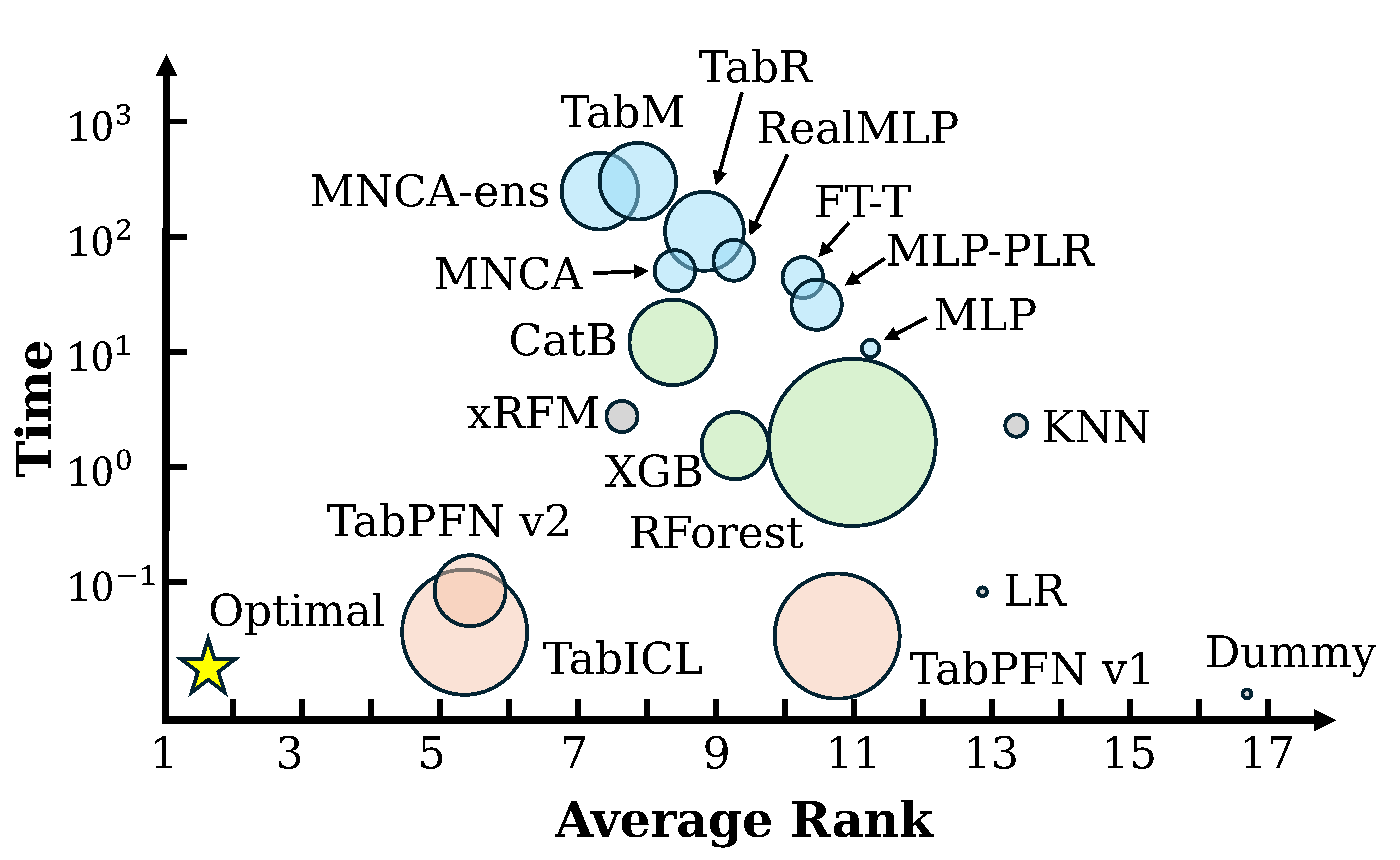
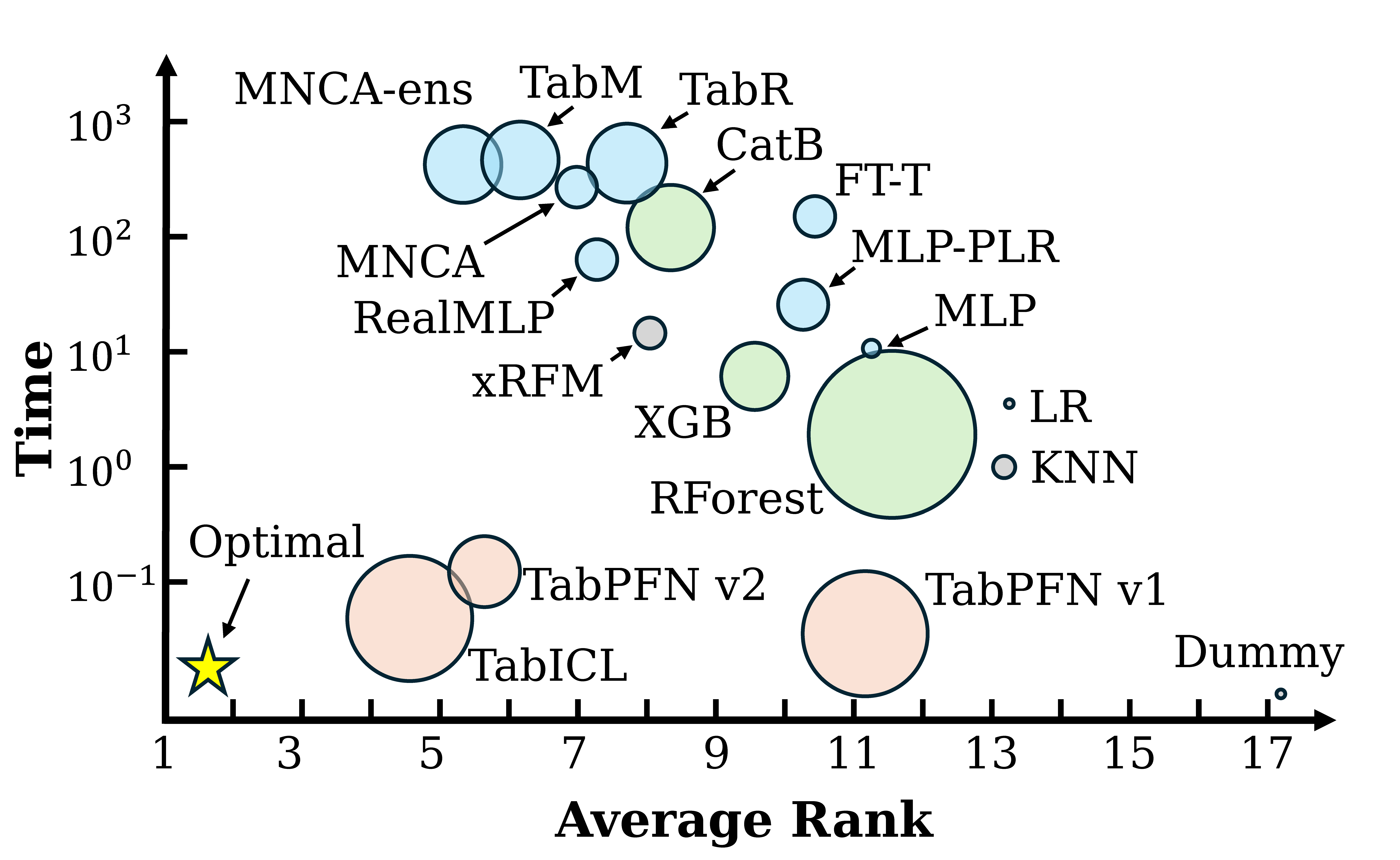
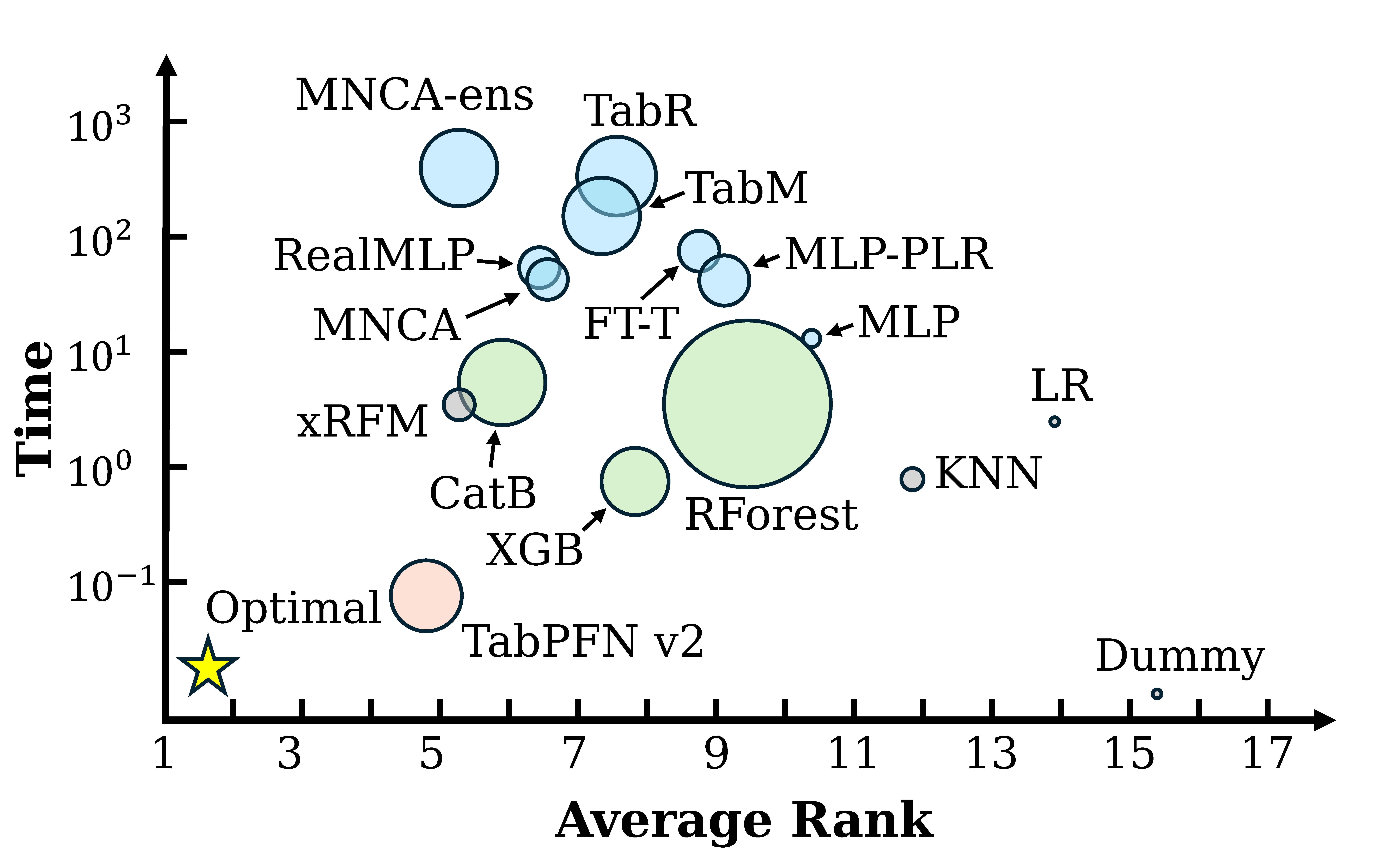
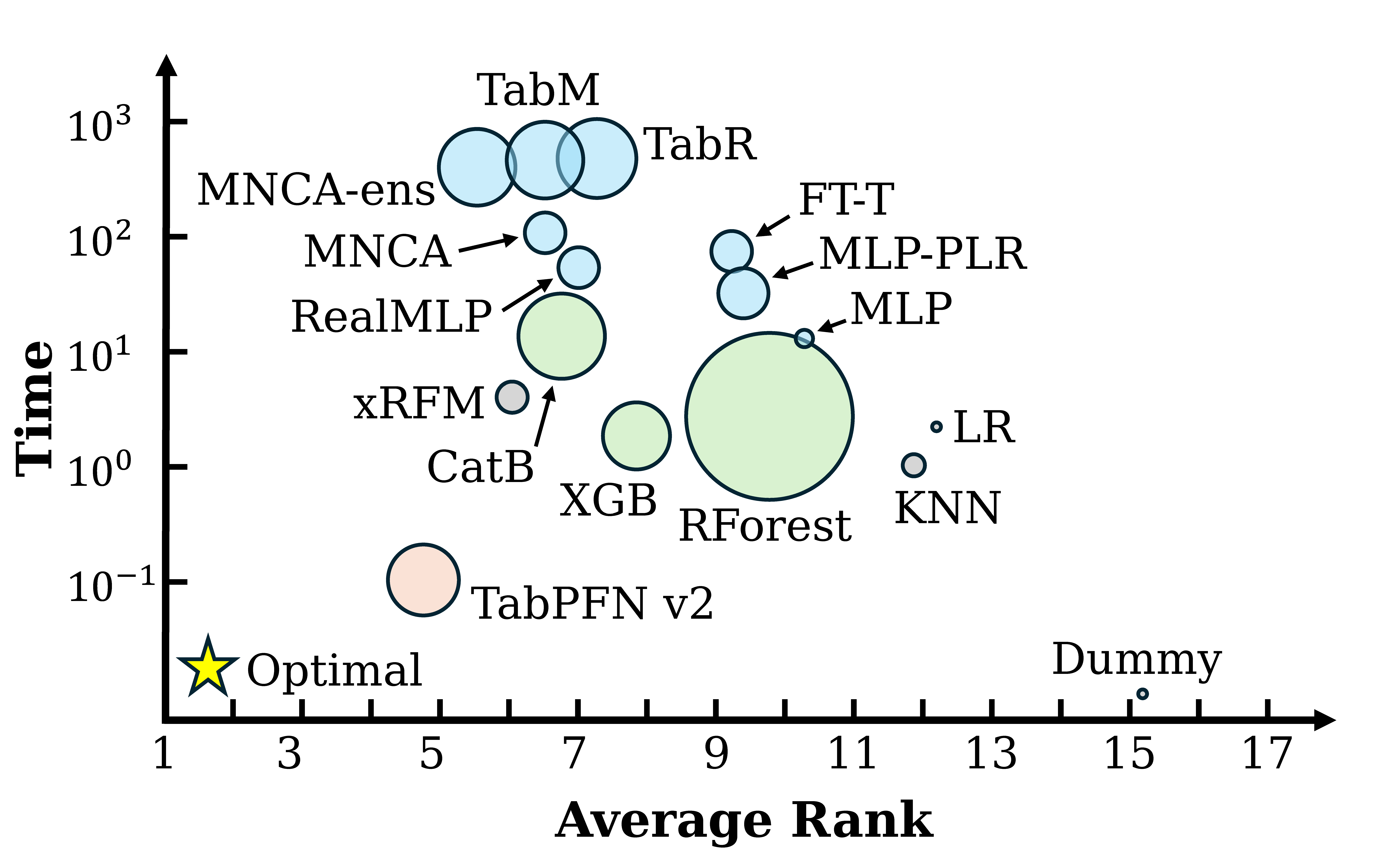
We provide comprehensive evaluations of classical and deep tabular methods based on our toolbox in a fair manner in the Figure. Three tabular prediction tasks, namely, binary classification, multi-class classification, and regression, are considered, and each subfigure represents a different task type.
We use Accuracy and RMSE as the metrics for classification tasks and regression tasks, respectively. To calibrate the metrics, we choose the average performance rank to compare all methods, where a lower rank indicates better performance, following Sheskin (2003). Efficiency is calculated by the average training time in seconds, with lower values denoting better time efficiency. The model size is visually indicated by the radius of the circles, offering a quick glance at the trade-off between model complexity and performance.
👨🏫 Acknowledgments
We thank the following repos for providing helpful components/functions in our work:
- Rtdl-revisiting-models
- Rtdl-num-embeddings
- Tabular-dl-tabr
- DANet
- TabCaps
- DNNR
- PTaRL
- Saint
- SwitchTab
- TabNet
- TabPFN
- Tabtransformer-pytorch
- TANGOS
- GrowNet
- HyperFast
- BiSHop
- ProtoGate
- Pytabkit
- Excelformer
- GRANDE
- AMFormer
- TabM
- TabICL
- TabAutoPNPNet
- LimiX
- xRFM
- TabDPT
- TabFM
🤗 Contact
If there are any questions, please feel free to propose new features by opening an issue or contact the author: Si-Yang Liu (liusy@lamda.nju.edu.cn) and Hao-Run Cai (caihr@lamda.nju.edu.cn) and Qile Zhou (zhouql@lamda.nju.edu.cn) and Jun-Peng Jiang (jiangjp@lamda.nju.edu.cn) and Huai-Hong Yin (yinhh@lamda.nju.edu.cn) and Tao Zhou ([zhout@lamda.nju.edu.cn]) and Han-Jia Ye (yehj@lamda.nju.edu.cn). Enjoy the code.
🚀 Star History
Thanks LAMDA-PILOT and LAMDA-ZhiJian for the template.
Contributors


Similar repos


Languages
Python
90.1%
HTML
9.0%
A comprehensive toolkit and benchmark for tabular data learning, featuring 35+ deep methods, more than 10 classical methods, and 300 diverse tabular datasets.
Python
862
390 commits
updated Sep 4, 2026
README
🎉 Introduction
Welcome to TALENT, a benchmark with a comprehensive machine learning toolbox designed to enhance model performance on tabular data. TALENT integrates advanced deep learning models, classical algorithms, and efficient hyperparameter tuning, offering robust preprocessing capabilities to optimize learning from tabular datasets. The toolbox is user-friendly and adaptable, catering to both novice and expert data scientists.
TALENT offers the following advantages:
- Diverse Methods: Includes various classical methods, tree-based methods, and the latest popular deep learning methods.
- Extensive Dataset Collection: Equipped with 300 datasets, covering a wide range of task types, size distributions, and dataset domains.
- Customizability: Easily allows the addition of datasets and methods.
- Versatile Support: Supports diverse normalization, encoding, and metrics.
📚Citing TALENT
If you use any content of this repo for your work, please cite the following bib entries:
@article{ye2024closerlookdeeplearning,
         title={A Closer Look at Deep Learning on Tabular Data},
         author={Han-Jia Ye and
         		 Si-Yang Liu and
         		 Hao-Run Cai and
         		 Qi-Le Zhou and
         		 De-Chuan Zhan},
         journal={arXiv preprint arXiv:2407.00956},
         year={2024}
}

@article{JMLR:v26:25-0512,
  author  = {Si-Yang Liu and
			 Hao-Run Cai and
 			 Qi-Le Zhou and
			 Huai-Hong Yin and
			 Tao Zhou and
			 Jun-Peng Jiang and
			 Han-Jia Ye},
  title   = {Talent: A Tabular Analytics and Learning Toolbox},
  journal = {Journal of Machine Learning Research},
  year    = {2025},
  volume  = {26},
  number  = {226},
  pages   = {1--16},
  url     = {http://jmlr.org/papers/v26/25-0512.html}
}
📰 What's New
- [2026-08]🌟 Add TRC (TPAMI 2026), a post-hoc representation corrector that trains and freezes an FT-Transformer backbone before learning representation re-estimation and light-space mapping.
- [2026-07]🌟 Add TabFM (Google Research, zero-shot tabular foundation model) as an optional method via
pip install -U "tabfm[pytorch]". - [2026-06]🌟 Add TabPFN v2.5 (PriorLabs, Nov 2025) and TabDPT (Layer 6 AI, ICL + retrieval). TALENT now ships the full TabPFN family (v1, v2, v2.5, v3) plus TabDPT alongside the other tabular foundation models.
- [2026-06]🌟 Evaluation improvements: calibration metrics (Brier, ECE) are now reported by default for every classifier, decision thresholds are tuned on the validation set for binary classification (used for Accuracy/F1/Precision/Recall; threshold-independent metrics like AUC/LogLoss/Brier/ECE are unaffected), and
RunResultexposes a uniformpredict_proba/predict_labelsinterface regardless of whether the underlying method natively returns logits or probabilities. Bundled checkpoints are now resolved viaimportlib.resourcesso methods work from any working directory. - [2026-05]🌟 Add TabPFN v3 (PriorLabs 2026) and TabICL v2 (ICML 2026, regression support added).
- [2026-03]🌟 We have updated the TALENT-extension datasets and results. Link
- [2025-11]🌟 Add RFM (Science).
- [2025-11]🌟 Add Real-TabPFN.
- [2025-11]🌟 Add LimiX.
- [2025-09]🌟 Add xRFM.
- [2025-08]🌟 Add Mitra.
- [2025-06]🌟 Add TabAutoPNPNet (Electronics 2025).
- [2025-06]🌟 Add TabICL (ICML 2025). The current code is based on TabICL v0.1.2.
- [2025-05]🌟 Check out our three papers MMTU, Tabular-Temporal-Shift, and BETA accepted at ICML 2025!
- [2025-04]🌟 Check out our new survey Representation Learning for Tabular Data: A Comprehensive Survey (Repo). We organize existing methods into three main categories according to their generalization capabilities: specialized, transferable, and general models, which provides a comprehensive taxonomy for deep tabular representation methods.🚀🚀🚀
- [2025-02]🌟 Add T2Gformer (AAAI 2023).
- [2025-02]🌟 Add TabPFN v2 (Nature).
- [2025-02]🌟 Thanks to Hengzhe Zhang for providing a Scikit-Learn compatible wrapper for TALENT!
- [2025-01]🌟 Check out our new baseline ModernNCA (ICLR 2025), inspired by traditional Neighbor Component Analysis, which outperforms both tree-based and other deep tabular models, while also reducing training time and model size!🚀🚀🚀
- [2025-01]🌟 Check out our latest version of the benchmark paper for updated and expanded results and analysis!
- [2025-01]🌟We have curated and released new benchmark datasets, along with updated results of the dataset across a broader range of methods. This update focuses on enhancing dataset quality, including removing duplicates, and correcting tasks where bin-class was mistakenly treated as regression. We have also separated the larger datasets and formed the basic benchmark (300 datasets, including 120 bin-class, 80 multi-class, and 100 regression), and the large benchmark (22 datasets).
- [2024-12]🌟 Add TabM (ICLR 2025).
- [2024-09]🌟 Add Trompt (ICML 2023).
- [2024-09]🌟 Add AMFormer (AAAI 2024).
- [2024-08]🌟 Add GRANDE (ICLR 2024).
- [2024-08]🌟 Add Excelformer (KDD 2024).
- [2024-08]🌟 Add MLP_PLR (NeurIPS 2022).
- [2024-07]🌟 Add RealMLP(NeurIPS 2024).
- [2024-07]🌟 Add ProtoGate (ICML 2024).
- [2024-07]🌟 Add BiSHop (ICML 2024).
- [2024-06]🌟 Check out our new baseline ModernNCA, inspired by traditional Neighbor Component Analysis, which outperforms both tree-based and other deep tabular models, while also reducing training time and model size!
- [2024-06]🌟 Check out our benchmark paper about tabular data, which provides comprehensive evaluations of classical and deep tabular methods based on our toolbox in a fair manner!
🌟 Methods
TALENT integrates an extensive array of 30+ deep learning architectures for tabular data, including but not limited to:
- MLP: A multi-layer neural network, which is implemented according to RTDL.
- ResNet: A DNN that uses skip connections across many layers, which is implemented according to RTDL.
- SNN: An MLP-like architecture utilizing the SELU activation, which facilitates the training of deeper neural networks.
- DANets: A neural network designed to enhance tabular data processing by grouping correlated features and reducing computational complexity.
- TabCaps: A capsule network that encapsulates all feature values of a record into vectorial features.
- DCNv2: Consists of an MLP-like module combined with a feature crossing module, which includes both linear layers and multiplications.
- NODE: A tree-mimic method that generalizes oblivious decision trees, combining gradient-based optimization with hierarchical representation learning.
- GrowNet: A gradient boosting framework that uses shallow neural networks as weak learners.
- TabNet: A tree-mimic method using sequential attention for feature selection, offering interpretability and self-supervised learning capabilities.
- TabR: A deep learning model that integrates a KNN component to enhance tabular data predictions through an efficient attention-like mechanism.
- ModernNCA: A deep tabular model inspired by traditional Neighbor Component Analysis, which makes predictions based on the relationships with neighbors in a learned embedding space.
- DNNR: Enhances KNN by using local gradients and Taylor approximations for more accurate and interpretable predictions.
- AutoInt: A token-based method that uses a multi-head self-attentive neural network to automatically learn high-order feature interactions.
- Saint: A token-based method that leverages row and column attention mechanisms for tabular data.
- TabTransformer: A token-based method that enhances tabular data modeling by transforming categorical features into contextual embeddings.
- FT-Transformer: A token-based method which transforms features to embeddings and applies a series of attention-based transformations to the embeddings.
- TANGOS: A regularization-based method for tabular data that uses gradient attributions to encourage neuron specialization and orthogonalization.
- SwitchTab: A self-supervised method tailored for tabular data that improves representation learning through an asymmetric encoder-decoder framework. Following the original paper, our toolkit uses a supervised learning form, optimizing both reconstruction and supervised loss in each epoch.
- PTaRL: A regularization-based framework that enhances prediction by constructing and projecting into a prototype-based space.
- TabPFN: A general model which involves the use of pre-trained deep neural networks that can be directly applied to any tabular task.
- HyperFast: A meta-trained hypernetwork that generates task-specific neural networks for instant classification of tabular data.
- TabPTM: A general method for tabular data that standardizes heterogeneous datasets using meta-representations, allowing a pre-trained model to generalize to unseen datasets without additional training.
- BiSHop: An end-to-end framework for deep tabular learning which leverages a sparse Hopfield model with adaptable sparsity, enhanced by column-wise and row-wise modules.
- ProtoGate: A prototype-based model for feature selection in HDLSS biomedical data that adapts global and local feature selection to enhance prediction accuracy and interpretability, addressing co-adaptation issues through a non-parametric prototype-based mechanism.
- RealMLP: An improved multilayer perceptron (MLP).
- MLP_PLR: An improved multilayer perceptron (MLP), which utilizes periodic activations.
- Excelformer: A deep learning model for tabular data prediction, featuring a semi-permeable attention module to address rotational invariance, tailored data augmentation, and an attentive feedforward network, making it a reliable solution across diverse datasets.
- GRANDE: A tree-mimic method for learning hard, axis-aligned decision tree ensembles using end-to-end gradient descent.
- AMFormer: A token-based method which improves the transformer architecture for tabular data by incorporating parallel addition and multiplication attention mechanisms, utilizing prompt tokens to constrain feature interactions.
- Trompt: A prompt-based deep neural network for tabular data that separates learning into intrinsic column features and sample-specific feature importance.
- TabM : A model based on MLP and variations of BatchEnsemble.
- TabPFN v2: A general model which involves the use of pre-trained deep neural networks that can be directly applied to any tabular task.
- T2Gformer: A Transformer network for tabular learning that processes data guided by relation graphs and uses a Cross-level Readout for global semantics in prediction.
- TabICL: A comparable tabular foundation model with performance on par with TabPFN v2.
- TabAutoPNPNet: A tabular model based on periodicity, particularly the Fourier transform and Chebyshev polynomials, with performance on par with or superior to FT-Transformer.
- Mitra: A tabular foundation model learned with mixed synthetic priors.
- LimiX: A tabular foundation model that leverages transformers to support a wide range of tasks, from prediction to imputation and causal inference, within a unified architecture.
- Real-TabPFN: An enhanced tabular foundation model that extends TabPFNv2 through continued pre-training on real-world datasets for classification tasks.
- RFM: A non-deep, backpropagation-free feature learning algorithm, iteratively applies AGOP to a kernel machine to adaptively learn task-specific features.
- xRFM: A tabular model that combines RFMs with an adaptive tree structure, enabling it to learn features local to data subsets and scale log-linearly with the number of samples.
- TabPFN v3: TabPFN v3 (PriorLabs 2026), with native context up to ~1M rows × 200 features, 160-class support, and an optional thinking mode. Requires
pip install -U 'tabpfn>=8.0.0'. - TabICL v2: TabICL v2 (ICML 2026), now supporting both classification and regression (via
TabICLRegressor), with native quantile regression. Requirespip install -U 'tabicl>=2.0.0'. - TabPFN v2.5: TabPFN v2.5 (PriorLabs, Nov 2025), the intermediate release between v2 and v3. Scales in-context learning to ~50k rows × 2k features. Requires
pip install -U 'tabpfn>=8.0.0'. - TabDPT: A tabular foundation model from Layer 6 AI that combines in-context learning with retrieval and self-supervised pre-training on real data, removing fixed context-size limits. Requires
pip install -U tabdpt. - TabFM: Google's zero-shot tabular foundation model for classification and regression, using in-context learning over training rows as context. Requires
pip install -U "tabfm[pytorch]"; the upstream model weights use the TabFM Non-Commercial License. - TRC: A post-hoc Tabular Representation Corrector that freezes a trained backbone, learns to remove representation shift, and maps corrected representations into a compact light-embedding space.
🔧 If you want to check the default hyperparameters and hyperparameter search spaces of all methods, please visit:
👉 https://6sy666.github.io/TALENT-Configs/
☄️ How to Use TALENT
🕹️ Quick Start
Install with the newest version through GitHub:
$ pip install git+https://github.com/LAMDA-Tabular/TALENT.git@main --upgrade
Try a demo train_model_deep.py :
from tqdm import tqdm
from TALENT.model.utils import get_deep_args, show_results, tune_hyper_parameters, get_method, set_seeds
from TALENT.model.lib.data import get_dataset
from TALENT.model.lib.evaluation import evaluate
from TALENT.model.method_registry import get_method_spec

if __name__ == '__main__':
    loss_list, results_list, time_list = [], [], []
    args, default_para, opt_space = get_deep_args()
    train_val_data, test_data, info = get_dataset(args.dataset, args.dataset_path)
    if args.tune:
        args = tune_hyper_parameters(args, opt_space, train_val_data, info)

    spec = get_method_spec(args.model_type)
    for seed in tqdm(range(args.seed_num)):
        args.seed = seed    # update seed
        set_seeds(args.seed)
        method = get_method(args.model_type)(args, info['task_type'] == 'regression')
        method.fit(train_val_data, info)
        # evaluate() standardizes predict_proba and (for binary tasks) tunes
        # the decision threshold on the validation split.
        eval_result = evaluate(
            method, train_val_data, test_data, info,
            model_name=args.evaluate_option,
            output_type=spec.output_type,
            tune_threshold=True,
        )
        loss_list.append(eval_result["loss"])
        results_list.append(eval_result["metrics"])
        metric_name = eval_result["metric_names"]
        time_list.append((method.fit_time, method.predict_time))

    show_results(args, info, metric_name, loss_list, results_list, time_list)
python train_model_deep.py --model_type MODEL_NAME
For TRC, use integer-encoded categorical features as required by its FT-Transformer backbone:
python train_model_deep.py --model_type trc --cat_policy indices
TRC first trains the backbone for at most --max_epoch epochs, freezes it,
and then trains the representation corrector for at most the same number of
epochs. Ablations and paper hyperparameters are available in
TALENT/configs/default/trc.json; set shift_estimator, space_mapping, or
loss_orth to false to disable the corresponding component.
🐍 Python API (library mode)
TALENT also exposes a library-style API alongside the CLI scripts, so you can call methods directly from Python or a Jupyter notebook without manipulating sys.argv:
import TALENT
from TALENT.model.lib.data import get_dataset

train_val, test, info = get_dataset("your_dataset", "./data")

# Single-seed run
result = TALENT.run("tabpfn_v3", train_val, test, info)
print(dict(zip(result.metric_names, result.metrics)))
print("Fit time:", result.fit_time, "Predict time:", result.predict_time)

# Multi-seed run with hyperparameter tuning
result = TALENT.run("catboost", train_val, test, info, tune=True, n_trials=50, seed_num=3)
print("Mean metrics:", dict(zip(result.metric_names, result.metrics_mean)))
print("Std metrics:",  dict(zip(result.metric_names, result.metrics_std)))
Choosing the HPO objective metric
By default the hyperparameter search optimizes TALENT's historical objective
(validation Accuracy for classification, MAE / RMSE for regression).
Pass tune_metric to optimize any metric that Method.metric reports instead;
the optimization direction is inferred automatically.
# Tune on ROC-AUC (classification) or R2 (regression) rather than the default
result = TALENT.run("catboost", train_val, test, info,
                    tune=True, n_trials=50, tune_metric="AUC")

from TALENT.model.lib.tuning_metric import supported_tune_metrics
print(supported_tune_metrics())
# ('Accuracy', 'Avg_Recall', 'Avg_Precision', 'F1', 'AUC',
#  'LogLoss', 'Brier', 'ECE', 'R2', 'MAE', 'RMSE')
tune_metric is also exposed on the CLI (--tune_metric AUC). It defaults to
None, which preserves the previous behavior exactly. A few methods optimize an
internal training loss and do not accept it (tabnet, ptarl, tabcaps); use
the default for those.
Introspect or filter methods via the unified registry:
# What does this method need?
spec = TALENT.get_method_spec("tabicl_v2")
print(spec.cat_policy, spec.normalization, spec.supports_regression, spec.supports_hpo)

# List all GPU-only deep methods that support regression
for s in TALENT.list_methods(
    architecture=TALENT.Architecture.DEEP,
    hardware=TALENT.Hardware.GPU,
    supports_regression=True,
):
    print(s.name)
Both the CLI scripts and the Python API are backed by the same MethodSpec registry, so adding a new method requires only a single registry entry (see TALENT/model/method_registry.py).
The registry is also the single source of truth for foundation-model training-row caps (train_row_limit): TabPFN 1k, TabPFN v2 / Real-TabPFN / Mitra 10k, TabPFN v2.5 50k, TabICL 500k, TabPFN v3 / TabICL v2 1M, TabDPT / TabFM no registry cap. The cap is applied automatically when fitting; setting config['general']['sample_size'] overrides it for a single run.
For researchers:
🕹️ Clone
Clone this GitHub repository:
git clone https://github.com/LAMDA-Tabular/TALENT
cd TALENT/test
🔑 Run experiment
-
Edit the
configs/default/[MODEL_NAME].jsonandconfig/opt_space/[MODEL_NAME].jsonfor global settings and hyperparameters. -
Run:
python train_model_deep.py --model_type MODEL_NAMEfor deep methods, or:
python train_model_classical.py --model_type MODEL_NAMEfor classical methods.
🛠️ How to Add New Methods
For methods like the MLP class that only need to design the model, you only need to:
- Add the model class in
model/models. - Inherit from
model/methods/base.pyand override theconstruct_model()method in the new class. - Register the method in the unified registry
model/method_registry.pyby appending aMethodSpec(...)entry. The CLI argparsechoicesandget_method()are both derived from this registry, so no other dispatcher edits are needed. - Add the parameter settings for the new method in
configs/default/[MODEL_NAME].jsonandconfigs/opt_space/[MODEL_NAME].json.
For other methods that require changing the training process, partially override functions based on model/methods/base.py. For details, refer to the implementation of other methods in model/methods/.
See our Contribution Guide for more details.
📦 Dependencies
pip install -r requirements.txt
If you want to use TabR, you have to manually install faiss, which is only available on conda:
conda install faiss-gpu -c pytorch
🗂️ Benchmark Datasets
Datasets are available at Google Drive.
📂 How to Place Datasets
Datasets are placed in the project's current directory, corresponding to the file name specified by args.dataset_path. For instance, if the project is LAMDA-TALENT, the data should be placed in LAMDA-TALENT/args.dataset_path/args.dataset.
Each dataset folder args.dataset consists of:
-
Numeric features:
N_train/val/test.npy(can be omitted if there are no numeric features) -
Categorical features:
C_train/val/test.npy(can be omitted if there are no categorical features) -
Labels:
y_train/val/test.npy -
info.json, which must include the following three contents (task_type can be "regression", "multiclass" or "binclass"):{ "task_type": "regression", "n_num_features": 10, "n_cat_features": 10 }
📝 Experimental Results
We provide comprehensive evaluations of classical and deep tabular methods based on our toolbox in a fair manner in the Figure. Three tabular prediction tasks, namely, binary classification, multi-class classification, and regression, are considered, and each subfigure represents a different task type.
We use Accuracy and RMSE as the metrics for classification tasks and regression tasks, respectively. To calibrate the metrics, we choose the average performance rank to compare all methods, where a lower rank indicates better performance, following Sheskin (2003). Efficiency is calculated by the average training time in seconds, with lower values denoting better time efficiency. The model size is visually indicated by the radius of the circles, offering a quick glance at the trade-off between model complexity and performance.
👨🏫 Acknowledgments
We thank the following repos for providing helpful components/functions in our work:
- Rtdl-revisiting-models
- Rtdl-num-embeddings
- Tabular-dl-tabr
- DANet
- TabCaps
- DNNR
- PTaRL
- Saint
- SwitchTab
- TabNet
- TabPFN
- Tabtransformer-pytorch
- TANGOS
- GrowNet
- HyperFast
- BiSHop
- ProtoGate
- Pytabkit
- Excelformer
- GRANDE
- AMFormer
- TabM
- TabICL
- TabAutoPNPNet
- LimiX
- xRFM
- TabDPT
- TabFM
🤗 Contact
If there are any questions, please feel free to propose new features by opening an issue or contact the author: Si-Yang Liu (liusy@lamda.nju.edu.cn) and Hao-Run Cai (caihr@lamda.nju.edu.cn) and Qile Zhou (zhouql@lamda.nju.edu.cn) and Jun-Peng Jiang (jiangjp@lamda.nju.edu.cn) and Huai-Hong Yin (yinhh@lamda.nju.edu.cn) and Tao Zhou ([zhout@lamda.nju.edu.cn]) and Han-Jia Ye (yehj@lamda.nju.edu.cn). Enjoy the code.
🚀 Star History
Thanks LAMDA-PILOT and LAMDA-ZhiJian for the template.
Similar repos
Contributors
Languages
Python
90.1%
HTML
9.0%