
Local desktop lunar HDR and exposure fusion with FITS, alignment, Mineral Moon, star controls, cropping and signatures.
Python
0
5 commits
updated Sep 27, 2026
See what people are saying
README
Lunar HDR Studio
A local desktop app for combining two or more lunar exposures and creating a Mineral Moon look. Version 0.4.0 supports FITS, any number of exposures, star backgrounds, custom signatures and cropping. Your photographs stay on your computer. The app interface is currently in Slovak.
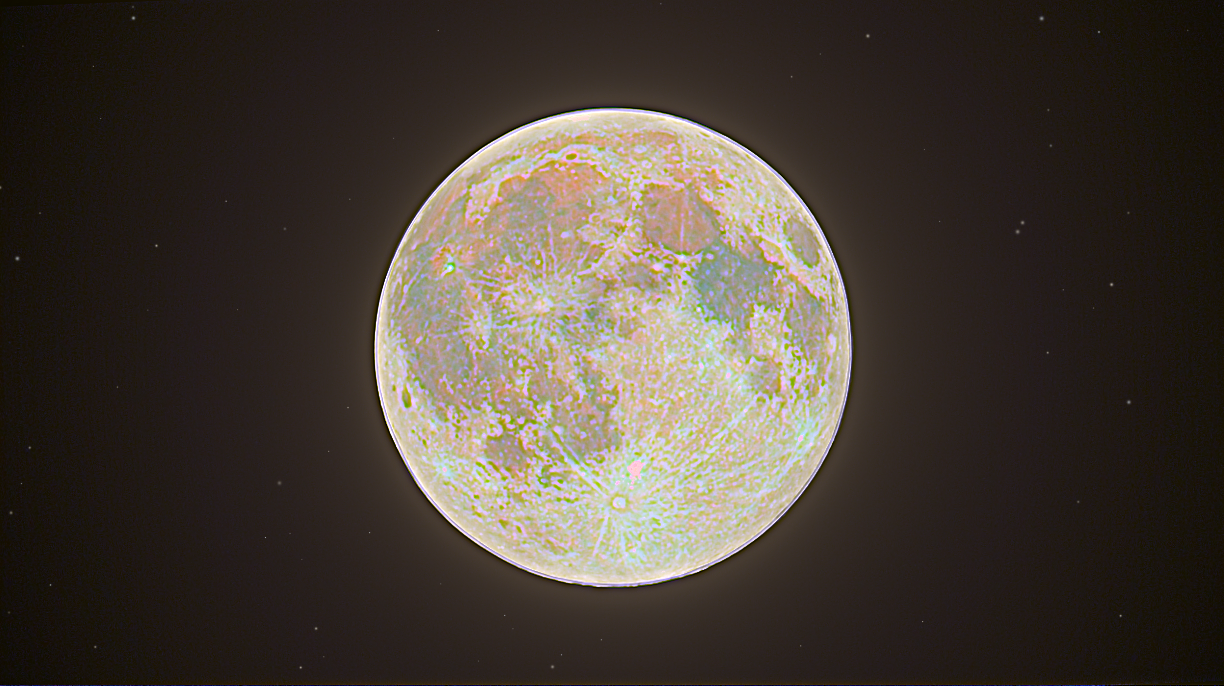
Moon photographed with DWARF Mini and processed in Lunar HDR Studio from three exposures: one underexposed, one normally exposed and one overexposed.
Quick start
Standalone apps: find published packages in Releases. On a Mac, open LunarHDR.app; Python is not required. ZIP packages for macOS Apple silicon, macOS Intel, Windows x64 and Linux x64 are also published as artifacts of successful GitHub Actions builds.
Clone and run on your own computer: install Git and Python 3.11–3.14, then clone the repository:
git clone https://github.com/Kwispy232/lunar-hdr-studio.git
cd lunar-hdr-studio
Run the launcher for your operating system from that directory:
Windows — PowerShell or Command Prompt
.\run.bat
You can also double-click run.bat. The launcher uses the Python py launcher when available, or python from PATH.
macOS — Terminal
bash run.command
You can also double-click run.command in Finder.
Linux — Terminal
sh run.sh
The launchers find a supported Python installation, create a local .venv environment and install the pinned dependencies. The first launch requires an internet connection; later launches reuse the environment without running pip when the installed versions match. Python 3.11 is the version used in CI. Python 3.15 is not supported by the pinned Qt dependency. Linux requires a graphical desktop and Qt system libraries. On Ubuntu/Debian, install them with:
sudo apt install python3-venv libegl1 libopengl0 libxkbcommon-x11-0 libxcb-cursor0
To check setup without opening the app, run the same launcher with --check. If an existing .venv was created with an unsupported Python version or is incomplete, rename that folder and rerun the launcher. Your image files are unaffected.
The pinned binary dependencies target modern systems: macOS 13+, Windows 10/11, and Linux x86_64 with glibc 2.34+ (such as Ubuntu 22.04+). Version 0.4.0 passed tests, packaging and packaged startup checks on all four targets listed above. Interactive app testing has been performed on macOS; successful CI builds do not replace visual testing on each target computer.
If you prefer manual setup, run the following commands from the cloned repository. No environment activation is required.
Windows:
py -3.11 -m venv .venv
.venv\Scripts\python.exe -m pip install -r requirements.txt
.venv\Scripts\python.exe main.py
macOS / Linux:
python3 -m venv .venv
.venv/bin/python -m pip install -r requirements.txt
.venv/bin/python main.py
Workflow
- Load two or more photographs. Add further exposures to the list, replace individual frames or remove them. Choose a sharp, well-exposed frame as the reference; it determines the alignment canvas and output dimensions before cropping.
- Set each frame's EV relative to the reference. When every FITS file contains an exposure time, EV values are filled from the headers. For example, exposures of 1/1000, 1/250 and 1/60 second at the same ISO and aperture are approximately −2, 0 and +2 EV. If metadata is missing, enter EV values manually; the initial zeros are not estimates of the actual exposure. JPEG EXIF exposure times are not read automatically.
- Choose HDR or exposure fusion, then align and merge. Inspect the alignment diagnostics and use manual adjustment if registration is uncertain.
- Try Mineral Moon, or adjust saturation, temperature, contrast, detail and the other sliders. Compare the result with the selected reference frame.
- In Dokončenie (Finishing), at the bottom of the right panel, keep the original star background, suppress small bright points or add synthetic stars as a visual effect. These options do not modify the source files.
- Select a crop with the mouse and optionally enable a custom text signature. You can reset the crop or edit the signature.
- Export the finished image as PNG, JPEG or 16-bit TIFF. For further HDR processing, export a linear Radiance
.hdrfile.
How the processing modes work
HDR from ordinary images converts input sRGB colors to linear values, accounts for the supplied EV values and combines exposures with weighted blending. The floating-point output preserves values above 1; the preview uses tone mapping. This produces relative HDR under an assumed sRGB response. It is not sensor calibration or a precise brightness measurement.
HDR from FITS uses the original linear samples after applying FITS BSCALE/BZERO scaling. Preview contrast does not change the samples used for merging. EXPTIME values allow intensity to be normalized per unit time; inputs already marked as rates are not divided by exposure time again. Frames must have compatible units and calibration. Supported units include ADU, DN, counts, electrons and photons, as well as their per-second forms. Other calibrated units, such as Jy/sr, require conversion first, or you can use visual exposure fusion. Automatic EV suggestions assume the same gain, aperture and filters. When exposure times differ by more than 1000×, the app warns you to check stack normalization. For stacks that have already been normalized in brightness, verify EV manually: total integration time may not represent a brightness difference in the stored pixels. Do not combine ordinary sRGB images and FITS data with physical units in one radiometric HDR merge; use exposure fusion for a visual combination.
Exposure fusion combines usable regions from the exposures into a displayable image. It does not produce linear HDR and cannot export HDR radiance. The distinction between HDR and exposure fusion is also covered in the OpenCV documentation.
Mineral Moon enhances existing color differences. The Neutralizácia farieb (Color neutralization) slider first balances the average color cast in the bright part of the lunar disk. It assumes the Moon is approximately neutral gray, and its strength can be reduced or disabled. The Mineral Moon preset enables it so that the preset does not simply amplify an overall yellow or green cast. It cannot recover real color information from monochrome data and is not a mineralogical analysis. Color noise and white balance affect the result. Your exposure stack controls the amount of surrounding glow. Mineral Moon selectively enhances recorded surface colors while preserving their brightness and protecting the surrounding glow. It does not impose a blue/copper palette: the achievable colors and detail depend on the captures. Star suppression remains a separate finishing choice.
PNG, JPEG and TIFF exports include slider adjustments, the selected star background, crop and signature. Radiance HDR exports contain the full base linear merge, without creative adjustments, cropping, signatures or tone mapping. Added stars are a deterministic visual effect, not recorded astronomical objects. Star suppression estimates small bright points outside the lunar disk, so inspect the preview.
The save dialog starts at an absolute path in your Pictures folder, or your home folder as a fallback. After a successful export, the app remembers the chosen folder for the current session. Write errors identify the destination and explain the problem; the result remains available for another export attempt.
Supported inputs and practical limits
- JPEG, PNG and TIFF; 8-bit and 16-bit inputs, RGB and grayscale.
- FITS (
.fits,.fit,.fts, including gzip and.fits.fz): 2D monochrome images and RGB image arrays. The first image HDU is used, including image extensions and compressed HDUs. Integer and floating-point values and FITS scaling are supported; working image arrays use float32. - FITS saturation levels are read from
SATURATE,SATLEVELorSATURLEV. Otherwise, integer data uses the storage type's upper limit. If the sensor saturates earlier, add the correct level to the FITS header. The maximum value in a floating-point image is not automatically treated as clipped. - Invalid FITS samples (
NaN,Inf,BLANK) are masked. Negative calibrated samples are not individually shifted by adding a constant; negative values in the final nonnegative HDR output are clipped with a warning. Spectral/time cubes and undeveloped 2D Bayer data are not treated as RGB: debayer them or select an image plane first. Three-channel RGB exports with a staleBAYERPATheader, such as some DWARF exports, are read as already-developed RGB with a warning and are not debayered again. - For camera RAW or SER files, export a color TIFF first. Use sRGB when exporting: full ICC color management and RAW development are outside the scope of this version.
- Frames should show the same lunar phase, captured close together, with a visible disk and shared surface detail. Extreme cropping, clouds, weak signal or complete clipping can prevent automatic alignment.
- Registration supports translation, scaling and rotation. It does not compensate for local atmospheric distortion or trails from moving stars.
- Detail clipped in every exposure cannot be recovered. The interface has no fixed frame-count limit, but large stacks at full resolution require sufficient RAM.
- This version does not save or restore complete editing projects.
Documentation photograph and built-in demo
The cover image in this README is a real photographic result from exactly three DWARF Mini photos: underexposed, normally exposed and overexposed. The finished PNG was supplied by the project maintainer and is reproduced unchanged. The source photos are not distributed.
The built-in demo is separate: it is an original procedurally generated image labeled SYNTHETIC DEMO. It contains no user photographs or external reference image. It is intended for trying registration and the controls; it is not a real photograph of the Moon, a map of its surface or mineralogical data. The generator is in lunarhdr/publicdemo.py, and image provenance is documented in docs/IMAGES.md and the bundled asset notes.
Building standalone apps
Use the Python executable from your local environment for these commands: .venv\Scripts\python.exe on Windows or .venv/bin/python on macOS/Linux, in place of python below.
python -m pip install -r requirements-dev.txt
python -m pytest -q
python build.py
The result is placed in dist/. Build standalone packages on the target operating system and architecture. The .github/workflows/build.yml workflow tests and builds macOS Apple silicon, macOS Intel, Windows x64 and Linux x64 packages on pushes to main, pull requests and manual runs. Verified 0.4.0 build: all four platforms passed, including packaged startup and bundled preview loading. macOS and Linux each passed 113 tests; Windows passed 112 because it has one launcher instead of two Unix launchers. A fresh anonymous clone was also installed and launched successfully on macOS with Python 3.14.2. ZIP archives are available from each successful run's artifacts. Runner platforms are described in the GitHub documentation; Qt for Python supports these three desktop operating systems.
The Mac package is a development build without Apple Developer notarization. See VALIDATION.md for local and CI checks. A successful build does not replace visual testing on the target computer.
Technology
Python, PySide6/Qt, OpenCV, NumPy, Pillow, tifffile and Astropy. Dependency versions are pinned in requirements.txt. FITS scaling and HDU reading use Astropy FITS. Qt/PySide libraries are dynamically linked; dependency licenses are included in their distributions. Bundled license notices are in lunarhdr/assets/licenses/. Public builds use these dynamic libraries; Apple Developer notarization and Windows code signing are not configured.
License
The project's original source code is available under the MIT License. Third-party dependencies retain their own licenses; bundled notices are in lunarhdr/assets/licenses/.
Photographs, reference images and other assets have separate rights and credits. The MIT code license does not relicense third-party images. See image provenance for the photographic example and bundled asset provenance for the demo. The real lunar example in this README is used with the maintainer's authorization; its source photographs are not included.
Contributors

5 commits
Similar repos


Languages
Python
99.2%
Local desktop lunar HDR and exposure fusion with FITS, alignment, Mineral Moon, star controls, cropping and signatures.
Python
0
5 commits
updated Sep 27, 2026
See what people are saying
README
Lunar HDR Studio
A local desktop app for combining two or more lunar exposures and creating a Mineral Moon look. Version 0.4.0 supports FITS, any number of exposures, star backgrounds, custom signatures and cropping. Your photographs stay on your computer. The app interface is currently in Slovak.
Moon photographed with DWARF Mini and processed in Lunar HDR Studio from three exposures: one underexposed, one normally exposed and one overexposed.
Quick start
Standalone apps: find published packages in Releases. On a Mac, open LunarHDR.app; Python is not required. ZIP packages for macOS Apple silicon, macOS Intel, Windows x64 and Linux x64 are also published as artifacts of successful GitHub Actions builds.
Clone and run on your own computer: install Git and Python 3.11–3.14, then clone the repository:
git clone https://github.com/Kwispy232/lunar-hdr-studio.git
cd lunar-hdr-studio
Run the launcher for your operating system from that directory:
Windows — PowerShell or Command Prompt
.\run.bat
You can also double-click run.bat. The launcher uses the Python py launcher when available, or python from PATH.
macOS — Terminal
bash run.command
You can also double-click run.command in Finder.
Linux — Terminal
sh run.sh
The launchers find a supported Python installation, create a local .venv environment and install the pinned dependencies. The first launch requires an internet connection; later launches reuse the environment without running pip when the installed versions match. Python 3.11 is the version used in CI. Python 3.15 is not supported by the pinned Qt dependency. Linux requires a graphical desktop and Qt system libraries. On Ubuntu/Debian, install them with:
sudo apt install python3-venv libegl1 libopengl0 libxkbcommon-x11-0 libxcb-cursor0
To check setup without opening the app, run the same launcher with --check. If an existing .venv was created with an unsupported Python version or is incomplete, rename that folder and rerun the launcher. Your image files are unaffected.
The pinned binary dependencies target modern systems: macOS 13+, Windows 10/11, and Linux x86_64 with glibc 2.34+ (such as Ubuntu 22.04+). Version 0.4.0 passed tests, packaging and packaged startup checks on all four targets listed above. Interactive app testing has been performed on macOS; successful CI builds do not replace visual testing on each target computer.
If you prefer manual setup, run the following commands from the cloned repository. No environment activation is required.
Windows:
py -3.11 -m venv .venv
.venv\Scripts\python.exe -m pip install -r requirements.txt
.venv\Scripts\python.exe main.py
macOS / Linux:
python3 -m venv .venv
.venv/bin/python -m pip install -r requirements.txt
.venv/bin/python main.py
Workflow
- Load two or more photographs. Add further exposures to the list, replace individual frames or remove them. Choose a sharp, well-exposed frame as the reference; it determines the alignment canvas and output dimensions before cropping.
- Set each frame's EV relative to the reference. When every FITS file contains an exposure time, EV values are filled from the headers. For example, exposures of 1/1000, 1/250 and 1/60 second at the same ISO and aperture are approximately −2, 0 and +2 EV. If metadata is missing, enter EV values manually; the initial zeros are not estimates of the actual exposure. JPEG EXIF exposure times are not read automatically.
- Choose HDR or exposure fusion, then align and merge. Inspect the alignment diagnostics and use manual adjustment if registration is uncertain.
- Try Mineral Moon, or adjust saturation, temperature, contrast, detail and the other sliders. Compare the result with the selected reference frame.
- In Dokončenie (Finishing), at the bottom of the right panel, keep the original star background, suppress small bright points or add synthetic stars as a visual effect. These options do not modify the source files.
- Select a crop with the mouse and optionally enable a custom text signature. You can reset the crop or edit the signature.
- Export the finished image as PNG, JPEG or 16-bit TIFF. For further HDR processing, export a linear Radiance
.hdrfile.
How the processing modes work
HDR from ordinary images converts input sRGB colors to linear values, accounts for the supplied EV values and combines exposures with weighted blending. The floating-point output preserves values above 1; the preview uses tone mapping. This produces relative HDR under an assumed sRGB response. It is not sensor calibration or a precise brightness measurement.
HDR from FITS uses the original linear samples after applying FITS BSCALE/BZERO scaling. Preview contrast does not change the samples used for merging. EXPTIME values allow intensity to be normalized per unit time; inputs already marked as rates are not divided by exposure time again. Frames must have compatible units and calibration. Supported units include ADU, DN, counts, electrons and photons, as well as their per-second forms. Other calibrated units, such as Jy/sr, require conversion first, or you can use visual exposure fusion. Automatic EV suggestions assume the same gain, aperture and filters. When exposure times differ by more than 1000×, the app warns you to check stack normalization. For stacks that have already been normalized in brightness, verify EV manually: total integration time may not represent a brightness difference in the stored pixels. Do not combine ordinary sRGB images and FITS data with physical units in one radiometric HDR merge; use exposure fusion for a visual combination.
Exposure fusion combines usable regions from the exposures into a displayable image. It does not produce linear HDR and cannot export HDR radiance. The distinction between HDR and exposure fusion is also covered in the OpenCV documentation.
Mineral Moon enhances existing color differences. The Neutralizácia farieb (Color neutralization) slider first balances the average color cast in the bright part of the lunar disk. It assumes the Moon is approximately neutral gray, and its strength can be reduced or disabled. The Mineral Moon preset enables it so that the preset does not simply amplify an overall yellow or green cast. It cannot recover real color information from monochrome data and is not a mineralogical analysis. Color noise and white balance affect the result. Your exposure stack controls the amount of surrounding glow. Mineral Moon selectively enhances recorded surface colors while preserving their brightness and protecting the surrounding glow. It does not impose a blue/copper palette: the achievable colors and detail depend on the captures. Star suppression remains a separate finishing choice.
PNG, JPEG and TIFF exports include slider adjustments, the selected star background, crop and signature. Radiance HDR exports contain the full base linear merge, without creative adjustments, cropping, signatures or tone mapping. Added stars are a deterministic visual effect, not recorded astronomical objects. Star suppression estimates small bright points outside the lunar disk, so inspect the preview.
The save dialog starts at an absolute path in your Pictures folder, or your home folder as a fallback. After a successful export, the app remembers the chosen folder for the current session. Write errors identify the destination and explain the problem; the result remains available for another export attempt.
Supported inputs and practical limits
- JPEG, PNG and TIFF; 8-bit and 16-bit inputs, RGB and grayscale.
- FITS (
.fits,.fit,.fts, including gzip and.fits.fz): 2D monochrome images and RGB image arrays. The first image HDU is used, including image extensions and compressed HDUs. Integer and floating-point values and FITS scaling are supported; working image arrays use float32. - FITS saturation levels are read from
SATURATE,SATLEVELorSATURLEV. Otherwise, integer data uses the storage type's upper limit. If the sensor saturates earlier, add the correct level to the FITS header. The maximum value in a floating-point image is not automatically treated as clipped. - Invalid FITS samples (
NaN,Inf,BLANK) are masked. Negative calibrated samples are not individually shifted by adding a constant; negative values in the final nonnegative HDR output are clipped with a warning. Spectral/time cubes and undeveloped 2D Bayer data are not treated as RGB: debayer them or select an image plane first. Three-channel RGB exports with a staleBAYERPATheader, such as some DWARF exports, are read as already-developed RGB with a warning and are not debayered again. - For camera RAW or SER files, export a color TIFF first. Use sRGB when exporting: full ICC color management and RAW development are outside the scope of this version.
- Frames should show the same lunar phase, captured close together, with a visible disk and shared surface detail. Extreme cropping, clouds, weak signal or complete clipping can prevent automatic alignment.
- Registration supports translation, scaling and rotation. It does not compensate for local atmospheric distortion or trails from moving stars.
- Detail clipped in every exposure cannot be recovered. The interface has no fixed frame-count limit, but large stacks at full resolution require sufficient RAM.
- This version does not save or restore complete editing projects.
Documentation photograph and built-in demo
The cover image in this README is a real photographic result from exactly three DWARF Mini photos: underexposed, normally exposed and overexposed. The finished PNG was supplied by the project maintainer and is reproduced unchanged. The source photos are not distributed.
The built-in demo is separate: it is an original procedurally generated image labeled SYNTHETIC DEMO. It contains no user photographs or external reference image. It is intended for trying registration and the controls; it is not a real photograph of the Moon, a map of its surface or mineralogical data. The generator is in lunarhdr/publicdemo.py, and image provenance is documented in docs/IMAGES.md and the bundled asset notes.
Building standalone apps
Use the Python executable from your local environment for these commands: .venv\Scripts\python.exe on Windows or .venv/bin/python on macOS/Linux, in place of python below.
python -m pip install -r requirements-dev.txt
python -m pytest -q
python build.py
The result is placed in dist/. Build standalone packages on the target operating system and architecture. The .github/workflows/build.yml workflow tests and builds macOS Apple silicon, macOS Intel, Windows x64 and Linux x64 packages on pushes to main, pull requests and manual runs. Verified 0.4.0 build: all four platforms passed, including packaged startup and bundled preview loading. macOS and Linux each passed 113 tests; Windows passed 112 because it has one launcher instead of two Unix launchers. A fresh anonymous clone was also installed and launched successfully on macOS with Python 3.14.2. ZIP archives are available from each successful run's artifacts. Runner platforms are described in the GitHub documentation; Qt for Python supports these three desktop operating systems.
The Mac package is a development build without Apple Developer notarization. See VALIDATION.md for local and CI checks. A successful build does not replace visual testing on the target computer.
Technology
Python, PySide6/Qt, OpenCV, NumPy, Pillow, tifffile and Astropy. Dependency versions are pinned in requirements.txt. FITS scaling and HDU reading use Astropy FITS. Qt/PySide libraries are dynamically linked; dependency licenses are included in their distributions. Bundled license notices are in lunarhdr/assets/licenses/. Public builds use these dynamic libraries; Apple Developer notarization and Windows code signing are not configured.
License
The project's original source code is available under the MIT License. Third-party dependencies retain their own licenses; bundled notices are in lunarhdr/assets/licenses/.
Photographs, reference images and other assets have separate rights and credits. The MIT code license does not relicense third-party images. See image provenance for the photographic example and bundled asset provenance for the demo. The real lunar example in this README is used with the maintainer's authorization; its source photographs are not included.
Similar repos
Contributors
5 commits
Languages
Python
99.2%