Stelliberty Remake: A high-performance, visually appealing, and modern cross-platform network client.
See the code


| Home · Light | Home · Dark |
|---|---|
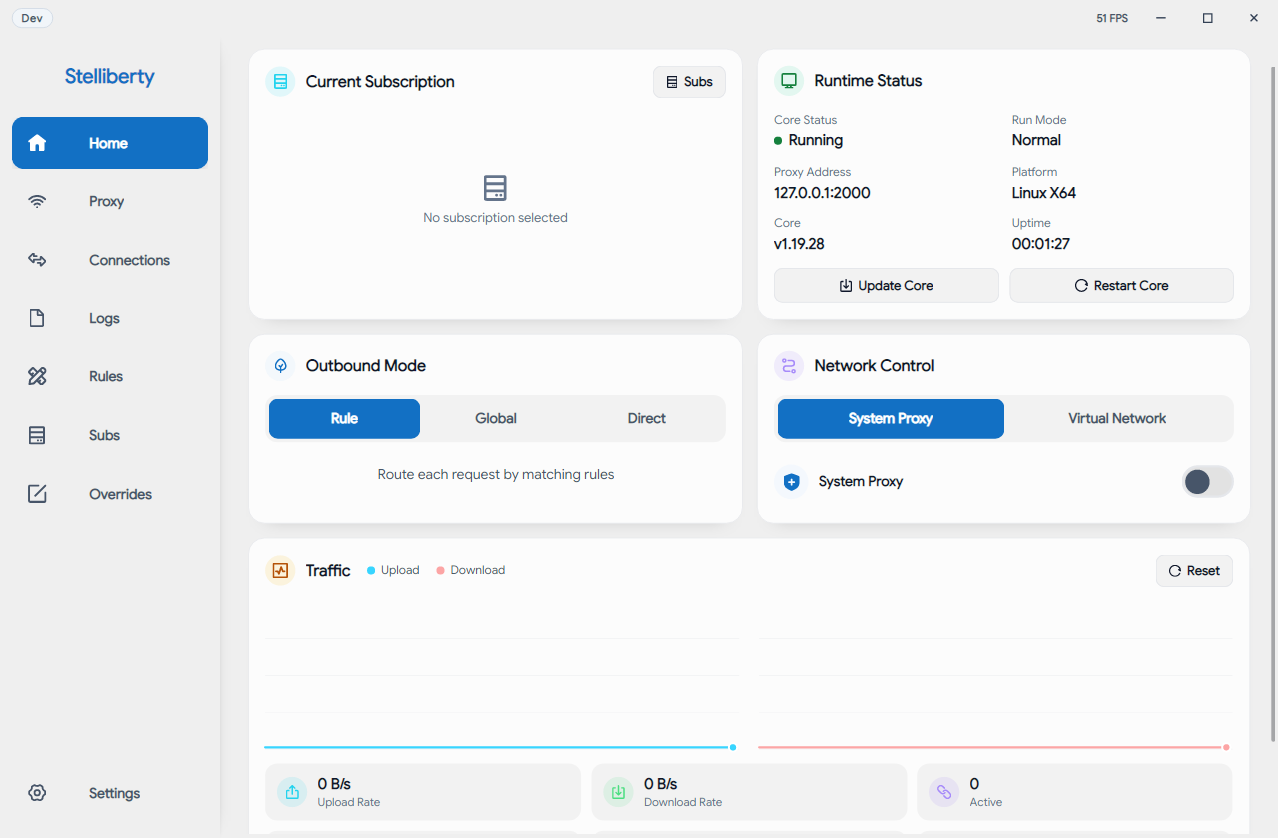 | 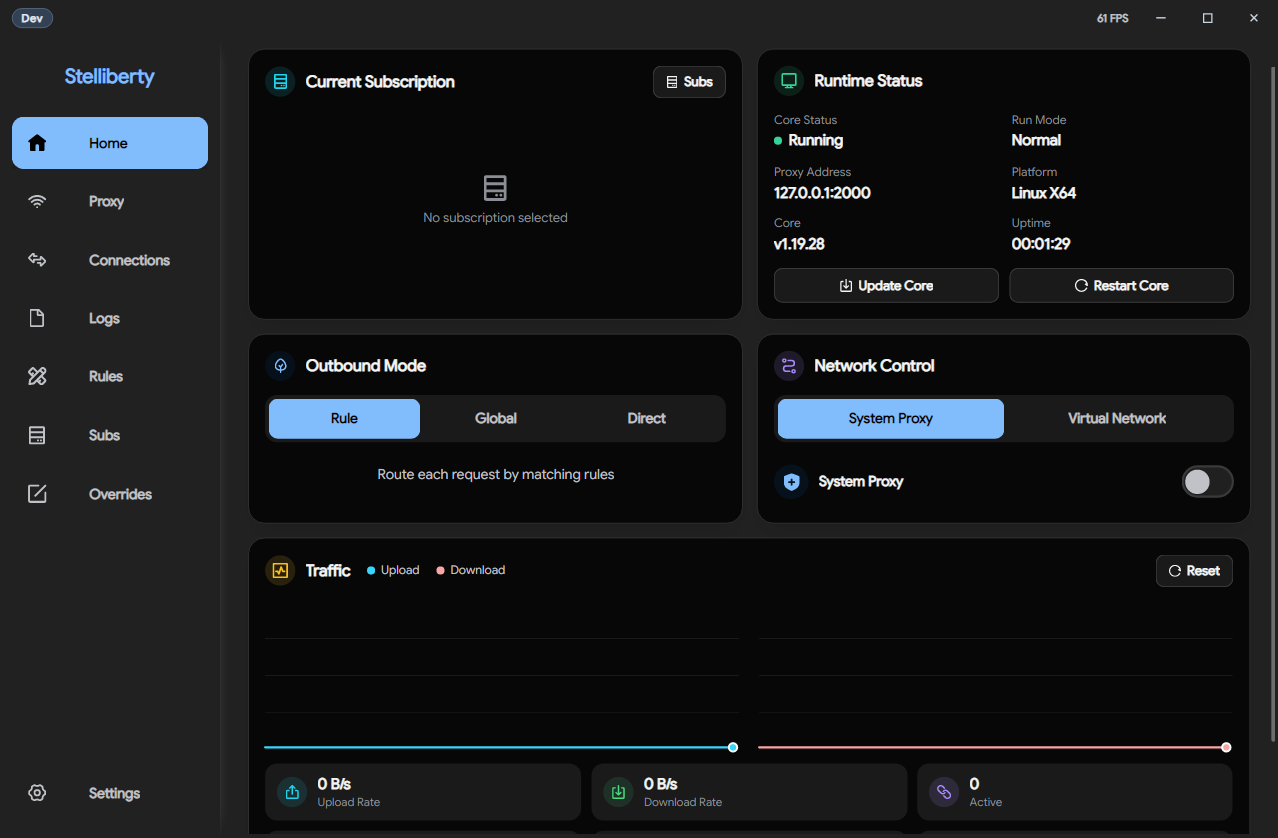 |
| Settings · Light | Settings · Dark |
|---|---|
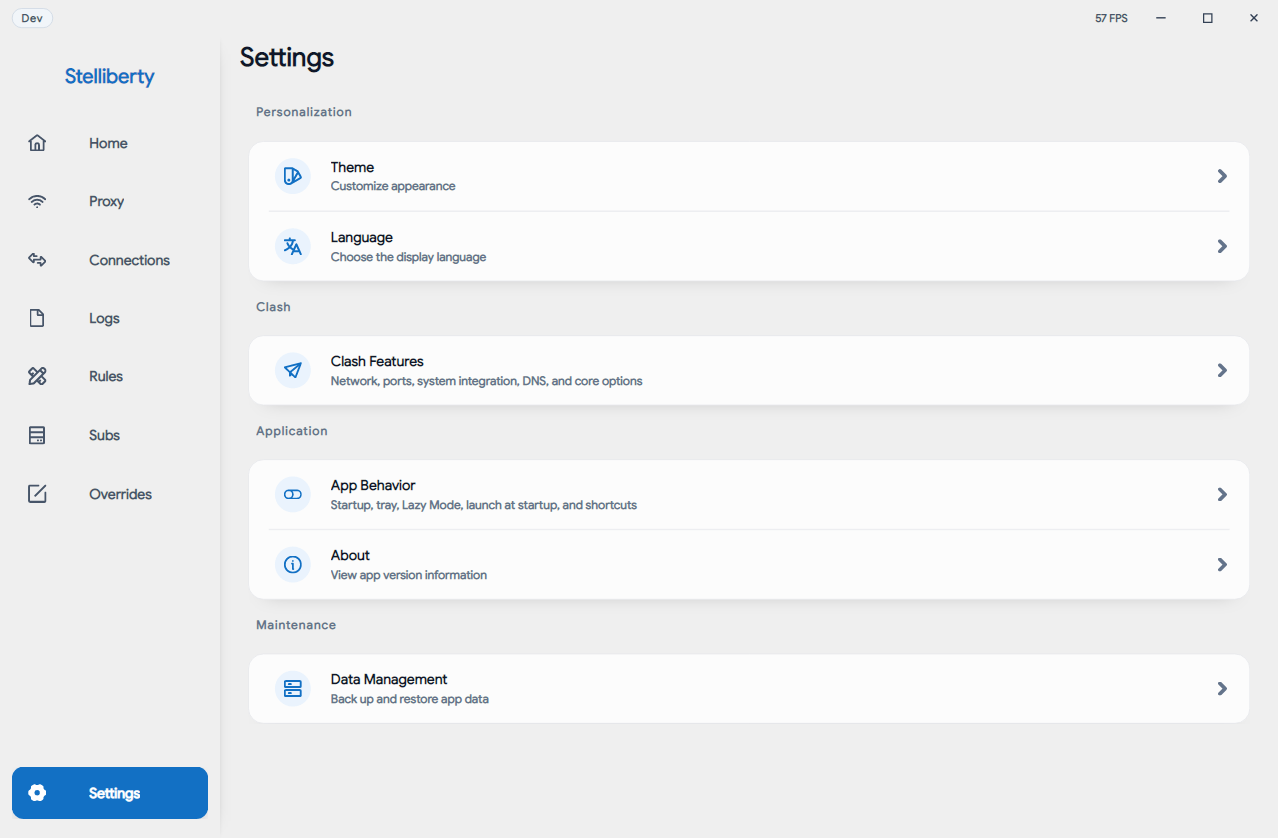 | 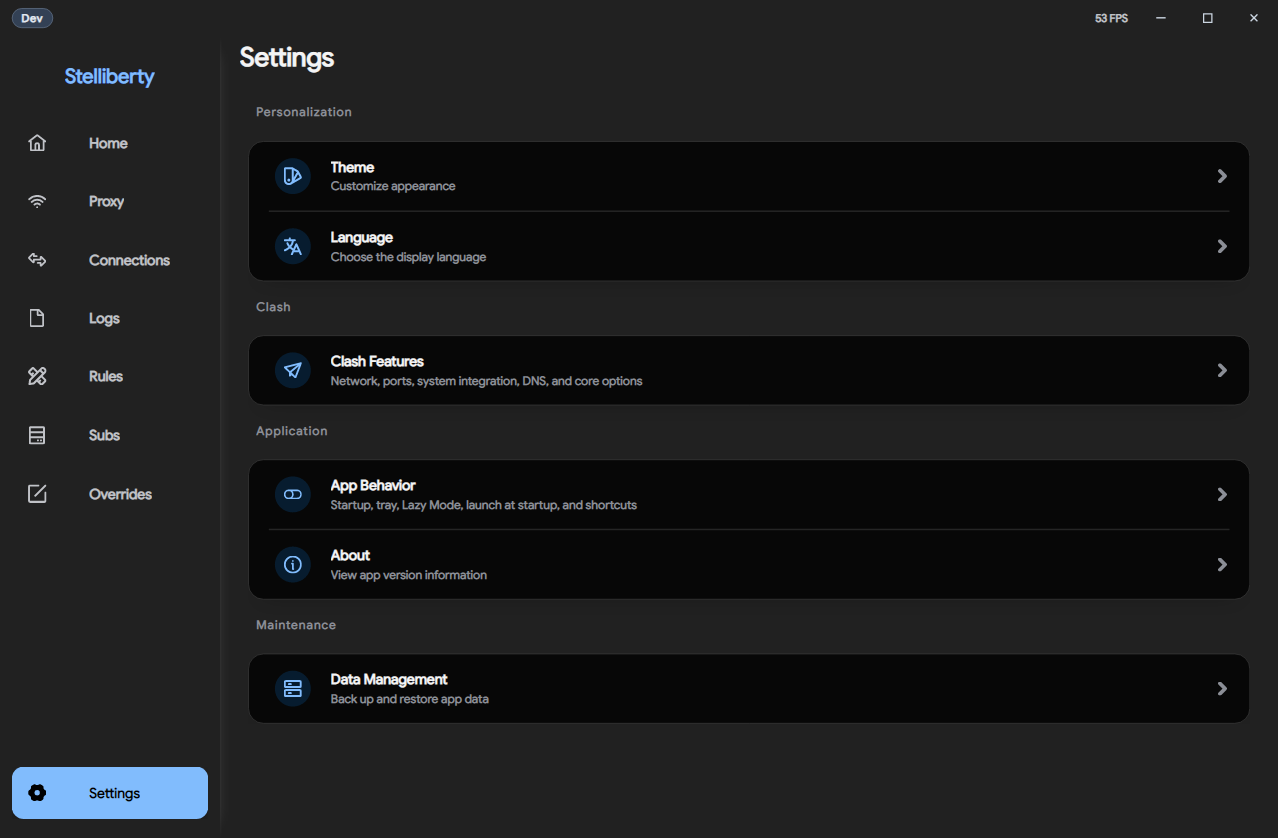 |
Stelliberty is a cross-platform desktop proxy client for Windows, Linux, and macOS.
Import Clash-standard and Base64 subscriptions. It starts quickly and uses little resources. On Windows and macOS, platform-level frosted window effects are available, with a simple native look.
Grab the package for your platform from the Releases page:
| Platform | Recommended | Alternative |
|---|---|---|
| Windows · x64 / arm64 | *-setup.exe (installer) | *.zip (portable) |
| Linux · x64 / arm64 | *.AppImage | *.zip · *.deb · *.rpm · *.pkg.tar.zst |
| macOS · x64 / arm64 | *.dmg | *.pkg |
| Platform | Minimum |
|---|---|
| Windows | 10 (1809+) or 11 · x64 / arm64 |
| Linux | glibc desktop with fontconfig + X11 |
| macOS | 22+ · Intel / Apple Silicon |
Config format is fully compatible with Clash Meta — see the mihomo documentation for details.
Install the .NET 11 Runtime, then start Stelliberty again:
dotnet-core-preview-binUWP apps on Windows (e.g. Microsoft Store apps) are blocked from accessing the local proxy loopback address by default. Stelliberty provides a UWP loopback exemption toggle to remove this restriction.
Notes:
| Tool | Version | Get it |
|---|---|---|
| .NET SDK | 11.0.x | https://dotnet.microsoft.com/download/dotnet/11.0 |
| Rust | stable (rustup) | https://rustup.rs |
| Python | 3.x | https://www.python.org/downloads/ |
Modular layers + Clean Architecture + MVVM, with separate tray and UI host processes.
src/Stelliberty.Tray            Persistent tray host, core lifecycle, background tasks
src/Stelliberty.Desktop         On-demand Avalonia UI host, windows, UI platform services
src/Stelliberty.Presentation    ViewModels, UI state, command bindings
src/Stelliberty.Application     Use cases, service & capability interfaces
src/Stelliberty.Domain          Entities, value objects, domain rules
src/Stelliberty.Infrastructure  File system, persistence, external services, IPC transport and clients
src/Stelliberty.Native          C# wrappers over the native FFI layer
native/hub                      Native library: config override, parsing, capabilities
native/service                  Service mode
scripts/                        build.py · prebuild.py · test.py
Dependency directions: Desktop → Presentation → Application → Domain and Tray → Application → Domain.
Infrastructure and Native implement interfaces defined by Application; Application has no dependency on desktop, Avalonia, or FFI details.
The public entry point, stelliberty.exe, owns the tray, core runtime, system proxy, service mode, global shortcuts, and background scheduling. It launches data/deps/stelliberty_ui.exe through an authenticated session when a window is needed. Other desktop platforms use the corresponding executable names without .exe.
Opening the window again reuses the active UI session. By default, hiding to the tray keeps the UI process alive. Lightweight Mode releases the UI process when hidden and creates a new session when reopened; the background runtime continues in both modes. Full application exit is coordinated by the tray. Startup integration, installers, and elevated restarts all use the tray entry point, and scripts/build.py packages both hosts together.
Prohibited:
Naming
PascalCasecamelCase; private readonly instance fields: _camelCaseI prefix only when expressing an abstract capabilityAsync; cancellable operations take CancellationTokenIsEnabled, CanSave, HasSelectionPractices
var when the type is obvious from the right side; explicit types otherwiseSaveResult, ParseResult), not bare bool.Result or .Wait() to block async tasksNaming
snake_casePascalCaseSCREAMING_SNAKE_CASEPractices
Result<T, E> and ? for error propagation; no unwrap() for recoverable errorsunsafe is prohibited by default; when necessary, minimize scope and comment the safety preconditionmod.rs — use Rust 2018+ same-name file stylehub_<capability>_<action>Capability module structure
native/hub/src/
├── lib.rs              // module declarations only
├── ffi.rs              // root FFI aggregation
├── capabilities/       // one file per capability
├── infra/              // HTTP client, runtime, etc.
└── util/               // pure utility functions
Application interfacesAll interactive controls must have AutomationProperties.AutomationId set.
PageOrArea.SemanticName, e.g. Main.SaveButton, Library.SearchBoxDevelopment workflow: prebuild → test → build.
Downloads the core binary, GeoIP data, and fonts; builds the service-mode binary.
python scripts/prebuild.py
| Flag | Effect |
|---|---|
| (default) | Release service binary |
--dev | Debug service binary |
--all | Both Debug and Release |
--platform <rid> | current · win-x64 · win-arm64 · linux-x64 · linux-arm64 · macos-x64 · macos-arm64 |
--clean | Clean build/ and bin/obj/ before fetching |
python scripts/test.py --all
| Flag | Effect |
|---|---|
<name> | Run a specific test by name |
--all | Run every pre-build test |
| Name | Description |
|---|---|
monitoring-rules | Connection and log parsing and reduction; rule parsing and classification |
settings-rules | TUN permission correction, system proxy requests, update release selection |
subscription-rules | Update planning, provider parsing, content normalization |
proxy-selection-rules | Group semantics, normalization, selection, visibility |
runtime-config-rules | Settings normalization and deterministic YAML generation |
chain-proxy-rules | Analysis and deterministic runtime config transformation |
python scripts/build.py
| Flag | Effect |
|---|---|
| (default) | Release build |
--dev | Debug build |
--all | Both Debug and Release |
--platform <rid> | Same as prebuild, plus desktop (win-x64 + linux-x64 + macos-arm64) |
--pack <format> | zip · installer · all |
--clean | Clean target output directory before building |
Full release build:
python scripts/prebuild.py
python scripts/build.py --pack all
dotnet format
cargo fmt
Before submitting a Pull Request, confirm the following:
Pull Requests must target beta. Direct Pull Requests to stable are prohibited; only the repository owner may promote the repository's beta branch to stable.
| Check | Description |
|---|---|
| Debug commands | Maintain UI commands under src/Stelliberty.Desktop/Debug and tray lifecycle commands under src/Stelliberty.Tray/Debug |
| Control IDs | New interactive controls must have AutomationProperties.AutomationId set |
| Test coverage | Pure business logic uses Pre-build Tests; packaged app behavior uses Post-build Tests |
| Formatting | C#: dotnet format, Rust: cargo fmt |
UI commands are wrapped under src/Stelliberty.Desktop/Debug and invoked through the debug control port, which exists only while the UI process is running. Tray lifecycle commands live under src/Stelliberty.Tray/Debug and use IPC. Keep the local app-debug skill in sync with the affected host; use its tray.* commands to inspect background state, open the UI, or verify UI crash recovery.
The local skill also provides tray.copy-terminal to verify clipboard access while the UI is closed. It requires a running core and reports failures to the caller. Both local skill copies remain outside Git tracking.
When adding clickable, input-capable, selectable, or state-assertable controls:
<Button AutomationProperties.AutomationId="Settings.SaveButton" />
<TextBox AutomationProperties.AutomationId="Subscription.UrlInput" />
Naming rule: PageOrArea.SemanticName — stable, unique, independent of visual layout.
This project is fully open source under the WTF License. Any derivative work based on this project must publish its complete corresponding source code and remain under the WTF License, whether it is distributed directly or provided as a network service.
This project and its derivative works must not be used for commercial purposes.
Derivative works must not retain any identifier associated with the original Stelliberty software, including but not limited to its name, logos, icons, product names, package names, application identifiers, and other branding.
Third-party components remain subject to their original licenses. See the WTF License for the complete terms and third-party project list.
1,077 followers · starred Dec 2025
424 followers · starred May 2026
114 followers · starred Nov 2025
8 followers · starred Dec 2025
Stelliberty Remake: A high-performance, visually appealing, and modern cross-platform network client.
See the code
| Home · Light | Home · Dark |
|---|---|
| |
| Settings · Light | Settings · Dark |
|---|---|
| |
Stelliberty is a cross-platform desktop proxy client for Windows, Linux, and macOS.
Import Clash-standard and Base64 subscriptions. It starts quickly and uses little resources. On Windows and macOS, platform-level frosted window effects are available, with a simple native look.
Grab the package for your platform from the Releases page:
| Platform | Recommended | Alternative |
|---|---|---|
| Windows · x64 / arm64 | *-setup.exe (installer) | *.zip (portable) |
| Linux · x64 / arm64 | *.AppImage | *.zip · *.deb · *.rpm · *.pkg.tar.zst |
| macOS · x64 / arm64 | *.dmg | *.pkg |
| Platform | Minimum |
|---|---|
| Windows | 10 (1809+) or 11 · x64 / arm64 |
| Linux | glibc desktop with fontconfig + X11 |
| macOS | 22+ · Intel / Apple Silicon |
Config format is fully compatible with Clash Meta — see the mihomo documentation for details.
Install the .NET 11 Runtime, then start Stelliberty again:
dotnet-core-preview-binUWP apps on Windows (e.g. Microsoft Store apps) are blocked from accessing the local proxy loopback address by default. Stelliberty provides a UWP loopback exemption toggle to remove this restriction.
Notes:
| Tool | Version | Get it |
|---|---|---|
| .NET SDK | 11.0.x | https://dotnet.microsoft.com/download/dotnet/11.0 |
| Rust | stable (rustup) | https://rustup.rs |
| Python | 3.x | https://www.python.org/downloads/ |
Modular layers + Clean Architecture + MVVM, with separate tray and UI host processes.
src/Stelliberty.Tray            Persistent tray host, core lifecycle, background tasks
src/Stelliberty.Desktop         On-demand Avalonia UI host, windows, UI platform services
src/Stelliberty.Presentation    ViewModels, UI state, command bindings
src/Stelliberty.Application     Use cases, service & capability interfaces
src/Stelliberty.Domain          Entities, value objects, domain rules
src/Stelliberty.Infrastructure  File system, persistence, external services, IPC transport and clients
src/Stelliberty.Native          C# wrappers over the native FFI layer
native/hub                      Native library: config override, parsing, capabilities
native/service                  Service mode
scripts/                        build.py · prebuild.py · test.py
Dependency directions: Desktop → Presentation → Application → Domain and Tray → Application → Domain.
Infrastructure and Native implement interfaces defined by Application; Application has no dependency on desktop, Avalonia, or FFI details.
The public entry point, stelliberty.exe, owns the tray, core runtime, system proxy, service mode, global shortcuts, and background scheduling. It launches data/deps/stelliberty_ui.exe through an authenticated session when a window is needed. Other desktop platforms use the corresponding executable names without .exe.
Opening the window again reuses the active UI session. By default, hiding to the tray keeps the UI process alive. Lightweight Mode releases the UI process when hidden and creates a new session when reopened; the background runtime continues in both modes. Full application exit is coordinated by the tray. Startup integration, installers, and elevated restarts all use the tray entry point, and scripts/build.py packages both hosts together.
Prohibited:
Naming
PascalCasecamelCase; private readonly instance fields: _camelCaseI prefix only when expressing an abstract capabilityAsync; cancellable operations take CancellationTokenIsEnabled, CanSave, HasSelectionPractices
var when the type is obvious from the right side; explicit types otherwiseSaveResult, ParseResult), not bare bool.Result or .Wait() to block async tasksNaming
snake_casePascalCaseSCREAMING_SNAKE_CASEPractices
Result<T, E> and ? for error propagation; no unwrap() for recoverable errorsunsafe is prohibited by default; when necessary, minimize scope and comment the safety preconditionmod.rs — use Rust 2018+ same-name file stylehub_<capability>_<action>Capability module structure
native/hub/src/
├── lib.rs              // module declarations only
├── ffi.rs              // root FFI aggregation
├── capabilities/       // one file per capability
├── infra/              // HTTP client, runtime, etc.
└── util/               // pure utility functions
Application interfacesAll interactive controls must have AutomationProperties.AutomationId set.
PageOrArea.SemanticName, e.g. Main.SaveButton, Library.SearchBoxDevelopment workflow: prebuild → test → build.
Downloads the core binary, GeoIP data, and fonts; builds the service-mode binary.
python scripts/prebuild.py
| Flag | Effect |
|---|---|
| (default) | Release service binary |
--dev | Debug service binary |
--all | Both Debug and Release |
--platform <rid> | current · win-x64 · win-arm64 · linux-x64 · linux-arm64 · macos-x64 · macos-arm64 |
--clean | Clean build/ and bin/obj/ before fetching |
python scripts/test.py --all
| Flag | Effect |
|---|---|
<name> | Run a specific test by name |
--all | Run every pre-build test |
| Name | Description |
|---|---|
monitoring-rules | Connection and log parsing and reduction; rule parsing and classification |
settings-rules | TUN permission correction, system proxy requests, update release selection |
subscription-rules | Update planning, provider parsing, content normalization |
proxy-selection-rules | Group semantics, normalization, selection, visibility |
runtime-config-rules | Settings normalization and deterministic YAML generation |
chain-proxy-rules | Analysis and deterministic runtime config transformation |
python scripts/build.py
| Flag | Effect |
|---|---|
| (default) | Release build |
--dev | Debug build |
--all | Both Debug and Release |
--platform <rid> | Same as prebuild, plus desktop (win-x64 + linux-x64 + macos-arm64) |
--pack <format> | zip · installer · all |
--clean | Clean target output directory before building |
Full release build:
python scripts/prebuild.py
python scripts/build.py --pack all
dotnet format
cargo fmt
Before submitting a Pull Request, confirm the following:
Pull Requests must target beta. Direct Pull Requests to stable are prohibited; only the repository owner may promote the repository's beta branch to stable.
| Check | Description |
|---|---|
| Debug commands | Maintain UI commands under src/Stelliberty.Desktop/Debug and tray lifecycle commands under src/Stelliberty.Tray/Debug |
| Control IDs | New interactive controls must have AutomationProperties.AutomationId set |
| Test coverage | Pure business logic uses Pre-build Tests; packaged app behavior uses Post-build Tests |
| Formatting | C#: dotnet format, Rust: cargo fmt |
UI commands are wrapped under src/Stelliberty.Desktop/Debug and invoked through the debug control port, which exists only while the UI process is running. Tray lifecycle commands live under src/Stelliberty.Tray/Debug and use IPC. Keep the local app-debug skill in sync with the affected host; use its tray.* commands to inspect background state, open the UI, or verify UI crash recovery.
The local skill also provides tray.copy-terminal to verify clipboard access while the UI is closed. It requires a running core and reports failures to the caller. Both local skill copies remain outside Git tracking.
When adding clickable, input-capable, selectable, or state-assertable controls:
<Button AutomationProperties.AutomationId="Settings.SaveButton" />
<TextBox AutomationProperties.AutomationId="Subscription.UrlInput" />
Naming rule: PageOrArea.SemanticName — stable, unique, independent of visual layout.
This project is fully open source under the WTF License. Any derivative work based on this project must publish its complete corresponding source code and remain under the WTF License, whether it is distributed directly or provided as a network service.
This project and its derivative works must not be used for commercial purposes.
Derivative works must not retain any identifier associated with the original Stelliberty software, including but not limited to its name, logos, icons, product names, package names, application identifiers, and other branding.
Third-party components remain subject to their original licenses. See the WTF License for the complete terms and third-party project list.
1,077 followers · starred Dec 2025
424 followers · starred May 2026
114 followers · starred Nov 2025
8 followers · starred Dec 2025



