A recursive, reflective POETRY algorithm variant using Goedel-Prover-V2
Python
34
455 commits
updated Mar 9, 2026


A recursive, reflective POETRY algorithm variant using Goedel-Prover-V2
Gödel's Poetry is an advanced automated theorem proving system that combines Large Language Models (LLMs) with formal verification in Lean 4. The system takes mathematical theorems—either in informal natural language or formal Lean syntax—and automatically generates verified proofs through a sophisticated multi-agent architecture.
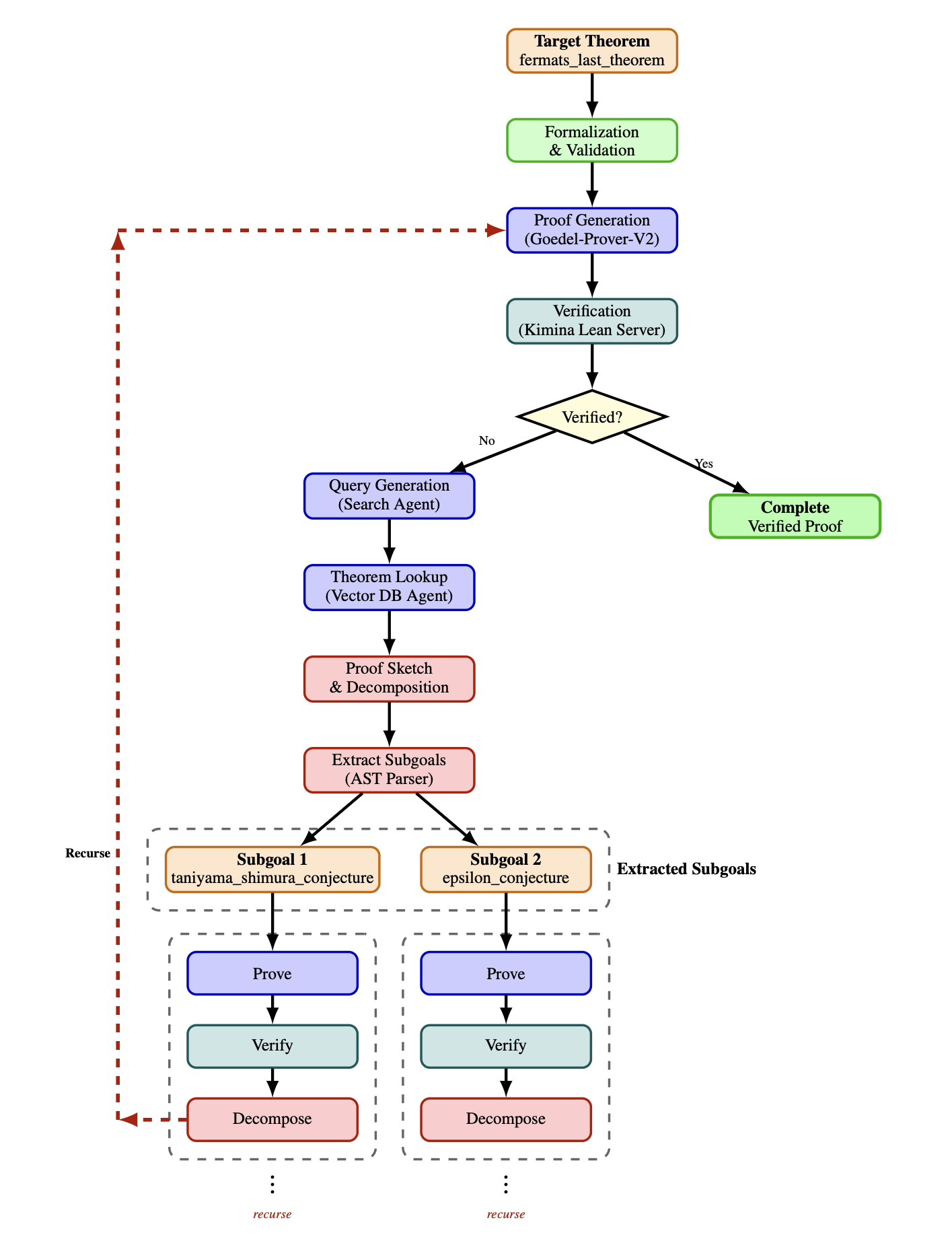
Gödel's Poetry is an AI-powered theorem proving system that bridges the gap between informal mathematical reasoning and formal verification. The system:
Accepts theorems in multiple formats:
theorem sqrt_two_irrational : Irrational (√2) := by sorry)Automatically generates verified proofs through a multi-agent workflow:
Leverages state-of-the-art technology:
The system is designed for researchers, mathematicians, and AI practitioners interested in automated theorem proving, formal verification, and the intersection of natural and formal languages.
Quick Starts assume a clean PyPI install (pip install goedels-poetry) and configuration via environment variables only. Each backend section is self-contained—pick your provider and follow the steps. If using OpenAI for any agent (including the decomposer), set the OPENAI_API_KEY environment variable.
pip install goedels-poetry
ollama pull kdavis/goedel-formalizer-v2:32b
ollama pull kdavis/Goedel-Prover-V2:32b
ollama pull qwen3:30b
export OPENAI_API_KEY="your-openai-key"
goedels_poetry --help
pip install goedels-poetry
Start vLLM locally on http://localhost:8002/v1 with these models (avoid 8000/8001 used by Kimina/Lean Explore):
Goedel-LM/Goedel-Formalizer-V2-32BGoedel-LM/Goedel-Prover-V2-32BQwen/Qwen3-30B-A3B-Instruct-2507Example (multi-model) start:
python -m vllm.entrypoints.openai.api_server \
  --served-model Goedel-LM/Goedel-Formalizer-V2-32B \
  --served-model Goedel-LM/Goedel-Prover-V2-32B \
  --served-model Qwen/Qwen3-30B-A3B-Instruct-2507 \
  --host 0.0.0.0 --port 8002
Configure environment
export OPENAI_API_KEY="your-openai-key"
export FORMALIZER_AGENT_LLM__PROVIDER="vllm"
export FORMALIZER_AGENT_LLM__URL="http://localhost:8002/v1"
export FORMALIZER_AGENT_LLM__MODEL="Goedel-LM/Goedel-Formalizer-V2-32B"

export PROVER_AGENT_LLM__PROVIDER="vllm"
export PROVER_AGENT_LLM__URL="http://localhost:8002/v1"
export PROVER_AGENT_LLM__MODEL="Goedel-LM/Goedel-Prover-V2-32B"

export SEMANTICS_AGENT_LLM__PROVIDER="vllm"
export SEMANTICS_AGENT_LLM__URL="http://localhost:8002/v1"
export SEMANTICS_AGENT_LLM__MODEL="Qwen/Qwen3-30B-A3B-Instruct-2507"

export SEARCH_QUERY_AGENT_LLM__PROVIDER="vllm"
export SEARCH_QUERY_AGENT_LLM__URL="http://localhost:8002/v1"
export SEARCH_QUERY_AGENT_LLM__MODEL="Qwen/Qwen3-30B-A3B-Instruct-2507"
goedels_poetry --help
pip install goedels-poetry
export OPENAI_API_KEY="your-openai-key"

export FORMALIZER_AGENT_LLM__PROVIDER="openai"
export FORMALIZER_AGENT_LLM__URL="https://api.openai.com/v1"
export FORMALIZER_AGENT_LLM__MODEL="gpt-5.2-2025-12-11"

export PROVER_AGENT_LLM__PROVIDER="openai"
export PROVER_AGENT_LLM__URL="https://api.openai.com/v1"
export PROVER_AGENT_LLM__MODEL="gpt-5.2-2025-12-11"

export SEMANTICS_AGENT_LLM__PROVIDER="openai"
export SEMANTICS_AGENT_LLM__URL="https://api.openai.com/v1"
export SEMANTICS_AGENT_LLM__MODEL="gpt-5.2-2025-12-11"

export SEARCH_QUERY_AGENT_LLM__PROVIDER="openai"
export SEARCH_QUERY_AGENT_LLM__URL="https://api.openai.com/v1"
export SEARCH_QUERY_AGENT_LLM__MODEL="gpt-5.2-2025-12-11"
goedels_poetry --help
pip install goedels-poetry
Start LM Studio with the OpenAI-compatible server enabled (default http://localhost:1234/v1) and load/download these models in the UI:
mradermacher/Goedel-Formalizer-V2-32B-GGUFmradermacher/Goedel-Prover-V2-32B-GGUFlmstudio-community/Qwen3-30B-A3B-Instruct-2507-GGUFConfigure environment
export OPENAI_API_KEY="your-openai-key"
export FORMALIZER_AGENT_LLM__PROVIDER="lmstudio"
export FORMALIZER_AGENT_LLM__URL="http://localhost:1234/v1"
export FORMALIZER_AGENT_LLM__MODEL="mradermacher/Goedel-Formalizer-V2-32B-GGUF"

export PROVER_AGENT_LLM__PROVIDER="lmstudio"
export PROVER_AGENT_LLM__URL="http://localhost:1234/v1"
export PROVER_AGENT_LLM__MODEL="mradermacher/Goedel-Prover-V2-32B-GGUF"

export SEMANTICS_AGENT_LLM__PROVIDER="lmstudio"
export SEMANTICS_AGENT_LLM__URL="http://localhost:1234/v1"
export SEMANTICS_AGENT_LLM__MODEL="lmstudio-community/Qwen3-30B-A3B-Instruct-2507-GGUF"

export SEARCH_QUERY_AGENT_LLM__PROVIDER="lmstudio"
export SEARCH_QUERY_AGENT_LLM__URL="http://localhost:1234/v1"
export SEARCH_QUERY_AGENT_LLM__MODEL="lmstudio-community/Qwen3-30B-A3B-Instruct-2507-GGUF"
goedels_poetry --help
The Kimina Lean Server is required for Gödel's Poetry to verify Lean 4 proofs. It provides high-performance parallel proof checking.
The easiest way to install and run the Kimina Lean Server is via PyPI:
Install the server package:
pip install kimina-ast-server
Set up the Lean workspace (installs Lean 4, mathlib4, and dependencies):
Run the setup command to automatically install and configure everything:
# Setup in current directory
kimina-ast-server setup

# Or setup in a specific directory
kimina-ast-server setup --workspace ~/lean-workspace

# Setup and save configuration to .env file
kimina-ast-server setup --workspace ~/lean-workspace --save-config
This will automatically:
⚠️ Note: This process can take 15-30 minutes depending on your system, primarily due to building mathlib4.
Start the server:
# If you ran setup in current directory
kimina-ast-server

# Or if workspace is elsewhere, set the environment variable first
export LEAN_SERVER_WORKSPACE=~/lean-workspace
kimina-ast-server

# You can also use the explicit run command
kimina-ast-server run
The server will start on http://0.0.0.0:8000 by default.
Verify the server is running (in a new terminal):
curl --request POST \
  --url http://localhost:8000/api/check \
  --header 'Content-Type: application/json' \
  --data '{
    "codes": [{"custom_id": "test", "proof": "#check Nat"}],
    "infotree_type": "original"
  }' | jq
You can also visit http://localhost:8000/docs for interactive API documentation.
If you prefer to install from source, please refer to the Kimina Lean Server repository for detailed installation instructions.
For production deployments, you can use Docker. See the Kimina Server README for Docker deployment options.
The Lean Explore Server is required for Gödel's Poetry to query the vector database for relevant theorems and lemmas. It provides semantic search capabilities across Lean 4 declarations.
The easiest way to install and run the Lean Explore Server is via PyPI:
Install the server package:
pip install lean-xplore
Download local data:
leanexplore data fetch
This downloads the database, embeddings, and search index needed for local searches. This step is required for the local backend.
⚠️ Note: The local backend must be used (not the remote API) because the remote API uses a Mathlib version incompatible with that required by Gödel's Poetry.
Start the HTTP server:
leanexplore http serve --backend local
The server will start on http://localhost:8001/api/v1 by default.
Verify the server is running (in a new terminal):
curl --request POST \
  --url http://localhost:8001/api/v1/search \
  --header 'Content-Type: application/json' \
  --data '{"query": "natural numbers", "package_filters": ["Mathlib"]}' | jq
You can also visit http://localhost:8001/docs for interactive API documentation (if available).
If you prefer to install from source, please refer to the Lean Explore repository for detailed installation instructions.
For more information, see the Lean Explore documentation.
Once installed, you can use the goedels_poetry command to prove theorems:
goedels_poetry --formal-theorem "import Mathlib\n\nopen BigOperators\n\ntheorem theorem_54_43 : 1 + 1 = 2 := by sorry"
Formal theorems supplied on the command line (or via files) must include their full Lean preamble—imports, options, namespaces, and any comments required to state the theorem. Gödel's Poetry no longer prepends the default header for user-supplied formal problems. (The default header is still added automatically when an informal theorem is formalized by the system.)
goedels_poetry --informal-theorem "Prove that the sum of two even numbers is even"
Process all .lean files in a directory:
goedels_poetry --formal-theorems ./my-theorems/
Process all .txt files containing informal theorems:
goedels_poetry --informal-theorems ./informal-theorems/
For batch processing, the tool will:
.proof files (for successful proofs) or .failed-proof files (for failed proofs, validation failures, or errors) alongside the originalsgoedels_poetry --help
To see detailed LLM and Kimina server responses during execution, set the GOEDELS_POETRY_DEBUG environment variable:
On Linux/macOS:
export GOEDELS_POETRY_DEBUG=1
goedels_poetry --formal-theorem "import Mathlib\n\nopen BigOperators\n\ntheorem theorem_54_43 : 1 + 1 = 2 := by sorry"
On Windows (Command Prompt):
set GOEDELS_POETRY_DEBUG=1
goedels_poetry --formal-theorem "import Mathlib\n\nopen BigOperators\n\ntheorem theorem_54_43 : 1 + 1 = 2 := by sorry"
On Windows (PowerShell):
$env:GOEDELS_POETRY_DEBUG=1
goedels_poetry --formal-theorem "import Mathlib`n`nopen BigOperators`n`ntheorem theorem_54_43 : 1 + 1 = 2 := by sorry"
When debug mode is enabled, all responses from:
will be printed to the console with rich formatting for easy debugging and inspection.
goedels_poetry --formal-theorem \
  "import Mathlib\n\nopen BigOperators\n\ntheorem add_comm_example : 3 + 5 = 5 + 3 := by sorry"
goedels_poetry --informal-theorem \
  "Prove that for any natural numbers a and b, a + b = b + a"
Create a directory with theorem files:
mkdir theorems
cat <<'EOF' > theorems/test1.lean
import Mathlib

open BigOperators

theorem test1 : 2 + 2 = 4 := by sorry
EOF

cat <<'EOF' > theorems/test2.lean
import Mathlib

open BigOperators

theorem test2 : 5 * 5 = 25 := by sorry
EOF

goedels_poetry --formal-theorems ./theorems/
Results will be saved as test1.proof and test2.proof.
Gödel's Poetry orchestrates a set of specialized agents over OpenAI-compatible LLM endpoints plus two external services (Kimina Lean Server and Lean Explore). The flow depends on whether the input is informal or already formal Lean.
Core loop (formal theorems)
Informal path (adds formalization)
Decomposition for hard problems
Providers and endpoints
OPENAI_API_KEY environment variable.Clone and install with development dependencies:
git clone https://github.com/KellyJDavis/goedels-poetry.git
cd goedels-poetry
make install
This will:
uvActivate the environment (if needed):
source .venv/bin/activate  # Linux/macOS
.venv\Scripts\activate     # Windows
The project includes comprehensive unit and integration tests.
make test
This runs all tests except those requiring Lean installation.
Integration tests verify the Kimina Lean Server integration. These tests require a running Kimina Lean server.
First-time setup:
You can set up the Kimina server using the PyPI package (recommended):
# Install integration test dependencies
uv sync

# Install Kimina server from PyPI
pip install kimina-ast-server

# Set up Lean workspace (installs Lean 4, mathlib4, and dependencies - takes 15-30 minutes)
kimina-ast-server setup

# Or setup in a specific directory
kimina-ast-server setup --workspace ~/lean-workspace
If you prefer to install from source, please refer to the Kimina Lean Server repository for detailed installation instructions.
Run integration tests:
# Terminal 1: Start the Kimina server
kimina-ast-server

# Or if workspace is in a different location
export LEAN_SERVER_WORKSPACE=~/lean-workspace
kimina-ast-server

# Terminal 2: Run the tests
cd ../goedels-poetry
make test-integration
The tests will automatically connect to http://localhost:8000. To use a different URL:
export KIMINA_SERVER_URL=http://localhost:9000
make test-integration
Note: Integration tests require Python 3.10+ and a running Lean server with proper REPL configuration.
make test-all
This runs both unit and integration tests sequentially.
The repository provides several convenient Make targets:
| Target | Description |
|---|---|
make install | Install the virtual environment and pre-commit hooks |
make check | Run all code quality checks (linting, type checking, dependency audit) |
make test | Run unit tests with coverage (excludes integration tests) |
make test-integration | Run integration tests (requires Lean installation) |
make test-all | Run all tests (unit + integration) |
make build | Build wheel distribution package |
make clean-build | Remove build artifacts |
make publish | Publish to PyPI (requires credentials) |
make docs | Build and serve documentation locally |
make docs-test | Test documentation build without serving |
make help | Display all available targets with descriptions |
The make check target runs:
Configuration is stored in goedels_poetry/data/config.ini:
[FORMALIZER_AGENT_LLM]
model = kdavis/goedel-formalizer-v2:32b
provider = ollama
url = http://localhost:11434/v1
max_tokens = 50000
num_ctx = 40960
max_retries = 10
max_remote_retries = 5

[PROVER_AGENT_LLM]
model = kdavis/Goedel-Prover-V2:32b
provider = ollama
url = http://localhost:11434/v1
max_tokens = 50000
num_ctx = 40960
max_self_correction_attempts = 2
max_depth = 20
max_pass = 32
max_remote_retries = 5

[SEMANTICS_AGENT_LLM]
model = qwen3:30b
provider = ollama
url = http://localhost:11434/v1
max_tokens = 50000
num_ctx = 262144
max_remote_retries = 5

[SEARCH_QUERY_AGENT_LLM]
model = qwen3:30b
provider = ollama
url = http://localhost:11434/v1
max_tokens = 50000
num_ctx = 262144
max_remote_retries = 5

[DECOMPOSER_AGENT_LLM]
model = gpt-5.2-2025-12-11
provider = openai
url = https://api.openai.com/v1
max_tokens = 50000
max_remote_retries = 5
max_self_correction_attempts = 6

[KIMINA_LEAN_SERVER]
url = http://0.0.0.0:8000
max_retries = 5

[LEAN_EXPLORE_SERVER]
url = http://localhost:8001/api/v1
package_filters = Mathlib,Batteries,Std,Init,Lean
Formalizer Agent:
model: The LLM used to convert informal theorems to Lean 4provider: Backend provider (ollama, vllm, lmstudio, or openai)url: Base URL for the provider API (required for non-OpenAI providers)max_tokens: Maximum tokens in a generated responsenum_ctx: Context window size (tokens)max_retries: Maximum attempts to formalize a theoremmax_remote_retries: Maximum remote API retry attempts for network/API errorsProver Agent:
model: The LLM used to generate proofsprovider: Backend provider (ollama, vllm, lmstudio, or openai)url: Base URL for the provider API (required for non-OpenAI providers)max_tokens: Maximum tokens in a generated responsenum_ctx: Context window size (tokens)max_self_correction_attempts: Maximum proof generation self-correction attemptsmax_depth: Maximum recursion depth for proof decompositionmax_pass: Maximum number of proof attempts before triggering decompositionmax_remote_retries: Maximum remote API retry attempts for network/API errorsSemantics Agent:
model: The LLM used to validate semantic equivalenceprovider: Backend provider (ollama, vllm, lmstudio, or openai)url: Base URL for the provider API (required for non-OpenAI providers)max_tokens: Maximum tokens in a generated responsenum_ctx: Context window size (tokens)max_remote_retries: Maximum remote API retry attempts for network/API errorsSearch Query Agent:
model: The LLM used to generate search queries for vector database retrievalprovider: Backend provider (ollama, vllm, lmstudio, or openai)url: Base URL for the provider API (required for non-OpenAI providers)max_tokens: Maximum tokens in a generated responsenum_ctx: Context window size (tokens)max_remote_retries: Maximum remote API retry attempts for network/API errorsDecomposer Agent:
provider: The provider type - "ollama", "vllm", "lmstudio", or "openai" (default: "openai")model: The model used for proof sketching (default: gpt-5.2-2025-12-11 for OpenAI)url: The base URL for the API endpoint (default: https://api.openai.com/v1 for OpenAI)max_tokens: Maximum tokens in generated response (preferred over max_completion_tokens)max_remote_retries: Maximum remote API retry attempts for network/API errorsmax_self_correction_attempts: Maximum decomposition self-correction attemptsnum_ctx: Context window size (only used when provider != "openai", optional)Optional provider-specific settings (commented out in config.ini): use_beam_search, best_of, top_k, repetition_penalty, length_penalty for vLLM, and ttl for LM Studio.
Note: The api_key parameter is no longer required in configuration. For OpenAI, set the OPENAI_API_KEY environment variable. For other providers, API keys are automatically derived from the provider setting.
Kimina Lean Server:
url: Server endpoint for Lean verificationmax_retries: Maximum retry attempts for server requestsLean Explore Server:
url: Server endpoint for the Lean Explore vector databasepackage_filters: Comma-separated list of package names to filter search results (e.g., "Mathlib,Batteries,Std,Init,Lean")The recommended way to customize configuration is using environment variables. This approach doesn't require modifying files and works great for different environments (development, testing, production):
Format: SECTION__OPTION (double underscore separator, uppercase)
Examples:
# Use a different prover model
export PROVER_AGENT_LLM__MODEL="custom-model:latest"

# Change the Kimina server URL
export KIMINA_LEAN_SERVER__URL="http://localhost:9000"

# Change the Lean Explore server URL
export LEAN_EXPLORE_SERVER__URL="http://localhost:8002/api/v1"

# Change package filters for vector database searches
export LEAN_EXPLORE_SERVER__PACKAGE_FILTERS="Mathlib,Batteries"

# Use a smaller context window for faster testing
export PROVER_AGENT_LLM__NUM_CTX="8192"

# Run with custom configuration
goedels_poetry --formal-theorem "import Mathlib\n\nopen BigOperators\n\ntheorem theorem_54_43 : 1 + 1 = 2 := by sorry"
Multiple overrides:
export PROVER_AGENT_LLM__MODEL="kdavis/Goedel-Prover-V2:70b"
export PROVER_AGENT_LLM__MAX_SELF_CORRECTION_ATTEMPTS="3"
export PROVER_AGENT_LLM__MAX_PASS="64"
export DECOMPOSER_AGENT_LLM__MODEL="gpt-5-pro"
export KIMINA_LEAN_SERVER__MAX_RETRIES="10"
# Provide the full preamble plus theorem body when invoking formal problems
goedels_poetry --formal-theorem "import Mathlib\n\nopen BigOperators\n\ntheorem theorem_54_43 : 1 + 1 = 2 := by sorry"
Environment variables are optional - if not set, the system uses values from config.ini.
For more details and advanced configuration options, see CONFIGURATION.md.
If you prefer, you can still modify the configuration file directly:
# Find the installation path
uv run python -c "import goedels_poetry; print(goedels_poetry.__file__)"

# Edit the config.ini in the installation directory
# Typically: .venv/lib/python3.x/site-packages/goedels_poetry/data/config.ini
Note: Direct file changes persist until you reinstall or update the package, while environment variables are more flexible and don't require reinstallation.
We welcome contributions! Please see CONTRIBUTING.md for detailed guidelines.
Quick contribution workflow:
git clone [email protected]:YOUR_NAME/goedels-poetry.gitmake installgit checkout -b feature-namemake checkmake testCode quality requirements:
make test)make check)goedels-poetry/
├── goedels_poetry/ # Main package
│ ├── agents/ # Multi-agent system components
│ │ ├── formalizer_agent.py
│ │ ├── prover_agent.py
│ │ ├── proof_checker_agent.py
│ │ ├── search_query_agent.py
│ │ ├── vector_db_agent.py
│ │ ├── sketch_*.py # Proof sketching agents
│ │ └── ...
│ ├── config/ # Configuration management
│ ├── data/ # Prompts and config files
│ │ ├── config.ini
│ │ └── prompts/
│ ├── parsers/ # AST parsing utilities
│ ├── cli.py # Command-line interface
│ ├── framework.py # Core orchestration logic
│ └── state.py # State management
├── tests/ # Test suite
├── Makefile # Development automation
├── pyproject.toml # Package configuration
├── CHANGELOG.md # Version history
└── README.md # This file
Note: The Kimina Lean Server is a separate repository that must be installed and run independently.
This project is licensed under the Apache License 2.0. See the LICENSE file for details.
If you use Gödel's Poetry in your research, please cite:
@misc{davis2025godelspoetry,
      title={G\"odel's Poetry},
      author={Kelly J. Davis},
      year={2025},
      eprint={2512.14252},
      archivePrefix={arXiv},
      primaryClass={cs.AI},
      url={https://arxiv.org/abs/2512.14252},
}
For the Kimina Lean Server:
@misc{santos2025kiminaleanservertechnical,
  title={Kimina Lean Server: Technical Report},
  author={Marco Dos Santos and Haiming Wang and Hugues de Saxcé and Ran Wang and Mantas Baksys and Mert Unsal and Junqi Liu and Zhengying Liu and Jia Li},
  year={2025},
  eprint={2504.21230},
  archivePrefix={arXiv},
  primaryClass={cs.LO},
  url={https://arxiv.org/abs/2504.21230}
}
For LeanExplore:
@misc{asher2025leanexploresearchenginelean,
      title={LeanExplore: A search engine for Lean 4 declarations},
      author={Justin Asher},
      year={2025},
      eprint={2506.11085},
      archivePrefix={arXiv},
      primaryClass={cs.SE},
      url={https://arxiv.org/abs/2506.11085},
}
Ready to prove some theorems? 🚀
goedels_poetry --informal-theorem "Prove that the sum of the first n natural numbers equals n(n+1)/2"
1,264 followers · starred Oct 2025
55 followers · starred Dec 2025
52 followers · starred Oct 2025
64 followers · starred Dec 2025
A recursive, reflective POETRY algorithm variant using Goedel-Prover-V2
Python
34
455 commits
updated Mar 9, 2026
A recursive, reflective POETRY algorithm variant using Goedel-Prover-V2
Gödel's Poetry is an advanced automated theorem proving system that combines Large Language Models (LLMs) with formal verification in Lean 4. The system takes mathematical theorems—either in informal natural language or formal Lean syntax—and automatically generates verified proofs through a sophisticated multi-agent architecture.
Gödel's Poetry is an AI-powered theorem proving system that bridges the gap between informal mathematical reasoning and formal verification. The system:
Accepts theorems in multiple formats:
theorem sqrt_two_irrational : Irrational (√2) := by sorry)Automatically generates verified proofs through a multi-agent workflow:
Leverages state-of-the-art technology:
The system is designed for researchers, mathematicians, and AI practitioners interested in automated theorem proving, formal verification, and the intersection of natural and formal languages.
Quick Starts assume a clean PyPI install (pip install goedels-poetry) and configuration via environment variables only. Each backend section is self-contained—pick your provider and follow the steps. If using OpenAI for any agent (including the decomposer), set the OPENAI_API_KEY environment variable.
pip install goedels-poetry
ollama pull kdavis/goedel-formalizer-v2:32b
ollama pull kdavis/Goedel-Prover-V2:32b
ollama pull qwen3:30b
export OPENAI_API_KEY="your-openai-key"
goedels_poetry --help
pip install goedels-poetry
Start vLLM locally on http://localhost:8002/v1 with these models (avoid 8000/8001 used by Kimina/Lean Explore):
Goedel-LM/Goedel-Formalizer-V2-32BGoedel-LM/Goedel-Prover-V2-32BQwen/Qwen3-30B-A3B-Instruct-2507Example (multi-model) start:
python -m vllm.entrypoints.openai.api_server \
  --served-model Goedel-LM/Goedel-Formalizer-V2-32B \
  --served-model Goedel-LM/Goedel-Prover-V2-32B \
  --served-model Qwen/Qwen3-30B-A3B-Instruct-2507 \
  --host 0.0.0.0 --port 8002
Configure environment
export OPENAI_API_KEY="your-openai-key"
export FORMALIZER_AGENT_LLM__PROVIDER="vllm"
export FORMALIZER_AGENT_LLM__URL="http://localhost:8002/v1"
export FORMALIZER_AGENT_LLM__MODEL="Goedel-LM/Goedel-Formalizer-V2-32B"

export PROVER_AGENT_LLM__PROVIDER="vllm"
export PROVER_AGENT_LLM__URL="http://localhost:8002/v1"
export PROVER_AGENT_LLM__MODEL="Goedel-LM/Goedel-Prover-V2-32B"

export SEMANTICS_AGENT_LLM__PROVIDER="vllm"
export SEMANTICS_AGENT_LLM__URL="http://localhost:8002/v1"
export SEMANTICS_AGENT_LLM__MODEL="Qwen/Qwen3-30B-A3B-Instruct-2507"

export SEARCH_QUERY_AGENT_LLM__PROVIDER="vllm"
export SEARCH_QUERY_AGENT_LLM__URL="http://localhost:8002/v1"
export SEARCH_QUERY_AGENT_LLM__MODEL="Qwen/Qwen3-30B-A3B-Instruct-2507"
goedels_poetry --help
pip install goedels-poetry
export OPENAI_API_KEY="your-openai-key"

export FORMALIZER_AGENT_LLM__PROVIDER="openai"
export FORMALIZER_AGENT_LLM__URL="https://api.openai.com/v1"
export FORMALIZER_AGENT_LLM__MODEL="gpt-5.2-2025-12-11"

export PROVER_AGENT_LLM__PROVIDER="openai"
export PROVER_AGENT_LLM__URL="https://api.openai.com/v1"
export PROVER_AGENT_LLM__MODEL="gpt-5.2-2025-12-11"

export SEMANTICS_AGENT_LLM__PROVIDER="openai"
export SEMANTICS_AGENT_LLM__URL="https://api.openai.com/v1"
export SEMANTICS_AGENT_LLM__MODEL="gpt-5.2-2025-12-11"

export SEARCH_QUERY_AGENT_LLM__PROVIDER="openai"
export SEARCH_QUERY_AGENT_LLM__URL="https://api.openai.com/v1"
export SEARCH_QUERY_AGENT_LLM__MODEL="gpt-5.2-2025-12-11"
goedels_poetry --help
pip install goedels-poetry
Start LM Studio with the OpenAI-compatible server enabled (default http://localhost:1234/v1) and load/download these models in the UI:
mradermacher/Goedel-Formalizer-V2-32B-GGUFmradermacher/Goedel-Prover-V2-32B-GGUFlmstudio-community/Qwen3-30B-A3B-Instruct-2507-GGUFConfigure environment
export OPENAI_API_KEY="your-openai-key"
export FORMALIZER_AGENT_LLM__PROVIDER="lmstudio"
export FORMALIZER_AGENT_LLM__URL="http://localhost:1234/v1"
export FORMALIZER_AGENT_LLM__MODEL="mradermacher/Goedel-Formalizer-V2-32B-GGUF"

export PROVER_AGENT_LLM__PROVIDER="lmstudio"
export PROVER_AGENT_LLM__URL="http://localhost:1234/v1"
export PROVER_AGENT_LLM__MODEL="mradermacher/Goedel-Prover-V2-32B-GGUF"

export SEMANTICS_AGENT_LLM__PROVIDER="lmstudio"
export SEMANTICS_AGENT_LLM__URL="http://localhost:1234/v1"
export SEMANTICS_AGENT_LLM__MODEL="lmstudio-community/Qwen3-30B-A3B-Instruct-2507-GGUF"

export SEARCH_QUERY_AGENT_LLM__PROVIDER="lmstudio"
export SEARCH_QUERY_AGENT_LLM__URL="http://localhost:1234/v1"
export SEARCH_QUERY_AGENT_LLM__MODEL="lmstudio-community/Qwen3-30B-A3B-Instruct-2507-GGUF"
goedels_poetry --help
The Kimina Lean Server is required for Gödel's Poetry to verify Lean 4 proofs. It provides high-performance parallel proof checking.
The easiest way to install and run the Kimina Lean Server is via PyPI:
Install the server package:
pip install kimina-ast-server
Set up the Lean workspace (installs Lean 4, mathlib4, and dependencies):
Run the setup command to automatically install and configure everything:
# Setup in current directory
kimina-ast-server setup

# Or setup in a specific directory
kimina-ast-server setup --workspace ~/lean-workspace

# Setup and save configuration to .env file
kimina-ast-server setup --workspace ~/lean-workspace --save-config
This will automatically:
⚠️ Note: This process can take 15-30 minutes depending on your system, primarily due to building mathlib4.
Start the server:
# If you ran setup in current directory
kimina-ast-server

# Or if workspace is elsewhere, set the environment variable first
export LEAN_SERVER_WORKSPACE=~/lean-workspace
kimina-ast-server

# You can also use the explicit run command
kimina-ast-server run
The server will start on http://0.0.0.0:8000 by default.
Verify the server is running (in a new terminal):
curl --request POST \
  --url http://localhost:8000/api/check \
  --header 'Content-Type: application/json' \
  --data '{
    "codes": [{"custom_id": "test", "proof": "#check Nat"}],
    "infotree_type": "original"
  }' | jq
You can also visit http://localhost:8000/docs for interactive API documentation.
If you prefer to install from source, please refer to the Kimina Lean Server repository for detailed installation instructions.
For production deployments, you can use Docker. See the Kimina Server README for Docker deployment options.
The Lean Explore Server is required for Gödel's Poetry to query the vector database for relevant theorems and lemmas. It provides semantic search capabilities across Lean 4 declarations.
The easiest way to install and run the Lean Explore Server is via PyPI:
Install the server package:
pip install lean-xplore
Download local data:
leanexplore data fetch
This downloads the database, embeddings, and search index needed for local searches. This step is required for the local backend.
⚠️ Note: The local backend must be used (not the remote API) because the remote API uses a Mathlib version incompatible with that required by Gödel's Poetry.
Start the HTTP server:
leanexplore http serve --backend local
The server will start on http://localhost:8001/api/v1 by default.
Verify the server is running (in a new terminal):
curl --request POST \
  --url http://localhost:8001/api/v1/search \
  --header 'Content-Type: application/json' \
  --data '{"query": "natural numbers", "package_filters": ["Mathlib"]}' | jq
You can also visit http://localhost:8001/docs for interactive API documentation (if available).
If you prefer to install from source, please refer to the Lean Explore repository for detailed installation instructions.
For more information, see the Lean Explore documentation.
Once installed, you can use the goedels_poetry command to prove theorems:
goedels_poetry --formal-theorem "import Mathlib\n\nopen BigOperators\n\ntheorem theorem_54_43 : 1 + 1 = 2 := by sorry"
Formal theorems supplied on the command line (or via files) must include their full Lean preamble—imports, options, namespaces, and any comments required to state the theorem. Gödel's Poetry no longer prepends the default header for user-supplied formal problems. (The default header is still added automatically when an informal theorem is formalized by the system.)
goedels_poetry --informal-theorem "Prove that the sum of two even numbers is even"
Process all .lean files in a directory:
goedels_poetry --formal-theorems ./my-theorems/
Process all .txt files containing informal theorems:
goedels_poetry --informal-theorems ./informal-theorems/
For batch processing, the tool will:
.proof files (for successful proofs) or .failed-proof files (for failed proofs, validation failures, or errors) alongside the originalsgoedels_poetry --help
To see detailed LLM and Kimina server responses during execution, set the GOEDELS_POETRY_DEBUG environment variable:
On Linux/macOS:
export GOEDELS_POETRY_DEBUG=1
goedels_poetry --formal-theorem "import Mathlib\n\nopen BigOperators\n\ntheorem theorem_54_43 : 1 + 1 = 2 := by sorry"
On Windows (Command Prompt):
set GOEDELS_POETRY_DEBUG=1
goedels_poetry --formal-theorem "import Mathlib\n\nopen BigOperators\n\ntheorem theorem_54_43 : 1 + 1 = 2 := by sorry"
On Windows (PowerShell):
$env:GOEDELS_POETRY_DEBUG=1
goedels_poetry --formal-theorem "import Mathlib`n`nopen BigOperators`n`ntheorem theorem_54_43 : 1 + 1 = 2 := by sorry"
When debug mode is enabled, all responses from:
will be printed to the console with rich formatting for easy debugging and inspection.
goedels_poetry --formal-theorem \
  "import Mathlib\n\nopen BigOperators\n\ntheorem add_comm_example : 3 + 5 = 5 + 3 := by sorry"
goedels_poetry --informal-theorem \
  "Prove that for any natural numbers a and b, a + b = b + a"
Create a directory with theorem files:
mkdir theorems
cat <<'EOF' > theorems/test1.lean
import Mathlib

open BigOperators

theorem test1 : 2 + 2 = 4 := by sorry
EOF

cat <<'EOF' > theorems/test2.lean
import Mathlib

open BigOperators

theorem test2 : 5 * 5 = 25 := by sorry
EOF

goedels_poetry --formal-theorems ./theorems/
Results will be saved as test1.proof and test2.proof.
Gödel's Poetry orchestrates a set of specialized agents over OpenAI-compatible LLM endpoints plus two external services (Kimina Lean Server and Lean Explore). The flow depends on whether the input is informal or already formal Lean.
Core loop (formal theorems)
Informal path (adds formalization)
Decomposition for hard problems
Providers and endpoints
OPENAI_API_KEY environment variable.Clone and install with development dependencies:
git clone https://github.com/KellyJDavis/goedels-poetry.git
cd goedels-poetry
make install
This will:
uvActivate the environment (if needed):
source .venv/bin/activate  # Linux/macOS
.venv\Scripts\activate     # Windows
The project includes comprehensive unit and integration tests.
make test
This runs all tests except those requiring Lean installation.
Integration tests verify the Kimina Lean Server integration. These tests require a running Kimina Lean server.
First-time setup:
You can set up the Kimina server using the PyPI package (recommended):
# Install integration test dependencies
uv sync

# Install Kimina server from PyPI
pip install kimina-ast-server

# Set up Lean workspace (installs Lean 4, mathlib4, and dependencies - takes 15-30 minutes)
kimina-ast-server setup

# Or setup in a specific directory
kimina-ast-server setup --workspace ~/lean-workspace
If you prefer to install from source, please refer to the Kimina Lean Server repository for detailed installation instructions.
Run integration tests:
# Terminal 1: Start the Kimina server
kimina-ast-server

# Or if workspace is in a different location
export LEAN_SERVER_WORKSPACE=~/lean-workspace
kimina-ast-server

# Terminal 2: Run the tests
cd ../goedels-poetry
make test-integration
The tests will automatically connect to http://localhost:8000. To use a different URL:
export KIMINA_SERVER_URL=http://localhost:9000
make test-integration
Note: Integration tests require Python 3.10+ and a running Lean server with proper REPL configuration.
make test-all
This runs both unit and integration tests sequentially.
The repository provides several convenient Make targets:
| Target | Description |
|---|---|
make install | Install the virtual environment and pre-commit hooks |
make check | Run all code quality checks (linting, type checking, dependency audit) |
make test | Run unit tests with coverage (excludes integration tests) |
make test-integration | Run integration tests (requires Lean installation) |
make test-all | Run all tests (unit + integration) |
make build | Build wheel distribution package |
make clean-build | Remove build artifacts |
make publish | Publish to PyPI (requires credentials) |
make docs | Build and serve documentation locally |
make docs-test | Test documentation build without serving |
make help | Display all available targets with descriptions |
The make check target runs:
Configuration is stored in goedels_poetry/data/config.ini:
[FORMALIZER_AGENT_LLM]
model = kdavis/goedel-formalizer-v2:32b
provider = ollama
url = http://localhost:11434/v1
max_tokens = 50000
num_ctx = 40960
max_retries = 10
max_remote_retries = 5

[PROVER_AGENT_LLM]
model = kdavis/Goedel-Prover-V2:32b
provider = ollama
url = http://localhost:11434/v1
max_tokens = 50000
num_ctx = 40960
max_self_correction_attempts = 2
max_depth = 20
max_pass = 32
max_remote_retries = 5

[SEMANTICS_AGENT_LLM]
model = qwen3:30b
provider = ollama
url = http://localhost:11434/v1
max_tokens = 50000
num_ctx = 262144
max_remote_retries = 5

[SEARCH_QUERY_AGENT_LLM]
model = qwen3:30b
provider = ollama
url = http://localhost:11434/v1
max_tokens = 50000
num_ctx = 262144
max_remote_retries = 5

[DECOMPOSER_AGENT_LLM]
model = gpt-5.2-2025-12-11
provider = openai
url = https://api.openai.com/v1
max_tokens = 50000
max_remote_retries = 5
max_self_correction_attempts = 6

[KIMINA_LEAN_SERVER]
url = http://0.0.0.0:8000
max_retries = 5

[LEAN_EXPLORE_SERVER]
url = http://localhost:8001/api/v1
package_filters = Mathlib,Batteries,Std,Init,Lean
Formalizer Agent:
model: The LLM used to convert informal theorems to Lean 4provider: Backend provider (ollama, vllm, lmstudio, or openai)url: Base URL for the provider API (required for non-OpenAI providers)max_tokens: Maximum tokens in a generated responsenum_ctx: Context window size (tokens)max_retries: Maximum attempts to formalize a theoremmax_remote_retries: Maximum remote API retry attempts for network/API errorsProver Agent:
model: The LLM used to generate proofsprovider: Backend provider (ollama, vllm, lmstudio, or openai)url: Base URL for the provider API (required for non-OpenAI providers)max_tokens: Maximum tokens in a generated responsenum_ctx: Context window size (tokens)max_self_correction_attempts: Maximum proof generation self-correction attemptsmax_depth: Maximum recursion depth for proof decompositionmax_pass: Maximum number of proof attempts before triggering decompositionmax_remote_retries: Maximum remote API retry attempts for network/API errorsSemantics Agent:
model: The LLM used to validate semantic equivalenceprovider: Backend provider (ollama, vllm, lmstudio, or openai)url: Base URL for the provider API (required for non-OpenAI providers)max_tokens: Maximum tokens in a generated responsenum_ctx: Context window size (tokens)max_remote_retries: Maximum remote API retry attempts for network/API errorsSearch Query Agent:
model: The LLM used to generate search queries for vector database retrievalprovider: Backend provider (ollama, vllm, lmstudio, or openai)url: Base URL for the provider API (required for non-OpenAI providers)max_tokens: Maximum tokens in a generated responsenum_ctx: Context window size (tokens)max_remote_retries: Maximum remote API retry attempts for network/API errorsDecomposer Agent:
provider: The provider type - "ollama", "vllm", "lmstudio", or "openai" (default: "openai")model: The model used for proof sketching (default: gpt-5.2-2025-12-11 for OpenAI)url: The base URL for the API endpoint (default: https://api.openai.com/v1 for OpenAI)max_tokens: Maximum tokens in generated response (preferred over max_completion_tokens)max_remote_retries: Maximum remote API retry attempts for network/API errorsmax_self_correction_attempts: Maximum decomposition self-correction attemptsnum_ctx: Context window size (only used when provider != "openai", optional)Optional provider-specific settings (commented out in config.ini): use_beam_search, best_of, top_k, repetition_penalty, length_penalty for vLLM, and ttl for LM Studio.
Note: The api_key parameter is no longer required in configuration. For OpenAI, set the OPENAI_API_KEY environment variable. For other providers, API keys are automatically derived from the provider setting.
Kimina Lean Server:
url: Server endpoint for Lean verificationmax_retries: Maximum retry attempts for server requestsLean Explore Server:
url: Server endpoint for the Lean Explore vector databasepackage_filters: Comma-separated list of package names to filter search results (e.g., "Mathlib,Batteries,Std,Init,Lean")The recommended way to customize configuration is using environment variables. This approach doesn't require modifying files and works great for different environments (development, testing, production):
Format: SECTION__OPTION (double underscore separator, uppercase)
Examples:
# Use a different prover model
export PROVER_AGENT_LLM__MODEL="custom-model:latest"

# Change the Kimina server URL
export KIMINA_LEAN_SERVER__URL="http://localhost:9000"

# Change the Lean Explore server URL
export LEAN_EXPLORE_SERVER__URL="http://localhost:8002/api/v1"

# Change package filters for vector database searches
export LEAN_EXPLORE_SERVER__PACKAGE_FILTERS="Mathlib,Batteries"

# Use a smaller context window for faster testing
export PROVER_AGENT_LLM__NUM_CTX="8192"

# Run with custom configuration
goedels_poetry --formal-theorem "import Mathlib\n\nopen BigOperators\n\ntheorem theorem_54_43 : 1 + 1 = 2 := by sorry"
Multiple overrides:
export PROVER_AGENT_LLM__MODEL="kdavis/Goedel-Prover-V2:70b"
export PROVER_AGENT_LLM__MAX_SELF_CORRECTION_ATTEMPTS="3"
export PROVER_AGENT_LLM__MAX_PASS="64"
export DECOMPOSER_AGENT_LLM__MODEL="gpt-5-pro"
export KIMINA_LEAN_SERVER__MAX_RETRIES="10"
# Provide the full preamble plus theorem body when invoking formal problems
goedels_poetry --formal-theorem "import Mathlib\n\nopen BigOperators\n\ntheorem theorem_54_43 : 1 + 1 = 2 := by sorry"
Environment variables are optional - if not set, the system uses values from config.ini.
For more details and advanced configuration options, see CONFIGURATION.md.
If you prefer, you can still modify the configuration file directly:
# Find the installation path
uv run python -c "import goedels_poetry; print(goedels_poetry.__file__)"

# Edit the config.ini in the installation directory
# Typically: .venv/lib/python3.x/site-packages/goedels_poetry/data/config.ini
Note: Direct file changes persist until you reinstall or update the package, while environment variables are more flexible and don't require reinstallation.
We welcome contributions! Please see CONTRIBUTING.md for detailed guidelines.
Quick contribution workflow:
git clone [email protected]:YOUR_NAME/goedels-poetry.gitmake installgit checkout -b feature-namemake checkmake testCode quality requirements:
make test)make check)goedels-poetry/
├── goedels_poetry/ # Main package
│ ├── agents/ # Multi-agent system components
│ │ ├── formalizer_agent.py
│ │ ├── prover_agent.py
│ │ ├── proof_checker_agent.py
│ │ ├── search_query_agent.py
│ │ ├── vector_db_agent.py
│ │ ├── sketch_*.py # Proof sketching agents
│ │ └── ...
│ ├── config/ # Configuration management
│ ├── data/ # Prompts and config files
│ │ ├── config.ini
│ │ └── prompts/
│ ├── parsers/ # AST parsing utilities
│ ├── cli.py # Command-line interface
│ ├── framework.py # Core orchestration logic
│ └── state.py # State management
├── tests/ # Test suite
├── Makefile # Development automation
├── pyproject.toml # Package configuration
├── CHANGELOG.md # Version history
└── README.md # This file
Note: The Kimina Lean Server is a separate repository that must be installed and run independently.
This project is licensed under the Apache License 2.0. See the LICENSE file for details.
If you use Gödel's Poetry in your research, please cite:
@misc{davis2025godelspoetry,
      title={G\"odel's Poetry},
      author={Kelly J. Davis},
      year={2025},
      eprint={2512.14252},
      archivePrefix={arXiv},
      primaryClass={cs.AI},
      url={https://arxiv.org/abs/2512.14252},
}
For the Kimina Lean Server:
@misc{santos2025kiminaleanservertechnical,
  title={Kimina Lean Server: Technical Report},
  author={Marco Dos Santos and Haiming Wang and Hugues de Saxcé and Ran Wang and Mantas Baksys and Mert Unsal and Junqi Liu and Zhengying Liu and Jia Li},
  year={2025},
  eprint={2504.21230},
  archivePrefix={arXiv},
  primaryClass={cs.LO},
  url={https://arxiv.org/abs/2504.21230}
}
For LeanExplore:
@misc{asher2025leanexploresearchenginelean,
      title={LeanExplore: A search engine for Lean 4 declarations},
      author={Justin Asher},
      year={2025},
      eprint={2506.11085},
      archivePrefix={arXiv},
      primaryClass={cs.SE},
      url={https://arxiv.org/abs/2506.11085},
}
Ready to prove some theorems? 🚀
goedels_poetry --informal-theorem "Prove that the sum of the first n natural numbers equals n(n+1)/2"
1,264 followers · starred Oct 2025
55 followers · starred Dec 2025
52 followers · starred Oct 2025
64 followers · starred Dec 2025



