AIPaste is a Windows application for editing clipboard text with AI. Simply summon the app with a hotkey and provide instructions to easily modify your copied text. The result is then copied back to your clipboard for immediate use.
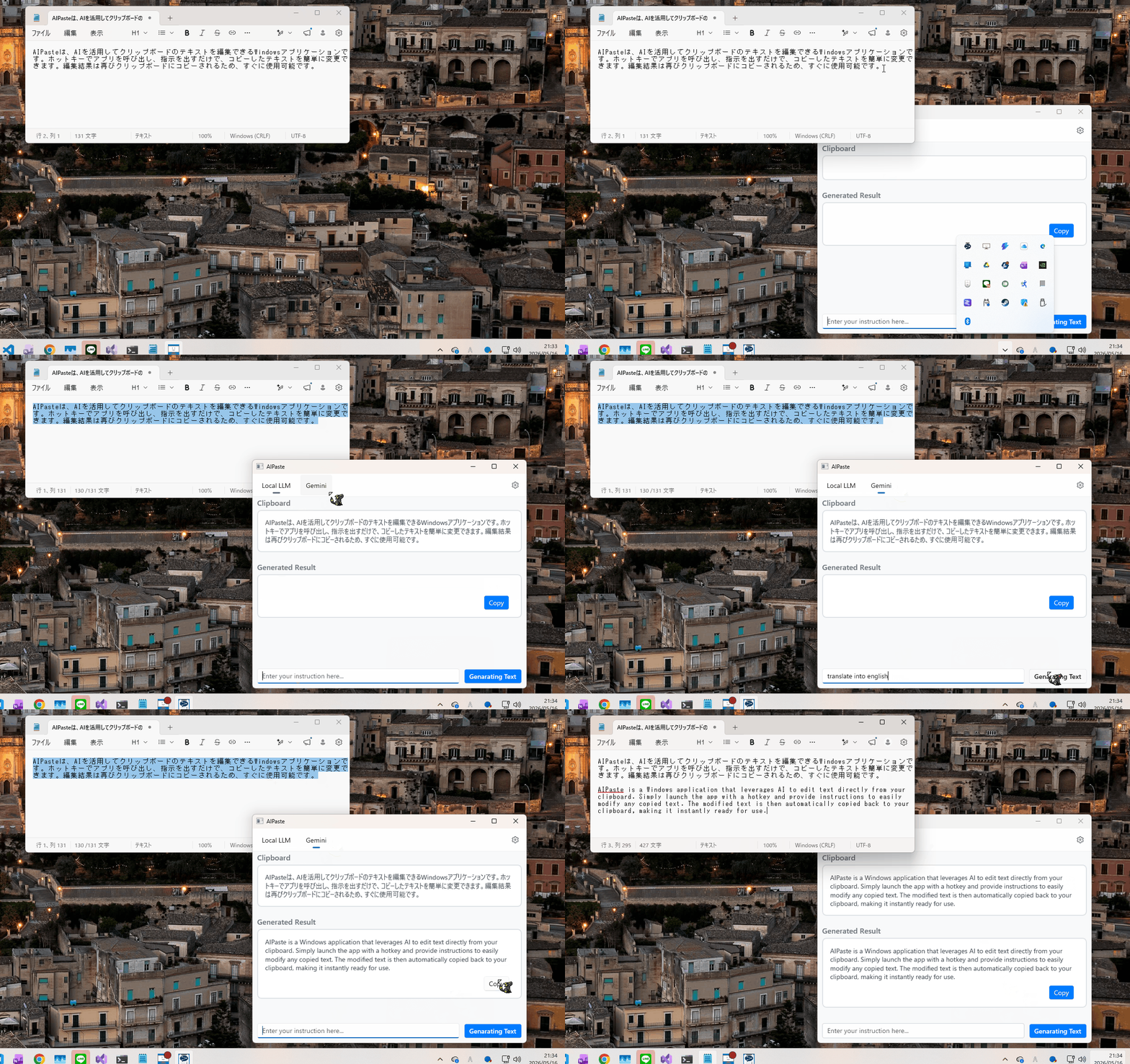
This tool uses a large language model (LLM) to revise and proofread text copied to your clipboard. It streamlines tasks like converting a casual message to a friend into a business email or correcting typos and grammatical errors in a document.
It runs in the background and can be called up at any time with a hotkey, so it doesn't interrupt your workflow. It supports both locally running LLMs and Google's Gemini model, allowing users to choose the AI model that best suits their needs.
This application uses the LLamaSharp library, but some of its binary files must be placed manually. This step is necessary to work around a known issue with the library (issue #382).
Please download the binary files for the following libraries and place them within the Binary/LLamaSharpBackend directory according to the specified structure.
Directory Structure:
Binary
 └── LLamaSharpBackend
   └── win-x64
     └── native
       ├── avx
       │   ├── ggml.dll
       │   └── ...
       ├── avx2
       ├── cuda11
       └── ...
Open the AIPaste.sln file in Visual Studio 2022 or later and build the project.
In this repository, the Binary\LLamaSharpBackend files are already present, so you can usually skip the manual placement step above unless you removed them.
The packaged app is the supported startup path. Directly running bin\x64\Debug\...\AIPaste.exe is not expected to work reliably.
From the repository root, run the following in PowerShell or Developer PowerShell for Visual Studio:
Set-Location <repository-root>

msbuild `
  '.\AIPaste\AIPaste\AIPaste.csproj' `
  /t:Build `
  /p:Configuration=Debug `
  /p:Platform=x64 `
  /p:GenerateAppxPackageOnBuild=true `
  /p:AppxBundle=Never `
  /nologo

powershell -ExecutionPolicy Bypass -File `
  '.\AIPaste\AIPaste\bin\publish\AIPaste_1.0.0.0_x64_Debug_Test\Install.ps1' `
  -Force -SkipLoggingTelemetry
After installation, launch the app from the Start menu as AIPaste.
Ctrl + Alt + C) to bring up the AIPaste window.On the settings page, you can customize the following options:
This repository is licensed under the MIT License. See LICENSE.txt for details.
AIPaste is a Windows application for editing clipboard text with AI. Simply summon the app with a hotkey and provide instructions to easily modify your copied text. The result is then copied back to your clipboard for immediate use.
This tool uses a large language model (LLM) to revise and proofread text copied to your clipboard. It streamlines tasks like converting a casual message to a friend into a business email or correcting typos and grammatical errors in a document.
It runs in the background and can be called up at any time with a hotkey, so it doesn't interrupt your workflow. It supports both locally running LLMs and Google's Gemini model, allowing users to choose the AI model that best suits their needs.
This application uses the LLamaSharp library, but some of its binary files must be placed manually. This step is necessary to work around a known issue with the library (issue #382).
Please download the binary files for the following libraries and place them within the Binary/LLamaSharpBackend directory according to the specified structure.
Directory Structure:
Binary
 └── LLamaSharpBackend
   └── win-x64
     └── native
       ├── avx
       │   ├── ggml.dll
       │   └── ...
       ├── avx2
       ├── cuda11
       └── ...
Open the AIPaste.sln file in Visual Studio 2022 or later and build the project.
In this repository, the Binary\LLamaSharpBackend files are already present, so you can usually skip the manual placement step above unless you removed them.
The packaged app is the supported startup path. Directly running bin\x64\Debug\...\AIPaste.exe is not expected to work reliably.
From the repository root, run the following in PowerShell or Developer PowerShell for Visual Studio:
Set-Location <repository-root>

msbuild `
  '.\AIPaste\AIPaste\AIPaste.csproj' `
  /t:Build `
  /p:Configuration=Debug `
  /p:Platform=x64 `
  /p:GenerateAppxPackageOnBuild=true `
  /p:AppxBundle=Never `
  /nologo

powershell -ExecutionPolicy Bypass -File `
  '.\AIPaste\AIPaste\bin\publish\AIPaste_1.0.0.0_x64_Debug_Test\Install.ps1' `
  -Force -SkipLoggingTelemetry
After installation, launch the app from the Start menu as AIPaste.
Ctrl + Alt + C) to bring up the AIPaste window.On the settings page, you can customize the following options:
This repository is licensed under the MIT License. See LICENSE.txt for details.



