
End-to-end pipeline to go from raw H&E slides to normalised extracted features for training
Python
28
138 commits
updated Mar 20, 2024
README
Note: Requires Python 3.8+
End-to-end WSI processing pipeline
This repository contains a pipeline for the pre-processing of Whole Slide Images (WSIs) as an initial step for histopathological deep learning. In this pipeline, we are using the Macenko normalization adapted method from https://github.com/wanghao14/Stain_Normalization.git
For usage on a local computer:
- Clone and enter this repository on your device
- Install the Singularity dependencies and build container, requires (fake) root access
  cd mlcontext
  sh setup.sh
  cd ..
- Edit run_wsi_norm.sh and specify your paths. Observe the following arguments:
| Input Variable name | Description |
|---|---|
| -o | Path to the output folder where features are saved |
| --wsi-dir | Path to the WSI folder |
| --cache-dir | Path to the output folder where intermediate slide JPGs are saved |
| -m | Path to the SSL model used for feature extraction |
| -e | Feature extractor, 'retccl' or 'ctranspath' |
| -c | Number of CPU cores, optional |
| --del-slide | Delete original slide from your drive, optional |
| --no-norm | Do not apply Macenko normalization, optional |
| --only-fex | Read the JPGs from previous runs and go straight into feature extraction |
Example usage:
python wsi-norm.py \
    -o FEATURE_OUTPUT_PATH \
    --wsi-dir INPUT_PATH \
    --cache-dir IMAGES_OUTPUT_PATH \
    -m MODEL_PATH \
    -e FEATURE_EXTRACTOR \
    -c NUM_OF_CPU_CORES \
    --del-slide \
    --no-norm \
- Run the script from the main directory with run_wsi_norm.sh:
singularity run --nv -B /:/ mlcontext/e2e_container.sif run_wsi_norm.sh
INFO
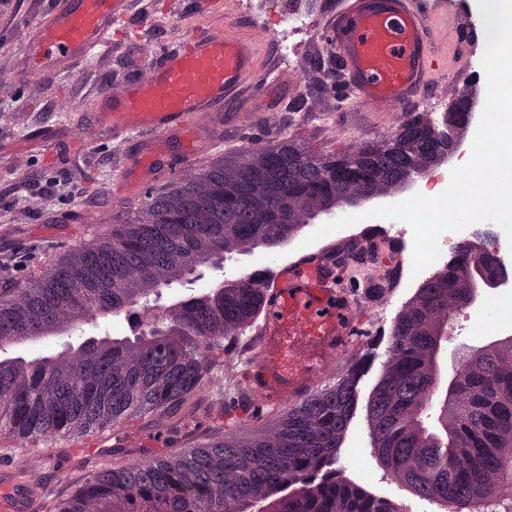
The features are extracted from tiles with a resolution of 224x224 px and edge length of 256 μm. When opting for normalization, the H&E slides are normalized according to Macenko et al., using the target distribution from the following image:
Similar repos


Languages
Python
98.1%
Shell
1.9%
End-to-end pipeline to go from raw H&E slides to normalised extracted features for training
Python
28
138 commits
updated Mar 20, 2024
README
Note: Requires Python 3.8+
End-to-end WSI processing pipeline
This repository contains a pipeline for the pre-processing of Whole Slide Images (WSIs) as an initial step for histopathological deep learning. In this pipeline, we are using the Macenko normalization adapted method from https://github.com/wanghao14/Stain_Normalization.git
For usage on a local computer:
- Clone and enter this repository on your device
- Install the Singularity dependencies and build container, requires (fake) root access
  cd mlcontext
  sh setup.sh
  cd ..
- Edit run_wsi_norm.sh and specify your paths. Observe the following arguments:
| Input Variable name | Description |
|---|---|
| -o | Path to the output folder where features are saved |
| --wsi-dir | Path to the WSI folder |
| --cache-dir | Path to the output folder where intermediate slide JPGs are saved |
| -m | Path to the SSL model used for feature extraction |
| -e | Feature extractor, 'retccl' or 'ctranspath' |
| -c | Number of CPU cores, optional |
| --del-slide | Delete original slide from your drive, optional |
| --no-norm | Do not apply Macenko normalization, optional |
| --only-fex | Read the JPGs from previous runs and go straight into feature extraction |
Example usage:
python wsi-norm.py \
    -o FEATURE_OUTPUT_PATH \
    --wsi-dir INPUT_PATH \
    --cache-dir IMAGES_OUTPUT_PATH \
    -m MODEL_PATH \
    -e FEATURE_EXTRACTOR \
    -c NUM_OF_CPU_CORES \
    --del-slide \
    --no-norm \
- Run the script from the main directory with run_wsi_norm.sh:
singularity run --nv -B /:/ mlcontext/e2e_container.sif run_wsi_norm.sh
INFO
The features are extracted from tiles with a resolution of 224x224 px and edge length of 256 μm. When opting for normalization, the H&E slides are normalized according to Macenko et al., using the target distribution from the following image:
Similar repos
Languages
Python
98.1%
Shell
1.9%