Your own self-hosted infra for lightweight VM sandboxes to safely execute untrusted code. CLI, API, Python SDK. ⭐ Star it if you like it! ⭐
See the codeSelf-hosted secure VM sandboxes for AI compute at scale






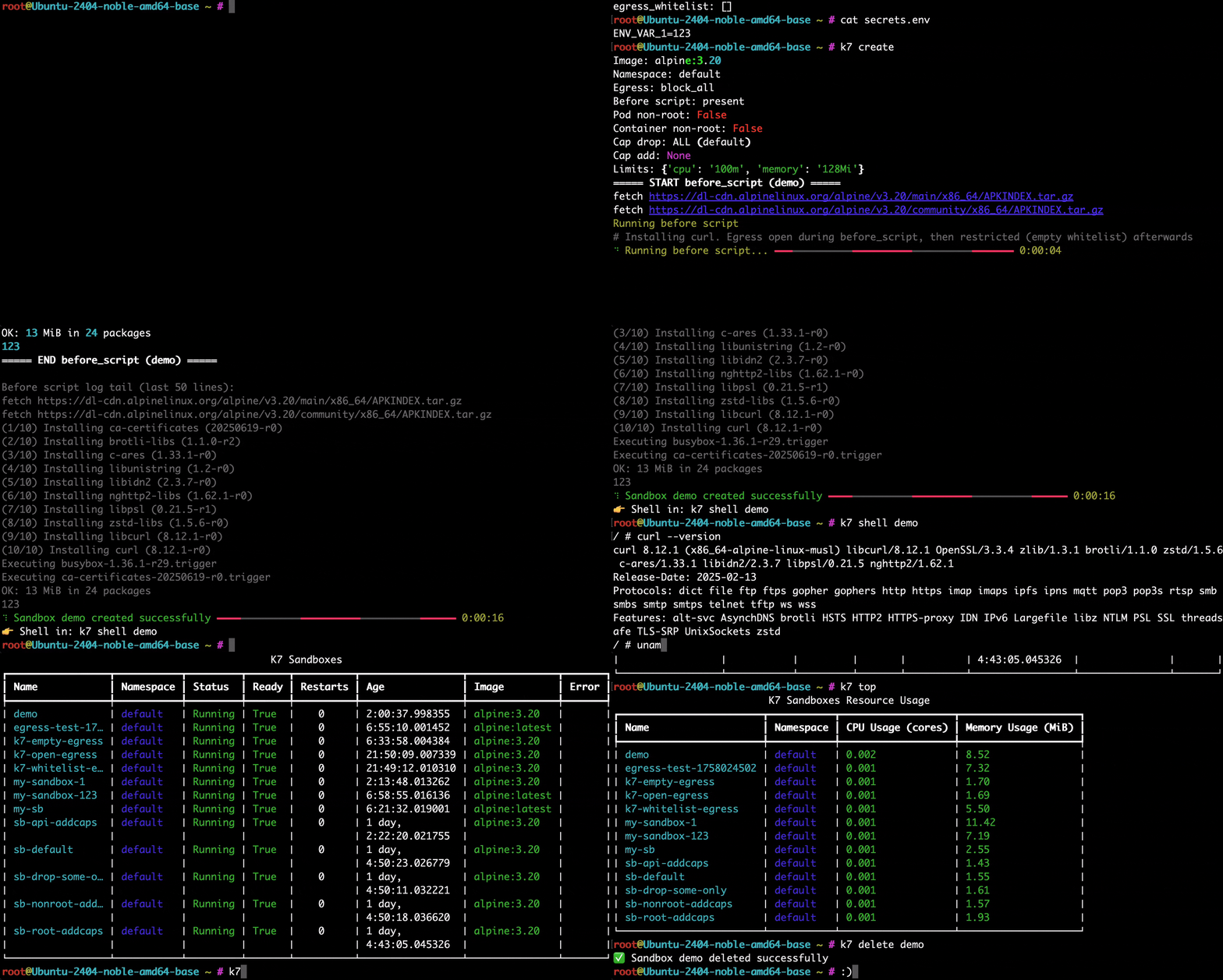
k7 aims to make it easy to create, manage and orchestrate lightweight safe VM sandboxes for executing untrusted code, at scale. It is built on battle-tested VM isolation with Kata, Firecracker, QEMU, Longhorn, and Kubernetes — plus k7's own k7d runtime. It is orignally motivated by AI agents that need to run arbitrary code at scale but it is also great for:
100% open‑source (Apache‑2.0). For technical support, write us at: [email protected]
k7 is built on:
kfd) for super-fast boots, light footprints and minimal attack surface (with the jailer),kql) via Kata when you want a fuller VMM and durable sandbox disks,k7 install --backend <kfd|kql|k7d|k7d-fc> provisions those backends (required; there is no default). none installs the cluster with no sandbox runtime — typical for scheduling-only masters (k7_backends=none in inventory). Each sandbox picks one runtime (k7 create --backend …). See docs/BACKENDS.md for the architecture and PERFORMANCE.md for the full measurements (Hetzner AX41 node, medians).
kfd (kata-firecracker-devmapper) | kql (kata-qemu-longhorn) | k7d | k7d-fc | |
|---|---|---|---|---|
| VMM | Firecracker (Kata) | QEMU (Kata) | k7d (custom KVM VMM) | k7d + Firecracker jailer |
| RuntimeClass | kata | kata-qemu | k7 | k7-fc |
| Sandbox storage | devmapper thin-pool (needs a spare raw disk) | Longhorn PVC (replicated, persistent) | erofs images + reflink XFS + guest tmpfs | same as k7d (no virtiofs / hostPath) |
| Create → Ready* | not re-measured† | 17.1s | 2.1s | 2.1s |
| Named snapshot* | — | 6.5s (Longhorn, disk-only) | — (VM snapshot trees via the k7d API) | — (same as k7d) |
| Fork → usable* | n/a (rejected) | 46.7s (disk clone + cold boot) | ~5 ms VM CoW fork; ~2.4 s end-to-end via k7/k8s (pod Ready + exec) | ~2.5 s end-to-end (same CoW; child --docker stays overlay2) |
| Pause / resume* | scale to 0 / 1 | 1.3s / 4.1s (disk survives) | 0.2s / 0.3s (VM frozen in place, memory survives) | 0.2s / —‡ |
| Docker in the VM | --docker: vehicle + overlay2 on ephemeral LVM block | --docker: vehicle + overlay2 on Longhorn block (fork/restore) | --docker: in-guest dockerd, overlay2 on virtio-blk, forkable | same guest dockerd, overlay2, forkable |
| Cross-pod persistence | ✗ | ✅ snapshots/restore | ✗ (fork carries state instead) | ✗ |
* medians of 3 on one Hetzner AX41 node — methodology, ranges, and docker-in-VM
numbers are in PERFORMANCE.md.
† kfd needs a spare raw disk the lifecycle-bench node didn't have; Show HN
measured kfd create→exec 3.74s and fork n/a (rejected). Docker-workload
numbers for kfd are in the PERFORMANCE.md Docker benchmark section.
‡ k7-fc VMM pause/resume returns immediately; CRI exec after resume hung on this
run (guest_cid=0 retained — CHALLENGES #17). k7d resume→exec is 0.3s.
build / run inside VM sandboxes: k7 create --docker --backend k7d --egress-open builder ubuntu:24.04 (name then image; or --backend k7d-fc). In-guest dockerd, overlay2, forkable. The same --docker flag on Kata (kfd/kql) injects a privileged docker-vehicle with overlay2 on a block disk — kql persists/forks the graph, kfd is ephemeral. --sidecar docker is a deprecated alias. See PERFORMANCE.mdk7 fork CoW-clones a running sandbox's disk and memory in ~5 ms at the VMM; end-to-end through k7/Kubernetes is ~2 s to a Ready podk7 install --hubble; off by default, observability only)k7 snapshot lifecyclepip install k7-sdk==0.4.0 (katakate package deprecated)📋 See ROADMAP.md for upcoming work (GPU passthrough, …).
Note: k7 is currently in beta and under security review. Use with caution for highly sensitive workloads.
For usage you need:
We provide a:
apt install k7k7 install (toggle with k7 api enable / k7 api disable)pip install k7-sdk==0.4.0k7d backend is amd64 / x86_64 only (same ISA; Debian calls it amd64,
the release tarball is *-x86_64-linux.tar.gz). kfd and kql support
amd64 and arm64.ls /dev/kvm should exist.Robot instances only, i.e. "dedicated": robot.hetzner.com..metal EC2 instances.--enable-nested-virtualization flag.kql, k7d) install without a spare drive. k7 install does not imply kfd.
./utils/wipe-disk.sh /your/disk to wipe a disk clean before provisioning. DANGER: destructive - it will remove data/partitions/formatting/SWRAID.sudo add-apt-repository universe -y
sudo apt update
sudo apt install -y ansible
curl -fsSL https://get.docker.com | sh
Already tested setups:
kfd thin-pool. Dual-NVMe boxes (no third drive): install the OS on one disk only — see tutorials/k7_hetzner_node_setup.md. (Older PDF that assumed an add-on third NVMe: tutorials/k7_hetzner_node_setup.pdf.)Recent Python, or the k7 CLI / k7-sdk from a Linux node or your laptop (API URL + key).
The .deb / PPA package is Linux-only (amd64/arm64). On a MacBook:
./src/k7/cli/dev.sh (same commands as k7; uses uv + PYTHONPATH=src)K7_API_URL and K7_API_KEY, then dev.sh create / dev.sh list (no --core)k7 install targets Linux servers with KVM — run on the node or via SSH, not on macOS locallypip install k7-sdk==0.4.0 for Python scripts onlyDo not install the Ubuntu .deb on macOS.
The Launchpad PPA publishes 0.4.0. Install the CLI, then clone the matching
source — k7 install builds k7-api:local from the current working directory:
sudo add-apt-repository ppa:katakate.org/k7
sudo apt update
sudo apt install k7
k7 -V   # 0.4.0
# GitHub .deb is the same package if you prefer not to add the PPA:
# curl -fsSL -O https://github.com/Katakate/k7/releases/download/v0.4.0/k7_0.4.0_amd64.deb
# sudo apt install ./k7_0.4.0_amd64.deb
git clone --branch v0.4.0 https://github.com/Katakate/k7.git
cd k7
sudo apt install -y ansible
curl -fsSL https://get.docker.com | sh
Then let k7 get your node ready. --backend is required (no silent
default). kfd needs a spare raw disk; kql uses Longhorn on the OS disk; k7d
is the warm-fork daemon. none is control-plane only (no sandbox runtime):
$ k7 install --backend kfd,kql,k7d
Current task: Reminder about logging out and back in for group changes
  Installing K7 on 1 host(s)... ━━━━━━━━━━━━━━━━━━━━━━━━━━━━━━━━━━━━━━━━ 100% 0:01:41
✅ Installation completed successfully!
Optionally pass -v for a verbose output.
Dual-NVMe Hetzner boxes have no third empty disk for the
kfdthin-pool. Put Ubuntu on one NVMe (SWRAID 0/TWO_DISK=1) and leave the other raw — the playbook auto-detects that spare. Do not pin--disk /dev/nvme1n1: NVMe names swap across reboots. Walkthrough: tutorials/k7_hetzner_node_setup.md (this file is also in public Katakate/k7).The playbook pins k7d 0.7.0.
--dockerneeds the guest docker service (payload on the node); an older k7d fails loudly withthis k7d has no docker service; upgrade. Multi-node inventory shapes (2-node server+agent, 3-node--ha) are insrc/k7/deploy/inventory.ini.example. Every inventory host must setk7_backends(or inherit group vars). Usek7_backends=noneon[k7_servers]when agents run the sandboxes — empty/omitted is an error.
k7 install serves k7-api on NodePort 31007 over HTTPS. The default
is a playbook-minted cluster CA (Let's Encrypt cannot issue for a bare
IP). Copy /etc/k7/tls/ca.crt off the node and point the CLI at it:
scp root@<node>:/etc/k7/tls/ca.crt ./k7-ca.crt
k7 config set api.url https://<node-ip>:31007
k7 config set api.ca ./k7-ca.crt
k7 config set api.key <key>
--api-hostname <name> uses Let's Encrypt via a Caddy sidecar (the DNS
A record must point at the first master). --api-tls-cert +
--api-tls-key installs an operator-supplied pair. --api-insecure-http
is today's plain HTTP NodePort and must be called what it is: keys travel
in cleartext. None of this is rate limiting; do not write "the API is
now secure".
Pass --api-allow-cidr <cidr> (repeatable, Cilium only) to restrict who
can connect. Off by default. Defence in depth for operators who know
their client CIDRs — it stacks with TLS and does not replace it. See
docs/BACKENDS.md "TLS for k7-api" and
"Restricting who can reach k7-api".
Pass --hubble to turn on Cilium Hubble (relay + CLI, no UI) so policy
drops are a hubble observe question. Off by default; requires the
Cilium CNI (--hubble --cni flannel fails loudly). See
docs/BACKENDS.md "Debugging policy drops".
This will install and most importantly connect together the following components (depending on --backend):
kfd)kql)containerd-shim-k7-v1 + RuntimeClass k7 (k7d)hubble CLI when --hubble is passedCareful design: config updates will not touch your existing Docker or containerd setups. We chose to use K3s' own containerd for minimal disruption. Installation may however overwrite existing installations of K3s, Kata, Firecracker, Jailer, QEMU/Kata config, or Longhorn.
You can run workloads directly from the node(s) using the CLI. To create a sandbox, just create a yaml config for it.
name: my-sandbox-123
image: alpine:latest
namespace: default

# Optional: restrict egress (safe pattern: whitelist only your own egress proxy IP)
egress_whitelist:
  - "10.0.0.5/32"     # Your private egress proxy/gateway

# Optional: resource limits
limits:
  cpu: "1"
  memory: "1Gi"
  ephemeral-storage: "2Gi"

# Optional: run before_script inside the container once at start. Network restrictions apply after the before-script, so you can install packages here, pull git repos, etc
before_script: |
  apk add --no-cache git curl

# Optional: load environment variables from a file. These will be available both during the before-script, and in the sandbox
env_file: path/to/your/secrets/.env
# Create a sandbox (uses k7.yaml in the current directory by default, but you can also pass: -f myfile.yaml)
k7 create

# Or pick a backend explicitly (kfd | kql | k7d — aliases for the full names)
k7 create -f k7.yaml --backend k7d

# List sandboxes
k7 list

# Delete a sandbox
k7 delete my-sandbox-123

# Delete all sandboxes. You can also pass a namespace
k7 delete-all
# Warm CoW fork (disk + memory) — source must be a k7d sandbox
k7 create -f k7.yaml --backend k7d          # name from yaml, e.g. my-sandbox-123
# exec wraps the argument in `sh -c`, so pass the whole guest command
# as one string (redirects and quotes survive). Do not add an extra `sh -c`.
k7 exec my-sandbox-123 -- 'echo hi > /tmp/state.txt'
k7 fork my-sandbox-123 branch-a
k7 exec branch-a -- 'cat /tmp/state.txt'        # inherited memory + disk

# Disk-only fork (cold boot from cloned PVC) — kql / kata-qemu-longhorn
k7 create -f k7.yaml --backend kql
k7 fork my-sandbox-123 branch-b
# optional: pin the Longhorn VolumeSnapshot name used for the clone
k7 fork my-sandbox-123 branch-c --snapshot my-snap

# Parallel branches from one base
for i in $(seq 0 7); do k7 fork my-sandbox-123 exp-$i & done; wait

# Pause / resume (kql keeps the PVC; k7d freezes the live VM)
k7 pause my-sandbox-123
k7 resume my-sandbox-123

# Named disk snapshot without pausing (kql)
k7 snapshot create my-sandbox-123 my-named-snap
On k7d, the VMM fork itself is ~5 ms; end-to-end through Kubernetes to a Ready pod is ~2 s. On kql, fork is a Longhorn snapshot + PVC clone + cold boot (~45 s). See PERFORMANCE.md and docs/BACKENDS.md.
The K7 API is deployed automatically by k7 install as the k7-api
Deployment in kube-system. K3s keeps it running on its own; there's no
separate "start" step.
# Check status + endpoint
k7 api status
k7 api endpoint

# Generate API key (optionally pin to a namespace and/or node)
k7 generate-api-key my-key1
k7 nodes list   # NAME is the Linux hostname K3s registered; not an inventory label
k7 generate-api-key tenant-a -n tenant-a --node k7-node-01
k7 nodes dedicate k7-node-01 --tenant acme

# Temporarily disable / re-enable
k7 api disable
k7 api enable
Generating / listing / revoking keys talks to /etc/k7/api_keys.json, so
those subcommands need to run on the node (typically sudo or root).
After your k7 API is up, usage is very simple.
Install the Python SDK via:
pip install k7-sdk==0.4.0
Or if you want async support:
pip install "k7-sdk[async]==0.4.0"
The legacy katakate PyPI name remains as a one-release shim that re-exports k7_sdk with a deprecation warning.
Then use with:
from k7_sdk import Client

k7 = Client(
  endpoint='https://<your-endpoint>',
  api_key='your-key',
  verify_ssl='./k7-ca.crt')  # cluster CA from /etc/k7/tls/ca.crt on the node

# Create sandbox (pick backend: kata-firecracker-devmapper | kata-qemu-longhorn | k7d)
sb = k7.create({
    "name": "base",
    "image": "alpine:latest",
    "backend": "k7d",
})

# Execute code
result = sb.exec('echo "Hello World" > /tmp/hi.txt && cat /tmp/hi.txt')
print(result['stdout'])

# Fork: k7d = warm CoW (disk + memory); kql = disk clone + cold boot
branch = sb.fork("branch-a")
print(branch.exec("cat /tmp/hi.txt")["stdout"])  # still there on k7d

# Parallel exploration
forks = [sb.fork(f"exp-{i}") for i in range(4)]

# List / delete
sandboxes = k7.list()
sb.delete()
import asyncio
from k7_sdk import AsyncClient

async def main():
    k7 = AsyncClient(
      endpoint='https://<your-endpoint>',
      api_key='your-key'
    )
    print(await k7.list())
    await k7.aclose()

asyncio.run(main())
First install make if not already available:
sudo add-apt-repository universe -y
sudo apt update
sudo apt install make
To build the k7 CLI and API into .deb package:
make build
You can then install it with:
sudo make install
To uninstall later:
sudo make uninstall
Note: we recommend running make uninstall before reinstalling if it is not your first install, to avoid stale copies of cached files in the .deb package.
Local dev image:
# Build the API image locally
make api-build-local

# Run API using local image (no pull)
make api-run-local
Preferred (uv):
# create env
uv venv .venv-build
. .venv-build/bin/activate

# install directly from source in editable mode
uv pip install -e .
K7 sandboxes are hardened by default with multiple layers of security:
VM isolation: Kata Containers (Firecracker or QEMU) or the k7d RuntimeClass provide hardware-level isolation via lightweight VMs
kfd, Firecracker processes are further restricted into a chroot using the Jailerkql uses QEMU + Longhorn for durable, cross-node-mobile disks; k7d has its own CoW-fork isolation trade-offs (see k7d SECURITY.md)Linux capabilities: All capabilities are dropped by default (drop: ALL) for defense-in-depth
cap_add parameterallow_privilege_escalation is always set to falseRuntimeDefault is applied on the sandbox container
and enforced inside the guest: on k7d, and on Kata (kfd / kql)
with disable_guest_seccomp = false in the playbook's Kata config
(the sandbox container's OCI seccomp reaches guest runc).Non-root execution: Optionally run containers and pods as non-root user (UID 65532):
container_non_root: Run the main container as non-root and disable privilege escalationpod_non_root: Run the entire pod as non-root with consistent filesystem ownership (UID/GID/FSGroup 65532)API security:
/etc/k7/api_keys.json by default)Network policies: Complete network isolation for VM sandboxes
--ingress-port / --ingress-from (sandbox:<name>, namespace:<ns>, cidr:<cidr>)CiliumNetworkPolicy; default CNI)egress_whitelist (CIDR or domain) are reachable--egress-open — from reaching the node, other nodes, the Kubernetes API, cloud metadata and the kube-system/longhorn-system pods (CoreDNS excepted). Not applied on --cni flannel clusters.kubectl exec and k7 shell is preserved (uses Kubernetes API, not pod networking)More security features are on the roadmap (e.g. AppArmor).
src/:
src/k7/src/k7_sdk/ (PyPI package k7-sdk; src/katakate/ is a deprecation shim)setup.py publishes the SDK; assets under src/k7/ belong to the Debian CLI / API image, not the PyPI wheel.~/docs/k7/ (Mintlify). See docs/README.md in this repo.src/k7/cli/build.sh and produces dist/k7_<version>_amd64.deb and dist/k7_<version>_arm64.deb.v*) can publish the PyPI SDK and upload the .deb artifact.(top 24 of 35)
3,385 followers · starred Feb 2026
17,042 followers · starred Oct 2025
1,154 followers · starred Oct 2025
1,008 followers · starred Oct 2025
Your own self-hosted infra for lightweight VM sandboxes to safely execute untrusted code. CLI, API, Python SDK. ⭐ Star it if you like it! ⭐
See the codeSelf-hosted secure VM sandboxes for AI compute at scale
k7 aims to make it easy to create, manage and orchestrate lightweight safe VM sandboxes for executing untrusted code, at scale. It is built on battle-tested VM isolation with Kata, Firecracker, QEMU, Longhorn, and Kubernetes — plus k7's own k7d runtime. It is orignally motivated by AI agents that need to run arbitrary code at scale but it is also great for:
100% open‑source (Apache‑2.0). For technical support, write us at: [email protected]
k7 is built on:
kfd) for super-fast boots, light footprints and minimal attack surface (with the jailer),kql) via Kata when you want a fuller VMM and durable sandbox disks,k7 install --backend <kfd|kql|k7d|k7d-fc> provisions those backends (required; there is no default). none installs the cluster with no sandbox runtime — typical for scheduling-only masters (k7_backends=none in inventory). Each sandbox picks one runtime (k7 create --backend …). See docs/BACKENDS.md for the architecture and PERFORMANCE.md for the full measurements (Hetzner AX41 node, medians).
kfd (kata-firecracker-devmapper) | kql (kata-qemu-longhorn) | k7d | k7d-fc | |
|---|---|---|---|---|
| VMM | Firecracker (Kata) | QEMU (Kata) | k7d (custom KVM VMM) | k7d + Firecracker jailer |
| RuntimeClass | kata | kata-qemu | k7 | k7-fc |
| Sandbox storage | devmapper thin-pool (needs a spare raw disk) | Longhorn PVC (replicated, persistent) | erofs images + reflink XFS + guest tmpfs | same as k7d (no virtiofs / hostPath) |
| Create → Ready* | not re-measured† | 17.1s | 2.1s | 2.1s |
| Named snapshot* | — | 6.5s (Longhorn, disk-only) | — (VM snapshot trees via the k7d API) | — (same as k7d) |
| Fork → usable* | n/a (rejected) | 46.7s (disk clone + cold boot) | ~5 ms VM CoW fork; ~2.4 s end-to-end via k7/k8s (pod Ready + exec) | ~2.5 s end-to-end (same CoW; child --docker stays overlay2) |
| Pause / resume* | scale to 0 / 1 | 1.3s / 4.1s (disk survives) | 0.2s / 0.3s (VM frozen in place, memory survives) | 0.2s / —‡ |
| Docker in the VM | --docker: vehicle + overlay2 on ephemeral LVM block | --docker: vehicle + overlay2 on Longhorn block (fork/restore) | --docker: in-guest dockerd, overlay2 on virtio-blk, forkable | same guest dockerd, overlay2, forkable |
| Cross-pod persistence | ✗ | ✅ snapshots/restore | ✗ (fork carries state instead) | ✗ |
* medians of 3 on one Hetzner AX41 node — methodology, ranges, and docker-in-VM
numbers are in PERFORMANCE.md.
† kfd needs a spare raw disk the lifecycle-bench node didn't have; Show HN
measured kfd create→exec 3.74s and fork n/a (rejected). Docker-workload
numbers for kfd are in the PERFORMANCE.md Docker benchmark section.
‡ k7-fc VMM pause/resume returns immediately; CRI exec after resume hung on this
run (guest_cid=0 retained — CHALLENGES #17). k7d resume→exec is 0.3s.
build / run inside VM sandboxes: k7 create --docker --backend k7d --egress-open builder ubuntu:24.04 (name then image; or --backend k7d-fc). In-guest dockerd, overlay2, forkable. The same --docker flag on Kata (kfd/kql) injects a privileged docker-vehicle with overlay2 on a block disk — kql persists/forks the graph, kfd is ephemeral. --sidecar docker is a deprecated alias. See PERFORMANCE.mdk7 fork CoW-clones a running sandbox's disk and memory in ~5 ms at the VMM; end-to-end through k7/Kubernetes is ~2 s to a Ready podk7 install --hubble; off by default, observability only)k7 snapshot lifecyclepip install k7-sdk==0.4.0 (katakate package deprecated)📋 See ROADMAP.md for upcoming work (GPU passthrough, …).
Note: k7 is currently in beta and under security review. Use with caution for highly sensitive workloads.
For usage you need:
We provide a:
apt install k7k7 install (toggle with k7 api enable / k7 api disable)pip install k7-sdk==0.4.0k7d backend is amd64 / x86_64 only (same ISA; Debian calls it amd64,
the release tarball is *-x86_64-linux.tar.gz). kfd and kql support
amd64 and arm64.ls /dev/kvm should exist.Robot instances only, i.e. "dedicated": robot.hetzner.com..metal EC2 instances.--enable-nested-virtualization flag.kql, k7d) install without a spare drive. k7 install does not imply kfd.
./utils/wipe-disk.sh /your/disk to wipe a disk clean before provisioning. DANGER: destructive - it will remove data/partitions/formatting/SWRAID.sudo add-apt-repository universe -y
sudo apt update
sudo apt install -y ansible
curl -fsSL https://get.docker.com | sh
Already tested setups:
kfd thin-pool. Dual-NVMe boxes (no third drive): install the OS on one disk only — see tutorials/k7_hetzner_node_setup.md. (Older PDF that assumed an add-on third NVMe: tutorials/k7_hetzner_node_setup.pdf.)Recent Python, or the k7 CLI / k7-sdk from a Linux node or your laptop (API URL + key).
The .deb / PPA package is Linux-only (amd64/arm64). On a MacBook:
./src/k7/cli/dev.sh (same commands as k7; uses uv + PYTHONPATH=src)K7_API_URL and K7_API_KEY, then dev.sh create / dev.sh list (no --core)k7 install targets Linux servers with KVM — run on the node or via SSH, not on macOS locallypip install k7-sdk==0.4.0 for Python scripts onlyDo not install the Ubuntu .deb on macOS.
The Launchpad PPA publishes 0.4.0. Install the CLI, then clone the matching
source — k7 install builds k7-api:local from the current working directory:
sudo add-apt-repository ppa:katakate.org/k7
sudo apt update
sudo apt install k7
k7 -V   # 0.4.0
# GitHub .deb is the same package if you prefer not to add the PPA:
# curl -fsSL -O https://github.com/Katakate/k7/releases/download/v0.4.0/k7_0.4.0_amd64.deb
# sudo apt install ./k7_0.4.0_amd64.deb
git clone --branch v0.4.0 https://github.com/Katakate/k7.git
cd k7
sudo apt install -y ansible
curl -fsSL https://get.docker.com | sh
Then let k7 get your node ready. --backend is required (no silent
default). kfd needs a spare raw disk; kql uses Longhorn on the OS disk; k7d
is the warm-fork daemon. none is control-plane only (no sandbox runtime):
$ k7 install --backend kfd,kql,k7d
Current task: Reminder about logging out and back in for group changes
  Installing K7 on 1 host(s)... ━━━━━━━━━━━━━━━━━━━━━━━━━━━━━━━━━━━━━━━━ 100% 0:01:41
✅ Installation completed successfully!
Optionally pass -v for a verbose output.
Dual-NVMe Hetzner boxes have no third empty disk for the
kfdthin-pool. Put Ubuntu on one NVMe (SWRAID 0/TWO_DISK=1) and leave the other raw — the playbook auto-detects that spare. Do not pin--disk /dev/nvme1n1: NVMe names swap across reboots. Walkthrough: tutorials/k7_hetzner_node_setup.md (this file is also in public Katakate/k7).The playbook pins k7d 0.7.0.
--dockerneeds the guest docker service (payload on the node); an older k7d fails loudly withthis k7d has no docker service; upgrade. Multi-node inventory shapes (2-node server+agent, 3-node--ha) are insrc/k7/deploy/inventory.ini.example. Every inventory host must setk7_backends(or inherit group vars). Usek7_backends=noneon[k7_servers]when agents run the sandboxes — empty/omitted is an error.
k7 install serves k7-api on NodePort 31007 over HTTPS. The default
is a playbook-minted cluster CA (Let's Encrypt cannot issue for a bare
IP). Copy /etc/k7/tls/ca.crt off the node and point the CLI at it:
scp root@<node>:/etc/k7/tls/ca.crt ./k7-ca.crt
k7 config set api.url https://<node-ip>:31007
k7 config set api.ca ./k7-ca.crt
k7 config set api.key <key>
--api-hostname <name> uses Let's Encrypt via a Caddy sidecar (the DNS
A record must point at the first master). --api-tls-cert +
--api-tls-key installs an operator-supplied pair. --api-insecure-http
is today's plain HTTP NodePort and must be called what it is: keys travel
in cleartext. None of this is rate limiting; do not write "the API is
now secure".
Pass --api-allow-cidr <cidr> (repeatable, Cilium only) to restrict who
can connect. Off by default. Defence in depth for operators who know
their client CIDRs — it stacks with TLS and does not replace it. See
docs/BACKENDS.md "TLS for k7-api" and
"Restricting who can reach k7-api".
Pass --hubble to turn on Cilium Hubble (relay + CLI, no UI) so policy
drops are a hubble observe question. Off by default; requires the
Cilium CNI (--hubble --cni flannel fails loudly). See
docs/BACKENDS.md "Debugging policy drops".
This will install and most importantly connect together the following components (depending on --backend):
kfd)kql)containerd-shim-k7-v1 + RuntimeClass k7 (k7d)hubble CLI when --hubble is passedCareful design: config updates will not touch your existing Docker or containerd setups. We chose to use K3s' own containerd for minimal disruption. Installation may however overwrite existing installations of K3s, Kata, Firecracker, Jailer, QEMU/Kata config, or Longhorn.
You can run workloads directly from the node(s) using the CLI. To create a sandbox, just create a yaml config for it.
name: my-sandbox-123
image: alpine:latest
namespace: default

# Optional: restrict egress (safe pattern: whitelist only your own egress proxy IP)
egress_whitelist:
  - "10.0.0.5/32"     # Your private egress proxy/gateway

# Optional: resource limits
limits:
  cpu: "1"
  memory: "1Gi"
  ephemeral-storage: "2Gi"

# Optional: run before_script inside the container once at start. Network restrictions apply after the before-script, so you can install packages here, pull git repos, etc
before_script: |
  apk add --no-cache git curl

# Optional: load environment variables from a file. These will be available both during the before-script, and in the sandbox
env_file: path/to/your/secrets/.env
# Create a sandbox (uses k7.yaml in the current directory by default, but you can also pass: -f myfile.yaml)
k7 create

# Or pick a backend explicitly (kfd | kql | k7d — aliases for the full names)
k7 create -f k7.yaml --backend k7d

# List sandboxes
k7 list

# Delete a sandbox
k7 delete my-sandbox-123

# Delete all sandboxes. You can also pass a namespace
k7 delete-all
# Warm CoW fork (disk + memory) — source must be a k7d sandbox
k7 create -f k7.yaml --backend k7d          # name from yaml, e.g. my-sandbox-123
# exec wraps the argument in `sh -c`, so pass the whole guest command
# as one string (redirects and quotes survive). Do not add an extra `sh -c`.
k7 exec my-sandbox-123 -- 'echo hi > /tmp/state.txt'
k7 fork my-sandbox-123 branch-a
k7 exec branch-a -- 'cat /tmp/state.txt'        # inherited memory + disk

# Disk-only fork (cold boot from cloned PVC) — kql / kata-qemu-longhorn
k7 create -f k7.yaml --backend kql
k7 fork my-sandbox-123 branch-b
# optional: pin the Longhorn VolumeSnapshot name used for the clone
k7 fork my-sandbox-123 branch-c --snapshot my-snap

# Parallel branches from one base
for i in $(seq 0 7); do k7 fork my-sandbox-123 exp-$i & done; wait

# Pause / resume (kql keeps the PVC; k7d freezes the live VM)
k7 pause my-sandbox-123
k7 resume my-sandbox-123

# Named disk snapshot without pausing (kql)
k7 snapshot create my-sandbox-123 my-named-snap
On k7d, the VMM fork itself is ~5 ms; end-to-end through Kubernetes to a Ready pod is ~2 s. On kql, fork is a Longhorn snapshot + PVC clone + cold boot (~45 s). See PERFORMANCE.md and docs/BACKENDS.md.
The K7 API is deployed automatically by k7 install as the k7-api
Deployment in kube-system. K3s keeps it running on its own; there's no
separate "start" step.
# Check status + endpoint
k7 api status
k7 api endpoint

# Generate API key (optionally pin to a namespace and/or node)
k7 generate-api-key my-key1
k7 nodes list   # NAME is the Linux hostname K3s registered; not an inventory label
k7 generate-api-key tenant-a -n tenant-a --node k7-node-01
k7 nodes dedicate k7-node-01 --tenant acme

# Temporarily disable / re-enable
k7 api disable
k7 api enable
Generating / listing / revoking keys talks to /etc/k7/api_keys.json, so
those subcommands need to run on the node (typically sudo or root).
After your k7 API is up, usage is very simple.
Install the Python SDK via:
pip install k7-sdk==0.4.0
Or if you want async support:
pip install "k7-sdk[async]==0.4.0"
The legacy katakate PyPI name remains as a one-release shim that re-exports k7_sdk with a deprecation warning.
Then use with:
from k7_sdk import Client

k7 = Client(
  endpoint='https://<your-endpoint>',
  api_key='your-key',
  verify_ssl='./k7-ca.crt')  # cluster CA from /etc/k7/tls/ca.crt on the node

# Create sandbox (pick backend: kata-firecracker-devmapper | kata-qemu-longhorn | k7d)
sb = k7.create({
    "name": "base",
    "image": "alpine:latest",
    "backend": "k7d",
})

# Execute code
result = sb.exec('echo "Hello World" > /tmp/hi.txt && cat /tmp/hi.txt')
print(result['stdout'])

# Fork: k7d = warm CoW (disk + memory); kql = disk clone + cold boot
branch = sb.fork("branch-a")
print(branch.exec("cat /tmp/hi.txt")["stdout"])  # still there on k7d

# Parallel exploration
forks = [sb.fork(f"exp-{i}") for i in range(4)]

# List / delete
sandboxes = k7.list()
sb.delete()
import asyncio
from k7_sdk import AsyncClient

async def main():
    k7 = AsyncClient(
      endpoint='https://<your-endpoint>',
      api_key='your-key'
    )
    print(await k7.list())
    await k7.aclose()

asyncio.run(main())
First install make if not already available:
sudo add-apt-repository universe -y
sudo apt update
sudo apt install make
To build the k7 CLI and API into .deb package:
make build
You can then install it with:
sudo make install
To uninstall later:
sudo make uninstall
Note: we recommend running make uninstall before reinstalling if it is not your first install, to avoid stale copies of cached files in the .deb package.
Local dev image:
# Build the API image locally
make api-build-local

# Run API using local image (no pull)
make api-run-local
Preferred (uv):
# create env
uv venv .venv-build
. .venv-build/bin/activate

# install directly from source in editable mode
uv pip install -e .
K7 sandboxes are hardened by default with multiple layers of security:
VM isolation: Kata Containers (Firecracker or QEMU) or the k7d RuntimeClass provide hardware-level isolation via lightweight VMs
kfd, Firecracker processes are further restricted into a chroot using the Jailerkql uses QEMU + Longhorn for durable, cross-node-mobile disks; k7d has its own CoW-fork isolation trade-offs (see k7d SECURITY.md)Linux capabilities: All capabilities are dropped by default (drop: ALL) for defense-in-depth
cap_add parameterallow_privilege_escalation is always set to falseRuntimeDefault is applied on the sandbox container
and enforced inside the guest: on k7d, and on Kata (kfd / kql)
with disable_guest_seccomp = false in the playbook's Kata config
(the sandbox container's OCI seccomp reaches guest runc).Non-root execution: Optionally run containers and pods as non-root user (UID 65532):
container_non_root: Run the main container as non-root and disable privilege escalationpod_non_root: Run the entire pod as non-root with consistent filesystem ownership (UID/GID/FSGroup 65532)API security:
/etc/k7/api_keys.json by default)Network policies: Complete network isolation for VM sandboxes
--ingress-port / --ingress-from (sandbox:<name>, namespace:<ns>, cidr:<cidr>)CiliumNetworkPolicy; default CNI)egress_whitelist (CIDR or domain) are reachable--egress-open — from reaching the node, other nodes, the Kubernetes API, cloud metadata and the kube-system/longhorn-system pods (CoreDNS excepted). Not applied on --cni flannel clusters.kubectl exec and k7 shell is preserved (uses Kubernetes API, not pod networking)More security features are on the roadmap (e.g. AppArmor).
src/:
src/k7/src/k7_sdk/ (PyPI package k7-sdk; src/katakate/ is a deprecation shim)setup.py publishes the SDK; assets under src/k7/ belong to the Debian CLI / API image, not the PyPI wheel.~/docs/k7/ (Mintlify). See docs/README.md in this repo.src/k7/cli/build.sh and produces dist/k7_<version>_amd64.deb and dist/k7_<version>_arm64.deb.v*) can publish the PyPI SDK and upload the .deb artifact.(top 24 of 35)
3,385 followers · starred Feb 2026
17,042 followers · starred Oct 2025
1,154 followers · starred Oct 2025
1,008 followers · starred Oct 2025