
✨ Sophisticated online marketplace designed to connect buyers and sellers through a secure, intuitive, and interactive bidding platform. 🚀
See the codeREADME
🔨 AuctionHub - Premium Digital Marketplace





AuctionHub is a high-performance, enterprise-grade digital marketplace built with ASP.NET Core 8.0. It features a multi-layered architecture, real-time bidding via SignalR, AI-powered image moderation, and a robust financial ledger system. Designed for scalability, it is currently deployed on a private K3s Kubernetes cluster.
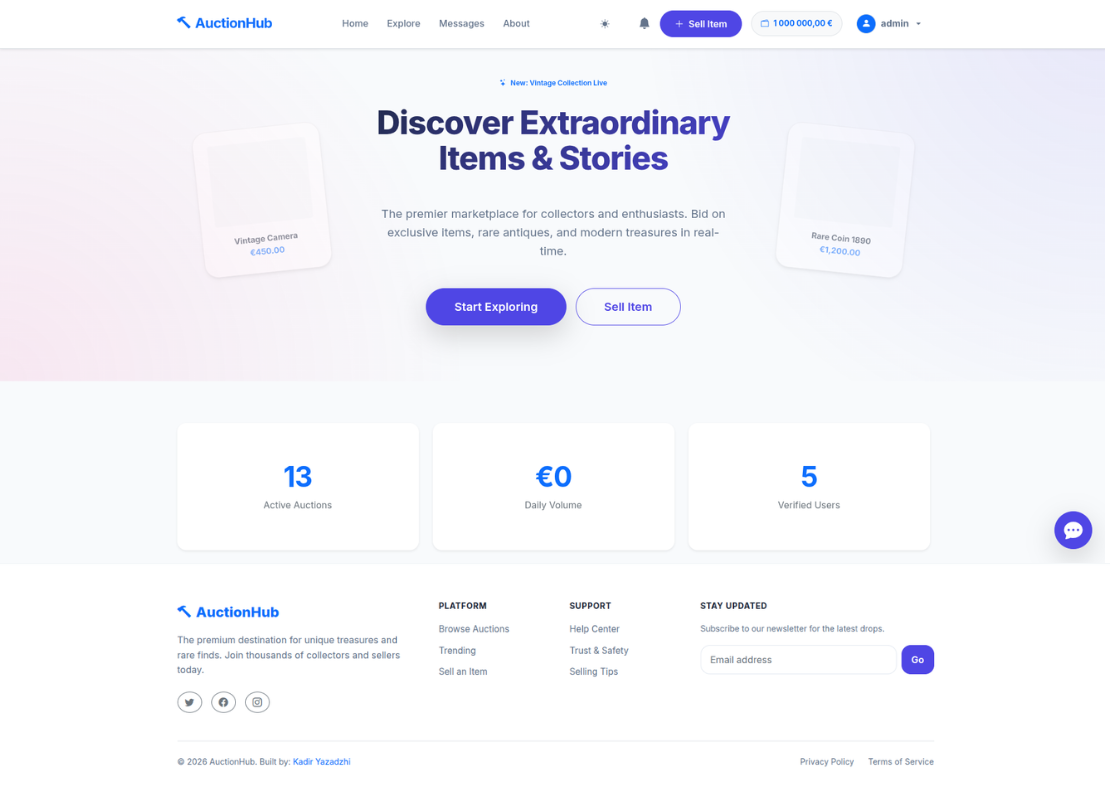
📑 Table of Contents
- 🌟 Key Features
- 📸 Gallery & UI
- ⚙️ How It Works
- 🏗️ Technical Architecture
- 💾 Database Schema
- 📂 Project Structure
- 🚀 Installation & Environment
- 🧪 Testing
- ☁️ Deployment (K3s)
🌟 Key Features
🛒 Advanced Auction Mechanics
- Dynamic Listings: Standard auctions with customizable start/end times and increments.
- Dutch Auction Mechanic: Reverse auction support where the price drops over time until someone buys.
- Private Negotiation: "Private Offers" system allowing direct price negotiation between buyers and sellers.
- Smart Bidding (SignalR):
- Live Updates: Bids reflect instantly across all connected clients without page refresh.
- Auto-Bidder: Users can set a maximum price, and the system outbids competitors automatically.
- Anti-Snipe Protection: Auctions are automatically extended if a bid is placed in the final minutes.
- Participation Fee (Tickets): Premium auctions can require a "Bidding Ticket" purchase before entry.
💰 Financial Ecosystem (Wallet & Escrow)
- Internal Banking: Comprehensive digital wallet for every user with full transaction history.
- Escrow Service: Automated fund locking (Hold) during active bids to guarantee payment.
- Instant Refunds: Real-time fund release back to users when they are outbid.
- Secure Settlements: Funds are only released to the seller upon delivery confirmation or admin resolution.
🛡️ Administration & Moderation
- Global Dashboard: Advanced metrics (Platform Volume, User Growth, System Integrity).
- Audit Logs: Full traceability of all admin actions (suspensions, setting changes, user management).
- System Integrity: Precision timestamping and consistency checks for all financial and auction operations.
- Dispute Resolution: Integrated system for admins to mediate and resolve transaction conflicts.
- System Controls: Dynamic management of commission rates, promotion fees, and platform-wide settings.
🔔 Social & Engagement
- Real-time Chat: Instant messaging between users for item inquiries and negotiation.
- Community Feed: Public comments and discussions on every auction listing.
- Reputation System: Five-star reviews and feedback allowed only after verified successful trades.
- Seller Following: Users can follow favorite sellers to get notified of new listings.
- Notifications: Real-time alerts for outbids, wins, and social interactions.
- Dual AI Moderation:
- Hugging Face: Cloud-based NSFW detection.
- Local AI: Support for private, local-hosted moderation services.
📸 Gallery & UI
1. User Experience (The Marketplace)
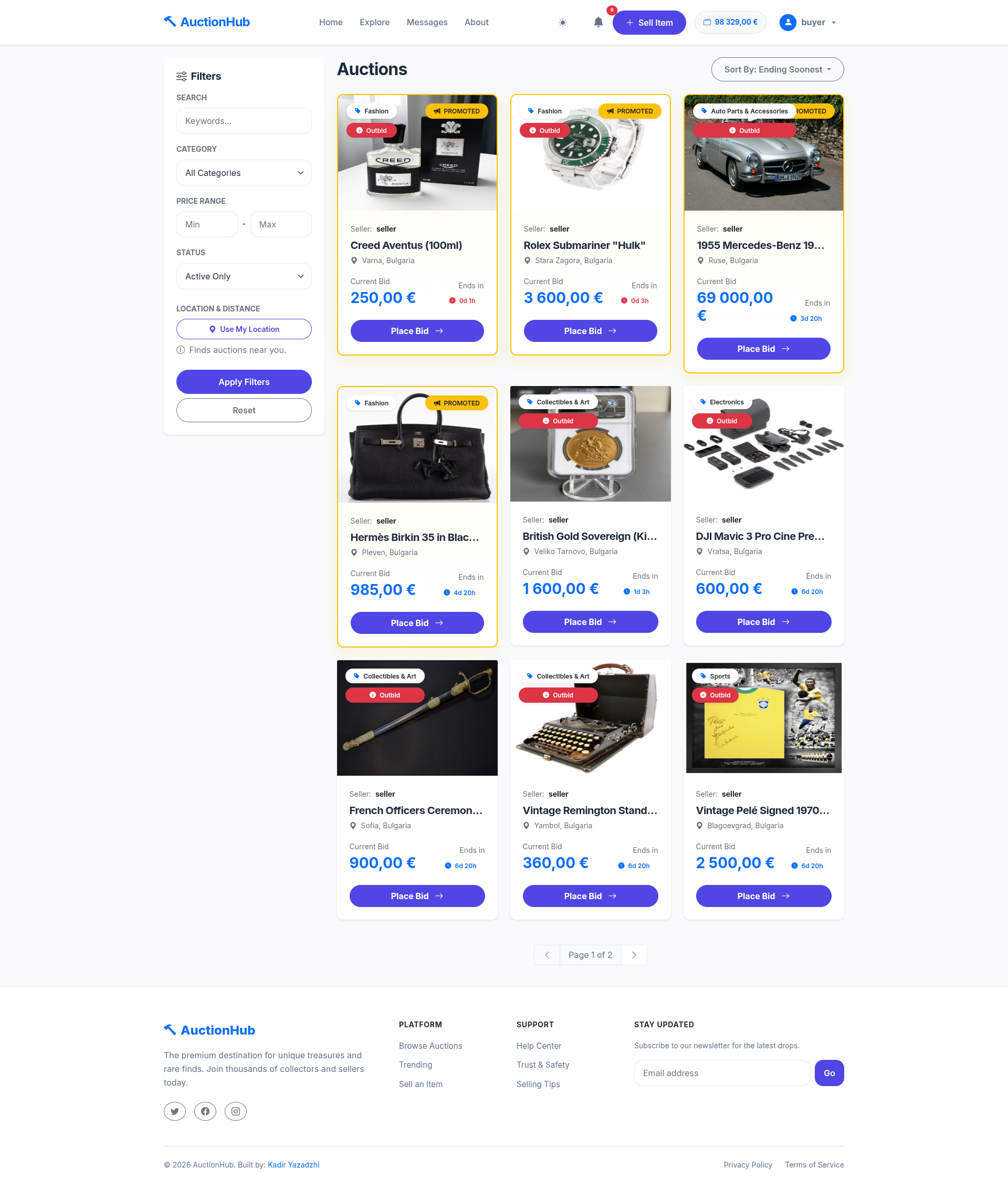
Explore All Auctions
A clean grid view of all available items with real-time status.
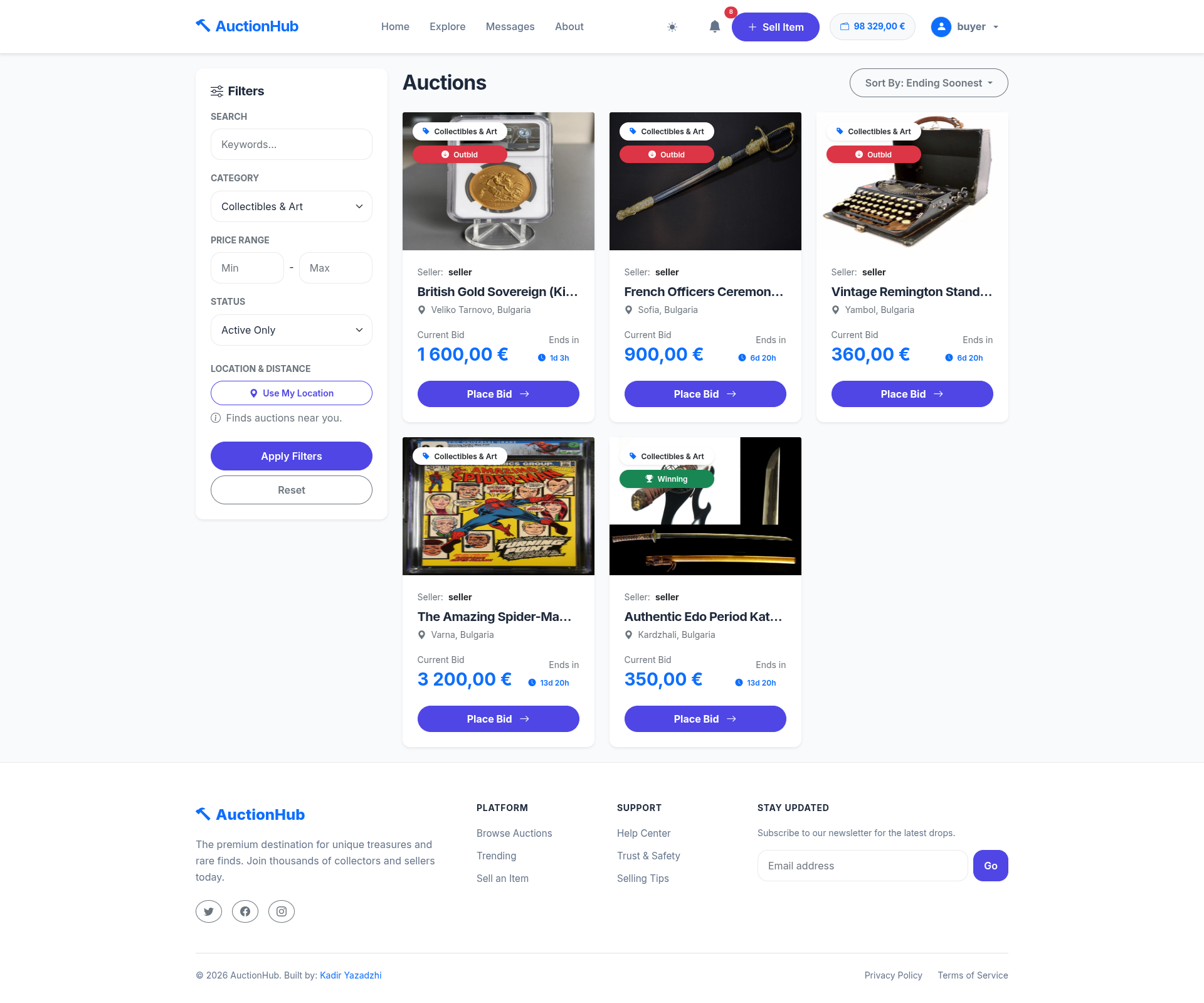
Advanced Filtering
Multi-criteria filtering by Category, Price, Distance (Geolocation), and Status.
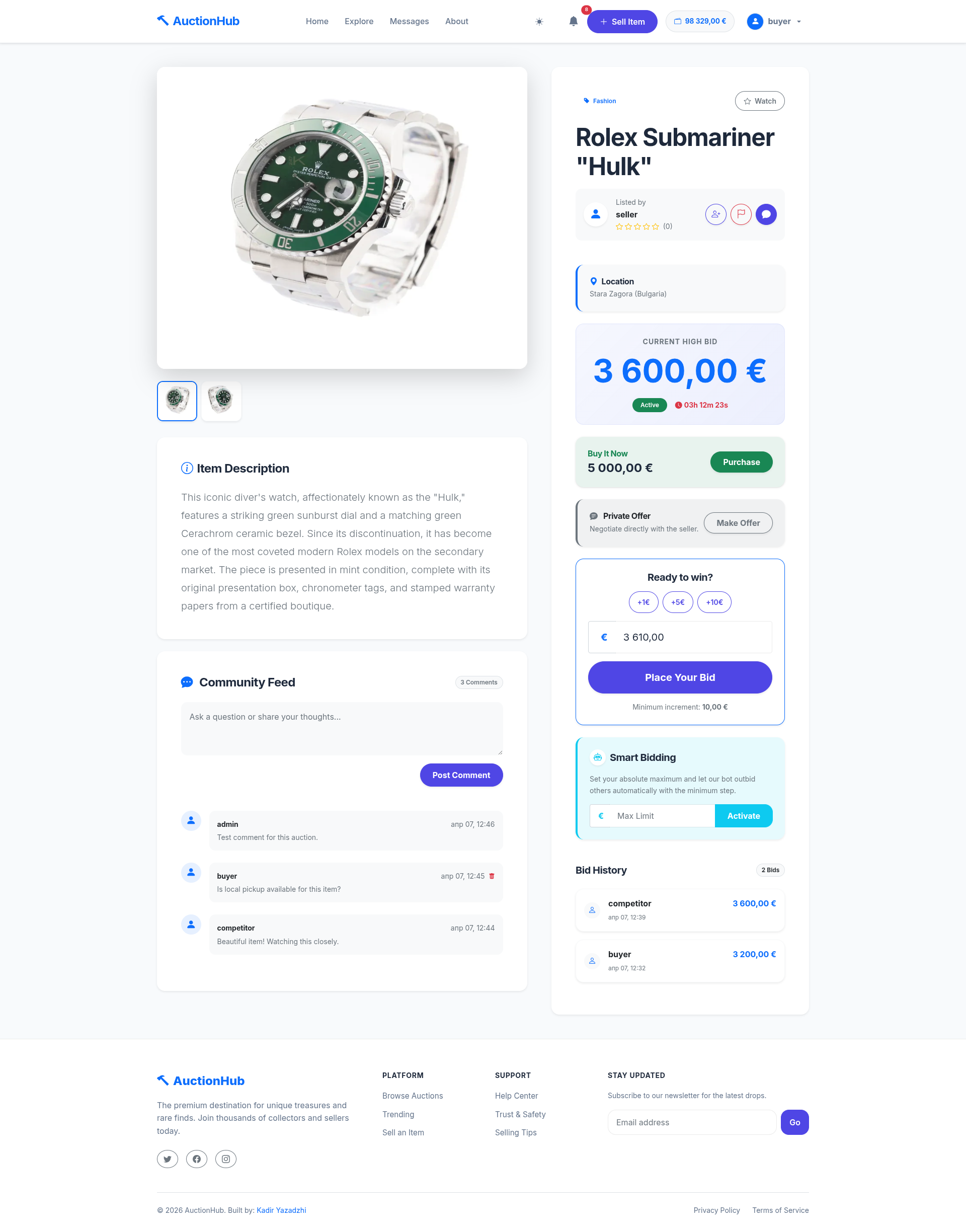
Auction Details & Bidding
Detailed view showing bid history, private offers, and real-time countdown.
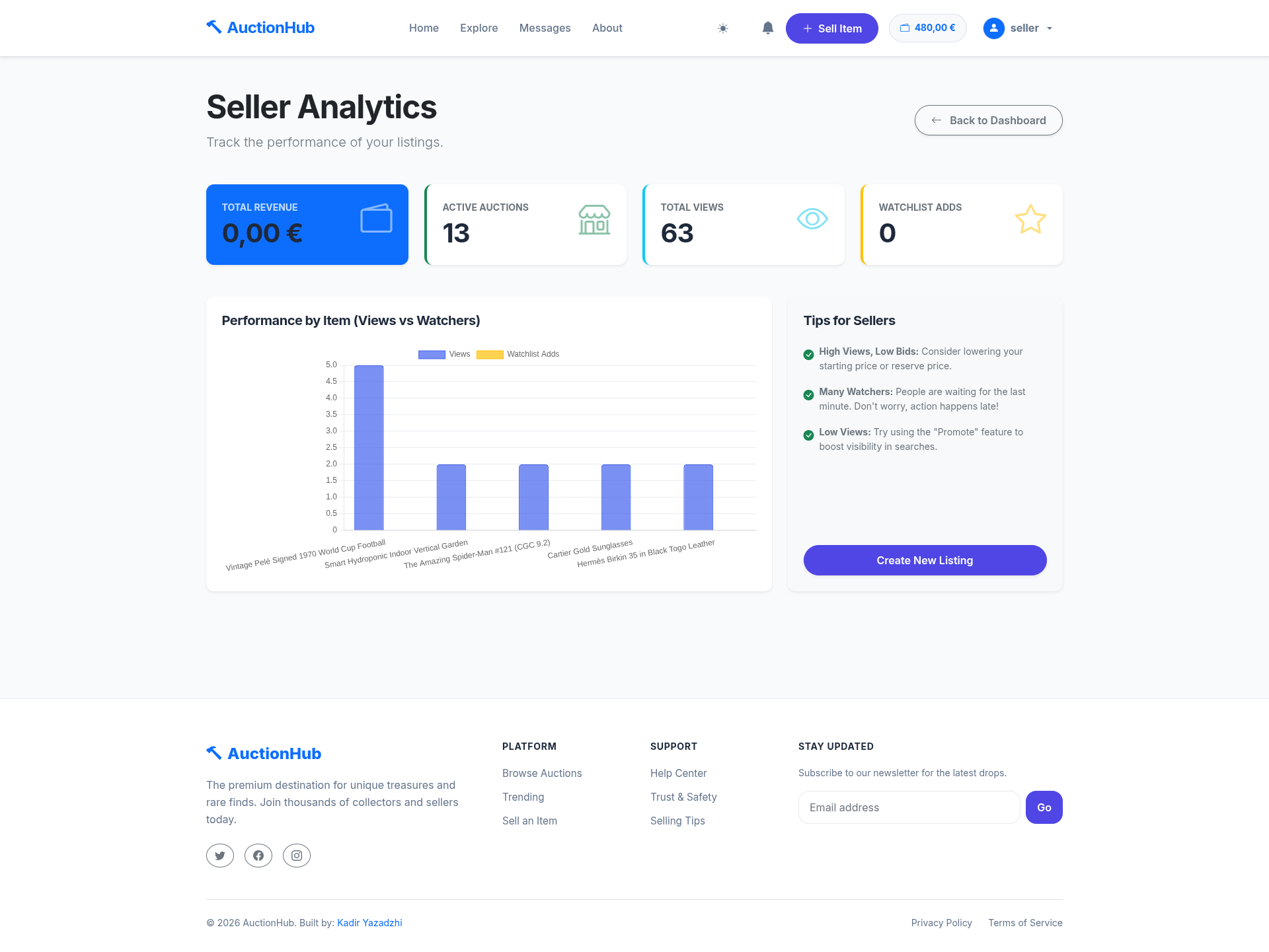
Seller Analytics
Dynamic charts showing views and engagement for listed items.
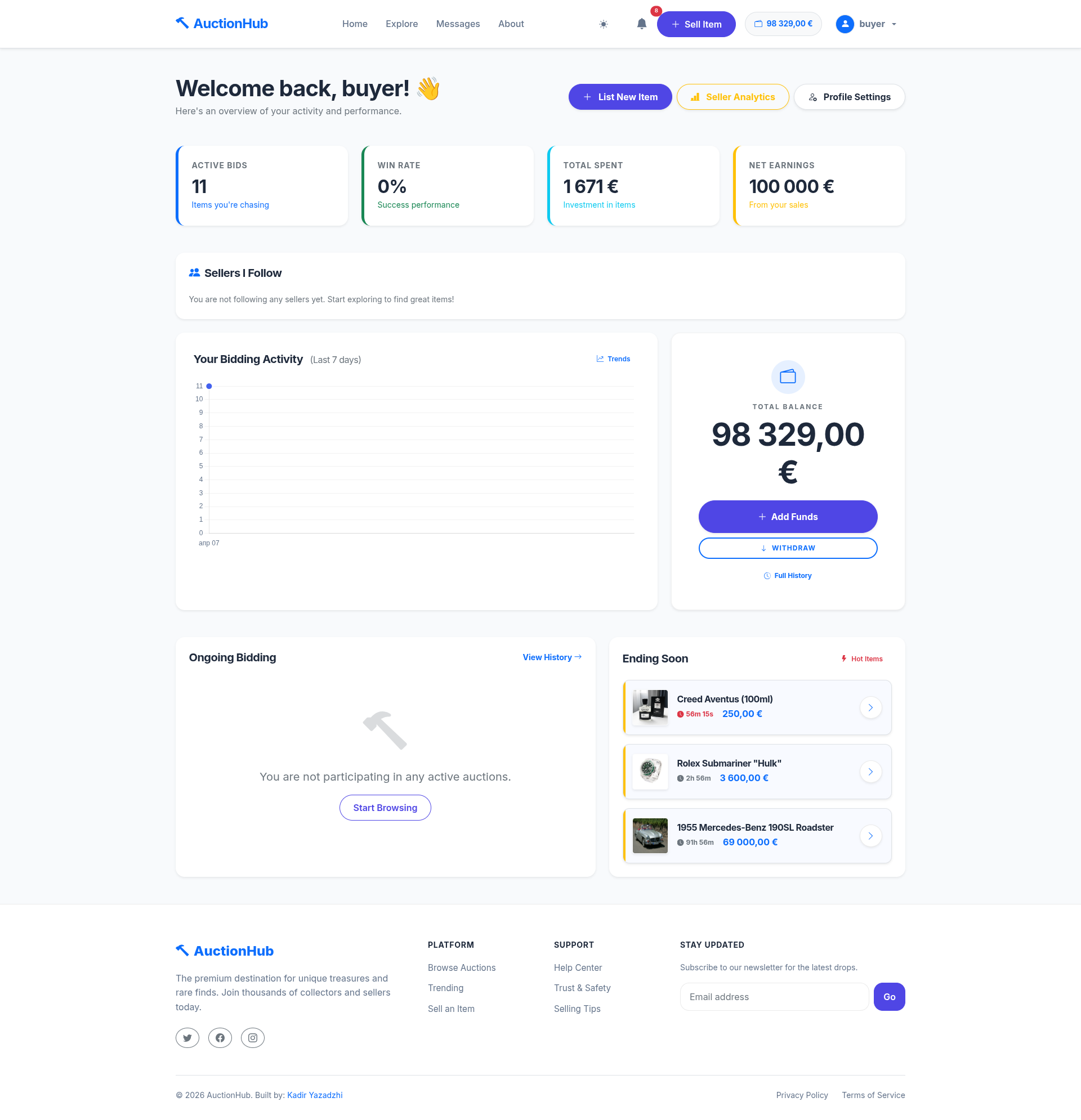
Personal Profile & Activity
User-specific dashboard for tracking participation and won auctions.
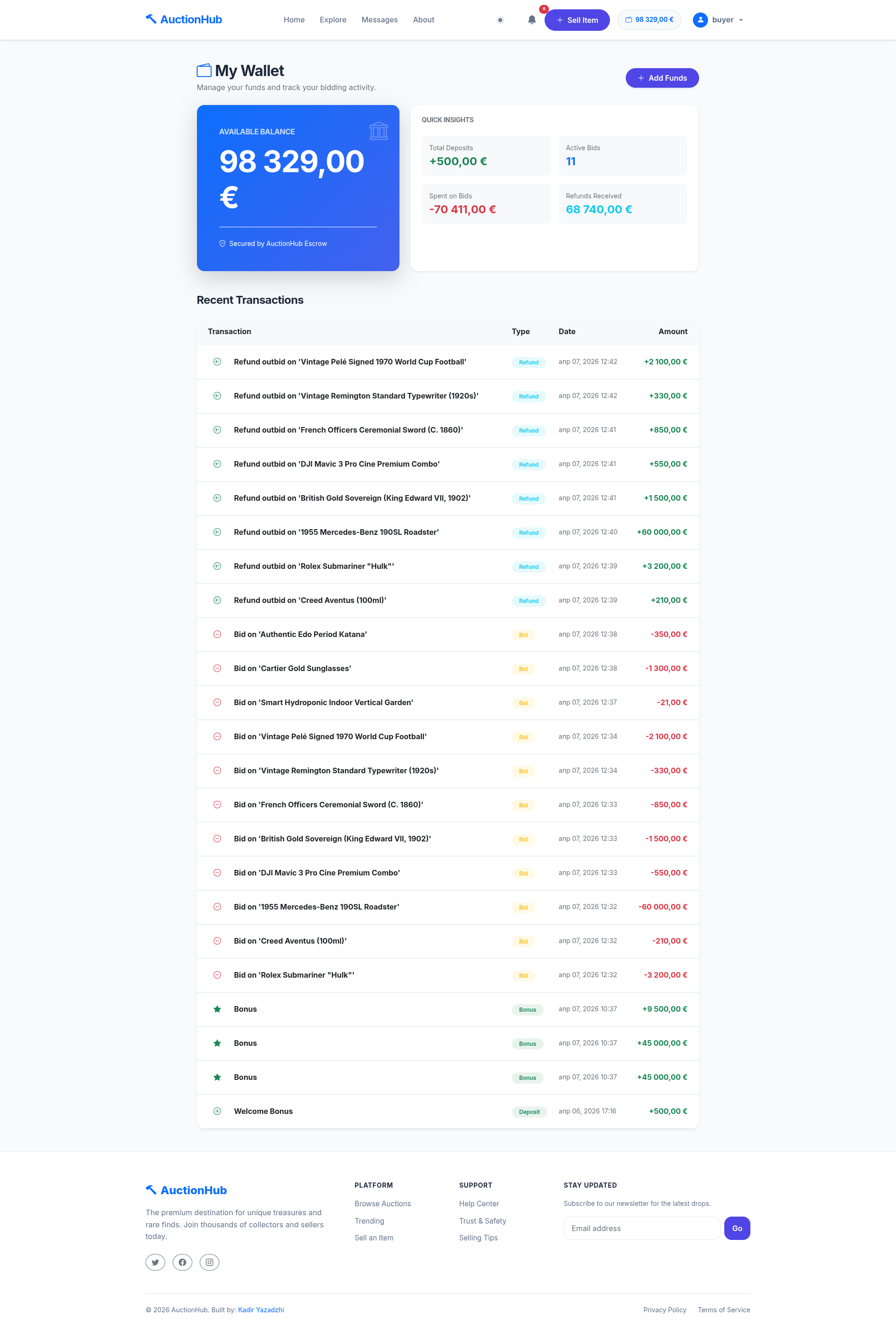
My Wallet
The financial hub showing balance, escrowed funds, and detailed ledger.
2. Administration Area
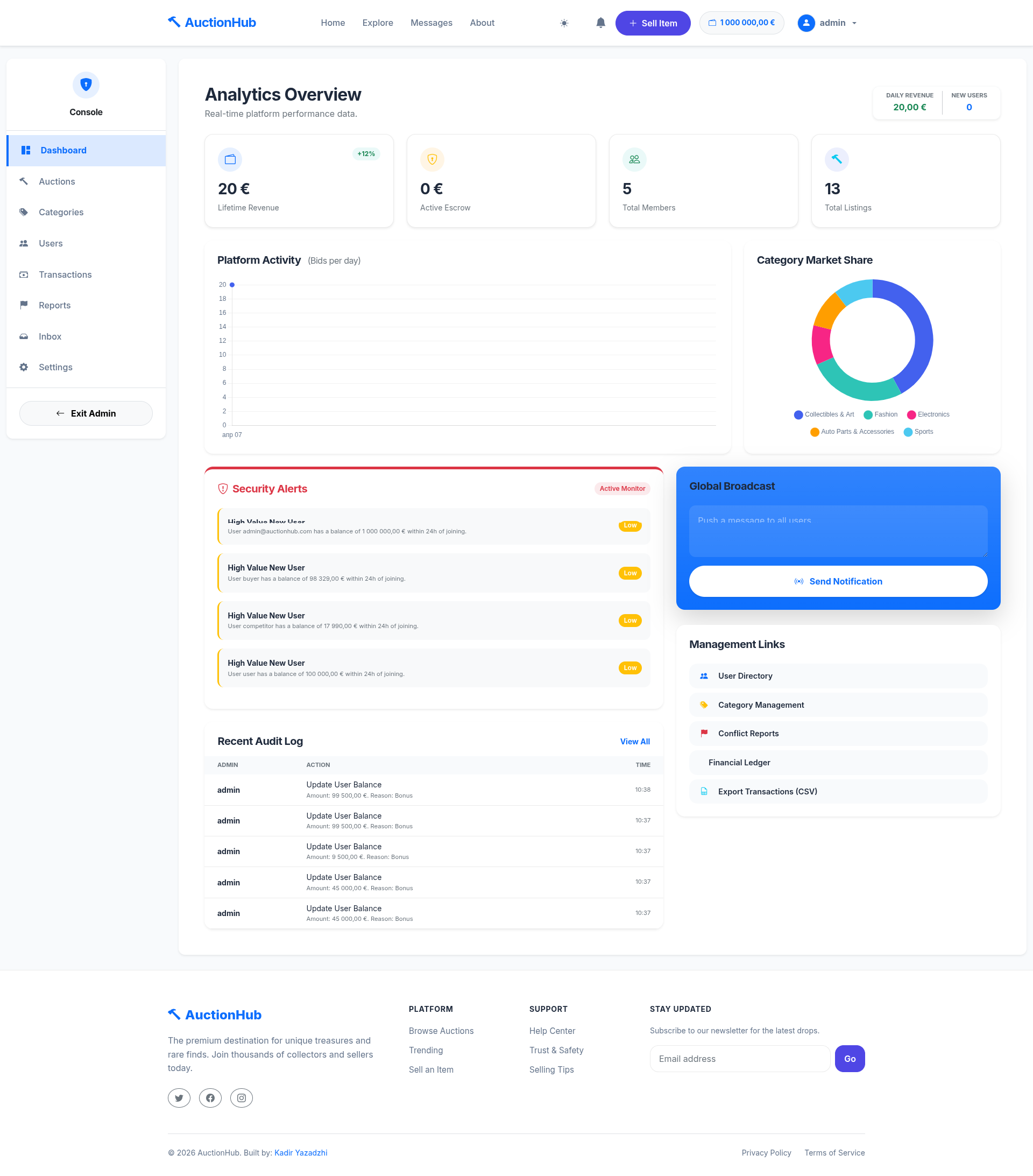
Admin Dashboard
Real-time platform metrics and system integrity checks.
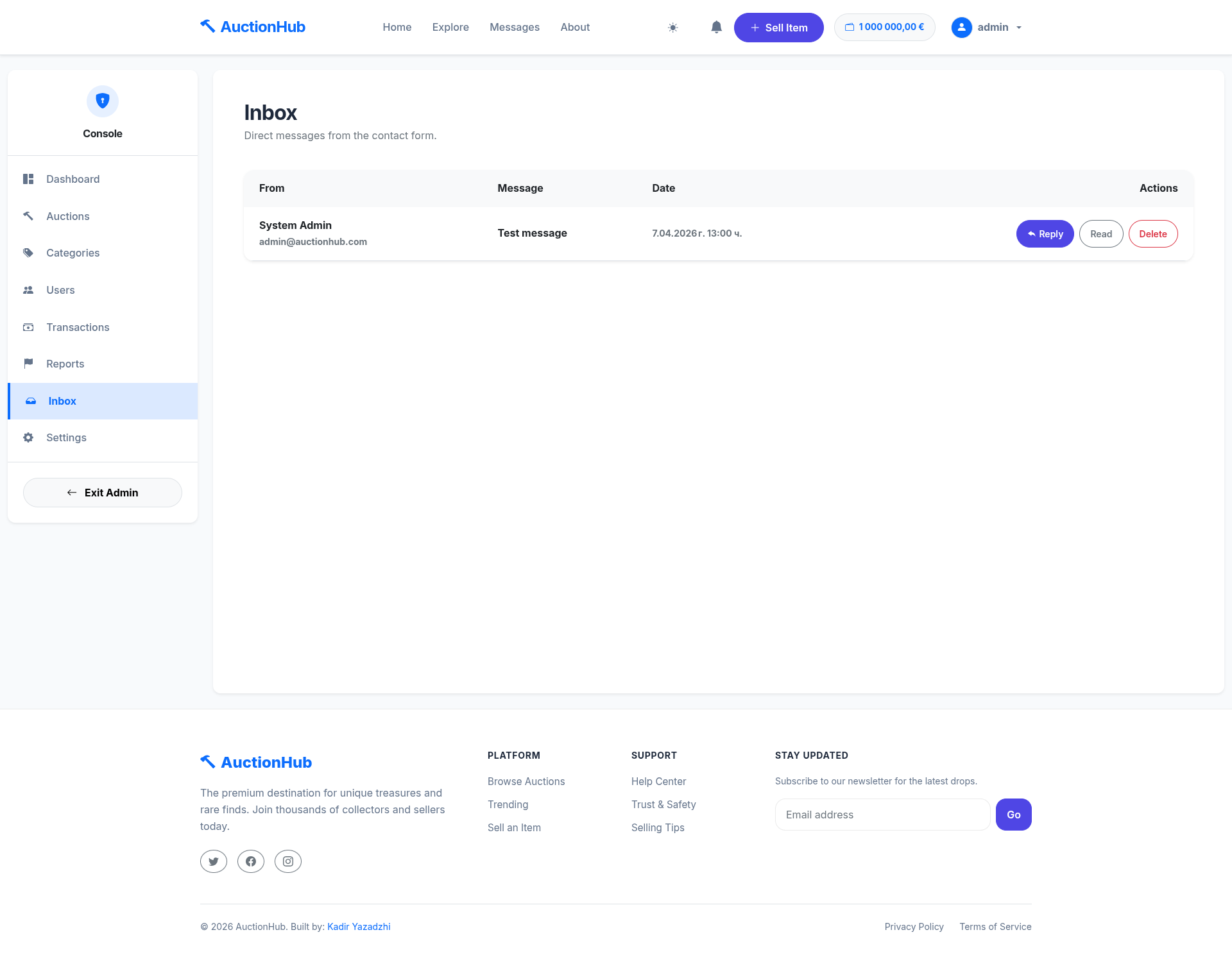
Admin Inbox
Internal communication and support ticket management.
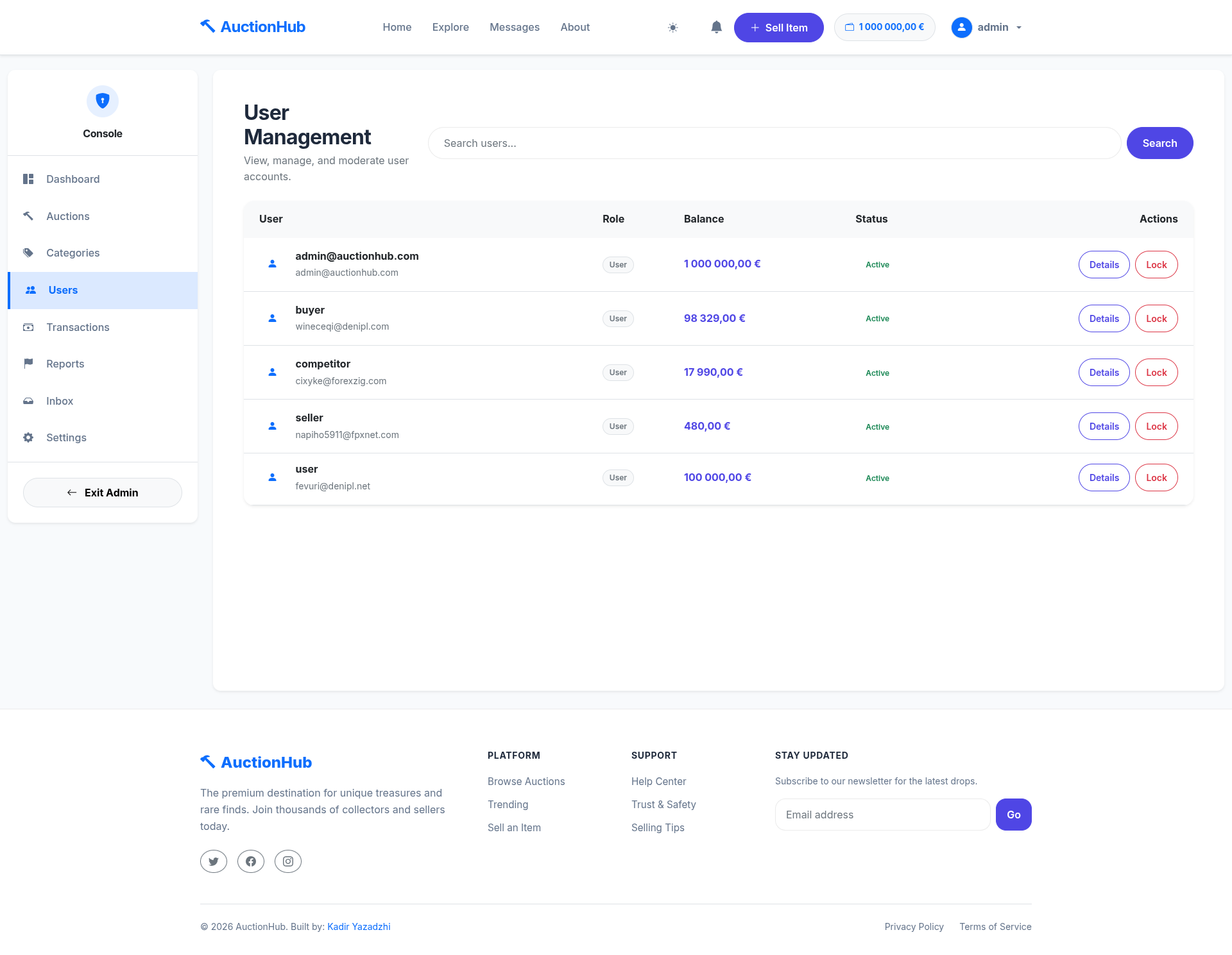
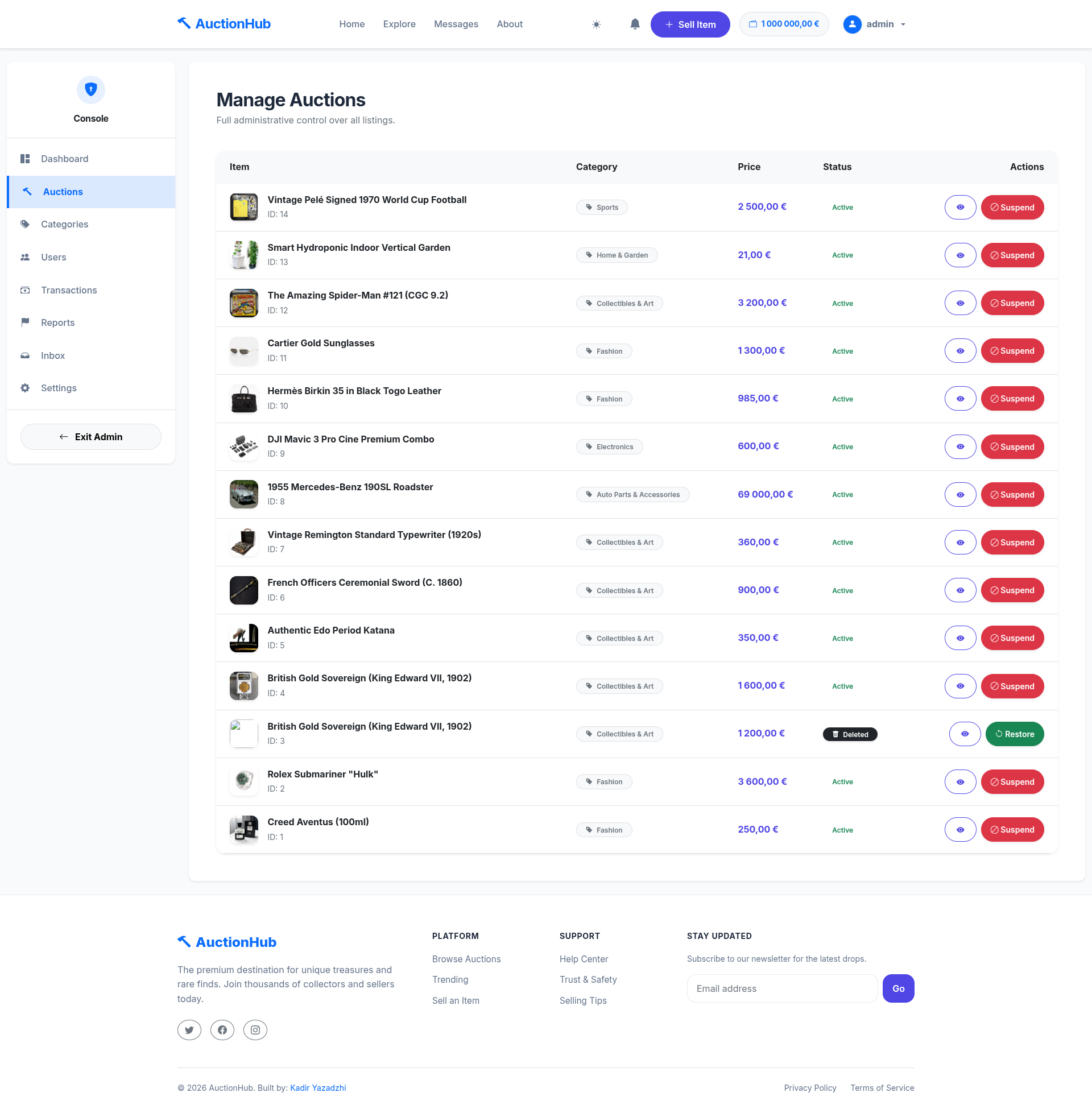
User & Auction Moderation
Tools to manage user roles, suspend listings, and resolve disputes.
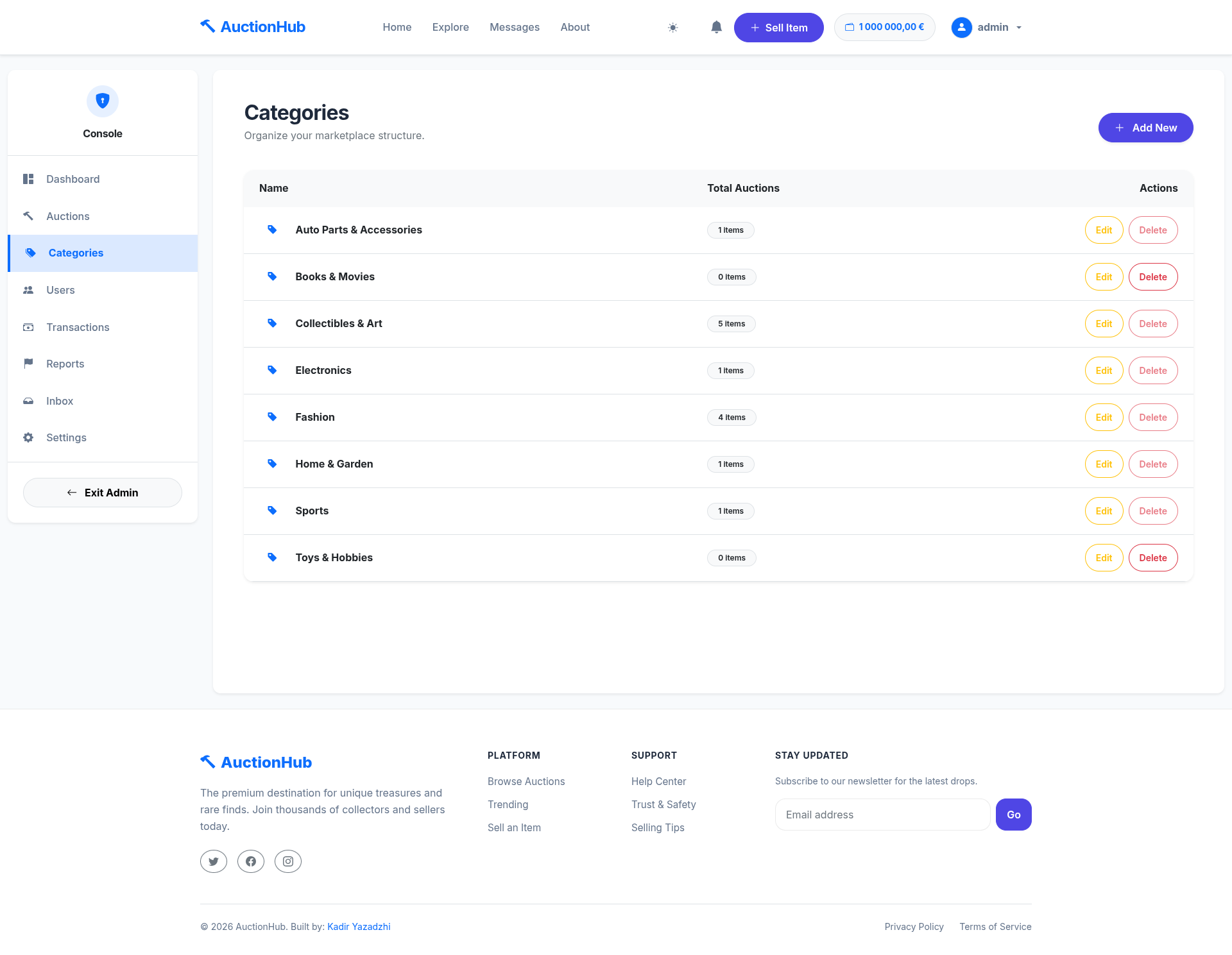
Category Management
Create and edit product categories with specific icons.
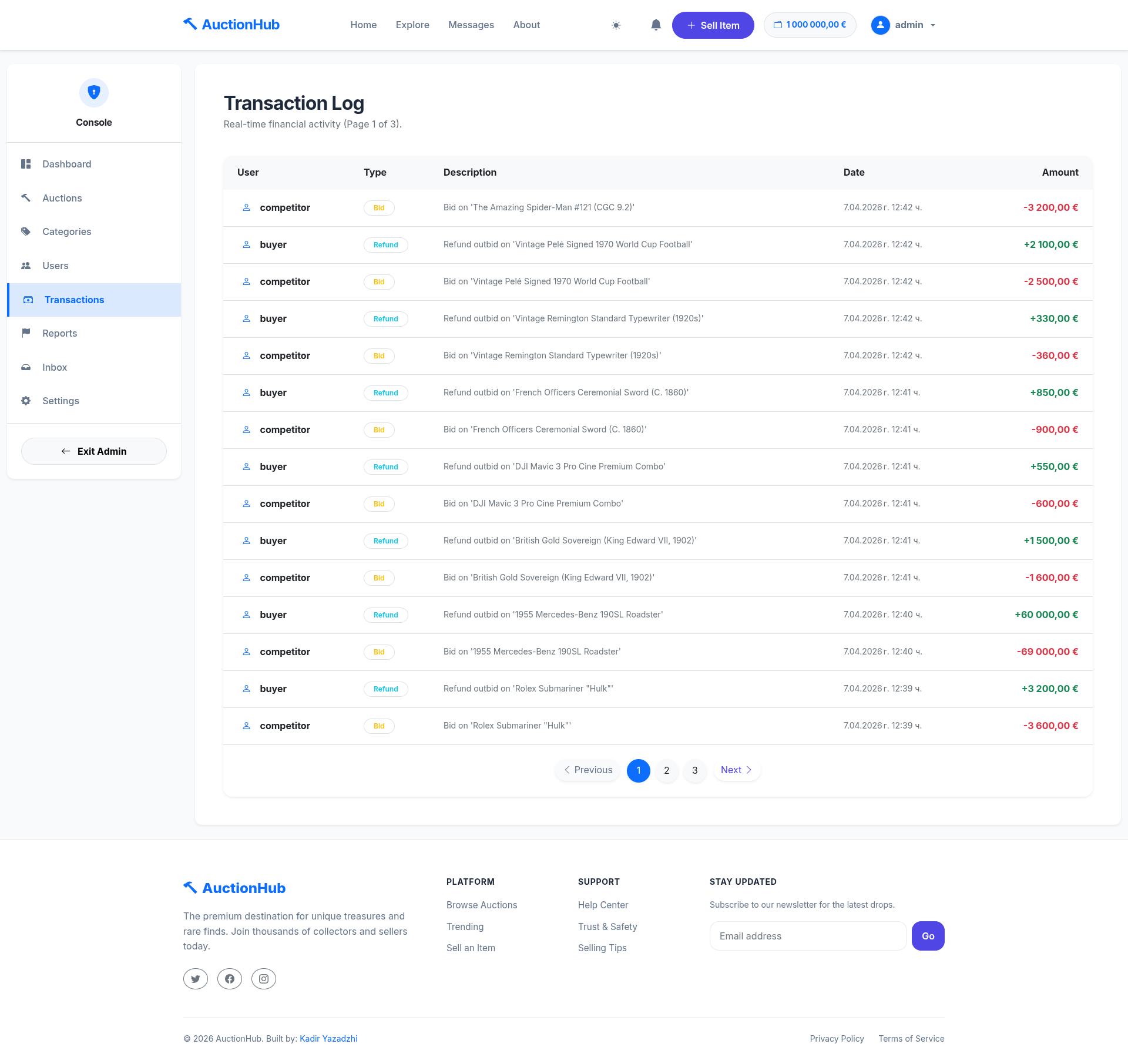
Transaction Logs
Audit trail of all financial movements in the system.
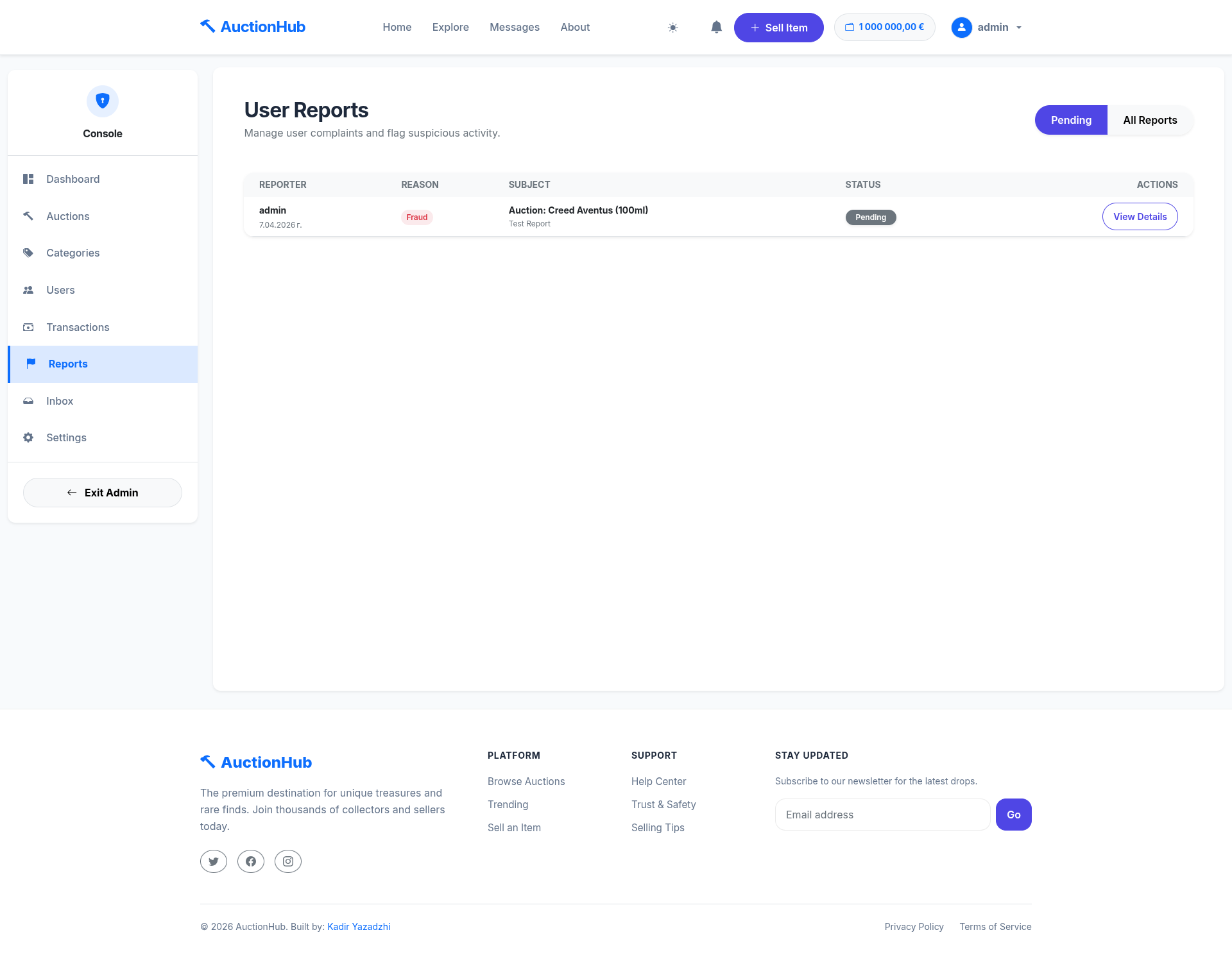
Reports & Analytics
Platform-wide reporting on user reports and system activity.
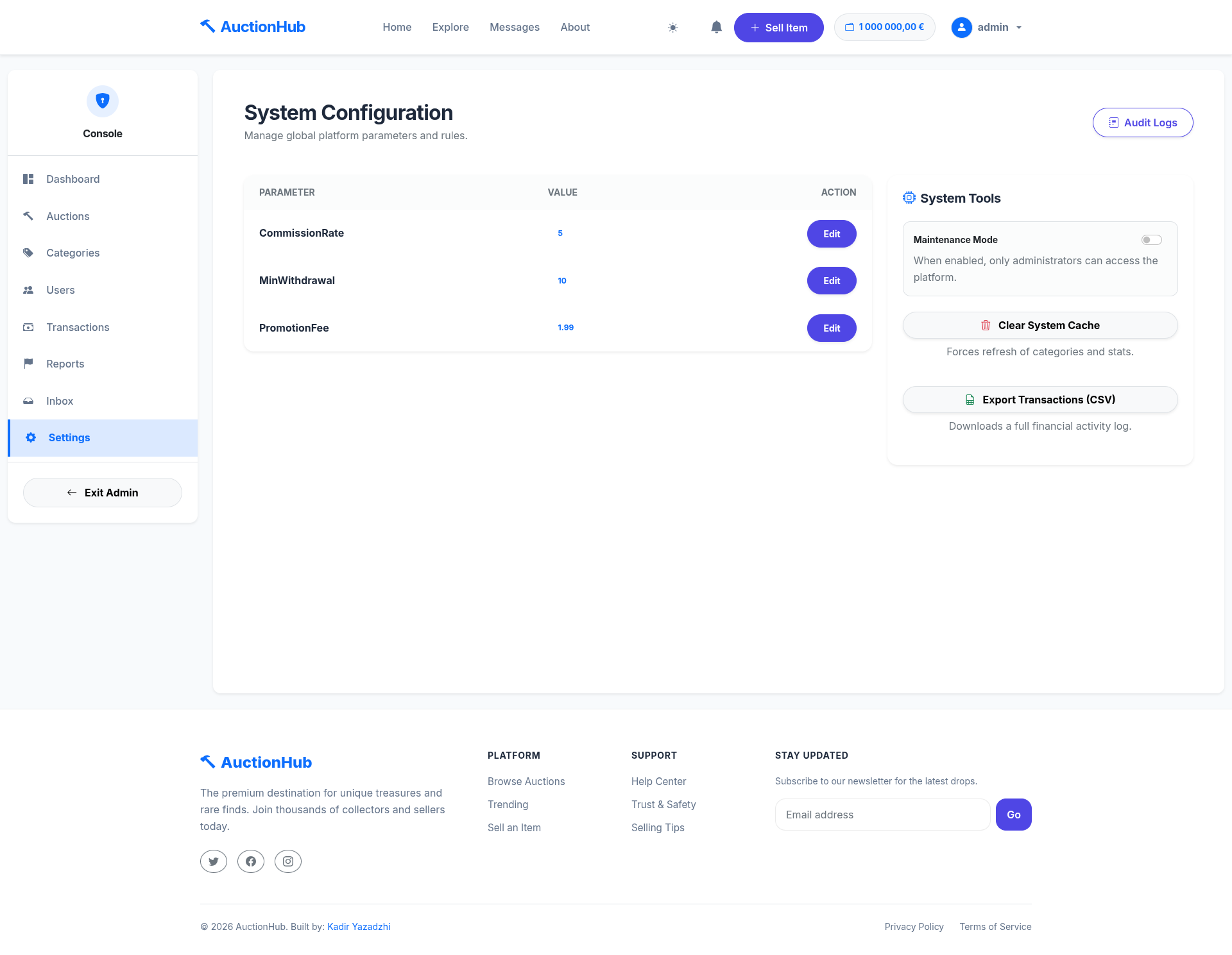
System Settings
Dynamic configuration of platform fees, rules, and AI thresholds.
⚙️ How It Works
- Listing: Sellers create auctions, setting start prices, categories, and optional "Buy It Now" or "Dutch" mechanics.
- Bidding: Buyers place bids in real-time. Funds are automatically "held" in their wallet (Escrow) to guarantee payment.
- Completion: When the timer hits zero, the highest bidder wins. The system transfers funds to the seller, minus platform commission.
- Verification: Buyers and sellers can leave feedback once the transaction is finalized.
🏗️ Technical Architecture
The project follows Clean Architecture principles, ensuring a strict separation of concerns.
- Presentation Layer: ASP.NET Core MVC with SignalR (Real-time) and Razor Pages.
- Application Layer: Business logic, Service interfaces, and DTOs. High testability via DI.
- Domain Layer: Core entities, business rules, and shared abstractions.
- Infrastructure Layer: EF Core (SQL Server), Redis (Caching & SignalR Backplane), Cloudinary (Image storage), and Hangfire (Scheduled Jobs).
Tech Stack
| Component | Technology |
|---|---|
| Framework | .NET 8.0 (C# 12) |
| Real-time | SignalR (with Redis Backplane) |
| Background Jobs | Hangfire (SQL Server Storage) |
| Database | MS SQL Server |
| Caching | Redis (Distributed Cache) |
| Storage | Cloudinary (Cloud Image API) |
| AI Moderation | Hugging Face & Local AI (Custom) |
| Testing | xUnit, Moq, FluentAssertions |
| Security | Google reCAPTCHA (V2/V3) |
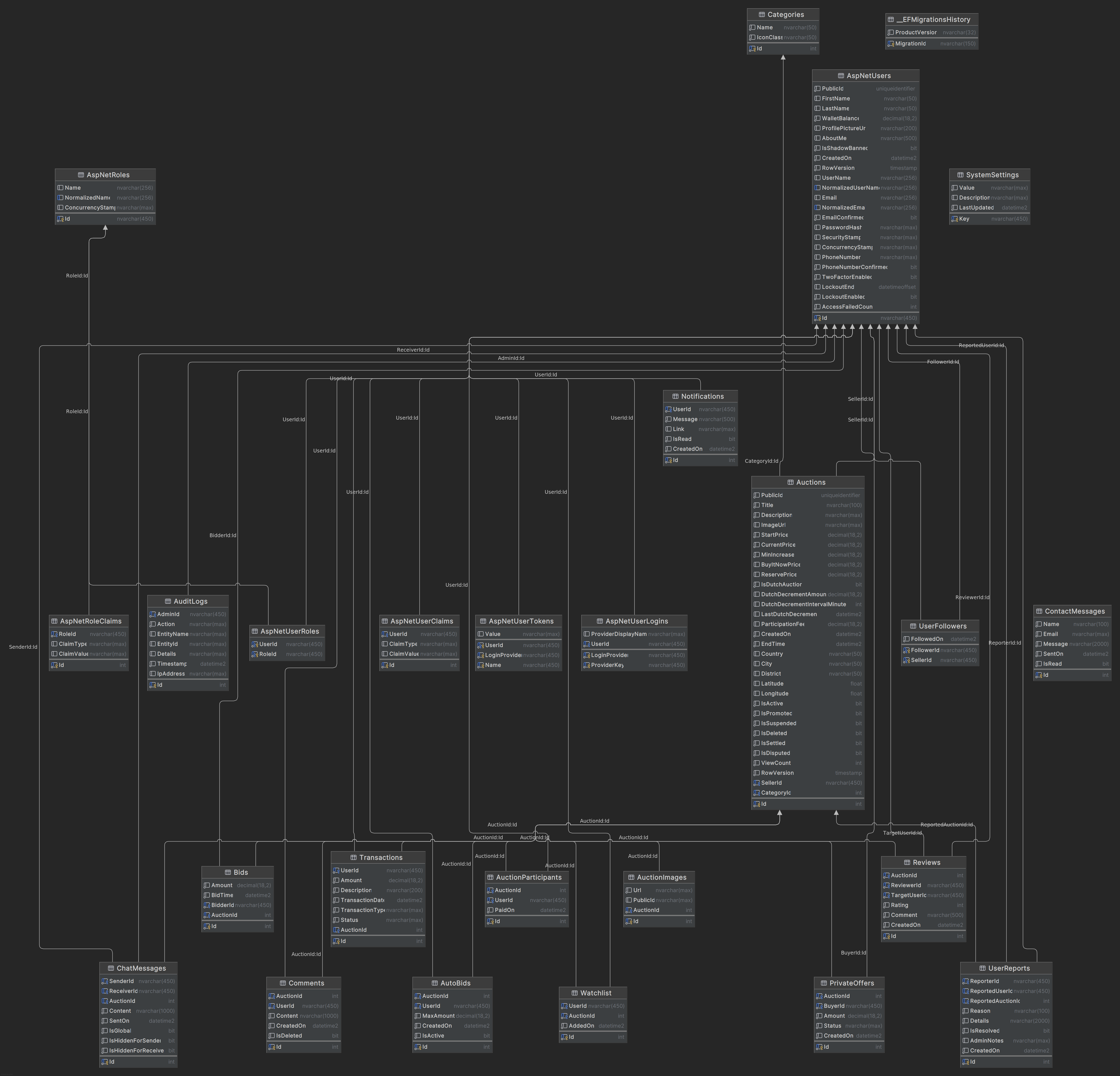
💾 Database Schema
The system uses a highly normalized MS SQL Server database designed for financial integrity and performance.
📂 Project Structure
- AuctionHub: The main Web MVC project (Controllers, Views, Hubs, wwwroot).
- AuctionHub.Application: Business logic, service implementations, and DTOs.
- AuctionHub.Domain: Core entities, business rules, and shared abstractions.
- AuctionHub.Infrastructure: Data access (EF Core), Migrations, and External Service integrations.
- AuctionHub.Tests: Comprehensive unit and integration test suite covering 65%+ of logic.
🚀 Installation & Setup
1. Environment Configuration (.env)
The application requires several external services. Create a .env file in the root directory with the following keys:
# --- Database (Standard & Extended) ---
ConnectionStrings__DefaultConnection="Server=<YOUR_SERVER>;Database=AuctionHubDb;User Id=<YOUR_USER>;Password=<YOUR_PASSWORD>;TrustServerCertificate=True;Encrypt=False;"
DB_SERVER="<YOUR_SERVER_IP_PORT>"
DB_NAME="AuctionHubDb"
DB_USER="<YOUR_USER>"
DB_PASSWORD="<YOUR_PASSWORD>"

# --- Redis (Caching & SignalR) ---
REDIS_URL="localhost:6379"
Redis__Configuration="localhost:6379,password=<YOUR_REDIS_PASSWORD>"

# --- Identity & OAuth ---
Authentication__Google__ClientId="<YOUR_GOOGLE_CLIENT_ID>"
Authentication__Google__ClientSecret="<YOUR_GOOGLE_CLIENT_SECRET>"
Authentication__GitHub__ClientId="<YOUR_GITHUB_CLIENT_ID>"
Authentication__GitHub__ClientSecret="<YOUR_GITHUB_CLIENT_SECRET>"

# --- Cloudinary (Image Storage) ---
Cloudinary__CloudName="<YOUR_CLOUD_NAME>"
Cloudinary__ApiKey="<YOUR_API_KEY>"
Cloudinary__ApiSecret="<YOUR_API_SECRET>"

# --- AI Image Analysis ---
AI__HuggingFaceToken="<YOUR_HUGGING_FACE_TOKEN>"
AI__ModerationServiceUrl="http://<YOUR_LOCAL_AI_URL>/classify"

# --- Email Settings ---
EmailSettings__ApiToken="<YOUR_EMAIL_API_TOKEN>"
EmailSettings__InboxId="<YOUR_INBOX_ID>"
EmailSettings__Host="<YOUR_SMTP_HOST>"
EmailSettings__Port="<YOUR_SMTP_PORT>"
EmailSettings__Username="<YOUR_SMTP_USERNAME>"
EmailSettings__Password="<YOUR_SMTP_PASSWORD>"

# --- Security ---
GoogleReCaptcha__SiteKey="<YOUR_RECAPTCHA_SITE_KEY>"
GoogleReCaptcha__SecretKey="<YOUR_RECAPTCHA_SECRET_KEY>"

# --- Initial Admin Account (Seeding) ---
ADMIN_EMAIL="<ADMIN_EMAIL>"
ADMIN_PASSWORD="<ADMIN_PASSWORD>"
ADMIN_FIRST_NAME="System"
ADMIN_LAST_NAME="Admin"
2. Standard Local Setup
- Clone the Repo:
git clone https://github.com/KadirYazadzhi/AuctionHub cd AuctionHub - Apply Database Migrations:
dotnet ef database update --project AuctionHub.Infrastructure --startup-project AuctionHub - Run the Application:
dotnet run --project AuctionHub
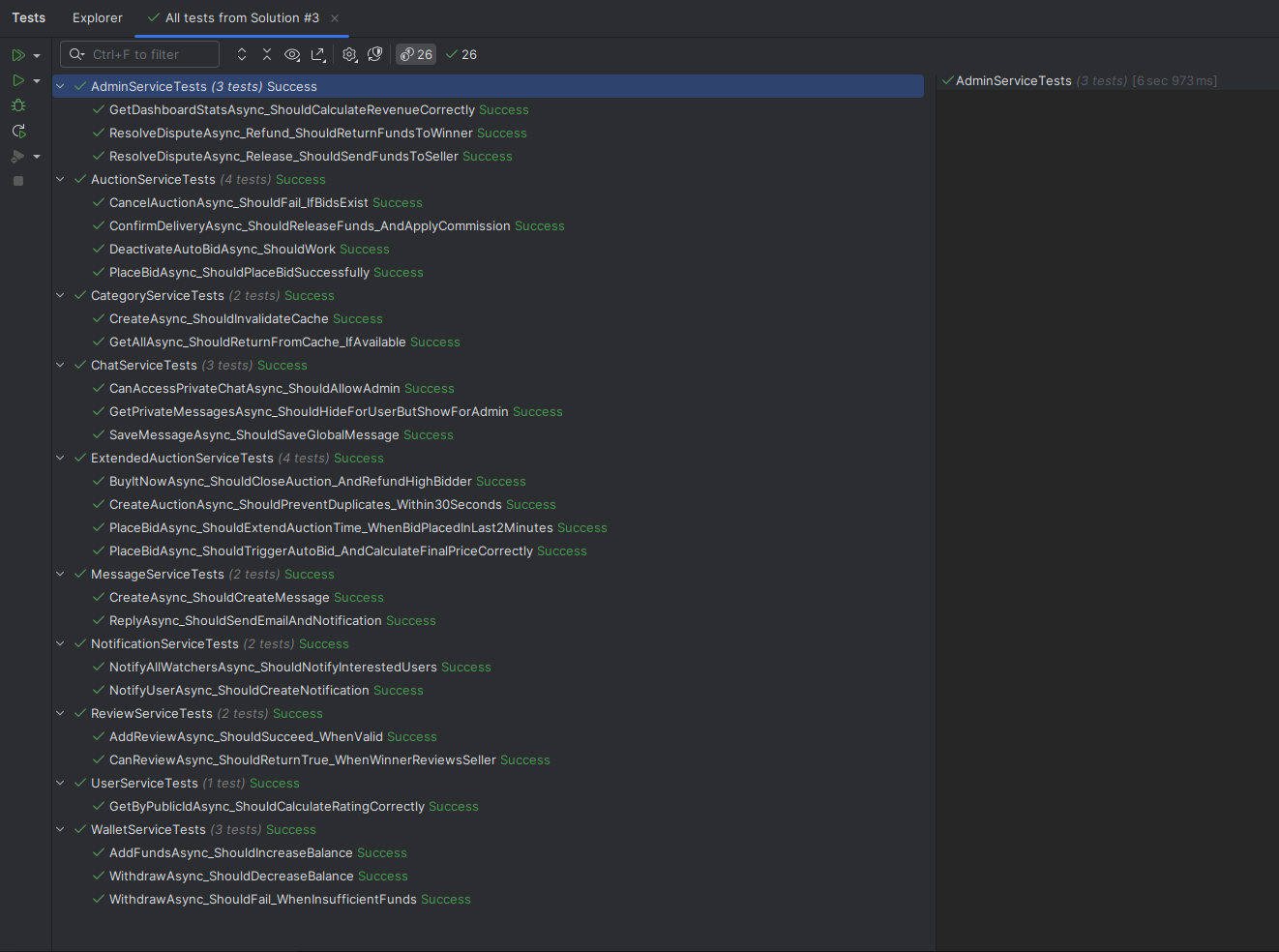
🧪 Testing
The project implements a rigorous testing strategy covering over 65% of business logic.
- Unit Tests: Business rules, wallet calculations, and bid validations.
- Integration Tests: Database transactions and SignalR connectivity.
Run all tests:
dotnet test
☁️ Deployment (K3s)
This application is fully production-ready and hosted on a self-managed K3s (Lightweight Kubernetes) клъстер.
- Cluster Architecture: Multi-node setup with automated SSL handling via Cert-Manager and Let's Encrypt.
- Ingress: Traefik Ingress Controller routing traffic to
auction.kadiryazadzhi.tech. - Resilience: Redis-backed SignalR allows the application to scale across multiple pods without losing real-time state.
- Monitoring: Integrated health checks and automated background job monitoring via Hangfire.
📂 Detailed Kubernetes Docs: A comprehensive guide on how to deploy this entire stack (including SQL and Redis) on K3s, along with the YAML manifests, can be found in the /deploy folder.
Project created for SoftUni ASP.NET Advanced Course.
Similar repos


✨ Sophisticated online marketplace designed to connect buyers and sellers through a secure, intuitive, and interactive bidding platform. 🚀
See the codeREADME
🔨 AuctionHub - Premium Digital Marketplace
AuctionHub is a high-performance, enterprise-grade digital marketplace built with ASP.NET Core 8.0. It features a multi-layered architecture, real-time bidding via SignalR, AI-powered image moderation, and a robust financial ledger system. Designed for scalability, it is currently deployed on a private K3s Kubernetes cluster.
📑 Table of Contents
- 🌟 Key Features
- 📸 Gallery & UI
- ⚙️ How It Works
- 🏗️ Technical Architecture
- 💾 Database Schema
- 📂 Project Structure
- 🚀 Installation & Environment
- 🧪 Testing
- ☁️ Deployment (K3s)
🌟 Key Features
🛒 Advanced Auction Mechanics
- Dynamic Listings: Standard auctions with customizable start/end times and increments.
- Dutch Auction Mechanic: Reverse auction support where the price drops over time until someone buys.
- Private Negotiation: "Private Offers" system allowing direct price negotiation between buyers and sellers.
- Smart Bidding (SignalR):
- Live Updates: Bids reflect instantly across all connected clients without page refresh.
- Auto-Bidder: Users can set a maximum price, and the system outbids competitors automatically.
- Anti-Snipe Protection: Auctions are automatically extended if a bid is placed in the final minutes.
- Participation Fee (Tickets): Premium auctions can require a "Bidding Ticket" purchase before entry.
💰 Financial Ecosystem (Wallet & Escrow)
- Internal Banking: Comprehensive digital wallet for every user with full transaction history.
- Escrow Service: Automated fund locking (Hold) during active bids to guarantee payment.
- Instant Refunds: Real-time fund release back to users when they are outbid.
- Secure Settlements: Funds are only released to the seller upon delivery confirmation or admin resolution.
🛡️ Administration & Moderation
- Global Dashboard: Advanced metrics (Platform Volume, User Growth, System Integrity).
- Audit Logs: Full traceability of all admin actions (suspensions, setting changes, user management).
- System Integrity: Precision timestamping and consistency checks for all financial and auction operations.
- Dispute Resolution: Integrated system for admins to mediate and resolve transaction conflicts.
- System Controls: Dynamic management of commission rates, promotion fees, and platform-wide settings.
🔔 Social & Engagement
- Real-time Chat: Instant messaging between users for item inquiries and negotiation.
- Community Feed: Public comments and discussions on every auction listing.
- Reputation System: Five-star reviews and feedback allowed only after verified successful trades.
- Seller Following: Users can follow favorite sellers to get notified of new listings.
- Notifications: Real-time alerts for outbids, wins, and social interactions.
- Dual AI Moderation:
- Hugging Face: Cloud-based NSFW detection.
- Local AI: Support for private, local-hosted moderation services.
📸 Gallery & UI
1. User Experience (The Marketplace)
Explore All Auctions
A clean grid view of all available items with real-time status.
Advanced Filtering
Multi-criteria filtering by Category, Price, Distance (Geolocation), and Status.
Auction Details & Bidding
Detailed view showing bid history, private offers, and real-time countdown.
Seller Analytics
Dynamic charts showing views and engagement for listed items.
Personal Profile & Activity
User-specific dashboard for tracking participation and won auctions.
My Wallet
The financial hub showing balance, escrowed funds, and detailed ledger.
2. Administration Area
Admin Dashboard
Real-time platform metrics and system integrity checks.
Admin Inbox
Internal communication and support ticket management.
User & Auction Moderation
Tools to manage user roles, suspend listings, and resolve disputes.
Category Management
Create and edit product categories with specific icons.
Transaction Logs
Audit trail of all financial movements in the system.
Reports & Analytics
Platform-wide reporting on user reports and system activity.
System Settings
Dynamic configuration of platform fees, rules, and AI thresholds.
⚙️ How It Works
- Listing: Sellers create auctions, setting start prices, categories, and optional "Buy It Now" or "Dutch" mechanics.
- Bidding: Buyers place bids in real-time. Funds are automatically "held" in their wallet (Escrow) to guarantee payment.
- Completion: When the timer hits zero, the highest bidder wins. The system transfers funds to the seller, minus platform commission.
- Verification: Buyers and sellers can leave feedback once the transaction is finalized.
🏗️ Technical Architecture
The project follows Clean Architecture principles, ensuring a strict separation of concerns.
- Presentation Layer: ASP.NET Core MVC with SignalR (Real-time) and Razor Pages.
- Application Layer: Business logic, Service interfaces, and DTOs. High testability via DI.
- Domain Layer: Core entities, business rules, and shared abstractions.
- Infrastructure Layer: EF Core (SQL Server), Redis (Caching & SignalR Backplane), Cloudinary (Image storage), and Hangfire (Scheduled Jobs).
Tech Stack
| Component | Technology |
|---|---|
| Framework | .NET 8.0 (C# 12) |
| Real-time | SignalR (with Redis Backplane) |
| Background Jobs | Hangfire (SQL Server Storage) |
| Database | MS SQL Server |
| Caching | Redis (Distributed Cache) |
| Storage | Cloudinary (Cloud Image API) |
| AI Moderation | Hugging Face & Local AI (Custom) |
| Testing | xUnit, Moq, FluentAssertions |
| Security | Google reCAPTCHA (V2/V3) |
💾 Database Schema
The system uses a highly normalized MS SQL Server database designed for financial integrity and performance.
📂 Project Structure
- AuctionHub: The main Web MVC project (Controllers, Views, Hubs, wwwroot).
- AuctionHub.Application: Business logic, service implementations, and DTOs.
- AuctionHub.Domain: Core entities, business rules, and shared abstractions.
- AuctionHub.Infrastructure: Data access (EF Core), Migrations, and External Service integrations.
- AuctionHub.Tests: Comprehensive unit and integration test suite covering 65%+ of logic.
🚀 Installation & Setup
1. Environment Configuration (.env)
The application requires several external services. Create a .env file in the root directory with the following keys:
# --- Database (Standard & Extended) ---
ConnectionStrings__DefaultConnection="Server=<YOUR_SERVER>;Database=AuctionHubDb;User Id=<YOUR_USER>;Password=<YOUR_PASSWORD>;TrustServerCertificate=True;Encrypt=False;"
DB_SERVER="<YOUR_SERVER_IP_PORT>"
DB_NAME="AuctionHubDb"
DB_USER="<YOUR_USER>"
DB_PASSWORD="<YOUR_PASSWORD>"

# --- Redis (Caching & SignalR) ---
REDIS_URL="localhost:6379"
Redis__Configuration="localhost:6379,password=<YOUR_REDIS_PASSWORD>"

# --- Identity & OAuth ---
Authentication__Google__ClientId="<YOUR_GOOGLE_CLIENT_ID>"
Authentication__Google__ClientSecret="<YOUR_GOOGLE_CLIENT_SECRET>"
Authentication__GitHub__ClientId="<YOUR_GITHUB_CLIENT_ID>"
Authentication__GitHub__ClientSecret="<YOUR_GITHUB_CLIENT_SECRET>"

# --- Cloudinary (Image Storage) ---
Cloudinary__CloudName="<YOUR_CLOUD_NAME>"
Cloudinary__ApiKey="<YOUR_API_KEY>"
Cloudinary__ApiSecret="<YOUR_API_SECRET>"

# --- AI Image Analysis ---
AI__HuggingFaceToken="<YOUR_HUGGING_FACE_TOKEN>"
AI__ModerationServiceUrl="http://<YOUR_LOCAL_AI_URL>/classify"

# --- Email Settings ---
EmailSettings__ApiToken="<YOUR_EMAIL_API_TOKEN>"
EmailSettings__InboxId="<YOUR_INBOX_ID>"
EmailSettings__Host="<YOUR_SMTP_HOST>"
EmailSettings__Port="<YOUR_SMTP_PORT>"
EmailSettings__Username="<YOUR_SMTP_USERNAME>"
EmailSettings__Password="<YOUR_SMTP_PASSWORD>"

# --- Security ---
GoogleReCaptcha__SiteKey="<YOUR_RECAPTCHA_SITE_KEY>"
GoogleReCaptcha__SecretKey="<YOUR_RECAPTCHA_SECRET_KEY>"

# --- Initial Admin Account (Seeding) ---
ADMIN_EMAIL="<ADMIN_EMAIL>"
ADMIN_PASSWORD="<ADMIN_PASSWORD>"
ADMIN_FIRST_NAME="System"
ADMIN_LAST_NAME="Admin"
2. Standard Local Setup
- Clone the Repo:
git clone https://github.com/KadirYazadzhi/AuctionHub cd AuctionHub - Apply Database Migrations:
dotnet ef database update --project AuctionHub.Infrastructure --startup-project AuctionHub - Run the Application:
dotnet run --project AuctionHub
🧪 Testing
The project implements a rigorous testing strategy covering over 65% of business logic.
- Unit Tests: Business rules, wallet calculations, and bid validations.
- Integration Tests: Database transactions and SignalR connectivity.
Run all tests:
dotnet test
☁️ Deployment (K3s)
This application is fully production-ready and hosted on a self-managed K3s (Lightweight Kubernetes) клъстер.
- Cluster Architecture: Multi-node setup with automated SSL handling via Cert-Manager and Let's Encrypt.
- Ingress: Traefik Ingress Controller routing traffic to
auction.kadiryazadzhi.tech. - Resilience: Redis-backed SignalR allows the application to scale across multiple pods without losing real-time state.
- Monitoring: Integrated health checks and automated background job monitoring via Hangfire.
📂 Detailed Kubernetes Docs: A comprehensive guide on how to deploy this entire stack (including SQL and Redis) on K3s, along with the YAML manifests, can be found in the /deploy folder.
Project created for SoftUni ASP.NET Advanced Course.