[ECCV 2026] Official code for DiverseVAR: Balancing Diversity and Quality of Next-Scale Visual Autoregressive Models
Python
2
5 commits
updated Sep 1, 2026
Mingue Park* · Prin Phunyaphibarn* · Phillip Y. Lee · Minhyuk Sung
(* Equal Contribution)
KAIST
ECCV 2026

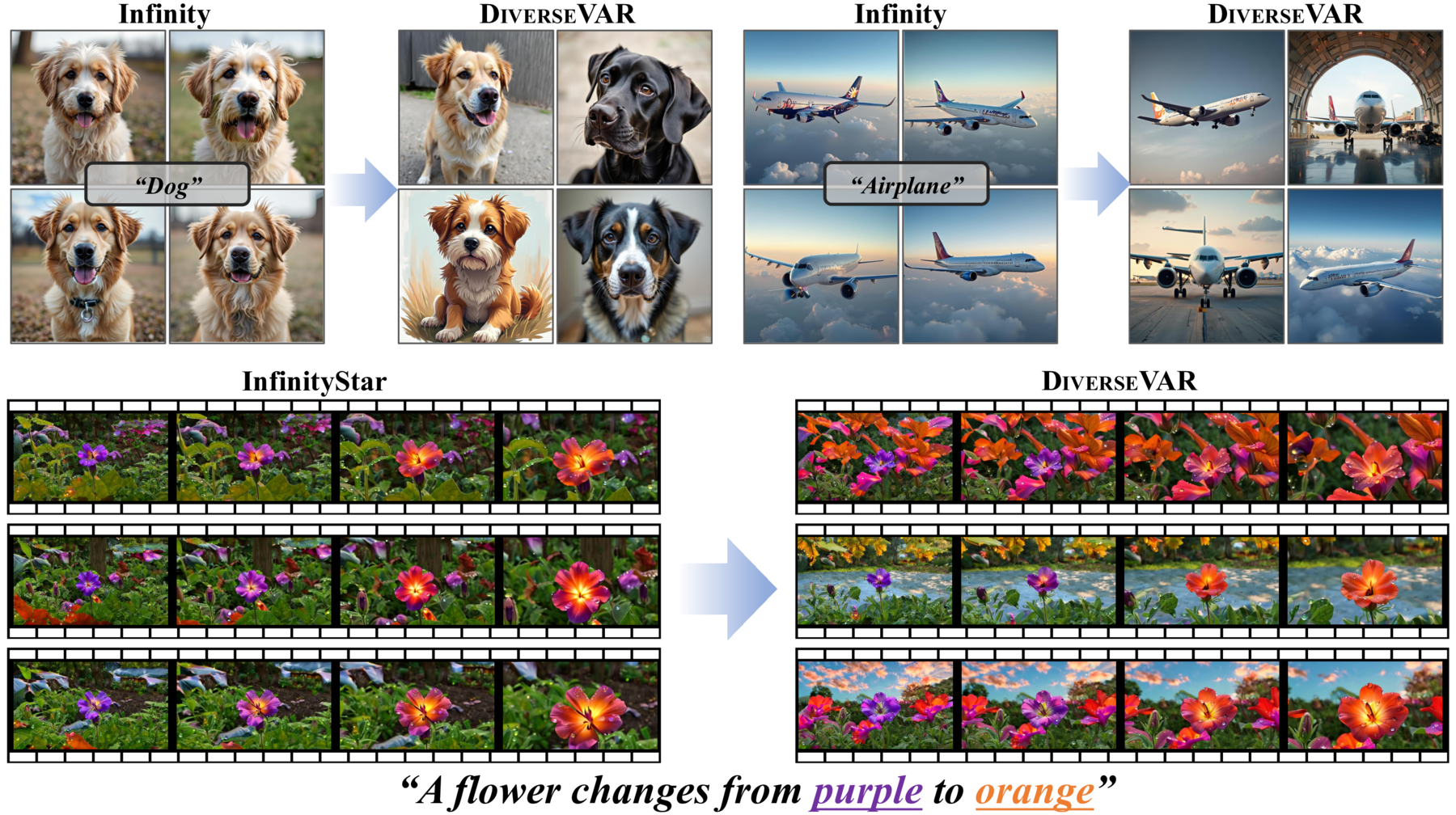
DiverseVAR is a two-stage inference framework that improves per-prompt diversity in next-scale visual autoregressive models while preserving generation quality, requiring no retraining or fine-tuning. First, condition annealing weakens conditioning at early scales to encourage more diverse generations. Next, scale-travel rewinds generation to an earlier scale, enabling diffusion-style refinement to recover visual quality.
| Integration | Modality | Base model | Entry point | Evaluation |
|---|---|---|---|---|
infinity/ | text-to-image | Infinity | infinity/inference.py | LPIPS-MPD, Vendi, ImageReward, FID |
switti/ | text-to-image | Switti | switti/inference.py | LPIPS-MPD, Vendi, ImageReward, FID |
infinitystar/ | text-to-video | InfinityStar | infinitystar/tools/infer_video_480p.py | VBench / VBench-2.0 |
Each integration is self-contained, with its own Conda environment, requirements, checkpoint instructions and README.
In the commands below, <MODEL> is one of: infinity, switti, infinitystar.
cd <MODEL>
conda env create -f environment.yml
conda activate diversevar-<MODEL>
pip install -r requirements.txt

# Infinity and InfinityStar only
pip install flash-attn==2.7.4.post1 --no-build-isolation
No checkpoint, dataset, or generated result is bundled in this repository. Download the weights for the integration you want to run and pass every path explicitly.
Download from FoundationVision/Infinity. For the
2B model, place infinity_2b_reg.pth and infinity_vae_d32reg.pth under infinity/weights/. The
T5 encoder defaults to google/flan-t5-xl and is fetched by Transformers on first use.
yresearch/Switti-1024 and its VQ-VAE dependencies are downloaded automatically from Hugging Face on
first use. If the repository becomes gated, authenticate with huggingface-cli login; never place a
token in source code.
huggingface-cli download FoundationVision/InfinityStar \
  --local-dir infinitystar/pretrained/InfinityStar
The expected directory contains infinitystar_8b_480p_weights/, infinitystar_videovae.pth, and
text_encoder/flan-t5-xl-official/.
DiverseVAR is configured entirely through inference flags, shared by all three integrations.
| Stage | Flag | Meaning |
|---|---|---|
| Condition annealing | --noise_type | Where noise is injected. Text embedding (the paper's choice): cads for Infinity / InfinityStar, context for Switti. <SOS> token: sos (Infinity, InfinityStar) or cond_bd (Switti). none disables it. |
| Condition annealing | --noise_scale | Initial noise magnitude $\alpha(1)$ |
| Condition annealing | --noise_stage | Number of leading scales that receive noise ($k_{\max}$) |
| Condition annealing | --anneal_func | Annealing schedule $\alpha(\cdot)$; the paper uses cosine |
| Scale-travel | --repeat_num | Number of scale-travel passes (1 disables it) |
| Scale-travel | --encode_stage | Scale $l$ whose feature map is re-encoded |
| Scale-travel | --restart_stage | Coarser scale $m < l$ from which generation resumes |
To reproduce the baseline model instead, set --noise_type none --noise_scale 0 --repeat_num 1.
All three integrations read prompts from a text file, one prompt per line. The shared
prompts/ directory holds the lists used in this work:
| File | Prompts | Description |
|---|---|---|
prompts/example-image-prompt.txt | 1 | Qualitative image prompt used in the commands below |
prompts/example-video-prompt.txt | 1 | Qualitative video prompt (the motion-aware augmented prompt marked † in Fig. 7) |
prompts/ms-coco-1000-prompts.txt | 1000 | Captions sampled from the MS-COCO val2014 30K caption set used for FID |
prompts/mjhq-mixed-1000-prompts.txt | 1000 | Prompts sampled from MJHQ-30K, mixed across its category splits |
Paths below are written relative to the integration directory you cd into, so the shared lists are
reached as ../prompts/<file>.
Benchmark lists must keep the <dataset>-<variant>-<count>-prompts.txt naming. The in-process
evaluator (inference.py --eval 1) reads the prompt count from the third --separated field of
the path, and its FID branch picks the reference set from the first field of the filename (ms for
MS-COCO, mjhq for MJHQ-30K; any other name skips FID). The two example-*-prompt.txt files do
not follow that naming because they are meant for qualitative runs, so do not pass them with
--eval 1. The standalone evaluate.py does not read the filename; it takes --fid_dataset.
cd infinity
python inference.py \
  --network_type infinity_2b \
  --model_path weights/infinity_2b_reg.pth \
  --vae_path weights/infinity_vae_d32reg.pth \
  --prompt_txt ../prompts/example-image-prompt.txt \
  --save_path outputs/infinity \
  --imgs_per_prompt 4 --save_indv 1 \
  --noise_type cads --noise_scale 1.0 --noise_stage 4 \
  --anneal_func cosine --noise_rescale 1.0 \
  --repeat_num 2 --encode_stage 8 --restart_stage 2
cd switti
python inference.py \
  --model_path yresearch/Switti-1024 \
  --prompt_txt ../prompts/example-image-prompt.txt \
  --save_path outputs/switti \
  --imgs_per_prompt 4 --save_indv 1 \
  --noise_type context --noise_scale 1.0 --noise_stage 6 \
  --anneal_func cosine --noise_rescale 1.0 \
  --repeat_num 2 --encode_stage 8 --restart_stage 3
DiverseVAR is applied to the keyframe stage only, as described in the paper. Leave
--noise_stage_video 0 --repeat_num_video 1 unless you are explicitly studying temporal-stage
variants. Line 1 of the example list is the motion-aware augmented prompt denoted by † in Fig. 7.
cd infinitystar
python tools/infer_video_480p.py \
  --checkpoints_dir pretrained/InfinityStar \
  --prompt_txt ../prompts/example-video-prompt.txt \
  --save_dir outputs/infinitystar --duration 5 --num_seeds 3 \
  --noise_type cads --noise_seed 990730 \
  --noise_scale 1.0 --noise_stage 8 \
  --anneal_func cosine \
  --repeat_num 2 --encode_stage 12 --restart_stage 6
Outputs are written to a nested directory that records every sampling setting, together with a
metadata.json describing the run.
Metric backends bring their own dependencies and checkpoints, so install only the ones you use. No metric checkpoint and no FID reference statistics are included in this repository.
| Metric | Role | Backend | What it computes |
|---|---|---|---|
| LPIPS-MPD | diversity | lpips (net='alex') | Mean pairwise LPIPS distance between all image pairs within one prompt, averaged over prompts. Higher values mean more diverse samples. Reported as LPIPS_Mean and LPIPS_Std. |
| Vendi | diversity | vendi-score + SSCD | Per-prompt effective number of dissimilar samples. SSCD embeddings give a cosine-similarity matrix, vendi.score_K turns it into a score, and the scores are averaged over prompts. As in CADS, SSCD is the similarity backbone. Vendi_MSS reports the mean pairwise cosine similarity. |
| ImageReward | quality | image-reward | Human-preference reward for each (prompt, image) pair, averaged over all images. Higher values mean better perceived quality and alignment. |
| FID | quality + diversity | see below | Fréchet distance to a benchmark reference set. |
| VBench | video quality | VBench | Frame-wise and temporal Quality Score for generated videos, computed by the official evaluator. |
| VBench-2.0 | video diversity | VBench-2.0 | Inter-sample style and content variation (VGG-19 based) for videos generated from the same prompt. |
SSCD-based metrics require DIVERSEVAR_SSCD_PATH to point to an SSCD TorchScript checkpoint
(e.g. sscd_disc_mixup.torchscript.pt from the SSCD release):
export DIVERSEVAR_SSCD_PATH=/path/to/sscd_disc_mixup.torchscript.pt
LPIPS-MPD and Vendi are per-prompt metrics. They sort the image files in a folder
lexicographically and slice that list into consecutive chunks of imgs_per_prompt, and each chunk
is treated as the sample set of one prompt. The filenames must therefore sort so that all images of
a prompt are contiguous and the prompt order is preserved:
<save_path>/
  00000_00.png   # prompt 0, sample 0
  00000_01.png   # prompt 0, sample 1
  ...
  00000_09.png
  00001_00.png   # prompt 1, sample 0
  ...
  metadata.json
The pattern is {prompt_idx:05d}_{sample_idx:02d}.{ext}, which is what inference.py --save_indv 1
writes, and the same keys appear in metadata.json under images. Keep the zero padding, since
10_0.png would sort before 2_0.png and silently mix prompts. evaluate.py recovers
(prompt_num, imgs_per_prompt) from those metadata keys and raises an error if the count differs
across prompts, so every prompt must have the same number of samples. Use one flat directory per
configuration, without nesting. Prompt text is read from metadata.json, so the quality and
alignment metrics need it next to the images.
The paper uses 100 prompts with 10 images each for the Pareto fronts (Fig. 6), and 1000 prompts with 10 images each for Tab. 1.
FID uses a different backend per benchmark, selected by --fid_dataset (or auto-detected from the
save path):
| Benchmark | Package | Reference set | Notes |
|---|---|---|---|
| MS-COCO | T2IBenchmark (calculate_fid + get_coco_fid_stats) | Precomputed InceptionV3 statistics over the MS-COCO val2014 30K split (MS-COCO_val2014_fid_stats.npz, downloaded and cached on first use) | Generated images are compared directly against those statistics, so nothing has to be prepared manually. The prompts come from the same 30K caption pool as ms-coco-1000-prompts.txt. |
| MJHQ-30K | clean-fid (fid.compute_fid(..., mode="clean", dataset_split="custom")) | Custom statistics that you build once from the 30,000 reference images of MJHQ-30K | The clean-fid resizing path (mode="clean") avoids the resizing artifacts of legacy FID implementations. |
clean-fid is listed in the image integrations' requirements.txt. T2IBenchmark is not on PyPI,
so install it from source when you need MS-COCO FID:
pip install git+https://github.com/boomb0om/text2image-benchmark
Build the MJHQ-30K reference statistics once, under the exact name the evaluator looks up
(dataset_name="mjhq-30k", dataset_split="custom"):
from cleanfid import fid
# <mjhq-ref-dir> contains the 30k MJHQ-30K reference images (all categories, flat or nested)
fid.make_custom_stats("mjhq-30k", "<mjhq-ref-dir>", mode="clean")
FID is computed over the whole generation folder (all prompts and all samples), unlike the per-prompt diversity metrics, so it captures quality and diversity together. Use the 1000-prompt lists for it, since a handful of prompts gives a meaningless FID.
Both image integrations ship the same evaluate.py and evaluation/eval_metrics.py (identical
files, one copy per self-contained integration), so the command, the flags and the scores.json
schema are the same and only the Conda environment differs. The evaluator reads metadata.json,
derives prompt_num and imgs_per_prompt from it, and writes scores.json next to the images.
metadata.json is never modified.
cd infinity            # or: cd switti
python evaluate.py --save_path <generated-image-directory> \
  --metrics LPIPS,Vendi,ImageReward,FID --fid_dataset mjhq-30k
| Flag | Effect |
|---|---|
--metrics | Comma-separated subset of LPIPS, Vendi, ImageReward, FID. |
--image_exts | auto by default, which detects png (Infinity) or jpg (Switti). |
--fid_dataset | ms-coco or mjhq-30k; auto-detected from the prompt-file name in the path. |
--scores_path | Write the scores elsewhere; defaults to <save_path>/scores.json. |
--label | Optional tag stored in scores.json for downstream aggregation. |
--overwrite | Recompute metrics already present; without it a run resumes. |
The same code path runs in-process right after generation with inference.py --eval 1, where
--eval_metrics selects what is computed, so an interactive run and a post-hoc scoring pass
produce identical score files.
VBench is not included in this repository. Install it separately, generate its inputs with the command below, then run the official VBench or VBench-2.0 evaluator on the output directory.
cd infinitystar
python tools/infer_vbench2_480p.py \
  --worker_id 0 --num_workers 1 \
  --checkpoints_dir pretrained/InfinityStar \
  --vbench_prompt_dir /path/to/VBench-2.0/prompts/prompt \
  --save_dir outputs/vbench2 \
  --dimensions Diversity --max_prompts_per_dim 1 \
  --noise_type cads --noise_seed 990730 \
  --noise_scale 1.0 --noise_stage 8 \
  --anneal_func cosine --repeat_num 2 --encode_stage 12 --restart_stage 6
This repository is built on top of the Infinity, Switti, and InfinityStar codebases. Please cite the corresponding base model alongside our work. If you find our work useful, please cite:
@article{park2026diversevar,
  title={DiverseVAR: Balancing Diversity and Quality of Next-Scale Visual Autoregressive Models},
  author={Park, Mingue and Phunyaphibarn, Prin and Lee, Phillip Y. and Sung, Minhyuk},
  year={2026}
}
[ECCV 2026] Official code for DiverseVAR: Balancing Diversity and Quality of Next-Scale Visual Autoregressive Models
Python
2
5 commits
updated Sep 1, 2026
Mingue Park* · Prin Phunyaphibarn* · Phillip Y. Lee · Minhyuk Sung
(* Equal Contribution)
KAIST
ECCV 2026
DiverseVAR is a two-stage inference framework that improves per-prompt diversity in next-scale visual autoregressive models while preserving generation quality, requiring no retraining or fine-tuning. First, condition annealing weakens conditioning at early scales to encourage more diverse generations. Next, scale-travel rewinds generation to an earlier scale, enabling diffusion-style refinement to recover visual quality.
| Integration | Modality | Base model | Entry point | Evaluation |
|---|---|---|---|---|
infinity/ | text-to-image | Infinity | infinity/inference.py | LPIPS-MPD, Vendi, ImageReward, FID |
switti/ | text-to-image | Switti | switti/inference.py | LPIPS-MPD, Vendi, ImageReward, FID |
infinitystar/ | text-to-video | InfinityStar | infinitystar/tools/infer_video_480p.py | VBench / VBench-2.0 |
Each integration is self-contained, with its own Conda environment, requirements, checkpoint instructions and README.
In the commands below, <MODEL> is one of: infinity, switti, infinitystar.
cd <MODEL>
conda env create -f environment.yml
conda activate diversevar-<MODEL>
pip install -r requirements.txt

# Infinity and InfinityStar only
pip install flash-attn==2.7.4.post1 --no-build-isolation
No checkpoint, dataset, or generated result is bundled in this repository. Download the weights for the integration you want to run and pass every path explicitly.
Download from FoundationVision/Infinity. For the
2B model, place infinity_2b_reg.pth and infinity_vae_d32reg.pth under infinity/weights/. The
T5 encoder defaults to google/flan-t5-xl and is fetched by Transformers on first use.
yresearch/Switti-1024 and its VQ-VAE dependencies are downloaded automatically from Hugging Face on
first use. If the repository becomes gated, authenticate with huggingface-cli login; never place a
token in source code.
huggingface-cli download FoundationVision/InfinityStar \
  --local-dir infinitystar/pretrained/InfinityStar
The expected directory contains infinitystar_8b_480p_weights/, infinitystar_videovae.pth, and
text_encoder/flan-t5-xl-official/.
DiverseVAR is configured entirely through inference flags, shared by all three integrations.
| Stage | Flag | Meaning |
|---|---|---|
| Condition annealing | --noise_type | Where noise is injected. Text embedding (the paper's choice): cads for Infinity / InfinityStar, context for Switti. <SOS> token: sos (Infinity, InfinityStar) or cond_bd (Switti). none disables it. |
| Condition annealing | --noise_scale | Initial noise magnitude $\alpha(1)$ |
| Condition annealing | --noise_stage | Number of leading scales that receive noise ($k_{\max}$) |
| Condition annealing | --anneal_func | Annealing schedule $\alpha(\cdot)$; the paper uses cosine |
| Scale-travel | --repeat_num | Number of scale-travel passes (1 disables it) |
| Scale-travel | --encode_stage | Scale $l$ whose feature map is re-encoded |
| Scale-travel | --restart_stage | Coarser scale $m < l$ from which generation resumes |
To reproduce the baseline model instead, set --noise_type none --noise_scale 0 --repeat_num 1.
All three integrations read prompts from a text file, one prompt per line. The shared
prompts/ directory holds the lists used in this work:
| File | Prompts | Description |
|---|---|---|
prompts/example-image-prompt.txt | 1 | Qualitative image prompt used in the commands below |
prompts/example-video-prompt.txt | 1 | Qualitative video prompt (the motion-aware augmented prompt marked † in Fig. 7) |
prompts/ms-coco-1000-prompts.txt | 1000 | Captions sampled from the MS-COCO val2014 30K caption set used for FID |
prompts/mjhq-mixed-1000-prompts.txt | 1000 | Prompts sampled from MJHQ-30K, mixed across its category splits |
Paths below are written relative to the integration directory you cd into, so the shared lists are
reached as ../prompts/<file>.
Benchmark lists must keep the <dataset>-<variant>-<count>-prompts.txt naming. The in-process
evaluator (inference.py --eval 1) reads the prompt count from the third --separated field of
the path, and its FID branch picks the reference set from the first field of the filename (ms for
MS-COCO, mjhq for MJHQ-30K; any other name skips FID). The two example-*-prompt.txt files do
not follow that naming because they are meant for qualitative runs, so do not pass them with
--eval 1. The standalone evaluate.py does not read the filename; it takes --fid_dataset.
cd infinity
python inference.py \
  --network_type infinity_2b \
  --model_path weights/infinity_2b_reg.pth \
  --vae_path weights/infinity_vae_d32reg.pth \
  --prompt_txt ../prompts/example-image-prompt.txt \
  --save_path outputs/infinity \
  --imgs_per_prompt 4 --save_indv 1 \
  --noise_type cads --noise_scale 1.0 --noise_stage 4 \
  --anneal_func cosine --noise_rescale 1.0 \
  --repeat_num 2 --encode_stage 8 --restart_stage 2
cd switti
python inference.py \
  --model_path yresearch/Switti-1024 \
  --prompt_txt ../prompts/example-image-prompt.txt \
  --save_path outputs/switti \
  --imgs_per_prompt 4 --save_indv 1 \
  --noise_type context --noise_scale 1.0 --noise_stage 6 \
  --anneal_func cosine --noise_rescale 1.0 \
  --repeat_num 2 --encode_stage 8 --restart_stage 3
DiverseVAR is applied to the keyframe stage only, as described in the paper. Leave
--noise_stage_video 0 --repeat_num_video 1 unless you are explicitly studying temporal-stage
variants. Line 1 of the example list is the motion-aware augmented prompt denoted by † in Fig. 7.
cd infinitystar
python tools/infer_video_480p.py \
  --checkpoints_dir pretrained/InfinityStar \
  --prompt_txt ../prompts/example-video-prompt.txt \
  --save_dir outputs/infinitystar --duration 5 --num_seeds 3 \
  --noise_type cads --noise_seed 990730 \
  --noise_scale 1.0 --noise_stage 8 \
  --anneal_func cosine \
  --repeat_num 2 --encode_stage 12 --restart_stage 6
Outputs are written to a nested directory that records every sampling setting, together with a
metadata.json describing the run.
Metric backends bring their own dependencies and checkpoints, so install only the ones you use. No metric checkpoint and no FID reference statistics are included in this repository.
| Metric | Role | Backend | What it computes |
|---|---|---|---|
| LPIPS-MPD | diversity | lpips (net='alex') | Mean pairwise LPIPS distance between all image pairs within one prompt, averaged over prompts. Higher values mean more diverse samples. Reported as LPIPS_Mean and LPIPS_Std. |
| Vendi | diversity | vendi-score + SSCD | Per-prompt effective number of dissimilar samples. SSCD embeddings give a cosine-similarity matrix, vendi.score_K turns it into a score, and the scores are averaged over prompts. As in CADS, SSCD is the similarity backbone. Vendi_MSS reports the mean pairwise cosine similarity. |
| ImageReward | quality | image-reward | Human-preference reward for each (prompt, image) pair, averaged over all images. Higher values mean better perceived quality and alignment. |
| FID | quality + diversity | see below | Fréchet distance to a benchmark reference set. |
| VBench | video quality | VBench | Frame-wise and temporal Quality Score for generated videos, computed by the official evaluator. |
| VBench-2.0 | video diversity | VBench-2.0 | Inter-sample style and content variation (VGG-19 based) for videos generated from the same prompt. |
SSCD-based metrics require DIVERSEVAR_SSCD_PATH to point to an SSCD TorchScript checkpoint
(e.g. sscd_disc_mixup.torchscript.pt from the SSCD release):
export DIVERSEVAR_SSCD_PATH=/path/to/sscd_disc_mixup.torchscript.pt
LPIPS-MPD and Vendi are per-prompt metrics. They sort the image files in a folder
lexicographically and slice that list into consecutive chunks of imgs_per_prompt, and each chunk
is treated as the sample set of one prompt. The filenames must therefore sort so that all images of
a prompt are contiguous and the prompt order is preserved:
<save_path>/
  00000_00.png   # prompt 0, sample 0
  00000_01.png   # prompt 0, sample 1
  ...
  00000_09.png
  00001_00.png   # prompt 1, sample 0
  ...
  metadata.json
The pattern is {prompt_idx:05d}_{sample_idx:02d}.{ext}, which is what inference.py --save_indv 1
writes, and the same keys appear in metadata.json under images. Keep the zero padding, since
10_0.png would sort before 2_0.png and silently mix prompts. evaluate.py recovers
(prompt_num, imgs_per_prompt) from those metadata keys and raises an error if the count differs
across prompts, so every prompt must have the same number of samples. Use one flat directory per
configuration, without nesting. Prompt text is read from metadata.json, so the quality and
alignment metrics need it next to the images.
The paper uses 100 prompts with 10 images each for the Pareto fronts (Fig. 6), and 1000 prompts with 10 images each for Tab. 1.
FID uses a different backend per benchmark, selected by --fid_dataset (or auto-detected from the
save path):
| Benchmark | Package | Reference set | Notes |
|---|---|---|---|
| MS-COCO | T2IBenchmark (calculate_fid + get_coco_fid_stats) | Precomputed InceptionV3 statistics over the MS-COCO val2014 30K split (MS-COCO_val2014_fid_stats.npz, downloaded and cached on first use) | Generated images are compared directly against those statistics, so nothing has to be prepared manually. The prompts come from the same 30K caption pool as ms-coco-1000-prompts.txt. |
| MJHQ-30K | clean-fid (fid.compute_fid(..., mode="clean", dataset_split="custom")) | Custom statistics that you build once from the 30,000 reference images of MJHQ-30K | The clean-fid resizing path (mode="clean") avoids the resizing artifacts of legacy FID implementations. |
clean-fid is listed in the image integrations' requirements.txt. T2IBenchmark is not on PyPI,
so install it from source when you need MS-COCO FID:
pip install git+https://github.com/boomb0om/text2image-benchmark
Build the MJHQ-30K reference statistics once, under the exact name the evaluator looks up
(dataset_name="mjhq-30k", dataset_split="custom"):
from cleanfid import fid
# <mjhq-ref-dir> contains the 30k MJHQ-30K reference images (all categories, flat or nested)
fid.make_custom_stats("mjhq-30k", "<mjhq-ref-dir>", mode="clean")
FID is computed over the whole generation folder (all prompts and all samples), unlike the per-prompt diversity metrics, so it captures quality and diversity together. Use the 1000-prompt lists for it, since a handful of prompts gives a meaningless FID.
Both image integrations ship the same evaluate.py and evaluation/eval_metrics.py (identical
files, one copy per self-contained integration), so the command, the flags and the scores.json
schema are the same and only the Conda environment differs. The evaluator reads metadata.json,
derives prompt_num and imgs_per_prompt from it, and writes scores.json next to the images.
metadata.json is never modified.
cd infinity            # or: cd switti
python evaluate.py --save_path <generated-image-directory> \
  --metrics LPIPS,Vendi,ImageReward,FID --fid_dataset mjhq-30k
| Flag | Effect |
|---|---|
--metrics | Comma-separated subset of LPIPS, Vendi, ImageReward, FID. |
--image_exts | auto by default, which detects png (Infinity) or jpg (Switti). |
--fid_dataset | ms-coco or mjhq-30k; auto-detected from the prompt-file name in the path. |
--scores_path | Write the scores elsewhere; defaults to <save_path>/scores.json. |
--label | Optional tag stored in scores.json for downstream aggregation. |
--overwrite | Recompute metrics already present; without it a run resumes. |
The same code path runs in-process right after generation with inference.py --eval 1, where
--eval_metrics selects what is computed, so an interactive run and a post-hoc scoring pass
produce identical score files.
VBench is not included in this repository. Install it separately, generate its inputs with the command below, then run the official VBench or VBench-2.0 evaluator on the output directory.
cd infinitystar
python tools/infer_vbench2_480p.py \
  --worker_id 0 --num_workers 1 \
  --checkpoints_dir pretrained/InfinityStar \
  --vbench_prompt_dir /path/to/VBench-2.0/prompts/prompt \
  --save_dir outputs/vbench2 \
  --dimensions Diversity --max_prompts_per_dim 1 \
  --noise_type cads --noise_seed 990730 \
  --noise_scale 1.0 --noise_stage 8 \
  --anneal_func cosine --repeat_num 2 --encode_stage 12 --restart_stage 6
This repository is built on top of the Infinity, Switti, and InfinityStar codebases. Please cite the corresponding base model alongside our work. If you find our work useful, please cite:
@article{park2026diversevar,
  title={DiverseVAR: Balancing Diversity and Quality of Next-Scale Visual Autoregressive Models},
  author={Park, Mingue and Phunyaphibarn, Prin and Lee, Phillip Y. and Sung, Minhyuk},
  year={2026}
}





