DocExtractRAG is a Retrieval-Augmented Generation (RAG) system that combines the power of large language models (LLMs) with document retrieval to provide insightful responses based on academic or other types of documents. The system utilizes the Zephyr-7B-beta model for text generation; BAAI/bge-large-en for document embeddings.
Python
0
7 commits
updated Dec 22, 2024
DocExtractRAG is a Retrieval-Augmented Generation (RAG) system that combines the power of large language models (LLMs) with document retrieval to provide insightful responses based on academic or other types of documents. The DocExtractRAG utilizes the Zephyr-7B-beta model for text generation, BAAI/bge-large-en for document embeddings, and Chroma for efficient document retrieval.
Users can interact with the DocExtractRAG via a Gradio web interface, where they input a question, and the DocExtractRAG retrieves relevant information from the stored documents and generates a concise, structured answer.
| Components | Details |
|---|---|
| Model Used | zephyr-7B-beta-GGUF |
| Embeddings Model | BAAI/bge-large-en |
| Vector Store | Chroma |
| Accelerator | CTransformers |
| Framework | LangChain |
| Interface | Gradio |
To get started with DocExtractRAG, follow these steps:
Clone the repository and install the required libraries:
pip install -r requirements.txt
Download the Zephyr-7B-beta model using the Hugging Face CLI:
huggingface-cli download TheBloke/zephyr-7B-beta-GGUF zephyr-7b-beta.Q4_K_M.gguf --local-dir .\models\zephyr-7B-beta-GGUF --local-dir-use-symlinks False
For optimal performance on GPUs, install ctransformers with CUDA acceleration:
pip install ctransformers[cuda]
Initialize the vector store by running the vector_store.py script:
python vector_store.py
Tip: If you want to process a different PDF document, update the file name in line 28 of vector_store.py:
loader = PyPDFLoader("file_name")
Launch the application:
python app.py
Running the DocExtractRAG in your local host. http://127.0.0.1:7860
Note:
- Check for breaking changes and deprecations for Langchain libraires (Optional):
langchain-cli migrate --diff app.py
- If CUDA error due to CUDA driver version is insufficient for CUDA runtime version: Update your CUDA toolkits version on Nvidia Developer Website - cuda download
The Gradio interface enables intuitive interaction with DocExtractRAG.
Blocks is used instead of gradio.interface.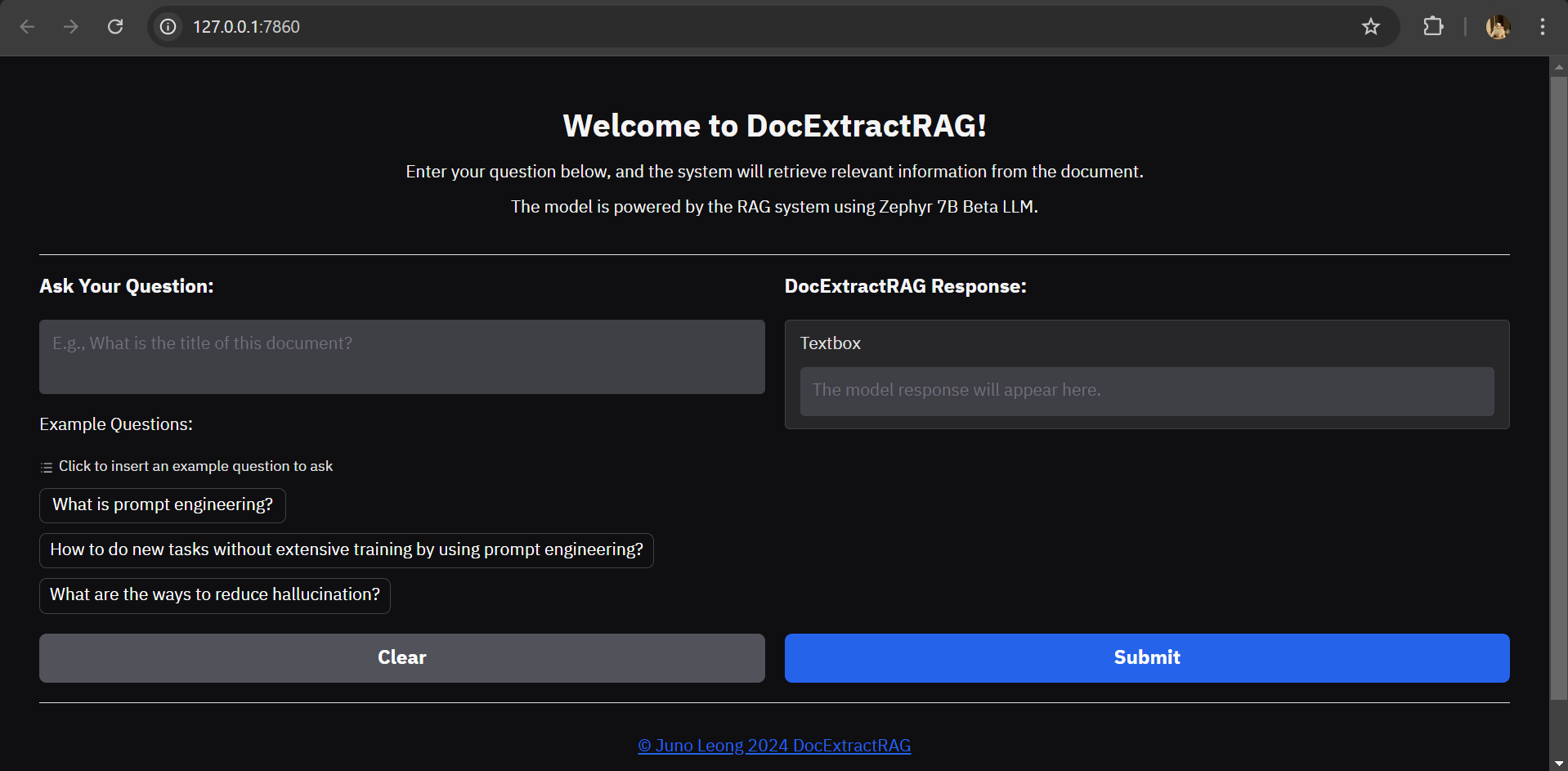
LLM Model
Citation: Tunstall, Lewis et al. (2023). Zephyr: Direct Distillation of LM Alignment. arXiv:2310.16944
Exploring offline RAG with Langchain, Zephyr-7b-beta and DeciLM-7b
Feel free to reach out with suggestions or improvements for the project! If you like or are using this project, please consider giving it a star⭐. Thanks! (●'◡'●)
DocExtractRAG is a Retrieval-Augmented Generation (RAG) system that combines the power of large language models (LLMs) with document retrieval to provide insightful responses based on academic or other types of documents. The system utilizes the Zephyr-7B-beta model for text generation; BAAI/bge-large-en for document embeddings.
Python
0
7 commits
updated Dec 22, 2024
DocExtractRAG is a Retrieval-Augmented Generation (RAG) system that combines the power of large language models (LLMs) with document retrieval to provide insightful responses based on academic or other types of documents. The DocExtractRAG utilizes the Zephyr-7B-beta model for text generation, BAAI/bge-large-en for document embeddings, and Chroma for efficient document retrieval.
Users can interact with the DocExtractRAG via a Gradio web interface, where they input a question, and the DocExtractRAG retrieves relevant information from the stored documents and generates a concise, structured answer.
| Components | Details |
|---|---|
| Model Used | zephyr-7B-beta-GGUF |
| Embeddings Model | BAAI/bge-large-en |
| Vector Store | Chroma |
| Accelerator | CTransformers |
| Framework | LangChain |
| Interface | Gradio |
To get started with DocExtractRAG, follow these steps:
Clone the repository and install the required libraries:
pip install -r requirements.txt
Download the Zephyr-7B-beta model using the Hugging Face CLI:
huggingface-cli download TheBloke/zephyr-7B-beta-GGUF zephyr-7b-beta.Q4_K_M.gguf --local-dir .\models\zephyr-7B-beta-GGUF --local-dir-use-symlinks False
For optimal performance on GPUs, install ctransformers with CUDA acceleration:
pip install ctransformers[cuda]
Initialize the vector store by running the vector_store.py script:
python vector_store.py
Tip: If you want to process a different PDF document, update the file name in line 28 of vector_store.py:
loader = PyPDFLoader("file_name")
Launch the application:
python app.py
Running the DocExtractRAG in your local host. http://127.0.0.1:7860
Note:
- Check for breaking changes and deprecations for Langchain libraires (Optional):
langchain-cli migrate --diff app.py
- If CUDA error due to CUDA driver version is insufficient for CUDA runtime version: Update your CUDA toolkits version on Nvidia Developer Website - cuda download
The Gradio interface enables intuitive interaction with DocExtractRAG.
Blocks is used instead of gradio.interface.
LLM Model
Citation: Tunstall, Lewis et al. (2023). Zephyr: Direct Distillation of LM Alignment. arXiv:2310.16944
Exploring offline RAG with Langchain, Zephyr-7b-beta and DeciLM-7b
Feel free to reach out with suggestions or improvements for the project! If you like or are using this project, please consider giving it a star⭐. Thanks! (●'◡'●)



