
Stubs of most MicroPython ports, boards and versions to make writing code that much simpler.
See the codeREADME
MicroPython Stubs: Enhance Your Development Experience




Welcome to the MicroPython Stubs repository!
Here, you’ll find a treasure trove of over 3,000 stub files generated by the MicroPython-Stubber tool. Whether you’re just starting out or a seasoned developer, these stubs are designed to supercharge your MicroPython development process.
Stubs are like cheat sheets for your code. They provide hints, auto-completion, and static type checking, making your life as a developer easier and more productive. Here’s what you can expect from these MicroPython stubs:
- Faster Coding: With stubs, you’ll write code more quickly and confidently. No more guessing function names or parameters!
- Fewer Errors: Stubs help catch mistakes early. If you provide incorrect arguments, you’ll get immediate feedback.
- Code Completion: Say goodbye to endless Bingling. Stubs provide context-aware auto-completion, even for board-specific features.
- Static Type Checking: By adding typing information, you’ll catch type-related bugs before they cause runtime issues.
One Click test in your bowser
Try the stubs with your own code in your browser in the Stubs Playground
One CLI install on your machine.
Use the setup script to create a pyproject.toml using the test template and install stubs into typings:
uv run https://raw.githubusercontent.com/Josverl/micropython-stubs/refs/heads/main/setup_micropython_stubs.py
Allows you to select :
- your project folder
- the source layout of your project (src/flat)
- the static type checker you use (pyright, mypy, ty, none)
- Select the stubs package you want to use
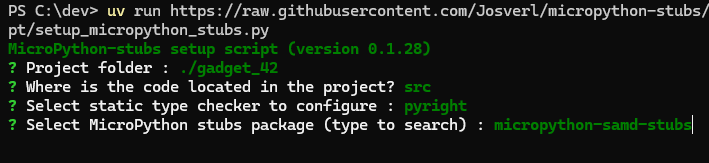
This will create or update a pyproject.toml file , with the settings for your preferred type cheker or IDE and install the stubs into a typings folder in your project folder.
No need to wade through pages of documentation to get started, just run the script and you are good to go!
Note: The setup script is in early beta, so expect some rough edges and please share your feedback and suggestions for improvement. uv is still the recommended runner for the one-line setup command above. For package installation, the script now auto-falls back to pipx run --spec pip pip install ... --target ... when uv is not available.
Installation
For installation instructions and configuration of your preferred IDE, please refer to the documentation
Integrations with IDEs and Tools
- VSCode:
A VSCode extension to simplify and speed up the development of MicroPython projects for the Raspberry Pi Pico and Pico W boards.
https://github.com/paulober/MicroPico - PyCharm / IntelliJ:
MicroPython Tools Plugin for PyCharm, CLion, IntelliJ and other JetBrains IDEs.
https://github.com/lukaskremla/micropython-tools-jetbrains
- Thonny:
Thonny IDE 5 has built-in support for MicroPython and uses the micropython-stubs.
https://github.com/thonny/thonny - Tooling:
A TypeScript tool to fetch and use MicroPython stubs for code completion and type checking in editors like VSCode.
https://github.com/standsi/MicropythonStubsFetchTypescript
3rd party stubs that use MicroPython stubs
- Pimorino pico stubs:
Type stubs that help you write code for Pimoroni Pico MicroPython's many built-in modules. https://github.com/pimoroni/pimoroni-pico-stubs
Explore Available Stubs
Curious about which versions, ports, and boards are covered, or the differences between different board ?
Try the beta version of the new Stubs Explorer, an app written in MicroPython using PyScript to explore and compare MicroPython stubs for various boards.
Or check out the online viewer or search for MicroPython stub packages on PyPI.
For a comprehensive overview of all stubs, dive into the documentation on the documentation on read the docs.
Sponsoring
In order to build accurate stubs I need access to a board to flash it with a specific version of MicroPython and run part of the stubbing software (createsubs.py) on the board.
You can help me by:
-
running the software and sharing a PR with the generated MCU stubs,
-
sending me a spare board you may have,
-
or by sponsoring me through Github
Contributors
Thanks to everyone that has submitted stubs or other relevant pieces of code and information, or published relevant stubs on pypi or github.


I invite everyone that has generated stubs for a board or port not on the current list, or has another contribution, to submit the stubs via a pull request or by just zipping up your stubs and creating an issue.
This project follows the all-contributors specification.
Contributors


Similar repos


Languages
Python
99.4%
Stubs of most MicroPython ports, boards and versions to make writing code that much simpler.
See the codeREADME
MicroPython Stubs: Enhance Your Development Experience
Welcome to the MicroPython Stubs repository!
Here, you’ll find a treasure trove of over 3,000 stub files generated by the MicroPython-Stubber tool. Whether you’re just starting out or a seasoned developer, these stubs are designed to supercharge your MicroPython development process.
Stubs are like cheat sheets for your code. They provide hints, auto-completion, and static type checking, making your life as a developer easier and more productive. Here’s what you can expect from these MicroPython stubs:
- Faster Coding: With stubs, you’ll write code more quickly and confidently. No more guessing function names or parameters!
- Fewer Errors: Stubs help catch mistakes early. If you provide incorrect arguments, you’ll get immediate feedback.
- Code Completion: Say goodbye to endless Bingling. Stubs provide context-aware auto-completion, even for board-specific features.
- Static Type Checking: By adding typing information, you’ll catch type-related bugs before they cause runtime issues.
One Click test in your bowser
Try the stubs with your own code in your browser in the Stubs Playground
One CLI install on your machine.
Use the setup script to create a pyproject.toml using the test template and install stubs into typings:
uv run https://raw.githubusercontent.com/Josverl/micropython-stubs/refs/heads/main/setup_micropython_stubs.py
Allows you to select :
- your project folder
- the source layout of your project (src/flat)
- the static type checker you use (pyright, mypy, ty, none)
- Select the stubs package you want to use
This will create or update a pyproject.toml file , with the settings for your preferred type cheker or IDE and install the stubs into a typings folder in your project folder.
No need to wade through pages of documentation to get started, just run the script and you are good to go!
Note: The setup script is in early beta, so expect some rough edges and please share your feedback and suggestions for improvement. uv is still the recommended runner for the one-line setup command above. For package installation, the script now auto-falls back to pipx run --spec pip pip install ... --target ... when uv is not available.
Installation
For installation instructions and configuration of your preferred IDE, please refer to the documentation
Integrations with IDEs and Tools
- VSCode:
A VSCode extension to simplify and speed up the development of MicroPython projects for the Raspberry Pi Pico and Pico W boards.
https://github.com/paulober/MicroPico - PyCharm / IntelliJ:
MicroPython Tools Plugin for PyCharm, CLion, IntelliJ and other JetBrains IDEs.
https://github.com/lukaskremla/micropython-tools-jetbrains
- Thonny:
Thonny IDE 5 has built-in support for MicroPython and uses the micropython-stubs.
https://github.com/thonny/thonny - Tooling:
A TypeScript tool to fetch and use MicroPython stubs for code completion and type checking in editors like VSCode.
https://github.com/standsi/MicropythonStubsFetchTypescript
3rd party stubs that use MicroPython stubs
- Pimorino pico stubs:
Type stubs that help you write code for Pimoroni Pico MicroPython's many built-in modules. https://github.com/pimoroni/pimoroni-pico-stubs
Explore Available Stubs
Curious about which versions, ports, and boards are covered, or the differences between different board ?
Try the beta version of the new Stubs Explorer, an app written in MicroPython using PyScript to explore and compare MicroPython stubs for various boards.
Or check out the online viewer or search for MicroPython stub packages on PyPI.
For a comprehensive overview of all stubs, dive into the documentation on the documentation on read the docs.
Sponsoring
In order to build accurate stubs I need access to a board to flash it with a specific version of MicroPython and run part of the stubbing software (createsubs.py) on the board.
You can help me by:
-
running the software and sharing a PR with the generated MCU stubs,
-
sending me a spare board you may have,
-
or by sponsoring me through Github
Contributors
Thanks to everyone that has submitted stubs or other relevant pieces of code and information, or published relevant stubs on pypi or github.
I invite everyone that has generated stubs for a board or port not on the current list, or has another contribution, to submit the stubs via a pull request or by just zipping up your stubs and creating an issue.
This project follows the all-contributors specification.
Similar repos
Contributors
Languages
Python
99.4%