Easily generate cross platform Swift framework projects from the command line
Swift
1,765
107 commits
updated Mar 31, 2019
Easily generate cross platform Swift framework projects from the command line.
SwiftPlate will generate Xcode projects for you in seconds, that support:
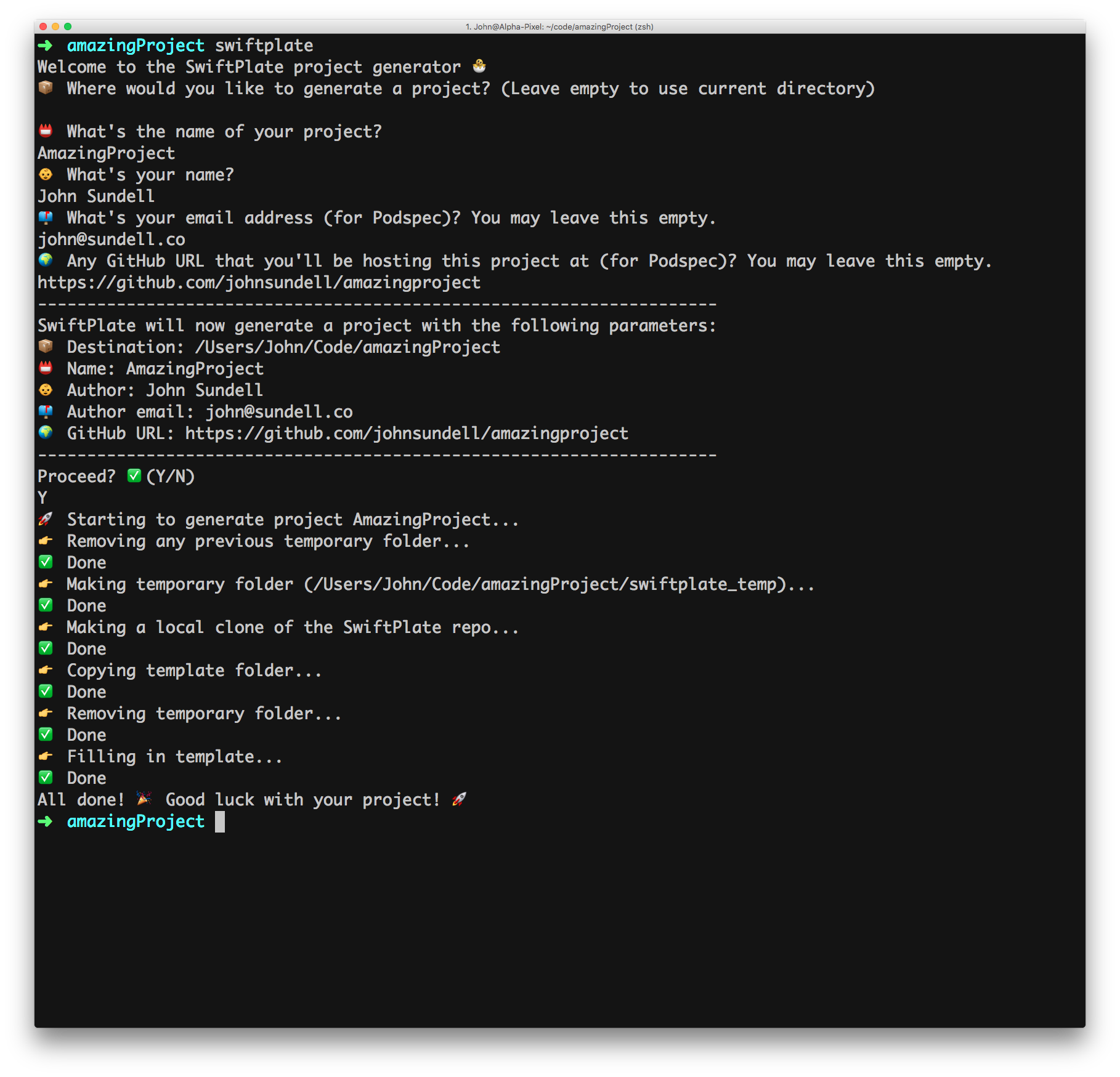
Just run swiftplate, and you’ll be presented with a simple step-by-step guide:
$ brew install swiftplate
$ swiftplate
$ git clone git@github.com:JohnSundell/SwiftPlate.git
$ cd swiftplate
$ make
$ git clone git@github.com:JohnSundell/SwiftPlate.git
$ marathon run swiftplate/main
$ git clone git@github.com:JohnSundell/SwiftPlate.git
$ swift swiftplate/main.swift
$ git clone git@github.com:JohnSundell/SwiftPlate.git
$ open swiftplate/SwiftPlate.xcodeproj
Besides using the guide to input information, SwiftPlate also supports command line arguments when launched. When a certain piece of information is supplied through an argument, SwiftPlate won't ask for that information when run. These are the arguments currently supported:
| Name | Description | Long parameter | Short parameter |
|---|---|---|---|
| Destination | Where the generated project should be saved | --destination | -d |
| Project name | The name of your project | --project | -p |
| Author name | Your name | --name | -n |
| Author email | Your email (for Podspec) | --email | -e |
| GitHub URL | Any URL you'll be hosting the project at (for Podspec) | --url | -u |
| Organization name | The name of your organization | --organization | -o |
| Repo | Any custom SwiftPlate repository that should be used for templates | --repo | -r |
| Force | Prevent user prompt at the end (for CIs etc.) | --force | -f |
Feel free to open an issue, or find me @johnsundell on Twitter.
2,004 followers · starred Apr 2017
464 followers · starred Apr 2017
508 followers · starred Mar 2017
748 followers · starred Nov 2016
Easily generate cross platform Swift framework projects from the command line
Swift
1,765
107 commits
updated Mar 31, 2019
Easily generate cross platform Swift framework projects from the command line.
SwiftPlate will generate Xcode projects for you in seconds, that support:
Just run swiftplate, and you’ll be presented with a simple step-by-step guide:
$ brew install swiftplate
$ swiftplate
$ git clone git@github.com:JohnSundell/SwiftPlate.git
$ cd swiftplate
$ make
$ git clone git@github.com:JohnSundell/SwiftPlate.git
$ marathon run swiftplate/main
$ git clone git@github.com:JohnSundell/SwiftPlate.git
$ swift swiftplate/main.swift
$ git clone git@github.com:JohnSundell/SwiftPlate.git
$ open swiftplate/SwiftPlate.xcodeproj
Besides using the guide to input information, SwiftPlate also supports command line arguments when launched. When a certain piece of information is supplied through an argument, SwiftPlate won't ask for that information when run. These are the arguments currently supported:
| Name | Description | Long parameter | Short parameter |
|---|---|---|---|
| Destination | Where the generated project should be saved | --destination | -d |
| Project name | The name of your project | --project | -p |
| Author name | Your name | --name | -n |
| Author email | Your email (for Podspec) | --email | -e |
| GitHub URL | Any URL you'll be hosting the project at (for Podspec) | --url | -u |
| Organization name | The name of your organization | --organization | -o |
| Repo | Any custom SwiftPlate repository that should be used for templates | --repo | -r |
| Force | Prevent user prompt at the end (for CIs etc.) | --force | -f |
Feel free to open an issue, or find me @johnsundell on Twitter.
2,004 followers · starred Apr 2017
464 followers · starred Apr 2017
508 followers · starred Mar 2017
748 followers · starred Nov 2016



