
README
MarkNull
This repository contains the implementation of MarkNull: Model-Agnostic Watermark Removal in AI-Generated Images via On-Manifold Latent Manipulation, accepted at USENIX Security 2026.
1. Overview
MarkNull consists of two complementary components:
- MarkNull: An optimization-based adversarial attack operating in the latent space.
- MarkNull-A: An amortized variant that performs efficient one-pass watermark suppression via a trained Watermark Removal Network (WRN).
2. Installation
We recommend using a fresh conda environment with Python 3.10.
conda create -n marknull python=3.10 -y
conda activate marknull
pip install -r requirements.txt
3. Watermarked Image Preparation
To reproduce experiments, watermarked images must first be generated using the target watermarking schemes. Readers may refer to the original implementations cited in our manuscript, or use the benchmark toolkit at https://github.com/THU-BPM/MarkDiffusion.
Once generated, store all watermarked images under ./Watermarked/ following the directory structure below. We provide Watermarked/SD2.1_GS/ as a concrete example, containing images watermarked by Gaussian Shading under Stable Diffusion 2.1.
Watermark baselines: DwtDctSvd and Gaussian Shading (CVPR 2024).
4. Data Layout
Watermarked/               # Clean watermarked images (input)
  SD2.1_GS/
    0.png
    1.png

Attacked/                  # Watermark-suppressed images (output)
  MarkNull/
    SD2.1_GS/
      0.png
      1.png
  MarkNull_A/
    SD2.1_GS/
      0.png
      1.png
<SUBSET_NAME>encodes the target model and watermarking scheme (e.g.,SD2.1_GS= Gaussian Shading under SD2.1).<ATTACK_NAME>denotes the attack method (MarkNullorMarkNull_A).
5. Attack
MarkNull (Optimization-Based)
python MarkNull_attack.py --input_dir Watermarked/SD2.1_GS
MarkNull-A (Amortized Variant)
Option A — Train the WRN
cd MarkNull-A
python train.py
Option B — Use Pretrained Weights
wget https://github.com/JieJayCao/MarkNull/releases/download/v.1.1/trained_model.7z
7z x trained_model.7z -o./
wget https://github.com/JieJayCao/MarkNull/releases/download/v1.0/Dataset.tar.gz
tar -xzvf Dataset.tar.gz --transform='s/.*\///' -C ./Dataset
Run MarkNull-A Attack
python MarkNull_A_attack.py --input_dir ../Watermarked/SD2.1_GS
6. Evaluation
Watermark Bit Accuracy
Evaluate watermark bit accuracy before and after attack using the provided decode scripts.
Before attack (original watermarked images):
cd Decode
./gs.sh ../Watermarked/SD2.1_GS
After attack:
cd Decode
./gs.sh ../Attacked/MarkNull/SD2.1_GS
./gs.sh ../Attacked/MarkNull_A/SD2.1_GS
Defense Evaluation
We additionally provide an implementation of the detection-based defense proposed in the paper:
python Attack_detection.py
7. Case Study: Breaking SynthID-Image
We evaluate whether MarkNull generalizes to SynthID-Image, the watermarking system deployed in Google Gemini.
Responsible disclosure. Before publication, we submitted the SynthID-Image watermark-removal vulnerability described in this section to Google through the Google Vulnerability Reward Program (VRP). The report is tracked by Google as Priority P3 and Severity S3.
- Open Gemini and generate an image from a text prompt. Download the generated image and save it to
../Watermarked/synthid_512/. - Apply MarkNull or MarkNull-A to the downloaded image, following the procedure described in the Attack section.
- Evaluate whether the watermark remains detectable using Google's official SynthID detection tool:
- Open Gemini on an Android device or via the web.
- Upload the attacked image using the image upload button.
- Follow Google's official SynthID detection guide.
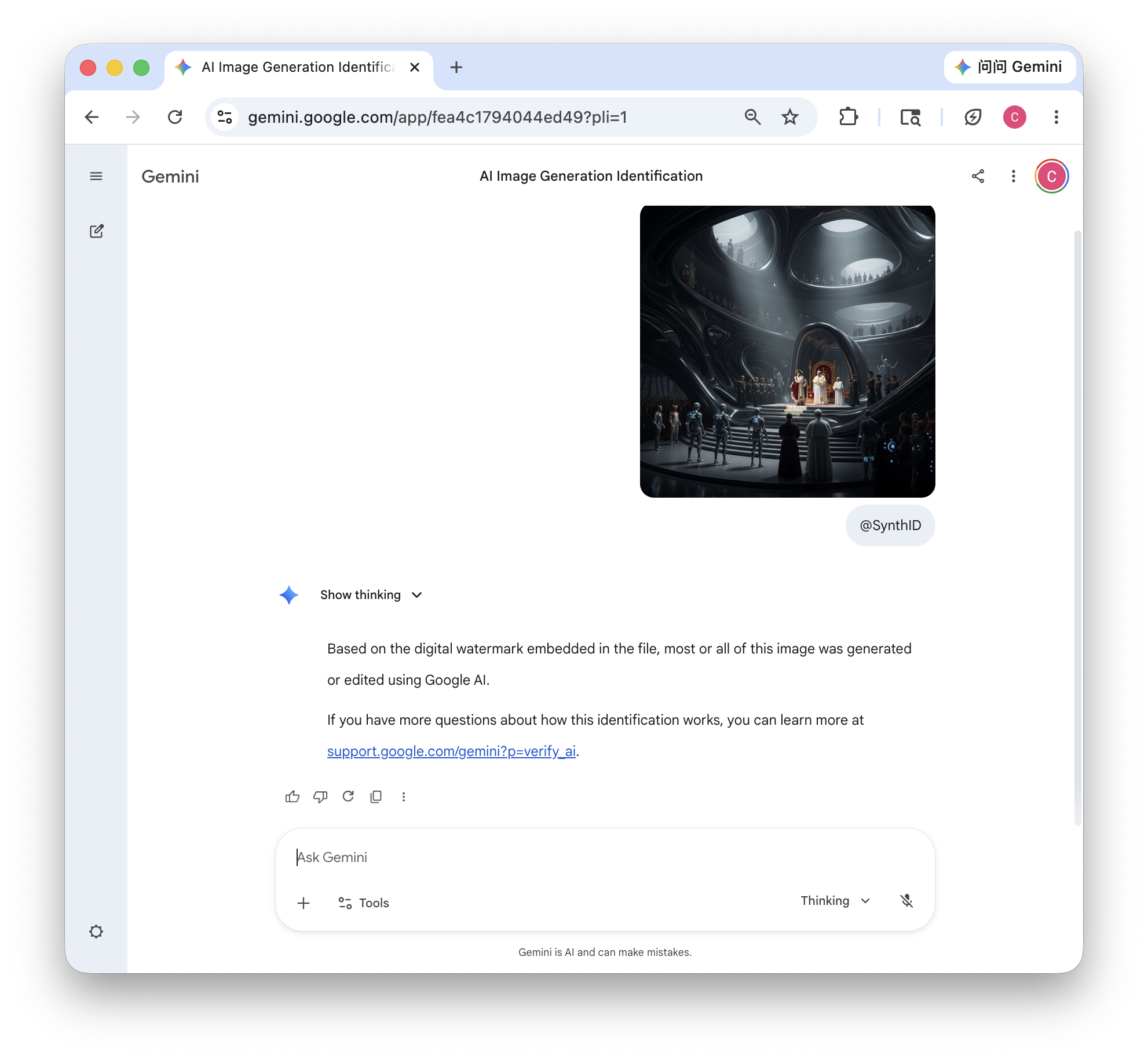
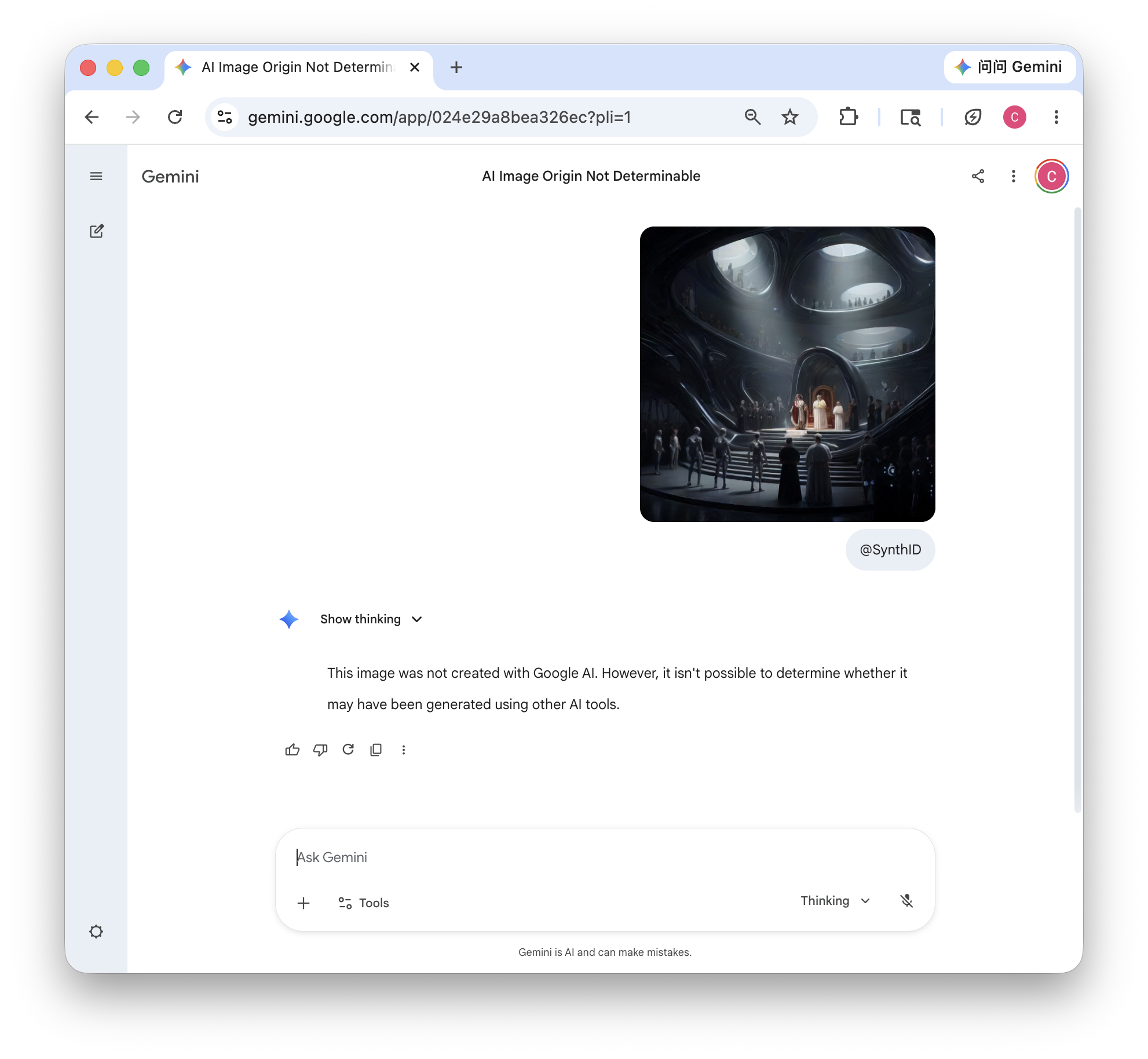
Left: SynthID detection result for the original watermarked image. Right: Detection result after applying MarkNull.
8. Case Study: Breaking AI-Generated Video Watermarking
This case study demonstrates that MarkNull generalizes to AI-generated video watermarking without any modality-specific adaptation.
Environment Setup
cd MarkDiffusion
conda create -n markdiffusion python=3.11 -y
conda activate markdiffusion
pip install -r requirements.txt
Step 1: Generate Watermarked Videos
conda activate markdiffusion
python videomark.py --ver 0
Watermarked videos will be saved to ../Watermarked/SVD_VideoMark/.
Step 2: Verify Watermark Integrity (Before Attack)
python videomark.py --ver 1 --input_dir ../Watermarked/SVD_VideoMark
Step 3: Run MarkNull Attack
cd ../
conda activate marknull
python MarkNull_attack.py --input_dir Watermarked/SVD_VideoMark
Attacked videos will be saved to Attacked/SVD_VideoMark/.
Step 4: Verify Attack Effectiveness (After Attack)
cd MarkDiffusion
conda activate markdiffusion
python videomark.py --ver 1 --input_dir ../Attacked/SVD_VideoMark
Citation
If you use this repository in your research, please cite:
@inproceedings{marknull2026,
  title = {MarkNull: Model-Agnostic Watermark Removal in AI-Generated Images via On-Manifold Latent Manipulation},
  author = {Cao, Jie and Li, Qi and Zhang, Zelin and Wu, Xiaodong and Liu, Lingshuang and Li, Xiangman and Ni, Jianbing},
  booktitle = {35nd USENIX Security Symposium (USENIX Security 26)},
  year = {2026}

}


Similar repos


Languages
Jupyter Notebook
64.3%
Python
35.7%
README
MarkNull
This repository contains the implementation of MarkNull: Model-Agnostic Watermark Removal in AI-Generated Images via On-Manifold Latent Manipulation, accepted at USENIX Security 2026.
1. Overview
MarkNull consists of two complementary components:
- MarkNull: An optimization-based adversarial attack operating in the latent space.
- MarkNull-A: An amortized variant that performs efficient one-pass watermark suppression via a trained Watermark Removal Network (WRN).
2. Installation
We recommend using a fresh conda environment with Python 3.10.
conda create -n marknull python=3.10 -y
conda activate marknull
pip install -r requirements.txt
3. Watermarked Image Preparation
To reproduce experiments, watermarked images must first be generated using the target watermarking schemes. Readers may refer to the original implementations cited in our manuscript, or use the benchmark toolkit at https://github.com/THU-BPM/MarkDiffusion.
Once generated, store all watermarked images under ./Watermarked/ following the directory structure below. We provide Watermarked/SD2.1_GS/ as a concrete example, containing images watermarked by Gaussian Shading under Stable Diffusion 2.1.
Watermark baselines: DwtDctSvd and Gaussian Shading (CVPR 2024).
4. Data Layout
Watermarked/               # Clean watermarked images (input)
  SD2.1_GS/
    0.png
    1.png

Attacked/                  # Watermark-suppressed images (output)
  MarkNull/
    SD2.1_GS/
      0.png
      1.png
  MarkNull_A/
    SD2.1_GS/
      0.png
      1.png
<SUBSET_NAME>encodes the target model and watermarking scheme (e.g.,SD2.1_GS= Gaussian Shading under SD2.1).<ATTACK_NAME>denotes the attack method (MarkNullorMarkNull_A).
5. Attack
MarkNull (Optimization-Based)
python MarkNull_attack.py --input_dir Watermarked/SD2.1_GS
MarkNull-A (Amortized Variant)
Option A — Train the WRN
cd MarkNull-A
python train.py
Option B — Use Pretrained Weights
wget https://github.com/JieJayCao/MarkNull/releases/download/v.1.1/trained_model.7z
7z x trained_model.7z -o./
wget https://github.com/JieJayCao/MarkNull/releases/download/v1.0/Dataset.tar.gz
tar -xzvf Dataset.tar.gz --transform='s/.*\///' -C ./Dataset
Run MarkNull-A Attack
python MarkNull_A_attack.py --input_dir ../Watermarked/SD2.1_GS
6. Evaluation
Watermark Bit Accuracy
Evaluate watermark bit accuracy before and after attack using the provided decode scripts.
Before attack (original watermarked images):
cd Decode
./gs.sh ../Watermarked/SD2.1_GS
After attack:
cd Decode
./gs.sh ../Attacked/MarkNull/SD2.1_GS
./gs.sh ../Attacked/MarkNull_A/SD2.1_GS
Defense Evaluation
We additionally provide an implementation of the detection-based defense proposed in the paper:
python Attack_detection.py
7. Case Study: Breaking SynthID-Image
We evaluate whether MarkNull generalizes to SynthID-Image, the watermarking system deployed in Google Gemini.
Responsible disclosure. Before publication, we submitted the SynthID-Image watermark-removal vulnerability described in this section to Google through the Google Vulnerability Reward Program (VRP). The report is tracked by Google as Priority P3 and Severity S3.
- Open Gemini and generate an image from a text prompt. Download the generated image and save it to
../Watermarked/synthid_512/. - Apply MarkNull or MarkNull-A to the downloaded image, following the procedure described in the Attack section.
- Evaluate whether the watermark remains detectable using Google's official SynthID detection tool:
- Open Gemini on an Android device or via the web.
- Upload the attacked image using the image upload button.
- Follow Google's official SynthID detection guide.
Left: SynthID detection result for the original watermarked image. Right: Detection result after applying MarkNull.
8. Case Study: Breaking AI-Generated Video Watermarking
This case study demonstrates that MarkNull generalizes to AI-generated video watermarking without any modality-specific adaptation.
Environment Setup
cd MarkDiffusion
conda create -n markdiffusion python=3.11 -y
conda activate markdiffusion
pip install -r requirements.txt
Step 1: Generate Watermarked Videos
conda activate markdiffusion
python videomark.py --ver 0
Watermarked videos will be saved to ../Watermarked/SVD_VideoMark/.
Step 2: Verify Watermark Integrity (Before Attack)
python videomark.py --ver 1 --input_dir ../Watermarked/SVD_VideoMark
Step 3: Run MarkNull Attack
cd ../
conda activate marknull
python MarkNull_attack.py --input_dir Watermarked/SVD_VideoMark
Attacked videos will be saved to Attacked/SVD_VideoMark/.
Step 4: Verify Attack Effectiveness (After Attack)
cd MarkDiffusion
conda activate markdiffusion
python videomark.py --ver 1 --input_dir ../Attacked/SVD_VideoMark
Citation
If you use this repository in your research, please cite:
@inproceedings{marknull2026,
  title = {MarkNull: Model-Agnostic Watermark Removal in AI-Generated Images via On-Manifold Latent Manipulation},
  author = {Cao, Jie and Li, Qi and Zhang, Zelin and Wu, Xiaodong and Liu, Lingshuang and Li, Xiangman and Ni, Jianbing},
  booktitle = {35nd USENIX Security Symposium (USENIX Security 26)},
  year = {2026}

}
Similar repos
Languages
Jupyter Notebook
64.3%
Python
35.7%