
AI-powered terminal assistant built on Semantic Kernel.
See the codeREADME
JD.AI





AI-powered terminal assistant and multi-channel platform built on Semantic Kernel. 15 AI providers, 27 tool categories, 33+ slash commands, MCP server integration, workflow engine, subagent orchestration, team strategies, and six channel adapters — across 18 projects with 772+ tests.
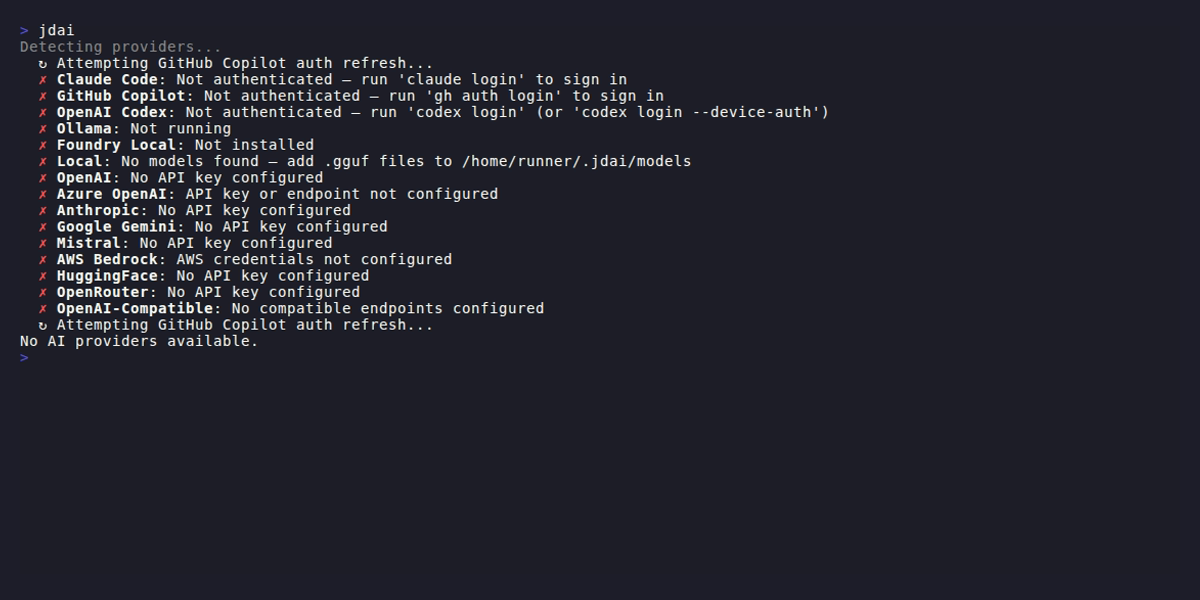
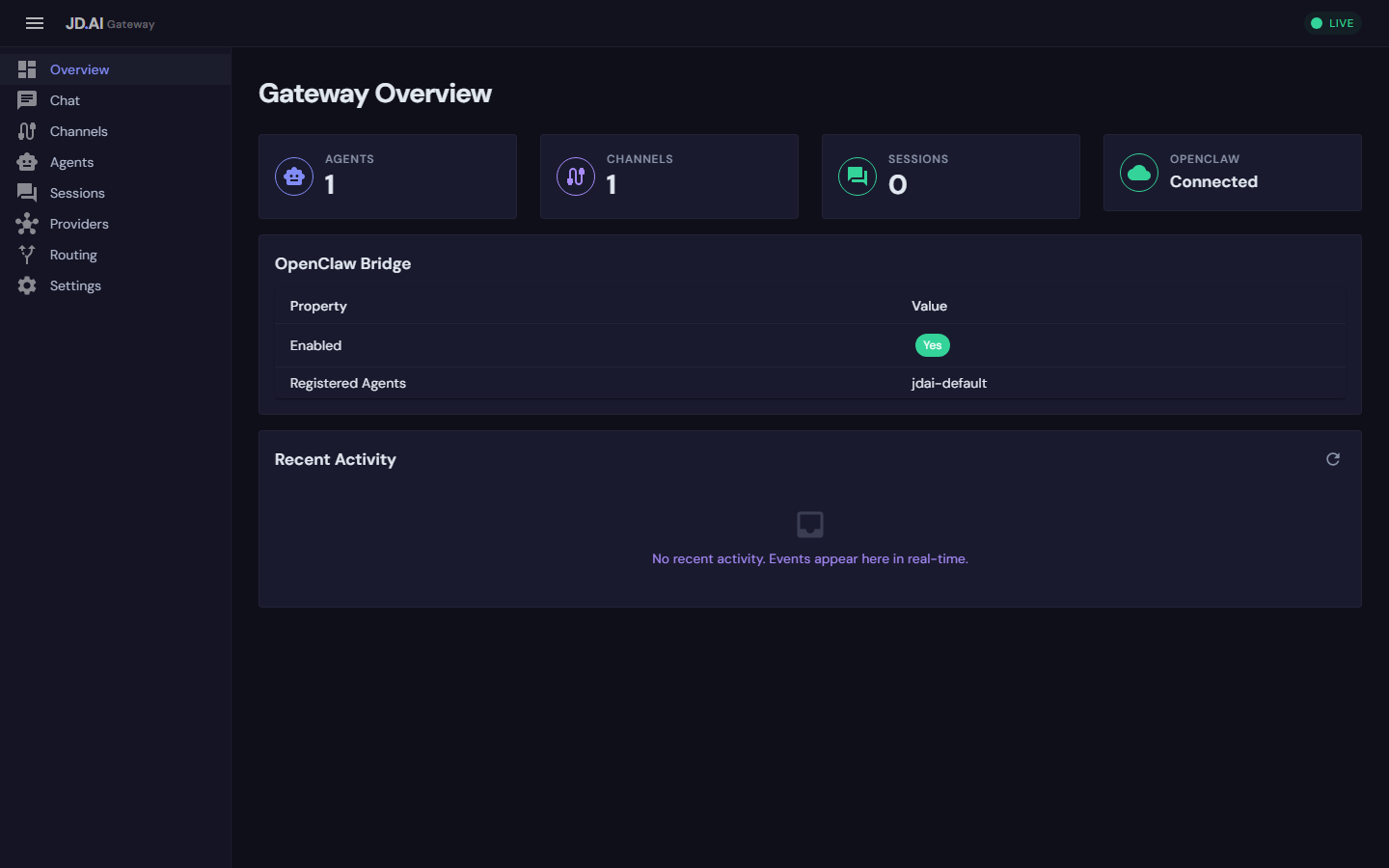
Architecture
┌──────────────────────────────────────────────┐
│              TUI Client (jdai)               │
│  33+ slash commands · model search · sessions│
└──────────────────────┬───────────────────────┘
                       │
┌──────────────────────▼───────────────────────┐
│         Gateway Control Plane                │
│       (REST API + SignalR Hubs)              │
└──────┬────────────┬────────────┬─────────────┘
       │            │            │
┌──────▼──────┐ ┌───▼──────┐ ┌──▼─────────────┐
│  Telemetry  │ │ Workflows│ │  MCP Servers    │
│ OpenTelemetry│ │  Engine  │ │ (add/list/rm)  │
│ tracing,    │ │ run/list │ │                 │
│ metrics,    │ │ /refine  │ │                 │
│ health      │ │          │ │                 │
└─────────────┘ └──────────┘ └─────────────────┘
       │
┌──────▼──────────────────────────────────────┐
│     Agent Pool + Routing                    │
│  5 subagent types · 4 team strategies       │
│  ConversationTransformer (5 modes)          │
└──────┬──────────────────┬───────────────────┘
       │                  │
┌──────▼──────┐   ┌───────▼───────────┐
│  Channel    │   │  Memory /         │
│  Adapters   │   │  Embeddings       │
│ (6 channels)│   │  (SQLite vectors) │
└─────────────┘   └───────────────────┘
       │
┌──────▼──────────────────────────────────────┐
│   15 AI Providers · 27 Tool Categories      │
│   Plugin SDK · Credential Store · Sessions  │
└─────────────────────────────────────────────┘
Features
| Area | Details |
|---|---|
| AI Providers | 15 providers — OAuth, API key, local, and AWS SDK auth (see table below) |
| Tools | 27 categories: File, Search, Shell, Git, Web, Web Search, Memory, Subagent, Think, Environment, Tasks, Code Execution, Clipboard, Questions, Diff & Patch, Batch Edit, Usage Tracking, Multimodal, Code Execution (Sandboxed), Task Management, Scheduling, Notebook, Structured Q&A, Encoding/Crypto, Capability Introspection, Policy/Governance, Session Usage |
| Slash Commands | 33+ commands for model management, sessions, providers, workflows, MCP, diagnostics, and more |
| Subagents | 5 types: Explore, Task, Plan, Review, General-purpose |
| Team Orchestration | 9 strategies: Sequential, Fan-Out, Supervisor, Debate, Voting, Pipeline, MapReduce, Relay, Blackboard |
| MCP Integration | /mcp add, /mcp list, /mcp remove — connect external tool servers |
| Workflows | /workflow run, /workflow list, /workflow refine — composable multi-step automation |
| Dynamic Switching | 5-mode ConversationTransformer (Preserve, Compact, Transform, Fresh, Cancel) with fork points |
| Model Search | /model search across Ollama, HuggingFace, and Foundry Local remote catalogs |
| Session Persistence | SQLite-backed history, model switch tracking, fork points; --continue/--resume restores model state |
| Git Checkpointing | Stash, directory, and commit strategies for safe rollback |
| Credentials | Encrypted credential store (DPAPI/AES); /provider add wizard |
| Global Defaults | ~/.jdai/config.json with per-project overrides via AtomicConfigStore |
| Observability | OpenTelemetry tracing, metrics, and health checks (JD.AI.Telemetry) |
| Dashboard | Blazor WebAssembly dashboard with MudBlazor UI (JD.AI.Dashboard.Wasm) |
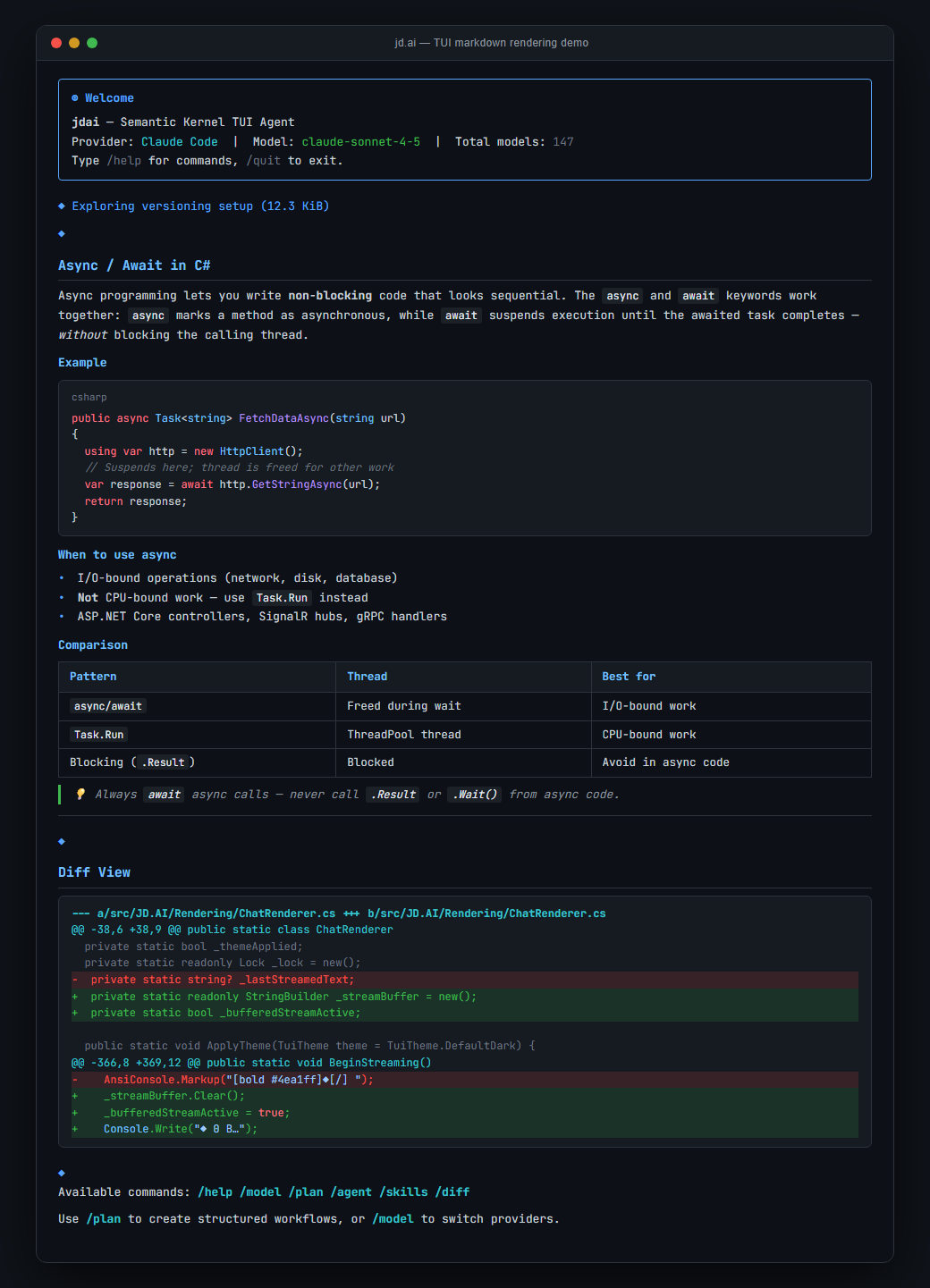
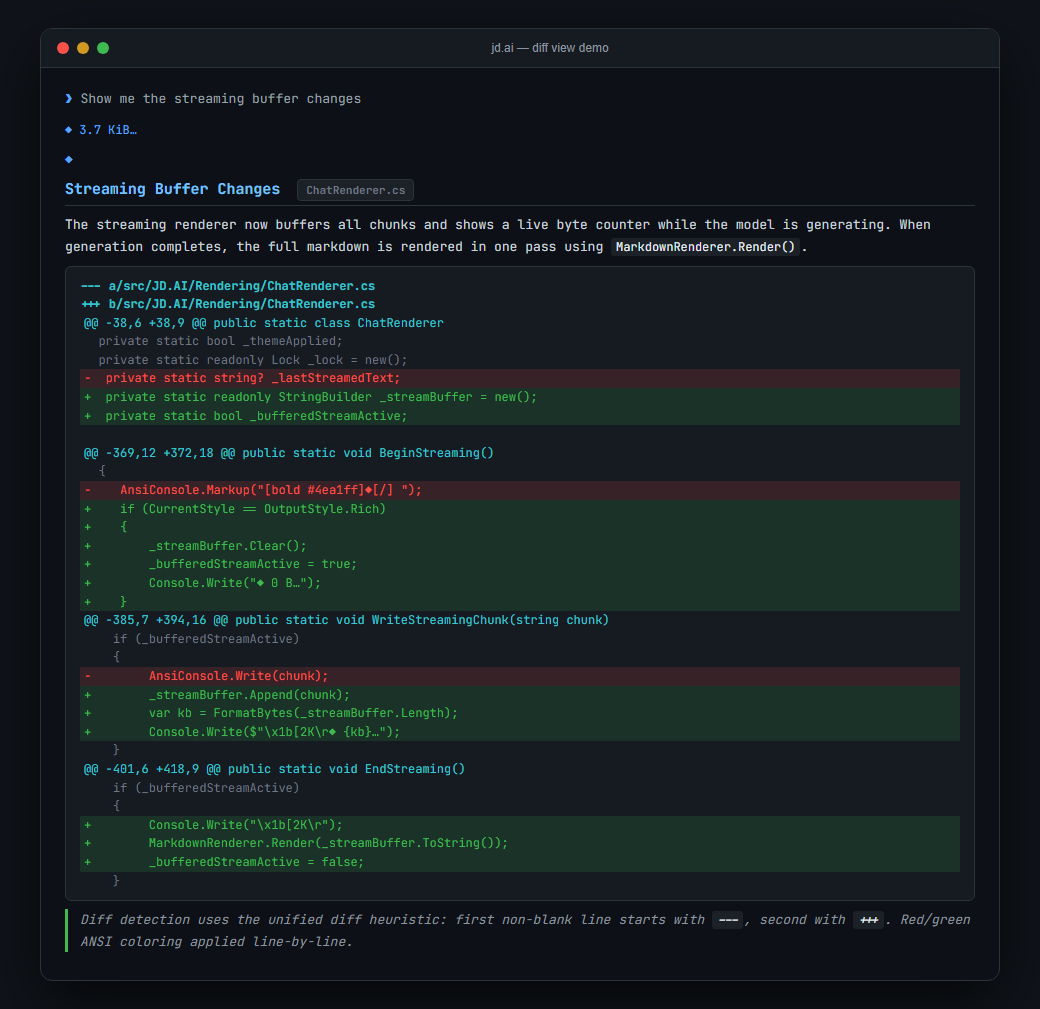
| Interactive TUI | Rich TUI Rendering: Spectre.Console rendering with Markdig markdown, syntax highlighting for 10 languages, diff view, slash-command colorization; plus streaming, thinking display, and tab-completion |
Quick Start
dotnet tool install -g JD.AI   # Install globally
jdai setup                      # One-command setup (daemon + onboarding + MCP)
jdai                            # Launch the TUI
First-Class Setup
jdai setup is the recommended, repeatable setup path. It is safe to run multiple times.
What it does:
- Ensures
jdai-daemonis installed/updated (unless--no-update) - Installs/refreshes the daemon service and starts it (unless
--no-start) - Shows daemon and bridge status
- Runs onboarding (
jdai onboard) to set provider/model defaults and MCP servers
# Full setup (recommended)
jdai setup

# Change provider/model defaults and save globally
jdai setup --skip-daemon --provider "OpenAI Codex" --model gpt-5.3-codex --global

# Daemon/gateway only
jdai setup --daemon-only

# Set bridge mode while setting up daemon
jdai setup --daemon-only --bridge disable
jdai setup --daemon-only --bridge passthrough
Setup flags:
--daemon-only: run daemon/gateway setup only--skip-daemon: run onboarding only--skip-onboard: run daemon/gateway only--no-update: skipjdai-daemontool install/update--no-start: do not start the daemon service--bridge <status|enable|disable|passthrough>: set/check bridge mode- onboarding flags are forwarded:
--provider,--model,--global,--skip-mcp,--skip-import
On Windows and Linux, daemon service operations may require elevation.
jdai-daemonwill prompt/recommend UAC/sudo as needed.
TUI Quick Commands
/provider add                   # Add an AI provider
/help                           # List all commands
Screenshots
Markdown rendering with syntax highlighting, tables, and slash-command colorization:
Unified diff view with red/green line coloring:
Providers
OAuth / Local (zero API key)
| Provider | Auth | Notes |
|---|---|---|
| Claude Code | OAuth (claude CLI) | Requires claude installed |
| GitHub Copilot | OAuth (device flow) | Uses VS Code Copilot token |
| OpenAI Codex | OAuth | Codex CLI authentication |
| Ollama | None (local) | HTTP localhost:11434 |
| Local Models / LLamaSharp | None (local) | Load .gguf files directly |
| Microsoft Foundry Local | None (local) | Microsoft Foundry runtime |
API Key
| Provider | Auth | Notes |
|---|---|---|
| OpenAI | API key | GPT-4o, o1, o3, etc. |
| Azure OpenAI | API key | Azure-hosted OpenAI deployments |
| Anthropic | API key | Claude 3.5/4 via Anthropic API |
| Google Gemini | API key | Gemini 2.x models |
| Mistral | API key | Mistral / Mixtral models |
| HuggingFace | API key | Inference API models |
| OpenRouter | API key | Multi-vendor routing — Claude, GPT-4, Gemini, Llama, Mistral |
| OpenAI-Compatible | API key | Groq, Together, DeepSeek, Fireworks, Perplexity |
AWS SDK
| Provider | Auth | Notes |
|---|---|---|
| AWS Bedrock | AWS SDK credentials | Claude, Titan, Llama via Bedrock |
Key Commands
| Command | Description |
|---|---|
/help | List all available commands |
/model | Show or switch the active model |
/model search <query> | Search Ollama, HuggingFace, Foundry Local catalogs |
/models | List available models for the current provider |
/provider | Show or switch the active provider |
/providers | List all configured providers |
/provider add | Interactive provider setup wizard |
/default provider <name> | Set default provider |
/default model <name> | Set default model |
/compact | Compact conversation context |
/save | Save the current session |
/sessions | List saved sessions |
/resume | Resume a saved session (restores model state) |
/fork | Fork conversation at the current point |
/cost | Show token usage and estimated cost |
/mcp add <url> | Register an MCP tool server |
/workflow run <name> | Execute a named workflow |
/autorun | Toggle automatic tool execution |
/doctor | Run environment diagnostics |
/export | Export conversation to file |
Run /help in the TUI for the complete list.
Gateway & Channels
The Gateway (JD.AI.Gateway) is an ASP.NET Core control plane exposing REST endpoints and SignalR hubs for real-time agent communication, authentication, rate limiting, and plugin orchestration.
Six channel adapters connect the agent pool to external platforms:
| Channel | Technology |
|---|---|
| Discord | Discord.Net — guilds, DMs, threads |
| Signal | signal-cli JSON-RPC bridge |
| Slack | SlackNet Socket Mode |
| Telegram | Telegram.Bot SDK |
| WebChat | SignalR browser client |
| OpenClaw | Cross-gateway HTTP forwarding |
See the Gateway API docs and Channel Adapters guide.
Project Structure
src/
├── JD.AI                      # TUI client (dotnet tool)
├── JD.AI.Core                 # Agents, providers, sessions, tools, memory, event bus
├── JD.AI.Gateway              # ASP.NET Core control plane (REST + SignalR)
├── JD.AI.Daemon               # Background service host (Windows/Linux)
├── JD.AI.Plugins.SDK          # Plugin interface library
├── JD.AI.Workflows            # Workflow engine (run/list/refine)
├── JD.AI.SpecSite             # UPSS static-site generator (HTML + DocFX content)
├── JD.AI.Telemetry            # OpenTelemetry tracing, metrics, health checks
├── JD.AI.Dashboard.Wasm       # Blazor WASM dashboard (MudBlazor)
├── JD.AI.Channels.Discord     # Discord adapter
├── JD.AI.Channels.Signal      # Signal adapter
├── JD.AI.Channels.Slack       # Slack adapter
├── JD.AI.Channels.Telegram    # Telegram adapter
├── JD.AI.Channels.Web         # WebChat adapter
└── JD.AI.Channels.OpenClaw    # OpenClaw bridge adapter
tests/
├── JD.AI.Tests                # Core unit tests
├── JD.AI.Gateway.Tests        # Gateway unit tests
├── JD.AI.Workflows.Tests      # Workflow engine tests
└── JD.AI.IntegrationTests     # End-to-end integration tests
Dependencies
| Package | Purpose |
|---|---|
| JD.SemanticKernel.Extensions | Compaction, memory, skills, hooks |
| JD.SemanticKernel.Extensions.Mcp | MCP server integration |
| JD.SemanticKernel.Connectors.ClaudeCode | Claude Code OAuth connector |
| JD.SemanticKernel.Connectors.GitHubCopilot | GitHub Copilot OAuth connector |
| JD.SemanticKernel.Connectors.OpenAICodex | OpenAI Codex OAuth connector |
| Microsoft.SemanticKernel | Core AI orchestration (v1.72.0) |
| LLamaSharp | Local GGUF model inference |
| OpenTelemetry | Distributed tracing and metrics |
| MudBlazor | Dashboard UI components |
Documentation
Full documentation is built with docfx and published from the docs/ directory.
- API Reference — Auto-generated from XML doc comments
- User Guide — Installation, commands, workflows, best practices
- Developer Guide — Architecture, custom tools, plugins, gateway API
- Operations — Deployment, observability, security, governance
- Reference — CLI flags, commands, tools, providers, environment variables
- Specifications — Generated UPSS portal content
Contributing
See CONTRIBUTING.md for guidelines. The project uses central package management, Nerdbank.GitVersioning, and enforces code style via Meziantou.Analyzer.
License
MIT © JD
Significant stargazers

13 followers · starred Jun 2026
Similar repos





Languages
C#
94.9%
HTML
3.2%
Gherkin
1.7%
AI-powered terminal assistant built on Semantic Kernel.
See the codeREADME
JD.AI
AI-powered terminal assistant and multi-channel platform built on Semantic Kernel. 15 AI providers, 27 tool categories, 33+ slash commands, MCP server integration, workflow engine, subagent orchestration, team strategies, and six channel adapters — across 18 projects with 772+ tests.
Architecture
┌──────────────────────────────────────────────┐
│              TUI Client (jdai)               │
│  33+ slash commands · model search · sessions│
└──────────────────────┬───────────────────────┘
                       │
┌──────────────────────▼───────────────────────┐
│         Gateway Control Plane                │
│       (REST API + SignalR Hubs)              │
└──────┬────────────┬────────────┬─────────────┘
       │            │            │
┌──────▼──────┐ ┌───▼──────┐ ┌──▼─────────────┐
│  Telemetry  │ │ Workflows│ │  MCP Servers    │
│ OpenTelemetry│ │  Engine  │ │ (add/list/rm)  │
│ tracing,    │ │ run/list │ │                 │
│ metrics,    │ │ /refine  │ │                 │
│ health      │ │          │ │                 │
└─────────────┘ └──────────┘ └─────────────────┘
       │
┌──────▼──────────────────────────────────────┐
│     Agent Pool + Routing                    │
│  5 subagent types · 4 team strategies       │
│  ConversationTransformer (5 modes)          │
└──────┬──────────────────┬───────────────────┘
       │                  │
┌──────▼──────┐   ┌───────▼───────────┐
│  Channel    │   │  Memory /         │
│  Adapters   │   │  Embeddings       │
│ (6 channels)│   │  (SQLite vectors) │
└─────────────┘   └───────────────────┘
       │
┌──────▼──────────────────────────────────────┐
│   15 AI Providers · 27 Tool Categories      │
│   Plugin SDK · Credential Store · Sessions  │
└─────────────────────────────────────────────┘
Features
| Area | Details |
|---|---|
| AI Providers | 15 providers — OAuth, API key, local, and AWS SDK auth (see table below) |
| Tools | 27 categories: File, Search, Shell, Git, Web, Web Search, Memory, Subagent, Think, Environment, Tasks, Code Execution, Clipboard, Questions, Diff & Patch, Batch Edit, Usage Tracking, Multimodal, Code Execution (Sandboxed), Task Management, Scheduling, Notebook, Structured Q&A, Encoding/Crypto, Capability Introspection, Policy/Governance, Session Usage |
| Slash Commands | 33+ commands for model management, sessions, providers, workflows, MCP, diagnostics, and more |
| Subagents | 5 types: Explore, Task, Plan, Review, General-purpose |
| Team Orchestration | 9 strategies: Sequential, Fan-Out, Supervisor, Debate, Voting, Pipeline, MapReduce, Relay, Blackboard |
| MCP Integration | /mcp add, /mcp list, /mcp remove — connect external tool servers |
| Workflows | /workflow run, /workflow list, /workflow refine — composable multi-step automation |
| Dynamic Switching | 5-mode ConversationTransformer (Preserve, Compact, Transform, Fresh, Cancel) with fork points |
| Model Search | /model search across Ollama, HuggingFace, and Foundry Local remote catalogs |
| Session Persistence | SQLite-backed history, model switch tracking, fork points; --continue/--resume restores model state |
| Git Checkpointing | Stash, directory, and commit strategies for safe rollback |
| Credentials | Encrypted credential store (DPAPI/AES); /provider add wizard |
| Global Defaults | ~/.jdai/config.json with per-project overrides via AtomicConfigStore |
| Observability | OpenTelemetry tracing, metrics, and health checks (JD.AI.Telemetry) |
| Dashboard | Blazor WebAssembly dashboard with MudBlazor UI (JD.AI.Dashboard.Wasm) |
| Interactive TUI | Rich TUI Rendering: Spectre.Console rendering with Markdig markdown, syntax highlighting for 10 languages, diff view, slash-command colorization; plus streaming, thinking display, and tab-completion |
Quick Start
dotnet tool install -g JD.AI   # Install globally
jdai setup                      # One-command setup (daemon + onboarding + MCP)
jdai                            # Launch the TUI
First-Class Setup
jdai setup is the recommended, repeatable setup path. It is safe to run multiple times.
What it does:
- Ensures
jdai-daemonis installed/updated (unless--no-update) - Installs/refreshes the daemon service and starts it (unless
--no-start) - Shows daemon and bridge status
- Runs onboarding (
jdai onboard) to set provider/model defaults and MCP servers
# Full setup (recommended)
jdai setup

# Change provider/model defaults and save globally
jdai setup --skip-daemon --provider "OpenAI Codex" --model gpt-5.3-codex --global

# Daemon/gateway only
jdai setup --daemon-only

# Set bridge mode while setting up daemon
jdai setup --daemon-only --bridge disable
jdai setup --daemon-only --bridge passthrough
Setup flags:
--daemon-only: run daemon/gateway setup only--skip-daemon: run onboarding only--skip-onboard: run daemon/gateway only--no-update: skipjdai-daemontool install/update--no-start: do not start the daemon service--bridge <status|enable|disable|passthrough>: set/check bridge mode- onboarding flags are forwarded:
--provider,--model,--global,--skip-mcp,--skip-import
On Windows and Linux, daemon service operations may require elevation.
jdai-daemonwill prompt/recommend UAC/sudo as needed.
TUI Quick Commands
/provider add                   # Add an AI provider
/help                           # List all commands
Screenshots
Markdown rendering with syntax highlighting, tables, and slash-command colorization:
Unified diff view with red/green line coloring:
Providers
OAuth / Local (zero API key)
| Provider | Auth | Notes |
|---|---|---|
| Claude Code | OAuth (claude CLI) | Requires claude installed |
| GitHub Copilot | OAuth (device flow) | Uses VS Code Copilot token |
| OpenAI Codex | OAuth | Codex CLI authentication |
| Ollama | None (local) | HTTP localhost:11434 |
| Local Models / LLamaSharp | None (local) | Load .gguf files directly |
| Microsoft Foundry Local | None (local) | Microsoft Foundry runtime |
API Key
| Provider | Auth | Notes |
|---|---|---|
| OpenAI | API key | GPT-4o, o1, o3, etc. |
| Azure OpenAI | API key | Azure-hosted OpenAI deployments |
| Anthropic | API key | Claude 3.5/4 via Anthropic API |
| Google Gemini | API key | Gemini 2.x models |
| Mistral | API key | Mistral / Mixtral models |
| HuggingFace | API key | Inference API models |
| OpenRouter | API key | Multi-vendor routing — Claude, GPT-4, Gemini, Llama, Mistral |
| OpenAI-Compatible | API key | Groq, Together, DeepSeek, Fireworks, Perplexity |
AWS SDK
| Provider | Auth | Notes |
|---|---|---|
| AWS Bedrock | AWS SDK credentials | Claude, Titan, Llama via Bedrock |
Key Commands
| Command | Description |
|---|---|
/help | List all available commands |
/model | Show or switch the active model |
/model search <query> | Search Ollama, HuggingFace, Foundry Local catalogs |
/models | List available models for the current provider |
/provider | Show or switch the active provider |
/providers | List all configured providers |
/provider add | Interactive provider setup wizard |
/default provider <name> | Set default provider |
/default model <name> | Set default model |
/compact | Compact conversation context |
/save | Save the current session |
/sessions | List saved sessions |
/resume | Resume a saved session (restores model state) |
/fork | Fork conversation at the current point |
/cost | Show token usage and estimated cost |
/mcp add <url> | Register an MCP tool server |
/workflow run <name> | Execute a named workflow |
/autorun | Toggle automatic tool execution |
/doctor | Run environment diagnostics |
/export | Export conversation to file |
Run /help in the TUI for the complete list.
Gateway & Channels
The Gateway (JD.AI.Gateway) is an ASP.NET Core control plane exposing REST endpoints and SignalR hubs for real-time agent communication, authentication, rate limiting, and plugin orchestration.
Six channel adapters connect the agent pool to external platforms:
| Channel | Technology |
|---|---|
| Discord | Discord.Net — guilds, DMs, threads |
| Signal | signal-cli JSON-RPC bridge |
| Slack | SlackNet Socket Mode |
| Telegram | Telegram.Bot SDK |
| WebChat | SignalR browser client |
| OpenClaw | Cross-gateway HTTP forwarding |
See the Gateway API docs and Channel Adapters guide.
Project Structure
src/
├── JD.AI                      # TUI client (dotnet tool)
├── JD.AI.Core                 # Agents, providers, sessions, tools, memory, event bus
├── JD.AI.Gateway              # ASP.NET Core control plane (REST + SignalR)
├── JD.AI.Daemon               # Background service host (Windows/Linux)
├── JD.AI.Plugins.SDK          # Plugin interface library
├── JD.AI.Workflows            # Workflow engine (run/list/refine)
├── JD.AI.SpecSite             # UPSS static-site generator (HTML + DocFX content)
├── JD.AI.Telemetry            # OpenTelemetry tracing, metrics, health checks
├── JD.AI.Dashboard.Wasm       # Blazor WASM dashboard (MudBlazor)
├── JD.AI.Channels.Discord     # Discord adapter
├── JD.AI.Channels.Signal      # Signal adapter
├── JD.AI.Channels.Slack       # Slack adapter
├── JD.AI.Channels.Telegram    # Telegram adapter
├── JD.AI.Channels.Web         # WebChat adapter
└── JD.AI.Channels.OpenClaw    # OpenClaw bridge adapter
tests/
├── JD.AI.Tests                # Core unit tests
├── JD.AI.Gateway.Tests        # Gateway unit tests
├── JD.AI.Workflows.Tests      # Workflow engine tests
└── JD.AI.IntegrationTests     # End-to-end integration tests
Dependencies
| Package | Purpose |
|---|---|
| JD.SemanticKernel.Extensions | Compaction, memory, skills, hooks |
| JD.SemanticKernel.Extensions.Mcp | MCP server integration |
| JD.SemanticKernel.Connectors.ClaudeCode | Claude Code OAuth connector |
| JD.SemanticKernel.Connectors.GitHubCopilot | GitHub Copilot OAuth connector |
| JD.SemanticKernel.Connectors.OpenAICodex | OpenAI Codex OAuth connector |
| Microsoft.SemanticKernel | Core AI orchestration (v1.72.0) |
| LLamaSharp | Local GGUF model inference |
| OpenTelemetry | Distributed tracing and metrics |
| MudBlazor | Dashboard UI components |
Documentation
Full documentation is built with docfx and published from the docs/ directory.
- API Reference — Auto-generated from XML doc comments
- User Guide — Installation, commands, workflows, best practices
- Developer Guide — Architecture, custom tools, plugins, gateway API
- Operations — Deployment, observability, security, governance
- Reference — CLI flags, commands, tools, providers, environment variables
- Specifications — Generated UPSS portal content
Contributing
See CONTRIBUTING.md for guidelines. The project uses central package management, Nerdbank.GitVersioning, and enforces code style via Meziantou.Analyzer.
License
MIT © JD
Similar repos
Significant stargazers
13 followers · starred Jun 2026
Languages
C#
94.9%
HTML
3.2%
Gherkin
1.7%