🤖 AI-powered Balatro automation system using multiagent orchestration, computer vision, and Docker. Features LangGraph, Azure OpenAI integration, and Streamlit web interface for autonomous gameplay.
Python
0
81 commits
updated Aug 31, 2025





Transform your Balatro gameplay with JokerNet 🤖✨
JokerNet represents a foundational framework for AI-powered game automation that can be extended far beyond Balatro. This section outlines potential enhancements and broader applications that demonstrate the scalability and versatility of the current multiagent architecture. 🤖✨
The system integrates Azure OpenAI for intelligent reasoning, Docker for scalable deployment, and custom mods for enhanced game interaction, making it a comprehensive solution for automated gaming.
Built with state-of-the-art AI frameworks like LangChain and LangGraph, this project exemplifies expertise in AI agent orchestration, full-stack development, and containerized gaming environments. As a software engineer specializing in AI and automation, I've crafted JokerNet to demonstrate innovative approaches to game AI - from sophisticated multiagent coordination to real-time visual analysis and precise control simulation.
| 🎯 AI-Powered Gameplay | 🎮 Dual Control Methods | 👁️ Real-Time Vision |
|---|---|---|
| Multiagent orchestration using LangGraph for coordinated strategic decisions | Gamepad control (primary) + Mouse control (under development) | Computer vision-powered game state recognition and dynamic planning |
| Learn more → | See interface → | Explore architecture → |
| 🌐 Modern Web UI | 🐳 Containerized | 🔧 Custom Mods |
|---|---|---|
| Responsive Streamlit interface for configuration and real-time monitoring | Fully containerized Balatro environment with noVNC remote access | Enhanced game experience with auto-start and automation features |
| View interface → | Setup guide → | Mod details → |
JokerNet operates through a sophisticated multi-layered architecture designed for maximum scalability and modularity:
graph TB
    subgraph "User Interface Layer"
        A[Streamlit Interface<br/>Port 8501]
    end

    subgraph "AI Orchestration Layer"
        C[Multiagent System<br/>LangGraph]
    end

    subgraph "🐳 Docker Container<br/>Complete Game Environment"
        subgraph "API Services"
            F[REST API<br/>Port 8000]
            G[MCP Server<br/>Port 8001]
        end

        subgraph "Game Runtime"
            B[noVNC<br/>Port 6080]
            D[Balatro Game<br/>Love2D Engine]
            E[Custom Mods<br/>BalatroLogger]
        end

        subgraph "Display System"
            H[Xvfb<br/>Virtual Display]
            I[x11vnc<br/>VNC Server]
        end

        B --> I
        I --> H
        H --> D
        F --> D
        G --> D
        E --> D
    end

    A --> F
    A --> B
    A --> C
    C --> A
    C --> G

    style A fill:#e1f5fe
    style C fill:#f3e5f5
    style D fill:#e8f5e8
    style F fill:#fff3e0
Architecture Highlights:
For detailed agent orchestration, see Multiagent System
At the heart of JokerNet lies a sophisticated multiagent system built using LangGraph, a powerful framework for orchestrating complex AI workflows. This system intelligently decomposes the challenging task of autonomous Balatro gameplay into coordinated, specialized agents that collaborate seamlessly.
The multiagent architecture features three specialized agents, each with distinct responsibilities:
| Agent | Role | Specialization | Key Functions |
|---|---|---|---|
| 🧠 Planner Agent | Strategic Director | High-level decision making | Task decomposition, strategic planning |
| 👁️ Visualizer Agent | Vision Specialist | Computer vision analysis | Screenshot processing, game state extraction |
| ⚙️ Worker Agent | Execution Expert | Action implementation | Gamepad control (primary), mouse interaction (under development) |
---
config:
flowchart:
curve: linear
---
graph TD;
__start__([<p>__start__</p>]):::first
planner_visualizer(planner_visualizer)
planner(planner)
worker_visualizer(worker_visualizer)
worker(worker)
tool(tool)
output(output)
__end__([<p>__end__</p>]):::last
__start__ --> planner_visualizer;
planner -. end .-> output;
planner -.-> worker_visualizer;
planner_visualizer --> planner;
tool --> worker_visualizer;
worker -.-> planner;
worker -.-> tool;
worker_visualizer --> worker;
output --> __end__;
classDef default fill:#f2f0ff,line-height:1.2
classDef first fill-opacity:0
classDef last fill:#bfb6fc
🔍 Workflow Breakdown:
🛡️ Advanced Flow Control Features:
This architecture enables complex decision-making while ensuring system reliability and user control. For the web interface that interacts with these agents, see Streamlit Interface
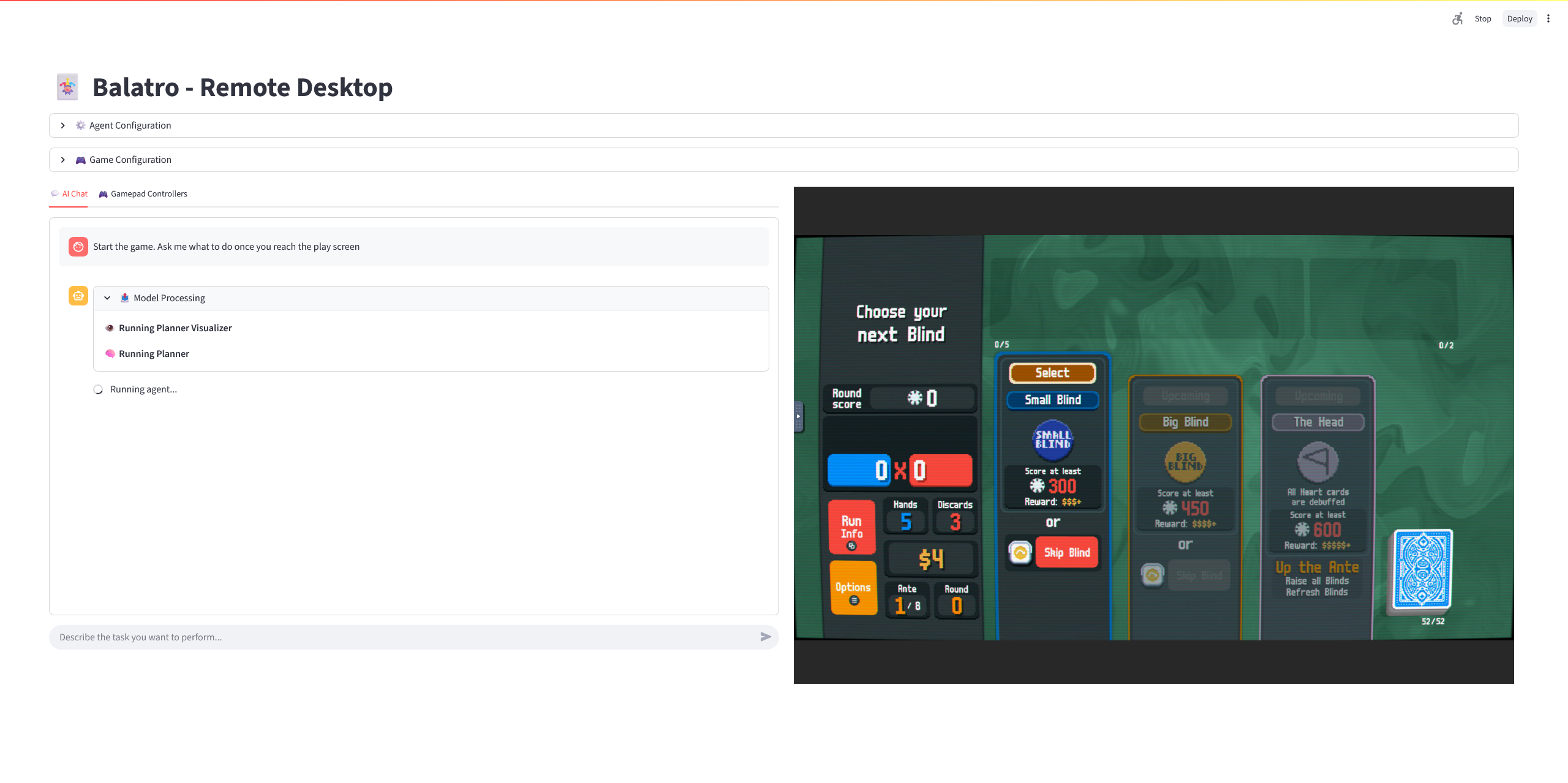
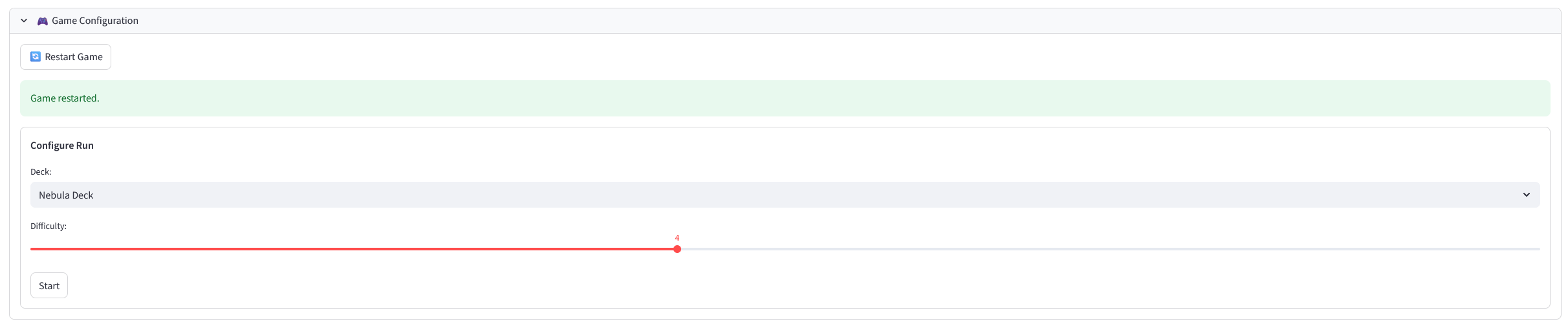
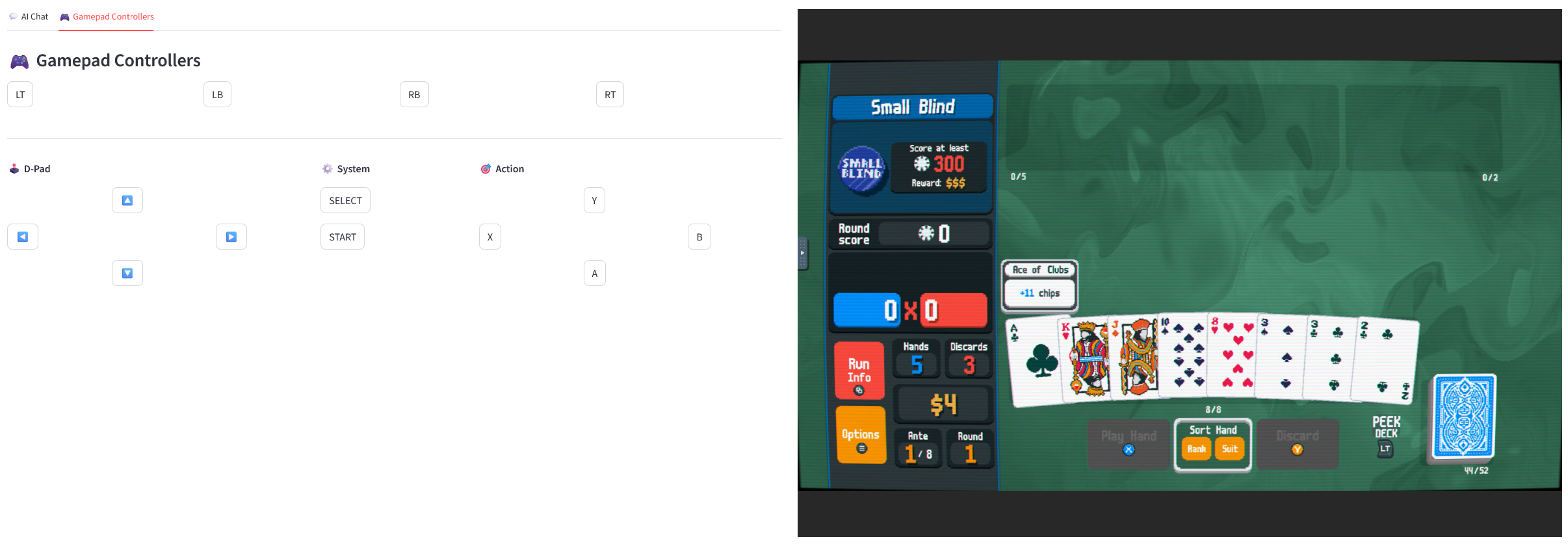
JokerNet features a modern, responsive Streamlit application that provides an intuitive and powerful interface for configuration, monitoring, and interaction with the AI agents.
| Feature | Description | Benefits |
|---|---|---|
| 📺 Live Game View | Embedded noVNC viewer for game monitoring | Visual feedback and control |
| ⚙️ Agent Configuration | Direct API calls for game and agent settings | Flexible automation strategies |
| 💬 Chat Interface | Natural language interaction with AI agents | Intuitive user experience |
| 🎯 Run Configuration | Deck selection, stake adjustment via API | Customized gameplay scenarios |
| 📊 Progress Monitoring | Live updates on agent actions and game state | Transparent automation process |

JokerNet includes a comprehensive Docker setup that containerizes the entire Balatro gaming environment, complete with custom mods, API servers, and remote access capabilities.
The Docker environment provides a fully isolated and optimized gaming ecosystem with all services running within a single container:
graph TB
    subgraph "🐳 Docker Container<br/>Internal Architecture"
        subgraph "API Services"
            F[REST API<br/>Port 8000]
            G[MCP Server<br/>Port 8001]
        end

        subgraph "Game Runtime"
            B[noVNC<br/>Port 6080]
            D[Balatro Game<br/>Love2D Engine]
            E[Custom Mods<br/>BalatroLogger]
        end

        subgraph "Display System"
            H[Xvfb<br/>Virtual Display]
            I[x11vnc<br/>VNC Server]
        end

        B --> I
        I --> H
        H --> D
        F --> D
        G --> D
        E --> D
    end

    style D fill:#e8f5e8
    style F fill:#fff3e0
🔧 Internal Service Flow:
🐳 Docker Container Benefits:
All services are expertly managed by Supervisor for reliable, production-grade operation:
| Service | Port | Purpose | Technology |
|---|---|---|---|
| 🖥️ Xvfb | N/A | Virtual X server for headless display | X11 |
| 📡 x11vnc | 5900 | VNC server for remote desktop access | VNC Protocol |
| 🌐 noVNC | 6080 | Web-based VNC client (no installation needed) | WebRTC |
| 🚀 FastAPI | 8000 | REST API server for game control | Python/FastAPI |
| 🤖 MCP Server | 8001 | AI agent integration and tool orchestration | Python/MCP |
JokerNet includes several custom modifications to dramatically enhance automation capabilities:
I've developed a custom mod (BalatroLogger) that significantly improves automation capabilities:
-- Key features from auto_start.lua
function love.update(dt)
    if config and config.auto_start then
        if G then
            -- Automatic deck and stake configuration
            if config.deck and G.P_CENTERS[config.deck] then
                G.GAME.viewed_back = G.P_CENTERS[config.deck]
            end

            -- Programmatic game start
            if G.FUNCS and G.FUNCS.start_run then
                G.FUNCS.start_run(nil, {
                    stake = config.stake or 1,
                    seed = (config.seed and config.seed ~= "random") and config.seed or nil
                })
            end
        end
    end
end
🎮 Mod Capabilities:
| Service | URL | Description | Primary Use |
|---|---|---|---|
| 🌐 noVNC Direct | http://localhost:6080 | Primary web-based game access | Main game interface |
| 📚 REST API | http://localhost:8000/docs | Interactive API documentation | Development & integration |
| 🤖 MCP Server | http://localhost:8001 | AI agent integration endpoint | Agent communication |
| 💻 VNC Native | localhost:5900 | Traditional VNC client access | Advanced users |
The REST API provides comprehensive control with intuitive endpoints:
# 🎮 Game control via gamepad
curl -X POST "http://localhost:8000/gamepad/buttons" \
     -H "Content-Type: application/json" \
     -d '{"sequence": "A RIGHT B", "duration": 0.1}'

# ⚙️ Auto-start configuration
curl -X POST "http://localhost:8000/auto_start" \
     -H "Content-Type: application/json" \
     -d '{"auto_start": true, "deck": "b_magic", "stake": 5}'

# 📸 Screenshot capture
curl "http://localhost:8000/screenshot" > game_state.png
The Model Context Protocol server enables seamless AI agent integration with powerful tools:
# Available tools for AI agents
- press_buttons(sequence): Gamepad control
- mouse_click(x, y): Mouse interaction (under development)
- get_screen(): Screenshot capture
- locate_element(description): UI element detection
For setup instructions, see Installation Guide
⚠️ WARNING: Mouse control is currently under development and does not work yet.
The system supports both gamepad and mouse control modes, but mouse functionality is not operational. The gamepad controller works reliably for automated gameplay, while mouse interaction requires additional development work.
I attempted to implement mouse control using AI vision models (HuggingFace ASKUI/PTA-1) for object detection, but encountered significant challenges:
# 🖥️ Host system requirements
sudo modprobe uinput
sudo chmod 666 /dev/uinput
git clone https://github.com/Javier-Jimenez99/JokerNet.git
cd JokerNet
uv sync  # Install dependencies
cp .env.example .env  # Configure environment variables
cd BalatroDocker
docker-compose up -d
cd src
streamlit run app.py
| Service | URL | Purpose |
|---|---|---|
| 🎮 Game | http://localhost:6080 | noVNC interface |
| 🌐 Interface | http://localhost:8501 | Streamlit web app |
| 📚 API Docs | http://localhost:8000/docs | REST API documentation |
Ejecuta ./startup.sh para iniciar en modo CPU. Usa ./startup.sh --gpu para activar GPU si está disponible.
JokerNet/
├── 🔧 .env                    # Environment configuration
├── 📦 pyproject.toml         # Project dependencies
├── 🔒 uv.lock               # Dependency lock file
├── 📁 src/
│   ├── 🌐 app.py           # Streamlit application
│   ├── 🔗 api.py           # API client
│   ├── 🤖 agents/
│   │   ├── 🧠 planner.py   # Strategic planning agent
│   │   ├── ⚙️ worker.py    # Execution agent
│   │   └── 📋 models/      # Pydantic models
│   └── 🎨 ui_components/    # Streamlit UI modules
├── 🐳 BalatroDocker/
│   ├── 📄 Dockerfile       # Container definition
│   ├── 🔄 docker-compose.yml # Service orchestration
│   ├── 📜 scripts/         # Setup and startup scripts
│   ├── ⚙️ config/          # Configuration files
│   └── 🔧 src/             # API and MCP servers
├── 📓 notebooks/           # Development and testing
└── 🎭 assets/             # Static resources
Configure your .env from .env.example file:
# Azure OpenAI Configuration (required for AI agent)
AZURE_OPENAI_ENDPOINT=https://your-azure-endpoint.openai.azure.com/
AZURE_OPENAI_API_KEY=your_api_key_here
AZURE_OPENAI_MODEL=gpt-4.1
AZURE_OPENAI_API_VERSION=2025-01-01-preview

# LangSmith Configuration
LANGCHAIN_TRACING_V2=true
LANGCHAIN_PROJECT=BalatroAgent-Worker
LANGCHAIN_API_KEY=your_langchain_api_key_here

# Docker/Steam Configuration
STEAM_USER=your_steam_username
STEAM_PASS=your_steam_password
GAME_SPEED=16
Available Deck Options:
🔴 b_red - Red Deck🔵 b_blue - Blue Deck (recommended)🪄 b_magic - Magic Deck🌌 b_nebula - Nebula Deck👻 b_ghost - Ghost Deck⚡ b_plasma - Plasma DeckStake Levels: 1-8 (1=easiest, 8=hardest)
JokerNet's modular architecture enables easy extension to other games and advanced AI capabilities.
This project showcases professional-level software engineering with a focus on AI-driven automation, game development integration, and scalable system design.
Start your AI-powered gaming journey today! 🚀
Built with ❤️ by Javier Jimenez


🤖 AI-powered Balatro automation system using multiagent orchestration, computer vision, and Docker. Features LangGraph, Azure OpenAI integration, and Streamlit web interface for autonomous gameplay.
Python
0
81 commits
updated Aug 31, 2025
Transform your Balatro gameplay with JokerNet 🤖✨
JokerNet represents a foundational framework for AI-powered game automation that can be extended far beyond Balatro. This section outlines potential enhancements and broader applications that demonstrate the scalability and versatility of the current multiagent architecture. 🤖✨
The system integrates Azure OpenAI for intelligent reasoning, Docker for scalable deployment, and custom mods for enhanced game interaction, making it a comprehensive solution for automated gaming.
Built with state-of-the-art AI frameworks like LangChain and LangGraph, this project exemplifies expertise in AI agent orchestration, full-stack development, and containerized gaming environments. As a software engineer specializing in AI and automation, I've crafted JokerNet to demonstrate innovative approaches to game AI - from sophisticated multiagent coordination to real-time visual analysis and precise control simulation.
| 🎯 AI-Powered Gameplay | 🎮 Dual Control Methods | 👁️ Real-Time Vision |
|---|---|---|
| Multiagent orchestration using LangGraph for coordinated strategic decisions | Gamepad control (primary) + Mouse control (under development) | Computer vision-powered game state recognition and dynamic planning |
| Learn more → | See interface → | Explore architecture → |
| 🌐 Modern Web UI | 🐳 Containerized | 🔧 Custom Mods |
|---|---|---|
| Responsive Streamlit interface for configuration and real-time monitoring | Fully containerized Balatro environment with noVNC remote access | Enhanced game experience with auto-start and automation features |
| View interface → | Setup guide → | Mod details → |
JokerNet operates through a sophisticated multi-layered architecture designed for maximum scalability and modularity:
graph TB
    subgraph "User Interface Layer"
        A[Streamlit Interface<br/>Port 8501]
    end

    subgraph "AI Orchestration Layer"
        C[Multiagent System<br/>LangGraph]
    end

    subgraph "🐳 Docker Container<br/>Complete Game Environment"
        subgraph "API Services"
            F[REST API<br/>Port 8000]
            G[MCP Server<br/>Port 8001]
        end

        subgraph "Game Runtime"
            B[noVNC<br/>Port 6080]
            D[Balatro Game<br/>Love2D Engine]
            E[Custom Mods<br/>BalatroLogger]
        end

        subgraph "Display System"
            H[Xvfb<br/>Virtual Display]
            I[x11vnc<br/>VNC Server]
        end

        B --> I
        I --> H
        H --> D
        F --> D
        G --> D
        E --> D
    end

    A --> F
    A --> B
    A --> C
    C --> A
    C --> G

    style A fill:#e1f5fe
    style C fill:#f3e5f5
    style D fill:#e8f5e8
    style F fill:#fff3e0
Architecture Highlights:
For detailed agent orchestration, see Multiagent System
At the heart of JokerNet lies a sophisticated multiagent system built using LangGraph, a powerful framework for orchestrating complex AI workflows. This system intelligently decomposes the challenging task of autonomous Balatro gameplay into coordinated, specialized agents that collaborate seamlessly.
The multiagent architecture features three specialized agents, each with distinct responsibilities:
| Agent | Role | Specialization | Key Functions |
|---|---|---|---|
| 🧠 Planner Agent | Strategic Director | High-level decision making | Task decomposition, strategic planning |
| 👁️ Visualizer Agent | Vision Specialist | Computer vision analysis | Screenshot processing, game state extraction |
| ⚙️ Worker Agent | Execution Expert | Action implementation | Gamepad control (primary), mouse interaction (under development) |
---
config:
flowchart:
curve: linear
---
graph TD;
__start__([<p>__start__</p>]):::first
planner_visualizer(planner_visualizer)
planner(planner)
worker_visualizer(worker_visualizer)
worker(worker)
tool(tool)
output(output)
__end__([<p>__end__</p>]):::last
__start__ --> planner_visualizer;
planner -. end .-> output;
planner -.-> worker_visualizer;
planner_visualizer --> planner;
tool --> worker_visualizer;
worker -.-> planner;
worker -.-> tool;
worker_visualizer --> worker;
output --> __end__;
classDef default fill:#f2f0ff,line-height:1.2
classDef first fill-opacity:0
classDef last fill:#bfb6fc
🔍 Workflow Breakdown:
🛡️ Advanced Flow Control Features:
This architecture enables complex decision-making while ensuring system reliability and user control. For the web interface that interacts with these agents, see Streamlit Interface
JokerNet features a modern, responsive Streamlit application that provides an intuitive and powerful interface for configuration, monitoring, and interaction with the AI agents.
| Feature | Description | Benefits |
|---|---|---|
| 📺 Live Game View | Embedded noVNC viewer for game monitoring | Visual feedback and control |
| ⚙️ Agent Configuration | Direct API calls for game and agent settings | Flexible automation strategies |
| 💬 Chat Interface | Natural language interaction with AI agents | Intuitive user experience |
| 🎯 Run Configuration | Deck selection, stake adjustment via API | Customized gameplay scenarios |
| 📊 Progress Monitoring | Live updates on agent actions and game state | Transparent automation process |
JokerNet includes a comprehensive Docker setup that containerizes the entire Balatro gaming environment, complete with custom mods, API servers, and remote access capabilities.
The Docker environment provides a fully isolated and optimized gaming ecosystem with all services running within a single container:
graph TB
    subgraph "🐳 Docker Container<br/>Internal Architecture"
        subgraph "API Services"
            F[REST API<br/>Port 8000]
            G[MCP Server<br/>Port 8001]
        end

        subgraph "Game Runtime"
            B[noVNC<br/>Port 6080]
            D[Balatro Game<br/>Love2D Engine]
            E[Custom Mods<br/>BalatroLogger]
        end

        subgraph "Display System"
            H[Xvfb<br/>Virtual Display]
            I[x11vnc<br/>VNC Server]
        end

        B --> I
        I --> H
        H --> D
        F --> D
        G --> D
        E --> D
    end

    style D fill:#e8f5e8
    style F fill:#fff3e0
🔧 Internal Service Flow:
🐳 Docker Container Benefits:
All services are expertly managed by Supervisor for reliable, production-grade operation:
| Service | Port | Purpose | Technology |
|---|---|---|---|
| 🖥️ Xvfb | N/A | Virtual X server for headless display | X11 |
| 📡 x11vnc | 5900 | VNC server for remote desktop access | VNC Protocol |
| 🌐 noVNC | 6080 | Web-based VNC client (no installation needed) | WebRTC |
| 🚀 FastAPI | 8000 | REST API server for game control | Python/FastAPI |
| 🤖 MCP Server | 8001 | AI agent integration and tool orchestration | Python/MCP |
JokerNet includes several custom modifications to dramatically enhance automation capabilities:
I've developed a custom mod (BalatroLogger) that significantly improves automation capabilities:
-- Key features from auto_start.lua
function love.update(dt)
    if config and config.auto_start then
        if G then
            -- Automatic deck and stake configuration
            if config.deck and G.P_CENTERS[config.deck] then
                G.GAME.viewed_back = G.P_CENTERS[config.deck]
            end

            -- Programmatic game start
            if G.FUNCS and G.FUNCS.start_run then
                G.FUNCS.start_run(nil, {
                    stake = config.stake or 1,
                    seed = (config.seed and config.seed ~= "random") and config.seed or nil
                })
            end
        end
    end
end
🎮 Mod Capabilities:
| Service | URL | Description | Primary Use |
|---|---|---|---|
| 🌐 noVNC Direct | http://localhost:6080 | Primary web-based game access | Main game interface |
| 📚 REST API | http://localhost:8000/docs | Interactive API documentation | Development & integration |
| 🤖 MCP Server | http://localhost:8001 | AI agent integration endpoint | Agent communication |
| 💻 VNC Native | localhost:5900 | Traditional VNC client access | Advanced users |
The REST API provides comprehensive control with intuitive endpoints:
# 🎮 Game control via gamepad
curl -X POST "http://localhost:8000/gamepad/buttons" \
     -H "Content-Type: application/json" \
     -d '{"sequence": "A RIGHT B", "duration": 0.1}'

# ⚙️ Auto-start configuration
curl -X POST "http://localhost:8000/auto_start" \
     -H "Content-Type: application/json" \
     -d '{"auto_start": true, "deck": "b_magic", "stake": 5}'

# 📸 Screenshot capture
curl "http://localhost:8000/screenshot" > game_state.png
The Model Context Protocol server enables seamless AI agent integration with powerful tools:
# Available tools for AI agents
- press_buttons(sequence): Gamepad control
- mouse_click(x, y): Mouse interaction (under development)
- get_screen(): Screenshot capture
- locate_element(description): UI element detection
For setup instructions, see Installation Guide
⚠️ WARNING: Mouse control is currently under development and does not work yet.
The system supports both gamepad and mouse control modes, but mouse functionality is not operational. The gamepad controller works reliably for automated gameplay, while mouse interaction requires additional development work.
I attempted to implement mouse control using AI vision models (HuggingFace ASKUI/PTA-1) for object detection, but encountered significant challenges:
# 🖥️ Host system requirements
sudo modprobe uinput
sudo chmod 666 /dev/uinput
git clone https://github.com/Javier-Jimenez99/JokerNet.git
cd JokerNet
uv sync  # Install dependencies
cp .env.example .env  # Configure environment variables
cd BalatroDocker
docker-compose up -d
cd src
streamlit run app.py
| Service | URL | Purpose |
|---|---|---|
| 🎮 Game | http://localhost:6080 | noVNC interface |
| 🌐 Interface | http://localhost:8501 | Streamlit web app |
| 📚 API Docs | http://localhost:8000/docs | REST API documentation |
Ejecuta ./startup.sh para iniciar en modo CPU. Usa ./startup.sh --gpu para activar GPU si está disponible.
JokerNet/
├── 🔧 .env                    # Environment configuration
├── 📦 pyproject.toml         # Project dependencies
├── 🔒 uv.lock               # Dependency lock file
├── 📁 src/
│   ├── 🌐 app.py           # Streamlit application
│   ├── 🔗 api.py           # API client
│   ├── 🤖 agents/
│   │   ├── 🧠 planner.py   # Strategic planning agent
│   │   ├── ⚙️ worker.py    # Execution agent
│   │   └── 📋 models/      # Pydantic models
│   └── 🎨 ui_components/    # Streamlit UI modules
├── 🐳 BalatroDocker/
│   ├── 📄 Dockerfile       # Container definition
│   ├── 🔄 docker-compose.yml # Service orchestration
│   ├── 📜 scripts/         # Setup and startup scripts
│   ├── ⚙️ config/          # Configuration files
│   └── 🔧 src/             # API and MCP servers
├── 📓 notebooks/           # Development and testing
└── 🎭 assets/             # Static resources
Configure your .env from .env.example file:
# Azure OpenAI Configuration (required for AI agent)
AZURE_OPENAI_ENDPOINT=https://your-azure-endpoint.openai.azure.com/
AZURE_OPENAI_API_KEY=your_api_key_here
AZURE_OPENAI_MODEL=gpt-4.1
AZURE_OPENAI_API_VERSION=2025-01-01-preview

# LangSmith Configuration
LANGCHAIN_TRACING_V2=true
LANGCHAIN_PROJECT=BalatroAgent-Worker
LANGCHAIN_API_KEY=your_langchain_api_key_here

# Docker/Steam Configuration
STEAM_USER=your_steam_username
STEAM_PASS=your_steam_password
GAME_SPEED=16
Available Deck Options:
🔴 b_red - Red Deck🔵 b_blue - Blue Deck (recommended)🪄 b_magic - Magic Deck🌌 b_nebula - Nebula Deck👻 b_ghost - Ghost Deck⚡ b_plasma - Plasma DeckStake Levels: 1-8 (1=easiest, 8=hardest)
JokerNet's modular architecture enables easy extension to other games and advanced AI capabilities.
This project showcases professional-level software engineering with a focus on AI-driven automation, game development integration, and scalable system design.
Start your AI-powered gaming journey today! 🚀
Built with ❤️ by Javier Jimenez