🔍 An OSINT tool for discovering linked social accounts and associated emails across multiple platforms using a single username.
Python
1,029
50 commits
updated Oct 1, 2026
English | 中文
Linkook is an OSINT tool for discovering linked/connected social accounts and associated emails across multiple platforms using a single username. It also supports exporting the gathered relationships in a Neo4j-friendly format for visual analysis.
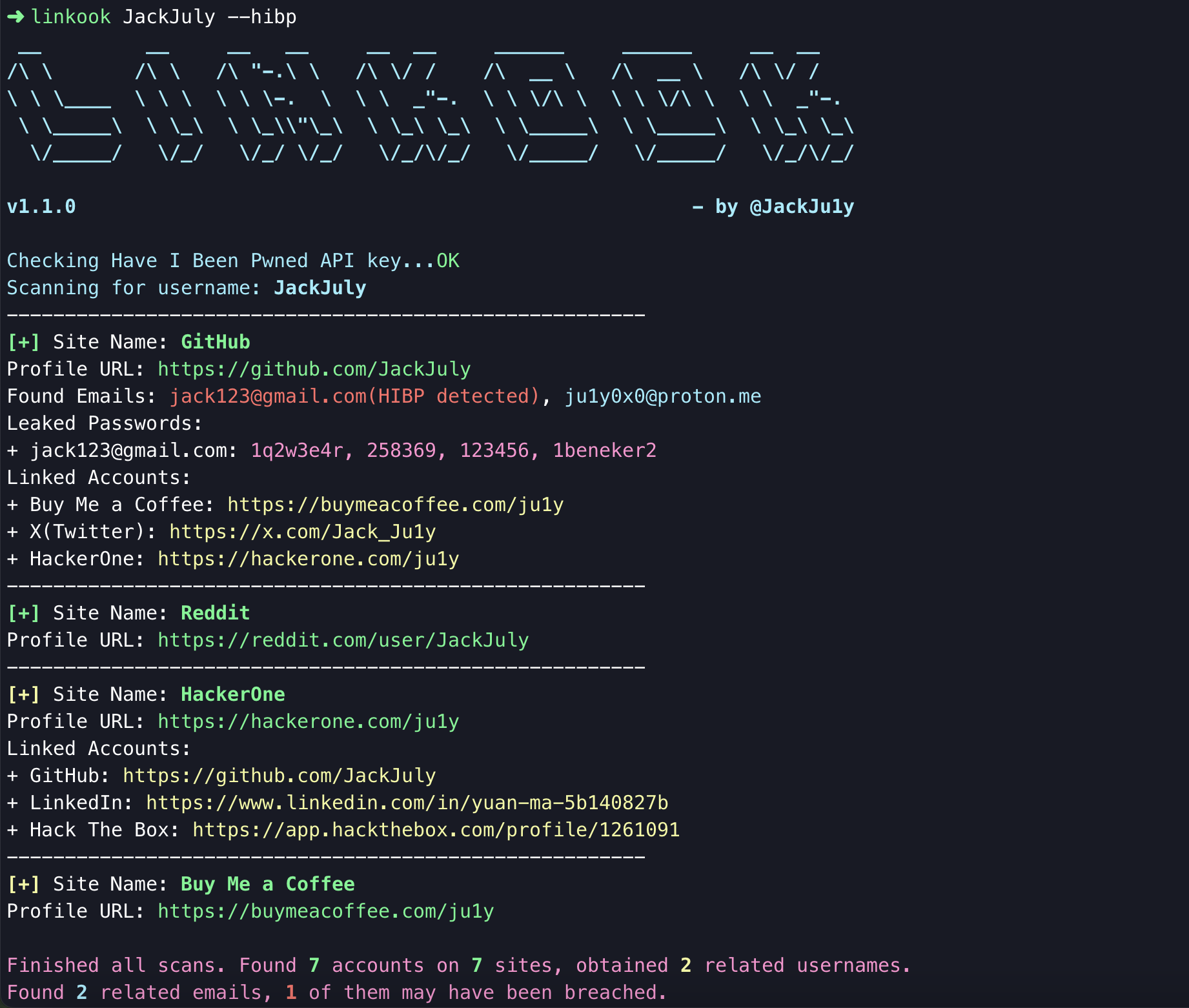
pipx install linkook
or use pip instead of pipx
You can also use the following commands to install it manually.
git clone https://github.com/JackJuly/linkook
cd linkook
Linkook directlypython -m linkook {username}
Linkookpython setup.py install
linkook {username}
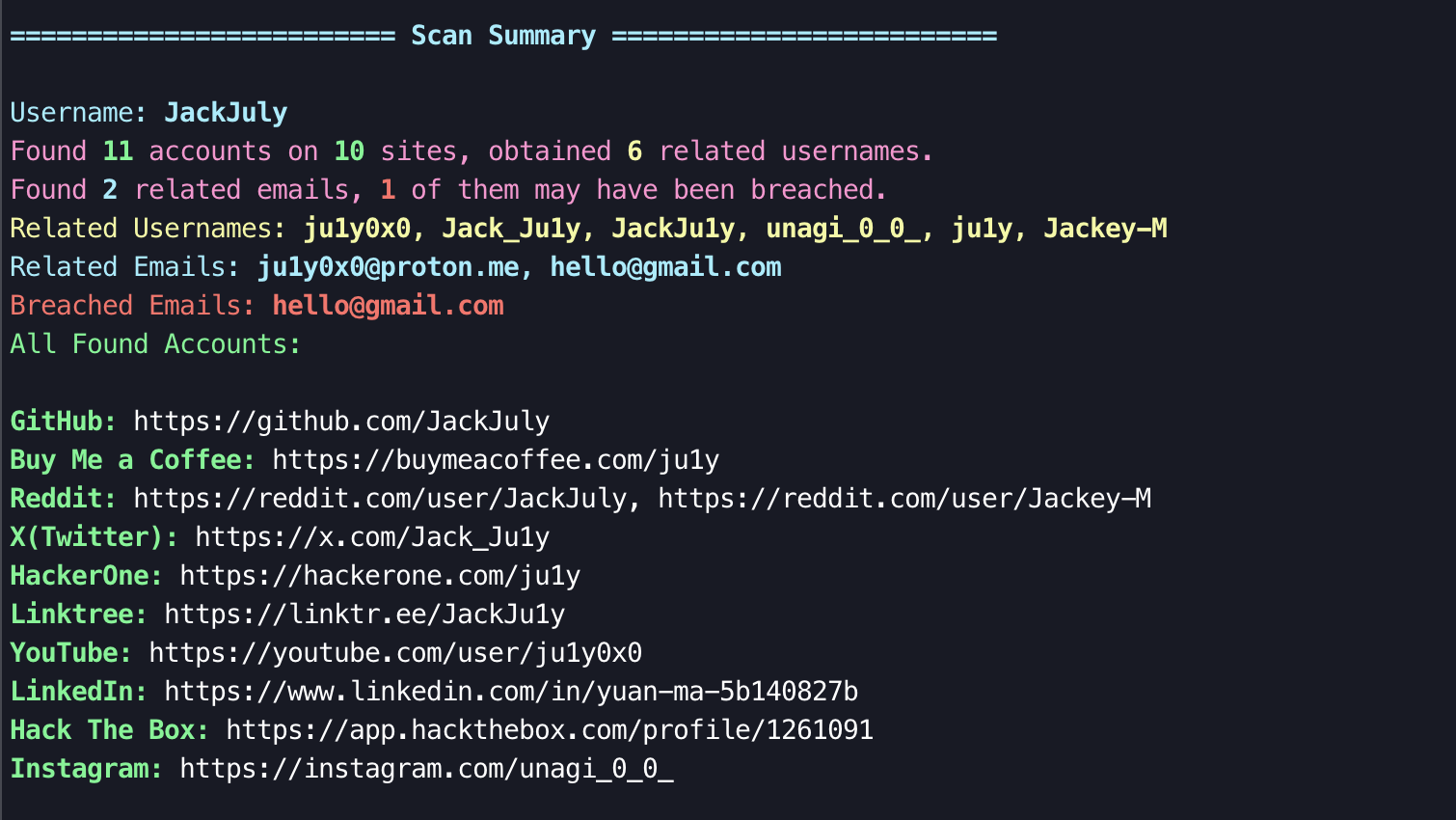
--show-summaryChoose whether to display a summary of the scan results.
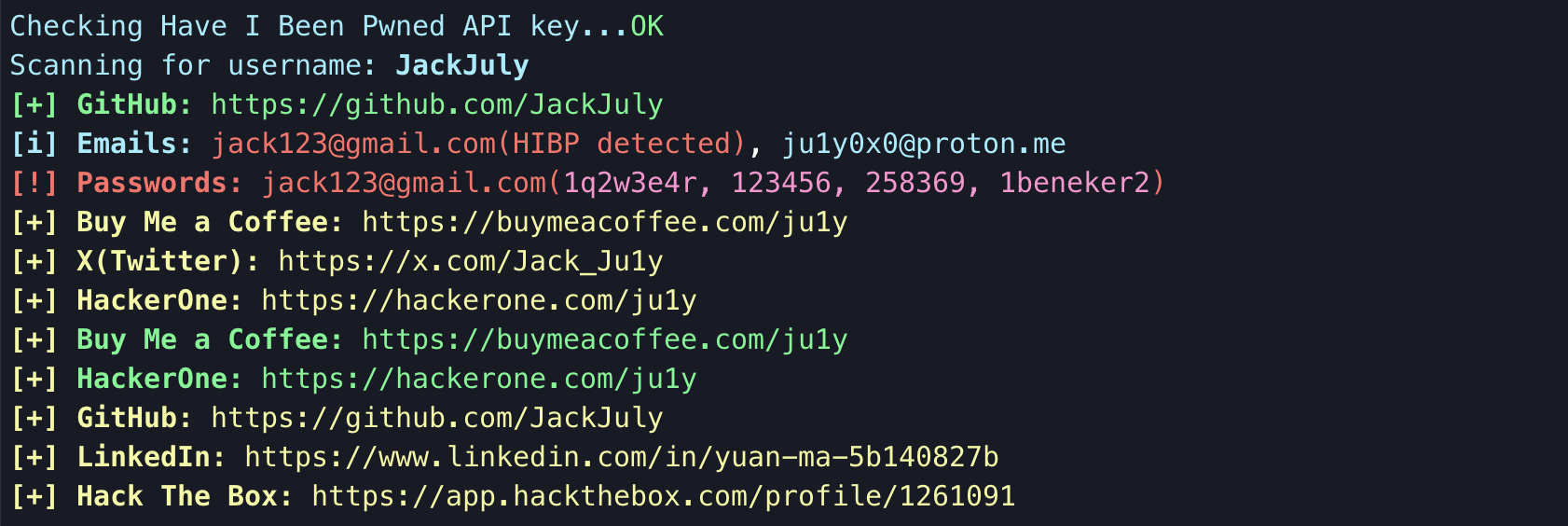
--conciseChoose whether to display the output in a concise format.
--check-breachUse HudsonRock's Cybercrime Intelligence Database to check whether the discovered email addresses have been compromised by cybercrime or info-stealing. If any data breach is found, the email address will be highlighted in red with '(breach detected)' in the output, and all detected emails will be listed in the Scan Summary.
...
Found Emails: notbreached@mail.com, breached@mail.com(breach detected)
Leaked Passwords:
+ breached@mail.com: password123
...
...
========================= Scan Summary =========================
...
Breached Emails: breached@mail.com(password123)
--hibpUse the Have I Been Pwned API instead of HudsonRock’s Database for breach information checks. When using it for the first time, you need to provide an API key (requiring a HIBP subscription). The API key will be saved locally in ~/.hibp.key.
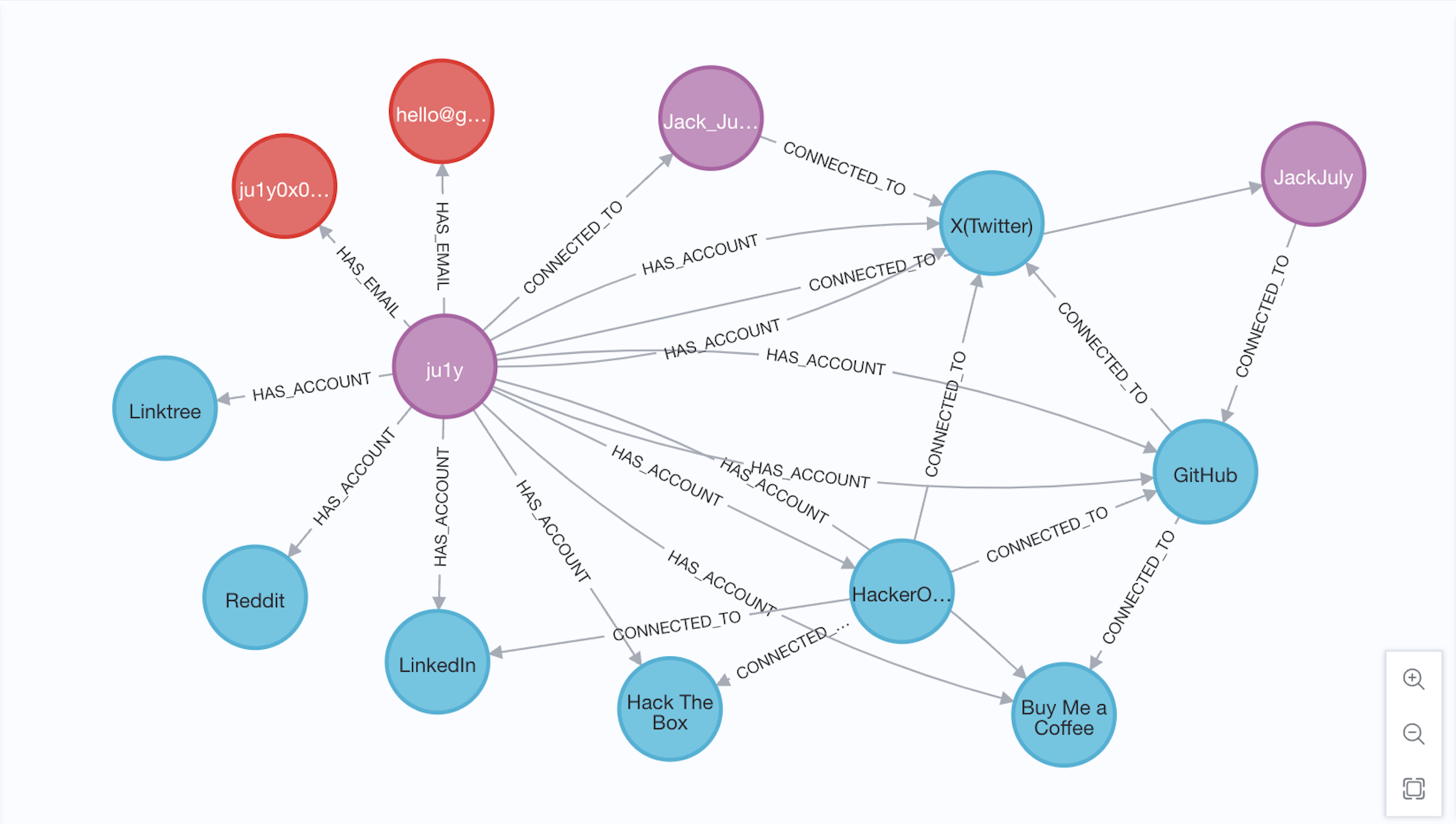
--neo4jExport the query results as a JSON file compatible with Neo4j database imports, producing neo4j_export.json.
In Neo4j, use the APOC plugin to import the JSON data. The following Cypher code will import the data and, upon successful execution, return the counts of imported nodes and relationships.
CALL apoc.load.json("file:///neo4j_export.json") YIELD value
CALL {
  WITH value
  UNWIND value.nodes AS node
  CALL apoc.create.node(
    node.labels,
    apoc.map.merge({ id: node.id }, node.properties)
  ) YIELD node AS createdNode
  RETURN count(createdNode) AS nodesCreated
}
CALL {
  WITH value
  UNWIND value.relationships AS rel
  MATCH (startNode {id: rel.startNode})
  MATCH (endNode {id: rel.endNode})
  CALL apoc.create.relationship(startNode, rel.type, {}, endNode) YIELD rel AS createdRel
  RETURN count(createdRel) AS relsCreated
}
RETURN nodesCreated, relsCreated;
You can use MATCH (n) RETURN n to view all results and their connections.
--help: show help message.
--silent: Suppress all output and only show summary.
--scan-all: Scan all available sites in provider.json. If not set, only scan sites with isConnected set to True.
--print-all: Output sites where the username was not found.
--no-color: Output without color.
--browse: Browse to all found profiles in the default browser.
--debug: Enable verbose logging for debugging.
--output: Directory to save the results. Default is results.
--local: Force the use of the local provider.json file, add a custom path if needed. Default is provider.json.
--version & --update: View version information and update directly using pipx.
Sherlock is a great tool that finds social media accounts based on usernames, and this project (Linkook) was partly inspired by it. But Sherlock has some limitations.
In contrast, Linkook can go one step further:
For details on how Linkook works and how to contribute, please refer to CONTRIBUTING.md for more details.
497 followers · starred Feb 2025
104 followers · starred Jan 2025
237 followers · starred Apr 2025
36 followers · starred May 2025
🔍 An OSINT tool for discovering linked social accounts and associated emails across multiple platforms using a single username.
Python
1,029
50 commits
updated Oct 1, 2026
English | 中文
Linkook is an OSINT tool for discovering linked/connected social accounts and associated emails across multiple platforms using a single username. It also supports exporting the gathered relationships in a Neo4j-friendly format for visual analysis.
pipx install linkook
or use pip instead of pipx
You can also use the following commands to install it manually.
git clone https://github.com/JackJuly/linkook
cd linkook
Linkook directlypython -m linkook {username}
Linkookpython setup.py install
linkook {username}
--show-summaryChoose whether to display a summary of the scan results.
--conciseChoose whether to display the output in a concise format.
--check-breachUse HudsonRock's Cybercrime Intelligence Database to check whether the discovered email addresses have been compromised by cybercrime or info-stealing. If any data breach is found, the email address will be highlighted in red with '(breach detected)' in the output, and all detected emails will be listed in the Scan Summary.
...
Found Emails: notbreached@mail.com, breached@mail.com(breach detected)
Leaked Passwords:
+ breached@mail.com: password123
...
...
========================= Scan Summary =========================
...
Breached Emails: breached@mail.com(password123)
--hibpUse the Have I Been Pwned API instead of HudsonRock’s Database for breach information checks. When using it for the first time, you need to provide an API key (requiring a HIBP subscription). The API key will be saved locally in ~/.hibp.key.
--neo4jExport the query results as a JSON file compatible with Neo4j database imports, producing neo4j_export.json.
In Neo4j, use the APOC plugin to import the JSON data. The following Cypher code will import the data and, upon successful execution, return the counts of imported nodes and relationships.
CALL apoc.load.json("file:///neo4j_export.json") YIELD value
CALL {
  WITH value
  UNWIND value.nodes AS node
  CALL apoc.create.node(
    node.labels,
    apoc.map.merge({ id: node.id }, node.properties)
  ) YIELD node AS createdNode
  RETURN count(createdNode) AS nodesCreated
}
CALL {
  WITH value
  UNWIND value.relationships AS rel
  MATCH (startNode {id: rel.startNode})
  MATCH (endNode {id: rel.endNode})
  CALL apoc.create.relationship(startNode, rel.type, {}, endNode) YIELD rel AS createdRel
  RETURN count(createdRel) AS relsCreated
}
RETURN nodesCreated, relsCreated;
You can use MATCH (n) RETURN n to view all results and their connections.
--help: show help message.
--silent: Suppress all output and only show summary.
--scan-all: Scan all available sites in provider.json. If not set, only scan sites with isConnected set to True.
--print-all: Output sites where the username was not found.
--no-color: Output without color.
--browse: Browse to all found profiles in the default browser.
--debug: Enable verbose logging for debugging.
--output: Directory to save the results. Default is results.
--local: Force the use of the local provider.json file, add a custom path if needed. Default is provider.json.
--version & --update: View version information and update directly using pipx.
Sherlock is a great tool that finds social media accounts based on usernames, and this project (Linkook) was partly inspired by it. But Sherlock has some limitations.
In contrast, Linkook can go one step further:
For details on how Linkook works and how to contribute, please refer to CONTRIBUTING.md for more details.
497 followers · starred Feb 2025
104 followers · starred Jan 2025
237 followers · starred Apr 2025
36 followers · starred May 2025