
[CVPR 2025] DEIM: DETR with Improved Matching for Fast Convergence
See the codeREADME
DEIM: DETR with Improved Matching for Fast Convergence






🎉 EdgeCrafter is released with SOTA performance on detection, pose estimation as well as instance segmentation.🎉
🎉 We’re excited to share DEIMv2 🎉
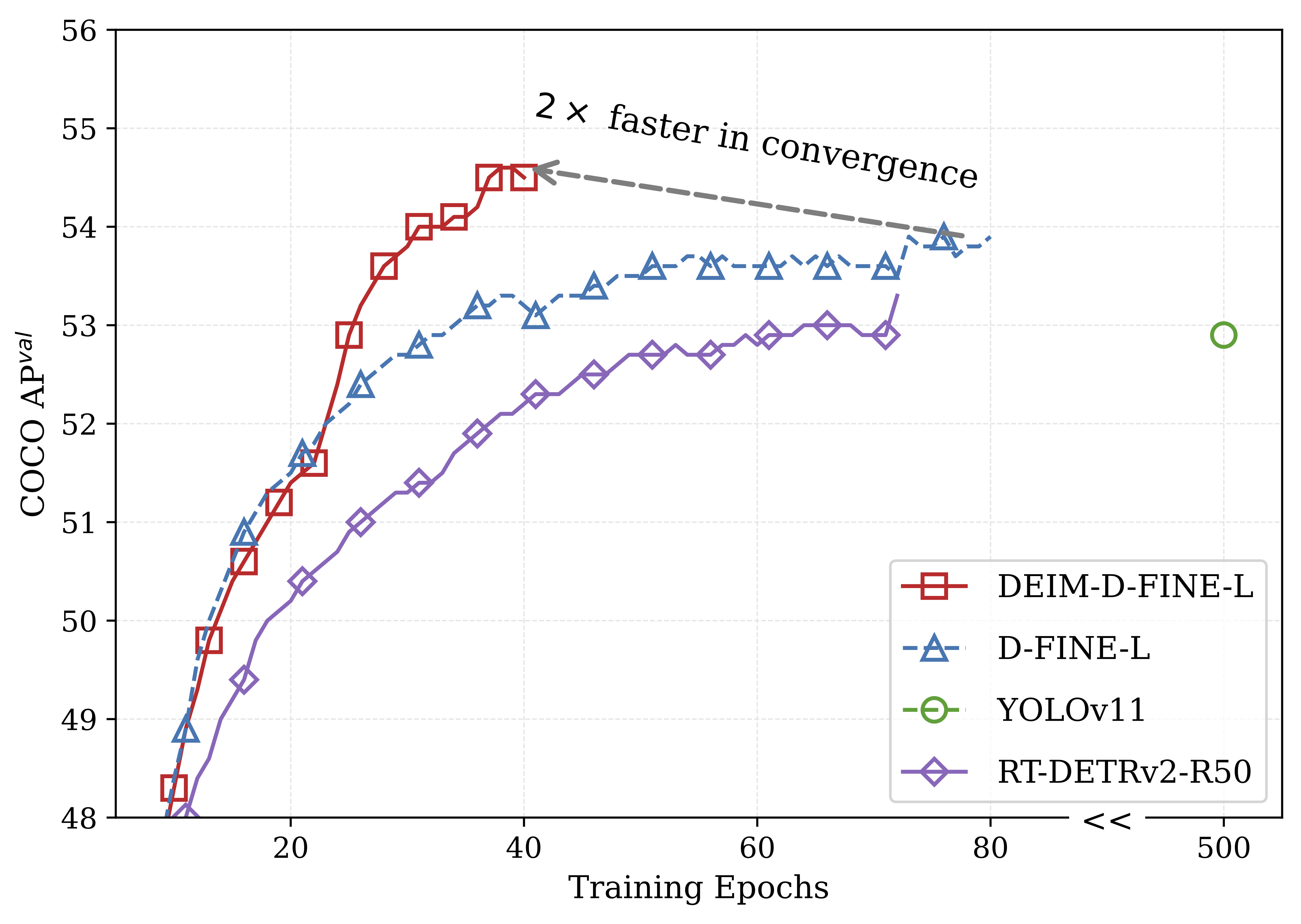
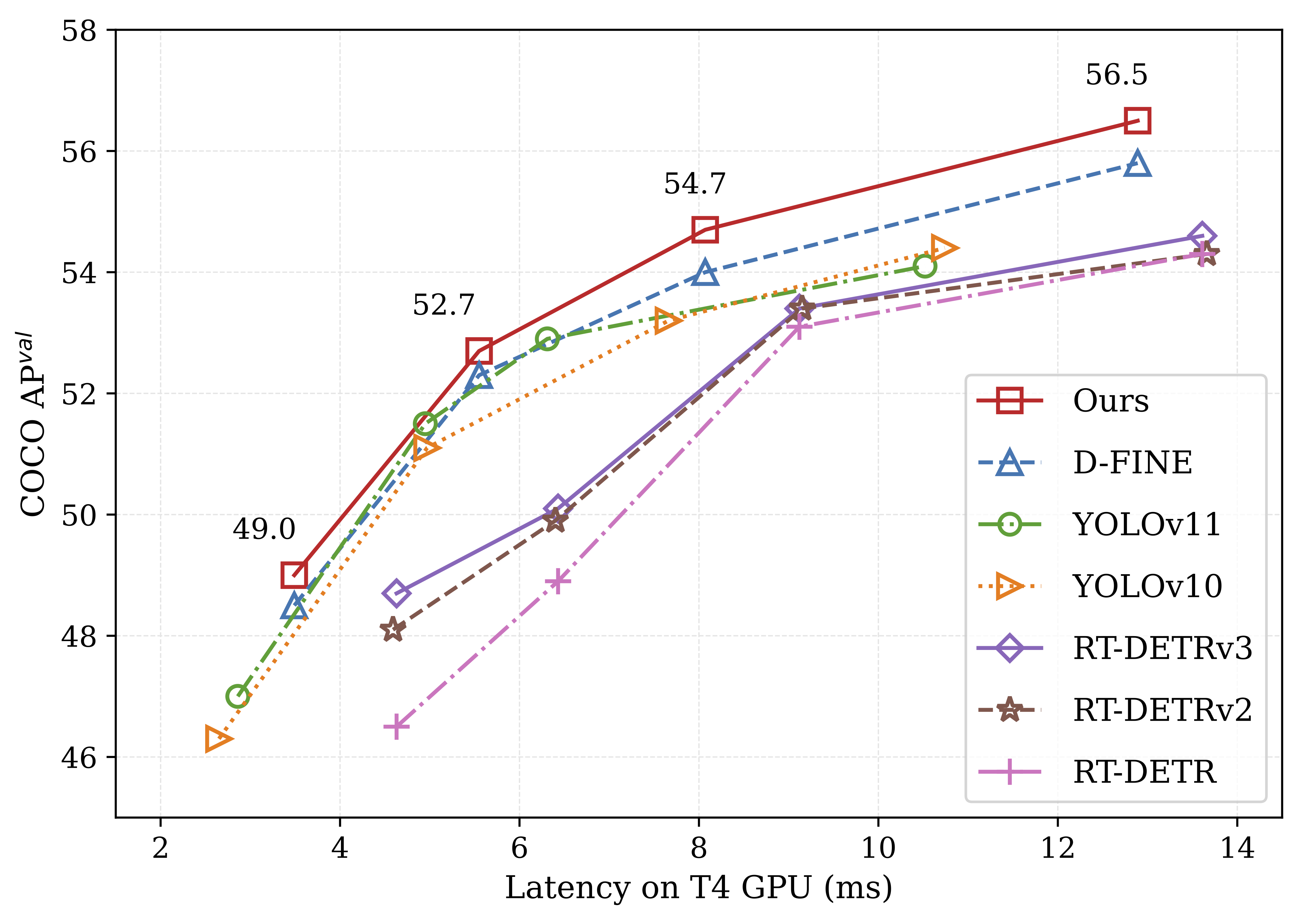
DEIM is an advanced training framework designed to enhance the matching mechanism in DETRs, enabling faster convergence and improved accuracy. It serves as a robust foundation for future research and applications in the field of real-time object detection.
1. Intellindust AI Lab 2. City University of Hong Kong 3. Great Bay University 4. Hefei Normal University
**📧 Corresponding author:** shenxiluc@gmail.com

If you like our work, please give us a ⭐!
🚀 Updates
- [2025.09.26] DEIMv2 is now available with the project page and release code. The series covers eight model sizes, from X down to Atto. For the S, M, L, and X variants, we leverage DINOv3 features (distilled or pretrained). DEIMv2 achieves higher performance with fewer parameters and FLOPs.
- [2025.06.24] DEIMv2 is coming soon: our next-gen detection series, along with three ultra-light variants: Pico (1.5M), Femto (0.96M), and Atto (0.49M), all delivering SoTA performance. Atto, in particular, is tailored for mobile devices, achieving 23.8 AP on COCO at 320×320 resolution.
- [2025.03.12] The Object365 Pretrained DEIM-D-FINE-X model is released, which achieves 59.5% AP after fine-tuning 24 COCO epochs.
- [2025.03.05] The Nano DEIM model is released.
- [2025.02.27] The DEIM paper is accepted to CVPR 2025. Thanks to all co-authors.
- [2024.12.26] A more efficient implementation of Dense O2O, achieving nearly a 30% improvement in loading speed (See the pull request for more details). Huge thanks to my colleague Longfei Liu.
- [2024.12.03] Release DEIM series. Besides, this repo also supports the re-implmentations of D-FINE and RT-DETR.
Table of Content
1. Model Zoo
DEIM-D-FINE
| Model | Dataset | APD-FINE | APDEIM | #Params | Latency | GFLOPs | config | checkpoint |
|---|---|---|---|---|---|---|---|---|
| N | COCO | 42.8 | 43.0 | 4M | 2.12ms | 7 | yml | ckpt |
| S | COCO | 48.7 | 49.0 | 10M | 3.49ms | 25 | yml | ckpt |
| M | COCO | 52.3 | 52.7 | 19M | 5.62ms | 57 | yml | ckpt |
| L | COCO | 54.0 | 54.7 | 31M | 8.07ms | 91 | yml | ckpt |
| X | COCO | 55.8 | 56.5 | 62M | 12.89ms | 202 | yml | ckpt |
DEIM-RT-DETRv2
| Model | Dataset | APRT-DETRv2 | APDEIM | #Params | Latency | GFLOPs | config | checkpoint |
|---|---|---|---|---|---|---|---|---|
| S | COCO | 47.9 | 49.0 | 20M | 4.59ms | 60 | yml | ckpt |
| M | COCO | 49.9 | 50.9 | 31M | 6.40ms | 92 | yml | ckpt |
| M* | COCO | 51.9 | 53.2 | 33M | 6.90ms | 100 | yml | ckpt |
| L | COCO | 53.4 | 54.3 | 42M | 9.15ms | 136 | yml | ckpt |
| X | COCO | 54.3 | 55.5 | 76M | 13.66ms | 259 | yml | ckpt |
2. Quick start
Setup
conda create -n deim python=3.11.9
conda activate deim
pip install -r requirements.txt
Data Preparation
COCO2017 Dataset
-
Download COCO2017 from OpenDataLab or COCO.
-
Modify paths in coco_detection.yml
train_dataloader:
    img_folder: /data/COCO2017/train2017/
    ann_file: /data/COCO2017/annotations/instances_train2017.json
val_dataloader:
    img_folder: /data/COCO2017/val2017/
    ann_file: /data/COCO2017/annotations/instances_val2017.json
Custom Dataset
To train on your custom dataset, you need to organize it in the COCO format. Follow the steps below to prepare your dataset:
-
Set
remap_mscoco_categorytoFalse:This prevents the automatic remapping of category IDs to match the MSCOCO categories.
remap_mscoco_category: False -
Organize Images:
Structure your dataset directories as follows:
dataset/ ├── images/ │ ├── train/ │ │ ├── image1.jpg │ │ ├── image2.jpg │ │ └── ... │ ├── val/ │ │ ├── image1.jpg │ │ ├── image2.jpg │ │ └── ... └── annotations/ ├── instances_train.json ├── instances_val.json └── ...images/train/: Contains all training images.images/val/: Contains all validation images.annotations/: Contains COCO-formatted annotation files.
-
Convert Annotations to COCO Format:
If your annotations are not already in COCO format, you'll need to convert them. You can use the following Python script as a reference or utilize existing tools:
import json def convert_to_coco(input_annotations, output_annotations): # Implement conversion logic here pass if __name__ == "__main__": convert_to_coco('path/to/your_annotations.json', 'dataset/annotations/instances_train.json') -
Update Configuration Files:
Modify your custom_detection.yml.
task: detection

evaluator:
  type: CocoEvaluator
  iou_types: ['bbox', ]

num_classes: 777 # your dataset classes
remap_mscoco_category: False

train_dataloader:
  type: DataLoader
  dataset:
    type: CocoDetection
    img_folder: /data/yourdataset/train
    ann_file: /data/yourdataset/train/train.json
    return_masks: False
    transforms:
      type: Compose
      ops: ~
  shuffle: True
  num_workers: 4
  drop_last: True
  collate_fn:
    type: BatchImageCollateFunction

val_dataloader:
  type: DataLoader
  dataset:
    type: CocoDetection
    img_folder: /data/yourdataset/val
    ann_file: /data/yourdataset/val/ann.json
    return_masks: False
    transforms:
      type: Compose
      ops: ~
  shuffle: False
  num_workers: 4
  drop_last: False
  collate_fn:
    type: BatchImageCollateFunction
3. Usage
COCO2017
- Training
CUDA_VISIBLE_DEVICES=0,1,2,3 torchrun --master_port=7777 --nproc_per_node=4 train.py -c configs/deim_dfine/deim_hgnetv2_${model}_coco.yml --use-amp --seed=0
- Testing
CUDA_VISIBLE_DEVICES=0,1,2,3 torchrun --master_port=7777 --nproc_per_node=4 train.py -c configs/deim_dfine/deim_hgnetv2_${model}_coco.yml --test-only -r model.pth
- Tuning
CUDA_VISIBLE_DEVICES=0,1,2,3 torchrun --master_port=7777 --nproc_per_node=4 train.py -c configs/deim_dfine/deim_hgnetv2_${model}_coco.yml --use-amp --seed=0 -t model.pth
Customizing Batch Size
For example, if you want to double the total batch size when training D-FINE-L on COCO2017, here are the steps you should follow:
-
Modify your dataloader.yml to increase the
total_batch_size:train_dataloader: total_batch_size: 64 # Previously it was 32, now doubled -
Modify your deim_hgnetv2_l_coco.yml. Here’s how the key parameters should be adjusted:
optimizer:
type: AdamW
params:
    -
    params: '^(?=.*backbone)(?!.*norm|bn).*$'
    lr: 0.000025  # doubled, linear scaling law
    -
    params: '^(?=.*(?:encoder|decoder))(?=.*(?:norm|bn)).*$'
    weight_decay: 0.

lr: 0.0005  # doubled, linear scaling law
betas: [0.9, 0.999]
weight_decay: 0.0001  # need a grid search

ema:  # added EMA settings
    decay: 0.9998  # adjusted by 1 - (1 - decay) * 2
    warmups: 500  # halved

lr_warmup_scheduler:
    warmup_duration: 250  # halved
Customizing Input Size
If you'd like to train DEIM on COCO2017 with an input size of 320x320, follow these steps:
-
Modify your dataloader.yml:
train_dataloader: dataset: transforms: ops: - {type: Resize, size: [320, 320], } collate_fn: base_size: 320 dataset: transforms: ops: - {type: Resize, size: [320, 320], } -
Modify your dfine_hgnetv2.yml:
eval_spatial_size: [320, 320]
4. Tools
Deployment
- Setup
pip install onnx onnxsim
- Export onnx
python tools/deployment/export_onnx.py --check -c configs/deim_dfine/deim_hgnetv2_${model}_coco.yml -r model.pth
- Export tensorrt
trtexec --onnx="model.onnx" --saveEngine="model.engine" --fp16
Inference (Visualization)
- Setup
pip install -r tools/inference/requirements.txt
- Inference (onnxruntime / tensorrt / torch)
Inference on images and videos is now supported.
python tools/inference/onnx_inf.py --onnx model.onnx --input image.jpg  # video.mp4
python tools/inference/trt_inf.py --trt model.engine --input image.jpg
python tools/inference/torch_inf.py -c configs/deim_dfine/deim_hgnetv2_${model}_coco.yml -r model.pth --input image.jpg --device cuda:0
Benchmark
- Setup
pip install -r tools/benchmark/requirements.txt
- Model FLOPs, MACs, and Params
python tools/benchmark/get_info.py -c configs/deim_dfine/deim_hgnetv2_${model}_coco.yml
- TensorRT Latency
python tools/benchmark/trt_benchmark.py --COCO_dir path/to/COCO2017 --engine_dir model.engine
Fiftyone Visualization
- Setup
pip install fiftyone
- Voxel51 Fiftyone Visualization (fiftyone)
python tools/visualization/fiftyone_vis.py -c configs/deim_dfine/deim_hgnetv2_${model}_coco.yml -r model.pth
Others
- Auto Resume Training
bash reference/safe_training.sh
- Converting Model Weights
python reference/convert_weight.py model.pth
5. Citation
If you use DEIM or its methods in your work, please cite the following BibTeX entries:
bibtex
@misc{huang2024deim,
      title={DEIM: DETR with Improved Matching for Fast Convergence},
      author={Shihua, Huang and Zhichao, Lu and Xiaodong, Cun and Yongjun, Yu and Xiao, Zhou and Xi, Shen},
      booktitle={Proceedings of the IEEE/CVF Conference on Computer Vision and Pattern Recognition},
      year={2025},
}
6. Acknowledgement
Our work is built upon D-FINE and RT-DETR.
✨ Feel free to contribute and reach out if you have any questions! ✨
Contributors


Similar repos


Languages
Python
99.3%
[CVPR 2025] DEIM: DETR with Improved Matching for Fast Convergence
See the codeREADME
DEIM: DETR with Improved Matching for Fast Convergence
🎉 EdgeCrafter is released with SOTA performance on detection, pose estimation as well as instance segmentation.🎉
🎉 We’re excited to share DEIMv2 🎉
DEIM is an advanced training framework designed to enhance the matching mechanism in DETRs, enabling faster convergence and improved accuracy. It serves as a robust foundation for future research and applications in the field of real-time object detection.
1. Intellindust AI Lab 2. City University of Hong Kong 3. Great Bay University 4. Hefei Normal University
**📧 Corresponding author:** shenxiluc@gmail.com
If you like our work, please give us a ⭐!
🚀 Updates
- [2025.09.26] DEIMv2 is now available with the project page and release code. The series covers eight model sizes, from X down to Atto. For the S, M, L, and X variants, we leverage DINOv3 features (distilled or pretrained). DEIMv2 achieves higher performance with fewer parameters and FLOPs.
- [2025.06.24] DEIMv2 is coming soon: our next-gen detection series, along with three ultra-light variants: Pico (1.5M), Femto (0.96M), and Atto (0.49M), all delivering SoTA performance. Atto, in particular, is tailored for mobile devices, achieving 23.8 AP on COCO at 320×320 resolution.
- [2025.03.12] The Object365 Pretrained DEIM-D-FINE-X model is released, which achieves 59.5% AP after fine-tuning 24 COCO epochs.
- [2025.03.05] The Nano DEIM model is released.
- [2025.02.27] The DEIM paper is accepted to CVPR 2025. Thanks to all co-authors.
- [2024.12.26] A more efficient implementation of Dense O2O, achieving nearly a 30% improvement in loading speed (See the pull request for more details). Huge thanks to my colleague Longfei Liu.
- [2024.12.03] Release DEIM series. Besides, this repo also supports the re-implmentations of D-FINE and RT-DETR.
Table of Content
1. Model Zoo
DEIM-D-FINE
| Model | Dataset | APD-FINE | APDEIM | #Params | Latency | GFLOPs | config | checkpoint |
|---|---|---|---|---|---|---|---|---|
| N | COCO | 42.8 | 43.0 | 4M | 2.12ms | 7 | yml | ckpt |
| S | COCO | 48.7 | 49.0 | 10M | 3.49ms | 25 | yml | ckpt |
| M | COCO | 52.3 | 52.7 | 19M | 5.62ms | 57 | yml | ckpt |
| L | COCO | 54.0 | 54.7 | 31M | 8.07ms | 91 | yml | ckpt |
| X | COCO | 55.8 | 56.5 | 62M | 12.89ms | 202 | yml | ckpt |
DEIM-RT-DETRv2
| Model | Dataset | APRT-DETRv2 | APDEIM | #Params | Latency | GFLOPs | config | checkpoint |
|---|---|---|---|---|---|---|---|---|
| S | COCO | 47.9 | 49.0 | 20M | 4.59ms | 60 | yml | ckpt |
| M | COCO | 49.9 | 50.9 | 31M | 6.40ms | 92 | yml | ckpt |
| M* | COCO | 51.9 | 53.2 | 33M | 6.90ms | 100 | yml | ckpt |
| L | COCO | 53.4 | 54.3 | 42M | 9.15ms | 136 | yml | ckpt |
| X | COCO | 54.3 | 55.5 | 76M | 13.66ms | 259 | yml | ckpt |
2. Quick start
Setup
conda create -n deim python=3.11.9
conda activate deim
pip install -r requirements.txt
Data Preparation
COCO2017 Dataset
-
Download COCO2017 from OpenDataLab or COCO.
-
Modify paths in coco_detection.yml
train_dataloader:
    img_folder: /data/COCO2017/train2017/
    ann_file: /data/COCO2017/annotations/instances_train2017.json
val_dataloader:
    img_folder: /data/COCO2017/val2017/
    ann_file: /data/COCO2017/annotations/instances_val2017.json
Custom Dataset
To train on your custom dataset, you need to organize it in the COCO format. Follow the steps below to prepare your dataset:
-
Set
remap_mscoco_categorytoFalse:This prevents the automatic remapping of category IDs to match the MSCOCO categories.
remap_mscoco_category: False -
Organize Images:
Structure your dataset directories as follows:
dataset/ ├── images/ │ ├── train/ │ │ ├── image1.jpg │ │ ├── image2.jpg │ │ └── ... │ ├── val/ │ │ ├── image1.jpg │ │ ├── image2.jpg │ │ └── ... └── annotations/ ├── instances_train.json ├── instances_val.json └── ...images/train/: Contains all training images.images/val/: Contains all validation images.annotations/: Contains COCO-formatted annotation files.
-
Convert Annotations to COCO Format:
If your annotations are not already in COCO format, you'll need to convert them. You can use the following Python script as a reference or utilize existing tools:
import json def convert_to_coco(input_annotations, output_annotations): # Implement conversion logic here pass if __name__ == "__main__": convert_to_coco('path/to/your_annotations.json', 'dataset/annotations/instances_train.json') -
Update Configuration Files:
Modify your custom_detection.yml.
task: detection

evaluator:
  type: CocoEvaluator
  iou_types: ['bbox', ]

num_classes: 777 # your dataset classes
remap_mscoco_category: False

train_dataloader:
  type: DataLoader
  dataset:
    type: CocoDetection
    img_folder: /data/yourdataset/train
    ann_file: /data/yourdataset/train/train.json
    return_masks: False
    transforms:
      type: Compose
      ops: ~
  shuffle: True
  num_workers: 4
  drop_last: True
  collate_fn:
    type: BatchImageCollateFunction

val_dataloader:
  type: DataLoader
  dataset:
    type: CocoDetection
    img_folder: /data/yourdataset/val
    ann_file: /data/yourdataset/val/ann.json
    return_masks: False
    transforms:
      type: Compose
      ops: ~
  shuffle: False
  num_workers: 4
  drop_last: False
  collate_fn:
    type: BatchImageCollateFunction
3. Usage
COCO2017
- Training
CUDA_VISIBLE_DEVICES=0,1,2,3 torchrun --master_port=7777 --nproc_per_node=4 train.py -c configs/deim_dfine/deim_hgnetv2_${model}_coco.yml --use-amp --seed=0
- Testing
CUDA_VISIBLE_DEVICES=0,1,2,3 torchrun --master_port=7777 --nproc_per_node=4 train.py -c configs/deim_dfine/deim_hgnetv2_${model}_coco.yml --test-only -r model.pth
- Tuning
CUDA_VISIBLE_DEVICES=0,1,2,3 torchrun --master_port=7777 --nproc_per_node=4 train.py -c configs/deim_dfine/deim_hgnetv2_${model}_coco.yml --use-amp --seed=0 -t model.pth
Customizing Batch Size
For example, if you want to double the total batch size when training D-FINE-L on COCO2017, here are the steps you should follow:
-
Modify your dataloader.yml to increase the
total_batch_size:train_dataloader: total_batch_size: 64 # Previously it was 32, now doubled -
Modify your deim_hgnetv2_l_coco.yml. Here’s how the key parameters should be adjusted:
optimizer:
type: AdamW
params:
    -
    params: '^(?=.*backbone)(?!.*norm|bn).*$'
    lr: 0.000025  # doubled, linear scaling law
    -
    params: '^(?=.*(?:encoder|decoder))(?=.*(?:norm|bn)).*$'
    weight_decay: 0.

lr: 0.0005  # doubled, linear scaling law
betas: [0.9, 0.999]
weight_decay: 0.0001  # need a grid search

ema:  # added EMA settings
    decay: 0.9998  # adjusted by 1 - (1 - decay) * 2
    warmups: 500  # halved

lr_warmup_scheduler:
    warmup_duration: 250  # halved
Customizing Input Size
If you'd like to train DEIM on COCO2017 with an input size of 320x320, follow these steps:
-
Modify your dataloader.yml:
train_dataloader: dataset: transforms: ops: - {type: Resize, size: [320, 320], } collate_fn: base_size: 320 dataset: transforms: ops: - {type: Resize, size: [320, 320], } -
Modify your dfine_hgnetv2.yml:
eval_spatial_size: [320, 320]
4. Tools
Deployment
- Setup
pip install onnx onnxsim
- Export onnx
python tools/deployment/export_onnx.py --check -c configs/deim_dfine/deim_hgnetv2_${model}_coco.yml -r model.pth
- Export tensorrt
trtexec --onnx="model.onnx" --saveEngine="model.engine" --fp16
Inference (Visualization)
- Setup
pip install -r tools/inference/requirements.txt
- Inference (onnxruntime / tensorrt / torch)
Inference on images and videos is now supported.
python tools/inference/onnx_inf.py --onnx model.onnx --input image.jpg  # video.mp4
python tools/inference/trt_inf.py --trt model.engine --input image.jpg
python tools/inference/torch_inf.py -c configs/deim_dfine/deim_hgnetv2_${model}_coco.yml -r model.pth --input image.jpg --device cuda:0
Benchmark
- Setup
pip install -r tools/benchmark/requirements.txt
- Model FLOPs, MACs, and Params
python tools/benchmark/get_info.py -c configs/deim_dfine/deim_hgnetv2_${model}_coco.yml
- TensorRT Latency
python tools/benchmark/trt_benchmark.py --COCO_dir path/to/COCO2017 --engine_dir model.engine
Fiftyone Visualization
- Setup
pip install fiftyone
- Voxel51 Fiftyone Visualization (fiftyone)
python tools/visualization/fiftyone_vis.py -c configs/deim_dfine/deim_hgnetv2_${model}_coco.yml -r model.pth
Others
- Auto Resume Training
bash reference/safe_training.sh
- Converting Model Weights
python reference/convert_weight.py model.pth
5. Citation
If you use DEIM or its methods in your work, please cite the following BibTeX entries:
bibtex
@misc{huang2024deim,
      title={DEIM: DETR with Improved Matching for Fast Convergence},
      author={Shihua, Huang and Zhichao, Lu and Xiaodong, Cun and Yongjun, Yu and Xiao, Zhou and Xi, Shen},
      booktitle={Proceedings of the IEEE/CVF Conference on Computer Vision and Pattern Recognition},
      year={2025},
}
6. Acknowledgement
Our work is built upon D-FINE and RT-DETR.
✨ Feel free to contribute and reach out if you have any questions! ✨
Similar repos
Contributors
Languages
Python
99.3%