Sync state and events across browser tabs in React - a lightweight, type-safe hook over the BroadcastChannel API
See the code






Guide: Using react-broadcast-sync in a real app: dashboard filters across tabs - install, usage patterns, gotchas and recipes.
Easily sync UI state or user events across browser tabs in React apps — notifications, presence, forms, and more. This package provides a clean and type-safe abstraction over the native API, enabling efficient, scoped, and reliable cross-tab messaging.
When to use it: React apps that need to share ephemeral state or events between browser tabs of the same origin (logout, notifications, presence, draft sync). It wraps the browser BroadcastChannel API in a hook (useBroadcastChannel) and an optional BroadcastProvider.
When not to use it: syncing to a server or other devices, persisting data across reloads (use localStorage/IndexedDB), or messaging across different origins.
import { useBroadcastChannel } from 'react-broadcast-sync';

const { messages, postMessage } = useBroadcastChannel('my-channel');
postMessage('logout', { at: Date.now() }); // other tabs receive it in `messages`
BroadcastProvider for context-based usage with full options supportonMessage callbacks (react to incoming messages without polling state)The first instinct for sharing state between tabs is often localStorage plus the storage event. It works for simple cases, but it was designed for persistence, not messaging - and the ecosystem offers a few different trade-offs. Here's how react-broadcast-sync compares:
| react-broadcast-sync | localStorage + storage events | jotai atomWithStorage | broadcast-channel | zustand-sync-tabs | |
|---|---|---|---|---|---|
| What it syncs | Typed messages on named channels | Raw key-value strings | A single persisted atom value | Messages on a channel | A Zustand store's state |
| React integration | First-class hook + provider | Manual event listeners | Requires Jotai | None - framework agnostic | Requires Zustand |
| Payloads | Any serializable value | Strings only (manual JSON) | JSON-serializable value | Any serializable value | Store state |
| Message lifecycle | Expiration, deduplication, batching, selective clearing | None | None | None | Latest state only |
| Tab awareness | Source naming, ping & active-source detection | None (no event in the tab that wrote) | None | Leader election | None |
| Extra environments | Browsers (same origin) | Browsers (same origin) | React Native via AsyncStorage | Old browsers, WebWorkers, Node, Deno | Browsers (same origin) |
A few honest notes:
atomWithStorage, plain localStorage). Messages in react-broadcast-sync are ephemeral - they notify and sync live tabs, they don't survive a refresh.broadcast-channel is the right low-level primitive. react-broadcast-sync builds on the native BroadcastChannel API and gives you the React layer on top: hooks, typed messages, and lifecycle handling out of the box.react-broadcast-sync is state-manager agnostic - it works next to any of them, or with plain useState.Full documentation lives at react-broadcast-sync-docs.vercel.app: a step-by-step getting started guide, concepts, per-feature guides, the complete API reference, recipes, a tutorial, FAQ, and troubleshooting.
Two live demos are hosted on the docs site:
useBroadcastChannel syncing a counter, text, and a todo list across tabs.BroadcastProvider + useBroadcastProvider sharing one channel through context.The original demo app is still available at react-broadcast-sync-3w3m.vercel.app.
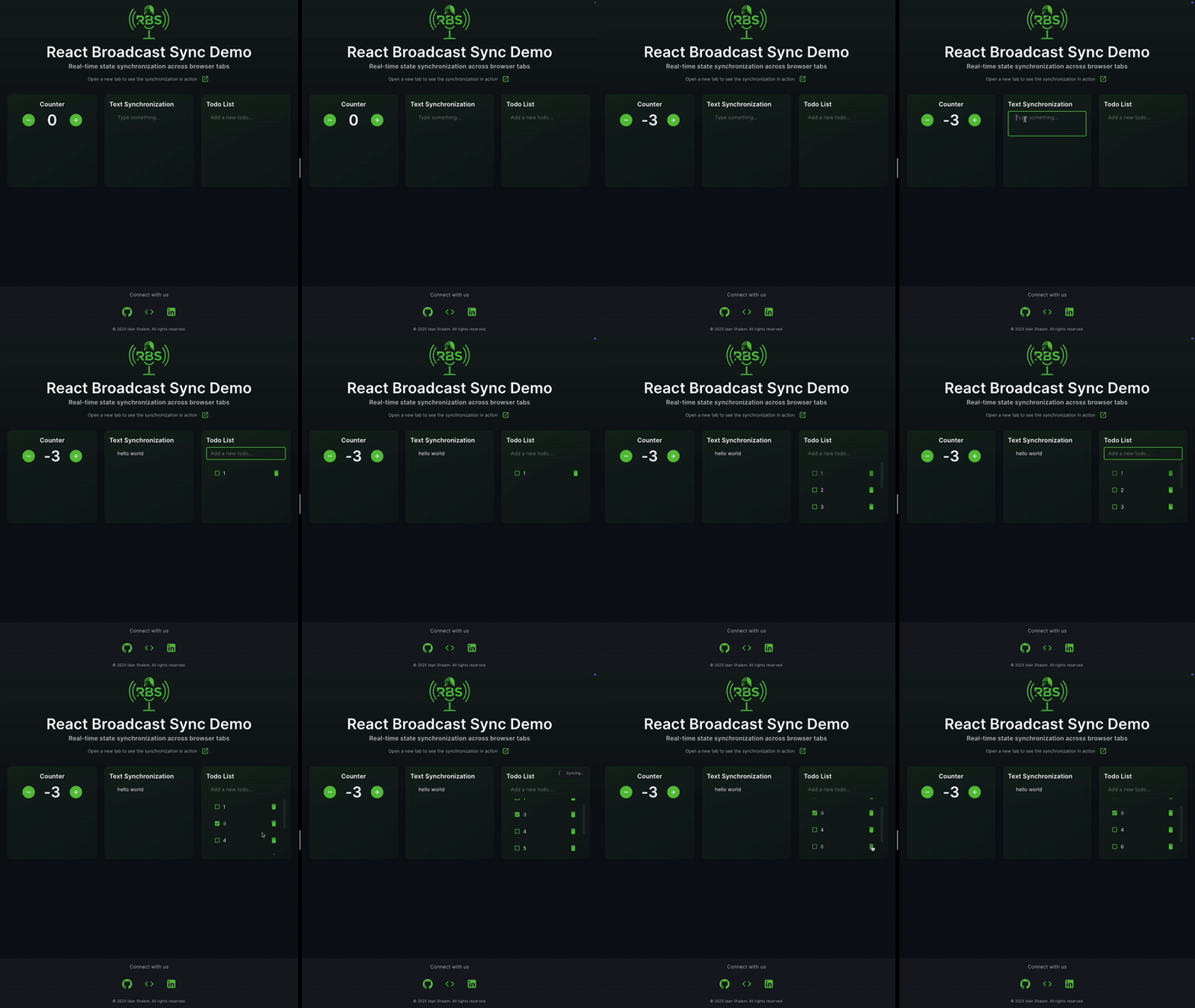
Check out our live demo to see the library in action! The demo showcases three main features:
Counter Synchronization
Text Synchronization
Todo List
The demo is built with React 19, TypeScript, Material-UI, and Framer Motion. You can find the source code in the demo directory.
npm install react-broadcast-sync
# or
yarn add react-broadcast-sync
# or
pnpm add react-broadcast-sync
import { useBroadcastChannel } from 'react-broadcast-sync';

function MyComponent() {
  const { messages, postMessage, clearReceivedMessages } = useBroadcastChannel('my-channel');

  const handleSend = () => {
    postMessage('greeting', { text: 'Hello from another tab!' });
  };

  return (
    <>
      <button onClick={handleSend}>Send</button>
      {messages.map(msg => (
        <div key={msg.id}>
          {msg.message.text}
          <button onClick={() => clearReceivedMessages({ ids: [msg.id] })}>Clear</button>
        </div>
      ))}
    </>
  );
}
const {
  channelName,
  messages,
  sentMessages,
  postMessage,
  clearReceivedMessages,
  clearSentMessages,
  error,
} = useBroadcastChannel('my-channel', {
  sourceName: 'my-tab',
  cleaningInterval: 2000,
  keepLatestMessage: true,
  registeredTypes: ['greeting', 'notification'],
  namespace: 'my-app',
  deduplicationTTL: 10 * 60 * 1000, // 10 minutes
  cleanupDebounceMs: 500, // Debounce cleanup operations by 500ms
});
postMessage('notification', { text: 'This disappears in 5s' }, { expirationDuration: 5000 });
BroadcastProviderYou can wrap part of your app with BroadcastProvider and use useBroadcastProvider() to consume the channel context.
import { BroadcastProvider, useBroadcastProvider } from 'react-broadcast-sync';

function App() {
  return (
    <BroadcastProvider channelName="notifications">
      <NotificationBar />
    </BroadcastProvider>
  );
}

function NotificationBar() {
  const { messages } = useBroadcastProvider();

  return (
    <div>
      {messages.map(msg => (
        <p key={msg.id}>{msg.message.text}</p>
      ))}
    </div>
  );
}
BroadcastProvider Props| Prop | Type | Required | Description |
|---|---|---|---|
channelName | string | ✅ | The name of the broadcast channel |
options | BroadcastOptions | ❌ | Any option accepted by useBroadcastChannel |
children | React.ReactNode | ✅ | Component subtree |
All fields in BroadcastOptions (see the table in the API Reference) can be forwarded via the options prop. This includes namespace, registeredTypes, onMessage, keepLatestMessage, sourceName, and more.
<BroadcastProvider
  channelName="notifications"
  options={{
    namespace: 'v2',
    registeredTypes: ['alert', 'info'],
    onMessage: {
      alert: msg => showToast(msg.message.text),
    },
  }}
>
  <App />
</BroadcastProvider>
messages is an event log of what other tabs sent, not the current state. To keep a piece of state
(for example dashboard filters) in sync, update local state and send one message from the handler,
and apply incoming messages with onMessage:
function Dashboard() {
  const [filters, setFilters] = useState({ status: 'all' });

  const { postMessage } = useBroadcastChannel('dashboard', {
    // sourceName is optional: a unique one is generated for each tab.
    // Do not build it inline with crypto.randomUUID(): it would change on every render.
    onMessage: {
      'filters-update': msg => setFilters(msg.message),
    },
  });

  const updateFilters = (next: typeof filters) => {
    setFilters(next);
    postMessage('filters-update', next);
  };

  return <FilterBar value={filters} onChange={updateFilters} />;
}
Do not call postMessage from a useEffect on state that you also set from incoming messages.
Each tab re-broadcasts what it receives, the tabs ping-pong, and they can end up with different
values. Deduplication is by message ID, so it does not stop this.
Messages are not replayed. A tab opened later only sees messages sent after it opened, and
keepLatestMessage and getLatestMessage do not change that. To give a new tab the current state,
let it ask for it and let an existing tab answer:
const { postMessage } = useBroadcastChannel('dashboard', {
  sourceName: sourceName, // unique per tab
  onMessage: {
    'filters-update': msg => setFilters(msg.message),
    'state-request': () => postMessage('filters-update', filtersRef.current),
  },
});

// Ask once when this tab mounts
useEffect(() => {
  postMessage('state-request', null);
}, []);
Keep the current value in a ref (filtersRef.current = filters) so the state-request handler
always answers with the latest state. If no other tab is open, nothing answers and the tab keeps its
default state.
useBroadcastChannel Hookconst {
channelName,
messages,
sentMessages,
postMessage,
clearReceivedMessages,
clearSentMessages,
error,
} = useBroadcastChannel(channelName, options);
interface BroadcastOptions {
  sourceName?: string; // Custom name for the message source. Must be unique per tab: a tab ignores messages from its own sourceName
  cleaningInterval?: number; // Interval in ms for cleaning expired messages (default: 1000)
  keepLatestMessage?: boolean; // Keep only the latest message (default: false)
  registeredTypes?: string[]; // List of allowed message types
  namespace?: string; // Channel namespace for isolation
  deduplicationTTL?: number; // Time in ms to keep message IDs for deduplication (default: 5 minutes)
  cleanupDebounceMs?: number; // Debounce time in ms for cleanup operations (default: 0)
  batchingDelayMs?: number; // Delay in ms to batch outgoing messages (default: 20). If > 0, messages are batched and sent together.
  excludedBatchMessageTypes?: string[]; // Message types to always send immediately, never batched (default: []).
  onMessage?: MessageCallback | OnMessageMap; // Callback(s) fired when a received message passes all filters (default: undefined).
  telemetry?: boolean; // Deprecated no-op.
}
| Option | Default Value | Description |
|---|---|---|
sourceName | undefined | Auto-generated if not provided |
cleaningInterval | 1000 | 1 second between cleanup runs |
keepLatestMessage | false | Keep all messages by default |
registeredTypes | [] | Accept all message types by default |
namespace | '' | No namespace by default |
deduplicationTTL | 300000 | 5 minutes (5 × 60 × 1000 ms) |
cleanupDebounceMs | 0 | No debounce by default |
batchingDelayMs | 20 | Batch delay in ms (0 = off) |
excludedBatchMessageTypes | [] | Types never batched |
onMessage | undefined | Callback(s) for received messages |
telemetry | false | Deprecated no-op. No telemetry is collected |
interface BroadcastActions {
  channelName: string; // The resolved channel name (includes namespace)
  messages: BroadcastMessage[]; // Received messages
  sentMessages: BroadcastMessage[]; // Messages sent by this instance
  postMessage: (type: string, content: any, options?: SendMessageOptions) => void;
  clearReceivedMessages: (opts?: { ids?: string[]; types?: string[]; sources?: string[] }) => void;
  clearSentMessages: (opts?: { ids?: string[]; types?: string[]; sync?: boolean }) => void;
  getLatestMessage: (opts?: { type?: string; source?: string }) => BroadcastMessage | null;
  closeChannel: () => void;
  error: string | null; // Current error state
}
useBroadcastChannel(channelName, options?)Returns an object with:
| Property | Type | Description |
|---|---|---|
channelName | string | The resolved channel name (includes namespace) |
messages | BroadcastMessage[] | All received messages from other tabs |
sentMessages | BroadcastMessage[] | Messages sent from this tab |
postMessage() | function | Send a message to all tabs |
clearReceivedMessages() | function | Clear received messages. No filters ⇒ clear all. With filters, a message is deleted only if it matches every provided filter (ids, types, sources). Empty arrays act as wildcards. |
clearSentMessages() | function | Clear messages this tab sent (same matching rules). Pass sync: true to broadcast the clear to other tabs. |
getLatestMessage() | function | Get the latest message matching optional filters (type, source). Returns the most recent message that matches, or null if none. |
ping(timeoutMs?) | function | Ping other tabs on the channel and collect their source names. timeoutMs (default: 300ms) controls how long to wait for responses before resolving. Returns a Promise of string array. |
isPingInProgress | boolean | true while a ping is active, otherwise false. |
closeChannel() | function | Explicitly closes the broadcast channel and removes event listeners. Safe to call multiple times. |
error | string | null | Any runtime error from the channel |
// Clear everything we've received
clearReceivedMessages();

// Clear all messages we sent and broadcast the clear to other tabs
clearSentMessages({ sync: true });

// Clear by id or by type (OR inside each array)
clearReceivedMessages({ ids: ['123'] }); // id match
clearReceivedMessages({ types: ['alert', 'chat'] }); // type match

// Combine filters (logical AND between filters)
// Removes messages whose id is '123' AND type is 'alert'
clearSentMessages({ ids: ['123'], types: ['alert'] });
interface SendMessageOptions {
  expirationDuration?: number; // TTL in ms
  expirationDate?: number; // Exact expiry timestamp
}
interface BroadcastMessage {
  id: string;
  type: string;
  message: any;
  timestamp: number;
  source: string;
  expirationDate?: number;
}
You can use getLatestMessage to retrieve the most recent message received, optionally filtered by type and/or source. If no options are provided, it returns the latest message of any kind. If no message matches, it returns null.
Signature:
getLatestMessage(options?: { type?: string; source?: string }): BroadcastMessage | null
Examples:
// Get the latest message of any type/source
const latest = getLatestMessage();

// Get the latest message of a specific type
const latestAlert = getLatestMessage({ type: 'alert' });

// Get the latest message from a specific source
const latestFromTab = getLatestMessage({ source: 'tab-123' });

// Get the latest message of a specific type from a specific source
const latestInfoFromTab = getLatestMessage({ type: 'info', source: 'tab-123' });

// Check if there are any messages of a type
if (getLatestMessage({ type: 'notification' })) {
  // ...
}
Behavior:
null.null.useBroadcastChannel provides a ping method and an isPingInProgress state for discovering active sources (tabs) on the same channel.
ping(timeoutMs?: number): Promise<string[]>: Broadcasts a ping and collects responses from other tabs within the timeout. Returns an array of source names (excluding your own).isPingInProgress: boolean: Indicates if a ping is currently in progress.Example:
const { ping, isPingInProgress } = useBroadcastChannel('my-channel', {
  sourceName: 'my-tab',
});

// To discover other active sources:
const activeSources = await ping(300); // e.g., ['tab-2', 'tab-3']

// To show loading state:
if (isPingInProgress) {
  // Show spinner or status
}
You can use closeChannel to explicitly close the underlying BroadcastChannel and remove all event listeners. This is useful if you want to clean up resources before the component unmounts, or to stop all cross-tab communication on demand. Note that the channel will automatically close and all event listeners will be removed when the component unmounts, so this method is mainly useful for manual cleanup.
Signature:
closeChannel(): void
Example:
const { closeChannel } = useBroadcastChannel('my-channel');

// ... later, when you want to stop all communication:
closeChannel();
Notes:
closeChannel, the channel is closed and will not send or receive any more messages.closeChannel multiple times (idempotent).onMessage CallbacksonMessage lets you react to incoming messages imperatively — without polling messages state or using useEffect. The callback fires after the message is added to state and only for messages that pass all active filters (registeredTypes, expiry, deduplication, self-filter). Internal protocol messages (PING, PONG, CLEAR_SENT_MESSAGES) never trigger it.
Two supported shapes:
// 1. A single catch-all function — fires for every accepted message type
type MessageCallback = (msg: BroadcastMessage) => void;

// 2. A map from message type → one handler function
type OnMessageMap = { [type: string]: (msg: BroadcastMessage) => void };
Catch-all example:
const { postMessage } = useBroadcastChannel('my-channel', {
  onMessage: msg => {
    console.log('received', msg.type, msg.message);
  },
});
Per-type map example:
useBroadcastChannel('my-channel', {
  onMessage: {
    error: msg => showToast(`Error: ${msg.message.text}`),
    success: msg => celebrate(),
    log: msg => console.log('[log]', msg.message),
  },
});
Behavior:
messages state is updated — both the callback argument and messages[messages.length - 1] will be the same object.onMessage between renders is safe — the latest callback is always used with no stale closure risk.telemetry Option (deprecated)The package no longer collects any telemetry. The telemetry option is still accepted as a deprecated no-op so existing code keeps compiling; it will be removed in the next major version.
The package ships an agent skill at skills/react-broadcast-sync/SKILL.md (the agentskills.io format) with safe recipes for coding agents. Nothing is installed automatically: there is no postinstall script and your agent settings are never modified. To use it, copy it into your project yourself:
mkdir -p .agents/skills
cp -r node_modules/react-broadcast-sync/skills/react-broadcast-sync .agents/skills/
Tools such as skills-npm can also extract it for you. Check your agent's docs for where it reads skills from.
sourceName: a tab ignores any message whose source equals its own sourceName. If two tabs use the same sourceName, they will not receive each other's messages. Leave it unset (a unique name is generated) unless you need a stable name, and keep it unique per tab.keepLatestMessage is one slot: with keepLatestMessage: true, messages holds only the single most recent message across all types, so a "b" message replaces a prior "a". Use registeredTypes or separate channels/namespaces if you need the latest message per type.cleanupDebounceMs vs cleaningInterval: cleanup is debounced. If cleanupDebounceMs is longer than cleaningInterval, each interval tick restarts the debounce and expired messages may never be removed. Keep cleanupDebounceMs smaller than cleaningInterval.BroadcastChannel does not cross origins, and a tab does not receive its own messages.telemetry option is a deprecated no-op (see Telemetry).namespace to isolate functionality between different app modules.registeredTypes to avoid processing unknown or irrelevant messages.error state in UI or logs to detect channel failures.keepLatestMessage: true if you only care about the most recent message (e.g. status updates).deduplicationTTL based on your message frequency and importance.cleanupDebounceMs when dealing with rapid message updates to prevent performance issues.onMessage for imperative side-effects (toasts, analytics, logging) rather than useEffect on messages — it fires exactly once per accepted message, with no extra renders required.function NotificationSystem() {
const { messages, postMessage } = useBroadcastChannel('notifications', {
keepLatestMessage: true,
registeredTypes: ['alert', 'info', 'warning'],
deduplicationTTL: 60000, // 1 minute
});
return (
<div>
{messages.map(msg => (
<Notification key={msg.id} type={msg.type} content={msg.message} />
))}
</div>
);
}
function FormSync() {
  const { messages, postMessage } = useBroadcastChannel('form-sync', {
    namespace: 'my-form',
    cleaningInterval: 5000,
  });

  const handleChange = (field: string, value: string) => {
    postMessage('field-update', { field, value }, { expirationDuration: 300000 }); // 5 minutes
  };

  return <Form onChange={handleChange} />;
}
function TabStatus() {
  const { postMessage } = useBroadcastChannel('tab-status', {
    sourceName: 'main-tab',
    keepLatestMessage: true,
  });

  useEffect(() => {
    postMessage('tab-active', { timestamp: Date.now() });
    return () => postMessage('tab-inactive', { timestamp: Date.now() });
  }, []);

  return null;
}
keepLatestMessage: true for high-frequency updatesexpirationDuration for temporary messagesBatching allows you to group multiple outgoing messages and send them together in a single post to the BroadcastChannel. This can significantly reduce the number of cross-tab events, improve performance, and avoid flooding the channel when many messages are sent in rapid succession (e.g., during fast typing or bulk updates).
How it works:
postMessage within the batching window are buffered and sent as a batch (array of messages) after the delay.Array.isArray(event.data).Why batching matters:
Example:
const { postMessage } = useBroadcastChannel('my-channel', {
  batchingDelayMs: 50, // Batch messages for up to 50ms
  excludedBatchMessageTypes: ['alert'], // Always send 'alert' immediately
});

// These will be batched if sent within 50ms
postMessage('edit', { field: 'a', value: 1 });
postMessage('edit', { field: 'b', value: 2 });
// This will be sent immediately
postMessage('alert', { message: 'Something happened!' });
clearReceivedMessages / clearSentMessagescleaningInterval to automatically remove expired messagesThe deduplicationTTL option creates a time window (in milliseconds) during which a received message with an already-seen message ID is ignored. Deduplication is by ID, not by content: two separate postMessage calls with identical type and payload get different IDs and are both delivered. This is particularly useful for:
Recommended TTL values based on use case:
Example:
// Without deduplication, this could cause a message loop
function ChatComponent() {
  const { postMessage } = useBroadcastChannel('chat', {
    deduplicationTTL: 5000, // Ignore duplicate messages for 5 seconds
  });

  const handleMessage = (text: string) => {
    postMessage('chat-message', { text });
  };
}
cleanupDebounceMs to prevent excessive cleanup operationscleaningInterval based on your message expiration needsMessages Not Received
registeredTypes includes your message typededuplicationTTL isn't too shortPerformance Issues
cleanupDebounceMs if cleanup is too frequentkeepLatestMessage: true for high-frequency updatescleaningInterval if cleanup is too aggressiveMemory Leaks
Enable debug logging by setting the environment variable:
REACT_APP_DEBUG_BROADCAST=true
This will log:
import { renderHook, act } from '@testing-library/react-hooks';
import { useBroadcastChannel } from 'react-broadcast-sync';

test('postMessage records the message in sentMessages', () => {
  const { result } = renderHook(() => useBroadcastChannel('test-channel'));

  act(() => {
    result.current.postMessage('test', { data: 'hello' });
  });

  // The hook does not echo your own messages back into `messages`.
  // `messages` only holds messages sent by other tabs or hook instances.
  expect(result.current.messages).toHaveLength(0);
  expect(result.current.sentMessages).toHaveLength(1);
  expect(result.current.sentMessages[0].message.data).toBe('hello');
});
To test receiving, render two hooks with different sourceName values on the same channel name
(this needs a BroadcastChannel implementation in the test environment, such as a mock that
delivers to other instances). The message sent by one appears in the other's messages.
import { render, screen } from '@testing-library/react';
import { BroadcastProvider } from 'react-broadcast-sync';

test('should render messages from provider', () => {
  render(
    <BroadcastProvider channelName="test-channel">
      <TestComponent />
    </BroadcastProvider>
  );

  // Your test assertions here
});
The repository has two test suites:
# Unit tests (Jest + jsdom)
npm test

# Cross-tab integration tests (Playwright + Chromium, Firefox, and WebKit)
npx playwright install --with-deps chromium firefox webkit   # one-time browser install
npm run test:integration
The integration suite runs each test in Chromium, Firefox, and WebKit. It serves a
small React app from integration/app and drives real browser tabs through the public
hook API: message delivery between tabs,
self-filtering, namespace isolation, registeredTypes filtering, ping source
discovery, synced clearSentMessages, local clearReceivedMessages, and message
expiration.
Relies on BroadcastChannel API:
The package no longer collects any telemetry. The telemetry option is still accepted as a deprecated no-op so existing code keeps compiling; it will be removed in the next major version.
We're actively improving react-broadcast-sync! Here are some features and enhancements planned for upcoming versions:
Automatic Channel Recovery
Reconnect automatically if the BroadcastChannel gets disconnected or closed by the browser, with configurable retry delay and attempt cap.
Cross-tab History (withHistory)
On connect, a new tab can request recent message history from already-open tabs. Includes chunked transfer, expiry filtering, and deduplication to prevent replaying stale or duplicate messages.
Integration Tests
Real browser cross-tab tests using Playwright that go beyond what jsdom mocks can cover.
Anonymous Usage Telemetry
Removed. The telemetry option remains as a deprecated no-op.
We're committed to keeping this package lightweight, flexible, and production-ready.
Your feedback and contributions are welcome — feel free to open an issue!
This project uses Semantic Release for fully automated versioning and changelog generation.
Every push to the main branch with a Conventional Commit message triggers a release that includes:
major, minor, or patch)feat: add support for per-type callbacks
fix: debounce cleanup runs properly on tab reload
chore: update dependencies
---
## Contributing
PRs and feature suggestions welcome! Open an issue or submit a pull request.
---
## License
MIT © [Idan Shalem](https://github.com/IdanShalem)
Sync state and events across browser tabs in React - a lightweight, type-safe hook over the BroadcastChannel API
See the code
Guide: Using react-broadcast-sync in a real app: dashboard filters across tabs - install, usage patterns, gotchas and recipes.
Easily sync UI state or user events across browser tabs in React apps — notifications, presence, forms, and more. This package provides a clean and type-safe abstraction over the native API, enabling efficient, scoped, and reliable cross-tab messaging.
When to use it: React apps that need to share ephemeral state or events between browser tabs of the same origin (logout, notifications, presence, draft sync). It wraps the browser BroadcastChannel API in a hook (useBroadcastChannel) and an optional BroadcastProvider.
When not to use it: syncing to a server or other devices, persisting data across reloads (use localStorage/IndexedDB), or messaging across different origins.
import { useBroadcastChannel } from 'react-broadcast-sync';

const { messages, postMessage } = useBroadcastChannel('my-channel');
postMessage('logout', { at: Date.now() }); // other tabs receive it in `messages`
BroadcastProvider for context-based usage with full options supportonMessage callbacks (react to incoming messages without polling state)The first instinct for sharing state between tabs is often localStorage plus the storage event. It works for simple cases, but it was designed for persistence, not messaging - and the ecosystem offers a few different trade-offs. Here's how react-broadcast-sync compares:
| react-broadcast-sync | localStorage + storage events | jotai atomWithStorage | broadcast-channel | zustand-sync-tabs | |
|---|---|---|---|---|---|
| What it syncs | Typed messages on named channels | Raw key-value strings | A single persisted atom value | Messages on a channel | A Zustand store's state |
| React integration | First-class hook + provider | Manual event listeners | Requires Jotai | None - framework agnostic | Requires Zustand |
| Payloads | Any serializable value | Strings only (manual JSON) | JSON-serializable value | Any serializable value | Store state |
| Message lifecycle | Expiration, deduplication, batching, selective clearing | None | None | None | Latest state only |
| Tab awareness | Source naming, ping & active-source detection | None (no event in the tab that wrote) | None | Leader election | None |
| Extra environments | Browsers (same origin) | Browsers (same origin) | React Native via AsyncStorage | Old browsers, WebWorkers, Node, Deno | Browsers (same origin) |
A few honest notes:
atomWithStorage, plain localStorage). Messages in react-broadcast-sync are ephemeral - they notify and sync live tabs, they don't survive a refresh.broadcast-channel is the right low-level primitive. react-broadcast-sync builds on the native BroadcastChannel API and gives you the React layer on top: hooks, typed messages, and lifecycle handling out of the box.react-broadcast-sync is state-manager agnostic - it works next to any of them, or with plain useState.Full documentation lives at react-broadcast-sync-docs.vercel.app: a step-by-step getting started guide, concepts, per-feature guides, the complete API reference, recipes, a tutorial, FAQ, and troubleshooting.
Two live demos are hosted on the docs site:
useBroadcastChannel syncing a counter, text, and a todo list across tabs.BroadcastProvider + useBroadcastProvider sharing one channel through context.The original demo app is still available at react-broadcast-sync-3w3m.vercel.app.
Check out our live demo to see the library in action! The demo showcases three main features:
Counter Synchronization
Text Synchronization
Todo List
The demo is built with React 19, TypeScript, Material-UI, and Framer Motion. You can find the source code in the demo directory.
npm install react-broadcast-sync
# or
yarn add react-broadcast-sync
# or
pnpm add react-broadcast-sync
import { useBroadcastChannel } from 'react-broadcast-sync';

function MyComponent() {
  const { messages, postMessage, clearReceivedMessages } = useBroadcastChannel('my-channel');

  const handleSend = () => {
    postMessage('greeting', { text: 'Hello from another tab!' });
  };

  return (
    <>
      <button onClick={handleSend}>Send</button>
      {messages.map(msg => (
        <div key={msg.id}>
          {msg.message.text}
          <button onClick={() => clearReceivedMessages({ ids: [msg.id] })}>Clear</button>
        </div>
      ))}
    </>
  );
}
const {
  channelName,
  messages,
  sentMessages,
  postMessage,
  clearReceivedMessages,
  clearSentMessages,
  error,
} = useBroadcastChannel('my-channel', {
  sourceName: 'my-tab',
  cleaningInterval: 2000,
  keepLatestMessage: true,
  registeredTypes: ['greeting', 'notification'],
  namespace: 'my-app',
  deduplicationTTL: 10 * 60 * 1000, // 10 minutes
  cleanupDebounceMs: 500, // Debounce cleanup operations by 500ms
});
postMessage('notification', { text: 'This disappears in 5s' }, { expirationDuration: 5000 });
BroadcastProviderYou can wrap part of your app with BroadcastProvider and use useBroadcastProvider() to consume the channel context.
import { BroadcastProvider, useBroadcastProvider } from 'react-broadcast-sync';

function App() {
  return (
    <BroadcastProvider channelName="notifications">
      <NotificationBar />
    </BroadcastProvider>
  );
}

function NotificationBar() {
  const { messages } = useBroadcastProvider();

  return (
    <div>
      {messages.map(msg => (
        <p key={msg.id}>{msg.message.text}</p>
      ))}
    </div>
  );
}
BroadcastProvider Props| Prop | Type | Required | Description |
|---|---|---|---|
channelName | string | ✅ | The name of the broadcast channel |
options | BroadcastOptions | ❌ | Any option accepted by useBroadcastChannel |
children | React.ReactNode | ✅ | Component subtree |
All fields in BroadcastOptions (see the table in the API Reference) can be forwarded via the options prop. This includes namespace, registeredTypes, onMessage, keepLatestMessage, sourceName, and more.
<BroadcastProvider
  channelName="notifications"
  options={{
    namespace: 'v2',
    registeredTypes: ['alert', 'info'],
    onMessage: {
      alert: msg => showToast(msg.message.text),
    },
  }}
>
  <App />
</BroadcastProvider>
messages is an event log of what other tabs sent, not the current state. To keep a piece of state
(for example dashboard filters) in sync, update local state and send one message from the handler,
and apply incoming messages with onMessage:
function Dashboard() {
  const [filters, setFilters] = useState({ status: 'all' });

  const { postMessage } = useBroadcastChannel('dashboard', {
    // sourceName is optional: a unique one is generated for each tab.
    // Do not build it inline with crypto.randomUUID(): it would change on every render.
    onMessage: {
      'filters-update': msg => setFilters(msg.message),
    },
  });

  const updateFilters = (next: typeof filters) => {
    setFilters(next);
    postMessage('filters-update', next);
  };

  return <FilterBar value={filters} onChange={updateFilters} />;
}
Do not call postMessage from a useEffect on state that you also set from incoming messages.
Each tab re-broadcasts what it receives, the tabs ping-pong, and they can end up with different
values. Deduplication is by message ID, so it does not stop this.
Messages are not replayed. A tab opened later only sees messages sent after it opened, and
keepLatestMessage and getLatestMessage do not change that. To give a new tab the current state,
let it ask for it and let an existing tab answer:
const { postMessage } = useBroadcastChannel('dashboard', {
  sourceName: sourceName, // unique per tab
  onMessage: {
    'filters-update': msg => setFilters(msg.message),
    'state-request': () => postMessage('filters-update', filtersRef.current),
  },
});

// Ask once when this tab mounts
useEffect(() => {
  postMessage('state-request', null);
}, []);
Keep the current value in a ref (filtersRef.current = filters) so the state-request handler
always answers with the latest state. If no other tab is open, nothing answers and the tab keeps its
default state.
useBroadcastChannel Hookconst {
channelName,
messages,
sentMessages,
postMessage,
clearReceivedMessages,
clearSentMessages,
error,
} = useBroadcastChannel(channelName, options);
interface BroadcastOptions {
  sourceName?: string; // Custom name for the message source. Must be unique per tab: a tab ignores messages from its own sourceName
  cleaningInterval?: number; // Interval in ms for cleaning expired messages (default: 1000)
  keepLatestMessage?: boolean; // Keep only the latest message (default: false)
  registeredTypes?: string[]; // List of allowed message types
  namespace?: string; // Channel namespace for isolation
  deduplicationTTL?: number; // Time in ms to keep message IDs for deduplication (default: 5 minutes)
  cleanupDebounceMs?: number; // Debounce time in ms for cleanup operations (default: 0)
  batchingDelayMs?: number; // Delay in ms to batch outgoing messages (default: 20). If > 0, messages are batched and sent together.
  excludedBatchMessageTypes?: string[]; // Message types to always send immediately, never batched (default: []).
  onMessage?: MessageCallback | OnMessageMap; // Callback(s) fired when a received message passes all filters (default: undefined).
  telemetry?: boolean; // Deprecated no-op.
}
| Option | Default Value | Description |
|---|---|---|
sourceName | undefined | Auto-generated if not provided |
cleaningInterval | 1000 | 1 second between cleanup runs |
keepLatestMessage | false | Keep all messages by default |
registeredTypes | [] | Accept all message types by default |
namespace | '' | No namespace by default |
deduplicationTTL | 300000 | 5 minutes (5 × 60 × 1000 ms) |
cleanupDebounceMs | 0 | No debounce by default |
batchingDelayMs | 20 | Batch delay in ms (0 = off) |
excludedBatchMessageTypes | [] | Types never batched |
onMessage | undefined | Callback(s) for received messages |
telemetry | false | Deprecated no-op. No telemetry is collected |
interface BroadcastActions {
  channelName: string; // The resolved channel name (includes namespace)
  messages: BroadcastMessage[]; // Received messages
  sentMessages: BroadcastMessage[]; // Messages sent by this instance
  postMessage: (type: string, content: any, options?: SendMessageOptions) => void;
  clearReceivedMessages: (opts?: { ids?: string[]; types?: string[]; sources?: string[] }) => void;
  clearSentMessages: (opts?: { ids?: string[]; types?: string[]; sync?: boolean }) => void;
  getLatestMessage: (opts?: { type?: string; source?: string }) => BroadcastMessage | null;
  closeChannel: () => void;
  error: string | null; // Current error state
}
useBroadcastChannel(channelName, options?)Returns an object with:
| Property | Type | Description |
|---|---|---|
channelName | string | The resolved channel name (includes namespace) |
messages | BroadcastMessage[] | All received messages from other tabs |
sentMessages | BroadcastMessage[] | Messages sent from this tab |
postMessage() | function | Send a message to all tabs |
clearReceivedMessages() | function | Clear received messages. No filters ⇒ clear all. With filters, a message is deleted only if it matches every provided filter (ids, types, sources). Empty arrays act as wildcards. |
clearSentMessages() | function | Clear messages this tab sent (same matching rules). Pass sync: true to broadcast the clear to other tabs. |
getLatestMessage() | function | Get the latest message matching optional filters (type, source). Returns the most recent message that matches, or null if none. |
ping(timeoutMs?) | function | Ping other tabs on the channel and collect their source names. timeoutMs (default: 300ms) controls how long to wait for responses before resolving. Returns a Promise of string array. |
isPingInProgress | boolean | true while a ping is active, otherwise false. |
closeChannel() | function | Explicitly closes the broadcast channel and removes event listeners. Safe to call multiple times. |
error | string | null | Any runtime error from the channel |
// Clear everything we've received
clearReceivedMessages();

// Clear all messages we sent and broadcast the clear to other tabs
clearSentMessages({ sync: true });

// Clear by id or by type (OR inside each array)
clearReceivedMessages({ ids: ['123'] }); // id match
clearReceivedMessages({ types: ['alert', 'chat'] }); // type match

// Combine filters (logical AND between filters)
// Removes messages whose id is '123' AND type is 'alert'
clearSentMessages({ ids: ['123'], types: ['alert'] });
interface SendMessageOptions {
  expirationDuration?: number; // TTL in ms
  expirationDate?: number; // Exact expiry timestamp
}
interface BroadcastMessage {
  id: string;
  type: string;
  message: any;
  timestamp: number;
  source: string;
  expirationDate?: number;
}
You can use getLatestMessage to retrieve the most recent message received, optionally filtered by type and/or source. If no options are provided, it returns the latest message of any kind. If no message matches, it returns null.
Signature:
getLatestMessage(options?: { type?: string; source?: string }): BroadcastMessage | null
Examples:
// Get the latest message of any type/source
const latest = getLatestMessage();

// Get the latest message of a specific type
const latestAlert = getLatestMessage({ type: 'alert' });

// Get the latest message from a specific source
const latestFromTab = getLatestMessage({ source: 'tab-123' });

// Get the latest message of a specific type from a specific source
const latestInfoFromTab = getLatestMessage({ type: 'info', source: 'tab-123' });

// Check if there are any messages of a type
if (getLatestMessage({ type: 'notification' })) {
  // ...
}
Behavior:
null.null.useBroadcastChannel provides a ping method and an isPingInProgress state for discovering active sources (tabs) on the same channel.
ping(timeoutMs?: number): Promise<string[]>: Broadcasts a ping and collects responses from other tabs within the timeout. Returns an array of source names (excluding your own).isPingInProgress: boolean: Indicates if a ping is currently in progress.Example:
const { ping, isPingInProgress } = useBroadcastChannel('my-channel', {
  sourceName: 'my-tab',
});

// To discover other active sources:
const activeSources = await ping(300); // e.g., ['tab-2', 'tab-3']

// To show loading state:
if (isPingInProgress) {
  // Show spinner or status
}
You can use closeChannel to explicitly close the underlying BroadcastChannel and remove all event listeners. This is useful if you want to clean up resources before the component unmounts, or to stop all cross-tab communication on demand. Note that the channel will automatically close and all event listeners will be removed when the component unmounts, so this method is mainly useful for manual cleanup.
Signature:
closeChannel(): void
Example:
const { closeChannel } = useBroadcastChannel('my-channel');

// ... later, when you want to stop all communication:
closeChannel();
Notes:
closeChannel, the channel is closed and will not send or receive any more messages.closeChannel multiple times (idempotent).onMessage CallbacksonMessage lets you react to incoming messages imperatively — without polling messages state or using useEffect. The callback fires after the message is added to state and only for messages that pass all active filters (registeredTypes, expiry, deduplication, self-filter). Internal protocol messages (PING, PONG, CLEAR_SENT_MESSAGES) never trigger it.
Two supported shapes:
// 1. A single catch-all function — fires for every accepted message type
type MessageCallback = (msg: BroadcastMessage) => void;

// 2. A map from message type → one handler function
type OnMessageMap = { [type: string]: (msg: BroadcastMessage) => void };
Catch-all example:
const { postMessage } = useBroadcastChannel('my-channel', {
  onMessage: msg => {
    console.log('received', msg.type, msg.message);
  },
});
Per-type map example:
useBroadcastChannel('my-channel', {
  onMessage: {
    error: msg => showToast(`Error: ${msg.message.text}`),
    success: msg => celebrate(),
    log: msg => console.log('[log]', msg.message),
  },
});
Behavior:
messages state is updated — both the callback argument and messages[messages.length - 1] will be the same object.onMessage between renders is safe — the latest callback is always used with no stale closure risk.telemetry Option (deprecated)The package no longer collects any telemetry. The telemetry option is still accepted as a deprecated no-op so existing code keeps compiling; it will be removed in the next major version.
The package ships an agent skill at skills/react-broadcast-sync/SKILL.md (the agentskills.io format) with safe recipes for coding agents. Nothing is installed automatically: there is no postinstall script and your agent settings are never modified. To use it, copy it into your project yourself:
mkdir -p .agents/skills
cp -r node_modules/react-broadcast-sync/skills/react-broadcast-sync .agents/skills/
Tools such as skills-npm can also extract it for you. Check your agent's docs for where it reads skills from.
sourceName: a tab ignores any message whose source equals its own sourceName. If two tabs use the same sourceName, they will not receive each other's messages. Leave it unset (a unique name is generated) unless you need a stable name, and keep it unique per tab.keepLatestMessage is one slot: with keepLatestMessage: true, messages holds only the single most recent message across all types, so a "b" message replaces a prior "a". Use registeredTypes or separate channels/namespaces if you need the latest message per type.cleanupDebounceMs vs cleaningInterval: cleanup is debounced. If cleanupDebounceMs is longer than cleaningInterval, each interval tick restarts the debounce and expired messages may never be removed. Keep cleanupDebounceMs smaller than cleaningInterval.BroadcastChannel does not cross origins, and a tab does not receive its own messages.telemetry option is a deprecated no-op (see Telemetry).namespace to isolate functionality between different app modules.registeredTypes to avoid processing unknown or irrelevant messages.error state in UI or logs to detect channel failures.keepLatestMessage: true if you only care about the most recent message (e.g. status updates).deduplicationTTL based on your message frequency and importance.cleanupDebounceMs when dealing with rapid message updates to prevent performance issues.onMessage for imperative side-effects (toasts, analytics, logging) rather than useEffect on messages — it fires exactly once per accepted message, with no extra renders required.function NotificationSystem() {
const { messages, postMessage } = useBroadcastChannel('notifications', {
keepLatestMessage: true,
registeredTypes: ['alert', 'info', 'warning'],
deduplicationTTL: 60000, // 1 minute
});
return (
<div>
{messages.map(msg => (
<Notification key={msg.id} type={msg.type} content={msg.message} />
))}
</div>
);
}
function FormSync() {
  const { messages, postMessage } = useBroadcastChannel('form-sync', {
    namespace: 'my-form',
    cleaningInterval: 5000,
  });

  const handleChange = (field: string, value: string) => {
    postMessage('field-update', { field, value }, { expirationDuration: 300000 }); // 5 minutes
  };

  return <Form onChange={handleChange} />;
}
function TabStatus() {
  const { postMessage } = useBroadcastChannel('tab-status', {
    sourceName: 'main-tab',
    keepLatestMessage: true,
  });

  useEffect(() => {
    postMessage('tab-active', { timestamp: Date.now() });
    return () => postMessage('tab-inactive', { timestamp: Date.now() });
  }, []);

  return null;
}
keepLatestMessage: true for high-frequency updatesexpirationDuration for temporary messagesBatching allows you to group multiple outgoing messages and send them together in a single post to the BroadcastChannel. This can significantly reduce the number of cross-tab events, improve performance, and avoid flooding the channel when many messages are sent in rapid succession (e.g., during fast typing or bulk updates).
How it works:
postMessage within the batching window are buffered and sent as a batch (array of messages) after the delay.Array.isArray(event.data).Why batching matters:
Example:
const { postMessage } = useBroadcastChannel('my-channel', {
  batchingDelayMs: 50, // Batch messages for up to 50ms
  excludedBatchMessageTypes: ['alert'], // Always send 'alert' immediately
});

// These will be batched if sent within 50ms
postMessage('edit', { field: 'a', value: 1 });
postMessage('edit', { field: 'b', value: 2 });
// This will be sent immediately
postMessage('alert', { message: 'Something happened!' });
clearReceivedMessages / clearSentMessagescleaningInterval to automatically remove expired messagesThe deduplicationTTL option creates a time window (in milliseconds) during which a received message with an already-seen message ID is ignored. Deduplication is by ID, not by content: two separate postMessage calls with identical type and payload get different IDs and are both delivered. This is particularly useful for:
Recommended TTL values based on use case:
Example:
// Without deduplication, this could cause a message loop
function ChatComponent() {
  const { postMessage } = useBroadcastChannel('chat', {
    deduplicationTTL: 5000, // Ignore duplicate messages for 5 seconds
  });

  const handleMessage = (text: string) => {
    postMessage('chat-message', { text });
  };
}
cleanupDebounceMs to prevent excessive cleanup operationscleaningInterval based on your message expiration needsMessages Not Received
registeredTypes includes your message typededuplicationTTL isn't too shortPerformance Issues
cleanupDebounceMs if cleanup is too frequentkeepLatestMessage: true for high-frequency updatescleaningInterval if cleanup is too aggressiveMemory Leaks
Enable debug logging by setting the environment variable:
REACT_APP_DEBUG_BROADCAST=true
This will log:
import { renderHook, act } from '@testing-library/react-hooks';
import { useBroadcastChannel } from 'react-broadcast-sync';

test('postMessage records the message in sentMessages', () => {
  const { result } = renderHook(() => useBroadcastChannel('test-channel'));

  act(() => {
    result.current.postMessage('test', { data: 'hello' });
  });

  // The hook does not echo your own messages back into `messages`.
  // `messages` only holds messages sent by other tabs or hook instances.
  expect(result.current.messages).toHaveLength(0);
  expect(result.current.sentMessages).toHaveLength(1);
  expect(result.current.sentMessages[0].message.data).toBe('hello');
});
To test receiving, render two hooks with different sourceName values on the same channel name
(this needs a BroadcastChannel implementation in the test environment, such as a mock that
delivers to other instances). The message sent by one appears in the other's messages.
import { render, screen } from '@testing-library/react';
import { BroadcastProvider } from 'react-broadcast-sync';

test('should render messages from provider', () => {
  render(
    <BroadcastProvider channelName="test-channel">
      <TestComponent />
    </BroadcastProvider>
  );

  // Your test assertions here
});
The repository has two test suites:
# Unit tests (Jest + jsdom)
npm test

# Cross-tab integration tests (Playwright + Chromium, Firefox, and WebKit)
npx playwright install --with-deps chromium firefox webkit   # one-time browser install
npm run test:integration
The integration suite runs each test in Chromium, Firefox, and WebKit. It serves a
small React app from integration/app and drives real browser tabs through the public
hook API: message delivery between tabs,
self-filtering, namespace isolation, registeredTypes filtering, ping source
discovery, synced clearSentMessages, local clearReceivedMessages, and message
expiration.
Relies on BroadcastChannel API:
The package no longer collects any telemetry. The telemetry option is still accepted as a deprecated no-op so existing code keeps compiling; it will be removed in the next major version.
We're actively improving react-broadcast-sync! Here are some features and enhancements planned for upcoming versions:
Automatic Channel Recovery
Reconnect automatically if the BroadcastChannel gets disconnected or closed by the browser, with configurable retry delay and attempt cap.
Cross-tab History (withHistory)
On connect, a new tab can request recent message history from already-open tabs. Includes chunked transfer, expiry filtering, and deduplication to prevent replaying stale or duplicate messages.
Integration Tests
Real browser cross-tab tests using Playwright that go beyond what jsdom mocks can cover.
Anonymous Usage Telemetry
Removed. The telemetry option remains as a deprecated no-op.
We're committed to keeping this package lightweight, flexible, and production-ready.
Your feedback and contributions are welcome — feel free to open an issue!
This project uses Semantic Release for fully automated versioning and changelog generation.
Every push to the main branch with a Conventional Commit message triggers a release that includes:
major, minor, or patch)feat: add support for per-type callbacks
fix: debounce cleanup runs properly on tab reload
chore: update dependencies
---
## Contributing
PRs and feature suggestions welcome! Open an issue or submit a pull request.
---
## License
MIT © [Idan Shalem](https://github.com/IdanShalem)



