Run MoE models bigger than your RAM, without the speed cliff
C++
15
121 commits
updated Oct 16, 2026
Run Mixture-of-Experts models that are bigger than your RAM, without the speed cliff.
A plugin for an unmodified llama-server. No fork, no patch.



%20and%207fe450e19%20(0.25.1)-green)

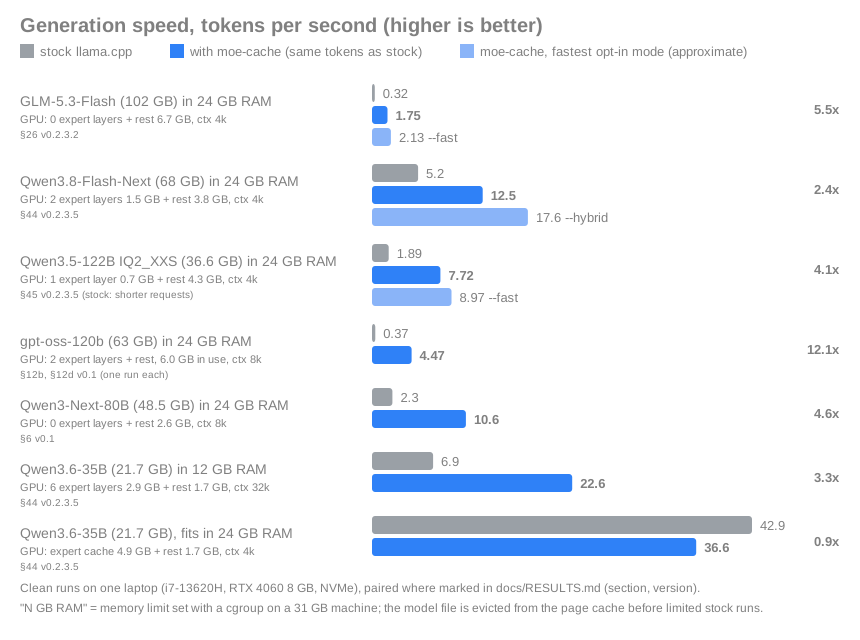
MoE models such as Qwen3, gpt-oss or DeepSeek only use a few "experts" per token, but stock llama.cpp keeps all expert weights in memory-mapped files. When they do not fit in RAM, the OS page cache thrashes and speed falls off a cliff.
moe-cache manages the CPU-side experts itself:
moe-cache-learn builds a profile in a minute);| Your situation | Best choice |
|---|---|
| The model fits in your RAM | Stock llama.cpp, ideally with its GPU expert cache (--moe-cache-mib N). On Qwen3.6-35B (21.7 GB) at a 24 GB limit, both with the same 5000 MiB GPU cache: stock 42 tok/s, moe-cache 30-34 (RESULTS section 29). moe-cache adds nothing here but its CPU pinning, which stock gets with -C MASK --cpu-strict 1. |
| You want Qwen3.8-Flash-Next or Qwen3.6-35B as fast as possible and have 12 GB+ VRAM and 32 GB+ RAM | Strata, an engine built for those models (its authors report 94 tok/s on an RTX 5070). |
| The model is bigger than your RAM, or it is another MoE architecture, or you want to stay on stock llama.cpp with the same tokens | moe-cache: 2x to 12x stock in our measurements (table below; the same Qwen3.6 at a 12 GB limit: 15.7 vs 5.5 tok/s). |
You need: Linux on x86-64, a llama-server built with shared ggml libraries (tested with llama.cpp commits 23b0202a1 (ggml 0.26.0, backend API 3) and 7fe450e19 (ggml 0.25.1, API 2); each needs its own plugin build, see docs/QUICKSTART.md), and a MoE model as a .gguf file. A GPU is optional.
Ollama user? The models in ollama list are plain GGUF files: the path is on the line starting with FROM in ollama show NAME --modelfile.
| Best if | What you do | |
|---|---|---|
| A. Prebuilt (2 minutes) | you already have a matching llama-server (Arch llama.cpp-cuda, a build from commit 7fe450e19) | download moe-cache-vX.Y.Z-linux-x86_64.tar.gz from Releases, then tar xzf it and cd into the folder. Releases built by CI can be verified: gh attestation verify FILE.tar.gz -R IbrahimSiddiqui007/moe-cache |
| B. One script (10 to 20 minutes) | fresh Ubuntu / Debian, nothing installed | git clone https://github.com/IbrahimSiddiqui007/moe-cache && cd moe-cache && ./install.sh (add --vulkan for AMD / Intel / NVIDIA through Vulkan). It builds the matching llama.cpp and the plugin and prints the next commands. It has only been tried on Arch with --no-apt so far: please report problems. |
| C. From source | you want to build it yourself | git clone ... && cd moe-cache && ./build.sh (needs g++; finds libggml-base.so next to your llama-server, or set GGML_LIB_DIR) |
bin/moe-cache-check /path/to/model.gguf --llama-server /path/to/llama-server
Every line says OK, WARN or FAIL and what to do about it.
bin/moe-cache-server /path/to/model.gguf --ram 12 --llama-server /path/to/llama-server --open
--ram 12 is the memory (GB) it may use; leave it out to use what is free. Add --fast for about +10 % on models much bigger than your RAM, at the cost of output that is no longer identical to stock (the launcher suggests it when it would help). The launcher plans the GPU/CPU split from your free VRAM, starts llama-server with the plugin and opens the chat page
(the same address, http://localhost:8080, is an OpenAI-compatible API for editors, Open WebUI and scripts).
tests/identity.sh /path/to/model.gguf --llama-server /path/to/llama-server # PASS = the same tokens as stock llama.cpp
More detail, troubleshooting and the Vulkan build: docs/QUICKSTART.md.
Re-measured on 2026-10-15 with the current code where the model is still on the test machine (RESULTS section 44); older rows say which version they come from.
| Situation | Stock llama.cpp | moe-cache | Measured with |
|---|---|---|---|
| GLM-5.3-Flash (102 GB, 4x the memory limit), 24 GB RAM, 8 GB GPU | 0.32 tok/s | 1.75 tok/s exact, 2.1 with --fast | v0.2.3.2 (§26) |
| Qwen3.8-Flash-Next IQ2_XS (68 GB), 24 GB RAM, 8 GB GPU, launcher defaults | 5.2 tok/s | 12.5 tok/s; 13.1 with --gpu-cache auto; 17.6 with --hybrid (approximate) | v0.2.3.5 (§44, §28, §31) |
| Qwen3.5-122B-A10B, 24 GB RAM, 8 GB GPU, launcher defaults: IQ2_XXS (36.6 GB) / IQ3_XXS (44.7 GB) / IQ4_XS (60.2 GB) | 1.89 / 1.10 / 0.91 tok/s | 7.7 / 5.7 / 3.7 tok/s (4-5x, same tokens); 9.0 / 6.8 / 4.5 with --fast | v0.2.3.5 (§45) |
| gpt-oss-120b (63 GB), 24 GB RAM, 2 expert layers on the GPU, ctx 8k, one run each | 0.37 tok/s | 4.47 tok/s | v0.1 (§12b, §12d) |
| Qwen3-Next-80B (48.5 GB), 24 GB RAM, ~2.6 GB GPU use | 2.3 tok/s | 10.6 tok/s | v0.1 (§6) |
| Same model, 20 GB RAM | 1.3 tok/s | 9.3 tok/s | v0.1 (§6) |
| Qwen3.6-35B (21.7 GB), 12 GB RAM, 6 expert layers on the GPU | 6.9 tok/s | 22.6 tok/s | v0.2.3.5 (§44) |
| Qwen3.6-35B, 12 GB RAM, no GPU at all | 3.1 tok/s | 9.9 tok/s | v0.1 (§5) |
| Model fits in RAM (Qwen3.6-35B, 24 GB, warm) | 42.9 tok/s | 36.6 tok/s | v0.2.3.5 (§44): the launcher now runs stock llama.cpp here |
| Model, memory limit | Stock llama.cpp | moe-cache | Measured with |
|---|---|---|---|
| Qwen3.6-35B (21.7 GB), 12 GB RAM, 2-5k token prompts | 132.8 tok/s (2.4k prompt) | 136.5 tok/s first prompt, 186 to 206 tok/s on the next ones | v0.2.3.5 (§46) |
| Qwen3.8-Flash-Next IQ2_XS (68 GB), 24 GB RAM, 2-5k token prompts | 65.9 tok/s (2.4k prompt) | 90 to 103 tok/s | stock v0.2.3.5 (§46), moe-cache v0.2.3.3 (§38) |
For long prompts llama.cpp already computes the experts on the GPU, so the prefill gain is smaller than the decode gain; it grows with how far the model exceeds RAM. Bigger prompt chunks on a 12-16 GB card are the next step (BIGGER_MACHINES B13).
Conditions: "RAM" is a memory limit set with a cgroup on a 31 GB machine; before every limited stock run the model file is dropped from the page cache (otherwise
stock can read it from cache that does not count against the limit and looks up to 4.6x faster than it is, RESULTS 44). One run per row unless the section says paired.
When the model fits in the memory llama-server may use, stock llama.cpp is faster (its page cache holds the whole file and stays warm across restarts), so
moe-cache-server starts stock llama-server then and says so.
Tip for Intel 12th gen and newer laptops (performance + efficiency cores): pin llama.cpp to one thread per performance core, e.g. -C 0x555 --cpu-strict 1 on a 6-performance-core CPU (this alone gave stock llama.cpp +15 % decode speed on our laptop; moe-cache-server does it for you). Details in docs/RESULTS.md, section 11.
Methods, all numbers and every caveat: docs/RESULTS.md. Hardware for all measurements: Intel i7-13620H, 31 GB RAM, RTX 4060 8 GB, NVMe SSD.
| Platform | Status |
|---|---|
| Linux + Intel CPU + NVIDIA GPU (CUDA) | Tested |
| Linux + Vulkan (NVIDIA, and the Intel integrated GPU) | Tested on llama.cpp 7fe450e19 only, loaded the official way (GGML_BACKEND_PATH; see the feature table below) |
| Linux, no usable GPU (CPU only) | Tested, identical to stock, within about 4 % of its speed when the model fits |
| Linux + AMD GPU / AMD CPU | Expected to work (same Vulkan path), not tested on AMD hardware yet |
| Windows | Not supported yet. The code has a Windows layer that compiles with mingw-w64 (./build.sh --windows) and passes its tests under Wine, but it has never run on real Windows with llama.cpp |
| macOS | No |
The benchmark tool (web page, standard protocol, many-model matrix, quality harness) now lives in its own repository: moe-cache-benchmark.
Clone it next to this folder (or set MOE_CACHE_DIR) and it finds the plugin and the planner by itself.
 llama.cpp builds the graph of the model
          |
  ggml scheduler hands each operation to a backend
          |
   +------+------------------+
   |  GPU backend            |  attention, norms, shared layers, the experts you put on the GPU
   |  CPU backend            |  everything else
   |  moe-cache backend  <-----+  the CPU-side expert matrix multiplications:
   +-------------------------+    1. look at which experts the router picked
                                  2. make sure those experts are in RAM (read the missing ones from the SSD, in the background)
                                  3. compute the experts that are ready while the others still load (several threads, optionally efficiency cores)
                                  4. give back the memory of experts nobody needs (LRU)
                                  5. use llama.cpp's own dot-product functions, so every number is identical
Each expert keeps its normal address inside one large reserved block of memory; moe-cache decides which experts have real memory behind them. It plugs into ggml, not into llama.cpp's model code, so a model that llama.cpp runs through its expert multiplication should work; the architectures that were actually tested are listed in COMPATIBILITY and RESULTS.
Long prompts (32+ tokens per batch) run their expert blocks on the GPU, as stock llama.cpp does, so prompt processing is at stock speed when the model fits (DeepSeek-V2-Lite: 166 to 183 tok/s vs 166 to 188 stock) and much faster when memory is short.
It does not manage the GPU; which layers' experts sit in VRAM is chosen once at start by the planner. A GPU expert tier was evaluated and is not built, see docs/ENGINE_DECISION.md.
Not every feature works with every llama.cpp build. How the plugin is loaded depends on how llama.cpp was built (moe-cache-server picks it):
| Feature | LD_PRELOAD (llama.cpp that links its backends directly: distro packages, ./install.sh) | GGML_BACKEND_PATH (backends as separate files: official releases, Vulkan builds, Windows) |
|---|---|---|
| RAM expert cache, SSD streaming, memory limit, warm start | yes | yes |
| Expert executor (computes ready experts while others load) | yes | yes (since 0.2.3.3; tested on a Vulkan build) |
| Fast Q2_0 / IQ3_XXS kernels | yes | inside the executor only |
Working together with llama.cpp's GPU expert cache (--gpu-cache) | yes | no |
The moe-cache: active: ... line in the server log says which parts are on.
Needs a llama.cpp with shared ggml libraries; tested with commits 23b0202a1 (ggml 0.26.0) and 7fe450e19 (ggml 0.25.1). The plugin refuses to load into a ggml with a different backend API than it was built for (it prints why and the model loads normally). Linux only for now.
Do I need this if my model fits in RAM? No. Use stock llama.cpp with --moe-cache-mib (see "When to use something else" above). The gain is when memory is short or the model is larger than your RAM. work in progress though, I'm currently seeing different ways to improve speed and efficiency
Why is it not faster when my model already fits in RAM? Because there is nothing to fix: stock llama.cpp then runs from the page cache with the same kernels. On Qwen3.6-35B at 24 GB, decode needs about 0.5 GB of expert weights per token (8 experts x 32 CPU layers x 1.9 MB), which the memory bus delivers at about 35 GB/s, close to this laptop's measured maximum (40 GB/s), so it is bandwidth-bound for everyone (stock 40, moe-cache 40 tok/s). The speed-ups appear when memory is short (the same model at 12 GB: 10 to 23 tok/s), for models larger than RAM, and for models with slow kernels (Q2_0 and the IQ types, where the executor and the faster kernel help).
Does it use my GPU? Yes, through llama.cpp as usual. moe-cache-server picks how many layers' experts live on the GPU from your free VRAM (that alone is worth about +60 % over keeping everything on the CPU). moe-cache itself manages the experts that stay on the CPU side.
Is there a GUI? llama-server already ships a web UI (moe-cache-server --open). For a fancier chat app, point Open WebUI at http://localhost:8080/v1 (OpenAI-compatible API; we have not tested that combination ourselves).
Why not an own inference engine like Strata or Maya? Short answer: they are single-model engines with a high hardware floor; moe-cache is a small layer for the MoE models llama.cpp runs (tested list in COMPATIBILITY). The reasoning and our measurements: docs/ENGINE_DECISION.md.
Quick start | Benchmarks | Results | Compatibility | Roadmap | Engine decision | Security and privacy
moe-cache-server sets them for you)| Variable | Meaning |
|---|---|
MOE_CACHE_SIZE_GIB | cache size in GiB, or auto (size from the memory limit) |
MOE_CACHE_RAM_GIB, MOE_CACHE_MARGIN_GIB | override the detected memory limit; memory to keep free (default 1 GiB) |
MOE_CACHE_GGUF | model file (split models: the first part) |
MOE_CACHE_PROFILE / MOE_CACHE_WARM | learn expert usage here and warm-start from it / warm start only |
MOE_CACHE_STATS=1 | print hit rate, reads and evictions at exit |
MOE_CACHE_DISABLE=1 | load nothing: the server behaves exactly like stock |
MOE_CACHE_EXEC=0 | switch the expert executor off (default on) |
MOE_CACHE_EXEC_ECORES=N | let the executor use N efficiency cores as well (the launcher sets up to 4 on hybrid Intel CPUs; --no-ecores to disable) |
MOE_CACHE_EXEC_THREADS=N, MOE_CACHE_EXEC_READERS=N | compute threads (default: what llama.cpp asks for) and background reader threads (default 4) |
MOE_CACHE_EXEC_CHECK=1 | recompute every expert op the stock way and compare (slow; for testing) |
MOE_CACHE_FAST_KERNELS=0 | use llama.cpp's own Q2_0 kernel instead of the plugin's |
MOE_CACHE_ROUTE=skip (moe-cache-server --fast) | opt-in approximate routing: skip a low-ranked expert that is not in RAM. About +10-12 % when the model is much bigger than RAM; about 1 top token in 40-50 differs from stock (KL 0.005-0.012; RESULTS section 31). Off by default |
MOE_CACHE_HYBRID=MiB|auto (moe-cache-server --hybrid) | opt-in, experimental: a bank of the most used experts (from the usage profile) in free GPU memory computes those picks while the CPU computes the rest. Flash-Next on 8 GB: 13.1 -> 17.4 tok/s; KL 0.0043 vs exact (about 1 top token in 60 differs). Needs a usage profile (the first session has none). The bank adapts to the session (MOE_CACHE_HYBRID_ADAPT=N,K, default 8,16; 0 = keep the profile choice). For models whose experts are slow on the CPU (IQ / Q2_0 quants); with Q4_K-class models such as Qwen3.6 it is slower than --gpu-cache (8.7 vs 15.7 tok/s at 12 GB). Off by default |
MOE_CACHE_COALESCE_MIB=N | merge neighbouring expert reads of a long prompt into reads of up to N MiB (default 16; 0 = off). Flash-Next prefill +14-24 % |
MOE_CACHE_HOST_RESERVE_MIB | memory kept free for llama-server's prompt cache (--cache-ram); the launcher sets it |
MOE_CACHE_GUARD=1 | tests only: reading an evicted expert crashes instead of returning zeros (small models only) |
moe-cache is built and tested in my spare time on my own machines. If it saves you a RAM upgrade, you can support it on Ko-fi.
third_party/ggml/ contains interface headers copied from ggml / llama.cpp (MIT, Copyright The ggml authors). Their license text is kept in third_party/ggml/LICENSE.Run MoE models bigger than your RAM, without the speed cliff
C++
15
121 commits
updated Oct 16, 2026
Run Mixture-of-Experts models that are bigger than your RAM, without the speed cliff.
A plugin for an unmodified llama-server. No fork, no patch.
MoE models such as Qwen3, gpt-oss or DeepSeek only use a few "experts" per token, but stock llama.cpp keeps all expert weights in memory-mapped files. When they do not fit in RAM, the OS page cache thrashes and speed falls off a cliff.
moe-cache manages the CPU-side experts itself:
moe-cache-learn builds a profile in a minute);| Your situation | Best choice |
|---|---|
| The model fits in your RAM | Stock llama.cpp, ideally with its GPU expert cache (--moe-cache-mib N). On Qwen3.6-35B (21.7 GB) at a 24 GB limit, both with the same 5000 MiB GPU cache: stock 42 tok/s, moe-cache 30-34 (RESULTS section 29). moe-cache adds nothing here but its CPU pinning, which stock gets with -C MASK --cpu-strict 1. |
| You want Qwen3.8-Flash-Next or Qwen3.6-35B as fast as possible and have 12 GB+ VRAM and 32 GB+ RAM | Strata, an engine built for those models (its authors report 94 tok/s on an RTX 5070). |
| The model is bigger than your RAM, or it is another MoE architecture, or you want to stay on stock llama.cpp with the same tokens | moe-cache: 2x to 12x stock in our measurements (table below; the same Qwen3.6 at a 12 GB limit: 15.7 vs 5.5 tok/s). |
You need: Linux on x86-64, a llama-server built with shared ggml libraries (tested with llama.cpp commits 23b0202a1 (ggml 0.26.0, backend API 3) and 7fe450e19 (ggml 0.25.1, API 2); each needs its own plugin build, see docs/QUICKSTART.md), and a MoE model as a .gguf file. A GPU is optional.
Ollama user? The models in ollama list are plain GGUF files: the path is on the line starting with FROM in ollama show NAME --modelfile.
| Best if | What you do | |
|---|---|---|
| A. Prebuilt (2 minutes) | you already have a matching llama-server (Arch llama.cpp-cuda, a build from commit 7fe450e19) | download moe-cache-vX.Y.Z-linux-x86_64.tar.gz from Releases, then tar xzf it and cd into the folder. Releases built by CI can be verified: gh attestation verify FILE.tar.gz -R IbrahimSiddiqui007/moe-cache |
| B. One script (10 to 20 minutes) | fresh Ubuntu / Debian, nothing installed | git clone https://github.com/IbrahimSiddiqui007/moe-cache && cd moe-cache && ./install.sh (add --vulkan for AMD / Intel / NVIDIA through Vulkan). It builds the matching llama.cpp and the plugin and prints the next commands. It has only been tried on Arch with --no-apt so far: please report problems. |
| C. From source | you want to build it yourself | git clone ... && cd moe-cache && ./build.sh (needs g++; finds libggml-base.so next to your llama-server, or set GGML_LIB_DIR) |
bin/moe-cache-check /path/to/model.gguf --llama-server /path/to/llama-server
Every line says OK, WARN or FAIL and what to do about it.
bin/moe-cache-server /path/to/model.gguf --ram 12 --llama-server /path/to/llama-server --open
--ram 12 is the memory (GB) it may use; leave it out to use what is free. Add --fast for about +10 % on models much bigger than your RAM, at the cost of output that is no longer identical to stock (the launcher suggests it when it would help). The launcher plans the GPU/CPU split from your free VRAM, starts llama-server with the plugin and opens the chat page
(the same address, http://localhost:8080, is an OpenAI-compatible API for editors, Open WebUI and scripts).
tests/identity.sh /path/to/model.gguf --llama-server /path/to/llama-server # PASS = the same tokens as stock llama.cpp
More detail, troubleshooting and the Vulkan build: docs/QUICKSTART.md.
Re-measured on 2026-10-15 with the current code where the model is still on the test machine (RESULTS section 44); older rows say which version they come from.
| Situation | Stock llama.cpp | moe-cache | Measured with |
|---|---|---|---|
| GLM-5.3-Flash (102 GB, 4x the memory limit), 24 GB RAM, 8 GB GPU | 0.32 tok/s | 1.75 tok/s exact, 2.1 with --fast | v0.2.3.2 (§26) |
| Qwen3.8-Flash-Next IQ2_XS (68 GB), 24 GB RAM, 8 GB GPU, launcher defaults | 5.2 tok/s | 12.5 tok/s; 13.1 with --gpu-cache auto; 17.6 with --hybrid (approximate) | v0.2.3.5 (§44, §28, §31) |
| Qwen3.5-122B-A10B, 24 GB RAM, 8 GB GPU, launcher defaults: IQ2_XXS (36.6 GB) / IQ3_XXS (44.7 GB) / IQ4_XS (60.2 GB) | 1.89 / 1.10 / 0.91 tok/s | 7.7 / 5.7 / 3.7 tok/s (4-5x, same tokens); 9.0 / 6.8 / 4.5 with --fast | v0.2.3.5 (§45) |
| gpt-oss-120b (63 GB), 24 GB RAM, 2 expert layers on the GPU, ctx 8k, one run each | 0.37 tok/s | 4.47 tok/s | v0.1 (§12b, §12d) |
| Qwen3-Next-80B (48.5 GB), 24 GB RAM, ~2.6 GB GPU use | 2.3 tok/s | 10.6 tok/s | v0.1 (§6) |
| Same model, 20 GB RAM | 1.3 tok/s | 9.3 tok/s | v0.1 (§6) |
| Qwen3.6-35B (21.7 GB), 12 GB RAM, 6 expert layers on the GPU | 6.9 tok/s | 22.6 tok/s | v0.2.3.5 (§44) |
| Qwen3.6-35B, 12 GB RAM, no GPU at all | 3.1 tok/s | 9.9 tok/s | v0.1 (§5) |
| Model fits in RAM (Qwen3.6-35B, 24 GB, warm) | 42.9 tok/s | 36.6 tok/s | v0.2.3.5 (§44): the launcher now runs stock llama.cpp here |
| Model, memory limit | Stock llama.cpp | moe-cache | Measured with |
|---|---|---|---|
| Qwen3.6-35B (21.7 GB), 12 GB RAM, 2-5k token prompts | 132.8 tok/s (2.4k prompt) | 136.5 tok/s first prompt, 186 to 206 tok/s on the next ones | v0.2.3.5 (§46) |
| Qwen3.8-Flash-Next IQ2_XS (68 GB), 24 GB RAM, 2-5k token prompts | 65.9 tok/s (2.4k prompt) | 90 to 103 tok/s | stock v0.2.3.5 (§46), moe-cache v0.2.3.3 (§38) |
For long prompts llama.cpp already computes the experts on the GPU, so the prefill gain is smaller than the decode gain; it grows with how far the model exceeds RAM. Bigger prompt chunks on a 12-16 GB card are the next step (BIGGER_MACHINES B13).
Conditions: "RAM" is a memory limit set with a cgroup on a 31 GB machine; before every limited stock run the model file is dropped from the page cache (otherwise
stock can read it from cache that does not count against the limit and looks up to 4.6x faster than it is, RESULTS 44). One run per row unless the section says paired.
When the model fits in the memory llama-server may use, stock llama.cpp is faster (its page cache holds the whole file and stays warm across restarts), so
moe-cache-server starts stock llama-server then and says so.
Tip for Intel 12th gen and newer laptops (performance + efficiency cores): pin llama.cpp to one thread per performance core, e.g. -C 0x555 --cpu-strict 1 on a 6-performance-core CPU (this alone gave stock llama.cpp +15 % decode speed on our laptop; moe-cache-server does it for you). Details in docs/RESULTS.md, section 11.
Methods, all numbers and every caveat: docs/RESULTS.md. Hardware for all measurements: Intel i7-13620H, 31 GB RAM, RTX 4060 8 GB, NVMe SSD.
| Platform | Status |
|---|---|
| Linux + Intel CPU + NVIDIA GPU (CUDA) | Tested |
| Linux + Vulkan (NVIDIA, and the Intel integrated GPU) | Tested on llama.cpp 7fe450e19 only, loaded the official way (GGML_BACKEND_PATH; see the feature table below) |
| Linux, no usable GPU (CPU only) | Tested, identical to stock, within about 4 % of its speed when the model fits |
| Linux + AMD GPU / AMD CPU | Expected to work (same Vulkan path), not tested on AMD hardware yet |
| Windows | Not supported yet. The code has a Windows layer that compiles with mingw-w64 (./build.sh --windows) and passes its tests under Wine, but it has never run on real Windows with llama.cpp |
| macOS | No |
The benchmark tool (web page, standard protocol, many-model matrix, quality harness) now lives in its own repository: moe-cache-benchmark.
Clone it next to this folder (or set MOE_CACHE_DIR) and it finds the plugin and the planner by itself.
 llama.cpp builds the graph of the model
          |
  ggml scheduler hands each operation to a backend
          |
   +------+------------------+
   |  GPU backend            |  attention, norms, shared layers, the experts you put on the GPU
   |  CPU backend            |  everything else
   |  moe-cache backend  <-----+  the CPU-side expert matrix multiplications:
   +-------------------------+    1. look at which experts the router picked
                                  2. make sure those experts are in RAM (read the missing ones from the SSD, in the background)
                                  3. compute the experts that are ready while the others still load (several threads, optionally efficiency cores)
                                  4. give back the memory of experts nobody needs (LRU)
                                  5. use llama.cpp's own dot-product functions, so every number is identical
Each expert keeps its normal address inside one large reserved block of memory; moe-cache decides which experts have real memory behind them. It plugs into ggml, not into llama.cpp's model code, so a model that llama.cpp runs through its expert multiplication should work; the architectures that were actually tested are listed in COMPATIBILITY and RESULTS.
Long prompts (32+ tokens per batch) run their expert blocks on the GPU, as stock llama.cpp does, so prompt processing is at stock speed when the model fits (DeepSeek-V2-Lite: 166 to 183 tok/s vs 166 to 188 stock) and much faster when memory is short.
It does not manage the GPU; which layers' experts sit in VRAM is chosen once at start by the planner. A GPU expert tier was evaluated and is not built, see docs/ENGINE_DECISION.md.
Not every feature works with every llama.cpp build. How the plugin is loaded depends on how llama.cpp was built (moe-cache-server picks it):
| Feature | LD_PRELOAD (llama.cpp that links its backends directly: distro packages, ./install.sh) | GGML_BACKEND_PATH (backends as separate files: official releases, Vulkan builds, Windows) |
|---|---|---|
| RAM expert cache, SSD streaming, memory limit, warm start | yes | yes |
| Expert executor (computes ready experts while others load) | yes | yes (since 0.2.3.3; tested on a Vulkan build) |
| Fast Q2_0 / IQ3_XXS kernels | yes | inside the executor only |
Working together with llama.cpp's GPU expert cache (--gpu-cache) | yes | no |
The moe-cache: active: ... line in the server log says which parts are on.
Needs a llama.cpp with shared ggml libraries; tested with commits 23b0202a1 (ggml 0.26.0) and 7fe450e19 (ggml 0.25.1). The plugin refuses to load into a ggml with a different backend API than it was built for (it prints why and the model loads normally). Linux only for now.
Do I need this if my model fits in RAM? No. Use stock llama.cpp with --moe-cache-mib (see "When to use something else" above). The gain is when memory is short or the model is larger than your RAM. work in progress though, I'm currently seeing different ways to improve speed and efficiency
Why is it not faster when my model already fits in RAM? Because there is nothing to fix: stock llama.cpp then runs from the page cache with the same kernels. On Qwen3.6-35B at 24 GB, decode needs about 0.5 GB of expert weights per token (8 experts x 32 CPU layers x 1.9 MB), which the memory bus delivers at about 35 GB/s, close to this laptop's measured maximum (40 GB/s), so it is bandwidth-bound for everyone (stock 40, moe-cache 40 tok/s). The speed-ups appear when memory is short (the same model at 12 GB: 10 to 23 tok/s), for models larger than RAM, and for models with slow kernels (Q2_0 and the IQ types, where the executor and the faster kernel help).
Does it use my GPU? Yes, through llama.cpp as usual. moe-cache-server picks how many layers' experts live on the GPU from your free VRAM (that alone is worth about +60 % over keeping everything on the CPU). moe-cache itself manages the experts that stay on the CPU side.
Is there a GUI? llama-server already ships a web UI (moe-cache-server --open). For a fancier chat app, point Open WebUI at http://localhost:8080/v1 (OpenAI-compatible API; we have not tested that combination ourselves).
Why not an own inference engine like Strata or Maya? Short answer: they are single-model engines with a high hardware floor; moe-cache is a small layer for the MoE models llama.cpp runs (tested list in COMPATIBILITY). The reasoning and our measurements: docs/ENGINE_DECISION.md.
Quick start | Benchmarks | Results | Compatibility | Roadmap | Engine decision | Security and privacy
moe-cache-server sets them for you)| Variable | Meaning |
|---|---|
MOE_CACHE_SIZE_GIB | cache size in GiB, or auto (size from the memory limit) |
MOE_CACHE_RAM_GIB, MOE_CACHE_MARGIN_GIB | override the detected memory limit; memory to keep free (default 1 GiB) |
MOE_CACHE_GGUF | model file (split models: the first part) |
MOE_CACHE_PROFILE / MOE_CACHE_WARM | learn expert usage here and warm-start from it / warm start only |
MOE_CACHE_STATS=1 | print hit rate, reads and evictions at exit |
MOE_CACHE_DISABLE=1 | load nothing: the server behaves exactly like stock |
MOE_CACHE_EXEC=0 | switch the expert executor off (default on) |
MOE_CACHE_EXEC_ECORES=N | let the executor use N efficiency cores as well (the launcher sets up to 4 on hybrid Intel CPUs; --no-ecores to disable) |
MOE_CACHE_EXEC_THREADS=N, MOE_CACHE_EXEC_READERS=N | compute threads (default: what llama.cpp asks for) and background reader threads (default 4) |
MOE_CACHE_EXEC_CHECK=1 | recompute every expert op the stock way and compare (slow; for testing) |
MOE_CACHE_FAST_KERNELS=0 | use llama.cpp's own Q2_0 kernel instead of the plugin's |
MOE_CACHE_ROUTE=skip (moe-cache-server --fast) | opt-in approximate routing: skip a low-ranked expert that is not in RAM. About +10-12 % when the model is much bigger than RAM; about 1 top token in 40-50 differs from stock (KL 0.005-0.012; RESULTS section 31). Off by default |
MOE_CACHE_HYBRID=MiB|auto (moe-cache-server --hybrid) | opt-in, experimental: a bank of the most used experts (from the usage profile) in free GPU memory computes those picks while the CPU computes the rest. Flash-Next on 8 GB: 13.1 -> 17.4 tok/s; KL 0.0043 vs exact (about 1 top token in 60 differs). Needs a usage profile (the first session has none). The bank adapts to the session (MOE_CACHE_HYBRID_ADAPT=N,K, default 8,16; 0 = keep the profile choice). For models whose experts are slow on the CPU (IQ / Q2_0 quants); with Q4_K-class models such as Qwen3.6 it is slower than --gpu-cache (8.7 vs 15.7 tok/s at 12 GB). Off by default |
MOE_CACHE_COALESCE_MIB=N | merge neighbouring expert reads of a long prompt into reads of up to N MiB (default 16; 0 = off). Flash-Next prefill +14-24 % |
MOE_CACHE_HOST_RESERVE_MIB | memory kept free for llama-server's prompt cache (--cache-ram); the launcher sets it |
MOE_CACHE_GUARD=1 | tests only: reading an evicted expert crashes instead of returning zeros (small models only) |
moe-cache is built and tested in my spare time on my own machines. If it saves you a RAM upgrade, you can support it on Ko-fi.
third_party/ggml/ contains interface headers copied from ggml / llama.cpp (MIT, Copyright The ggml authors). Their license text is kept in third_party/ggml/LICENSE.


