
From Local Matches to Global Masks: Novel Instance Detection in Open-World Scenes
Python
26
27 commits
updated Jul 28, 2026
README
L2G-Det
From Local Matches to Global Masks: Template-Guided Instance Detection and Segmentation in Open-World Scenes
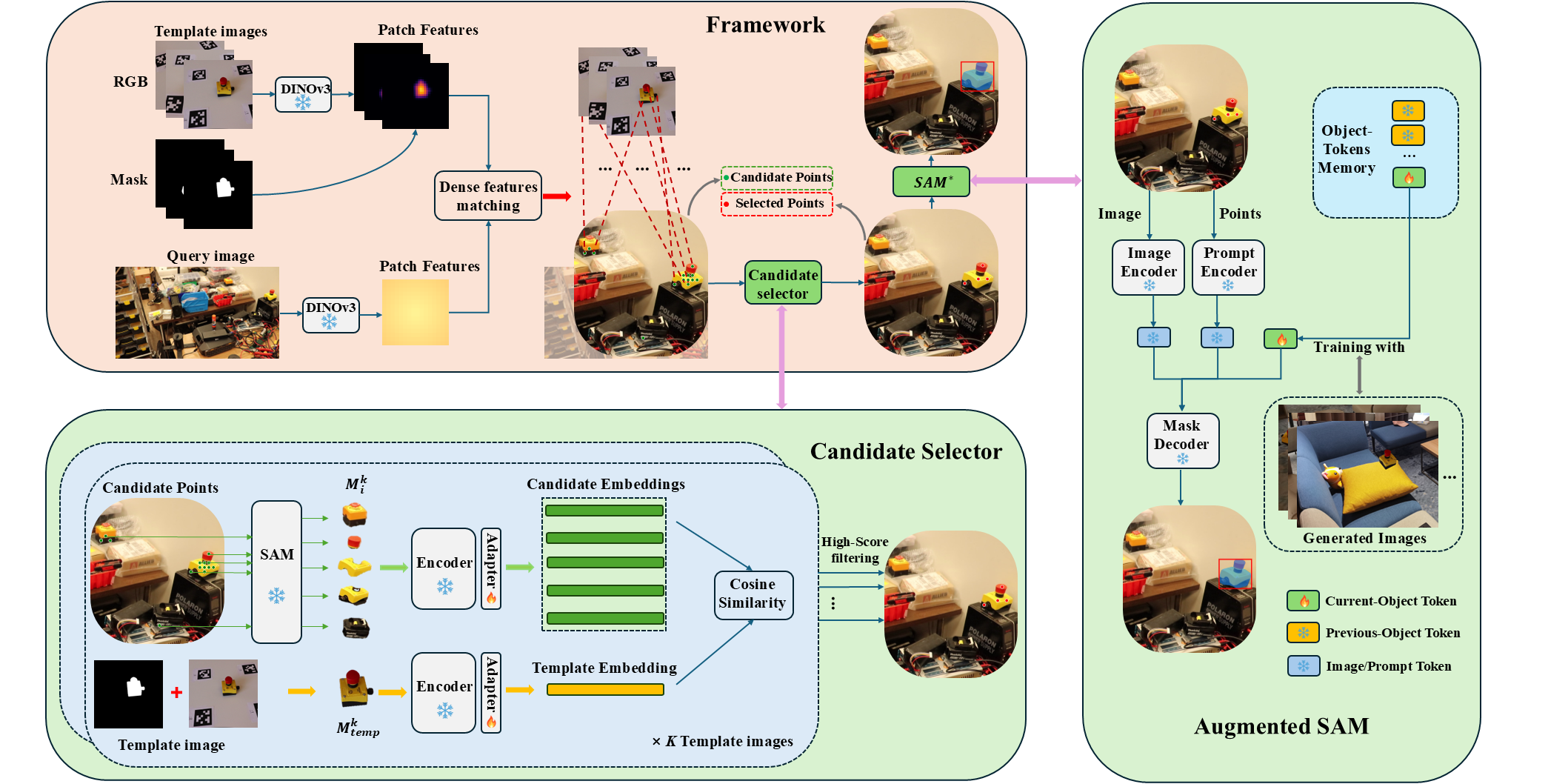
Detecting and segmenting novel object instances in open-world environments is a fundamental problem in robotic perception. Given only a small set of template images, a robot must locate and segment a specific object instance in a cluttered, previously unseen scene. Existing proposal-based approaches are highly sensitive to proposal quality and often fail under occlusion and background clutter. We propose L2G-Det, a local-to-global instance detection framework that bypasses explicit object proposals by leveraging dense patch-level matching between templates and the query image. Locally matched patches generate candidate points, which are refined through a candidate selection module to suppress false positives. The filtered points are then used to prompt an augmented Segment Anything Model (SAM) with instance-specific object tokens, enabling reliable reconstruction of complete instance masks. Experiments demonstrate improved performance over proposal-based methods in challenging open-world settings.
Framework
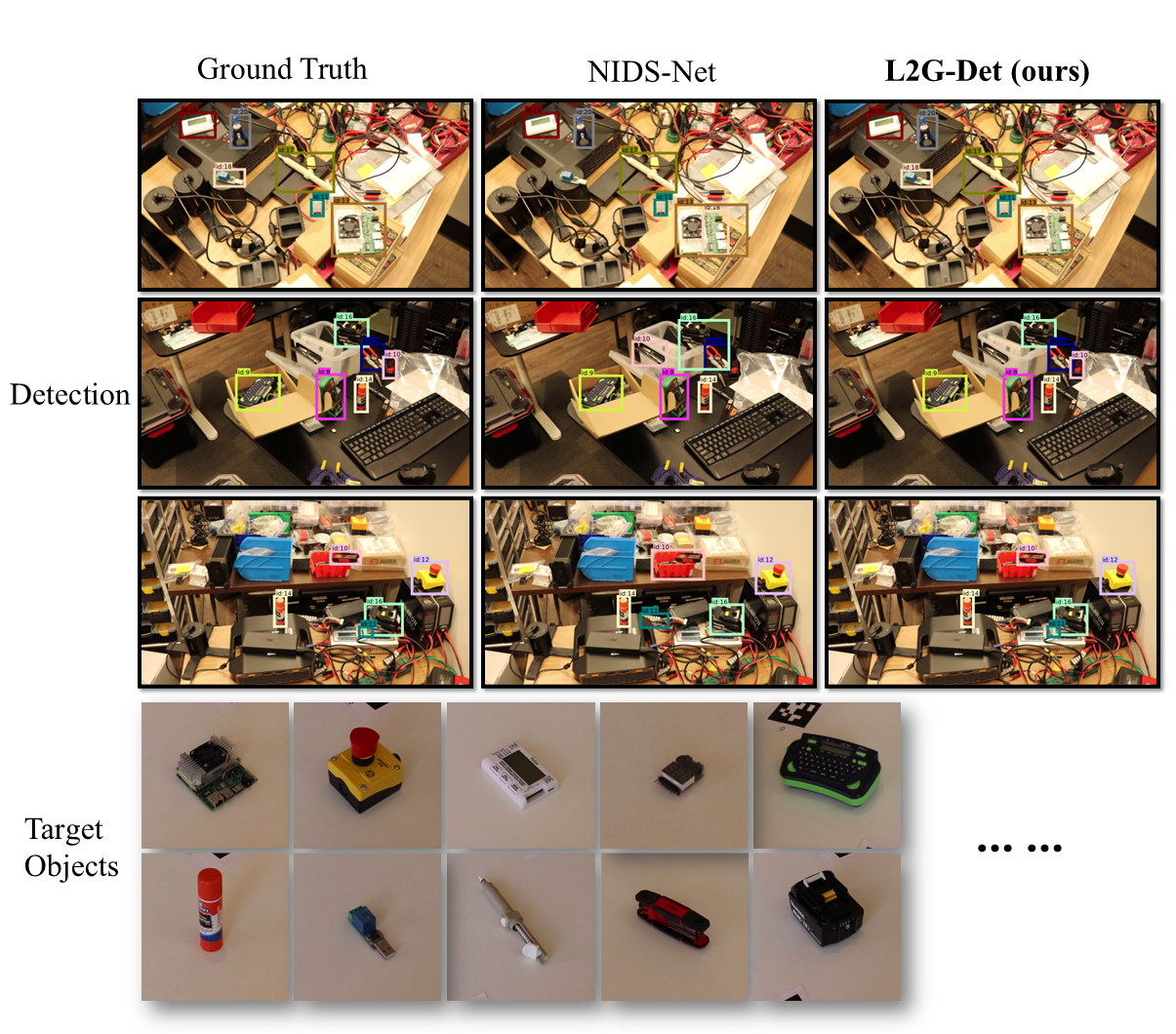
📸 Detection Examples
RoboTools
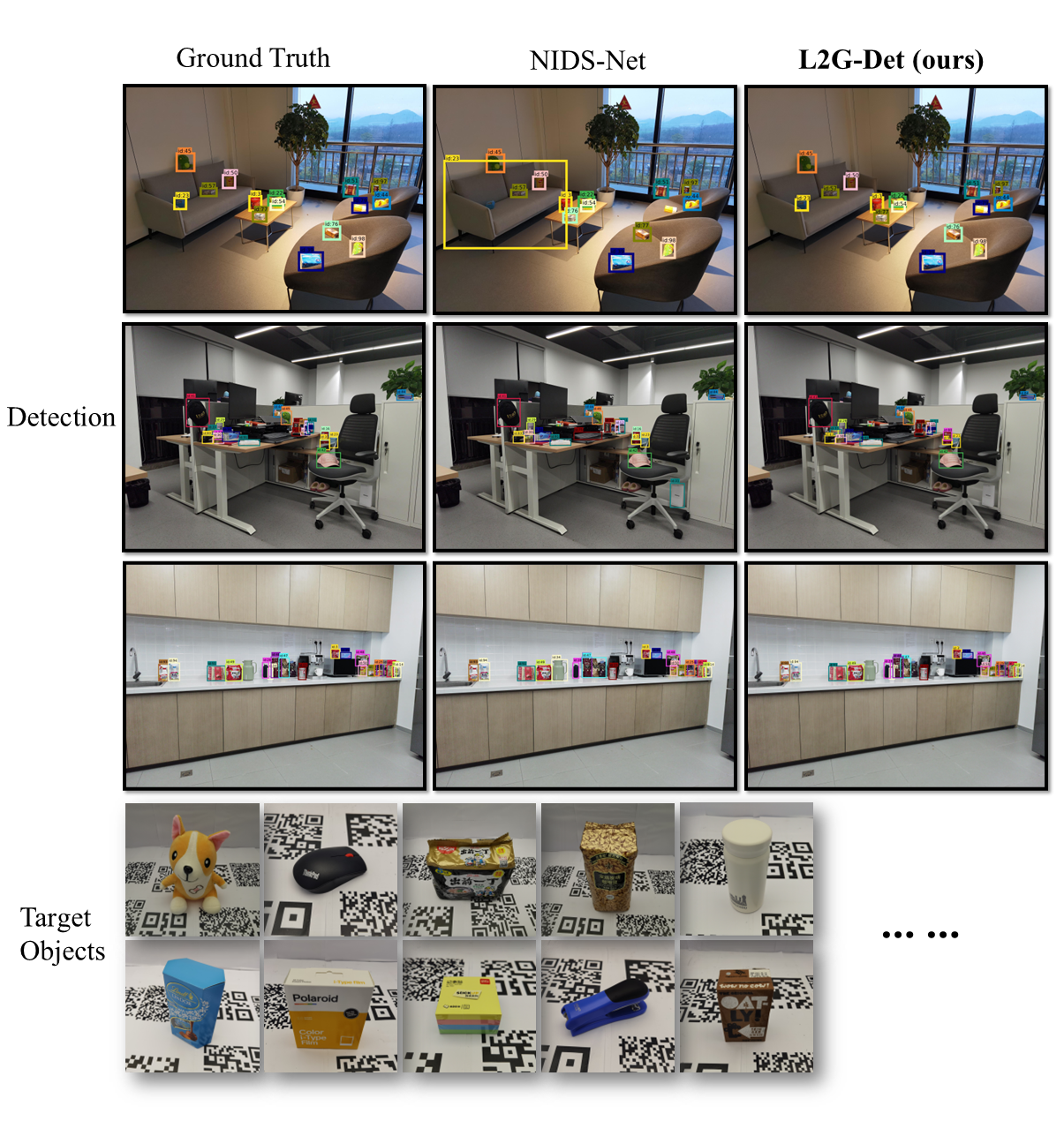
High Resolution
Getting Started
Prerequisites
- Python 3.10
- torch (tested 2.6)
- torchvision
Installation
We test the code on Ubuntu 20.04.
git clone https://github.com/IRVLUTD/L2G.git
cd L2G
# Create the conda env
conda create -n L2G python=3.10
conda activate L2G
# Install PyTorch
pip install torch==2.6.0+cu118 torchvision==0.21.0+cu118 torchaudio==2.6.0+cu118 --index-url https://download.pytorch.org/whl/cu118
# Install other packages
pip install -e.
Preparing models
Please put them into "checkpoints" folder as follows:
checkpoints/
├── dinov3/
│   └── dinov3_vitl16_pretrain_*.pt
│
├── SAM/
│   └── sam2.1_hiera_large.pt
│
├── Adapter/
│   ├── High_Res_Adapter.pt
│   └── RoboTools_Adapter.pt
│
├── Object_tokens_High_Res/
│   ├── full_mask_tokens_000001.pt
│   ├── full_mask_tokens_000002.pt
│   ├── ...
│
└── Object_tokens_RoboTools/
    ├── full_mask_tokens_000001.pt
    ├── full_mask_tokens_000002.pt
    ├── ...
Preparing Datasets
Setting Up Detection Datasets
The RoboTools dataset is divided into 24 scenes (Scene 1–24). Download the dataset:
The High_Resolution dataset is divided into 22 scenes (Hard : Scene 1–10; Easy: Scene 11-22). Download the dataset:
Please put them into "Data" folder as follows:
data/
│
├── Query/
│   ├── High_Resolution/
│   │   ├── 000001/
│   │   ├── 000002/
│   │   └── ...
│   │
│   └── RoboTools/
│       ├── 000001/
│       ├── 000002/
│       └── ...
│
└── Templates/
    ├── High_Resolution_all/
    │   ├── rgb/
    │   │   ├── 000001/
    │   │   ├── 000002/
    │   │   └── ...
    │   └── mask/
    │       ├── 000001/
    │       ├── 000002/
    │       └── ...
    │
    └── RoboTools_all/
        ├── rgb/
        │   ├── 000001/
        │   ├── 000002/
        │   └── ...
        │
        └── mask/
            ├── 000001/
            ├── 000002/
            └── ...
Usage
Demo
You can directly run the demo:
python run.py --config Demo.yaml
or check inference on the image
Benchmark
Sample the template images:
cd tools

# --n 8          : Number of templates to sample per object
# --datasets     : Dataset name (e.g., RoboTools; High_Resolution)
python sample_templates.py --n 8 --datasets RoboTools
Run L2G on the Benchmark:
python run.py --config RoboTools.yaml  #or High_Res.yaml
# --scene-start / --scene-end / --device select which scenes and GPU to run on,
See BENCHMARK.md for full single-GPU and multi-GPU examples covering all splits.
We include the ground truth files and our predictions in this link. Put them under:
eval_results/
├── Ground_Truth/
│   ├── High_Resolution/
│   │   ├── scene_gt_coco_hard.json
│   │   ├── scene_gt_coco_easy.json
│   │   └── scene_gt_coco_all.json
│   └── RoboTools/
│       └── scene_gt_coco_all.json
└── Results_COCO/          # merged predictions land here
Then merge the per-scene predictions and evaluate:
cd tools

bash mergh_RoboTools.sh   # RoboTools: merges all 24 scenes, then evaluates
bash mergh_high.sh        # High_Resolution: edit SPLIT="hard"/"easy"/"all" at the top first
Both scripts finish by calling eval_results.py, which can also be run directly once the merged results exist:
python eval_results.py --dataset RoboTools
python eval_results.py --dataset High_Res --split hard   # or "easy" / "all"
Create the template-based training images
Download the background with the link. Among these, Backgrounds_2048 is constructed by cropping local regions from the original high-resolution background images, resulting in images of size 2048 × 1536.
# Create the template-based training images on RoboTools
python tools/Compose_objects.py \
--objects-root data/Templates/RoboTools_all \
--backgrounds Backgrounds_2048 \
--out-root RoboTools_create \
--bbox-out-root RoboTools_create_bbox \
--start-object-id 1 \
--end-object-id 20
Training
Check the training demo in notebooks.
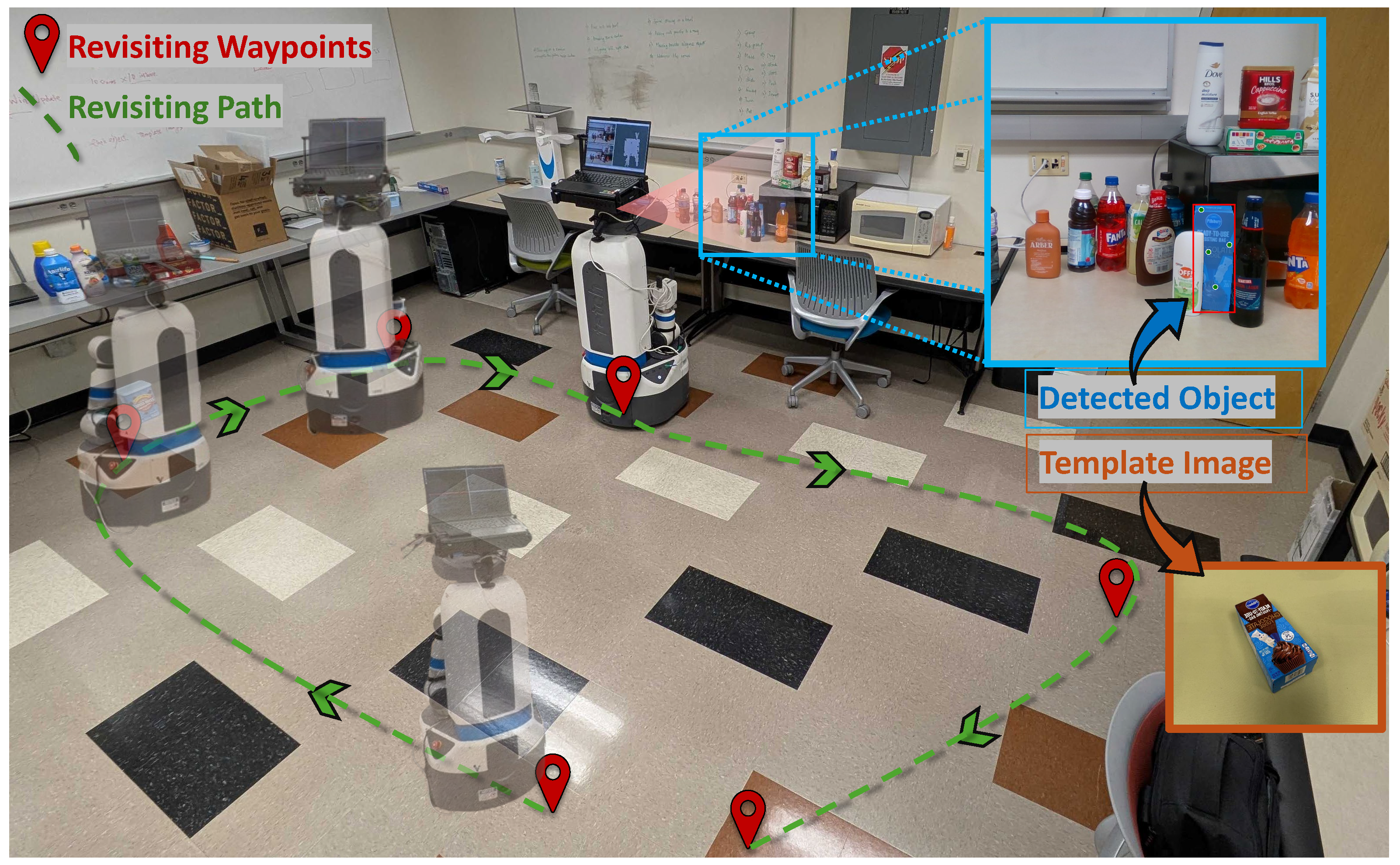
Real-World Robot Experiment
Click the following image to watch the video.
Acknowledgments
Issues and pull requests are welcome.
This project is based on the following repositories:
Similar repos


From Local Matches to Global Masks: Novel Instance Detection in Open-World Scenes
Python
26
27 commits
updated Jul 28, 2026
README
L2G-Det
From Local Matches to Global Masks: Template-Guided Instance Detection and Segmentation in Open-World Scenes
Detecting and segmenting novel object instances in open-world environments is a fundamental problem in robotic perception. Given only a small set of template images, a robot must locate and segment a specific object instance in a cluttered, previously unseen scene. Existing proposal-based approaches are highly sensitive to proposal quality and often fail under occlusion and background clutter. We propose L2G-Det, a local-to-global instance detection framework that bypasses explicit object proposals by leveraging dense patch-level matching between templates and the query image. Locally matched patches generate candidate points, which are refined through a candidate selection module to suppress false positives. The filtered points are then used to prompt an augmented Segment Anything Model (SAM) with instance-specific object tokens, enabling reliable reconstruction of complete instance masks. Experiments demonstrate improved performance over proposal-based methods in challenging open-world settings.
Framework
📸 Detection Examples
RoboTools
High Resolution
Getting Started
Prerequisites
- Python 3.10
- torch (tested 2.6)
- torchvision
Installation
We test the code on Ubuntu 20.04.
git clone https://github.com/IRVLUTD/L2G.git
cd L2G
# Create the conda env
conda create -n L2G python=3.10
conda activate L2G
# Install PyTorch
pip install torch==2.6.0+cu118 torchvision==0.21.0+cu118 torchaudio==2.6.0+cu118 --index-url https://download.pytorch.org/whl/cu118
# Install other packages
pip install -e.
Preparing models
Please put them into "checkpoints" folder as follows:
checkpoints/
├── dinov3/
│   └── dinov3_vitl16_pretrain_*.pt
│
├── SAM/
│   └── sam2.1_hiera_large.pt
│
├── Adapter/
│   ├── High_Res_Adapter.pt
│   └── RoboTools_Adapter.pt
│
├── Object_tokens_High_Res/
│   ├── full_mask_tokens_000001.pt
│   ├── full_mask_tokens_000002.pt
│   ├── ...
│
└── Object_tokens_RoboTools/
    ├── full_mask_tokens_000001.pt
    ├── full_mask_tokens_000002.pt
    ├── ...
Preparing Datasets
Setting Up Detection Datasets
The RoboTools dataset is divided into 24 scenes (Scene 1–24). Download the dataset:
The High_Resolution dataset is divided into 22 scenes (Hard : Scene 1–10; Easy: Scene 11-22). Download the dataset:
Please put them into "Data" folder as follows:
data/
│
├── Query/
│   ├── High_Resolution/
│   │   ├── 000001/
│   │   ├── 000002/
│   │   └── ...
│   │
│   └── RoboTools/
│       ├── 000001/
│       ├── 000002/
│       └── ...
│
└── Templates/
    ├── High_Resolution_all/
    │   ├── rgb/
    │   │   ├── 000001/
    │   │   ├── 000002/
    │   │   └── ...
    │   └── mask/
    │       ├── 000001/
    │       ├── 000002/
    │       └── ...
    │
    └── RoboTools_all/
        ├── rgb/
        │   ├── 000001/
        │   ├── 000002/
        │   └── ...
        │
        └── mask/
            ├── 000001/
            ├── 000002/
            └── ...
Usage
Demo
You can directly run the demo:
python run.py --config Demo.yaml
or check inference on the image
Benchmark
Sample the template images:
cd tools

# --n 8          : Number of templates to sample per object
# --datasets     : Dataset name (e.g., RoboTools; High_Resolution)
python sample_templates.py --n 8 --datasets RoboTools
Run L2G on the Benchmark:
python run.py --config RoboTools.yaml  #or High_Res.yaml
# --scene-start / --scene-end / --device select which scenes and GPU to run on,
See BENCHMARK.md for full single-GPU and multi-GPU examples covering all splits.
We include the ground truth files and our predictions in this link. Put them under:
eval_results/
├── Ground_Truth/
│   ├── High_Resolution/
│   │   ├── scene_gt_coco_hard.json
│   │   ├── scene_gt_coco_easy.json
│   │   └── scene_gt_coco_all.json
│   └── RoboTools/
│       └── scene_gt_coco_all.json
└── Results_COCO/          # merged predictions land here
Then merge the per-scene predictions and evaluate:
cd tools

bash mergh_RoboTools.sh   # RoboTools: merges all 24 scenes, then evaluates
bash mergh_high.sh        # High_Resolution: edit SPLIT="hard"/"easy"/"all" at the top first
Both scripts finish by calling eval_results.py, which can also be run directly once the merged results exist:
python eval_results.py --dataset RoboTools
python eval_results.py --dataset High_Res --split hard   # or "easy" / "all"
Create the template-based training images
Download the background with the link. Among these, Backgrounds_2048 is constructed by cropping local regions from the original high-resolution background images, resulting in images of size 2048 × 1536.
# Create the template-based training images on RoboTools
python tools/Compose_objects.py \
--objects-root data/Templates/RoboTools_all \
--backgrounds Backgrounds_2048 \
--out-root RoboTools_create \
--bbox-out-root RoboTools_create_bbox \
--start-object-id 1 \
--end-object-id 20
Training
Check the training demo in notebooks.
Real-World Robot Experiment
Click the following image to watch the video.
Acknowledgments
Issues and pull requests are welcome.
This project is based on the following repositories: